


U Home 5G
U Home 5G
|
|
 Nov 9 2024, 11:31 PM Nov 9 2024, 11:31 PM
|
 
Staff
72,804 posts Joined: Sep 2005 From: KUL  
|
I think someone needs to put a warning or something here to warn others not to sign up the router bundled package.
|
|
|
|
|
|
Nov 10 2024, 12:13 AM
Show posts by this member only | IPv6 | Post
#1882
|
 
All Stars
13,470 posts Joined: Jan 2012 
|
QUOTE(fruitie @ Nov 9 2024, 11:31 PM) I think someone needs to put a warning or something here to warn others not to sign up the router bundled package. True... Having said so, UM and YES is still the cheapest option for broadband. For single or light users, I think the router still can handle it. It is only when you are a heavy user that it can no longer handle your usage and overheat. Celcom did gave me a much better router with MC801A but at a much higher price point. It is still cheaper than Streamyx for my office usage but at RM149 (not including SST), I think it is a price too steep for me for home usage. |
|
|
Nov 10 2024, 08:42 AM
Show posts by this member only | IPv6 | Post
#1883
|
|
All Stars
13,470 posts Joined: Jan 2012
|
I'm going to try using the mc888s with WiFi starting today since mine no longer dc or reboot. Since the wifi is rated at AX5400 which should theoretical be better than my Tplink AX50. Let's see if the additional heat from the wifi usage will make it hang.
If everything works, then only I consider making a custom case for it. |
|
|
Nov 10 2024, 10:12 AM
|

Senior Member
967 posts Joined: Jan 2003 From: setapak
|
QUOTE(andrekua2 @ Nov 10 2024, 08:42 AM) I'm going to try using the mc888s with WiFi starting today since mine no longer dc or reboot. Since the wifi is rated at AX5400 which should theoretical be better than my Tplink AX50. Let's see if the additional heat from the wifi usage will make it hang. but for meIf everything works, then only I consider making a custom case for it. the mc888s Wifi range is not as broader as Maxis Kaon router since both do not have external antenna. |
|
|
Nov 10 2024, 01:29 PM
Show posts by this member only | IPv6 | Post
#1885
|
|
All Stars
13,470 posts Joined: Jan 2012
|
QUOTE(-oc-gassa @ Nov 10 2024, 10:12 AM) but for me It is still okay for me though. My router is placed on my sofa, right beside the window. My Tapo C210 in the back alley still can get the 2.4GHz signal and playback video. This is good enough for me already.the mc888s Wifi range is not as broader as Maxis Kaon router since both do not have external antenna. Update: 2PM well, it seems like the router had the first restart after enabling the wifi. It looks like it is still a better choice to just go buy a new router if you dont have a spare one to use as AP. I guess there is just too much for this poor router to handle. Once the 3 of us starts to game at the same time, it only took an hour to crash it. Switching the wifi off again and back to using AX50 for wifi. This post has been edited by andrekua2: Nov 10 2024, 02:02 PM yapmeo liked this post
|
|
|
Nov 10 2024, 02:39 PM
Show posts by this member only | IPv6 | Post
#1886
|

Senior Member
8,524 posts Joined: Jan 2003 From: The Jungle Of Pahang
|
QUOTE(andrekua2 @ Nov 10 2024, 01:29 PM) It is still okay for me though. My router is placed on my sofa, right beside the window. My Tapo C210 in the back alley still can get the 2.4GHz signal and playback video. This is good enough for me already. So basically the router having hard time to cope with both the 5G and Wifi work, use it as just a 5G modem and it lessen the load? Update: 2PM well, it seems like the router had the first restart after enabling the wifi. It looks like it is still a better choice to just go buy a new router if you dont have a spare one to use as AP. I guess there is just too much for this poor router to handle. Once the 3 of us starts to game at the same time, it only took an hour to crash it. Switching the wifi off again and back to using AX50 for wifi.  |
|
|
|
|
|
Nov 10 2024, 08:41 PM
Show posts by this member only | IPv6 | Post
#1887
|
|
All Stars
13,470 posts Joined: Jan 2012
|
QUOTE(cloudwan @ Nov 10 2024, 02:39 PM) So basically the router having hard time to cope with both the 5G and Wifi work, use it as just a 5G modem and it lessen the load? I think it is safe to say that ZTE mess up this router very badly. Perhaps it was not designed to handling such load. Even the 5G alone also make it dc/hang sometimes if you dont dismantle the cover to cool it. I think they totally skimp the cooling for the router which causes it to overheat very easily. Even after I change all the thermal pad to a bigger one, plus 2x 120mm fan cooling both top and bottom heatsink, I still encounter problem sometimes. Yes, it no longer DC/reboot but sometimes there is some throttling going on (hard to say which chip) but it will slow down to 30Mbps max. |
|
|
Nov 10 2024, 08:50 PM
|

Senior Member
671 posts Joined: Jul 2005
|
QUOTE(andrekua2 @ Nov 9 2024, 10:36 PM) Dual network? How did it show both 4G and 5G? I guessed the router just show the strength of the signal. It is actually connected to only 1 band at a time.Yeah, it seems like while MC888S is usable but only for 1-2 light users. The router will work just fine until I game together with both my sons. One of them playing Valorant, one playing Roblox and me playing Pixels + discord + youtube. Then it would occasionally hangs every hour or so. After I did the thermal pad mods, it still dc after even when I had a 120mm fan pointing at the 5G card area. Only with my latest mods with two 120mm sandwich the router which was strip naked then only it would not dc. I guess ZTE really under estimated the amount of heat produced by the IVY510 chip. I wonder if anyone would try to peltier this beast since you can find these going for very cheap in Taobao nowadays. Its fun to finally conquer this blardy chip but not easy. My family members don't game, don't download, we are consider as light users. Just casually surfing XHS and youtube, even during my wife home alone, although she just use the browser to read her novel, the shitty MC888S just can't handle it, always face disconnection. The 5G speed itself nonetheless is awesome, get the ala carte and refrain from signing the bundled router will do. Screenshot attached below shows good router can do wonder even the signal is not at its best state. 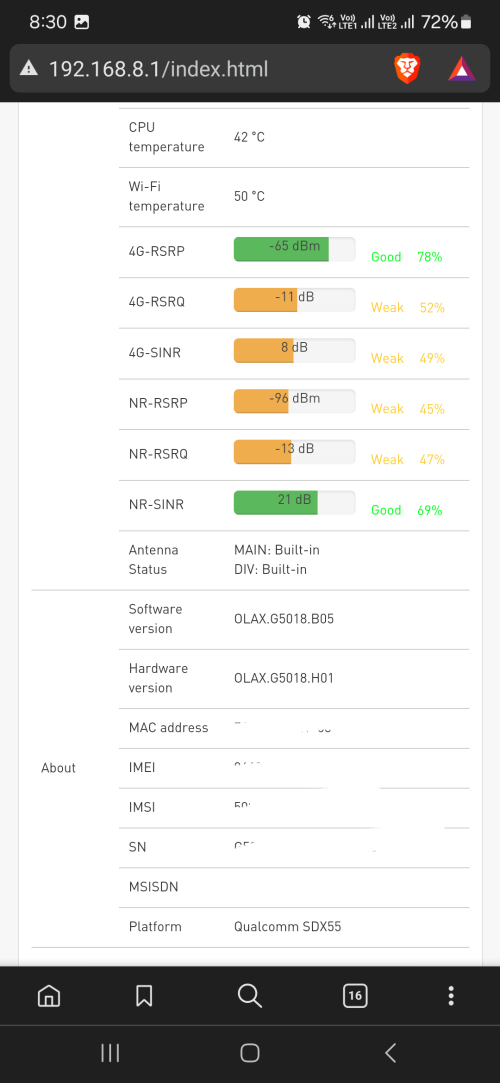 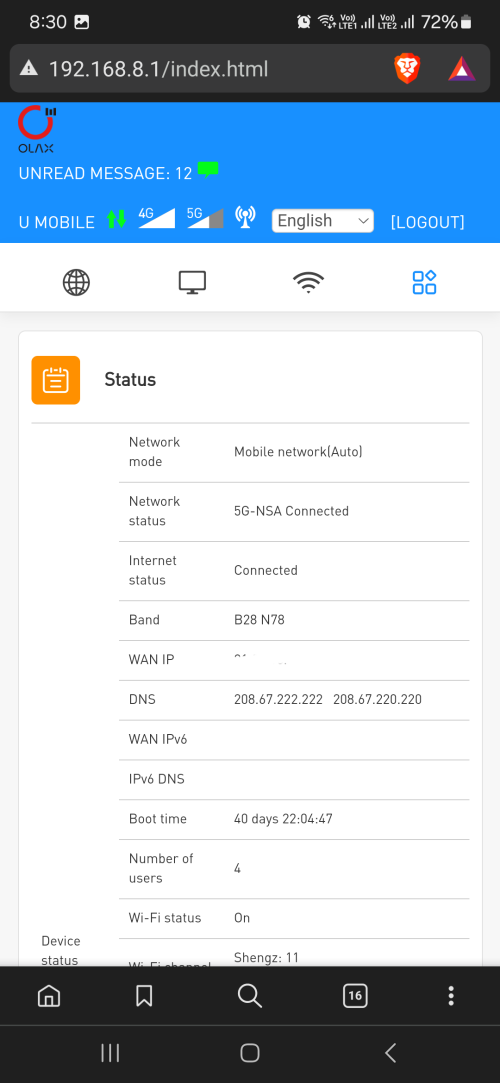 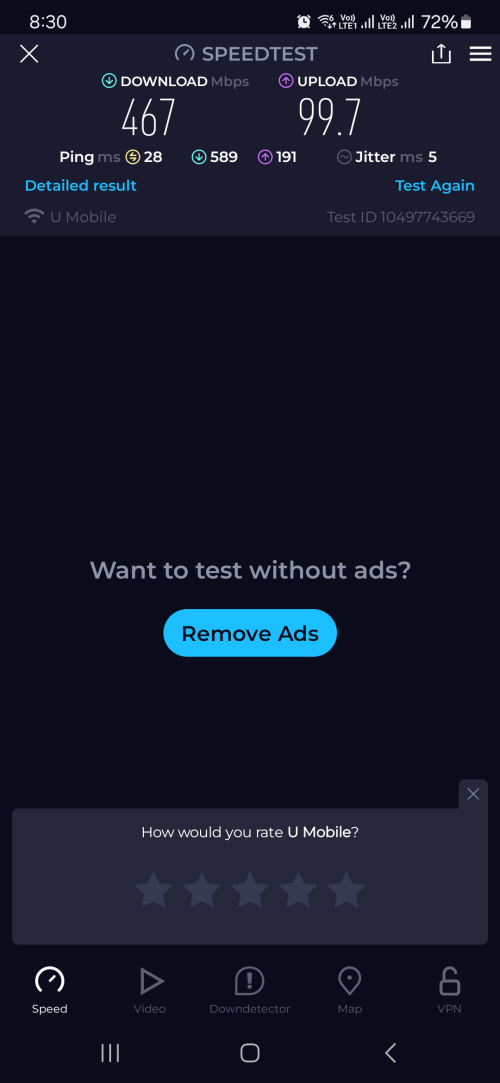 |
|
|
Nov 11 2024, 07:20 AM
|

Senior Member
1,185 posts Joined: Dec 2011
|
The mc888s has a log in advance setting -> other -> device log
If device is rebooted, I supposed the log will be cleared. The default configuration is that it will reboot around 2am every Tuesday. Seems there is a crash on the device driver to do with rndis rather than reboot ? 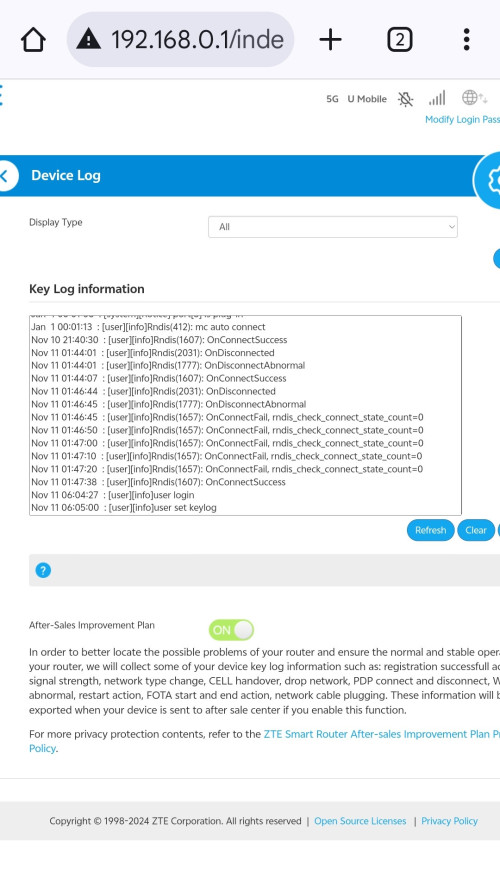 |
|
|
Nov 11 2024, 11:52 AM
|
|
Senior Member
1,185 posts Joined: Dec 2011
|
5G is down in my area. The router is showing 4G or 4G+ despite network settings to 5G NSA. Ghee .... |
|
|
Nov 11 2024, 12:37 PM
|
|
All Stars
13,470 posts Joined: Jan 2012
|
QUOTE(tmc @ Nov 11 2024, 11:52 AM) 5G is down in my area. The router is showing 4G or 4G+ despite network settings to 5G NSA. Check with your phone is easierGhee .... |
|
|
Nov 11 2024, 01:16 PM
|
|
Senior Member
1,185 posts Joined: Dec 2011
|
QUOTE(andrekua2 @ Nov 11 2024, 12:37 PM) Check with your phone is easier Recovered after a power reset. |
|
|
Nov 11 2024, 05:13 PM
Show posts by this member only | IPv6 | Post
#1893
|

Junior Member
405 posts Joined: Jul 2005
|
Placing modem near window = myth?
For the past one year, I have been placing my modem near window in my master bedroom since L.O.S of the tower is about 500m away and the outcome is as follows: Signal Strength: 4 Bar RSRP: -91dBm SNR: 4dB Average speed: 250Mbps Out of curiosity, I decided to test and move the modem to the 2nd floor hall where there is no window and position the modem to another tower behind my house about the same distance. Lo and behold Signal: 5 Bar (full) RSRP: -85dBm SNR: 10dB Average speed: 420Mbps |
|
|
|
|
|
Nov 11 2024, 05:54 PM
Show posts by this member only | IPv6 | Post
#1894
|
|
All Stars
13,470 posts Joined: Jan 2012
|
QUOTE(ad2000 @ Nov 11 2024, 05:13 PM) Placing modem near window = myth? It is not a myth. Try placing the router directly next to a wall and try again. If you are in lower floor in a condo or double storey house, surrounded by walls, it is best to place the router next to a window. If you are on 2nd floor of your double storey house, chances are the signal can still penetrade the roof tiles which is easier to penetrate than that solid 4-6 inch of walls.For the past one year, I have been placing my modem near window in my master bedroom since L.O.S of the tower is about 500m away and the outcome is as follows: Signal Strength: 4 Bar RSRP: -91dBm SNR: 4dB Average speed: 250Mbps Out of curiosity, I decided to test and move the modem to the 2nd floor hall where there is no window and position the modem to another tower behind my house about the same distance. Lo and behold Signal: 5 Bar (full) RSRP: -85dBm SNR: 10dB Average speed: 420Mbps |
|
|
Nov 11 2024, 08:05 PM
Show posts by this member only | IPv6 | Post
#1895
|
|
Junior Member
405 posts Joined: Jul 2005
|
QUOTE(andrekua2 @ Nov 11 2024, 05:54 PM) It is not a myth. Try placing the router directly next to a wall and try again. If you are in lower floor in a condo or double storey house, surrounded by walls, it is best to place the router next to a window. If you are on 2nd floor of your double storey house, chances are the signal can still penetrade the roof tiles which is easier to penetrate than that solid 4-6 inch of walls. Ermmm.. the router is placed next to a wall..there is no roof tiles above the hall but another floor level i.e a loft and the result are significantly better than previous location which is right beside the window.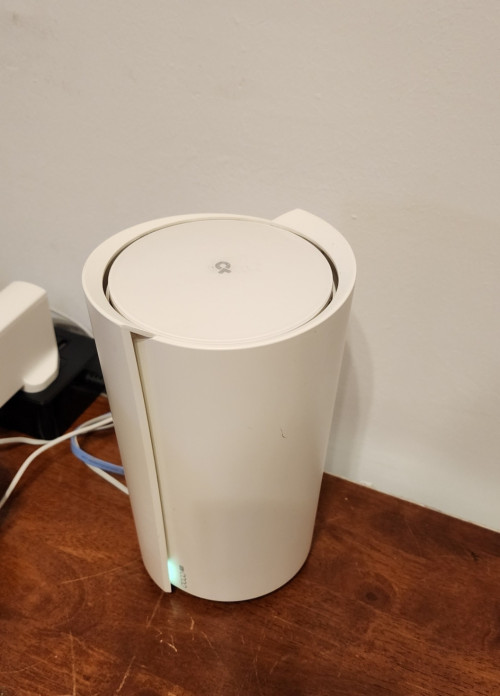 This post has been edited by ad2000: Nov 11 2024, 08:22 PM |
|
|
Nov 11 2024, 08:20 PM
|
|
All Stars
13,470 posts Joined: Jan 2012
|
QUOTE(ad2000 @ Nov 11 2024, 08:05 PM) Ermmm.. the router is placed next to a wall..and the result are significantly better than previous location which is right beside the window. 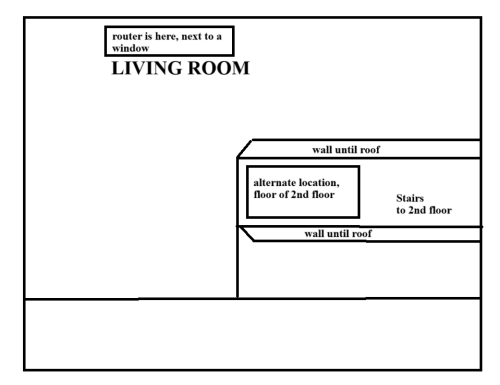 My house layout... between these 2 locations, speed difference is 2-3x... 100Mbps or so to almost 400Mbps using UM MC888S. Another is my office, 3 storey high, and we are located on ground floor. Moving the router closer to the windows (3 feet away vs placing the router nicely on one of the wall cabinet) also rendered the same result. 500Mbps vs 100-150Mbps. This one using ZTE MC801A on Celcom 5G. BTW... I forgot to mention that the 5G tower is next to the office building. You make me interested to splash 600 bucks to find out if it really helps...... ok, placed an order for X50 5G for RM615... lets see when I received it... This post has been edited by andrekua2: Nov 11 2024, 09:03 PM |
|
|
Nov 12 2024, 12:59 AM
|

Junior Member
164 posts Joined: May 2006 From: Rawang, Selangor
|
QUOTE(andrekua2 @ Nov 10 2024, 08:41 PM) I think it is safe to say that ZTE mess up this router very badly. Perhaps it was not designed to handling such load. Even the 5G alone also make it dc/hang sometimes if you dont dismantle the cover to cool it. I think they totally skimp the cooling for the router which causes it to overheat very easily. Even after I change all the thermal pad to a bigger one, plus 2x 120mm fan cooling both top and bottom heatsink, I still encounter problem sometimes. Yes, it no longer DC/reboot but sometimes there is some throttling going on (hard to say which chip) but it will slow down to 30Mbps max. you gave me an idea for my next project. i'll get heatsink for modem card and thermal conductive tape with cooling fan. |
|
|
Nov 12 2024, 01:36 AM
|
|
All Stars
13,470 posts Joined: Jan 2012
|
QUOTE(ameyhazuan @ Nov 12 2024, 12:59 AM) you gave me an idea for my next project. i'll get heatsink for modem card and thermal conductive tape with cooling fan. Actually there is one thing that I thought of doing but didnt proceed. When I dismantle the bigger aluminium heatsink, I find that ZTE did not do surface finishing. The heatsink do have very uneven surface. Initially I thought of using thermal paste instead of thermal pad but once I saw the surface, I cancelled my idea. When my tplink arrive, I might consider giving it one last go provided if I had the free time.I was also concerned that it would not attach well if I cut off the metal plate that were on the 5G card. I did thought of sending it over to my usual laser cut shop and cut out the area which the heatsink was attached to the 5G card. Then buy a used gaming phone cooler with a peltier and slap it on with some thermal paste and super glue. |
|
|
Nov 12 2024, 10:16 AM
Show posts by this member only | IPv6 | Post
#1899
|

Senior Member
6,381 posts Joined: Jun 2005 From: meow meow
|
QUOTE(Shengz @ Nov 10 2024, 08:50 PM) I guessed the router just show the strength of the signal. It is actually connected to only 1 band at a time. which olax modem you used? thinking to get one for my parent's houseMy family members don't game, don't download, we are consider as light users. Just casually surfing XHS and youtube, even during my wife home alone, although she just use the browser to read her novel, the shitty MC888S just can't handle it, always face disconnection. The 5G speed itself nonetheless is awesome, get the ala carte and refrain from signing the bundled router will do. Screenshot attached below shows good router can do wonder even the signal is not at its best state. |
|
|
Nov 12 2024, 11:25 PM
|
|
All Stars
13,470 posts Joined: Jan 2012
|
QUOTE(GameSky @ Nov 12 2024, 10:16 AM) which olax modem you used? thinking to get one for my parent's house you can see the hardware version g5018 GameSky liked this post
|
| Change to: |  0.0232sec 0.0232sec
 0.85 0.85
 6 queries 6 queries
 GZIP Disabled GZIP Disabled
Time is now: 4th December 2025 - 07:44 AM |
 Quote
Quote