

U Home 5G
|
|
 Oct 24 2024, 09:13 PM Oct 24 2024, 09:13 PM
Return to original view | IPv6 | Post
#1
|
 
Senior Member
1,185 posts Joined: Dec 2011 
|
My Umobile bundled modem/router disconnects on me, everyday a few times. I suspect the router rebooted. It is a MC888S. Apart from that, I am okay with its reception, I am getting 5 bar in signal, even tough it is not as fast as my phone. It is only around 200-300 Mbps. But usable. Regarding the disconnection, you think a complaint to Umobile will work to resolve this issue ? |
 Quote
Quote|
|
|
|
|
Nov 1 2024, 03:38 PM
Return to original view | IPv6 | Post
#2
|
|
Senior Member
1,185 posts Joined: Dec 2011
|
QUOTE(andrekua2 @ Oct 26 2024, 05:15 PM) Really? lets see if I still had my Philips 12v adapter. Does it work for you ? It did not work for me.  Still reboot several times after I changed the power supply. |
|
|
Nov 2 2024, 07:41 AM
Return to original view | Post
#3
|
|
Senior Member
1,185 posts Joined: Dec 2011
|
QUOTE(ccgoay @ Nov 2 2024, 01:58 AM) If your theoretical is correct, original is 1.5A, your should use 3A or 6A test out, as the 1.5A and 2A (unless branded with solid design) is not much difference in term of power loss! I tested with a 12V 5A power supply which I bought for this purpose. One day when the plane flied over, the router rebooted. Maybe just coincidence. LOL. Randomly there were other times. |
|
|
Nov 4 2024, 03:57 PM
Return to original view | IPv6 | Post
#4
|
|
Senior Member
1,185 posts Joined: Dec 2011
|
QUOTE(ameyhazuan @ Nov 4 2024, 02:43 PM) Last time i opened up the casing and use 80mm to cool off. Doesn't work, still reboot. The one that heat up the most is the modem module. Probably can't handle heat on 5G network. For 4G, the module cool as the breeze. Anyone tried this :-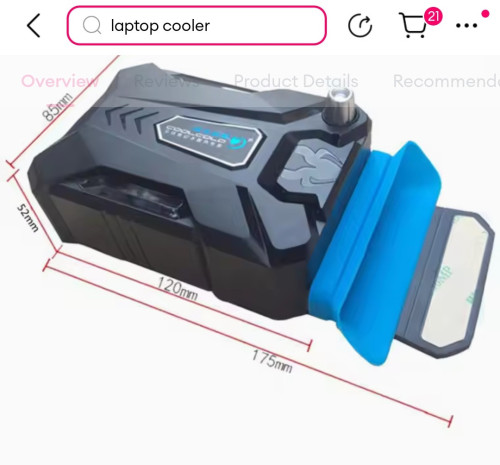 There is a flange with double side tape which stick to the edge of the router. |
|
|
Nov 4 2024, 09:21 PM
Return to original view | IPv6 | Post
#5
|
|
Senior Member
1,185 posts Joined: Dec 2011
|
QUOTE(andrekua2 @ Nov 4 2024, 04:23 PM) It's not the fan problem because it feels cool to the touch with the router cooler fan which only cost RM10. I think the problem is with the heat transfer which is not optimal. I changed the pads and lets monitor for a week. Good. Hope it works. Random reboot is annoying. |
|
|
Nov 11 2024, 07:20 AM
Return to original view | Post
#6
|
|
Senior Member
1,185 posts Joined: Dec 2011
|
The mc888s has a log in advance setting -> other -> device log
If device is rebooted, I supposed the log will be cleared. The default configuration is that it will reboot around 2am every Tuesday. Seems there is a crash on the device driver to do with rndis rather than reboot ? 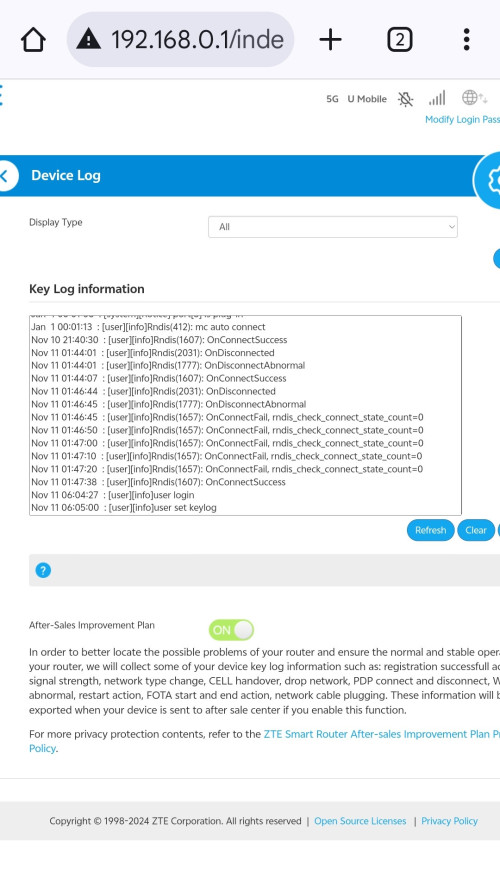 |
|
|
|
|
|
Nov 11 2024, 11:52 AM
Return to original view | Post
#7
|
|
Senior Member
1,185 posts Joined: Dec 2011
|
5G is down in my area. The router is showing 4G or 4G+ despite network settings to 5G NSA. Ghee .... |
|
|
Nov 11 2024, 01:16 PM
Return to original view | Post
#8
|
|
Senior Member
1,185 posts Joined: Dec 2011
|
QUOTE(andrekua2 @ Nov 11 2024, 12:37 PM) Check with your phone is easier Recovered after a power reset. |
|
|
Nov 13 2024, 10:23 AM
Return to original view | Post
#9
|
|
Senior Member
1,185 posts Joined: Dec 2011
|
QUOTE(a2zextra @ Nov 13 2024, 12:02 AM) You looking for good 5G modem can consider this item: Specs are not much meaning. Usefulness comes from world usage data in term of :-https://invl.io/cllpce5 (the link to said product) Cost-effective 5G modem with good chipset. Plus compatible with ample band frequencies. Some more with LTE-Advanced (LTE-A) if the network fall-back.  1. Ability to receive good signal strength, preferably with adjustable external antenna to optimize reception per site. Some tweaking provides a few dBm difference. 2. Stability in continuous usage. Not like the ZTE Mc888s which disconnects frequently. |
|
|
Nov 15 2024, 07:48 AM
Return to original view | Post
#10
|
|
Senior Member
1,185 posts Joined: Dec 2011
|
QUOTE(adam_lew85 @ Nov 14 2024, 07:27 PM) Hi, what do u guys think about the free 5g router come with 2 year subscription? I tested the speed for the router is only 50-60mbps, while my 5g phone hotpot can reach 100++ maps. Is that something wrong with my umobile 5g router? Getting 50-60 mbps is not primarily due to the router because as shown in your own result, using a 5G phone you only get 100++ mbps.Or u guys change to use another brand of router? If so, what brand do u recommend ya? Thanks in advance for your opinions! By right in good signal location, you can get > 300 mbps. Try to identify a better location or orientation. |
|
|
Nov 16 2024, 06:46 PM
Return to original view | Post
#11
|
|
Senior Member
1,185 posts Joined: Dec 2011
|
I still face the disconnection but it is getting less and less frequent. Don't know why. I strongly suspect it is not restarted, it is just a critical driver crashed. Because the system log is intact. If restarted, system log is cleared.
I have turn off the wifi and also the led display. If still happens, I will try schedule daily reboot in the early morning. Maybe 4am. Not buying new router. Wait till it becomes cheaper. LOL. |
|
|
Nov 16 2024, 11:22 PM
Return to original view | Post
#12
|
|
Senior Member
1,185 posts Joined: Dec 2011
|
QUOTE(tmc @ Nov 16 2024, 06:46 PM) I still face the disconnection but it is getting less and less frequent. Don't know why. I strongly suspect it is not restarted, it is just a critical driver crashed. Because the system log is intact. If restarted, system log is cleared. I have turn off the wifi and also the led display. If still happens, I will try schedule daily reboot in the early morning. Maybe 4am. Not buying new router. Wait till it becomes cheaper. LOL. 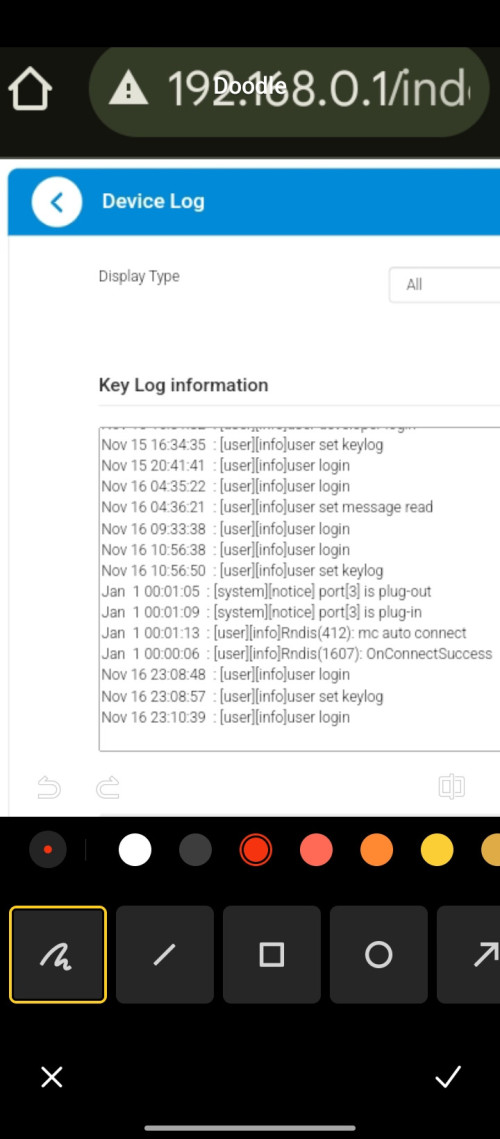 Look at this sample log, happens around 10.56 pm 16th November, it says port 3 is plugged out, and time server has crashed, so system time becomes Jan 1, bla bla, and then finally it recovered, mc auto connect, onConnectSuccess, time synchronized with time server. This post has been edited by tmc: Nov 16 2024, 11:24 PM |
|
|
Nov 17 2024, 08:05 AM
Return to original view | Post
#13
|
|
Senior Member
1,185 posts Joined: Dec 2011
|
QUOTE(andrekua2 @ Nov 17 2024, 02:12 AM) I believe the log is stored in a rom, not ram. Hence a brief power loss does not reset the log. You are right about log is stored in non volatile ram. Tested it. I still believe the cause of crash is not drivers related but temperature related. The lackluster cooling is the main cause especially when you turn on the WIFI which was rated at AX5400. The 4 lines out of time log becomes evidence of the router rebooted, since the router does not have battery to store time, a reboot requires time to be synced again from time server. |
|
|
|
|
|
Nov 22 2024, 01:26 PM
Return to original view | Post
#14
|
|
Senior Member
1,185 posts Joined: Dec 2011
|
QUOTE(Krieger22 @ Nov 22 2024, 12:29 PM) Does anyone have any experience with using an Asus router as a repeater or access point for the MC888S router? Maybe you should try testing the MC888s and Ax55 closed by first.I've tried setting my AX55 up as a repeater for it, but it only works for about 3 minutes after being set up before devices connected to it stop being able to connect to the internet. Additionally, the MC888S doesn't seem to be broadcasting in 5GHz at all |
|
|
Nov 22 2024, 05:08 PM
Return to original view | Post
#15
|
|
Senior Member
1,185 posts Joined: Dec 2011
|
QUOTE(tonynk9 @ Nov 22 2024, 04:19 PM) There is new firmware update. Anyone tried and noticed any difference or improvements for the zte mc888s modem? Haha at least zte is aware of the problem and attempting to fix it. I was about to ask why we as the users, are not able to complain about such shit annoying problem to Umobile .....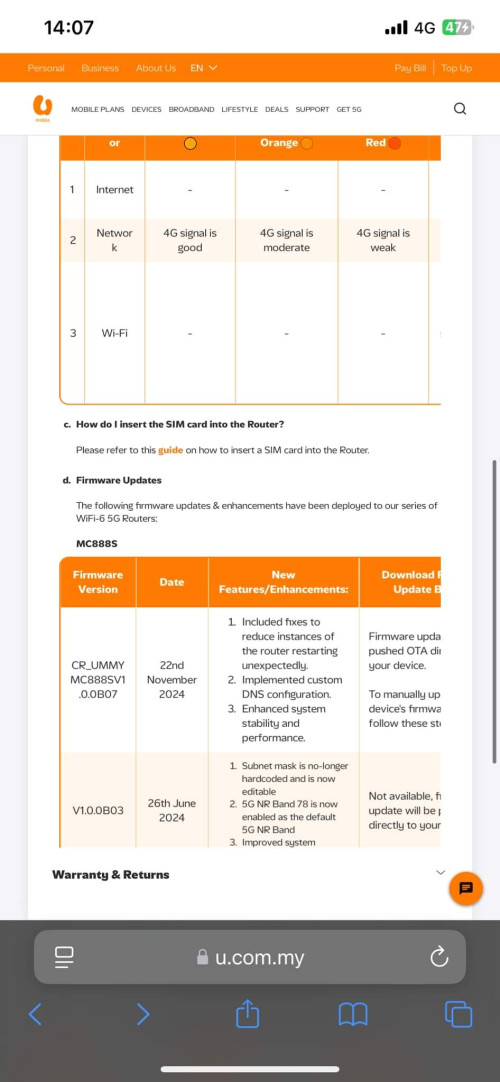 Updated. Now wait and see. This post has been edited by tmc: Nov 22 2024, 05:08 PM |
|
|
Nov 23 2024, 07:24 AM
Return to original view | Post
#16
|
|
Senior Member
1,185 posts Joined: Dec 2011
|
QUOTE(Krieger22 @ Nov 22 2024, 11:51 PM) This was with the MC888s and AX55 right next to each other. Haha then step 0, you need to test MC888s with a handphone close by.Most routers default dhcp IP is 192.168.0.x, if you configure two router chained together, you need to make them serving different IP range, eg mc888s with 192.168.0.x, AX55 with 192.168.1.x. QUOTE Alright, what settings do I use to set up the AX55 as the access point? Do I need to call U Mobile for the PPPoE username and login? No, you don't use pppoe, you should use dhcp ( easier ) or static IP setup on the wan port of Ax55 connected to the Lan port of mc888s. No configuration on Mc888s.This post has been edited by tmc: Nov 23 2024, 07:31 AM |
|
|
Nov 23 2024, 10:45 AM
Return to original view | Post
#17
|
|
Senior Member
1,185 posts Joined: Dec 2011
|
QUOTE(Zaryl @ Nov 23 2024, 09:47 AM) how often? less frequent than before or more or less the same? Yes, it just happened to me again. Can't tell if it is more, less or the same. I only experience it typically one or twice a day, other people are different. It is load related. More different devices and different connections, higher chances. yapmeo liked this post
|
|
|
Nov 23 2024, 05:29 PM
Return to original view | Post
#18
|
|
Senior Member
1,185 posts Joined: Dec 2011
|
QUOTE(Krieger22 @ Nov 23 2024, 02:35 PM) Where in the Mc888s settings do I check if the Mc888s already has DCHP enabled, as the Asus online guide seems to say that it's a prerequisite for setting it up in AP mode https://www.asus.com/my/support/faq/1015009/ You logon to the router using 192.168.0.1, and select PC interface. Actually you should not need to adjust anything on the MC888s, the DHCP on the MC888s is enabled by default. All confuration performed on the AX55 side, 1. If you use AP mode or bridge mode or relay mode, you should disable DHCP on the AX55. 2. If you use the router or NAT mode, then can selectively disable Wifi on the Mc888s. But since you should select different range LAN addresses for both routers, it does not really matter. Disable WIFI on MC888s primary purpose is to reduce work load. |
|
|
Nov 30 2024, 07:36 AM
Return to original view | Post
#19
|
|
Senior Member
1,185 posts Joined: Dec 2011
|
QUOTE(GoodToF @ Nov 29 2024, 09:28 PM) Hi, just received uhome 5g sim card with router. Login to the router and select PC interface, check if there is any SMS.Plugged in everything, looks like no Internet from sim card. Is there any activation required? Or plug in to the phone and see if there is any SMS. |
|
|
Dec 3 2024, 03:37 PM
Return to original view | Post
#20
|
|
Senior Member
1,185 posts Joined: Dec 2011
|
Another firmware update for zte MC888s. Where to find the change log ? |

| Change to: |  0.0762sec 0.0762sec
 0.48 0.48
 7 queries 7 queries
 GZIP Disabled GZIP Disabled
Time is now: 5th December 2025 - 09:36 AM |
All Rights Reserved © 2002- 2025 Vijandren Ramadass (~unite against racism~)
Powered by Invision Power Board © 2025 IPS, Inc.