|
fruitie
|
 Nov 4 2024, 03:38 PM Nov 4 2024, 03:38 PM
|
Rise and Shine


|
QUOTE(ameyhazuan @ Nov 4 2024, 02:38 PM) Yeah, not the network issue. It's the modem. I've replaced more than 5 times. The last modem lasted me almost 2 months before it started to disconnect and random reboot. They should change the ZTE modem to others. Never take Kaon, useless. Low signal reception. That's right. Saying our country sucks in managing 5G network is not a fair statement though at some points, we suck.  In this case, it is the router issue and not the network. |
|
|
|
|
|
tmc
|
Nov 4 2024, 03:57 PM
|
|
|
QUOTE(ameyhazuan @ Nov 4 2024, 02:43 PM) Last time i opened up the casing and use 80mm to cool off. Doesn't work, still reboot. The one that heat up the most is the modem module. Probably can't handle heat on 5G network. For 4G, the module cool as the breeze. Anyone tried this :- 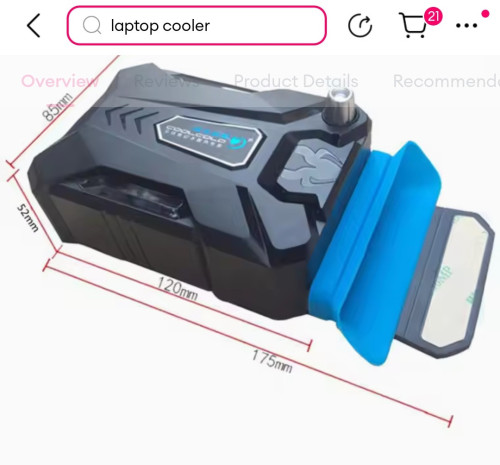 There is a flange with double side tape which stick to the edge of the router. |
|
|
|
|
|
andrekua2
|
Nov 4 2024, 04:22 PM
|
|
|
QUOTE(ameyhazuan @ Nov 4 2024, 02:43 PM) Last time i opened up the casing and use 80mm to cool off. Doesn't work, still reboot. The one that heat up the most is the modem module. Probably can't handle heat on 5G network. For 4G, the module cool as the breeze. Oh yeah, I mistaken that 5g module as wifi card. It wasnt working when I pulled that out. I replaced all the thermal pads with some that I bought from coolermaster. Will run the test for a week and see if it helps. The 5g module seems a bit warmer to my hands. See if this could be the remedy. |
|
|
|
|
|
andrekua2
|
Nov 4 2024, 04:23 PM
|
|
|
QUOTE(tmc @ Nov 4 2024, 03:57 PM) Anyone tried this :- There is a flange with double side tape which stick to the edge of the router. It's not the fan problem because it feels cool to the touch with the router cooler fan which only cost RM10. I think the problem is with the heat transfer which is not optimal. I changed the pads and lets monitor for a week. |
|
|
|
|
|
tmc
|
Nov 4 2024, 09:21 PM
|
|
|
QUOTE(andrekua2 @ Nov 4 2024, 04:23 PM) It's not the fan problem because it feels cool to the touch with the router cooler fan which only cost RM10. I think the problem is with the heat transfer which is not optimal. I changed the pads and lets monitor for a week. Good. Hope it works. Random reboot is annoying. |
|
|
|
|
|
chkwong
|
Nov 5 2024, 08:04 AM
|
|
|
QUOTE(tmc @ Nov 4 2024, 03:57 PM) Anyone tried this :- There is a flange with double side tape which stick to the edge of the router. Tried before. Not worth it. Just get a normal laptop cooler. Cheap and good. Now router can off 24x7 no heating issue whatsoever. |
|
|
|
|
|
ameyhazuan
|
Nov 5 2024, 05:11 PM
|
Getting Started

|
Nothing to do today i opened up kaon FA7801. Wondering why this modem don't generate much heat.
Many chipsets have their own hestsink. Modem module is M2 connector with its own heatsink.
The housing also has a place to put fan. 40mm fan.
This post has been edited by ameyhazuan: Nov 21 2024, 02:32 AM
|
|
|
|
|
|
andrekua2
|
Nov 6 2024, 08:56 PM
|
|
|
After monitoring for 2 days, I would say it does not fix the auto reboot thing. However the pattern is quite similar to what I experience with Celcom initally for the 5G fiber that I applied for my office.
It has a tendency to disconnect everyday between 8-9 PM. Another time is between 1-2AM (this one does not happen everyday). At this point, Im more inclined to think maybe its not the router. Will continue to monitor for few more days and see if I would commit to a TPLink X50.
BTW, this is when I only set the model to 5G NSA. I do not know if it will be better if I switch to 4G/5G mode which Im tempted to try.
This post has been edited by andrekua2: Nov 6 2024, 09:01 PM
|
|
|
|
|
|
BOTAK_WAI
|
Nov 7 2024, 09:05 PM
|
|
|
zyxel nr5103e 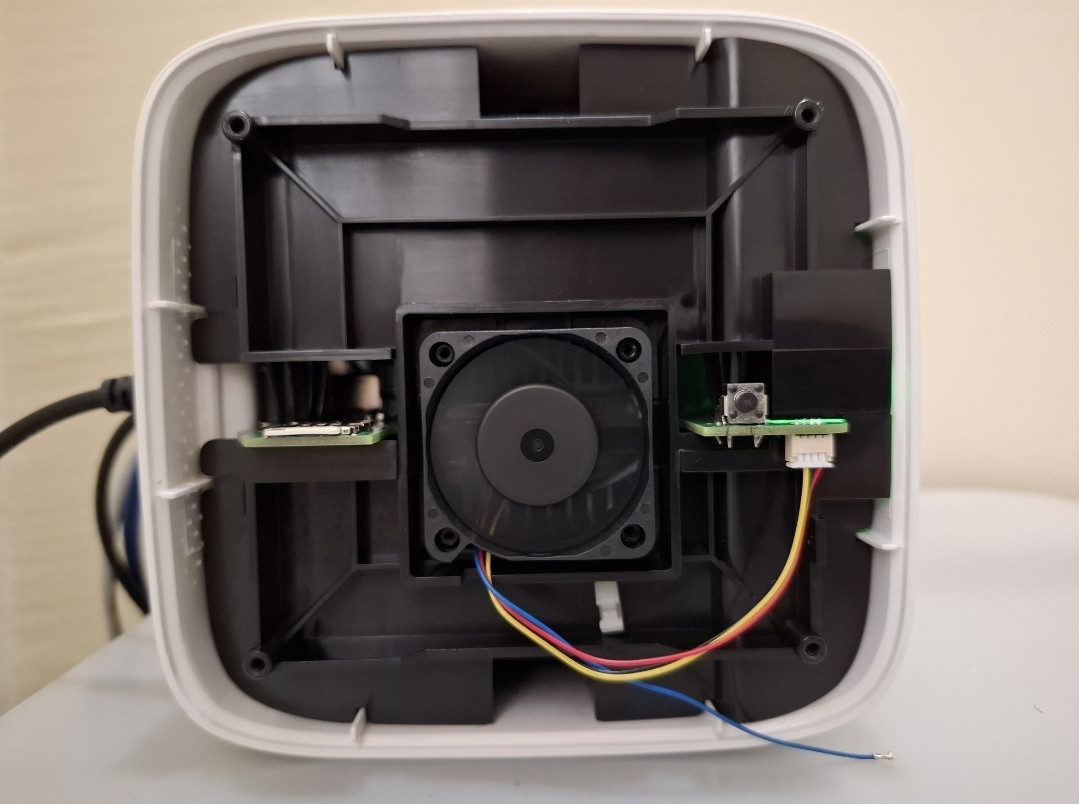 hardcore user can try to remove the blue color pwm wire to make the fan run at full speed. 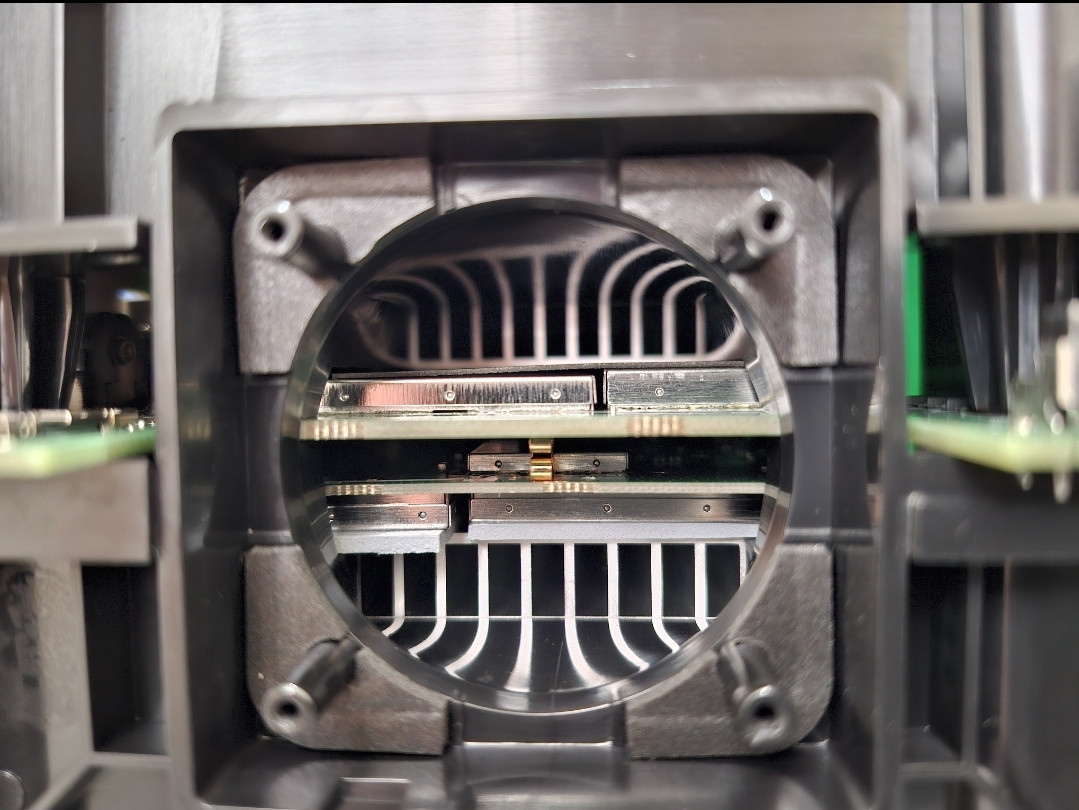 or u can remove the internal fan and use external 12cm usb fan directly blow inside. 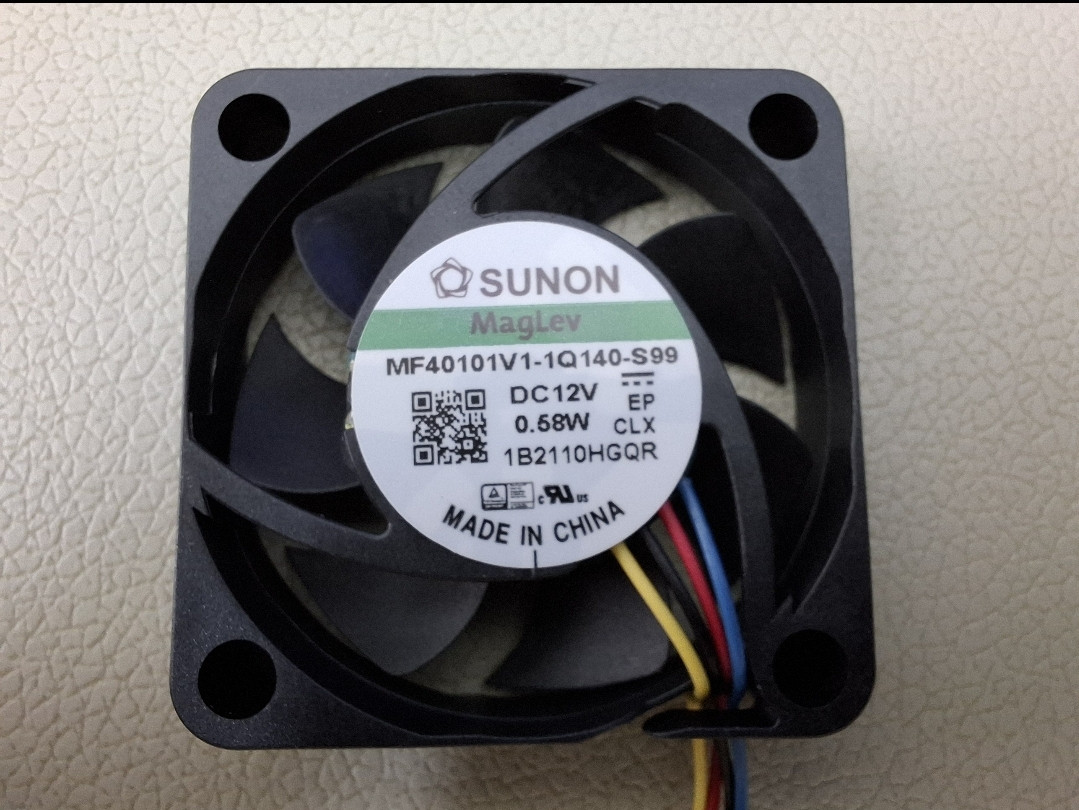 internal fan model 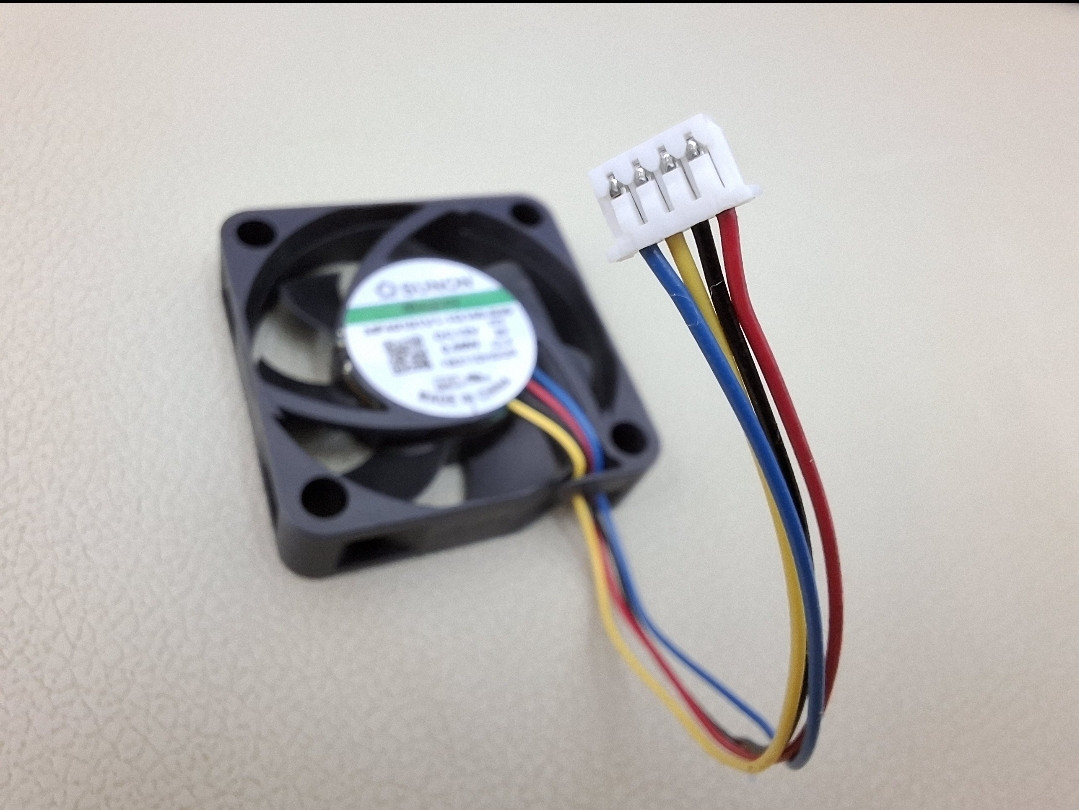 internal fan connector This post has been edited by BOTAK_WAI: Apr 27 2025, 07:17 AM |
|
|
|
|
|
BOTAK_WAI
|
Nov 8 2024, 07:25 AM
|
|
|
QUOTE(andrekua2 @ Nov 8 2024, 01:17 AM) After I tried out my thermal pad change, I ran the whole setup without any fan and it got ridiculously hot and rebooted the router. Most of the time it is just the 5G which dc. Made one final change and see if it helps. Now it is bare and sandwiched between 2 fans. My first >24hours uptime without dc or reboot. u might want to make a stand (maybe can use laundry detergent bottle) to screw the router pcb and fan on it. wrong orientation weaken the signal. -94 is quite poor signal. This post has been edited by BOTAK_WAI: Nov 8 2024, 10:19 AM |
|
|
|
|
|
andrekua2
|
Nov 8 2024, 08:12 PM
|
|
|
QUOTE(BOTAK_WAI @ Nov 8 2024, 07:25 AM) u might want to make a stand (maybe can use laundry detergent bottle) to screw the router pcb and fan on it. wrong orientation weaken the signal. -94 is quite poor signal. Well... I'm not complaining because I'm getting good speed. I just checked and the 5g uptime is now 11hours+. It was dc when I went to work this morning. Now is 8pm again. If it goes through till midnight without dc, I'm keeping this setup till next year. Attached thumbnail(s)
|
|
|
|
|
|
yapmeo
|
Nov 8 2024, 08:29 PM
|
New Member
|
Just registered u home 5g today and received ZTE MC888S. We noticed the modem will auto-restart out of the blue for many times, so frastrated... Until we saw someone in the forum suggested to change the power adapter, so we switched to a brick 12v (3.33A) adapter from old display monitor. Now the modem no longer auto-restart, both WiFi and 5G is on, selected to 5G NSA. We also noticed the angle of the modem also affect the signal strength, so we tilt the modem to face toward the cell tower (~500m away), signel increased about -5dbm, but speedtest improvement was not significant tbh... Hope the speed will remain like this for long long time. 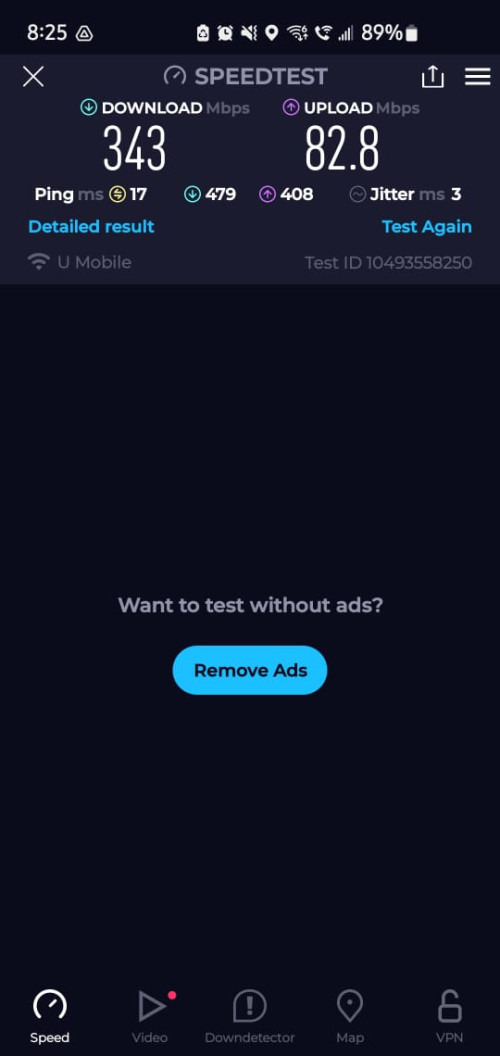 |
|
|
|
|
|
andrekua2
|
Nov 8 2024, 10:54 PM
|
|
|
QUOTE(yapmeo @ Nov 8 2024, 08:29 PM) Just registered u home 5g today and received ZTE MC888S. We noticed the modem will auto-restart out of the blue for many times, so frastrated... Until we saw someone in the forum suggested to change the power adapter, so we switched to a brick 12v (3.33A) adapter from old display monitor. Now the modem no longer auto-restart, both WiFi and 5G is on, selected to 5G NSA. We also noticed the angle of the modem also affect the signal strength, so we tilt the modem to face toward the cell tower (~500m away), signel increased about -5dbm, but speedtest improvement was not significant tbh... Hope the speed will remain like this for long long time. Personally I dont think the auto restart was a result of the power adapter... I didnt noticed any improvement going from 1.5A to 2A. Besides power draw are usually regulated on the board. It wont draw than what was permitted. You can try to cool the device by placing it vertically on a 120MM router cooler fan. You will feel the heat rising up and exiting the ventilation holes. |
|
|
|
|
|
andrekua2
|
Nov 8 2024, 10:59 PM
|
|
|
Just now, 5G going crazy. At first, I thought the router was going to reboot or dc... but Im still playing games with vpn. Both my son on valorant and roblox were complaining. OK... I dc and reconnect but also same problem. Then I setup their devices on VPN and no more lag. Now I tried speedtest and speed is back to normal again. Before this it drop to 30-40Mbps. Strange but Im happy that my extreme cooling works and no more hang.
|
|
|
|
|
|
yapmeo
|
Nov 9 2024, 02:30 AM
|
New Member
|
well.. changed to power adapter brick doesn't solve problem, still random reboot when everyone is back home using internet.
I switched off wifi and connect to an AP instead... see how...
(update: still random reboot tho...) T.T will try to put fan and see..
This post has been edited by yapmeo: Nov 9 2024, 03:08 AM
|
|
|
|
|
|
Shengz
|
Nov 9 2024, 05:23 PM
|
|
|
That MC888S is a piece of junk. I already gave it to my heir.
I am now using Olax G5018 which recommended by member here with no disconnection neither reboot, and the best part, always connected to 5G.
My mind is so peaceful after the well spent money, otherwise children and wife keeps complaining everyday. 🤬
|
|
|
|
|
|
cloudwan
|
Nov 9 2024, 06:21 PM
|
|
|
QUOTE(Shengz @ Nov 9 2024, 05:23 PM) That MC888S is a piece of junk. I already gave it to my heir. I am now using Olax G5018 which recommended by member here with no disconnection neither reboot, and the best part, always connected to 5G. My mind is so peaceful after the well spent money, otherwise children and wife keeps complaining everyday. 🤬 Kinda make me thankful that i spend the moolah buying Tplink NX510v before umobile bundle the MC888S, can't imagine having to face constant rebooting..  Atleast the Tplink only reboots like 1 to 1 1/2 month once. My only regret now is being itchy so much taking the free MC888S with 24 months contract offer afterwards..  |
|
|
|
|
|
Shengz
|
Nov 9 2024, 08:58 PM
|
|
|
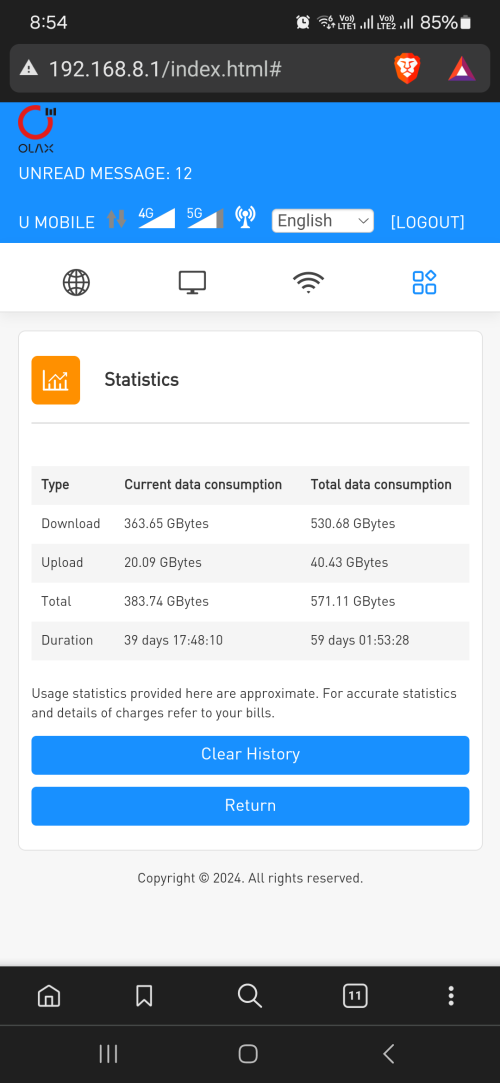 39 days already no reboot, disconnection or whatsoever. Stop torturing yourself guys. Spend some money and you're good to go. |
|
|
|
|
|
andrekua2
|
Nov 9 2024, 10:36 PM
|
|
|
QUOTE(Shengz @ Nov 9 2024, 08:58 PM) 39 days already no reboot, disconnection or whatsoever. Stop torturing yourself guys. Spend some money and you're good to go. Dual network? How did it show both 4G and 5G? Yeah, it seems like while MC888S is usable but only for 1-2 light users. The router will work just fine until I game together with both my sons. One of them playing Valorant, one playing Roblox and me playing Pixels + discord + youtube. Then it would occasionally hangs every hour or so. After I did the thermal pad mods, it still dc after even when I had a 120mm fan pointing at the 5G card area. Only with my latest mods with two 120mm sandwich the router which was strip naked then only it would not dc. I guess ZTE really under estimated the amount of heat produced by the IVY510 chip. I wonder if anyone would try to peltier this beast since you can find these going for very cheap in Taobao nowadays. Its fun to finally conquer this blardy chip but not easy. |
|
|
|
|



 Quote
Quote


 0.0202sec
 0.37
0.37
 6 queries
 GZIP Disabled