Welcome Guest ( Log In | Register )

8 Pages  1 2 3 > » Bottom

Outline · [ Standard ] · Linear+

 U Home 5G

views
     
andrekua2
post Jun 24 2023, 11:42 AM

10k Club
********
All Stars
13,476 posts

Joined: Jan 2012


Even though it is cheap but the fact that 5G router cost between 1.5~2k, I dont think it is a good deal unless you are going to use it as a hotspot with your phone.

I think YES is a better deal at RM99 with a free 5G router. Too bad I signed up with Celcom Home Wireless 5G at RM149 before YES introduced the price cut.
andrekua2
post Jun 24 2023, 01:16 PM

10k Club
********
All Stars
13,476 posts

Joined: Jan 2012


QUOTE(petpenyubobo @ Jun 24 2023, 11:50 AM)
RM700 to RM900 can get a decent one already but DNB Ericsson equipment really has serious compatibility issues with China based chipsets such as Huawei Balong, ZTE and Unisoc.
Those more expensive modems use wither SD or Mediatek that's why they have better compatibility.

YES also restricts speeds to around 120Mbps on their 5G on average. Their network very high ping rate.

Best we get a cheaper modem for time being to future proof investment. Wait for 2nd 5G network to use Huawei equipment for better compatibility with China based chipsets.
*
Celcom also give ZTE MC801A. Basically it is kinda crap. Not sure why it would disconnect everyday at 8AM. I tried to restart at 7xxAM also cannot solve. I only managed to solve this by disabling the WiFi and instead using Tplink AX50 as access point for WiFi which ultimately solve the disconnection problem. So far it has been pretty stable since the 5G tower in right in front of my office (since it sits on the U Mobile building). I just need a cat6e cable since the original cable that came with the router are unable to get above 130Mbps via access point.
andrekua2
post May 13 2024, 12:59 PM

10k Club
********
All Stars
13,476 posts

Joined: Jan 2012


How is UM speed compared with YES?

Which router is UM using now?

This post has been edited by andrekua2: May 13 2024, 01:00 PM
andrekua2
post May 15 2024, 02:01 AM

10k Club
********
All Stars
13,476 posts

Joined: Jan 2012


QUOTE(ultrageek @ May 14 2024, 09:10 AM)
Define problematic? tongue.gif

A few of us had DC's that requires a reboot to resolve on a frequent basis...
*
So this problem persist in the newer 888 as well? I'm using 801 with celcom. I did find it strange having to restart few times every week but found a solution simply by disabling the wifi and connecting it to my tplink ax50 for wifi. Solid ever since.
andrekua2
post May 15 2024, 12:52 PM

10k Club
********
All Stars
13,476 posts

Joined: Jan 2012


QUOTE(eauyong @ May 15 2024, 09:51 AM)
Nice to hear it is solid by disabling the WiFi. How is the speed test?
*
Up and down... when I first use it few months ago, 1gbps... nowadays... between 300-500mbps...

This post has been edited by andrekua2: May 15 2024, 01:04 PM
andrekua2
post May 15 2024, 03:40 PM

10k Club
********
All Stars
13,476 posts

Joined: Jan 2012


I just signed up 2 years contract with U Home 68. I made the call to the UM in Batu Caves and they still have the MC888s. So I rushed there and straight sign up. They also have the newer Kaon rated at AX1800.

Just did speed test in KIP Kepong at 380Mbps. Later will do another speedtest at home.
andrekua2
post May 16 2024, 01:07 AM

10k Club
********
All Stars
13,476 posts

Joined: Jan 2012


QUOTE(netken @ May 15 2024, 05:48 PM)
u choose ZTE unit over Kaon? any specific reason?
*
I have been using 801 with Celcom for office (TM quote us thousands of ringgit to pull a cable since we are the only factory that further up from the main road). At first, it hangs quite often and always at a certain time like 8am (although the timing change after a week or two). Then I found out that by disabling the wifi function, it actually does not suffer from this problem and I have been using it along with tplink ax50. Hence I would pretty much prefer to stay with the ZTE brand since Im getting consistent result with it.

Tried 2 locations to place the router, at the front and back of the house. I dont plan to use the wifi function since I already pulled a router to the center of my house which would cover the whole house with decent connection. Im getting around 350Mbps at the front of the house vs 250Mbps at the back of the house. Placing it at the back of the house first since there was where the previous TM modem was placed and had a LAN cable routed to the main wifi at the center of the house.
andrekua2
post May 18 2024, 07:03 AM

10k Club
********
All Stars
13,476 posts

Joined: Jan 2012


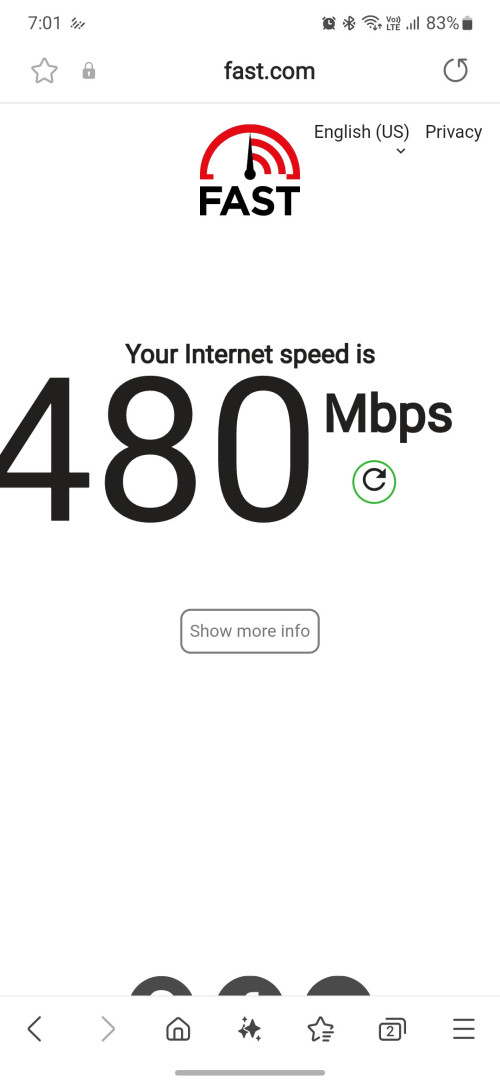
Finally found a good spot in my house... wonder why ppl still pay 3 digits for internet... maybe for torrent but I already stop torrent for many years

user posted image
andrekua2
post May 18 2024, 11:11 AM

10k Club
********
All Stars
13,476 posts

Joined: Jan 2012


QUOTE(MR_alien @ May 18 2024, 09:05 AM)
2 reasons

1. consistent promised speed
2. latency(for gaming)

this 2 4G or 5G also cannot give anyone
*
Do you really get good ping with gaming though? My son said his Roblox is less laggy now with 5G
andrekua2
post May 18 2024, 12:09 PM

10k Club
********
All Stars
13,476 posts

Joined: Jan 2012


QUOTE(MR_alien @ May 18 2024, 11:31 AM)
Yes...speed test will reveal that part
Anything cable is more consistent
Speed alone 5G sometimes 300Mbps, sometimes 50Mbps
Same goes with ping

Surf web alone with both already feel the difference
*
nah... been using 5G for months... this is not 4G... speed exceed 300mbps most of the time even on bad days...
andrekua2
post May 19 2024, 11:10 AM

10k Club
********
All Stars
13,476 posts

Joined: Jan 2012


QUOTE(ChenKaiWen @ May 18 2024, 07:09 AM)
If you’re talking about fibre,
1) Promised speed most of the time
2) Lower latency compared to wireless
3) Not susceptible to weather
4) Public IP

That’s just a few reasons I can think of.
*
Nah... you just never had bad days with fibre

1. Youtube fucking lag when streaming live
2. Gaming such as Roblox also lag like shit that had my 12 years old screaming
3. Still complaining about weather affecting speed? Oh dear.... what era are you from? If anything, unifi is more likely to LOS after really heavy rain
4. No public IP for lower end fibre package which cost more than 5G... dont even mention the speed
andrekua2
post May 19 2024, 06:03 PM

10k Club
********
All Stars
13,476 posts

Joined: Jan 2012


QUOTE(year2020 @ May 19 2024, 11:23 AM)
Just got the UM68 plan with router. I took the ZTE C888S router.

However the speed I'm getting is only about 50mbps. This is after I connect to 5GHz wifi. If connect to 2.4GHz I will only get 25mbps.

I check from cellmapper, there are 2 towers start with 703 within 500m to my house. There are no building in between, the first tower is on private hospital and the second tower is on indoor swimming pool. I'm on fifth floor and my building is the tallest. No other building blocking the path.

What else can i do? I don't expect to get 300mbps but I read 5G DNB should be minimum 100mbps.

I tried locking 4G band 28, but no difference. In fact download suffers and drop to 20mbps.

Appreciate any pointers.
*
5G range is kinda low.

1. Try placing the ZTE modem router besides windows... avoid placing them next to wall and 5g has poor wall panetration

2. Disable the wifi, connect another router as AP if you happen to have an extra one.


andrekua2
post May 23 2024, 02:51 PM

10k Club
********
All Stars
13,476 posts

Joined: Jan 2012


QUOTE(netken @ May 21 2024, 10:33 AM)
ZTE getting stuck with red light and required a restart.

anyone successfully request for exchange from ZTE to KAON?
*
Bro, I already shared my findings since I have been using 801s for more than a year. I just signed with UM and got this 888s router. Although I havent tried it but I think the symptom is same. The router will hang at the same hour every day or every few days. The problem lies with the WiFi. Disable the WiFi and plug in any old router you have, set to AP mode and use the wifi, you will find that it will never hang at all even after weeks.

This post has been edited by andrekua2: May 23 2024, 02:52 PM
andrekua2
post May 23 2024, 03:04 PM

10k Club
********
All Stars
13,476 posts

Joined: Jan 2012


QUOTE(k_yagami @ May 21 2024, 12:50 AM)
I can only make do with what I can get. Maxis 5G here is almost nonexistent in this house. I can get 5G with U mobile considered good already. The only way to improve is to upgrade the infrastructure, which is something I can't do even I complain to MCMC.
Maybe I'll try this. But so far the current spot for my modem is the best one, although the modem Suggested Location function said that it's a terrible place to place my modem.

This is what I can get in the house that I stay in

user posted image
*
Bro,

UM just signed tower sharing deals with Celcom Digi. Why not try 4G and see if the speed is faster?
andrekua2
post May 23 2024, 08:59 PM

10k Club
********
All Stars
13,476 posts

Joined: Jan 2012


QUOTE(ameyhazuan @ May 23 2024, 08:42 PM)
may be black zte is better. i have not tried mine. black zte and white zte came from different supplier. probable different hardware version.

now i have doubt on using kaon.
*
white zte also 888? or 801s?

andrekua2
post May 24 2024, 05:46 AM

10k Club
********
All Stars
13,476 posts

Joined: Jan 2012


QUOTE(Zaryl @ May 24 2024, 02:25 AM)
hi sifus,

just took umobile 5g together with the ZTE MC888s router black color(contract for 2 years) yesterday.

so far been testing almost a day, and the nearest 5G tower is just behind my house, about ~100m, direct LoS.

but average speedtest i get is <150Mbps DL, 20Mbps UL at my parents' house in Klang area.

i checked the speedtest pattern,

afternoon - got ~130Mbps
evening - ~25Mbps
midnight - ~35Mbps

latency wise, ~30-50ms.  sad.gif

this is very unacceptable. But i could easily get ~500Mbps at my home in Jitra kedah or Penang though via ZTE MU5120 5G portable router ( i have another U5G simcard). doh.gif 

all settings are by default, except i changed the wifi password of course.
so I was thinking to buy another 5G router on shopee.

so Zyxel 3UK NR5103E v2 comes to mind. This one using Qualcomm or Mediatek chip ya?
Saw TPLink X50 5G but the price is kinda steep.  rclxub.gif

Didn't want to terminate to pay the penalty obviously. So i just continue using this package like normal.

i shall make the ZTE MC888s as a spare router in case i could use this better at other places using my another U5G simcard.
*
You can use your phone with the sim I think... then you can test if it's the router that's causing the problem. I'm surprised you get such speed when you're less than 100m away from the tower.

I find it perform best when not placed beside a wall. Try another location near windows. My office is located behind a 5g tower, less than 20m away, more if you calculate the tower is probably 50m height. If I placed 801s tower in the cabinet, 6m away from main door, I get less than 200mbps. I moved it to one of the desk, 2m away from main door, not besides any walls, I get 500mbps most of the time. This is with celcom though. I did tried um in the same location, 400mbps... not that far.

andrekua2
post May 24 2024, 05:58 AM

10k Club
********
All Stars
13,476 posts

Joined: Jan 2012


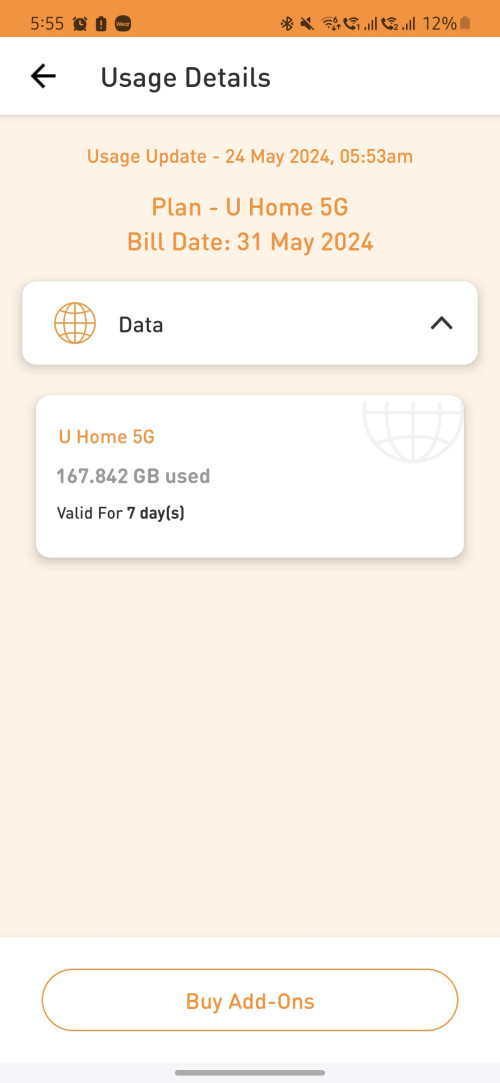
I know I did a lot of speedtest while trying to find the perfect location before I pulled the lan cable but it shouldn't be included in the quota.

user posted image

This post has been edited by andrekua2: May 24 2024, 05:58 AM
andrekua2
post May 24 2024, 10:47 AM

10k Club
********
All Stars
13,476 posts

Joined: Jan 2012


QUOTE(Zaryl @ May 24 2024, 10:02 AM)
Actually my parents' house has unifi 100Mbps. But it's kinda slow because a lot of devices are using it and my little nephews are here too. Playing roblox, ML and what not makes the overall internet speed slower.

hence I took the decision to get myself a 5G simcard and router.

I gave the ZTE MU5210 to my wife as she frequent outstations for work.
Tried different placement and voila, i think I finally got it.
This time i put the ZTE MC888s router LITERALLY ON THE WINDOW itself. Perhaps windows somewhat amplified the signal and act as a natural signal booster?

and the speedtest difference is night & day!

But i worry the router will get fried real quick soon, seeing the window faced sunlight and the room is kinda hot.
Gotta put a fan there for improvised cooling  laugh.gif

Speedtest before
user posted image

Speedtest after
user posted image

Circled is the 5G router just behind my house, about ~100m or so
user posted image
But i wonder if i do get the Zyxcel NR5103E v2 or similar powerful 5G router, i would get >~300Mbps ya?
*
There is no need to place it next to the window itself... why you cant place it next to a wall is because 5G has much much poorer wall penetration(concrete) than 4G. Hence when you placed it at a corner, you basically blocked the signal from reaching the router. You just need place it a few feet away, next to a windows or door where 5G signal would have no problem penetrating the materials.

This post has been edited by andrekua2: May 24 2024, 10:50 AM
andrekua2
post May 24 2024, 04:06 PM

10k Club
********
All Stars
13,476 posts

Joined: Jan 2012


QUOTE(Zaryl @ May 24 2024, 03:18 PM)
Ok now that the 5G speed problem was resolved after correct placement, now i faced another problem:

ZTE MC888s will keep on DC on certain time and WiFi SSID will reappear after 1-2 minutes.
the DC frequency sometimes vary; sometime it will DC after an hour, then sometime few hours.

I already put a 16” Khind table fan set at speed 2 and aim straight at it.
I guess the router overheats and it forced itself to auto restart?

But the speed still fast, although now it’s only average at ~150Mbps after auto restart. Before this ~230-280Mbps easy.

So, it’s time for me to make that Zyxel NR5103E v2 5G router purchase then? Cooling is good, never auto restart? icon_idea.gif
*
No... no problem... the problem lies with the wifi... just turn off the wifi, attached your old router set to AP mode... works like charm.

I dont know what ZTE did with the WiFI... it will hang at the same time everyday. For me, the 801s from Celcom will auto hang every morning at 8am. I tried many things like cooler, restart everyday, but nothing helps. One day I brought my router and turn off the wifi for better coverage. To my surprise, it never hang anymore ever since I attached my own wifi router.

Im using the 888s the same way. Been few days since I last restart the device.

This post has been edited by andrekua2: May 24 2024, 04:08 PM
andrekua2
post May 24 2024, 08:31 PM

10k Club
********
All Stars
13,476 posts

Joined: Jan 2012


QUOTE(netken @ May 24 2024, 05:52 PM)
packing back the ZTE for exchange.

put in the Umobile into the deco x50 5g and walla! now deco x50 can lock band and even lock cell ...
*
Buy from Shopee or Lazada?

At first I wanna buy one too but then again, splashing RM850 for it seems kinda excessive.

8 Pages  1 2 3 > » Top
 

Change to:
| Lo-Fi Version
0.0729sec    0.59    7 queries    GZIP Disabled
Time is now: 13th December 2025 - 08:03 PM