|
andrekua2
|
 Aug 24 2024, 02:55 AM Aug 24 2024, 02:55 AM
|

|
QUOTE(burn1892 @ Aug 23 2024, 11:17 PM) hi can someone help.. usually i get 120-150mbps but now my internet is so bad I get 0.5 to 8mbps max regardless how many times I turn off and on. been 2-3 days now. called umob cust serv they said everything fine in my area. i think its the modem coz i tried switching to my maxis sim its the same (modem showing 5G). appreciate your inputs, TIA again Create a new apn... copy everything from default but change to ipv4 only. It helps a lot for me. I think the dns filtering by mcmc is hurting. |
|
|
|
|
|
hustlerism
|
Aug 24 2024, 03:07 AM
|
|
|
QUOTE(andrekua2 @ Aug 24 2024, 02:55 AM) Create a new apn... copy everything from default but change to ipv4 only. It helps a lot for me. I think the dns filtering by mcmc is hurting. can provide some guidance on how to do this? |
|
|
|
|
|
andrekua2
|
Aug 24 2024, 07:04 AM
|
|
|
QUOTE(hustlerism @ Aug 24 2024, 03:07 AM) can provide some guidance on how to do this? Login to your um router. Disable the internet toggle. Then go into settings and then click apn. 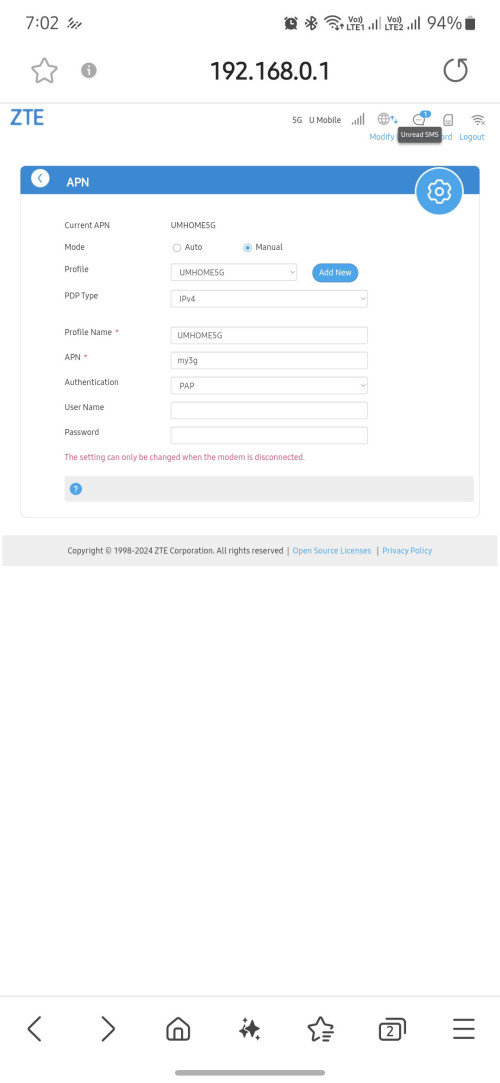 |
|
|
|
|
|
burn1892
|
Aug 24 2024, 08:35 PM
|
New Member

|
QUOTE(andrekua2 @ Aug 24 2024, 02:55 AM) Create a new apn... copy everything from default but change to ipv4 only. It helps a lot for me. I think the dns filtering by mcmc is hurting. appreciate that bro, will try and update soon.. thanks alot |
|
|
|
|
|
andrekua2
|
Aug 25 2024, 12:49 AM
|
|
|
Today finally managed to take off the MC888S cover. I think the small heat plate is not enough to cool it down. Before this, I put the router in vertical position on top of a 120mm fan to cool it through the grill. Now I just let sit on the fan and it was cool to touch after a while. If the heat plate has some fins, it would have much better cooling performance. Now I'm trying to turn on the 5ghz wifi on the um router along with the tplink router which I used as AP to see if cooler temp help the router be more stable even with wifi on. Attached thumbnail(s)

|
|
|
|
|
|
andrekua2
|
Aug 26 2024, 06:18 PM
|
|
|
Anyone experiencing slow network speed?
On sunday, I can get between 200-300Mbps but today its back down to 30Mbps... some hanky panky going on with UM. Im gonna launch a complaint and see how it went.
|
|
|
|
|
|
fruitie
|
Aug 26 2024, 06:27 PM
|
Rise and Shine

|
QUOTE(andrekua2 @ Aug 26 2024, 06:18 PM) Anyone experiencing slow network speed? On sunday, I can get between 200-300Mbps but today its back down to 30Mbps... some hanky panky going on with UM. Im gonna launch a complaint and see how it went. Nope. All OK here in Seremban.  |
|
|
|
|
|
andrekua2
|
Aug 26 2024, 06:52 PM
|
|
|
QUOTE(fruitie @ Aug 26 2024, 06:27 PM) Nope. All OK here in Seremban. I see... TQ I also got Celcom 5G Home Wireless and it also experienced some lag when gaming. I havent tried speedtest on my phones yet but speed is definitely affected since last week. I wonder if this is a broader problem with 5G or what. Really not a good experience. |
|
|
|
|
|
cloudwan
|
Aug 28 2024, 12:01 PM
|
|
|
|
|
|
|
|
|
tomato people
|
Aug 28 2024, 12:36 PM
|
|
|
QUOTE(cloudwan @ Aug 28 2024, 12:01 PM) Tplink > zte |
|
|
|
|
|
fruitie
|
Aug 28 2024, 12:43 PM
|
Rise and Shine
|
I'm using Zyxel and it is pretty good. I like it. High speed all the time.
|
|
|
|
|
|
cloudwan
|
Aug 28 2024, 01:56 PM
|
|
|
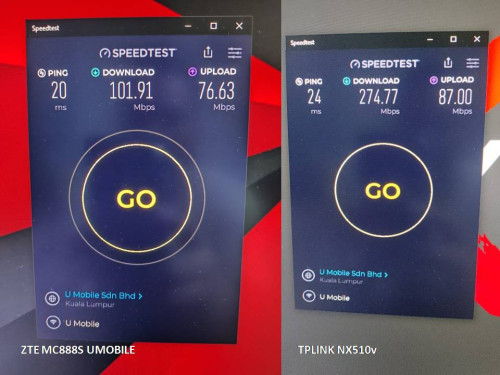
QUOTE(tomato people @ Aug 28 2024, 12:36 PM) Lol, i really thought atleast i could get around 90% or 80% speed of what i could get with my TPLink, didn't expect i couldn't even get half of the speed. Already even updated to the latest firmware somemore  |
|
|
|
|
|
ultrageek
|
Aug 28 2024, 03:45 PM
|
|
|
For some unknown reason, these past few days, it's been shitty at my area here in Damansara. I"m getting frequent DC's on my Zyxel...
Sometimes, the modem is able to reconnect, other few times, only a reboot resolves the issue. Since last Sunday, it's been a almost daily reboot on my end...
|
|
|
|
|
|
andrekua2
|
Aug 29 2024, 12:54 AM
|
|
|
QUOTE(ultrageek @ Aug 28 2024, 03:45 PM) For some unknown reason, these past few days, it's been shitty at my area here in Damansara. I"m getting frequent DC's on my Zyxel... Sometimes, the modem is able to reconnect, other few times, only a reboot resolves the issue. Since last Sunday, it's been a almost daily reboot on my end... KV is getting worse somehow. Since last week, I've been getting less than 100Mbps on peak hours. Sometimes as low as 30Mbps. I have sent a complaint to UM and they were asking to check the router and such but I sent them another reply with a screenshot after 12am where the speed is back to normal. I even told them I'm gonna complain with mcmc if they continue to throttle my connection to 30Mbps. I'm gonna start gathering some screenshots of speedtest.net at different time then present them to mcmc if necessary. One thing for sure is that the slowness also seen on my phones with xOx, hotlink as well as Celcom 5G home wireless that I've been using in my office few KM away. Just not as extreme as what UM has been doing. |
|
|
|
|
|
ad2000
|
Aug 29 2024, 03:03 PM
|
|
|
QUOTE(andrekua2 @ Aug 29 2024, 12:54 AM) KV is getting worse somehow. Since last week, I've been getting less than 100Mbps on peak hours. Sometimes as low as 30Mbps. I have sent a complaint to UM and they were asking to check the router and such but I sent them another reply with a screenshot after 12am where the speed is back to normal. I even told them I'm gonna complain with mcmc if they continue to throttle my connection to 30Mbps. I'm gonna start gathering some screenshots of speedtest.net at different time then present them to mcmc if necessary. One thing for sure is that the slowness also seen on my phones with xOx, hotlink as well as Celcom 5G home wireless that I've been using in my office few KM away. Just not as extreme as what UM has been doing. Same scenarios here at Nilai.. peak hours on celcom, yes, UM drop up to 50% from normal.. average 100-150Mbps compare to 200-250Mbps. Maxis also on my Hp This post has been edited by ad2000: Aug 29 2024, 03:04 PM |
|
|
|
|
|
andrekua2
|
Aug 29 2024, 03:22 PM
|
|
|
QUOTE(ad2000 @ Aug 29 2024, 03:03 PM) Same scenarios here at Nilai.. peak hours on celcom, yes, UM drop up to 50% from normal.. average 100-150Mbps compare to 200-250Mbps. Maxis also on my Hp Why do you think it's happening? I'm suspecting the recent commencement of few data centre recently. |
|
|
|
|
|
Mewhatt P
|
Aug 29 2024, 03:52 PM
|
New Member
|
I think if I'm not mistaken digital nasional berhad (DNB) said that they guaranteed at least 100mbps for 5g speed.
So if congested, more than 100mbps is good enough, right? We cannot expect 300-500mbps for 24/7.
BUT! If drop below 100mbps even with strong 5g signal then something is wrong somewhere. Either modem, telco provider, or DNB.
Because mine drops to 100mbps when congested but I'm still happy for it. It's an okay/acceptable speed for me for RM68 uhome
|
|
|
|
|
|
ultrageek
|
Aug 29 2024, 04:15 PM
|
|
|
That is true: The MCMC is also setting a minimum standard for 5G, requiring each carrier to have a download throughput that averages at least 100Mbps. On the minimum upload speed, the MSQoS requires an average of 5Mbps for standalone 5G and 3Mbps for non-standalone 5G. Full article here: https://www.lowyat.net/2024/319681/mcmc-mob...affected-msqos/But when it drops below 100, can we then complain?  Sadly, though, there's also nothing about DC's? This post has been edited by ultrageek: Aug 29 2024, 04:15 PM |
|
|
|
|
|
MR_alien
|
Aug 29 2024, 05:29 PM
|
|
|
QUOTE(andrekua2 @ Aug 26 2024, 06:18 PM) Anyone experiencing slow network speed? On sunday, I can get between 200-300Mbps but today its back down to 30Mbps... some hanky panky going on with UM. Im gonna launch a complaint and see how it went. if you want consistent speed, you're on the wrong plan you should've subscribed to fiber |
|
|
|
|



 Quote
Quote







 0.0393sec
 0.29
0.29
 6 queries
 GZIP Disabled