Welcome Guest ( Log In | Register )

120 Pages « < 81 82 83 84 85 > » Bottom

Outline · [ Standard ] · Linear+

 U Home 5G

views
     
Mewhatt P
post Aug 19 2024, 12:31 AM

New Member
*
Probation
22 posts

Joined: Aug 2024
One thing i noticed, even if the modem's position is the same, the way that the modem is facing towards can also affect the speed. I put it facing towards the window can have significantly faster speed when compared to when not facing the window.
cloudwan
post Aug 20 2024, 01:07 PM

- Knob -
*******
Senior Member
8,525 posts

Joined: Jan 2003
From: The Jungle Of Pahang


QUOTE(MR_alien @ Aug 18 2024, 03:28 PM)
the DNS issue is finally reaching u-mobile
*
Oh the open DNS and google DNS screening thingy? hmm.gif hmm.gif
Hope it won't disturb my gaming sessions.. sweat.gif sweat.gif
MR_alien
post Aug 20 2024, 01:09 PM

Mr.Alien on the loss
*******
Senior Member
3,582 posts

Joined: Oct 2007
From: everywhere in sabah


QUOTE(cloudwan @ Aug 20 2024, 01:07 PM)
Oh the open DNS and google DNS screening thingy?  hmm.gif  hmm.gif
Hope it won't disturb my gaming sessions..  sweat.gif  sweat.gif
*
google DNS and 1.1.1.1
and i notice web browsing has been weird these few days
there's a very obvious delay in loading everything...and this is not even a night thingy already, it's 24 hours)

but if you turn on your VPN or WARP, it changes everything...all those problem went away
burn1892
post Aug 21 2024, 03:00 PM

New Member
*
Junior Member
22 posts

Joined: Feb 2011


Hi all… anyone using CPE 5G modem ZLT X21? how to get the latest firmware version? I’m not good at this so pls teach 😊. TIA
ericsow
post Aug 21 2024, 04:02 PM

Casual
***
Junior Member
363 posts

Joined: Jan 2009
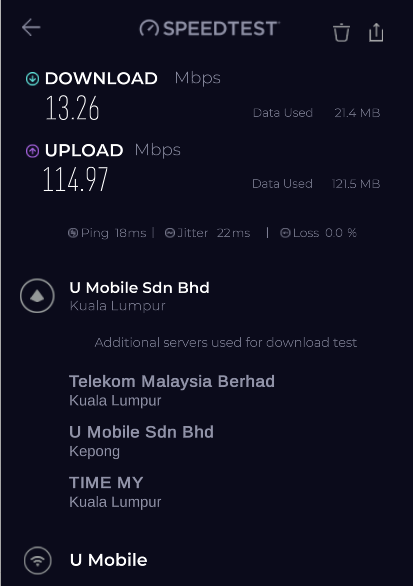
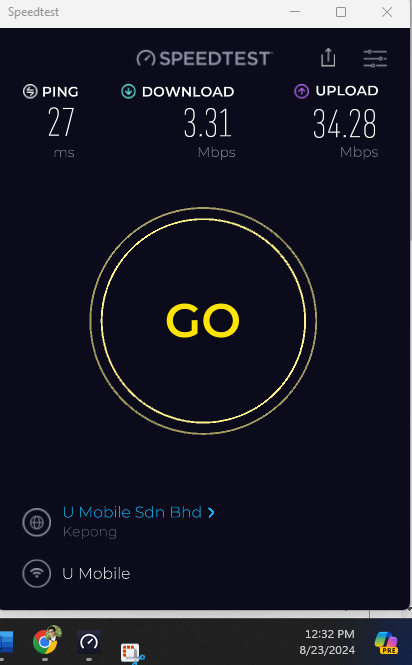
Waiting for my fourth router replacement. And today the connection still same as weird.

4g download speed with 5g upload speed. blush.gif

user posted image
-oc-gassa
post Aug 21 2024, 06:09 PM

Enthusiast
*****
Senior Member
967 posts

Joined: Jan 2003
From: setapak
QUOTE(ericsow @ Aug 21 2024, 04:02 PM)
Waiting for my fourth router replacement. And today the connection still same as weird.

4g download speed with 5g upload speed. blush.gif

user posted image
*
ur your place tower is weird since the 4th time changing router still facing very low download speed
as for me, the ZTE work as expected from day 1 after upgrade firmware... the speed depends on peak time & off peak time, peak max 100Mbps
off peak 300Mbps, but to get 5G must open sliding door...cannot close.. if close line very unstable
iz1011
post Aug 21 2024, 10:47 PM

On my way
****
Junior Member
516 posts

Joined: Dec 2008
Currently I'm using the ZTE MC888 from the UMobile bundle anyone here facing Wi-Fi issue with this modem? It not consistent or stable. The issue I'm facing is that whenever the modem decide to switch channel from 2.4 to 5Ghz it seems to disconnect for awhile and connect back everything but the i can't consistently replicated the issue here somettimes it happen once in a blue moon while something it happen every few hours. My workaround atm is by disconnecting the on board wifi and plug in a router to use it as an AP mode from my router then every issue seems to goes away. Just wanted to knowif you guys faced this issue or mine was a defective unit? Got it bundle with u home tho.
MR_alien
post Aug 22 2024, 09:26 AM

Mr.Alien on the loss
*******
Senior Member
3,582 posts

Joined: Oct 2007
From: everywhere in sabah


QUOTE(ericsow @ Aug 21 2024, 04:02 PM)
Waiting for my fourth router replacement. And today the connection still same as weird.

4g download speed with 5g upload speed. blush.gif

user posted image
*
have you tried taking the modem and sim elsewhere to try?

QUOTE(iz1011 @ Aug 21 2024, 10:47 PM)
Currently I'm using the ZTE MC888 from the UMobile bundle anyone here facing Wi-Fi issue with this modem? It not consistent or stable. The issue I'm facing is that whenever the modem decide to switch channel from 2.4 to 5Ghz it seems to disconnect for awhile and connect back everything but the i can't consistently replicated the issue here somettimes it happen once in a blue moon while something it happen every few hours. My workaround atm is by disconnecting the on board wifi and plug in a router to use it as an AP mode from my router then every issue seems to goes away. Just wanted to knowif you guys faced this issue or mine was a defective unit? Got it bundle with u home tho.
*
why didn't u just merge the 2.4 and 5Ghz together?
Sunshape
post Aug 22 2024, 09:34 AM

Regular
******
Senior Member
1,027 posts

Joined: Jul 2018
I bought Archa 5g modem and I like it!
iz1011
post Aug 22 2024, 01:41 PM

On my way
****
Junior Member
516 posts

Joined: Dec 2008
QUOTE(MR_alien @ Aug 22 2024, 10:26 AM)
have you tried taking the modem and sim elsewhere to try?
why didn't u just merge the 2.4 and 5Ghz together?
*
I’m currently using a single SSID only and that’s is having the same issue because you can check on your devices that which connection that your modem is giving you.
ericsow
post Aug 22 2024, 02:20 PM

Casual
***
Junior Member
363 posts

Joined: Jan 2009
QUOTE(MR_alien @ Aug 22 2024, 09:26 AM)
have you tried taking the modem and sim elsewhere to try?
*
I think is not necessary, I had test run before signed bundle modem at my phone and B618 and result is acceptable. The key is the bundle modem is.... not so....well.

After sign up with bundle modem. Each time I had captured bundle modem, phone and B618 speedtest results to UM customer service and they will said no problem on tower/my area. Then UM CS will dispatch new router to me. (Of cause MUST logged with MCMC).

The strong point is my entry level 5G phone able get average 200mbps all time at most of spot of my home. For the bundle modem I did used 10feet ladder trying every indoor location, moving modem inch to inch, step by step, up and down and turn a round to get best B28 and N78 signal strength and SINR. Once moment it able get >100mbps, next moment the signal strength unchanged but performance will drop below 10mbps.
Even at B618 locked B28 only the performance better than UM's modem.

Meantime, I also tested 5G WIFI only and linked external WIFI AP 5G only(Include different LAN cable). The result remain same.

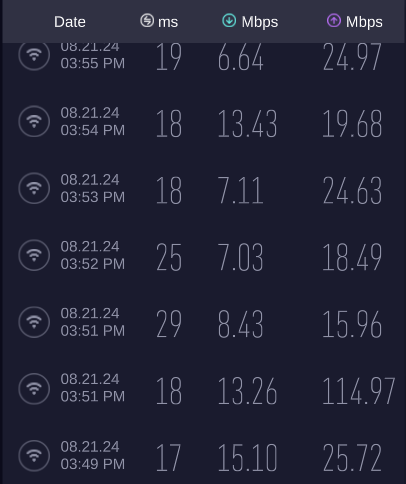
Sometime I always question "mana wire pasang salah". Exchange the upload speed with download speed, at least I can run some thing.
user posted image
Mewhatt P
post Aug 22 2024, 02:41 PM

New Member
*
Probation
22 posts

Joined: Aug 2024
QUOTE(ericsow @ Aug 22 2024, 02:20 PM)
I think is not necessary, I had test run before signed bundle modem at my phone and B618 and result is acceptable. The key is the bundle modem is.... not so....well.

After sign up with bundle modem. Each time I had captured bundle modem, phone and B618 speedtest results to UM customer service and they will said no problem on tower/my area. Then UM CS will dispatch new router to me. (Of cause MUST logged with MCMC).

The strong point is my entry level 5G phone able get average 200mbps all time at most of spot of my home. For the bundle modem I did used 10feet ladder trying every indoor location, moving modem inch to inch, step by step, up and down and turn a round to get best B28 and N78 signal strength and SINR. Once moment it able get >100mbps, next moment the signal strength unchanged but performance will drop below 10mbps.
Even at B618 locked B28 only the performance better than UM's modem.

Meantime, I also tested 5G WIFI only and linked external WIFI AP 5G only(Include different LAN cable). The result remain same.

Sometime I always question "mana wire pasang salah". Exchange the upload speed with download speed, at least I can run some thing.

user posted image
*
I have similar issue like this. Once I get a good speed, not changing the modem's location, but suddenly speed drop. When use phone the speed is really fast. I think because of the cheap modem provided by UM. Guess i will buy a new modem that can pull signal better.


iz1011
post Aug 23 2024, 12:08 PM

On my way
****
Junior Member
516 posts

Joined: Dec 2008
QUOTE(ericsow @ Aug 21 2024, 05:02 PM)
Waiting for my fourth router replacement. And today the connection still same as weird.

4g download speed with 5g upload speed. blush.gif

user posted image
*
May I know what modem you’re using? MC888S?
ericsow
post Aug 23 2024, 12:38 PM

Casual
***
Junior Member
363 posts

Joined: Jan 2009
QUOTE(iz1011 @ Aug 23 2024, 12:08 PM)
May I know what modem you’re using? MC888S?
*
First is Kaon, then the following two replacement are ZTE MC888S.

user posted image
vkashin
post Aug 23 2024, 02:24 PM

Casual
***
Junior Member
335 posts

Joined: Dec 2005


Hi everyone, would like to ask if it is normal to have the billing cycle to be less than 30 days?

I signed up for U Home 5G Sim only plan on 17 Aug 2024, with RM68 paid on the same day
However when I checked in app today, it shows that it is only valid for another 14 days, which means i only got 21 days with the first RM68 paid? Next billing date in app is on 6 Sept 2024

Should I contact customer service or will it be adjusted later on?
Thanks
ericsow
post Aug 23 2024, 03:05 PM

Casual
***
Junior Member
363 posts

Joined: Jan 2009
QUOTE(vkashin @ Aug 23 2024, 02:24 PM)
Hi everyone, would like to ask if it is normal to have the billing cycle to be less than 30 days?

I signed up for U Home 5G Sim only plan on 17 Aug 2024, with RM68 paid on the same day
However when I checked in app today, it shows that it is only valid for another 14 days, which means i only got 21 days with the first RM68 paid? Next billing date in app is on 6 Sept 2024

Should I contact customer service or will it be adjusted later on?
Thanks
*
Don't worry, UM will prorated you first month charge and adjust your billing cycle to begin of the month. The first month payment you make at center, just a deposit not monthly payment.

Example your first month prorated amount is RM38. You still has extra balance RM30 at next begin of the month.

The sale person should told you about this during signup.

vkashin
post Aug 23 2024, 03:18 PM

Casual
***
Junior Member
335 posts

Joined: Dec 2005


QUOTE(ericsow @ Aug 23 2024, 03:05 PM)
Don't worry, UM will prorated you first month charge and adjust your billing cycle to begin of the month. The first month payment you make at center, just a deposit not monthly payment.

Example your first month prorated amount is RM38. You still has extra balance RM30 at next begin of the month.

The sale person should told you about this during signup.
*
alright thanks for the clarification! then that should be no issue
unfortunately I think the sales that attended to me was still under training, as there was another senior personnel guiding her during registration
andrekua2
post Aug 23 2024, 08:29 PM

10k Club
********
All Stars
13,478 posts

Joined: Jan 2012


QUOTE(ericsow @ Aug 22 2024, 02:20 PM)
I think is not necessary, I had test run before signed bundle modem at my phone and B618 and result is acceptable. The key is the bundle modem is.... not so....well.

After sign up with bundle modem. Each time I had captured bundle modem, phone and B618 speedtest results to UM customer service and they will said no problem on tower/my area. Then UM CS will dispatch new router to me. (Of cause MUST logged with MCMC).

The strong point is my entry level 5G phone able get average 200mbps all time at most of spot of my home. For the bundle modem I did used 10feet ladder trying every indoor location, moving modem inch to inch, step by step, up and down and turn a round to get best B28 and N78 signal strength and SINR. Once moment it able get >100mbps, next moment the signal strength unchanged but performance will drop below 10mbps.
Even at B618 locked B28 only the performance better than UM's modem.

Meantime, I also tested 5G WIFI only and linked external WIFI AP 5G only(Include different LAN cable). The result remain same.

Sometime I always question "mana wire pasang salah". Exchange the upload speed with download speed, at least I can run some thing.
user posted image
*
Where do you live btw?
burn1892
post Aug 23 2024, 11:17 PM

New Member
*
Junior Member
22 posts

Joined: Feb 2011


QUOTE(burn1892 @ Aug 21 2024, 03:00 PM)
Hi all… anyone using CPE 5G modem ZLT X21? how to get the latest firmware version? I’m not good at this so pls teach 😊. TIA
*
hi can someone help.. usually i get 120-150mbps but now my internet is so bad I get 0.5 to 8mbps max regardless how many times I turn off and on.
been 2-3 days now. called umob cust serv they said everything fine in my area. i think its the modem coz i tried switching to my maxis sim its the same (modem showing 5G). appreciate your inputs, TIA again

ericsow
post Aug 23 2024, 11:39 PM

Casual
***
Junior Member
363 posts

Joined: Jan 2009
QUOTE(andrekua2 @ Aug 23 2024, 08:29 PM)
Where do you live btw?
*
Melaka City center. 520m away from 5G tower.

120 Pages « < 81 82 83 84 85 > » Top
 

Change to:
| Lo-Fi Version
0.0223sec    0.85    6 queries    GZIP Disabled
Time is now: 16th December 2025 - 11:51 AM