Welcome Guest ( Log In | Register )

Bump Topic Topic Closed RSS Feed
453 Pages « < 20 21 22 23 24 > » Bottom

Outline · [ Standard ] · Linear+

Unifi Official TM UniFi High Speed Broadband Thread V40, READ 1ST PAGE FOR RELEVANT WIFI INFO

views
     
Iceman74
post Apr 17 2022, 11:55 AM

Regular
******
Senior Member
1,407 posts

Joined: May 2010


QUOTE(JayChoww @ Apr 17 2022, 01:02 AM)
Hi, how to apply for this? I'm on 100mbps and I pay more than that
*
I applied 500Mbps with my digi 60, the offer price is RM145.

The problems for me is house landlines, me lazy to informed all the changes to relatives

Since unifi CS called but can't offer me any better or matching the 500Mbps Digi offer, I ask about 300Mbps. They give me offer everythings remain same (but take out the unifi tv that I don't use) including the price but up the speed to 300Mbps with 2 years contract.
CS do hint, after 2 years see how lar

QUOTE(YoungMan @ Apr 17 2022, 10:06 AM)
129 for 300mbps? How? Afaik there is RM100 for 300mbps if combine with postpaid 90.
*
I think RM129 for 300Mbps is the new norm price structure.
For 100Mbps price should be below or around RM100

This post has been edited by Iceman74: Apr 17 2022, 01:03 PM
RallyNight
post Apr 17 2022, 01:51 PM

Regular
******
Senior Member
1,146 posts

Joined: Nov 2015
QUOTE(Iceman74 @ Apr 17 2022, 12:55 PM)
I applied 500Mbps with my digi 60, the offer price is RM145.

The problems for me is house landlines, me lazy to informed all the changes to relatives 

Since unifi CS called but can't offer me any better or matching the 500Mbps Digi offer,  I ask about 300Mbps. They give me offer everythings remain same (but take out the unifi tv that I don't use) including the price but up the speed to 300Mbps with 2 years contract.
CS do hint, after 2 years see how lar
I think RM129 for 300Mbps is the new norm price structure.
For 100Mbps price should be below or around RM100
*
Even tho give you 300, their service now is like shit pass few days i only get 10mbps

This post has been edited by RallyNight: Apr 17 2022, 01:51 PM
afif92
post Apr 17 2022, 03:43 PM

Casual
***
Junior Member
374 posts

Joined: Mar 2010
QUOTE(RallyNight @ Apr 17 2022, 01:51 PM)
Even tho give you 300, their service now is like shit pass few days i only get 10mbps
*
It maybe only on certain area.. I noticed that you complaint for a few days before.. But I dont have any issues with Unifi at the moment..

Are you still using TM provided router or have change to aftermarket one?
YoungMan
post Apr 17 2022, 04:32 PM

Look at all my stars!!
*******
Senior Member
6,836 posts

Joined: Oct 2008
From: Kuala Lumpur


QUOTE(Iceman74 @ Apr 17 2022, 12:55 PM)
I think RM129 for 300Mbps is the new norm price structure.
For 100Mbps price should be below or around RM100
*
Don't think so. Currently it is still a selective offer to selected few lucky people. Everythin is offered through selective negotiation only.
RallyNight
post Apr 17 2022, 04:39 PM

Regular
******
Senior Member
1,146 posts

Joined: Nov 2015
QUOTE(afif92 @ Apr 17 2022, 04:43 PM)
It maybe only on certain area.. I noticed that you complaint for a few days before.. But I dont have any issues with Unifi at the moment..

Are you still using TM provided router or have change to aftermarket one?
*
Already use my own asus router and their technician come and use their own router, same result but gone even worst than yesterday. Saw their facebook seems like many people facing the same issue especially from the east

This post has been edited by RallyNight: Apr 17 2022, 04:39 PM
Iceman74
post Apr 17 2022, 04:54 PM

Regular
******
Senior Member
1,407 posts

Joined: May 2010


QUOTE(RallyNight @ Apr 17 2022, 01:51 PM)
Even tho give you 300, their service now is like shit pass few days i only get 10mbps
*
so far ok for me. Only twice me reported problem. Once the fiber cable broken outside and another time my speed are always turtle speed at certain hours, complaining about it. Reset it but still cannot, me tell them just go change my port outside to other available port. So far all ok.
After service are much better than Maxis for my office.

QUOTE(YoungMan @ Apr 17 2022, 04:32 PM)
Don't think so. Currently it is still a selective offer to selected few lucky people. Everythin is offered through selective negotiation only.
*
Going to apply for my mom place, undecided now
Time offer RM99/mth for 100Mbps free 1 month(so far this is best offer, no need attach to any other plan)
Digi offer RM75/mth for 50Mbps or RM115/mth for 100 or 300Mbps plan since I already Digi 60 postpaid.
Celcom offer RM120/mth but if I'm Mega customer, rebate RM21/mth.. too bad, me port put from Celcom quite some time.

Maxis i think got rebate 6mths but not sure applicable which plan, will find out later if wanted.
Unifi is the worse for 100Mbps plan for now.

This post has been edited by Iceman74: Apr 17 2022, 05:19 PM
RallyNight
post Apr 17 2022, 04:58 PM

Regular
******
Senior Member
1,146 posts

Joined: Nov 2015
QUOTE(Iceman74 @ Apr 17 2022, 05:54 PM)
so far ok for me. Only twice me reported problem. Once the fiber cable broken outside and another time my speed are always turtle speed at certain hours, complaining about it. Reset it but still cannot, me tell them just go change my port outside to other available port. So far all ok. 
After service are much better than Maxis for my office.
*
Atm i just make more update report for their shit service, if cant i endup mcmc settle.

Iceman74
post Apr 17 2022, 05:27 PM

Regular
******
Senior Member
1,407 posts

Joined: May 2010


QUOTE(RallyNight @ Apr 17 2022, 04:39 PM)
Already use my own asus router and their technician come and use their own router, same result but gone even worst than yesterday. Saw their facebook seems like many people facing the same issue especially from the east
*
I can feel your pain. Did you ask around your neighborhood facing the same problems like yours or you are the isolate one?
If yours are isolate case, tell them or ask the technician change port from their outside post.
If constantly registering low speed and already changed all the equipments, then need to look at the cabling problem.
Of cos, request change the outside cabling is the first option, then test it whistling.gif

This post has been edited by Iceman74: Apr 17 2022, 05:27 PM
RallyNight
post Apr 17 2022, 05:43 PM

Regular
******
Senior Member
1,146 posts

Joined: Nov 2015
QUOTE(Iceman74 @ Apr 17 2022, 06:27 PM)
I can feel your pain. Did you ask around your neighborhood facing the same problems like yours or you are the isolate one?
If yours are isolate case, tell them or ask the technician change port from their outside post.
If constantly registering low speed and already changed all the equipments, then need to look at the cabling problem.
Of cos, request change the outside cabling is the first option, then test it  whistling.gif
*
Their tecnician come check seems like my optic cable to server is on clean transfer to server without interfer. He said seems like server problem
Iceman74
post Apr 17 2022, 05:49 PM

Regular
******
Senior Member
1,407 posts

Joined: May 2010


QUOTE(RallyNight @ Apr 17 2022, 05:43 PM)
Their tecnician come check seems like my optic cable to server is on clean transfer to server without interfer. He said seems like server problem
*
then request rebate on the bill for their substandard service, since they can't fixed it if more then 1 months
afif92
post Apr 17 2022, 05:51 PM

Casual
***
Junior Member
374 posts

Joined: Mar 2010
QUOTE(RallyNight @ Apr 17 2022, 04:39 PM)
Already use my own asus router and their technician come and use their own router, same result but gone even worst than yesterday. Saw their facebook seems like many people facing the same issue especially from the east
*
Oh i see.. yeah just found out at fb too.. many people faced this problem.. I think thats maybe problem for CGNAT user like 100mbps and below package.. Thats maybe la..
YoungMan
post Apr 17 2022, 06:00 PM

Look at all my stars!!
*******
Senior Member
6,836 posts

Joined: Oct 2008
From: Kuala Lumpur


QUOTE(Iceman74 @ Apr 17 2022, 06:27 PM)
I can feel your pain. Did you ask around your neighborhood facing the same problems like yours or you are the isolate one?
If yours are isolate case, tell them or ask the technician change port from their outside post.
If constantly registering low speed and already changed all the equipments, then need to look at the cabling problem.
Of cos, request change the outside cabling is the first option, then test it  whistling.gif
*
Change port also depend on the housing area. If that area port full, then it's impossible.
RallyNight
post Apr 17 2022, 06:07 PM

Regular
******
Senior Member
1,146 posts

Joined: Nov 2015
QUOTE(afif92 @ Apr 17 2022, 06:51 PM)
Oh i see.. yeah just found out at fb too.. many people faced this problem.. I think thats maybe problem for CGNAT user like 100mbps and below package.. Thats maybe la..
*
I also think the same now. But i try vpn still get same result.
shaktiv8
post Apr 17 2022, 06:44 PM

Casual
***
Junior Member
366 posts

Joined: Sep 2014


QUOTE(YoungMan @ Apr 15 2022, 08:56 PM)
You can try call TM and ask them to cancel the existing transfer. Or wait for 2 weeks usually the transfer ID will lapse because you do not  visit Tmpoint to confirm it.
*
Thank you for the reply! Just wanted to give update

Turns out someone tried to subscribe to BBC iplayer last year when connected to my Wi-Fi

Because the tac didn’t go through there was a stuck order

TM said need to go tm point and cancel because it is “pending” and not “processing” lmao
YoungMan
post Apr 17 2022, 07:33 PM

Look at all my stars!!
*******
Senior Member
6,836 posts

Joined: Oct 2008
From: Kuala Lumpur


QUOTE(shaktiv8 @ Apr 17 2022, 07:44 PM)
Thank you for the reply! Just wanted to give update

Turns out someone tried to subscribe to BBC iplayer last year when connected to my Wi-Fi

Because the tac didn’t go through there was a stuck order

TM said need to go tm point and cancel because it is “pending” and not “processing” lmao
*
Lol you better be careful if that someone is not from your household but can access your Wifi.
KKW
post Apr 17 2022, 10:25 PM

Look at all my stars!!
*******
Senior Member
2,954 posts

Joined: Apr 2008


QUOTE(PJng @ Apr 16 2022, 11:40 PM)
Means there is not other to pay Unifi using grab right?
GameSky
post Apr 17 2022, 10:36 PM

Nyancat too much
*******
Senior Member
6,381 posts

Joined: Jun 2005
From: meow meow
QUOTE(KKW @ Apr 17 2022, 10:25 PM)
Means there is not other to pay Unifi using grab right?
*
could try shopee or lazada .. too bad epay shuts down tho
mcchin
post Apr 18 2022, 10:01 AM

SLAVA UKRAINI !
*******
Senior Member
3,902 posts

Joined: Jul 2005
From: Sin Lor, B'worth,Pg.
Hi

Got my 300mbps upgrade earlier of the month

My problem seems that for local speed no problem

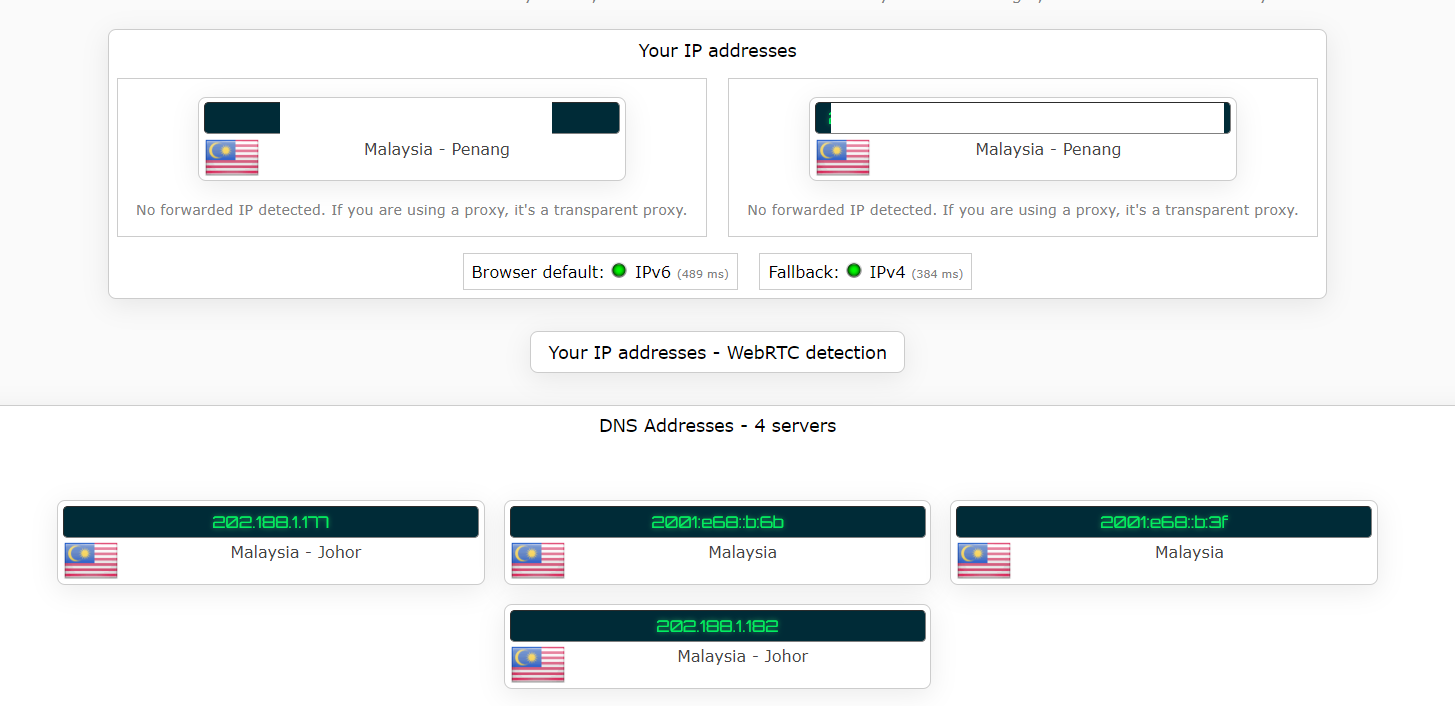
But stuff like imgur, APK mirror
Unless using some VPN, the speed is shit

With free VPN like tunnel bear to download an apk that only takes 2 sec
While without it, takes 13mins @ 1mbps or so?

Using fiberhome SR1041Y model with another for ??mesh??

Changed DNS, the homescreen no show change, ipleak.net show my DNS still malaysian, I guess?

user posted image

Anyone can point me to the right direction?
MyProLife
post Apr 18 2022, 11:08 AM

I bully wumao & MPKL
*******
Senior Member
2,075 posts

Joined: Sep 2021
From: nowhere

QUOTE(mcchin @ Apr 18 2022, 10:01 AM)
Hi

Got my 300mbps upgrade earlier of the month

My problem seems that for local speed no problem

But stuff like imgur, APK mirror
Unless using some VPN, the speed is shit

With free VPN like tunnel bear to download an apk that only takes 2 sec
While without it, takes 13mins @ 1mbps or so?

Using fiberhome SR1041Y model with another for ??mesh??

Changed DNS, the homescreen no show change, ipleak.net show my DNS still malaysian, I guess?

user posted image

Anyone can point me to the right direction?
*
probably the firmware hardcoded. you can either set DNS in the LAN DHCP setting of the router OR set DNS in the device network settings. That's only way so far to circumvent the hardcode with DHCP or DoT/DoH way.

note: using cloudflare DNS will shown malaysian ip because cloudflare data center in johor

Anyhow the unifi routing is like that, especially on some websites with unfriendly CDNs (in TM eyes). some times twitter video also struggle to load. VPN can circumvent this issue

This post has been edited by MyProLife: Apr 18 2022, 11:27 AM
mcchin
post Apr 18 2022, 12:42 PM

SLAVA UKRAINI !
*******
Senior Member
3,902 posts

Joined: Jul 2005
From: Sin Lor, B'worth,Pg.
QUOTE(MyProLife @ Apr 18 2022, 11:08 AM)
probably the firmware hardcoded. you can either set DNS in the LAN DHCP setting of the router OR set DNS in the device network settings. That's only way so far to circumvent the hardcode with DHCP or DoT/DoH way.

note: using cloudflare DNS will shown malaysian ip because cloudflare data center in johor

Anyhow the unifi routing is like that, especially on some websites with unfriendly CDNs (in TM eyes). some times twitter video also struggle to load. VPN can circumvent this issue
*
I saw reply that fiberhome DNS change in home page is bugged?

Oh cloudflare is Malaysia johor

Sad that speed 300mbps also need to buffer wait for load a gif....

453 Pages « < 20 21 22 23 24 > » Top
Topic ClosedOptions
 

Change to:
| Lo-Fi Version
0.0410sec    0.39    6 queries    GZIP Disabled
Time is now: 22nd December 2025 - 04:58 PM