Welcome Guest ( Log In | Register )

Bump Topic Topic Closed RSS Feed
8 Pages  1 2 3 > » Bottom

Outline · [ Standard ] · Linear+

Unifi Official TM UniFi High Speed Broadband Thread V40, READ 1ST PAGE FOR RELEVANT WIFI INFO

views
     
SUSMyProLife
post Mar 31 2022, 12:34 AM

I bully wumao & MPKL
*******
Senior Member
2,075 posts

Joined: Sep 2021
From: nowhere

QUOTE(frozenstarxd93 @ Mar 30 2022, 11:29 PM)
Did anyone use tp link AX20 as main router then use Unifi stock router dlink 842 as AP? Any issue on internet stability? Previously, I tried on dlink 842 as main router and connect another old router as AP,  speed dropped almost zero.
*
842 belongs to trash bin along with "trash bin" itself 850L
SUSMyProLife
post Apr 18 2022, 11:08 AM

I bully wumao & MPKL
*******
Senior Member
2,075 posts

Joined: Sep 2021
From: nowhere

QUOTE(mcchin @ Apr 18 2022, 10:01 AM)
Hi

Got my 300mbps upgrade earlier of the month

My problem seems that for local speed no problem

But stuff like imgur, APK mirror
Unless using some VPN, the speed is shit

With free VPN like tunnel bear to download an apk that only takes 2 sec
While without it, takes 13mins @ 1mbps or so?

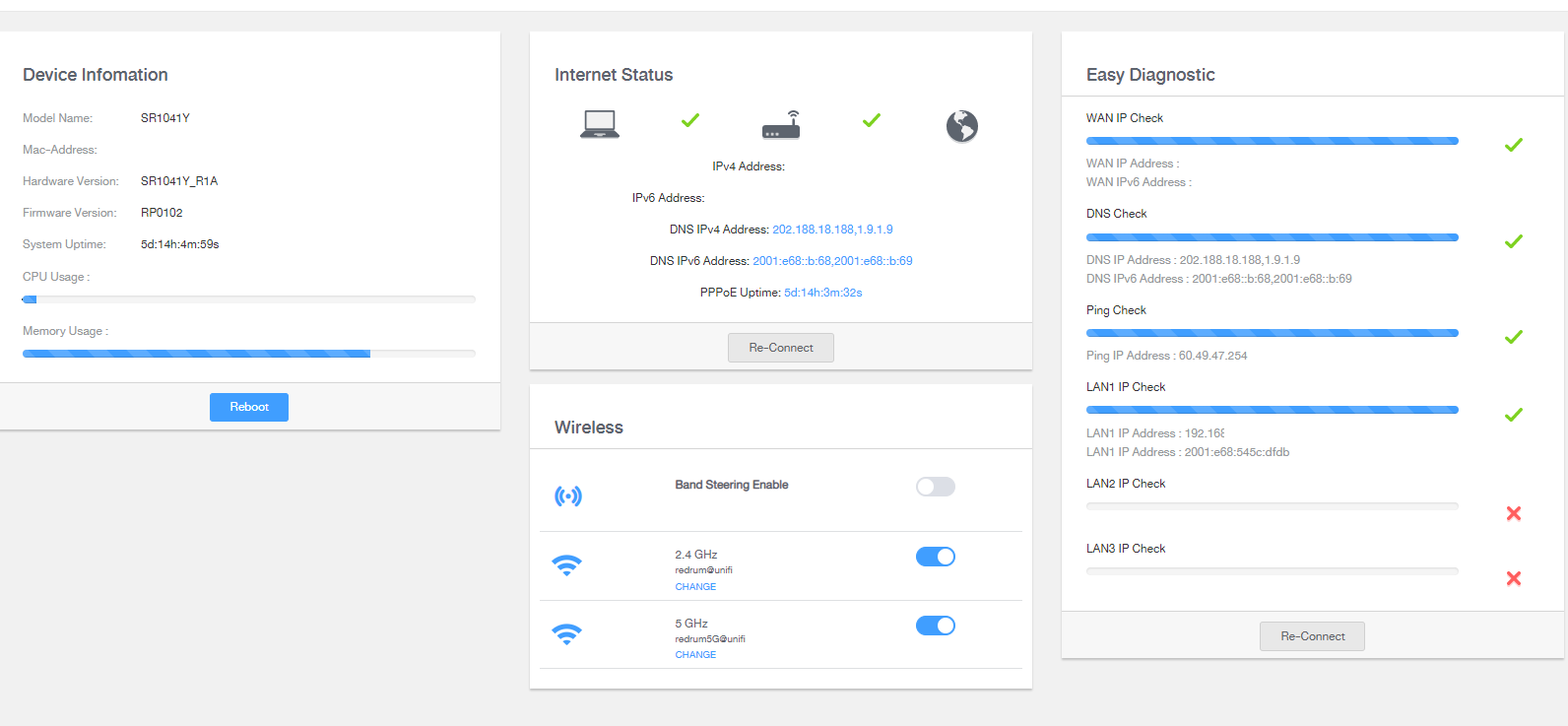
Using fiberhome SR1041Y model with another for ??mesh??

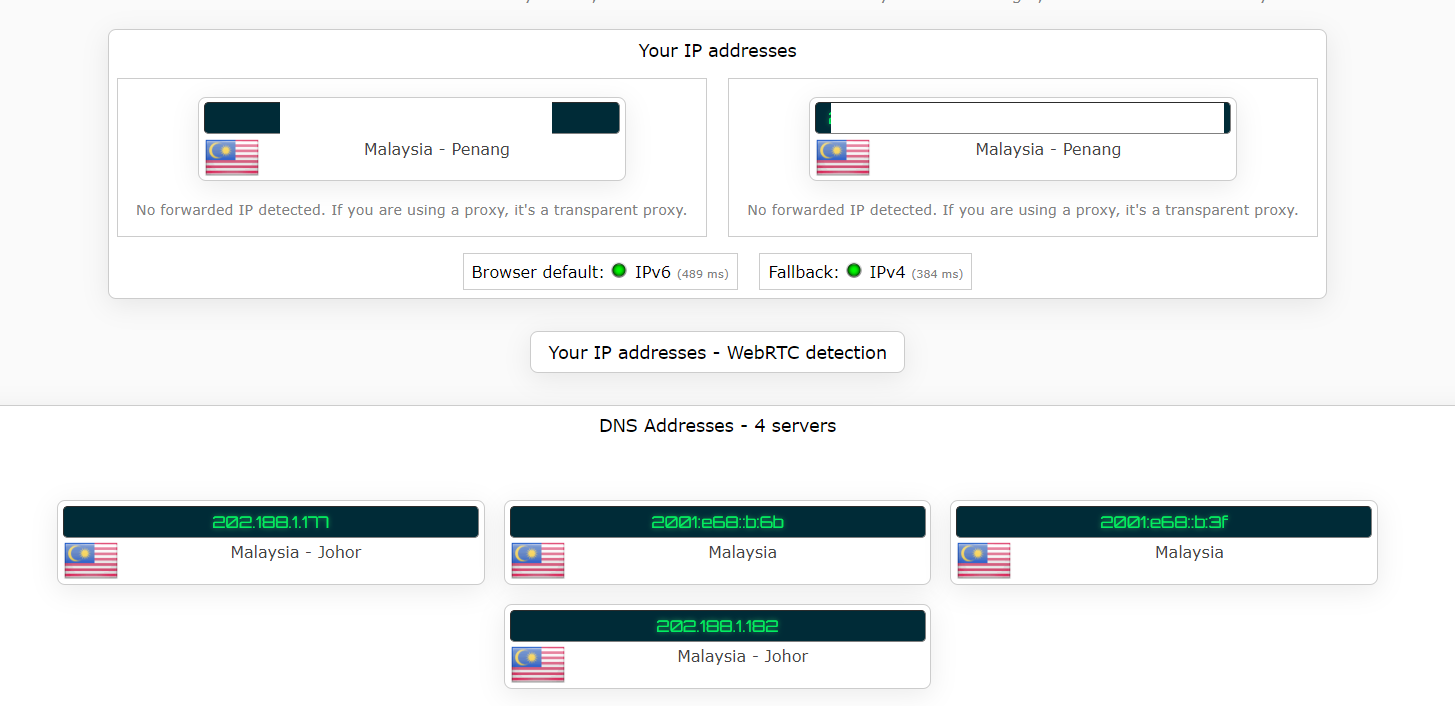
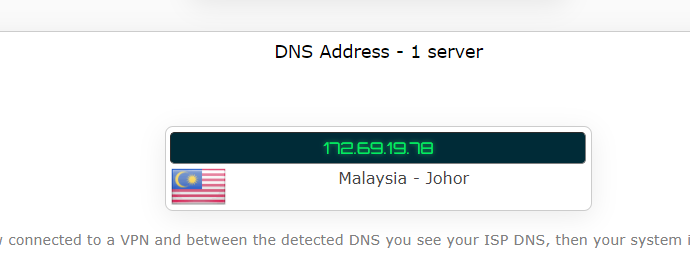
Changed DNS, the homescreen no show change, ipleak.net show my DNS still malaysian, I guess?

user posted image

Anyone can point me to the right direction?
*
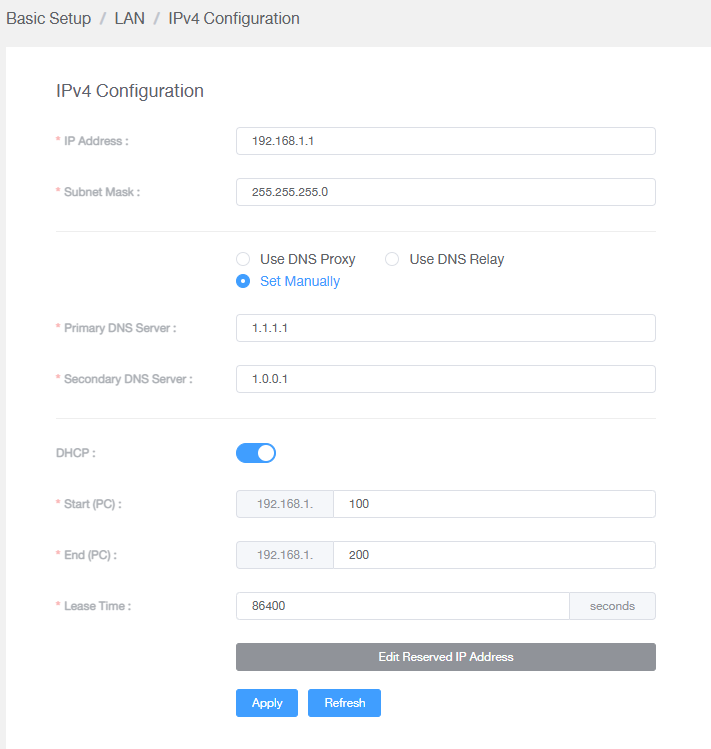
probably the firmware hardcoded. you can either set DNS in the LAN DHCP setting of the router OR set DNS in the device network settings. That's only way so far to circumvent the hardcode with DHCP or DoT/DoH way.

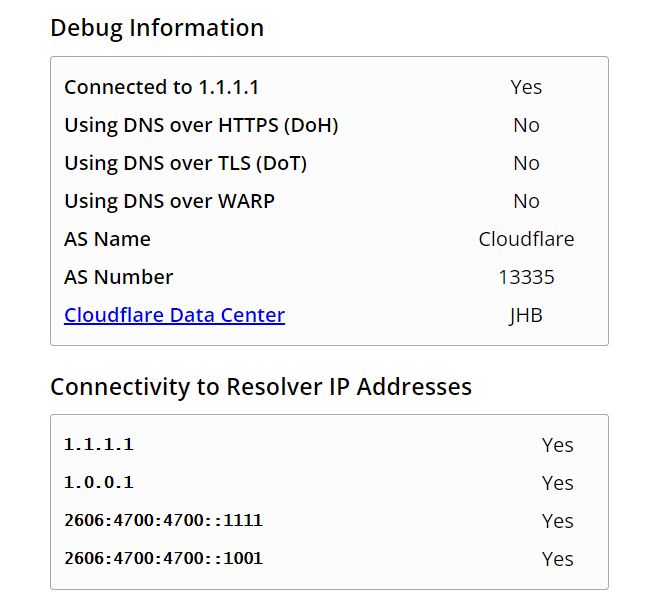
note: using cloudflare DNS will shown malaysian ip because cloudflare data center in johor

Anyhow the unifi routing is like that, especially on some websites with unfriendly CDNs (in TM eyes). some times twitter video also struggle to load. VPN can circumvent this issue

This post has been edited by MyProLife: Apr 18 2022, 11:27 AM
SUSMyProLife
post Apr 18 2022, 01:04 PM

I bully wumao & MPKL
*******
Senior Member
2,075 posts

Joined: Sep 2021
From: nowhere

QUOTE(mcchin @ Apr 18 2022, 12:42 PM)
I saw reply that fiberhome  DNS change in home page is bugged?

Oh cloudflare is Malaysia johor

Sad that speed 300mbps also need to buffer wait for load a gif....
*
If you are using cloudflare settings, use this to check

https://1.1.1.1/help
SUSMyProLife
post Apr 18 2022, 01:37 PM

I bully wumao & MPKL
*******
Senior Member
2,075 posts

Joined: Sep 2021
From: nowhere

QUOTE(mcchin @ Apr 18 2022, 01:20 PM)
user posted image
user posted image
user posted image
are these normal?
*
so you are using DHCP way. after that make sure you clear the DNS cache in your computer

https://www.ubisoft.com/en-gb/help/connecti...h-dns/000061010


then retry the ipleak. if successful setup should see 172.69.x.x in DNS section instead of 202.x.x.x

This post has been edited by MyProLife: Apr 18 2022, 01:45 PM
SUSMyProLife
post Apr 18 2022, 01:53 PM

I bully wumao & MPKL
*******
Senior Member
2,075 posts

Joined: Sep 2021
From: nowhere

QUOTE(mcchin @ Apr 18 2022, 01:48 PM)
So basically
currently I am set up the best I can now?

user posted image

this applies to the pc only right

phones and laptop not configured like this will still revert back to TM right?
*
phones/laptops if able to get proper DHCP settings should also use the same DNS settings as on PC within the same network

otherwise (alternatively) the modern native os (android 9+ for example) should have the DoT or DoH setting. in settings > wifi network > more connection settings > private DNS (this is DoT setting for android 9+)
SUSMyProLife
post Apr 22 2022, 11:40 AM

I bully wumao & MPKL
*******
Senior Member
2,075 posts

Joined: Sep 2021
From: nowhere

QUOTE(pretty23 @ Apr 22 2022, 11:16 AM)
The AZ tech router good or not compare with previous one ?
*
Actually is random according to installer stock availability

Can be ZTE, d link, fiberhome or other

AZ tech is outright trash
SUSMyProLife
post Apr 22 2022, 05:09 PM

I bully wumao & MPKL
*******
Senior Member
2,075 posts

Joined: Sep 2021
From: nowhere

QUOTE(pretty23 @ Apr 22 2022, 02:59 PM)
I think on 2nd week I will decide either still want continue to use Unifi 100M or just jump ship to maxis 300M. Really cant imagine how suck AZ tech device.
*
it doesnt matter which isp, all isp will give very cheap OR very locked down router (RG/home gateway) because

1. to cut cost
2. for maximum control and easier for tech support to control remotely

the best is to buy third party router no matter which isp you are going. the rest of experience depends on what website you/your family visit often. Unifi recently has bad routing cause slow loading/high latency/high packet loss to some international sites/online game servers in which other ISP can give you better experience in such usage case
SUSMyProLife
post Apr 22 2022, 05:19 PM

I bully wumao & MPKL
*******
Senior Member
2,075 posts

Joined: Sep 2021
From: nowhere

QUOTE(pretty23 @ Apr 22 2022, 05:12 PM)
the wifi signal compare AZ with other brand which previously provide from TM more suck. If for new user how you gonna do? Spend more ?
*
no choice lo. because it's what you cannot control because is given randomly. you can switch to other ISP which give wifi 6 router or try luck ask unifi tech/installer to exchange to another one.

spend one time for better experience is worth because its yours to do whatever you want
SUSMyProLife
post Apr 29 2022, 09:17 PM

I bully wumao & MPKL
*******
Senior Member
2,075 posts

Joined: Sep 2021
From: nowhere

QUOTE(HumanExtinction @ Apr 29 2022, 08:14 PM)
Halo friends, want to ask for your all opinions. Now im using tp link ax archer ax90 as my main router, and the 2 mesh m9+ provided by TM. However, my room at the end of the house can only receive 200 - 300mbps [i have 800mbps].

So my question is, if i buy another single wifi 6 deco mesh and use it as my main mesh and the two m9+ as my side mesh, any hope to increase the speed to my room? My main router is hardwire to my first m9+, so im planning to = Main router hardwire to new wifi 6 deco main mesh and hardwire again to my second m9+, but the third mesh wouldn't able to hardwire since its too far away and not convenient to do so.
*
for the mesh that cannot be hardwire, use m9 plus or upgrade to x68

The second mesh that hardwire can get the wifi 6 together with main

So you will has 4 router (including deco) units should you go with original plan (buy just one wifi 6 deco)
2 wifi 6 for hardwire

2 m9 plus for which hard to reach by wire, the third band can help release the burden that will otherwise reduce the speed

However m9 plus will never reach the speed you want because is wifi5, you may need to upgrade to x68


Tldr: get 2 x68 kit, the hard to wire one use x68 replace the m9 plus, the main one that hardwire to main router also use x68.

M9 plus can stay as additional node, either do hardwire or wirelessly

For this plan, is better because can overcome wifi 5 limit, but you will have total 5 router + deco units

This post has been edited by MyProLife: Apr 29 2022, 09:34 PM
SUSMyProLife
post Apr 29 2022, 09:39 PM

I bully wumao & MPKL
*******
Senior Member
2,075 posts

Joined: Sep 2021
From: nowhere

QUOTE(HumanExtinction @ Apr 29 2022, 09:32 PM)
No prob, the second to third mesh is connecting wirelessly also.
I see. So it would be main router hardwire to main mesh, main mesh hardwire to second mesh, while second mesh is connecting wirelessly to third mesh. So the main mesh will be using x68 right? The second and third mesh would be the m9+. Not really hoping to get full 800mbps, but if can increase to 400 - 500 mbps then it would be worth it. I check the deco app and the signal strength only show two bars for my current setup, so would like to get full 3 bars.

Other than x68, another other wifi 6 mesh? Will x20 suffice?
*
From previous edit, this is better but more expensive solution:
get 2 x68 kit, the hard to wire one use x68 replace the m9 plus, the main one that hardwire to main router also use x68.

M9 plus can stay as additional node, either do hardwire or wirelessly

For this plan, is better because can overcome wifi 5 limit, but you will have total 5 router + deco units


If you want the cheaper solution, you will need additional measures

Get x20 as hardwire between main router and 1st m9 plus
Then 1st m9 plus need to be closer to 2nd m9 plus

But if you can try to move 1st m9 plus closer to 2nd m9 plus without x20 in between, is better because you don't need buy x20

The problem you get 200-300 m is because wifi 5 technology limited

Your house is apartment or multi story?

SUSMyProLife
post Apr 29 2022, 10:25 PM

I bully wumao & MPKL
*******
Senior Member
2,075 posts

Joined: Sep 2021
From: nowhere

QUOTE(HumanExtinction @ Apr 29 2022, 10:21 PM)
Thanks for the suggestion. It's an apartment, but the walls are quite thick.

So main router (hardwire) - X68 (hardwire) - M9+ (wireless) - X68. < like this right?  But won't the m9+ wireless speed bottleneck the x68 in my room?
*
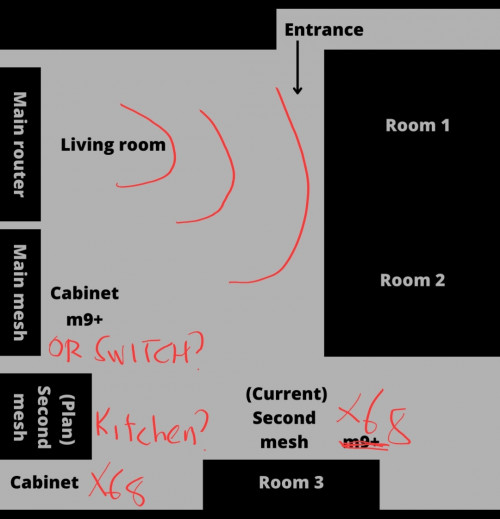
Don't mind draw something like your house layout so i can suggest you better?
SUSMyProLife
post Apr 29 2022, 11:18 PM

I bully wumao & MPKL
*******
Senior Member
2,075 posts

Joined: Sep 2021
From: nowhere

user posted image

The main router (archer ax90) keep on the wireless, for living room and room #1,#2

The cabinet besides the living room, can consider replaced with a gigabit switch since you will hardwire between ax90 and x68 anyway?

The cabinet in the kitchen (?) This going to be the first x68

Second x68 put besides The room #3
SUSMyProLife
post May 4 2022, 08:22 PM

I bully wumao & MPKL
*******
Senior Member
2,075 posts

Joined: Sep 2021
From: nowhere

QUOTE(NooBiE888 @ May 4 2022, 08:19 PM)
When you screenshot the speed test

Were you connected to the main mesh or the second mesh?

Via Lan or WiFi?

****

Edit

Why didn't you use the main mesh directly as the main router?

I believe it is able to do so
*
Not easily to tell unless check from deco app

He already has one strong router archer ax90

So he can only wire the main router to mesh, mesh put in ap mode

I glad he go for something the best from tp link, must be cost so much
SUSMyProLife
post May 4 2022, 09:18 PM

I bully wumao & MPKL
*******
Senior Member
2,075 posts

Joined: Sep 2021
From: nowhere

QUOTE(HumanExtinction @ May 4 2022, 09:08 PM)
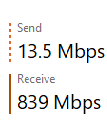
Second mesh. The distance between the first mesh and second mesh not very far and i use a 10m cat 6 cable to link between the main router and the main mesh. Since i ard bought the ax90 last year, might as well just use it. Another thing is my house has a lot of wifi devices and i got 3 other family members all very tech heavy use. So my other family members will use the ax90 while i will use the x90.

Edit: this is the speed im able to get through second mesh

user posted image
ya, whole setup cost me around 2.2k. I bought the ax90 last year at around 829 and the x90 i bought yesterday for 1349 at harvey norman cause got do promotion. If bought online then a bit cheaper but dont want to wait since raya sure package will delay. Spend a bit more also ok since internet very important for me and will be more than enough for years to come.
*
Very good for future proofing, all units in your system has one 2.5g port for future usage like 2.5g capable NAS server
SUSMyProLife
post May 4 2022, 10:43 PM

I bully wumao & MPKL
*******
Senior Member
2,075 posts

Joined: Sep 2021
From: nowhere

QUOTE(NooBiE888 @ May 4 2022, 09:50 PM)
Like ASUS, is expensive but at least they provide tons of features and also frequent updates.

This deco need to pay expensive, then need us subscribe to a subscription to keep milking you.

Xiaomi dont have fast roaming. So far I only know TP LINK support fast roaming. Not sure other more expensive brands.

So no difference between the AX3000 and AX3200

I hope to get the AX3200 cheaper tomorrow (~ RM170 / pc)
*
Yes only deco series supports fast roaming (k/v/r) full mesh technology

Other brands like aimesh only has k/v mesh technology

Xiaomi mesh AX3000 is cheaper by almost half if compared to similar spec Deco X50, but also the warranty is much shorter at up to 1 year (depending on reseller, some resellers only give shop warranty instead of manufacture warranty)

Also xiaomi has had bad rep of compatibility with VLAN fiber systems widely used in Malaysia. But global firmware should at least support Internet vlan settings actually


I will wait for further feedback about this model, because it has limited availability, not ever available on xiaomi global stores online, only some online and offline resellers carry this
SUSMyProLife
post May 9 2022, 10:40 AM

I bully wumao & MPKL
*******
Senior Member
2,075 posts

Joined: Sep 2021
From: nowhere

QUOTE(al_madd @ May 9 2022, 10:16 AM)
hai.i have this situation

1. have 1 account in kota bahru kelantan 30mbps, installled since dec 2020, plan to stay there until 2025

2. planning to install new unifi 30mbps at taman desa kuala lumpur, plan to stay KL for 6-8 months

my question, can i swap position between 2 account, to avoid penalty early termination at taman desa KL?
*
Subject to port availability in both areas, so it doesn't always work

You can apply for relocation for the kota bahru subscription move to KL, then for kota bahru apply new subscription once the relocation finished

But make sure the existing kota bahru contract is less than 6 months remaining
SUSMyProLife
post May 9 2022, 02:11 PM

I bully wumao & MPKL
*******
Senior Member
2,075 posts

Joined: Sep 2021
From: nowhere

QUOTE(AdrianS_99 @ May 9 2022, 11:06 AM)
Currently facing some website are blocked by MCMC, not sure why

example:

linktree, On maxis fiber no issue, on DG fiber & Unifi blocked...

using digi fiber & unifi show this :

user posted image

anyone can try to check is your unifi also facing same issue?
*
No problem here

Check for extension, browser privacy features or even security software/firewall whether is blocked by these due to false positive
SUSMyProLife
post May 9 2022, 03:11 PM

I bully wumao & MPKL
*******
Senior Member
2,075 posts

Joined: Sep 2021
From: nowhere

QUOTE(akhito @ May 9 2022, 03:00 PM)
ok similar settings also available for google chrome and edge desktop. chrome android also have. but firefox android no yet
*
android 9+ can use doT in settings > wifi network setting > additional network options > private dns

This post has been edited by MyProLife: May 9 2022, 03:12 PM
SUSMyProLife
post May 16 2022, 02:04 PM

I bully wumao & MPKL
*******
Senior Member
2,075 posts

Joined: Sep 2021
From: nowhere

QUOTE(silverwave @ May 16 2022, 10:54 AM)
Does Hypp TV box support wireless?

Planning to move it to another tv in the house but i do not have any LAN cable for that TV.
*
Get unifi plus box then you can use wireless
SUSMyProLife
post May 17 2022, 04:25 PM

I bully wumao & MPKL
*******
Senior Member
2,075 posts

Joined: Sep 2021
From: nowhere

fruitie oltromen ripot soonwai ps: i know tag will lose it effectiveness after edit but want let you know anyway

user posted image

SOURCE FAQ.PDF

This post has been edited by MyProLife: May 17 2022, 04:29 PM

8 Pages  1 2 3 > » Top
Topic ClosedOptions
 

Change to:
| Lo-Fi Version
0.3874sec    1.19    7 queries    GZIP Disabled
Time is now: 14th December 2025 - 03:15 PM