Welcome Guest ( Log In | Register )

Bump Topic Topic Closed RSS Feed
453 Pages « < 17 18 19 20 21 > » Bottom

Outline · [ Standard ] · Linear+

Unifi Official TM UniFi High Speed Broadband Thread V40, READ 1ST PAGE FOR RELEVANT WIFI INFO

views
     
bitebug
post Apr 11 2022, 02:11 AM

Getting Started
**
Junior Member
291 posts

Joined: Aug 2007

My unifi lost internet connection again today. 3 times already this happened. Red lights on both the modem and router. The same technican has only been replacing the fibre optic but now I'm thinking it's not the problem after all.

Anyone has any clue what the problem is since obviously the techican has no clue either. Fml

This post has been edited by bitebug: Apr 11 2022, 02:32 AM
eternity4av
post Apr 11 2022, 08:21 AM

♥ ♥ ♥ taeyeon
*******
Senior Member
2,270 posts

Joined: Nov 2004
anyone seniors here can advise if my hypptv remote is not responsive even changing the battery of the remote, can i request from TM for replacements?
YoungMan
post Apr 11 2022, 10:27 AM

Look at all my stars!!
*******
Senior Member
6,828 posts

Joined: Oct 2008
From: Kuala Lumpur


QUOTE(bitebug @ Apr 11 2022, 03:11 AM)
My unifi lost internet connection again today. 3 times already this happened. Red lights on both the modem and router. The same technican has only been replacing the fibre optic but now I'm thinking it's not the problem after all.

Anyone has any clue what the problem is since obviously the techican has no clue either. Fml
*
They replace the whole fibre optic cable from outside to your house or just replace the BTU?
sam240
post Apr 11 2022, 12:06 PM

Look at all my stars!!
*******
Senior Member
3,657 posts

Joined: Jan 2003


I'm new to Unifi and plan to use my own router.
I get the Unifi and password from 100 thru SMS and try key-in on own router, it never connector to internet while the Unifi stock router no issue for that. Need any special setting or to unlock for own router?
YoungMan
post Apr 11 2022, 12:24 PM

Look at all my stars!!
*******
Senior Member
6,828 posts

Joined: Oct 2008
From: Kuala Lumpur


QUOTE(sam240 @ Apr 11 2022, 01:06 PM)
I'm new to Unifi and plan to use my own router.
I get the Unifi and password from 100 thru SMS and try key-in on own router, it never connector to internet while the Unifi stock router no issue for that. Need any special setting or to unlock for own router?
*
You need to configure the internet profile to Unifi, or set vlan 500 for internet, vlan 600 for HyppTv. What is the model and brand of router you are using?
sHawTY
post Apr 11 2022, 12:39 PM

Frequent Reporter
********
All Stars
14,909 posts

Joined: Jul 2005

QUOTE(sam240 @ Apr 11 2022, 12:06 PM)
I'm new to Unifi and plan to use my own router.
I get the Unifi and password from 100 thru SMS and try key-in on own router, it never connector to internet while the Unifi stock router no issue for that. Need any special setting or to unlock for own router?
State the brand and model of your router
sam240
post Apr 11 2022, 03:07 PM

Look at all my stars!!
*******
Senior Member
3,657 posts

Joined: Jan 2003


QUOTE(YoungMan @ Apr 11 2022, 12:24 PM)
You need to configure the internet profile to Unifi, or set vlan 500 for internet, vlan 600 for HyppTv. What is the model and brand of router you are using?
*
Oh, wondering how to set this info. Any website / guide that can follow?
Below are my router:
1) Asus RT-AX56U AX1800 (main)
2) TP-Link AC1200 (as backup, just in case)
1mr3tard3d
post Apr 11 2022, 04:53 PM

Regular
******
Senior Member
1,144 posts

Joined: Oct 2018


QUOTE(sam240 @ Apr 11 2022, 03:07 PM)
Oh, wondering how to set this info. Any website / guide that can follow?
Below are my router:
1) Asus RT-AX56U AX1800 (main)
2) TP-Link AC1200 (as backup, just in case)
*
easy way, check if your have selected Unifi-Home as your ISP provider setting
ISP provider

otherwise, u may manually configure the VLAN settings
VLAN
the internet VID should be 500 instead of 621

This post has been edited by 1mr3tard3d: Apr 11 2022, 04:55 PM
frontierzone
post Apr 11 2022, 05:29 PM

Enthusiast
*****
Senior Member
735 posts

Joined: May 2010
QUOTE(andrekua2 @ Apr 6 2022, 01:27 AM)
Reddit is okay on both... telegram, well, you know i know what that's all about. I haven't test taobao on unifi yet. On maxis, lately it wouldn't load but working fine on my hotlink line.

Twitch, Iqiyi working fine... this weekend will test hotstar. Will test more apps soon. So far still havent found big difference between both.
*
What's wrong with telegram? Pornography?
sHawTY
post Apr 11 2022, 06:20 PM

Frequent Reporter
********
All Stars
14,909 posts

Joined: Jul 2005

QUOTE(sam240 @ Apr 11 2022, 03:07 PM)
1) Asus RT-AX56U AX1800 (main)
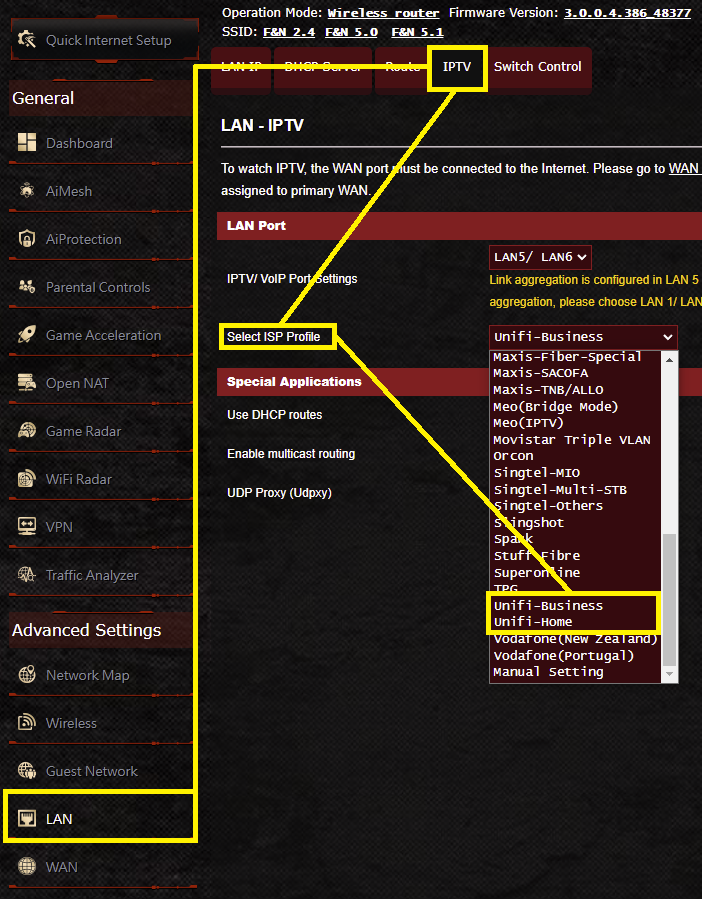
Go into the ASUS router setings > LAN > IPTV > Select ISP Profile > UniFi Home or UniFi Business (if you don't use the HyppTV at all) > Click Apply then the router will reboot

Or just refer to the screenshot below

user posted image

This post has been edited by sHawTY: Apr 11 2022, 06:22 PM
sam240
post Apr 11 2022, 08:13 PM

Look at all my stars!!
*******
Senior Member
3,657 posts

Joined: Jan 2003


QUOTE(1mr3tard3d @ Apr 11 2022, 04:53 PM)
easy way, check if your have selected Unifi-Home as your ISP provider setting
ISP provider

otherwise, u may manually configure the VLAN settings
VLAN
the internet VID should be 500 instead of 621
*

thanks for the link and tips. That's really help.

QUOTE(sHawTY @ Apr 11 2022, 06:20 PM)
Go into the ASUS router setings > LAN > IPTV > Select ISP Profile > UniFi Home or UniFi Business (if you don't use the HyppTV at all) > Click Apply then the router will reboot

Or just refer to the screenshot below

user posted image
*
Thanks for the screenshot.

I did a quick check on my very old N-wireless router, I do not see "VLAN" option inside.
Only ask me to key-in "service name".
I'm not sure this kind of old router can connect UNIFI or not

sHawTY
post Apr 11 2022, 08:39 PM

Frequent Reporter
********
All Stars
14,909 posts

Joined: Jul 2005

QUOTE(sam240 @ Apr 11 2022, 08:13 PM)
I did a quick check on my very old N-wireless router
Why bother with the wireless N router?
YoungMan
post Apr 11 2022, 08:51 PM

Look at all my stars!!
*******
Senior Member
6,828 posts

Joined: Oct 2008
From: Kuala Lumpur


QUOTE(sam240 @ Apr 11 2022, 09:13 PM)
thanks for the link and tips. That's really help.

Thanks for the screenshot.

I did a quick check on my very old N-wireless router, I do not see "VLAN" option inside.
Only ask me to key-in "service name".
I'm not sure this kind of old router can connect UNIFI or not
*
Use the Asus router lah. Why bother with whatever old router. Both router that you mentioned above is compatible with Unifi.
JasonTheGreat
post Apr 11 2022, 08:54 PM

Enthusiast
*****
Junior Member
832 posts

Joined: Jul 2016
QUOTE(eternity4av @ Apr 11 2022, 08:21 AM)
anyone seniors here can advise if my hypptv remote is not responsive even changing the battery of the remote, can i request from TM for replacements?
*
Open the controller. Use an eraser to rub and clean the contacts and it will work again
sam240
post Apr 12 2022, 12:43 AM

Look at all my stars!!
*******
Senior Member
3,657 posts

Joined: Jan 2003


QUOTE(sHawTY @ Apr 11 2022, 08:39 PM)
Why bother with the wireless N router?
*
QUOTE(YoungMan @ Apr 11 2022, 08:51 PM)
Use the Asus router lah. Why bother with whatever old router. Both router that you mentioned above is compatible with Unifi.
*
haha... my main connection actually majoriry is LAN that running Gigabit.
my old N-router had gigabit port, just as a backup router only.
Well, yeah it's old and slow speed for wireless, just in case and last option as standby only sweat.gif

Anyway, thanks for all sifu input here, my both router can connect to Unifi rclxms.gif
Singh93
post Apr 12 2022, 02:51 AM

Getting Started
**
Junior Member
224 posts

Joined: Sep 2019


QUOTE(eternity4av @ Apr 11 2022, 09:21 AM)
anyone seniors here can advise if my hypptv remote is not responsive even changing the battery of the remote, can i request from TM for replacements?
*
Just go to any tm point and purchase replacement remote.
Rhetoric
post Apr 12 2022, 08:03 PM

On my way
****
Junior Member
554 posts

Joined: Mar 2018
here i am once again to check if anybody else has problem with Twitter video buffering. is it only me, unifi routing problem or worldwide. only video. twtter feed loading normally.
andrekua2
post Apr 12 2022, 10:18 PM

10k Club
********
All Stars
13,484 posts

Joined: Jan 2012


QUOTE(Rhetoric @ Apr 12 2022, 08:03 PM)
here i am once again to check if anybody else has problem with Twitter video buffering. is it only me, unifi routing problem or worldwide. only video. twtter feed loading normally.
*
Certain streamer or all ? Live?

Not surprised if only particular streamer since Twitch has so many servers. Still my first month with Unifi. Just now watching YouTube LPL playoff, it buffer for 15minutes which forced me to use my data. After that it returned to normal.

I havent encounter any problem with twitch yet, but when I was using Maxis fibre, I would occasionally get buffering when watching LCK after 8pm. I also tried and managed to get it fixed by switching from 1080p50 to 720p which wasn't ideal for my 65" TV.
SUSpetpenyubobo
post Apr 12 2022, 10:34 PM

Regular
******
Senior Member
1,030 posts

Joined: Jan 2022

QUOTE(Rhetoric @ Apr 12 2022, 08:03 PM)
here i am once again to check if anybody else has problem with Twitter video buffering. is it only me, unifi routing problem or worldwide. only video. twtter feed loading normally.
*
No problem here even with YTL Broadband, Time and Maxis Fibre. Loads without any pauses from start to finish.
steelv
post Apr 13 2022, 01:19 AM

Getting Started
**
Junior Member
73 posts

Joined: May 2015
QUOTE(Rhetoric @ Apr 12 2022, 08:03 PM)
here i am once again to check if anybody else has problem with Twitter video buffering. is it only me, unifi routing problem or worldwide. only video. twtter feed loading normally.
*
no problem for me ip start with 210, i mainly watch apex, dota2 and csgo.

453 Pages « < 17 18 19 20 21 > » Top
Topic ClosedOptions
 

Change to:
| Lo-Fi Version
0.0268sec    0.61    6 queries    GZIP Disabled
Time is now: 19th December 2025 - 08:11 PM