Welcome Guest ( Log In | Register )

Bump Topic Topic Closed RSS Feed

Outline · [ Standard ] · Linear+

Unifi Official TM UniFi High Speed Broadband Thread V40, READ 1ST PAGE FOR RELEVANT WIFI INFO

views
     
sam240
post Apr 11 2022, 12:06 PM

Look at all my stars!!
*******
Senior Member
3,657 posts

Joined: Jan 2003


I'm new to Unifi and plan to use my own router.
I get the Unifi and password from 100 thru SMS and try key-in on own router, it never connector to internet while the Unifi stock router no issue for that. Need any special setting or to unlock for own router?
sam240
post Apr 11 2022, 03:07 PM

Look at all my stars!!
*******
Senior Member
3,657 posts

Joined: Jan 2003


QUOTE(YoungMan @ Apr 11 2022, 12:24 PM)
You need to configure the internet profile to Unifi, or set vlan 500 for internet, vlan 600 for HyppTv. What is the model and brand of router you are using?
*
Oh, wondering how to set this info. Any website / guide that can follow?
Below are my router:
1) Asus RT-AX56U AX1800 (main)
2) TP-Link AC1200 (as backup, just in case)
sam240
post Apr 11 2022, 08:13 PM

Look at all my stars!!
*******
Senior Member
3,657 posts

Joined: Jan 2003


QUOTE(1mr3tard3d @ Apr 11 2022, 04:53 PM)
easy way, check if your have selected Unifi-Home as your ISP provider setting
ISP provider

otherwise, u may manually configure the VLAN settings
VLAN
the internet VID should be 500 instead of 621
*

thanks for the link and tips. That's really help.

QUOTE(sHawTY @ Apr 11 2022, 06:20 PM)
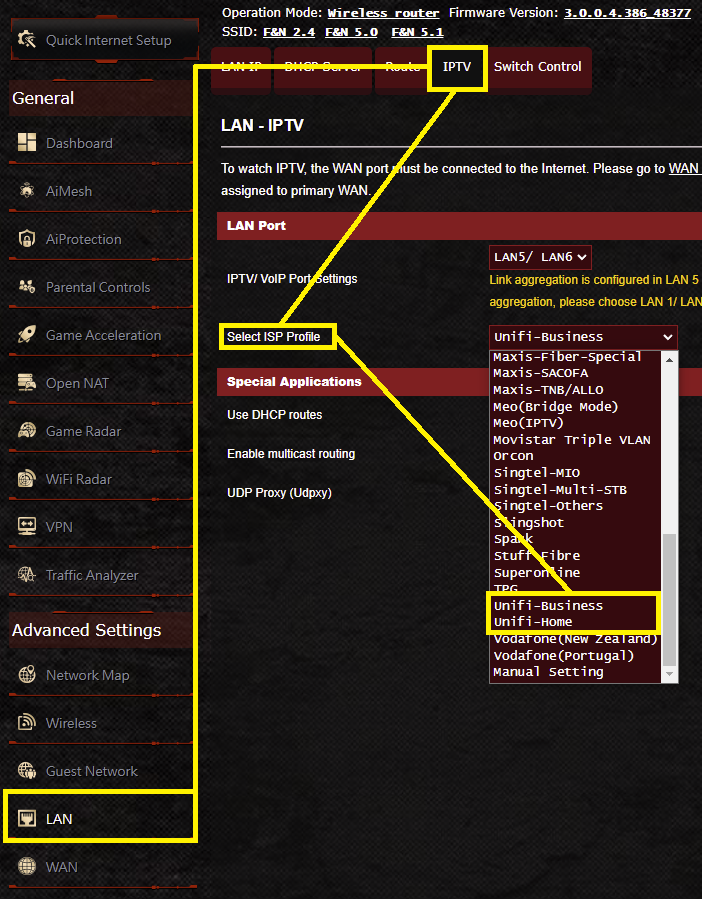
Go into the ASUS router setings > LAN > IPTV > Select ISP Profile > UniFi Home or UniFi Business (if you don't use the HyppTV at all) > Click Apply then the router will reboot

Or just refer to the screenshot below
user posted image
*
Thanks for the screenshot.

I did a quick check on my very old N-wireless router, I do not see "VLAN" option inside.
Only ask me to key-in "service name".
I'm not sure this kind of old router can connect UNIFI or not

sam240
post Apr 12 2022, 12:43 AM

Look at all my stars!!
*******
Senior Member
3,657 posts

Joined: Jan 2003


QUOTE(sHawTY @ Apr 11 2022, 08:39 PM)
Why bother with the wireless N router?
*
QUOTE(YoungMan @ Apr 11 2022, 08:51 PM)
Use the Asus router lah. Why bother with whatever old router. Both router that you mentioned above is compatible with Unifi.
*
haha... my main connection actually majoriry is LAN that running Gigabit.
my old N-router had gigabit port, just as a backup router only.
Well, yeah it's old and slow speed for wireless, just in case and last option as standby only sweat.gif

Anyway, thanks for all sifu input here, my both router can connect to Unifi rclxms.gif

Topic ClosedOptions
 

Change to:
| Lo-Fi Version
0.2696sec    0.71    7 queries    GZIP Disabled
Time is now: 3rd December 2025 - 12:14 PM