Outline ·
[ Standard ] ·
Linear+
Windows 11, To be announce on 24 June 2021
|
PJng
|
 Dec 9 2021, 09:11 PM Dec 9 2021, 09:11 PM
|

|
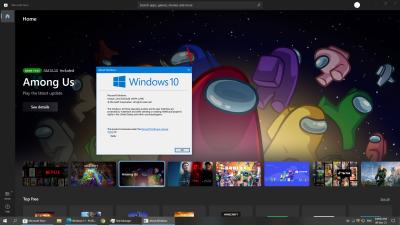
just update to windows 21H1 to 21H2, new windows 11 store is on windows 10 now random check 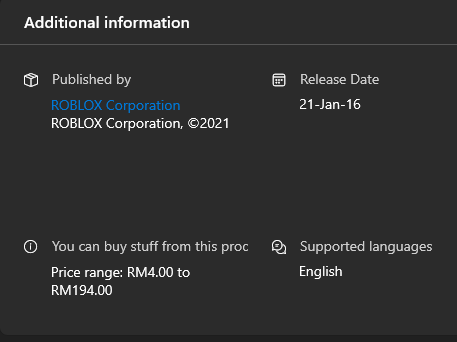 You can buy stuff from this pro... and download app no showing speed, but not accurate at all on old windows store This post has been edited by PJng: Dec 9 2021, 09:20 PM |
|
|
|
|
|
Andrewtst
|
Dec 10 2021, 03:04 AM
|
|
|
QUOTE(PJng @ Dec 9 2021, 09:11 PM)
just update to windows 21H1 to 21H2, new windows 11 store is on windows 10 now random check You can buy stuff from this pro... and download app no showing speed, but not accurate at all on old windows store The new design Microsoft Store in Windows 10 had nothing to do with new 21H2, it is there in older build Windows 10 also. I think you should post at Windows 10 section as here is Windows 11 section. https://forum.lowyat.net/Windows10 |
|
|
|
|
|
xxboxx
|
Dec 12 2021, 08:25 AM
|
|
|
QUOTE(mashimarow @ Dec 9 2021, 09:33 AM) https://www.gsmarena.com/some_nvme_ssds_get...-news-52180.phpit's affecting the random write and only on the drive with OS, I think is the OS bug itself thinking of upgrading manually this weekend(the auto update never come in)  random write isn't much big issue right? I only use Nvme for OS, nothing else is stored there Looks like MS found out what's the problem is, the fix only coming on next year. But honestly when using, I didn't notice any slow down compare to before when use Win 10 QUOTE Microsoft has figured out what is causing this issue, as revealed in a blog post, noting it will be resolved in Windows Preview build KB5007262. Instead of the issue being related to Windows drivers, it’s due to the enabling of the USN journal on the C:/ drive, which keeps track of changes made to the drive and is always enabled. According to Microsoft, the fix “Addresses an issue that affects the performance of all disks (NVMe, SSD, hardisk) on Windows 11 by performing unnecessary actions each time a write operation occurs.” This would explain why some users were seeing it on their primary drive, but not on secondary volumes. It’s not clear what is causing these “unnecessary actions,” but thankfully it’ll be patched soon. Microsoft notes there will only be security updates this moth as opposed to bug fixes like this, so we expect this to roll out sometime in January of 2022. https://www.extremetech.com/computing/32965...me-ssd-behavior |
|
|
|
|
|
SUSMyProLife
|
Dec 12 2021, 12:44 PM
|
|
|
QUOTE(xxboxx @ Dec 12 2021, 08:25 AM) Looks like MS found out what's the problem is, the fix only coming on next year. But honestly when using, I didn't notice any slow down compare to before when use Win 10 The November preview will be included in December patch Tuesday update as well. No need to wait next year The so call bug fix preview for December is not coming but since updates are cumulative there will still be November bug fix together with December security fix for Tuesday |
|
|
|
|
|
mashimarow
|
Dec 14 2021, 09:28 AM
|
|
|
QUOTE(xxboxx @ Dec 12 2021, 08:25 AM) Looks like MS found out what's the problem is, the fix only coming on next year. But honestly when using, I didn't notice any slow down compare to before when use Win 10 Yeah, I see the news, I'm still struggling to update it via assistant updater or keep on waiting for the update signal everything is running so fine in win10 now, am I looking for trouble?  |
|
|
|
|
|
X1X1
|
Dec 14 2021, 01:44 PM
|
|
|
guy how to completely remove MS edge (plan to do fresh install EDGE) ?
my edge seem like having major issue with very high Proc usage (10-20%).
|
|
|
|
|
|
SUSlife5tyle
|
Dec 14 2021, 02:51 PM
|
Getting Started

|
QUOTE(X1X1 @ Dec 14 2021, 01:44 PM) guy how to completely remove MS edge (plan to do fresh install EDGE) ? my edge seem like having major issue with very high Proc usage (10-20%). Mind screenshot and show us. Each process/services sometime running on different usage. 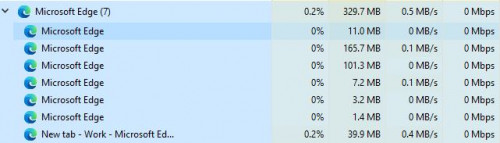 To uninstall Edge you can follow the steps in the guide here. This post has been edited by life5tyle: Dec 14 2021, 02:54 PM |
|
|
|
|
|
X1X1
|
Dec 14 2021, 03:10 PM
|
|
|
QUOTE(life5tyle @ Dec 14 2021, 02:51 PM) Mind screenshot and show us. Each process/services sometime running on different usage. To uninstall Edge you can follow the steps in the guide here. i try but it won't completely uninstall ..... after reinstall, even my old login, cache, plugin and everything still there. and it does show some weird behavior (like i cant use Home key to go top page or end key to go bottom + others hotkey also) 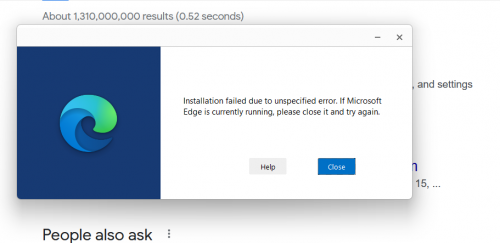 |
|
|
|
|
|
SUSMyProLife
|
Dec 14 2021, 04:24 PM
|
|
|
QUOTE(X1X1 @ Dec 14 2021, 03:10 PM) i try but it won't completely uninstall ..... after reinstall, even my old login, cache, plugin and everything still there. and it does show some weird behavior (like i cant use Home key to go top page or end key to go bottom + others hotkey also) try this edge://settings/reset to reset default settings |
|
|
|
|
|
X1X1
|
Dec 14 2021, 06:51 PM
|
|
|
QUOTE(MyProLife @ Dec 14 2021, 04:24 PM) try this edge://settings/reset to reset default settings another weird issue with edge and win 11. i have two desktop mode 1. for work (which include android studio, 3 whatsapp (1 desktop whatsapp/Pale Moon/brave) + Edge/firefox normal browsing. 2. for personal. normally e-reading apps, library, music player, video player and edge/ff for online shopping and reading). but recently having weird behavior when swapping desktop, i have to go task manager to kill MS edge, else i click edge on desktop 2, it swap back to desktop 1 ..... |
|
|
|
|
|
X1X1
|
Dec 14 2021, 06:57 PM
|
|
|
QUOTE(MyProLife @ Dec 14 2021, 04:24 PM) try this edge://settings/reset to reset default settings hhahahha thanks. now my MS edge hot key works. thanks This post has been edited by X1X1: Dec 14 2021, 07:05 PM |
|
|
|
|
|
xxboxx
|
Dec 14 2021, 10:48 PM
|
|
|
QUOTE(mashimarow @ Dec 14 2021, 09:28 AM) Yeah, I see the news, I'm still struggling to update it via assistant updater or keep on waiting for the update signal everything is running so fine in win10 now, am I looking for trouble? My PC also can't update using the assistant. Something somewhere corrupt until no matter which method to update, all still fail. I end up delete the drive partition and do fresh install on new partition. I won't say one is better than another, both have it's plus and minus. Win 11 wear makeup and have fancy animation, but at the cost of more processing power. |
|
|
|
|
|
SUSlife5tyle
|
Dec 15 2021, 07:47 AM
|
Getting Started
|
QUOTE(xxboxx @ Dec 14 2021, 10:48 PM) My PC also can't update using the assistant. Something somewhere corrupt until no matter which method to update, all still fail. I end up delete the drive partition and do fresh install on new partition. I won't say one is better than another, both have it's plus and minus. Win 11 wear makeup and have fancy animation, but at the cost of more processing power. Need to use commands to execute the update. Unlike Linux, Windows user depending too much on GUI. In Windows, you can also use commands like Linux to perform Windows Update or install certain Windows components. |
|
|
|
|
|
mashimarow
|
Dec 15 2021, 10:54 AM
|
|
|
QUOTE(xxboxx @ Dec 14 2021, 10:48 PM) My PC also can't update using the assistant. Something somewhere corrupt until no matter which method to update, all still fail. I end up delete the drive partition and do fresh install on new partition. I won't say one is better than another, both have it's plus and minus. Win 11 wear makeup and have fancy animation, but at the cost of more processing power. That's why until now I still not try manually update yet, my PC more than capable to handle it, PC is just a month old, everything is fresh, patched to latest Win10-21H2, just the W11 update signal never come... |
|
|
|
|
|
SUSMyProLife
|
Dec 15 2021, 11:49 AM
|
|
|
The third ever security only patch for windows 11 original release (for all channels except dev) https://support.microsoft.com/en-gb/topic/d...42-d95c794bebf0Please note that this patch is cumulative. So it also includes preview patch from last month. This month no preview patch later for Beta/RP/release channel due to holidays Too bad even after November/December patch the ssd performance issues is NOT completely resolved as reported by some |
|
|
|
|
|
imperia70
|
Dec 16 2021, 10:01 AM
|
New Member
|
QUOTE(mashimarow @ Dec 15 2021, 10:54 AM) That's why until now I still not try manually update yet, my PC more than capable to handle it, PC is just a month old, everything is fresh, patched to latest Win10-21H2, just the W11 update signal never come... Just use the Windows 11 Installation Assistant, don't wait for the w11 upgrade prompt if you in a hurry to try-out W11.  |
|
|
|
|
|
xxboxx
|
Dec 16 2021, 10:10 AM
|
|
|
QUOTE(life5tyle @ Dec 15 2021, 07:47 AM) Need to use commands to execute the update. Unlike Linux, Windows user depending too much on GUI. In Windows, you can also use commands like Linux to perform Windows Update or install certain Windows components. I use the assistant, it goes until about 80% then it auto undo the update. Even choosing the option to full wipe everything and clean install, it still undo back. |
|
|
|
|
|
SUSlife5tyle
|
Dec 16 2021, 06:37 PM
|
Getting Started
|
QUOTE(xxboxx @ Dec 16 2021, 10:10 AM) I use the assistant, it goes until about 80% then it auto undo the update. Even choosing the option to full wipe everything and clean install, it still undo back. Avoid using GUI assistant. I believe you need to use Windows Terminal or Command Prompt to execute via commands. |
|
|
|
|
|
AV_2018
|
Dec 16 2021, 10:04 PM
|
|
|
QUOTE(xxboxx @ Dec 12 2021, 08:25 AM) Looks like MS found out what's the problem is, the fix only coming on next year. But honestly when using, I didn't notice any slow down compare to before when use Win 10 That patch for NTFS USN Journal seems to be for another issue. I've tested CrystalDiskMark before and after this month's patch and there is no difference. An article here also says similar https://www.neowin.net/news/microsoft039s-n...to-our-testing/. I didn't notice any slowdown also so no big issue. My NVMe SSD doesn't have random writes that are that fast so any difference with Windows 10 isn't that much also. |
|
|
|
|
|
FusionXY
|
Dec 16 2021, 10:10 PM
|
|
|
Done update my Intel NUC from Windows 10 Pro to Windows 11 Pro.
|
|
|
|
|



 Quote
Quote




 0.0358sec
 0.52
0.52
 6 queries
 GZIP Disabled