Welcome Guest ( Log In | Register )

95 Pages « < 38 39 40 41 42 > » Bottom

Outline · [ Standard ] · Linear+

 Windows 11, To be announce on 24 June 2021

views
     
X1X1
post Nov 27 2021, 12:07 PM

Casual
***
Junior Member
330 posts

Joined: Jan 2019
QUOTE(Andrewtst @ Nov 27 2021, 11:31 AM)
Probably it is better you upgrade your RAM. Windows 11 is much hunger for RAM.
Minimum 4GB set by Microsoft is too minimum. To me minimum is 8 GB and it is better with 16 GB and above.
*
Current is 16gb n 64 otw. Hahhaha
supsupsui
post Nov 27 2021, 03:23 PM

Getting Started
**
Junior Member
76 posts

Joined: Jun 2019


installed windows 11 today. so far so good
Andrewtst
post Nov 27 2021, 04:24 PM

Forgiveness is Happiness
*********
All Stars
29,771 posts

Joined: Jan 2009
From: Johor, Malaysia.


QUOTE(X1X1 @ Nov 27 2021, 12:07 PM)
Current is 16gb n 64 otw. Hahhaha
*
Your current is 16 GB and you can use up to 97%. Something is not right.

You better further check your system.

This post has been edited by Andrewtst: Nov 27 2021, 04:24 PM
ijkho17 P
post Nov 30 2021, 06:05 AM

New Member
*
Probation
1 posts

Joined: Nov 2021


Upgraded to Windows 11, take some time to get used to the new menu structure
SUSMyProLife
post Nov 30 2021, 08:29 AM

I bully wumao & MPKL
*******
Senior Member
2,075 posts

Joined: Sep 2021
From: nowhere

QUOTE(X1X1 @ Nov 26 2021, 05:14 PM)
my win 11 with firefox memory issue.
user posted image
*
Are you on Intel igpu

Maybe driver bugs cause DWM desktop compositor to CPU spike and memory leak

This may cause extra battery drain (faster to drain) and make dwm itself consume unreasonably high memory

Possible way to fix this with driver updates from intel website
BETA driver from intel website
edit : wrong quote
edit 2: beta driver solved dwm issues, if you mind about installing beta driver, final version is coming soon

This post has been edited by MyProLife: Nov 30 2021, 08:43 AM
X1X1
post Nov 30 2021, 11:16 AM

Casual
***
Junior Member
330 posts

Joined: Jan 2019
QUOTE(MyProLife @ Nov 30 2021, 08:29 AM)
Are you on Intel igpu

Maybe driver bugs cause DWM desktop compositor to CPU spike and memory leak

This may cause extra battery drain (faster to drain) and make dwm itself consume unreasonably high memory

Possible way to fix this with driver updates from intel website
BETA driver from intel website
edit : wrong quote
edit 2: beta driver solved dwm issues, if you mind about installing beta driver, final version is coming soon
*
i use dedi GC but low end.
SUSMyProLife
post Nov 30 2021, 12:41 PM

I bully wumao & MPKL
*******
Senior Member
2,075 posts

Joined: Sep 2021
From: nowhere

QUOTE(X1X1 @ Nov 30 2021, 11:16 AM)
i use dedi GC but low end.
*
notice that your dwm is normal. so can eliminate the intel issue.

maybe try to create another clean firefox profile to try

maybe update or even reinstall ff

or maybe try to troubleshoot it yourself, see whether is cause by some bad extensions

If Firefox is using an unexpected amount of RAM, report a bug to bugzilla website by following the steps below:

Open about:memory?verbose in a new tab.

Click Measure and save...

Attach the memory report to a new bug

Paste your about:support info (Click Copy text to clipboard) to your bug.

This post has been edited by MyProLife: Nov 30 2021, 12:44 PM
Andrewtst
post Dec 2 2021, 02:52 AM

Forgiveness is Happiness
*********
All Stars
29,771 posts

Joined: Jan 2009
From: Johor, Malaysia.


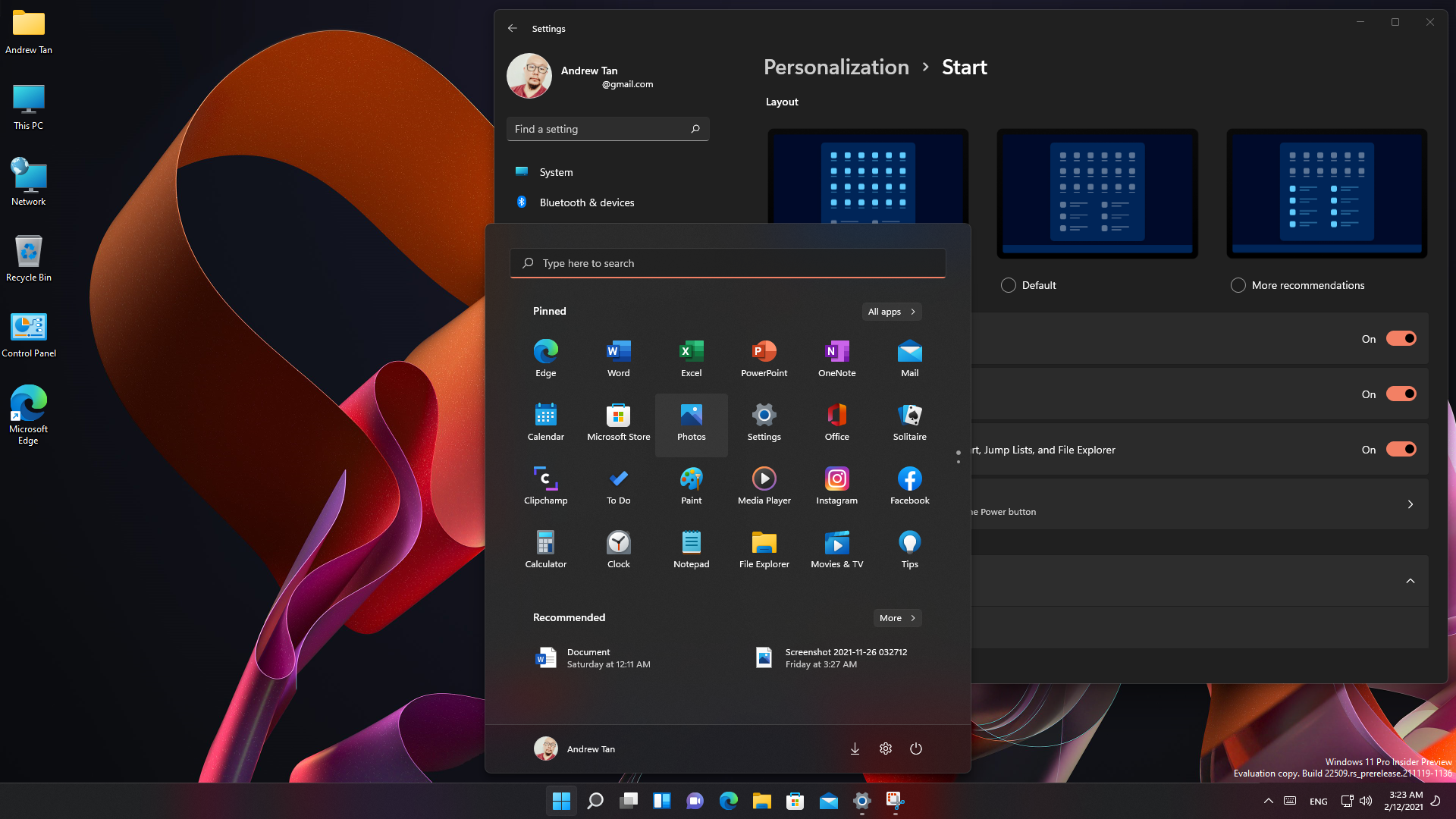
22509 for Dev Channel Main Changes
  • Start customize - More Pins, Default, More Recommendations
  • Browsing the web in Microsoft Edge with Narrator is now easier
https://blogs.windows.com/windows-insider/2...ew-build-22509/

user posted image

This post has been edited by Andrewtst: Dec 2 2021, 03:31 AM
PJng
post Dec 2 2021, 11:41 AM

10k Club
********
All Stars
12,039 posts

Joined: Oct 2017


Is it can run win 11 vm on old win 10 pc?
Just want play around win 11 since my pc not support
Andrewtst
post Dec 2 2021, 11:43 AM

Forgiveness is Happiness
*********
All Stars
29,771 posts

Joined: Jan 2009
From: Johor, Malaysia.


QUOTE(PJng @ Dec 2 2021, 11:41 AM)
Is it can run win 11 vm on old win 10 pc?
Just want play around win 11 since my pc not support
*
Yes, just need by pass only during installation.
PJng
post Dec 2 2021, 11:46 AM

10k Club
********
All Stars
12,039 posts

Joined: Oct 2017


QUOTE(Andrewtst @ Dec 2 2021, 11:43 AM)
Yes, just need by pass only during installation.
*
And since my pc max out 8GB RAM, vm i can only reserve 4GB for it
Does after bypass, windows update will kick in? Since also not activated windows

This post has been edited by PJng: Dec 2 2021, 11:47 AM
Andrewtst
post Dec 2 2021, 11:52 AM

Forgiveness is Happiness
*********
All Stars
29,771 posts

Joined: Jan 2009
From: Johor, Malaysia.


QUOTE(PJng @ Dec 2 2021, 11:46 AM)
And since my pc max out 8GB RAM, vm i can only reserve 4GB for it
Does after bypass, windows update will kick in? Since also not activated windows
*
Update for the moment still work.
X1X1
post Dec 2 2021, 09:44 PM

Casual
***
Junior Member
330 posts

Joined: Jan 2019
i think win 11 is serious memory hunger monster.
i try upgrade to 64gb but fail (cant get seller), so now i upgrade to 16*2+8*2.
my start up and run for a while reach 11gb ..... no FF
Andrewtst
post Dec 8 2021, 05:51 AM

Forgiveness is Happiness
*********
All Stars
29,771 posts

Joined: Jan 2009
From: Johor, Malaysia.


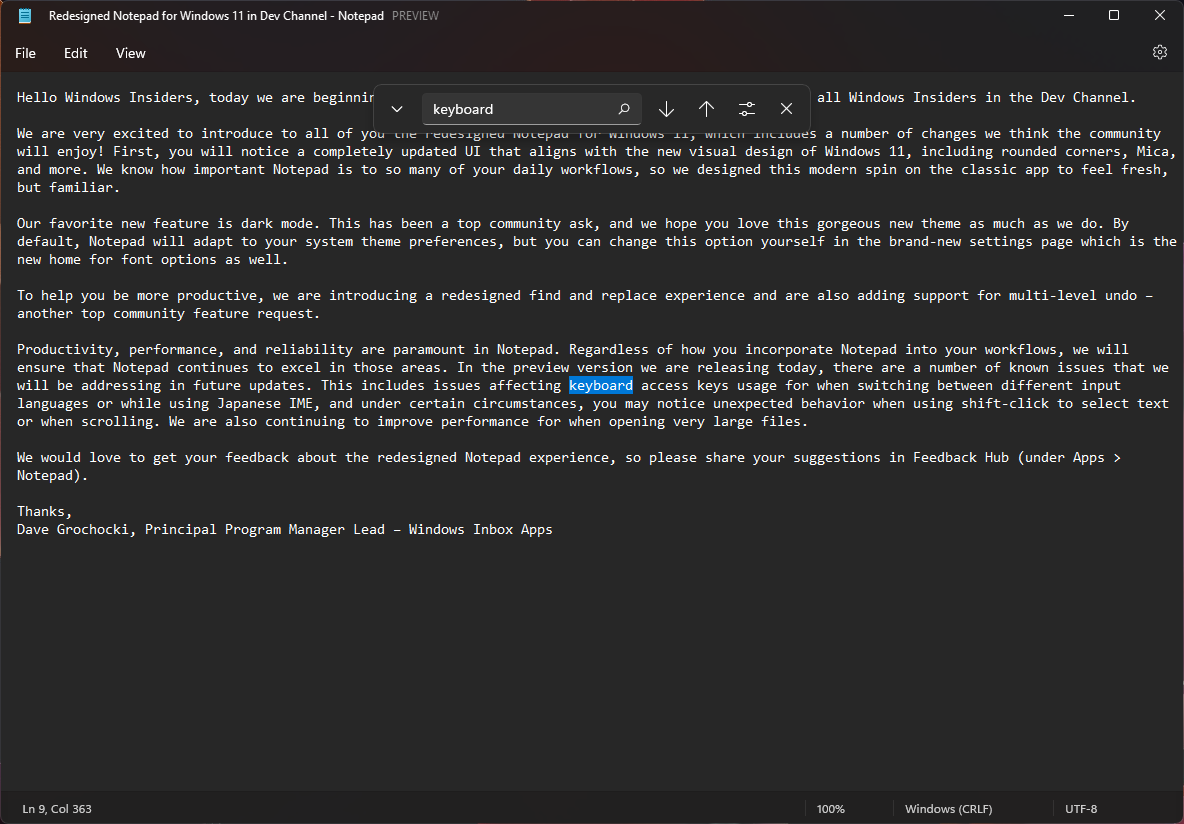
Notepad Redesigned for Windows 11 in Dev Channel.

Now with Dark Themes support and better search function. 🄰

https://blogs.windows.com/windows-insider/2...ndows-insiders/

user posted image

This post has been edited by Andrewtst: Dec 8 2021, 05:57 AM
mashimarow
post Dec 8 2021, 11:53 AM

Regular
******
Senior Member
1,742 posts

Joined: Aug 2006
From: Selangor


Recently read an article windows 11 serious impact on SSD Nvme read/write speed compare to windows 10

Any update on that?

I am using SSD Nvme GEN4 for my win10 now where cold boot only take seconds hmm.gif
xxboxx
post Dec 8 2021, 10:48 PM

The mind is for having ideas, not holding them
*******
Senior Member
5,261 posts

Joined: Oct 2004
From: J@Y B33


QUOTE(mashimarow @ Dec 8 2021, 11:53 AM)
Recently read an article windows 11 serious impact on SSD Nvme read/write speed compare to windows 10

Any update on that? 

I am using SSD Nvme GEN4 for my win10 now where cold boot only take seconds  hmm.gif
*
Doesn't notice any speed different from cold boot now compare to last time when on Win 10.
Benchmark on my 3 years old drive, still get good speed.
user posted image
Andrewtst
post Dec 9 2021, 06:31 AM

Forgiveness is Happiness
*********
All Stars
29,771 posts

Joined: Jan 2009
From: Johor, Malaysia.


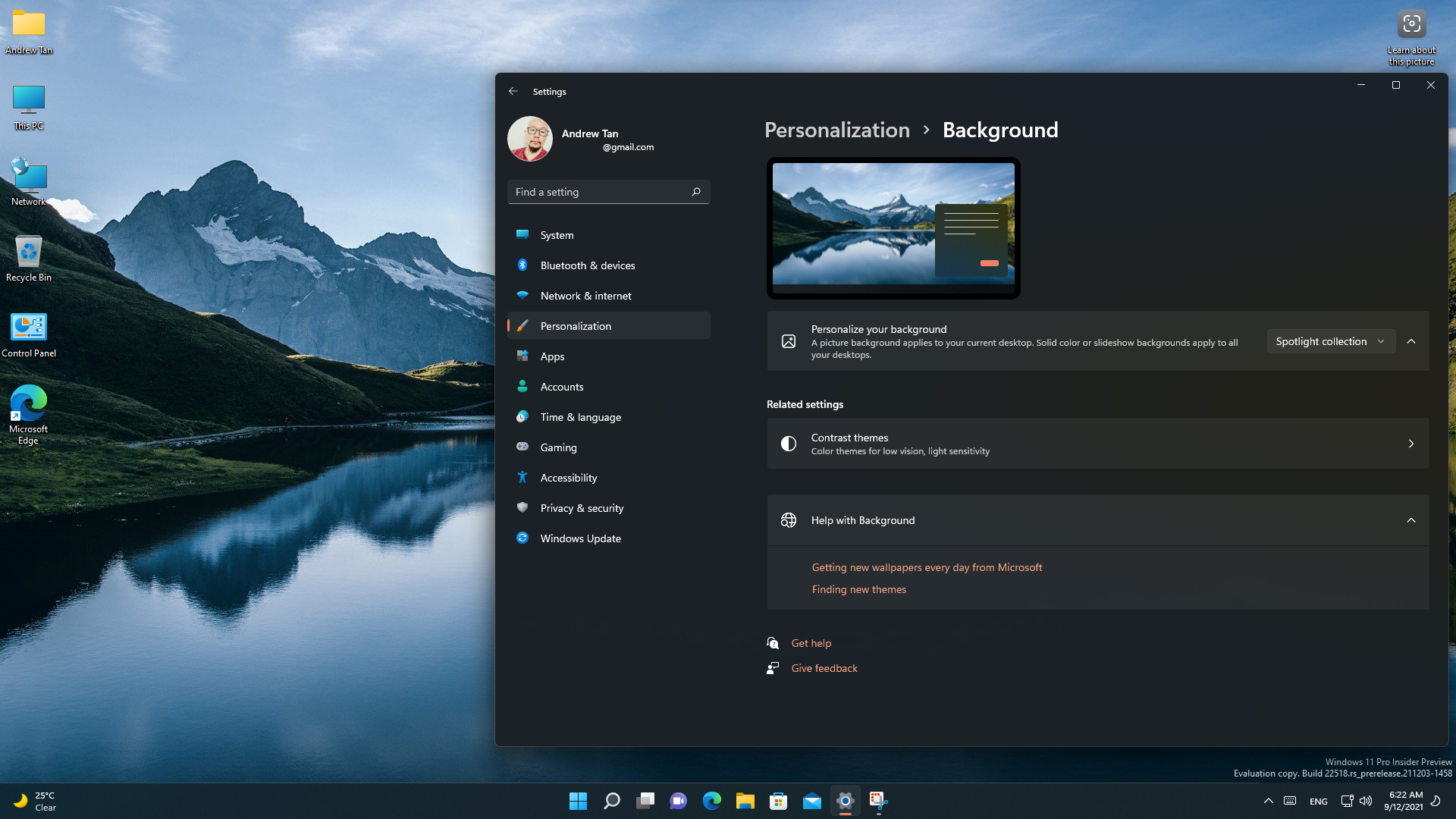
22518 - Dev Channel New Build as of 8 Dec 2021.
  • Widget now preset as Weather condition at Bottom Left Taskbar by default if you set your icon at center.
  • New Spotlight Collection for Desktop Background.
  • Introducing Voice Access.
https://blogs.windows.com/windows-insider/2...ew-build-22518/

user posted image

This post has been edited by Andrewtst: Dec 9 2021, 07:26 AM
mashimarow
post Dec 9 2021, 09:33 AM

Regular
******
Senior Member
1,742 posts

Joined: Aug 2006
From: Selangor


QUOTE(xxboxx @ Dec 8 2021, 10:48 PM)
Doesn't notice any speed different from cold boot now compare to last time when on Win 10.
Benchmark on my 3 years old drive, still get good speed.
user posted image
*
https://www.gsmarena.com/some_nvme_ssds_get...-news-52180.php

it's affecting the random write and only on the drive with OS, I think is the OS bug itself

thinking of upgrading manually this weekend(the auto update never come in) hmm.gif random write isn't much big issue right? I only use Nvme for OS, nothing else is stored there

This post has been edited by mashimarow: Dec 9 2021, 09:47 AM
Benefon
post Dec 9 2021, 10:15 AM

Look at all my stars!!
*******
Senior Member
4,800 posts

Joined: Mar 2017


QUOTE(mashimarow @ Dec 8 2021, 11:53 AM)
Recently read an article windows 11 serious impact on SSD Nvme read/write speed compare to windows 10

Any update on that?Ā 

I am using SSD Nvme GEN4 for my win10 now where cold boot only take secondsĀ  hmm.gif
*
Except to open explorer and any apps after login windows.
Those apps may take few seconds to launched.
(Such as delay)
But once ur windows is ready to use, any apps can open quicky.

This post has been edited by Benefon: Dec 9 2021, 10:16 AM
Andrewtst
post Dec 9 2021, 12:03 PM

Forgiveness is Happiness
*********
All Stars
29,771 posts

Joined: Jan 2009
From: Johor, Malaysia.


QUOTE(mashimarow @ Dec 9 2021, 09:33 AM)
https://www.gsmarena.com/some_nvme_ssds_get...-news-52180.php

it's affecting the random write and only on the drive with OS, I think is the OS bug itself

thinking of upgrading manually this weekend(the auto update never come in)Ā  hmm.gifĀ  random write isn't much big issue right? I only use Nvme for OS, nothing else is stored there
*
QUOTE(Benefon @ Dec 9 2021, 10:15 AM)
Except to open explorer and any apps after login windows.
Those apps may take few seconds to launched.
(Such as delay)
But once ur windows is ready to use, any apps can open quicky.
*
If your system is very fast, you won't feel any different.

I still open File Explorer, Settings, and common Windows 11 apps instant. Even Microsoft 365 also instant.

This post has been edited by Andrewtst: Dec 9 2021, 12:04 PM

95 Pages « < 38 39 40 41 42 > » Top
 

Change to:
| Lo-Fi Version
0.1831sec    0.14    6 queries    GZIP Disabled
Time is now: 9th December 2025 - 04:02 AM