Outline ·
[ Standard ] ·
Linear+
Windows 11, To be announce on 24 June 2021
|
Andrewtst
|
 Dec 17 2021, 01:49 AM Dec 17 2021, 01:49 AM
|

|
22523 Dev Channel Build Main Changes (Personal Tested)Update 15 Dec 2021. - More integration from Control Panel to Settings.
- New Installed apps and now uninstall apps will direct open Settings > Apps > Installed Apps when you clicking Uninstall a program at Control Panel.
- Uninstall updates direct open Settings Windows Update > Update history > Uninstall updates instead from Control Panel.
https://blogs.windows.com/windows-insider/2...ew-build-22523/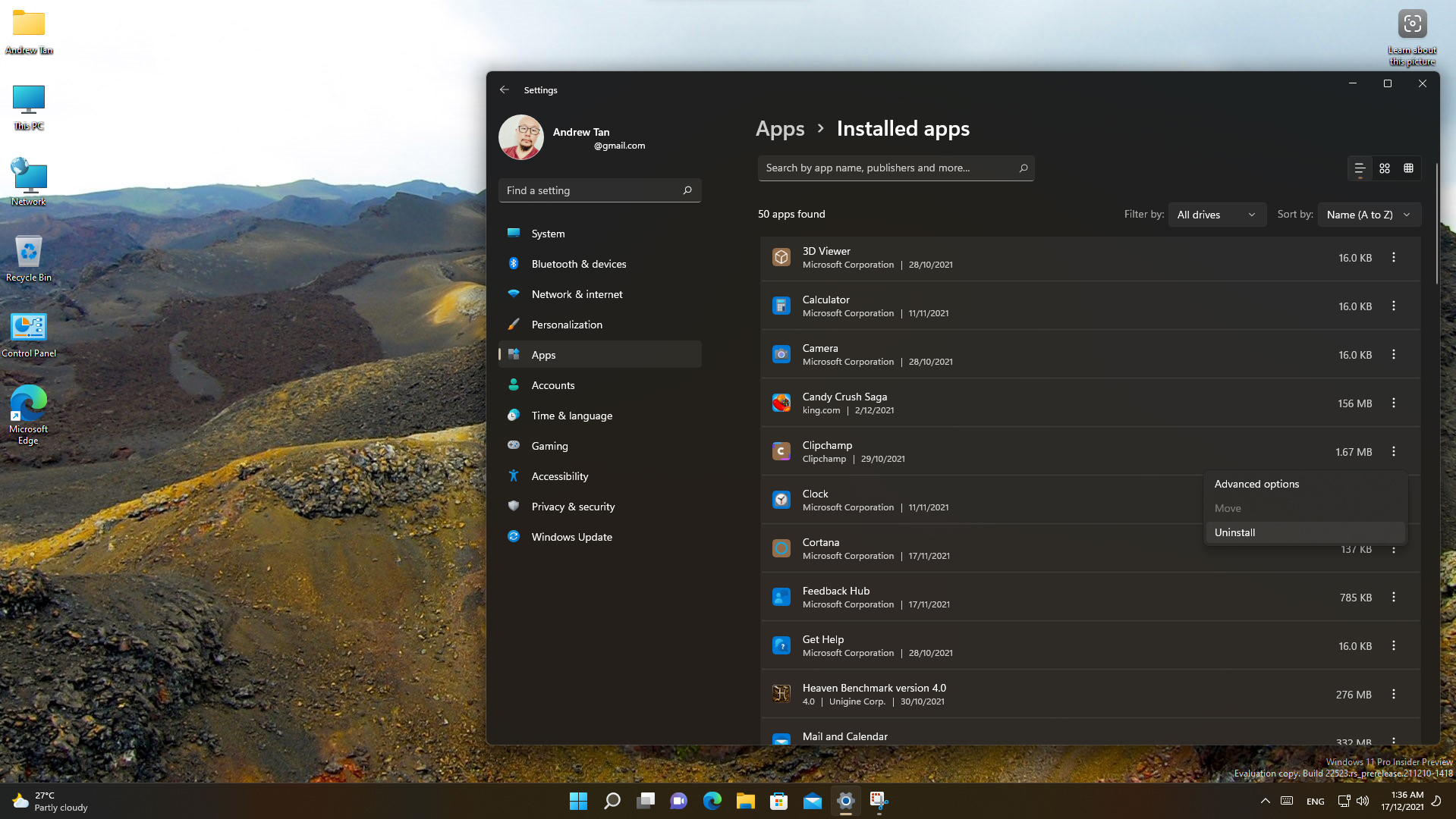 This post has been edited by Andrewtst: Dec 17 2021, 01:53 AM This post has been edited by Andrewtst: Dec 17 2021, 01:53 AM
|
|
|
|
|
|
VeeJay
|
Dec 17 2021, 02:13 AM
|
|
|
Not sure if this was posted?...but just in case! QUOTE Good news! Microsoft has announced that it will allow users to install Windows 11 on all modern hardware, including 1st Gen Ryzen and 6th and 7th Gen Core processors. There is a catch, though. You won’t be able to upgrade your PC directly from Windows 10 to 11 if you are running older hardware, not in the official requirement list. Instead, you’ll have to download the Windows 11 ISO from the official Microsoft website and do a clean install. https://www.hardwaretimes.com/windows-11-wi...karound-needed/ |
|
|
|
|
|
mashimarow
|
Dec 17 2021, 12:13 PM
|
|
|
QUOTE(VeeJay @ Dec 17 2021, 02:13 AM) Isn't everyone know any PC can run windows 11 if you can run Win10 by using the media creation kit, except that not qualify PC won't get the updates. |
|
|
|
|
|
SUSMyProLife
|
Dec 17 2021, 12:44 PM
|
|
|
QUOTE(mashimarow @ Dec 17 2021, 12:13 PM) Isn't everyone know any PC can run windows 11 if you can run Win10 by using the media creation kit, except that not qualify PC won't get the updates. Not qualify pc for now still can get updates Just that Microsoft do not guarantee that, may anytime stop support and stop gib updates |
|
|
|
|
|
lawrencehl
|
Dec 21 2021, 10:44 AM
|
|
|
Hi guys, just upgrade to win 11 few days ago can I roll back win10? After upgrade found out it required higher ram and if I open higher video settings in dota2 same as previous it lag ...currently my laptop running 4gb X2
|
|
|
|
|
|
mashimarow
|
Dec 21 2021, 11:23 AM
|
|
|
8GB is minimum these days, you need at least 16GB for everything to be smooth.
You can roll back to windows 10 within 7 days I think but eventually, you need to upgrade to windows 11, service end on 2025 October
There is no guarantee windows 11 upgrade will still be free or you plan to change new pc within these 3 years?
|
|
|
|
|
|
lawrencehl
|
Dec 21 2021, 02:40 PM
|
|
|
QUOTE(mashimarow @ Dec 21 2021, 11:23 AM) 8GB is minimum these days, you need at least 16GB for everything to be smooth. You can roll back to windows 10 within 7 days I think but eventually, you need to upgrade to windows 11, service end on 2025 October There is no guarantee windows 11 upgrade will still be free or you plan to change new pc within these 3 years? Currently my laptop almost 4years old, 2025 I think should be no longer using this laptop |
|
|
|
|
|
akhito
|
Dec 22 2021, 07:22 AM
|
|
|
QUOTE(lawrencehl @ Dec 21 2021, 10:44 AM) Hi guys, just upgrade to win 11 few days ago can I roll back win10? After upgrade found out it required higher ram and if I open higher video settings in dota2 same as previous it lag ...currently my laptop running 4gb X2 I think u can roll back within 10 days. Just roll it back. OS is to maximize user experience not deteriorate them |
|
|
|
|
|
lawrencehl
|
Dec 22 2021, 07:56 AM
|
|
|
QUOTE(akhito @ Dec 22 2021, 07:22 AM) I think u can roll back within 10 days. Just roll it back. OS is to maximize user experience not deteriorate them Rollback yesterday, just takes around 5min quite fast. |
|
|
|
|
|
chocobo7779
|
Dec 22 2021, 07:52 PM
|
|
|
QUOTE(lawrencehl @ Dec 21 2021, 10:44 AM) Hi guys, just upgrade to win 11 few days ago can I roll back win10? After upgrade found out it required higher ram and if I open higher video settings in dota2 same as previous it lag ...currently my laptop running 4gb X2 Are you on integrated graphics or an AMD based system? Note that Windows 11 is basically a reskinned Windows 10 (at this moment) so RAM usage should be the same (if not slightly more)  |
|
|
|
|
|
chocobo7779
|
Dec 22 2021, 07:53 PM
|
|
|
QUOTE(mashimarow @ Dec 21 2021, 11:23 AM) 8GB is minimum these days, you need at least 16GB for everything to be smooth. You can roll back to windows 10 within 7 days I think but eventually, you need to upgrade to windows 11, service end on 2025 October There is no guarantee windows 11 upgrade will still be free or you plan to change new pc within these 3 years? 4GB is actually doable (after all the base Surface Go has only 4GB RAM), but you definitely want SSD/eMMC storage otherwise the OS will feel very unresponsive This post has been edited by chocobo7779: Dec 22 2021, 07:53 PM |
|
|
|
|
|
chocobo7779
|
Dec 22 2021, 07:54 PM
|
|
|
QUOTE(MyProLife @ Dec 17 2021, 12:44 PM) Not qualify pc for now still can get updates Just that Microsoft do not guarantee that, may anytime stop support and stop gib updates Yup, but knowing Microsoft they will likely won't stopping those 'unsupported' machines from getting updates anytime soon  |
|
|
|
|
|
mashimarow
|
Dec 23 2021, 06:43 AM
|
|
|
QUOTE(chocobo7779 @ Dec 22 2021, 07:53 PM) 4GB is actually doable (after all the base Surface Go has only 4GB RAM), but you definitely want SSD/eMMC storage otherwise the OS will feel very unresponsive 4GB for office use still bearable, for gaming? Nah but 1 point is very true, nowadays not using SSD/eMMC, however much RAM you put in, your system still slow down significantly |
|
|
|
|
|
neato4u
|
Dec 25 2021, 01:38 PM
|
|
|
Win 11 on i5 3470, 16GB DDR3 1600Mhz RAM, 512GB SSD, dual monitor. Everything works well. Actually loading times for apps and games improved vs Win 10. 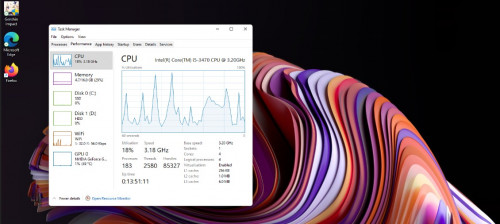 |
|
|
|
|
|
mashimarow
|
Dec 28 2021, 02:53 PM
|
|
|
QUOTE(andrewphang95 @ Dec 26 2021, 02:23 PM) just upgraded and now regert... dontk now how to use what do you mean by don't know how to use? just use like windows 10 show desktop? windows+d ? can you clarify more which part you don't know? |
|
|
|
|
|
jesse
|
Jan 5 2022, 08:43 PM
|
Getting Started

|
I got the option to upgrade, went for it, then after that my network cannot use (no network adapters found)... then rollback to windows 10, now I can't print in windows 10... sigh...
|
|
|
|
|
|
mashimarow
|
Jan 6 2022, 01:06 PM
|
|
|
sounds like a corrupted update  might need to reformat the windows |
|
|
|
|
|
X1X1
|
Jan 9 2022, 10:55 AM
|
|
|
guy my windows switch desktop hotkey is not working.
normally i click control + window + arrow to switch but now not working.
same as windows + shift + s for partial print screen also fail now
|
|
|
|
|
|
xxboxx
|
Jan 9 2022, 02:24 PM
|
|
|
QUOTE(X1X1 @ Jan 9 2022, 10:55 AM) guy my windows switch desktop hotkey is not working. normally i click control + window + arrow to switch but now not working. same as windows + shift + s for partial print screen also fail now Are you on latest update? I heard about partial screenshot not working on some earlier version then MS have fix it in latest update. Didn't hear about issue with switch desktop though, mine here working fine. |
|
|
|
|
|
X1X1
|
Jan 9 2022, 05:08 PM
|
|
|
QUOTE(xxboxx @ Jan 9 2022, 02:24 PM) Are you on latest update? I heard about partial screenshot not working on some earlier version then MS have fix it in latest update. Didn't hear about issue with switch desktop though, mine here working fine. yah just update yesterday ...... fix already, find out my alt n win button swap, i don't recall i change any keyboard setting recently ... |
|
|
|
|




 Quote
Quote




 0.0425sec
 0.28
0.28
 6 queries
 GZIP Disabled