

QUOTE(howszat @ Nov 6 2021, 04:07 PM)
It still work in progress but sorry I not going to try it. Not use for me. 
https://rammichael.com/7-taskbar-tweaker-an...k-at-windows-11
This post has been edited by Andrewtst: Nov 6 2021, 04:50 PM
Windows 11, To be announce on 24 June 2021
|
|
 Nov 6 2021, 04:50 PM Nov 6 2021, 04:50 PM
|
 
All Stars
29,773 posts Joined: Jan 2009 From: Johor, Malaysia.  
|
QUOTE(howszat @ Nov 6 2021, 04:07 PM) It still work in progress but sorry I not going to try it. Not use for me. https://rammichael.com/7-taskbar-tweaker-an...k-at-windows-11 This post has been edited by Andrewtst: Nov 6 2021, 04:50 PM |
|
|
|
|
|
Nov 6 2021, 08:44 PM
Show posts by this member only | IPv6 | Post
#722
|

Senior Member
2,075 posts Joined: Sep 2021 From: nowhere
|
Try this from github if you want bring back win10 taskbar, win10 explorer "ribbon" interface, win10 right click menu/alt tab menu and more
https://github.com/valinet/ExplorerPatcher Warning: for advanced user only, use at own risk, because will require restarting explorer.exe sometimes |
|
|
Nov 7 2021, 01:14 PM
|

Senior Member
5,261 posts Joined: Oct 2004 From: J@Y B33
|
Anyone know if my computer running secure boot or not? If off, how to re-enable it?
tpm.msc and Win Security show have TPM but sysinfo show secure boot is off. Drive partition using UEFI. 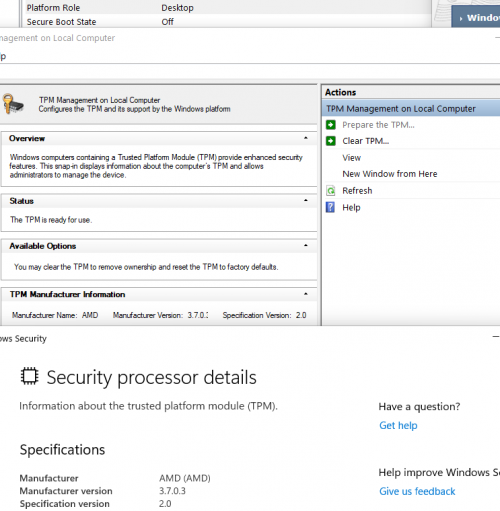 Things I tried, but still remain same. Clear TPM at tpm.msc and reboot. Clear TPM and then Prepare the TPM, before reboot. Clear TPM in BIOS. Disable fTPM in BIOS, restart to Windows, reboot back to BIOS and re-enabled fTPM. I thought it might be because previously when BIOS failed to run due to bad RAM timing, it revert to backup BIOS and when Windows start it show some security settings and need to log in account online. When I clear or disable TPM in BIOS, it will also show the security prompt when Windows start. |
|
|
Nov 7 2021, 02:15 PM
Show posts by this member only | IPv6 | Post
#724
|
|
Senior Member
2,075 posts Joined: Sep 2021 From: nowhere
|
QUOTE(xxboxx @ Nov 7 2021, 01:14 PM) Anyone know if my computer running secure boot or not? If off, how to re-enable it? Go into bios advanced setup, look for boot option, turn off CSM (legacy) mode then can on secure boottpm.msc and Win Security show have TPM but sysinfo show secure boot is off. Drive partition using UEFI. Things I tried, but still remain same. Clear TPM at tpm.msc and reboot. Clear TPM and then Prepare the TPM, before reboot. Clear TPM in BIOS. Disable fTPM in BIOS, restart to Windows, reboot back to BIOS and re-enabled fTPM. I thought it might be because previously when BIOS failed to run due to bad RAM timing, it revert to backup BIOS and when Windows start it show some security settings and need to log in account online. When I clear or disable TPM in BIOS, it will also show the security prompt when Windows start.  xxboxx liked this post
|
|
|
Nov 7 2021, 04:07 PM
|
|
All Stars
29,773 posts Joined: Jan 2009 From: Johor, Malaysia.
|
QUOTE(xxboxx @ Nov 7 2021, 01:14 PM) Anyone know if my computer running secure boot or not? If off, how to re-enable it? It may located at different area, for example my motherboard secure boot is located at Boot but my TPM is located at Settings.tpm.msc and Win Security show have TPM but sysinfo show secure boot is off. Drive partition using UEFI. Things I tried, but still remain same. Clear TPM at tpm.msc and reboot. Clear TPM and then Prepare the TPM, before reboot. Clear TPM in BIOS. Disable fTPM in BIOS, restart to Windows, reboot back to BIOS and re-enabled fTPM. I thought it might be because previously when BIOS failed to run due to bad RAM timing, it revert to backup BIOS and when Windows start it show some security settings and need to log in account online. When I clear or disable TPM in BIOS, it will also show the security prompt when Windows start. Secure Boot  TPM  This post has been edited by Andrewtst: Nov 7 2021, 04:07 PM |
|
|
Nov 7 2021, 04:16 PM
|
|
Senior Member
5,261 posts Joined: Oct 2004 From: J@Y B33
|
QUOTE(MyProLife @ Nov 7 2021, 02:15 PM) Go into bios advanced setup, look for boot option, turn off CSM (legacy) mode then can on secure boot Thanks!  disabled CSM bring back Secure Boot option. I also need to factory default back the Secure Boot option. |
|
|
|
|
|
Nov 7 2021, 04:20 PM
|
|
Senior Member
5,261 posts Joined: Oct 2004 From: J@Y B33
|
QUOTE(Andrewtst @ Nov 7 2021, 04:07 PM) It may located at different area, for example my motherboard secure boot is located at Boot but my TPM is located at Settings. My BIOS reset to default when fail to start, and it turn on CSM. When CSM turn on, Secure Boot option doesn't appear.Secure Boot TPM Andrewtst liked this post
|
|
|
Nov 7 2021, 04:28 PM
Show posts by this member only | IPv6 | Post
#728
|
|
All Stars
29,773 posts Joined: Jan 2009 From: Johor, Malaysia.
|
QUOTE(xxboxx @ Nov 7 2021, 04:20 PM) My BIOS reset to default when fail to start, and it turn on CSM. When CSM turn on, Secure Boot option doesn't appear. My Bios don't have CSM mode, it just default Secure Boot is off.When update bios time they will also reset to default. Microsoft just make trouble to people. In my MB latest Bios at least now it will default with TPM on instead of off previously. But still I need to turn on the Secure Boot every time I update my Bios. This post has been edited by Andrewtst: Nov 7 2021, 04:46 PM |
|
|
Nov 7 2021, 05:10 PM
|

Junior Member
66 posts Joined: Sep 2021
|
Win11 seems so much issue with BIOS.
|
|
|
Nov 7 2021, 05:30 PM
|
|
Senior Member
5,261 posts Joined: Oct 2004 From: J@Y B33
|
QUOTE(Andrewtst @ Nov 7 2021, 04:28 PM) My Bios don't have CSM mode, it just default Secure Boot is off. I think only old board still have CSM, mine is X470. And it also will turn off TPM every time BIOS reset. When update bios time they will also reset to default. Microsoft just make trouble to people. In my MB latest Bios at least now it will default with TPM on instead of off previously. But still I need to turn on the Secure Boot every time I update my Bios.  MS and board maker doesn't make TPM and Secure Boot function seamless, user have to manually change some settings to get it pair back. I checked, my laptop's Secure Boot also turned off. Must be when after I upgrade to Win 11, there's update for the BIOS. After BIOS update, that's when Bitlocker ask to re-enter it's decryption key. Thing is, MS doesn't give reminder that Secure Boot was off. Maybe when the 1 time it ask me to login online, there's also msg about it is turned off but are not prominent. Both my devices was running without Secure Boot for almost 1 month. I still receive update every week. Don't know what prompt me to check about Secure Boot this morning. Unless check at sysinfo, no other place mention it is off. Win Security now also have details for Secure Boot. When it is off, there's no mention about it in Device Security. It would be useful if there's a prompt, like how it constantly prompt me to use Windows Hello as sign-in option. 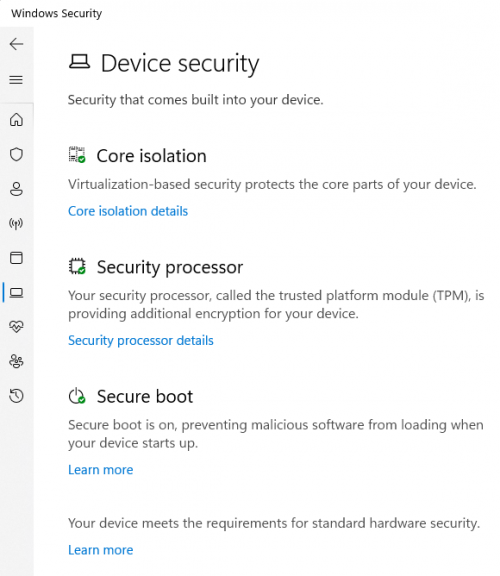 |
|
|
Nov 7 2021, 05:38 PM
|
|
All Stars
29,773 posts Joined: Jan 2009 From: Johor, Malaysia.
|
QUOTE(xxboxx @ Nov 7 2021, 05:30 PM) I think only old board still have CSM, mine is X470. And it also will turn off TPM every time BIOS reset. Yup, you area correct and secure boot off seems doesn't matter at all. MS and board maker doesn't make TPM and Secure Boot function seamless, user have to manually change some settings to get it pair back. I checked, my laptop's Secure Boot also turned off. Must be when after I upgrade to Win 11, there's update for the BIOS. After BIOS update, that's when Bitlocker ask to re-enter it's decryption key. Thing is, MS doesn't give reminder that Secure Boot was off. Maybe when the 1 time it ask me to login online, there's also msg about it is turned off but are not prominent. Both my devices was running without Secure Boot for almost 1 month. I still receive update every week. Don't know what prompt me to check about Secure Boot this morning. Unless check at sysinfo, no other place mention it is off. Win Security now also have details for Secure Boot. When it is off, there's no mention about it in Device Security. It would be useful if there's a prompt, like how it constantly prompt me to use Windows Hello as sign-in option. Microsoft only deal with those branded prebuild PC but less communicate with Custom Build PC MB manufacturer. This post has been edited by Andrewtst: Nov 7 2021, 05:39 PM |
|
|
Nov 7 2021, 06:38 PM
|
|
Senior Member
5,261 posts Joined: Oct 2004 From: J@Y B33
|
QUOTE(Andrewtst @ Nov 7 2021, 05:38 PM) Yup, you area correct and secure boot off seems doesn't matter at all. MS makes so much hoo-ha about must have Secure Boot to install Win 11, how it's a critical function for the OS security and help to reduce malware attacks by 60%. But when it was turned off later, no reminder, no prompt, not even a nudge asking to turn it back on. Microsoft only deal with those branded prebuild PC but less communicate with Custom Build PC MB manufacturer.  |
|
|
Nov 7 2021, 08:15 PM
|
|
All Stars
29,773 posts Joined: Jan 2009 From: Johor, Malaysia.
|
QUOTE(xxboxx @ Nov 7 2021, 06:38 PM) MS makes so much hoo-ha about must have Secure Boot to install Win 11, how it's a critical function for the OS security and help to reduce malware attacks by 60%. But when it was turned off later, no reminder, no prompt, not even a nudge asking to turn it back on. Exactly. To me their so call safety is just their business tactic to ask people buy new system so Microsoft can earn some money for their Windows 11. Existing Windows 10 user is free updated and Microsoft earn nothing for existing user. This post has been edited by Andrewtst: Nov 7 2021, 08:26 PM |
|
|
|
|
|
Nov 8 2021, 10:04 AM
|

Junior Member
476 posts Joined: Mar 2009 From: Malaysia
|
i upgraded win10 to win11 and rolled back to win10 as i feel my laptop very lagging and battery seems dead, must use charger. End up i awared not due to win 11.
i wish to upgrade to win11 again now but i cant find the win11 update in Windows Update setting anymore. Anyone can suggest solution? Thank you! |
|
|
Nov 8 2021, 10:50 AM
|

Junior Member
277 posts Joined: Oct 2016
|
QUOTE(xxboxx @ Nov 7 2021, 06:38 PM) MS makes so much hoo-ha about must have Secure Boot to install Win 11, how it's a critical function for the OS security and help to reduce malware attacks by 60%. But when it was turned off later, no reminder, no prompt, not even a nudge asking to turn it back on. By right, it got prompt once a while on the right hand corner for few seconds before go away. Well, it does remind me on laptop. Unless the notification you also turn off.QUOTE(x88yunkw @ Nov 8 2021, 10:04 AM) i upgraded win10 to win11 and rolled back to win10 as i feel my laptop very lagging and battery seems dead, must use charger. End up i awared not due to win 11. So far never test out such as way that rollback then upgrade again to Windows 11. Anyone tried that before?i wish to upgrade to win11 again now but i cant find the win11 update in Windows Update setting anymore. Anyone can suggest solution? Thank you! |
|
|
Nov 8 2021, 11:17 AM
Show posts by this member only | IPv6 | Post
#736
|
|
Senior Member
2,075 posts Joined: Sep 2021 From: nowhere
|
QUOTE(x88yunkw @ Nov 8 2021, 10:04 AM) i upgraded win10 to win11 and rolled back to win10 as i feel my laptop very lagging and battery seems dead, must use charger. End up i awared not due to win 11. You can upgrade back to Windows 11, Anytime via ISO or Upgrade assistance/media creation tool from Microsoft download websitei wish to upgrade to win11 again now but i cant find the win11 update in Windows Update setting anymore. Anyone can suggest solution? Thank you! https://www.microsoft.com/en-au/software-download/windows11 |
|
|
Nov 8 2021, 12:29 PM
|

Senior Member
5,726 posts Joined: Feb 2006 From: Penang 
|
guys, any idea how to make the taskbar icons in the same size?
noticed my win11 on envy4 does not have same size icons whereas on ideapad pro 5, all the icons are in same size.  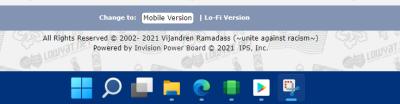
|
|
|
Nov 8 2021, 12:30 PM
|
|
Senior Member
5,261 posts Joined: Oct 2004 From: J@Y B33
|
QUOTE(life5tyle @ Nov 8 2021, 10:50 AM) By right, it got prompt once a while on the right hand corner for few seconds before go away. Well, it does remind me on laptop. Unless the notification you also turn off. I didn't turn off notification, it got prompt me use Windows Hello and the annoying have scans X amount of times.Both PC and laptop doesn't have the notification. |
|
|
Nov 8 2021, 12:34 PM
|
|
Senior Member
5,261 posts Joined: Oct 2004 From: J@Y B33
|
QUOTE(squall_kay @ Nov 8 2021, 12:29 PM) guys, any idea how to make the taskbar icons in the same size? Did you hold right click and drag the icon? That will make the icon become smaller.noticed my win11 on envy4 does not have same size icons whereas on ideapad pro 5, all the icons are in same size.
Example this, Edge smaller because I hold right click and drag the icon.  |
|
|
Nov 8 2021, 01:27 PM
|
|
Senior Member
5,726 posts Joined: Feb 2006 From: Penang
|
QUOTE(xxboxx @ Nov 8 2021, 12:34 PM) Did you hold right click and drag the icon? That will make the icon become smaller. nope.Example this, Edge smaller because I hold right click and drag the icon. below screenshot from my other laptop with win11. just curious why the differences. 
|
| Change to: |  0.0334sec 0.0334sec
 0.73 0.73
 6 queries 6 queries
 GZIP Disabled GZIP Disabled
Time is now: 11th December 2025 - 01:33 PM |
 Quote
Quote