

Try benchmark Unigine Heaven Extreme and scores average of 238.6 FPS.
Never though Hyper-V is so awesome and I think the only VM machine can use Host GPU. 🥰

Tutorial Link:
This post has been edited by Andrewtst: Oct 30 2021, 10:04 AM
Windows 11, To be announce on 24 June 2021
|
|
 Oct 30 2021, 09:55 AM Oct 30 2021, 09:55 AM
|
 
All Stars
29,777 posts Joined: Jan 2009 From: Johor, Malaysia.  
|
Manage to use my Host GPU - Nvidia GeForce RTX 3080 in Hyper-V VM and it truly run. 😃
Try benchmark Unigine Heaven Extreme and scores average of 238.6 FPS. Never though Hyper-V is so awesome and I think the only VM machine can use Host GPU. 🥰 Tutorial Link: This post has been edited by Andrewtst: Oct 30 2021, 10:04 AM |
|
|
|
|
|
Oct 30 2021, 10:00 AM
|

Senior Member
5,261 posts Joined: Oct 2004 From: J@Y B33
|
Well, this is awkward.
MS own Office corner is not rounded while other, even old program, can be rounded.  |
|
|
Oct 30 2021, 10:06 AM
|
|
All Stars
29,777 posts Joined: Jan 2009 From: Johor, Malaysia.
|
QUOTE(xxboxx @ Oct 30 2021, 10:00 AM) Well, this is awkward. Rounded to me in Microsoft 365. MS own Office corner is not rounded while other, even old program, can be rounded.   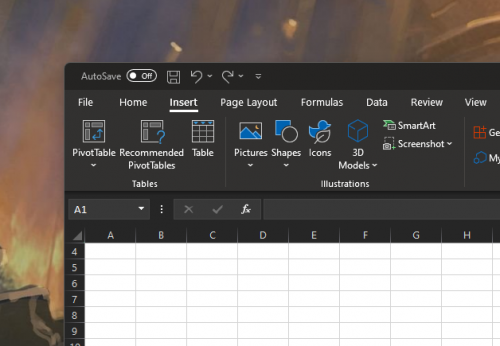 |
|
|
Oct 30 2021, 10:12 AM
Show posts by this member only | IPv6 | Post
#684
|

Junior Member
42 posts Joined: Dec 2010
|
Just fresh formatted and installed windows 11 (Twice LoL) and the problem still not gone,
Games suddenly closed by itself randomly, so far only New World and Black Desert Only, havent tried other games yet Intel 10700K, 2080Ti, MSI MAG Z490 I don't know why...requirements everything TPM seems fine  The only thing i havent tried is BIOS update, let see what will happen |
|
|
Oct 30 2021, 10:17 AM
|
|
All Stars
29,777 posts Joined: Jan 2009 From: Johor, Malaysia.
|
QUOTE(sos_tiram @ Oct 30 2021, 10:12 AM) Just fresh formatted and installed windows 11 (Twice LoL) and the problem still not gone, Make sure you install Nvidia GeForce driver and not using the driver auto install by Microsoft.Games suddenly closed by itself randomly, so far only New World and Black Desert Only, havent tried other games yet Intel 10700K, 2080Ti, MSI MAG Z490 I don't know why...requirements everything TPM seems fine The only thing i havent tried is BIOS update, let see what will happen https://www.nvidia.com/Download/driverResul...px/183364/en-us |
|
|
Oct 30 2021, 10:32 AM
|
|
Senior Member
5,261 posts Joined: Oct 2004 From: J@Y B33
|
QUOTE(Andrewtst @ Oct 30 2021, 10:06 AM) Rounded to me in Microsoft 365. I think Win 11 will auto round corner for all apps, but MS own app can break that. |
|
|
|
|
|
Oct 30 2021, 11:19 AM
|
|
All Stars
29,777 posts Joined: Jan 2009 From: Johor, Malaysia.
|
QUOTE(xxboxx @ Oct 30 2021, 10:32 AM) I think Win 11 will auto round corner for all apps, but MS own app can break that. Haha! Maybe that office is a bit too old, I seen the interface seems is older version. |
|
|
Oct 30 2021, 11:29 AM
|

Senior Member
3,642 posts Joined: Jul 2014
|
QUOTE(flying_duck @ Oct 28 2021, 03:18 PM) Just went to download and install Windows 11 last night. Is it a manual download by yourself? Or it's a recommended download from the updates itself.The UI is very refreshing and now with the animation, it doesn't feel so dull like the past. However, I do have some laggy feel in the UI / opening some applications (my laptop running on i7 8th gen, 16GB DDR4 RAM, PCIe SSD, but with integrated graphic card only..). Hopefully they improve it over time. Overall, it feels refreshing. My laptop already trigger me that win 11 is ready for update, but thinking wan update or not, worrying about the bugs. |
|
|
Oct 30 2021, 12:07 PM
|
|
All Stars
29,777 posts Joined: Jan 2009 From: Johor, Malaysia.
|
QUOTE(ry8128 @ Oct 30 2021, 11:29 AM) Is it a manual download by yourself? Or it's a recommended download from the updates itself. If your PC had at leas 8 GB RAM, Intel 8 Gen and above, AMD 4xxx series and above. Nvidia GPU, AMD Radeon GPU and even Intel Integrated.My laptop already trigger me that win 11 is ready for update, but thinking wan update or not, worrying about the bugs. The most important is running SSD and also installed GPU driver from official site. This post has been edited by Andrewtst: Oct 30 2021, 12:34 PM |
|
|
Oct 30 2021, 12:11 PM
|
|
Senior Member
3,642 posts Joined: Jul 2014
|
QUOTE(Andrewtst @ Oct 30 2021, 12:07 PM) If you PC had at leas 8 GB RAM, Intel 8 Gen and above, AMD 4xxx series and above. Nvidia GPU, AMD Radeon GPU and even Intel Integrated. For specs shouldn't be a problem. I just worried some driver related bugs only.The most important is running SSD and also installed GPU driver from official site. Anyhow, I already begin downloading it. Hopefully it works out well  |
|
|
Oct 30 2021, 12:35 PM
|
|
All Stars
29,777 posts Joined: Jan 2009 From: Johor, Malaysia.
|
QUOTE(ry8128 @ Oct 30 2021, 12:11 PM) For specs shouldn't be a problem. I just worried some driver related bugs only. They still some tiny cosmetic bugs but it is very stable for me. I install in both my meet the requirement and not meet the requirement system. So far so good. Anyhow, I already begin downloading it. Hopefully it works out well  |
|
|
Oct 30 2021, 02:28 PM
|
|
All Stars
29,777 posts Joined: Jan 2009 From: Johor, Malaysia.
|
Is Turn on VBS (Virtualization-based Security) in Windows 11 impact to Gaming Performance ?
Yes but very little to me based on 3DMark scores. Such dropping is very ok to me. 😊 It is around 0.1% to 2.2% dropping only.
 This post has been edited by Andrewtst: Oct 30 2021, 02:53 PM |
|
|
Oct 30 2021, 02:29 PM
Show posts by this member only | IPv6 | Post
#693
|
|
Senior Member
3,642 posts Joined: Jul 2014
|
QUOTE(Andrewtst @ Oct 30 2021, 12:35 PM) They still some tiny cosmetic bugs but it is very stable for me. I install in both my meet the requirement and not meet the requirement system. So far so good. Done update, so far so good. New looks and icons looks good.But it seems that remove the 'uncombine taskbar buttons'? I hate this, prefer for it to be uncombined.  |
|
|
|
|
|
Oct 30 2021, 02:34 PM
|
|
All Stars
29,777 posts Joined: Jan 2009 From: Johor, Malaysia.
|
QUOTE(ry8128 @ Oct 30 2021, 02:29 PM) Done update, so far so good. New looks and icons looks good. Not only that. The new Taskbar is very basic.But it seems that remove the 'uncombine taskbar buttons'? I hate this, prefer for it to be uncombined. You cannot drag and drop to Taskbar, cannot resize Taskbar and also cannot move the Taskbar to Top, Left or Right. This post has been edited by Andrewtst: Oct 30 2021, 02:35 PM |
|
|
Oct 30 2021, 04:45 PM
Show posts by this member only | IPv6 | Post
#695
|

All Stars
12,051 posts Joined: Oct 2017
|
QUOTE(ry8128 @ Oct 30 2021, 02:29 PM) Done update, so far so good. New looks and icons looks good. I always show full name on taskbar in windows 7 and 10 like windows XP, don like combinedBut it seems that remove the 'uncombine taskbar buttons'? I hate this, prefer for it to be uncombined. |
|
|
Oct 30 2021, 09:51 PM
|

Junior Member
269 posts Joined: Mar 2020
|
QUOTE(ry8128 @ Oct 30 2021, 11:29 AM) Is it a manual download by yourself? Or it's a recommended download from the updates itself. I download it..My laptop already trigger me that win 11 is ready for update, but thinking wan update or not, worrying about the bugs. if this is your main laptop and you can't afford any minor glitch or bug to happen in case it will interrupt your usage, better wait.. So far I don't have any big issue with it except for minor UI cacat sometimes.. |
|
|
Oct 31 2021, 01:14 PM
|

Senior Member
4,800 posts Joined: Mar 2017
|
Win 11 are nice feature with new UI, including hidden recycle bin.
Except open explorer launching a bit slower pop out, other than that all are fine to me. This post has been edited by Benefon: Oct 31 2021, 01:15 PM |
|
|
Nov 1 2021, 10:24 AM
|
 
Elite
7,826 posts Joined: Jan 2003 
|
Finally upgraded my desktop PC with Windows 11, always afraid of trying it out. Managed to play AOE IV on it fine and slowly enjoying the newer UI.
|
|
|
Nov 1 2021, 10:29 AM
|
|
Junior Member
277 posts Joined: Oct 2016
|
QUOTE(Mavik @ Nov 1 2021, 10:24 AM) Finally upgraded my desktop PC with Windows 11, always afraid of trying it out. Managed to play AOE IV on it fine and slowly enjoying the newer UI. Welcome to the family! You upgrade or fresh installation? Double check on drivers as Windows 11 driver and Windows 10 driver slightly different. So far I did few fresh installation and all the BIOS, chipset, LAN, graphics driver have to install the Windows 11 version. |
|
|
Nov 1 2021, 10:35 AM
|
|
Elite
7,826 posts Joined: Jan 2003
|
QUOTE(life5tyle @ Nov 1 2021, 10:29 AM) Welcome to the family! You upgrade or fresh installation? Double check on drivers as Windows 11 driver and Windows 10 driver slightly different. So far I did few fresh installation and all the BIOS, chipset, LAN, graphics driver have to install the Windows 11 version. It was an upgrade, the only thing I updated after the upgrade was my Ryzen chipset drivers and Nvidia drivers. Everything else seems to run fine for the moment. |
| Change to: |  0.0186sec 0.0186sec
 0.92 0.92
 6 queries 6 queries
 GZIP Disabled GZIP Disabled
Time is now: 16th December 2025 - 11:28 PM |
 Quote
Quote