Outline ·
[ Standard ] ·
Linear+
Windows 11, To be announce on 24 June 2021
|
SUSlife5tyle
|
 Nov 1 2021, 10:40 AM Nov 1 2021, 10:40 AM
|
Getting Started


|
QUOTE(Mavik @ Nov 1 2021, 10:35 AM) It was an upgrade, the only thing I updated after the upgrade was my Ryzen chipset drivers and Nvidia drivers. Everything else seems to run fine for the moment. If they got newest driver, make sure you download and install them. Sometime you won't notice the problem. So far on normal usage we don't notice the problem but for gaming or graphics related, then you will start notice minor issue. Usually I don't upgrade, personally I prefer clean/fresh installation. |
|
|
|
|
|
mashimarow
|
Nov 1 2021, 10:46 AM
|
|
|
 my new home pc still not received any notice for upgrading from 21H1 to W11 but all my old office PC got the notice, all are gen3, gen4 old pc, not capable of running W11 |
|
|
|
|
|
Mavik
|
Nov 1 2021, 11:52 AM
|
Patience is a virtue

|
QUOTE(life5tyle @ Nov 1 2021, 10:40 AM) If they got newest driver, make sure you download and install them. Sometime you won't notice the problem. So far on normal usage we don't notice the problem but for gaming or graphics related, then you will start notice minor issue. Usually I don't upgrade, personally I prefer clean/fresh installation. So far no issues, no bugs, no game crashes and everything run smoothly. |
|
|
|
|
|
zzzz52
|
Nov 2 2021, 08:04 AM
|
|
|
Same here, so far on my Dell Aurora R12, everything is running smooth.
|
|
|
|
|
|
xxboxx
|
Nov 2 2021, 11:51 AM
|
|
|
|
|
|
|
|
|
SUSlife5tyle
|
Nov 2 2021, 01:05 PM
|
Getting Started
|
QUOTE(xxboxx @ Nov 2 2021, 11:51 AM) This is common issue for Windows OS. Due to Windows Update, software/driver installation, Windows Update and software update. By right, it should remove after the process finish running but somehow some folder was left over. Usually I will housekeep and remove them manually. Sometime scandisk process or antivirus cleaning/recovery process also creating temp files and temp folders. |
|
|
|
|
|
wusplay P
|
Nov 3 2021, 10:29 PM
|
New Member
|
Just updated to win11
The first 'problem' I found was the task bar can't be moved to the top.
I was using task bar arranged on top of the screen for years. I was surprised it become less flexible now for the latest window.
|
|
|
|
|
|
PJng
|
Nov 3 2021, 11:38 PM
|
|
|
QUOTE(wusplay @ Nov 3 2021, 10:29 PM) Just updated to win11 The first 'problem' I found was the task bar can't be moved to the top. I was using task bar arranged on top of the screen for years. I was surprised it become less flexible now for the latest window. This is not a problem, have been say many time on any where https://www.howtogeek.com/761064/5-ways-the...an-windows-10s/ |
|
|
|
|
|
Andrewtst
|
Nov 4 2021, 03:52 AM
|
|
|
Dev Channel Build 22494 released (3 Nov) New Microphone icon appear at lower right corner for easier access settings for turn on/off the Microphone when you are using application utilize the Microphone, for example Chat (Microsoft Teams). https://blogs.windows.com/windows-insider/2...ew-build-22494/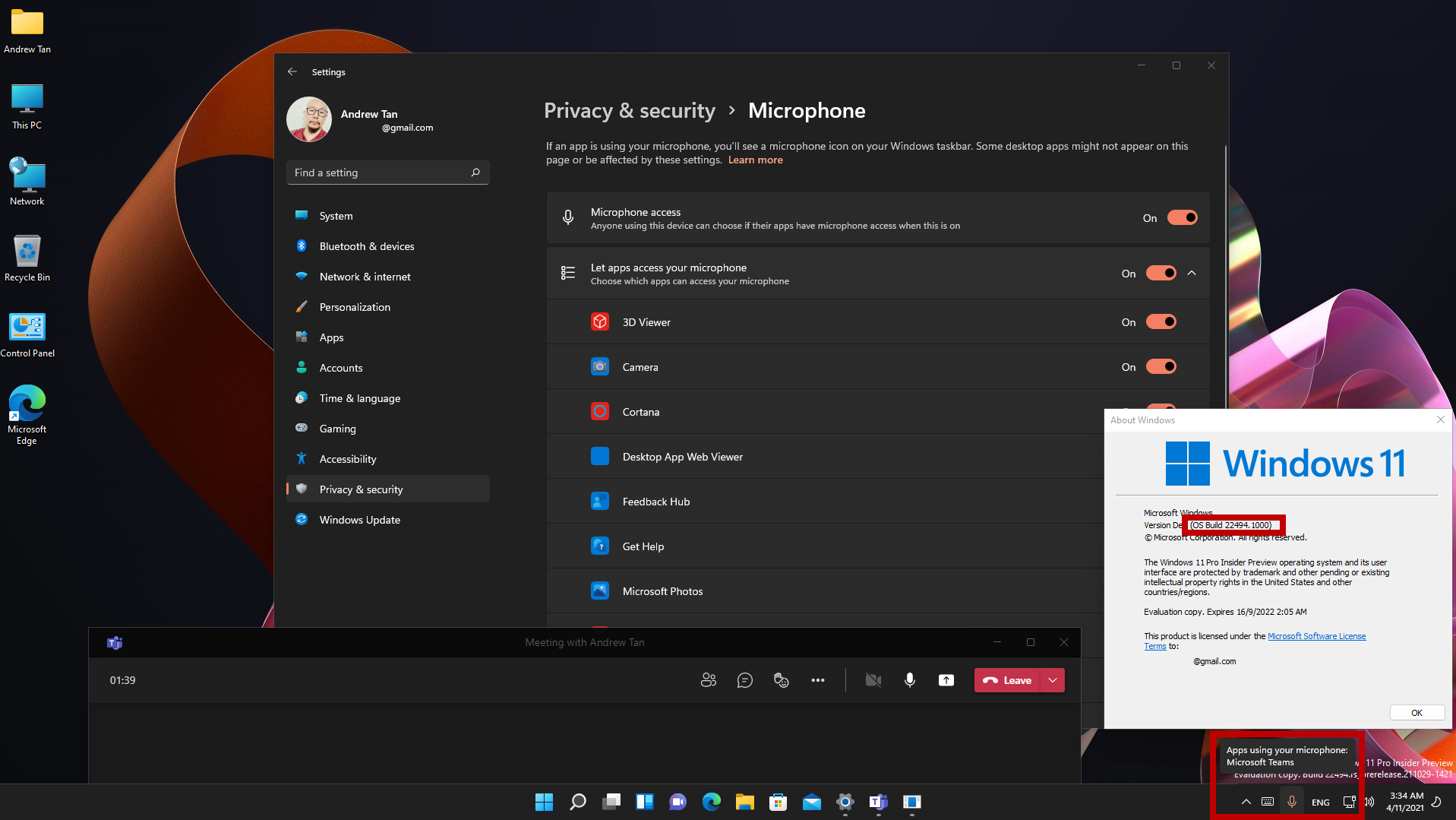 This post has been edited by Andrewtst: Nov 4 2021, 04:02 AM This post has been edited by Andrewtst: Nov 4 2021, 04:02 AM |
|
|
|
|
|
TongCN
|
Nov 5 2021, 09:01 AM
|
|
|
QUOTE(wusplay @ Nov 3 2021, 10:29 PM) Just updated to win11 The first 'problem' I found was the task bar can't be moved to the top. I was using task bar arranged on top of the screen for years. I was surprised it become less flexible now for the latest window. Just updated my office laptop to win 11 and there is no "Never combine taskbar button"  How am i going to work productively with 10~20 excels open at the same time , Microsoft!?  |
|
|
|
|
|
Andrewtst
|
Nov 5 2021, 11:48 AM
|
|
|
Microsoft just release KB5008295Main fixed - Snipping Tools not working for certain user due to certification expired. (For Beta or Release Preview Channels). https://blogs.windows.com/windows-insider/2...eview-channels/ |
|
|
|
|
|
Andrewtst
|
Nov 5 2021, 12:06 PM
|
|
|
QUOTE(TongCN @ Nov 5 2021, 09:01 AM) Just updated my office laptop to win 11 and there is no "Never combine taskbar button" How am i going to work productively with 10~20 excels open at the same time , Microsoft!? Just move your mouse over the excel icon at Taskbar and they will expand all open excels and you can direct pick from there. 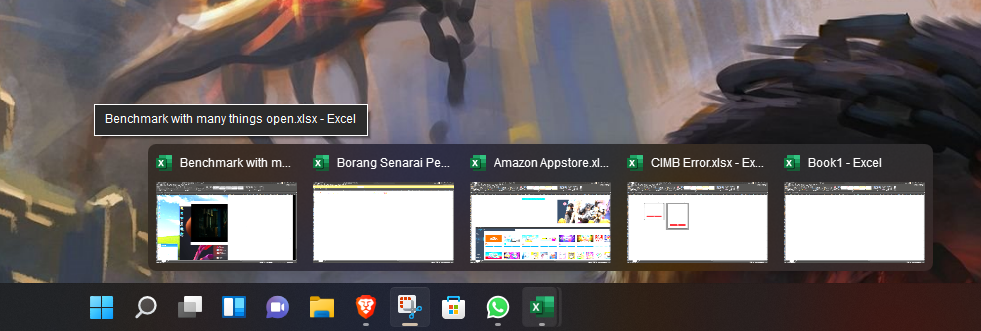 This post has been edited by Andrewtst: Nov 5 2021, 12:06 PM This post has been edited by Andrewtst: Nov 5 2021, 12:06 PM |
|
|
|
|
|
TongCN
|
Nov 5 2021, 01:39 PM
|
|
|
QUOTE(Andrewtst @ Nov 5 2021, 12:06 PM) Just move your mouse over the excel icon at Taskbar and they will expand all open excels and you can direct pick from there. Currently this is one of the solution if wanna stick with Win 11 (else revert back to Win 10). But nothing beats when u can direct click on the specific excel where it shows there (without combine). |
|
|
|
|
|
Andrewtst
|
Nov 5 2021, 05:54 PM
|
|
|
QUOTE(TongCN @ Nov 5 2021, 01:39 PM) Currently this is one of the solution if wanna stick with Win 11 (else revert back to Win 10). But nothing beats when u can direct click on the specific excel where it shows there (without combine). I am ok with that as I not using without combine since got option of with combine.  This post has been edited by Andrewtst: Nov 5 2021, 05:55 PM This post has been edited by Andrewtst: Nov 5 2021, 05:55 PM |
|
|
|
|
|
TongCN
|
Nov 6 2021, 09:52 AM
|
|
|
QUOTE(Andrewtst @ Nov 5 2021, 05:54 PM) I am ok with that as I not using without combine since got option of with combine. Haha, cause I’m auditor XD |
|
|
|
|
|
xxboxx
|
Nov 6 2021, 10:22 AM
|
|
|
QUOTE(TongCN @ Nov 5 2021, 01:39 PM) Currently this is one of the solution if wanna stick with Win 11 (else revert back to Win 10). But nothing beats when u can direct click on the specific excel where it shows there (without combine). How about using Win+1? (If the app is the first one in taskbar) Tapping 1 while holding Tab will cycle through only the app. |
|
|
|
|
|
Andrewtst
|
Nov 6 2021, 10:37 AM
|
|
|
QUOTE(TongCN @ Nov 6 2021, 09:52 AM) Haha, cause I’m auditor XD I am also auditor but company level only. 😅 Actually it is user preferable, too bad Microsoft limit it now. |
|
|
|
|
|
PJng
|
Nov 6 2021, 02:27 PM
|
|
|
https://www.howtogeek.com/429223/master-win...h-these-tricks/Windows 11 still can use this trick to use back classic alt tab?
|
|
|
|
|
|
howszat
|
Nov 6 2021, 04:07 PM
|
|
|
QUOTE(TongCN @ Nov 5 2021, 01:39 PM) Currently this is one of the solution if wanna stick with Win 11 (else revert back to Win 10). But nothing beats when u can direct click on the specific excel where it shows there (without combine). Does https://rammichael.com/7-taskbar-tweaker work on Win 11? |
|
|
|
|
|
Andrewtst
|
Nov 6 2021, 04:49 PM
|
|
|
QUOTE(PJng @ Nov 6 2021, 02:27 PM) https://www.howtogeek.com/429223/master-win...h-these-tricks/Windows 11 still can use this trick to use back classic alt tab? All is working, but the last one old classic mode I not sure. |
|
|
|
|



 Quote
Quote










 0.0403sec
 0.52
0.52
 6 queries
 GZIP Disabled