

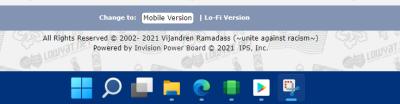
noticed my win11 on envy4 does not have same size icons whereas on ideapad pro 5, all the icons are in same size.

Windows 11, To be announce on 24 June 2021
|
|
 Nov 8 2021, 12:29 PM Nov 8 2021, 12:29 PM
Return to original view | Post
#1
|
Senior Member
5,726 posts Joined: Feb 2006 From: Penang   
|
guys, any idea how to make the taskbar icons in the same size?
noticed my win11 on envy4 does not have same size icons whereas on ideapad pro 5, all the icons are in same size.
|
|
|
Nov 8 2021, 01:27 PM
Return to original view | Post
#2
|
|
Senior Member
5,726 posts Joined: Feb 2006 From: Penang
|
QUOTE(xxboxx @ Nov 8 2021, 12:34 PM) Did you hold right click and drag the icon? That will make the icon become smaller. nope.Example this, Edge smaller because I hold right click and drag the icon.   below screenshot from my other laptop with win11. just curious why the differences. 
|
|
|
Nov 12 2021, 02:48 PM
Return to original view | Post
#3
|
|
Senior Member
5,726 posts Joined: Feb 2006 From: Penang
|
QUOTE(life5tyle @ Nov 8 2021, 04:24 PM) Try remove the icon from the taskbar, restart computer then re-add it back to taskbar. tried. it doesnt work. reset also seems not working. not sure why. end up (as having some other issue also), i rolled back to win10 and re-do back win11 update. now ok. |
| Change to: |  0.0559sec 0.0559sec
 0.70 0.70
 7 queries 7 queries
 GZIP Disabled GZIP Disabled
Time is now: 11th December 2025 - 09:43 AM |
 Quote
Quote