

Windows 11, To be announce on 24 June 2021
Windows 11, To be announce on 24 June 2021
|
|
 Oct 3 2021, 03:09 PM Oct 3 2021, 03:09 PM
Show posts by this member only | IPv6 | Post
#441
|
 
All Stars
12,040 posts Joined: Oct 2017  
|
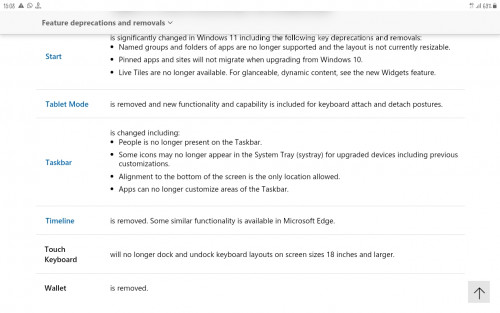
Don see upcoming taskbar allow to move, until now still show...
|
|
|
|
|
|
Oct 3 2021, 03:25 PM
|

All Stars
29,773 posts Joined: Jan 2009 From: Johor, Malaysia.
|
QUOTE(PJng @ Oct 3 2021, 03:09 PM) Don see upcoming taskbar allow to move, until now still show... The taskbar will be like that, it won't change. But I think it will became features in next big update of Windows 11  not the current release. not the current release. |
|
|
Oct 4 2021, 05:26 PM
|

Junior Member
330 posts Joined: Jan 2019
|
QUOTE(Andrewtst @ Oct 3 2021, 01:02 PM) It is out on 5 Oct 2021 (US time), here probably around 6 Oct 2021. ok i just upgrade my win 10 home to pro yesterday ....https://blogs.windows.com/windowsexperience...e-on-october-5/ New not means it is support if what you bought don't have TPM 2.0, Safe boot, UEFI and etc. or have but did not turn on. Get the tools and check whether it is support or not. https://www.microsoft.com/en-us/windows/get-windows-11 You will received the update from Windows 10 Windows Update. Setup now or later doesn't matter. ISO will provide if plan for Clean Install. Sometimes it is better just go for update to reduce hassle on finding driver. |
|
|
Oct 5 2021, 09:34 AM
|
|
All Stars
29,773 posts Joined: Jan 2009 From: Johor, Malaysia.
|
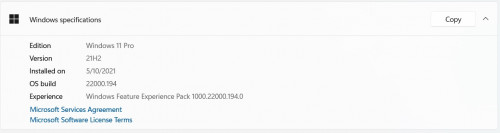
OMG! Microsoft dare to use that .194 as Final Windows 11 !!! Bravo! Microsoft !!!
Same build as .194 after update using Windows 11 ISO from https://www.microsoft.com/en-us/software-download/windows11  |
|
|
Oct 5 2021, 09:52 AM
|

All Stars
14,909 posts Joined: Jul 2005 
|
QUOTE(Andrewtst @ Oct 5 2021, 09:34 AM) OMG! Microsoft dare to use that .194 as Final Windows 11 Any issue with the .194?Serious question by the way because I really don't know  |
|
|
Oct 5 2021, 10:04 AM
|
|
Senior Member
4,158 posts Joined: Jan 2003 From: KL
|
Updated this morning, i kinda like the new design
 |
|
|
|
|
|
Oct 5 2021, 10:40 AM
Show posts by this member only | IPv6 | Post
#447
|
|
All Stars
29,773 posts Joined: Jan 2009 From: Johor, Malaysia.
|
QUOTE(sHawTY @ Oct 5 2021, 09:52 AM) Any issue with the .194? They is two bugs very annoying me.Serious question by the way because I really don't know 1) Single click for right click content menu not working in proper. This do fix in Dev Channel build but not in this so call final .194 build. 2) The notification at Taskbar will simply fly here and there once you had point your mouse cursor at Taskbar clock and date. This post has been edited by Andrewtst: Oct 5 2021, 10:41 AM |
|
|
Oct 5 2021, 08:11 PM
Show posts by this member only | IPv6 | Post
#448
|
|
Junior Member
277 posts Joined: Oct 2016
|
The Paint app look the same old Paint to me.
|
|
|
Oct 5 2021, 08:39 PM
|
|
All Stars
29,773 posts Joined: Jan 2009 From: Johor, Malaysia.
|
QUOTE(life5tyle @ Oct 5 2021, 08:11 PM) The Paint app look the same old Paint to me. The New of following need update from Microsoft Store.
|
|
|
Oct 5 2021, 09:12 PM
|
|
Senior Member
4,158 posts Joined: Jan 2003 From: KL
|
I'm experiencing internet connection via LAN keep disconnected itself after few hours, already 3rd time today so far, even i unplug and replug the LAN cable still can't bring back the connection, have to restart the PC.
|
|
|
Oct 5 2021, 09:56 PM
Show posts by this member only | IPv6 | Post
#451
|
|
All Stars
12,040 posts Joined: Oct 2017
|
Just open Dell website, desktop is show windows 11
So fast can ship with windows 11 |
|
|
Oct 6 2021, 12:34 AM
|
|
Junior Member
330 posts Joined: Jan 2019
|
any one use win 11 with mouse without border ?
i worry once i update, i need two set KB n Mouse. |
|
|
Oct 6 2021, 01:23 AM
|
|
All Stars
29,773 posts Joined: Jan 2009 From: Johor, Malaysia.
|
QUOTE(X1X1 @ Oct 6 2021, 12:34 AM) any one use win 11 with mouse without border ? I am using it, working perfectly fine. No worried. i worry once i update, i need two set KB n Mouse.   X1X1 liked this post
|
|
|
|
|
|
Oct 6 2021, 01:32 AM
|
|
Junior Member
330 posts Joined: Jan 2019
|
QUOTE(Andrewtst @ Oct 6 2021, 01:23 AM) I am using it, working perfectly fine. No worried. thanks .... yah tomorrow update win 11 .. Andrewtst liked this post
|
|
|
Oct 6 2021, 06:20 AM
|
|
Junior Member
330 posts Joined: Jan 2019
|
just down upgrade but revert back to win 10.
there is few software not compatible. 1. stardock fences fail. 2.powertoys fail. 3.UltraViewer fail. |
|
|
Oct 6 2021, 08:49 AM
Show posts by this member only | IPv6 | Post
#456
|

Senior Member
1,107 posts Joined: Jul 2007 From: 192.0.0.1
|
I can't seem to pop out my taskbar on my second screen when I choose to hide it.
It works well with my laptop screen but on my external monitor, quite hard to get it to pop out back. Anyone else facing this issue? |
|
|
Oct 6 2021, 10:20 AM
|
|
All Stars
29,773 posts Joined: Jan 2009 From: Johor, Malaysia.
|
QUOTE(X1X1 @ Oct 6 2021, 06:20 AM) just down upgrade but revert back to win 10. Powertoys is confirmed working. New version was release and design for Windows 11.there is few software not compatible. 1. stardock fences fail. 2.powertoys fail. 3.UltraViewer fail. You can get it from Microsoft Store. |
|
|
Oct 6 2021, 11:29 AM
|

Senior Member
8,642 posts Joined: Feb 2006 From: Jelutong Penang  
|
want to get back full menu context menu
https://www.tomshardware.com/how-to/windows...c-context-menus |
|
|
Oct 6 2021, 01:29 PM
Show posts by this member only | IPv6 | Post
#459
|
|
All Stars
12,040 posts Joined: Oct 2017
|
https://support.microsoft.com/en-us/windows...8b-2ce77ac7c70e
Install on not supported pc QUOTE Warning: Microsoft recommends against installing Windows 11 on a device that does not meet the Windows 11 minimum system requirements. If you choose to install Windows 11 on a device that does not meet these requirements, and you acknowledge and understand the risks, you can create the following registry key values and bypass the check for TPM 2.0 (at least TPM 1.2 is required) and the CPU family and model. Registry Key: HKEY_LOCAL_MACHINE\SYSTEM\Setup\MoSetup Name: AllowUpgradesWithUnsupportedTPMOrCPU Type: REG_DWORD Value: 1 Note: Serious problems might occur if you modify the registry incorrectly by using Registry Editor or by using another method. These problems might require that you reinstall the operating system. Microsoft cannot guarantee that these problems can be solved. Modify the registry at your own risk. |
|
|
Oct 6 2021, 01:37 PM
Show posts by this member only | IPv6 | Post
#460
|
|
Senior Member
2,516 posts Joined: Mar 2016
|
Anyone here noticed that navigating files/folders in file explorer seems slower than windows 10 and sometimes it would not register my clicks? pressing F11(full screen) would make it snappy This post has been edited by yongtjunkit: Oct 6 2021, 05:00 PM WhiteFlag liked this post
|
| Change to: |  0.0313sec 0.0313sec
 0.43 0.43
 6 queries 6 queries
 GZIP Disabled GZIP Disabled
Time is now: 11th December 2025 - 05:07 AM |
 Quote
Quote