

QUOTE(failed.hashcheck @ Apr 3 2022, 12:57 AM)
In Sabah you should use celcom only if it's confirmed serviced by hsbb not celcom timur

what is the issue with Celcom if serviced by Celcom Timur?Celcom Home Fibre - 30Mbps @ RM80. Yay or Nay?, Anything on Celcom Home Fibre
|
|
 Apr 4 2022, 04:26 PM Apr 4 2022, 04:26 PM
Show posts by this member only | IPv6 | Post
#241
|
 
Junior Member
191 posts Joined: Oct 2007  
|
QUOTE(failed.hashcheck @ Apr 3 2022, 12:57 AM) In Sabah you should use celcom only if it's confirmed serviced by hsbb not celcom timur what is the issue with Celcom if serviced by Celcom Timur? |
|
|
|
|
|
Apr 11 2022, 08:07 AM
|

Senior Member
2,096 posts Joined: Aug 2009 From: Shithole Klang
|
Just noticed the router firmware update prompt actually updates to factory firmware, thus unlock the @celcomfibre wifi suffix.
guess this does not void celcom warranty since the update is done by router itself |
|
|
Apr 18 2022, 06:01 PM
|

Junior Member
393 posts Joined: Nov 2006
|
Finally I've signed on to Celcom Fibre and am using it now. My setup is using the TP-Link router provided by Celcom. I tried looking DNS setting but to no avail. Anyone knows how I can change the DNS in the router (TP-Link AX1500)?
|
|
|
Apr 19 2022, 12:12 AM
Show posts by this member only | IPv6 | Post
#244
|
|
Senior Member
1,524 posts Joined: Dec 2020 From: Perak
|
QUOTE(chiwawa10 @ Apr 18 2022, 06:01 PM) Finally I've signed on to Celcom Fibre and am using it now. My setup is using the TP-Link router provided by Celcom. I tried looking DNS setting but to no avail. Anyone knows how I can change the DNS in the router (TP-Link AX1500)? Router supplied by the ISP, some functions on the router have been removed,since the router uses a ISP firmware |
|
|
Apr 19 2022, 01:39 AM
|
|
Senior Member
2,096 posts Joined: Aug 2009 From: Shithole Klang
|
QUOTE(chiwawa10 @ Apr 18 2022, 06:01 PM) Finally I've signed on to Celcom Fibre and am using it now. My setup is using the TP-Link router provided by Celcom. I tried looking DNS setting but to no avail. Anyone knows how I can change the DNS in the router (TP-Link AX1500)? You logged in as limited userUse actual admin instead username: admin password: c3lc0msuper This post has been edited by failed.hashcheck: Apr 19 2022, 01:40 AM |
|
|
Apr 20 2022, 05:27 PM
|
|
Junior Member
393 posts Joined: Nov 2006
|
QUOTE(failed.hashcheck @ Apr 19 2022, 01:39 AM) You logged in as limited user Have already logged in as admin but still can't find the setting. From what I gather on the Internet, it's supposedly found in Network -> Internet page. But mine is nowhere to be found.Use actual admin instead username: admin password: c3lc0msuper |
|
|
|
|
|
Apr 20 2022, 07:22 PM
|
|
Senior Member
2,096 posts Joined: Aug 2009 From: Shithole Klang
|
QUOTE(chiwawa10 @ Apr 20 2022, 05:27 PM) Have already logged in as admin but still can't find the setting. From what I gather on the Internet, it's supposedly found in Network -> Internet page. But mine is nowhere to be found. Advanced > Network > Internet > Advanced Settings > Dns Address > Primary/Secondary DNS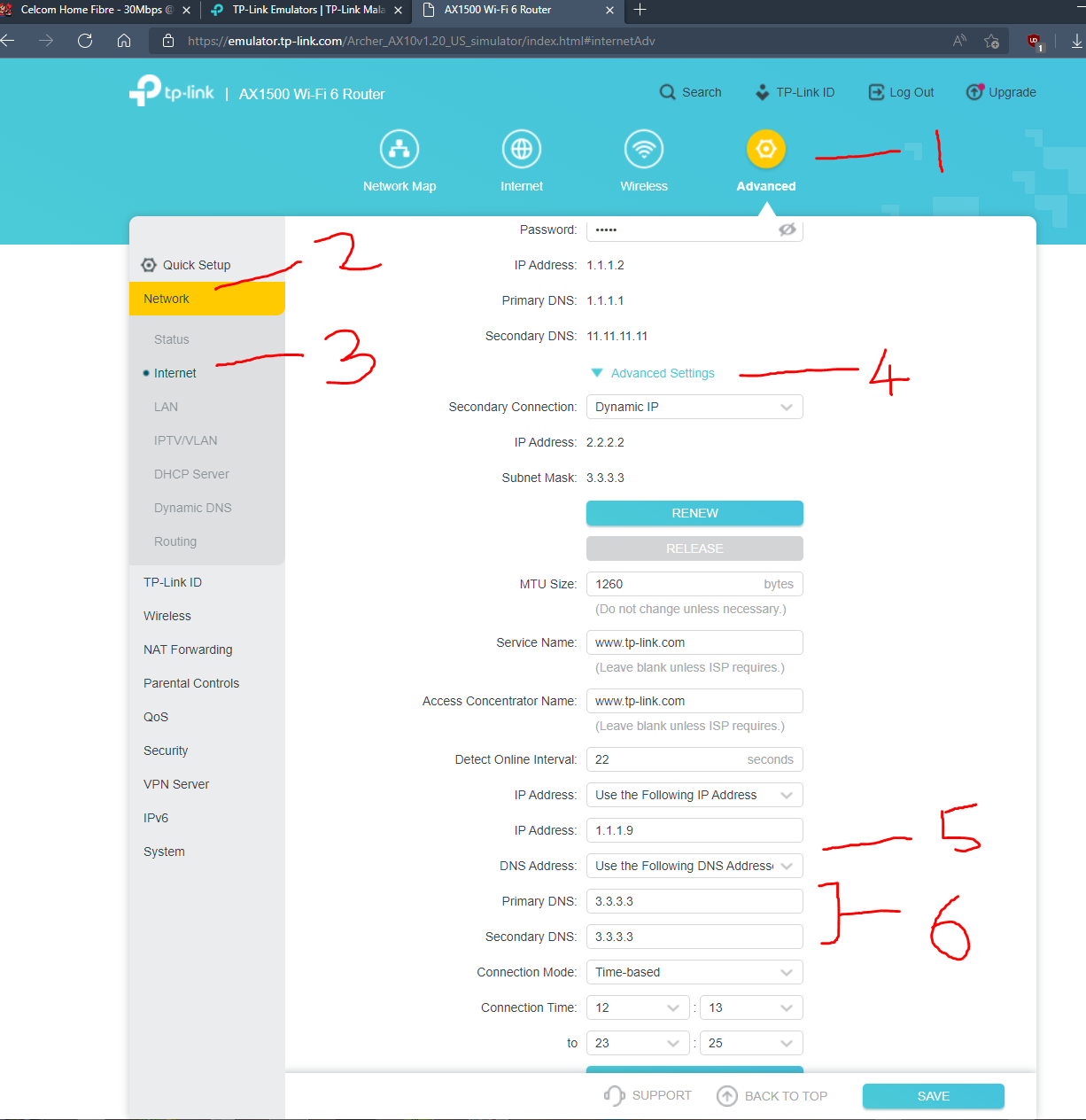 If you are unable to access this page, you are somehow still in limited user. not admin. |
|
|
Apr 22 2022, 03:43 PM
|
|
Junior Member
393 posts Joined: Nov 2006
|
QUOTE(failed.hashcheck @ Apr 20 2022, 07:22 PM) Advanced > Network > Internet > Advanced Settings > Dns Address > Primary/Secondary DNS Hm.... I'm already logged in as admin and that is the account given to me by the vendor. However, I noticed that it prompts me to upgrade the firmware. Maybe because I'm running an older version of firmware where this option is not available. I definitely don't see the advance settings option.If you are unable to access this page, you are somehow still in limited user. not admin. |
|
|
Apr 24 2022, 05:30 PM
Show posts by this member only | IPv6 | Post
#249
|
|
Junior Member
214 posts Joined: May 2017
|
QUOTE(chiwawa10 @ Apr 22 2022, 03:43 PM) Hm.... I'm already logged in as admin and that is the account given to me by the vendor. However, I noticed that it prompts me to upgrade the firmware. Maybe because I'm running an older version of firmware where this option is not available. I definitely don't see the advance settings option. worst case scenario you can manually set DNS on device itself. better move on to DNS over https/TLS as below. for iOS/Mac https://www.quad9.net/news/blog/ios-mobile-...oning-profiles/ for android https://support.quad9.net/hc/en-us/articles...-DNS-with-Quad9 |
|
|
May 9 2022, 11:08 AM
Show posts by this member only | IPv6 | Post
#250
|
|
Junior Member
81 posts Joined: Jan 2020
|
hii all
Currently facing some website are blocked by MCMC, not sure why example: linktree, On maxis fiber no issue, on DG fiber & Unifi blocked... using digi fiber & unifi show this : 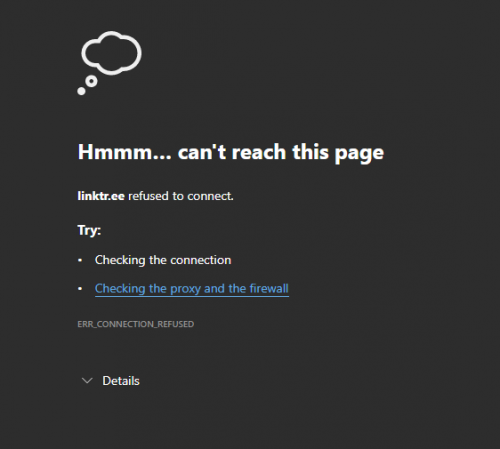 anyone can try to check is your celcom fiber also facing same issue? |
|
|
May 10 2022, 05:48 PM
|
|
Senior Member
2,096 posts Joined: Aug 2009 From: Shithole Klang
|
QUOTE(AdrianS_99 @ May 9 2022, 11:08 AM) hii all No problem from my network. Can ping can curl.Currently facing some website are blocked by MCMC, not sure why example: linktree, On maxis fiber no issue, on DG fiber & Unifi blocked... using digi fiber & unifi show this : anyone can try to check is your celcom fiber also facing same issue? 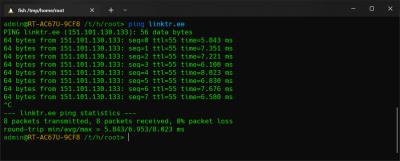
blocked website would be directed to 175.139.142.25. This one is not blocked. AdrianS_99 liked this post
|
|
|
May 19 2022, 02:17 PM
|

Senior Member
862 posts Joined: Jul 2008
|
QUOTE(failed.hashcheck @ Apr 20 2022, 07:22 PM) Advanced > Network > Internet > Advanced Settings > Dns Address > Primary/Secondary DNS Please help... I couldn't access this Page settings.If you are unable to access this page, you are somehow still in limited user. not admin. How should I go about it? Am I limited user? my login is admin c3lc0msuper |
|
|
May 19 2022, 02:36 PM
|
|
Senior Member
2,096 posts Joined: Aug 2009 From: Shithole Klang
|
QUOTE(WyjSwmW @ May 19 2022, 02:17 PM) Please help... I couldn't access this Page settings. If you don't have that option, set the dns via dhcp options instead.How should I go about it? Am I limited user? my login is admin c3lc0msuper 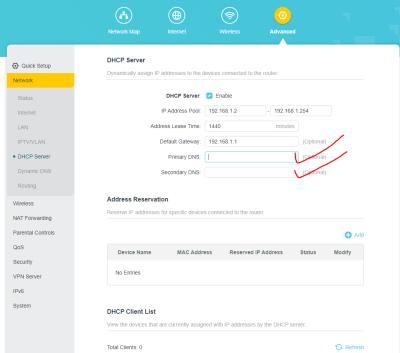
|
|
|
|
|
|
Jun 7 2022, 02:58 PM
|
|
Junior Member
397 posts Joined: Oct 2021
|
QUOTE(failed.hashcheck @ Nov 30 2021, 12:19 PM) Very straightforward. No question asked. Just call 1111 and tell them you want to request for public ip. what is the reason to change from private IP to public IPThey will insist to send technician home. But you can just diy and let the tech know its all good when he make visit call. And send him some requested screenshot and pics maybe. |
|
|
Jun 7 2022, 03:37 PM
Show posts by this member only | IPv6 | Post
#255
|
|
Junior Member
214 posts Joined: May 2017
|
QUOTE(chupapi_munyayo @ Jun 7 2022, 02:58 PM) what is the reason to change from private IP to public IP if you want to access CCTV at home, host anything at home. |
|
|
Jun 14 2022, 09:17 PM
|
|
Senior Member
1,103 posts Joined: Nov 2009
|
Anyone having router connection recently?
Always no internet these few days at night |
|
|
Jun 26 2022, 12:41 AM
|

All Stars
14,287 posts Joined: Jan 2011
|
the termination tnc has been changed for celcom fibre.
now also no more rm500 maximum charge for termination. 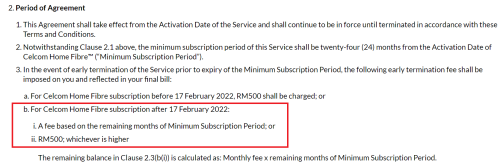 |
|
|
Jul 4 2022, 03:27 PM
|
|
Senior Member
921 posts Joined: Apr 2008 From: KL
|
Anyone on Celcom Fibre facing packet loss problem over the past few days?
The issue comes and go intermediatealy, causing some web pages cant load and crappy VOIP voice 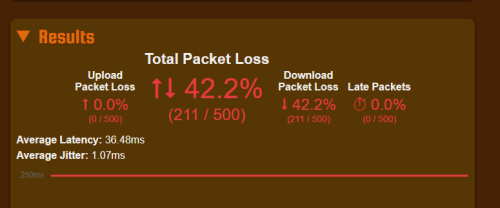 |
|
|
Jul 6 2022, 07:53 PM
|
|
Senior Member
2,096 posts Joined: Aug 2009 From: Shithole Klang
|
QUOTE(Dixon93 @ Jul 4 2022, 03:27 PM) Anyone on Celcom Fibre facing packet loss problem over the past few days? My connection is doing fine. Im running rsync to LA and Tokyo all the time everyday so any packet loss or latency spike should be immediately noticeable.The issue comes and go intermediatealy, causing some web pages cant load and crappy VOIP voice |
|
|
Jul 7 2022, 12:13 PM
|

Junior Member
205 posts Joined: Sep 2007
|
Am interested in getting rm80 plan.
Is the provided router's firmware a custom firmware like isp M's router or is it stock tp link firmware with C's isp settings only? |
| Change to: |  0.0373sec 0.0373sec
 0.43 0.43
 6 queries 6 queries
 GZIP Disabled GZIP Disabled
Time is now: 12th December 2025 - 04:50 PM |
 Quote
Quote