Welcome Guest ( Log In | Register )

Bump Topic Topic Closed RSS Feed
377 Pages « < 81 82 83 84 85 > » Bottom

Outline · [ Standard ] · Linear+

Unifi Official TM UniFi High Speed Broadband Thread V38, READ 1ST PAGE FOR TURBO SPEED INFO!

views
     
go626201
post Feb 2 2020, 11:12 PM

Regular
******
Senior Member
1,882 posts

Joined: Sep 2017
QUOTE(kahjye @ Feb 2 2020, 10:18 PM)
im sorry , ive been with the 300mbps turbo unifi all the times.

but i noticed that during downloads it can reach 25 to 30 mbps then it will be throttled to 30mbps. , checked in fast.com as well.

after 15mins or so of no downloads , the speed raise back to normal.

anyone similar?
*
What file you are downloading and from where?
Might be the file server overload.
If torrent,then may router overload.

And also mbps not equal to MB/s. 100mbps= 12.5MB/s so about 35 MB/s is normal.
TSSilentVampire
post Feb 2 2020, 11:24 PM

Networking Enthusiast
*******
Senior Member
5,714 posts

Joined: Mar 2007


QUOTE(judehow @ Feb 2 2020, 08:19 PM)
To be hornest since 1 st time tm have unifi fiber,  before  this I use streamyx
*
Get a new router. It is very easy to setup and if there are any issues, you can claim warranty directly yourself. Trust in your own skills and there are tutorials to set up your own router.
Dylnyat
post Feb 3 2020, 12:15 AM

Getting Started
**
Junior Member
216 posts

Joined: Dec 2019


What's wrong with unifi????


Twitter image & videos soo slow to load or can't even load.

Zalora also same.

Tunetalk also same
Whyy?????

But when using vpn, ok pula. Aishhhhhh.

I did change my unifi router dns, but mcm tkde kesan jak. 🤣🤣🤣🤣.

Help?

Ke tm ade masalah skrg ni, anyone facing thissss???

Easy My here!
SUSjudehow
post Feb 3 2020, 06:26 AM

Look at all my stars!!
*******
Senior Member
4,118 posts

Joined: Feb 2010
QUOTE(SilentVampire @ Feb 2 2020, 11:24 PM)
Get a new router. It is very easy to setup and if there are any issues, you can claim warranty directly yourself. Trust in your own skills and there are tutorials to set up your own router.
*
Yup , will try . I currently waiting for the technician man form tm to check what is the issue , then if is the router then I see buy router from tm point or computer shop , will try to keep you guys updated.
SUSpakji
post Feb 3 2020, 10:56 PM

Regular
******
Senior Member
1,386 posts

Joined: Nov 2012


QUOTE(judehow @ Feb 2 2020, 06:09 PM)
I am think to buy at tm point so that why can fix for me, cause i scare  if buy outside  tm will not fix for me and i am not IT Expert.
*
seen you are noob
don't buy tm point router its poor
i using unifi btu cannot change because btu is good don't care change btu
i got unifi btu and tm give free router tp link i don't like and seen problem and unstable
so i changed my own ASUS RT-AC68U almost prefect going strong

i was using streamyx that i bought ASUS RT-AC68U with 4mbps streamyx so already upgrade unifi 100mbps rm129
my house tm installer unifi so i already ask PPPOE unifi password i already take photo tm technician his tablet so i already saved my phone then i unplug free tm router and plug my own ASUS RT-AC68U i type unifi password almost connected prefect
SUSpakji
post Feb 3 2020, 11:02 PM

Regular
******
Senior Member
1,386 posts

Joined: Nov 2012


QUOTE(judehow @ Feb 3 2020, 06:26 AM)
Yup , will try . I currently  waiting for the technician  man form tm to check what is the issue , then if is the router  then I see buy router from tm point or computer shop , will try to keep you guys updated.
*
seen you are susah buy router from tm point its very bad i see you are noob rclxub.gif rclxub.gif rclxub.gif

i said not recommend buy router from tm point rclxub.gif

computer shop they sell ASUS Router don't mistake wrong model because wont support
SUSjudehow
post Feb 3 2020, 11:24 PM

Look at all my stars!!
*******
Senior Member
4,118 posts

Joined: Feb 2010
QUOTE(pakji @ Feb 3 2020, 10:56 PM)
seen you are noob
don't buy tm point router its poor
i using unifi btu cannot change because btu is good don't care change btu
i got unifi btu and tm give free router tp link i don't like and seen problem and unstable
so i changed my own ASUS RT-AC68U almost prefect going strong

i was using streamyx that i bought ASUS RT-AC68U with 4mbps streamyx so already upgrade unifi 100mbps rm129
my house tm installer unifi so i already ask PPPOE unifi password i already take photo tm technician his tablet so i already saved my phone then i unplug free tm router and plug my own ASUS RT-AC68U i type unifi password almost connected prefect
*
QUOTE(pakji @ Feb 3 2020, 11:02 PM)
seen you are susah buy router from tm point its very bad i see you are noob  rclxub.gif  rclxub.gif  rclxub.gif

i said not recommend buy router from tm point  rclxub.gif

computer shop they sell ASUS Router don't mistake wrong model because wont support
*
I will check with the computer shop.

SUSpakji
post Feb 3 2020, 11:45 PM

Regular
******
Senior Member
1,386 posts

Joined: Nov 2012


QUOTE(judehow @ Feb 3 2020, 11:24 PM)
I will check with the  computer shop.
*
once you bought router
you need unifi password

do you know how to setup router if you still noob then lagi lagi susah


SUSjudehow
post Feb 4 2020, 12:08 AM

Look at all my stars!!
*******
Senior Member
4,118 posts

Joined: Feb 2010
QUOTE(pakji @ Feb 3 2020, 11:45 PM)
once you bought router
you need unifi password

do you know how to setup router if you still noob then lagi lagi susah
*
I will follow manual guide
SUSpakji
post Feb 4 2020, 12:11 AM

Regular
******
Senior Member
1,386 posts

Joined: Nov 2012


QUOTE(judehow @ Feb 4 2020, 12:08 AM)
I will follow manual  guide
*
ok good luck
Jjuggler
post Feb 4 2020, 01:25 AM

Narcissistic Genius
******
Senior Member
1,341 posts

Joined: Dec 2016
QUOTE(judehow @ Feb 3 2020, 06:26 AM)
Yup , will try . I currently  waiting for the technician  man form tm to check what is the issue , then if is the router  then I see buy router from tm point or computer shop , will try to keep you guys updated.
*
Hi there my friend, I seen you have trouble picking up a right router for you to replace your current ageing router. You can buy your own third-party router at any IT shops, I prefer you to buy through shopee. If you're planning to take a cheaper wireless router model, I can suggest two major budget brands over here, D-Link and TP-Link. Their entry-level Wi-Fi 5 or 802.11ac (in general term we call it as Dual-Band Wireless Router) is quite cheap. You can head to a few reputable online reseller such as OOKAS to buy a unit. Recently, there is a Trial-Program offered by the seller with minimum fees. Just stay away from ISP routers due to poorly configured code and poor security issued updates. As for your problem, you can refer to a few setup guides on how to setup the router for first use by yourself. So you can save RM53 in the future if your home network goes wrong.


P/S: Well, just think this forum as a learning platform for you to expand your knowledge in networking field for your own future reference and no one is noob over here.
cfa28
post Feb 4 2020, 07:56 AM

Look at all my stars!!
*******
Senior Member
4,830 posts

Joined: Jan 2012


QUOTE(judehow @ Feb 4 2020, 12:08 AM)
I will follow manualĀ  guide
*
You can check out this website for guide on how to setup your own router

What you need is the pppoe password

https://www.blacktubi.com/unifi-router/

This post has been edited by cfa28: Feb 4 2020, 08:27 AM
SUSCrimsonKing
post Feb 4 2020, 08:24 AM

Getting Started
**
Junior Member
262 posts

Joined: Oct 2019
QUOTE(cfa28 @ Feb 4 2020, 07:56 AM)
You can check out this website for guide on how to setup your own router

What you need is the pppoe password
*
Where is the website?

cfa28
post Feb 4 2020, 08:28 AM

Look at all my stars!!
*******
Senior Member
4,830 posts

Joined: Jan 2012


QUOTE(CrimsonKing @ Feb 4 2020, 08:24 AM)
Where is the website?
*
Apologies realise that I forgot to paste the link

https://www.blacktubi.com/unifi-router/
SUSjudehow
post Feb 4 2020, 12:11 PM

Look at all my stars!!
*******
Senior Member
4,118 posts

Joined: Feb 2010
QUOTE(Jjuggler @ Feb 4 2020, 01:25 AM)
Hi there my friend, I seen you have trouble picking up a right router for you to replace your current ageing router. You can buy your own third-party router at any IT shops, I prefer you to buy through shopee. If you're planning to take a cheaper wireless router model, I can suggest two major budget brands over here, D-Link and TP-Link. Their entry-level Wi-Fi 5 or 802.11ac (in general term we call it as Dual-Band Wireless Router) is quite cheap. You can head to a few reputable online reseller such as OOKAS to buy a unit. Recently, there is a Trial-Program offered by the seller with minimum fees. Just stay away from ISP routers due to poorly configured code and poor security issued updates. As for your problem, you can refer to a few setup guides on how to setup the router for first use by yourself. So you can save RM53 in the future if your home network goes wrong.
P/S: Well, just think this forum as a learning platform for you to expand your knowledge in networking field for your own future reference and no one is noob over here.
*
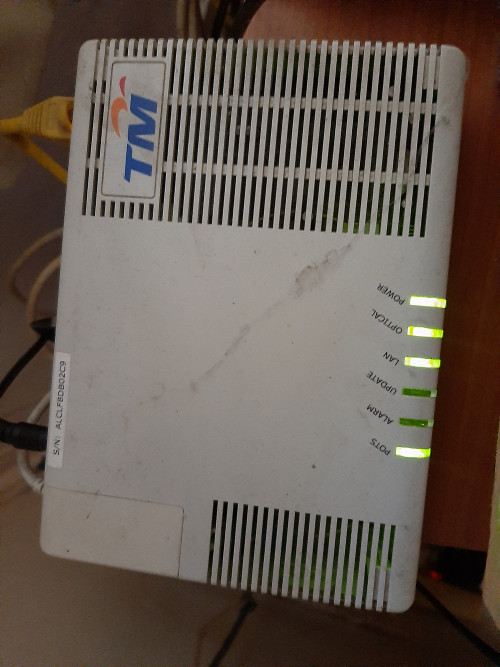
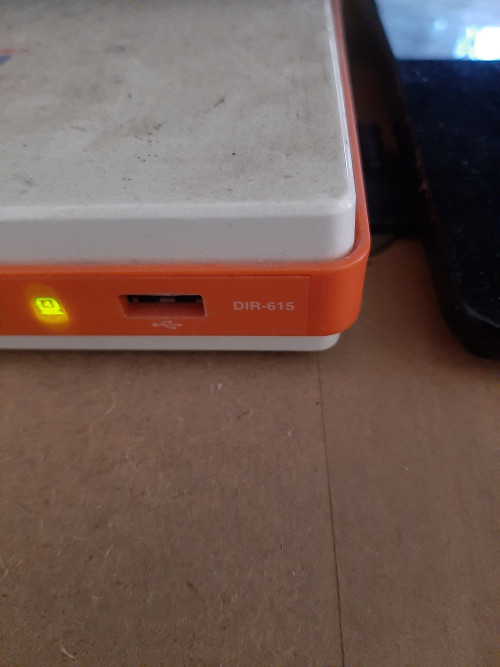
Thanks for your advice and explanation , before this I am level 1 computer hardware but , not including networking . I will show my modem and router just for the evidence worry people say I trolling

user posted image

user posted image
Jjuggler
post Feb 4 2020, 12:29 PM

Narcissistic Genius
******
Senior Member
1,341 posts

Joined: Dec 2016
QUOTE(judehow @ Feb 4 2020, 12:11 PM)
Thanks for your advice  and explanation  ,  before this I am  level 1 computer  hardware but , not including  networking . I will show my modem and router  just for the evidence  worry people say I trolling 

user posted image

user posted image
*
It seems you're using an old alcatel-lucent ONU (modem) and the ancient dir615. My advice, you can cancel your current package and subscribe again to get a newer equipment with 24months contract or you can request to TM to change the BTU (Modem) to a newer one and router (if you decided to use the stock router again). Try to see your luck. biggrin.gif
SUSjudehow
post Feb 4 2020, 12:46 PM

Look at all my stars!!
*******
Senior Member
4,118 posts

Joined: Feb 2010
QUOTE(Jjuggler @ Feb 4 2020, 12:29 PM)
It seems you're using an old alcatel-lucent ONU (modem) and the ancient dir615. My advice, you can cancel your current package and subscribe again to get a newer equipment with 24months contract or you can request to TM to change the BTU (Modem) to a newer one and router (if you decided to use the stock router again). Try to see your luck.  biggrin.gif
*
Do you have new equipment picture for the home unifi ? I call tm once last year about change the equipment they say if your BTU still work will not change but the route can but 24 month contract.
Jjuggler
post Feb 4 2020, 01:05 PM

Narcissistic Genius
******
Senior Member
1,341 posts

Joined: Dec 2016
QUOTE(judehow @ Feb 4 2020, 12:46 PM)
Do you have new equipmentĀ  pictureĀ  for the homeĀ  unifi ? I call tm onceĀ  last year about change the equipmentĀ Ā  they say if your BTU still work will not changeĀ  but the routeĀ  can but 24 month contract.
*
I am using my own third-party router. The newer modem comes with a black elegant case. For standard home users, you will get a modem (model varies for the place, certain place will get nokia like mine, certain will get huawei) and a really basic AC1200 router, the supplied router model is D-Link DIR-842, TP-LINK C1200 and some may get the Netis router.

[attachmentid=10419018]

This post has been edited by Jjuggler: Feb 4 2020, 01:08 PM
SUSjudehow
post Feb 4 2020, 01:10 PM

Look at all my stars!!
*******
Senior Member
4,118 posts

Joined: Feb 2010
QUOTE(Jjuggler @ Feb 4 2020, 01:05 PM)
I am using my own third-party router. The newer modem comes with a black elegant case. For standard home users, you will get a modem (model varies for the place, certain place will get nokia like mine, certain will get huawei) and a really basic AC1200 router, the supplied router model is D-Link DIR-842, TP-LINK C1200 and some may get the Netis router.

[attachmentid=10419018]
*
So many different modem TM have but most importantly connection must smooth
Jjuggler
post Feb 4 2020, 01:19 PM

Narcissistic Genius
******
Senior Member
1,341 posts

Joined: Dec 2016
QUOTE(judehow @ Feb 4 2020, 01:10 PM)
So many different modem TM  have but most importantly connection must smooth
*
TM is improving these days. So they're one of the best fibre provider for landed currently although they're the dominant fibre company.

377 Pages « < 81 82 83 84 85 > » Top
Topic ClosedOptions
 

Change to:
| Lo-Fi Version
0.0380sec    0.25    6 queries    GZIP Disabled
Time is now: 6th December 2025 - 10:30 AM