

Unifi Official TM UniFi High Speed Broadband Thread V38, READ 1ST PAGE FOR TURBO SPEED INFO!
|
|
 Feb 2 2020, 02:25 PM Feb 2 2020, 02:25 PM
Return to original view | IPv6 | Post
#1
|
 
Senior Member
4,118 posts Joined: Feb 2010 
|
Anyone have experience always keep disconnect from wifi? i am using a old rounter i am using home unifi,should change the rounter? Which is new rounter from TM? Thanks |
 Quote
Quote|
|
|
|
|
Feb 2 2020, 02:51 PM
Return to original view | IPv6 | Post
#2
|
|
Senior Member
4,118 posts Joined: Feb 2010
|
QUOTE(y500 @ Feb 2 2020, 02:39 PM) what router u using? Yes, wired thing is if connect wifi also keep disconnect if not hang, i am think change my pakge soonthis?   |
|
|
Feb 2 2020, 05:30 PM
Return to original view | Post
#3
|
|
Senior Member
4,118 posts Joined: Feb 2010
|
QUOTE(SilentVampire @ Feb 2 2020, 04:24 PM) As bro soonwai said, you CAN’T disable the IPTV mode. It will be the same thing for all routers. You will need VLAN tagging for Unifi to work. Just read quit technical not so understand, but what is new pricing for the router and btu unit do i need to change?Read 1st page, 1st post, green text. Read everything. That router is very ancient and is no longer optimal for use. I said that on the 1st page, 1st post. |
|
|
Feb 2 2020, 06:09 PM
Return to original view | Post
#4
|
|
Senior Member
4,118 posts Joined: Feb 2010
|
QUOTE(Jjuggler @ Feb 2 2020, 05:58 PM) It seems you're using a DIR-615 router (first-generation unifi router) - Source: y500, I am think to buy at tm point so that why can fix for me, cause i scare if buy outside tm will not fix for me and i am not IT Expert.If you wish to upgrade to a newer router, I would like to advise you to invest some cash to buy a better router out there. I don't and won't really recommend you to opt for ISP's stock router due to poorly coded firmware and only will be acknowledged by the ISP's when there is actual security breach found/encountered by the cyber-security experts out there before a quick fix over the firmware is issued. |
|
|
Feb 2 2020, 08:19 PM
Return to original view | IPv6 | Post
#5
|
|
Senior Member
4,118 posts Joined: Feb 2010
|
QUOTE(Kellicros @ Feb 2 2020, 06:50 PM) how old is the router tho? To be hornest since 1 st time tm have unifi fiber, before this I use streamyxanyway, setting up new router is pretty basic and just a few simple steps, but you will need to get your unifi password from customer service. |
|
|
Feb 3 2020, 06:26 AM
Return to original view | IPv6 | Post
#6
|
|
Senior Member
4,118 posts Joined: Feb 2010
|
QUOTE(SilentVampire @ Feb 2 2020, 11:24 PM) Get a new router. It is very easy to setup and if there are any issues, you can claim warranty directly yourself. Trust in your own skills and there are tutorials to set up your own router. Yup , will try . I currently waiting for the technician man form tm to check what is the issue , then if is the router then I see buy router from tm point or computer shop , will try to keep you guys updated. |
|
|
|
|
|
Feb 3 2020, 11:24 PM
Return to original view | Post
#7
|
|
Senior Member
4,118 posts Joined: Feb 2010
|
QUOTE(pakji @ Feb 3 2020, 10:56 PM) seen you are noob don't buy tm point router its poor i using unifi btu cannot change because btu is good don't care change btu i got unifi btu and tm give free router tp link i don't like and seen problem and unstable so i changed my own ASUS RT-AC68U almost prefect going strong i was using streamyx that i bought ASUS RT-AC68U with 4mbps streamyx so already upgrade unifi 100mbps rm129 my house tm installer unifi so i already ask PPPOE unifi password i already take photo tm technician his tablet so i already saved my phone then i unplug free tm router and plug my own ASUS RT-AC68U i type unifi password almost connected prefect QUOTE(pakji @ Feb 3 2020, 11:02 PM) seen you are susah buy router from tm point its very bad i see you are noob I will check with the computer shop.  i said not recommend buy router from tm point computer shop they sell ASUS Router don't mistake wrong model because wont support |
|
|
Feb 4 2020, 12:08 AM
Return to original view | Post
#8
|
|
Senior Member
4,118 posts Joined: Feb 2010
|
QUOTE(pakji @ Feb 3 2020, 11:45 PM) once you bought router I will follow manual guideyou need unifi password do you know how to setup router if you still noob then lagi lagi susah |
|
|
Feb 4 2020, 12:11 PM
Return to original view | Post
#9
|
|
Senior Member
4,118 posts Joined: Feb 2010
|
QUOTE(Jjuggler @ Feb 4 2020, 01:25 AM) Hi there my friend, I seen you have trouble picking up a right router for you to replace your current ageing router. You can buy your own third-party router at any IT shops, I prefer you to buy through shopee. If you're planning to take a cheaper wireless router model, I can suggest two major budget brands over here, D-Link and TP-Link. Their entry-level Wi-Fi 5 or 802.11ac (in general term we call it as Dual-Band Wireless Router) is quite cheap. You can head to a few reputable online reseller such as OOKAS to buy a unit. Recently, there is a Trial-Program offered by the seller with minimum fees. Just stay away from ISP routers due to poorly configured code and poor security issued updates. As for your problem, you can refer to a few setup guides on how to setup the router for first use by yourself. So you can save RM53 in the future if your home network goes wrong. Thanks for your advice and explanation , before this I am level 1 computer hardware but , not including networking . I will show my modem and router just for the evidence worry people say I trolling P/S: Well, just think this forum as a learning platform for you to expand your knowledge in networking field for your own future reference and no one is noob over here. 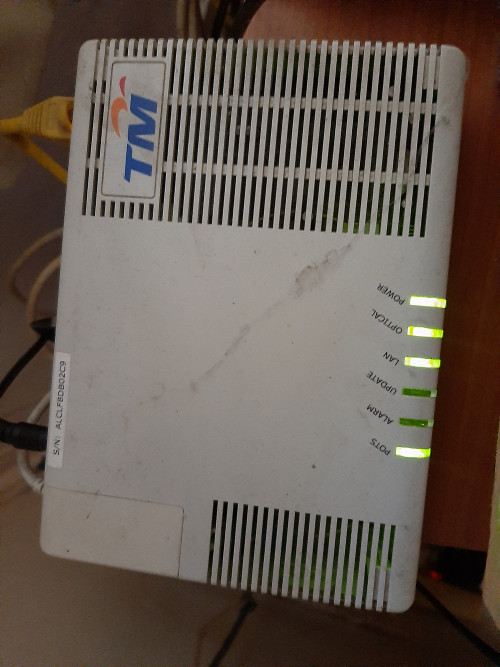 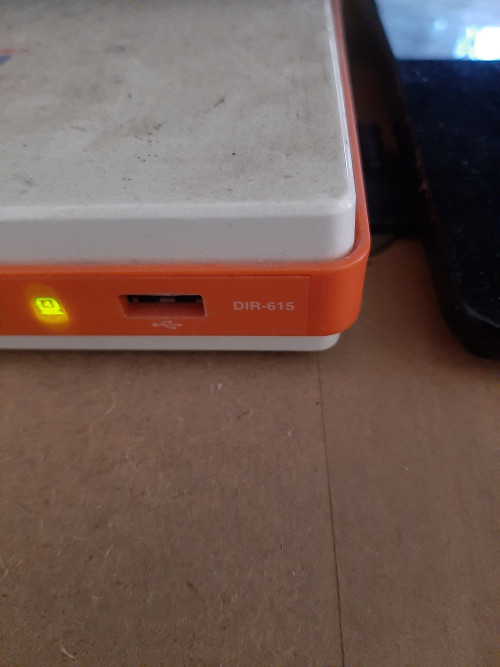 |
|
|
Feb 4 2020, 12:46 PM
Return to original view | Post
#10
|
|
Senior Member
4,118 posts Joined: Feb 2010
|
QUOTE(Jjuggler @ Feb 4 2020, 12:29 PM) It seems you're using an old alcatel-lucent ONU (modem) and the ancient dir615. My advice, you can cancel your current package and subscribe again to get a newer equipment with 24months contract or you can request to TM to change the BTU (Modem) to a newer one and router (if you decided to use the stock router again). Try to see your luck. Do you have new equipment picture for the home unifi ? I call tm once last year about change the equipment they say if your BTU still work will not change but the route can but 24 month contract. |
|
|
Feb 4 2020, 01:10 PM
Return to original view | Post
#11
|
|
Senior Member
4,118 posts Joined: Feb 2010
|
QUOTE(Jjuggler @ Feb 4 2020, 01:05 PM) I am using my own third-party router. The newer modem comes with a black elegant case. For standard home users, you will get a modem (model varies for the place, certain place will get nokia like mine, certain will get huawei) and a really basic AC1200 router, the supplied router model is D-Link DIR-842, TP-LINK C1200 and some may get the Netis router. So many different modem TM have but most importantly connection must smooth[attachmentid=10419018] |
|
|
Feb 4 2020, 02:16 PM
Return to original view | Post
#12
|
|
Senior Member
4,118 posts Joined: Feb 2010
|
QUOTE(Jjuggler @ Feb 4 2020, 01:19 PM) TM is improving these days. So they're one of the best fibre provider for landed currently although they're the dominant fibre company. Agree. That is a good signQUOTE(doremon @ Feb 4 2020, 01:50 PM) Successfully downgraded from 100mbps to 30mbps (RM94.35nett) monthly. Odd part now 30mbps more stable than 100mbps lol. Anyone here on 30mbps got lesser than RM94.35nett monthly? How many user is using and do have the hyppy tv too? |
|
|
Feb 4 2020, 02:25 PM
Return to original view | Post
#13
|
|
Senior Member
4,118 posts Joined: Feb 2010
|
QUOTE(doremon @ Feb 4 2020, 02:19 PM) 2 users and just internet line alone. No hyppy tv whatsoever. Suprisigly movie streaming smoother than before. Odd I was think downgrade too but scare wil lag cause got 6 user in home |
|
|
|
|
|
Feb 4 2020, 07:23 PM
Return to original view | Post
#14
|
|
Senior Member
4,118 posts Joined: Feb 2010
|
QUOTE(Jjuggler @ Feb 4 2020, 03:19 PM) In general, most ISP's supplies a pretty standard router, so no complaint on that. For power users, they will opt for a better wireless router with more powerful processing power. They used to be troublesome during their early days, but now, they are improving. I don't face any major problem at the moment, worst to worst, my BTU once went kaput before solved within 8 hours with a new BTU replacement. Well for me, they are okay. QUOTE(mech-warrior @ Feb 4 2020, 03:45 PM) 6 ppl ada torrent &Netflix or not. If got better stick with 100mbps lo You see guys can see the error in the picture is at top right 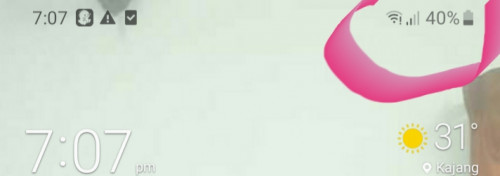 |
|
|
Feb 5 2020, 02:17 PM
Return to original view | Post
#15
|
|
Senior Member
4,118 posts Joined: Feb 2010
|
QUOTE(misspinky @ Feb 5 2020, 01:08 PM) This is an ancient hardware, what package internet speed do you using right now? better change your package if paid higher than yours right now, plus you got new hardware from them. But bare in mind, they will give you d-link router 842 that tm logo. I have using this router with tm stock firmware and d-link firmware. Even though i have changed to d-link firmware, the outcome not quite satisfied but much better than using d-link tm stock firmware. The wifi coverage just normal, wifi speed just good if you stay put nearly router, if you sit far like 3-5meters the wifi speed quite drop and unstable speed. I have experience with other d-link router, the result still not good enough for me. When i changed to tp-link, the speed and coverage much better, but bare in mind just get latest version of that router. Even though many users complaint of heating, just put its at place that temperature normal with external usb pc fan/laptop cooler at router. For price and setup both of brand quite competitive and easy. I remember when my tp-link router got not function well long time ago, tp-link support service change to new one with same model before i change other brand. Just remember if you got router tm dlink 842(black) soon just change to other router that suit for you. good luck. Noted QUOTE(soonwai @ Feb 5 2020, 01:27 PM) Is your modem I-240G-P? I think that already supports gigabit speeds. haven't check the model only the rounter I did some tests with the DIR-615 and 100Mbps UniFi here: https://forum.lowyat.net/index.php?showtopi...post&p=87190299 |
|
|
May 8 2020, 05:24 PM
Return to original view | Post
#16
|
|
Senior Member
4,118 posts Joined: Feb 2010
|
Can I know the speed test from direct connection will be diffrent then wifi ?
My unifi direct connection is Download 80 .3 mbps and upload 56.80 They say I suppose to get 100 MBPS for my packge For wifi mobile download 4 .2 MPBS and upload 3.0 mbps They currently TM Unifi have problem with their wifi connection he say need until 15 may . If still have issue call back . I told cs before mco the speed was bad also the cs did not trust me he think I am lying with test spend . Does all tm customers service have different method solving network issue? wifi How do i improve the wifi rounter speed for mobile usage ? I am not living double story no obstruction blocking my rounter . |
|
|
May 9 2020, 08:21 AM
Return to original view | Post
#17
|
|
Senior Member
4,118 posts Joined: Feb 2010
|
QUOTE(pakji @ May 8 2020, 11:25 PM) you using tm free router like tplink or netis that is crap can't get full speed I am using more on mobile actually. Then line, your router is latest router? wifi speed lowered download 4 .2 MPBS and upload 3.0 mbps look confirm its router problem cannot do anything i already unplug free tplink or netis router its crap so now i using ASUS RT-AC68U Router almost powerfull and LAN Cable i always get full speed look like 102mbps and upload 57mbps near 60mbps wifi i getting 95mbps and upload 52mbps that near full speed noting problem unifi i always getting full speed via LAN Cable for PC Desktop no problem wifi mobile i don't need full speed its not imported so enough speed wifi |
|
|
May 9 2020, 08:35 PM
Return to original view | Post
#18
|
|
Senior Member
4,118 posts Joined: Feb 2010
|
QUOTE(pakji @ May 9 2020, 12:53 PM) my router its already too old most since 2013 or 2014 I just chnage my equipment and extended contract for another 2 yrs and 1 year warranty for equipment I pray this will be last change now I still strong i was use before streamyx so i bought ASUS RT-AC68U then connected streamyx 4mbps then my area finally projected complete fiber cable roll out 2019 so may 2019 completed then installed 30may2019 then they install fiber cable to my room computer table place BTU + Router and connected then they left then i using free tm router but seen unstable i hate so night i got free time then i unplug free tm router cable removed then i plug my own ASUS RT-AC68U then i firmware update latest version then reset factory fresh then new setup then unifi id username and password then yay connected then i use wow to much stable so happy ohhh you use more on mobile wifi then you need buy ASUS RT-AC68U recommend to get stable wifi put standing fan near modem and router they say I need restart every day keep modem and router work well . Attached thumbnail(s) 
|
|
|
May 9 2020, 08:37 PM
Return to original view | Post
#19
|
|
Senior Member
4,118 posts Joined: Feb 2010
|
QUOTE(budakoye @ May 9 2020, 05:26 PM) waiting installation. hopefully tm not give the 'combined modem router' . gg I hope tm can improve by having all in one equipment like hypp tv with rounter together instead have 3 equipment , don't you think it take up space 😄 |
|
|
May 9 2020, 08:50 PM
Return to original view | Post
#20
|
|
Senior Member
4,118 posts Joined: Feb 2010
|
QUOTE(yujin86 @ May 9 2020, 08:44 PM) Wad modem they provide you? DL4480V1Attached thumbnail(s) 
|
|
Topic ClosedOptions
|

| Change to: |  1.9377sec 1.9377sec
 0.57 0.57
 7 queries 7 queries
 GZIP Disabled GZIP Disabled
Time is now: 8th December 2025 - 07:49 AM |
All Rights Reserved © 2002- 2025 Vijandren Ramadass (~unite against racism~)
Powered by Invision Power Board © 2025 IPS, Inc.