Outline ·
[ Standard ] ·
Linear+
Unifi Official TM UniFi High Speed Broadband Thread V38, READ 1ST PAGE FOR TURBO SPEED INFO!
|
fruitie
|
 Feb 5 2020, 12:09 AM Feb 5 2020, 12:09 AM
|
Rise and Shine


|
QUOTE(ben3003 @ Feb 4 2020, 11:44 PM) Hi guys, for unifi playtv newest app.. why keep on still saying in the midst of migrating? The newer app is much better but why my account cannot use? Well, kinda stupid right? I also cannot use, same issue - account hasn't migrated yet.  |
|
|
|
|
|
soonwai
|
Feb 5 2020, 12:16 AM
|
|
|
QUOTE(scion @ Feb 4 2020, 11:47 PM) Black Nokia modem, both no light. Only Power and LAN1 light up Sounds like optical line problem. Check got accidentally pull out or not or bent too much. Maybe rat bite. Probably time to call TM. |
|
|
|
|
|
scion
|
Feb 5 2020, 10:26 AM
|
Getting Started

|
QUOTE(soonwai @ Feb 5 2020, 12:16 AM) Sounds like optical line problem. Check got accidentally pull out or not or bent too much. Maybe rat bite. Probably time to call TM. Done calling TM. Waiting for them to come over to check, will get charge if user site problem. |
|
|
|
|
|
doremon
|
Feb 5 2020, 10:55 AM
|
|
|
QUOTE(scion @ Feb 5 2020, 10:26 AM) Done calling TM. Waiting for them to come over to check, will get charge if user site problem. Remember to nego with them first. Also you have to pay direct to the contractor. Check your billing if they double charge. |
|
|
|
|
|
misspinky
|
Feb 5 2020, 01:08 PM
|
|
|
QUOTE(judehow @ Feb 4 2020, 01:11 PM) Thanks for your advice and explanation , before this I am level 1 computer hardware but , not including networking . I will show my modem and router just for the evidence worry people say I trolling 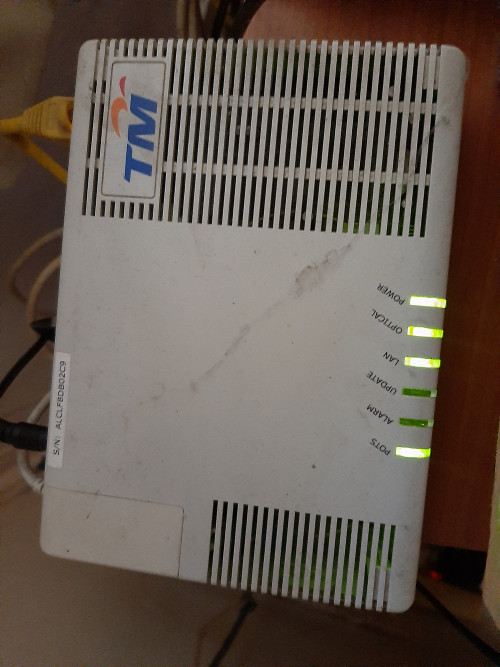 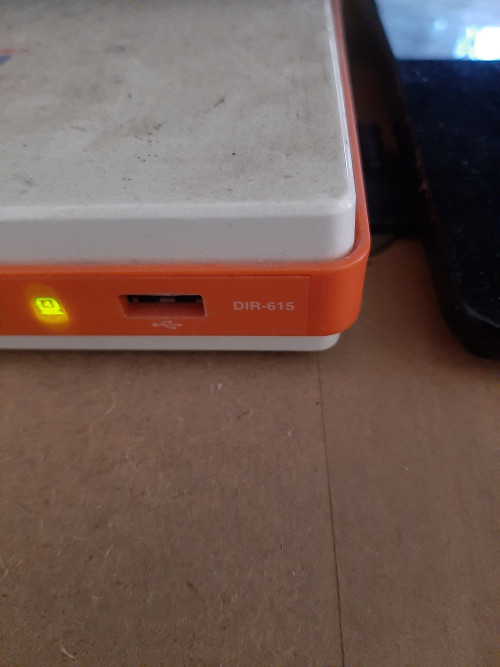 This is an ancient hardware, what package internet speed do you using right now? better change your package if paid higher than yours right now, plus you got new hardware from them. But bare in mind, they will give you d-link router 842 that tm logo. I have using this router with tm stock firmware and d-link firmware. Even though i have changed to d-link firmware, the outcome not quite satisfied but much better than using d-link tm stock firmware. The wifi coverage just normal, wifi speed just good if you stay put nearly router, if you sit far like 3-5meters the wifi speed quite drop and unstable speed. I have experience with other d-link router, the result still not good enough for me. When i changed to tp-link, the speed and coverage much better, but bare in mind just get latest version of that router. Even though many users complaint of heating, just put its at place that temperature normal with external usb pc fan/laptop cooler at router. For price and setup both of brand quite competitive and easy. I remember when my tp-link router got not function well long time ago, tp-link support service change to new one with same model before i change other brand. Just remember if you got router tm dlink 842(black) soon just change to other router that suit for you. good luck. |
|
|
|
|
|
soonwai
|
Feb 5 2020, 01:27 PM
|
|
|
QUOTE(judehow @ Feb 4 2020, 12:11 PM) Thanks for your advice and explanation , before this I am level 1 computer hardware but , not including networking . I will show my modem and router just for the evidence worry people say I trolling Is your modem I-240G-P? I think that already supports gigabit speeds. I did some tests with the DIR-615 and 100Mbps UniFi here: https://forum.lowyat.net/index.php?showtopi...post&p=87190299 |
|
|
|
|
|
SUSjudehow
|
Feb 5 2020, 02:17 PM
|
|
|
QUOTE(misspinky @ Feb 5 2020, 01:08 PM) This is an ancient hardware, what package internet speed do you using right now? better change your package if paid higher than yours right now, plus you got new hardware from them. But bare in mind, they will give you d-link router 842 that tm logo. I have using this router with tm stock firmware and d-link firmware. Even though i have changed to d-link firmware, the outcome not quite satisfied but much better than using d-link tm stock firmware. The wifi coverage just normal, wifi speed just good if you stay put nearly router, if you sit far like 3-5meters the wifi speed quite drop and unstable speed. I have experience with other d-link router, the result still not good enough for me. When i changed to tp-link, the speed and coverage much better, but bare in mind just get latest version of that router. Even though many users complaint of heating, just put its at place that temperature normal with external usb pc fan/laptop cooler at router. For price and setup both of brand quite competitive and easy. I remember when my tp-link router got not function well long time ago, tp-link support service change to new one with same model before i change other brand. Just remember if you got router tm dlink 842(black) soon just change to other router that suit for you. good luck.  Noted QUOTE(soonwai @ Feb 5 2020, 01:27 PM) Is your modem I-240G-P? I think that already supports gigabit speeds. I did some tests with the DIR-615 and 100Mbps UniFi here: https://forum.lowyat.net/index.php?showtopi...post&p=87190299 haven't check the model only the rounter |
|
|
|
|
|
lanzert
|
Feb 5 2020, 03:24 PM
|
New Member
|
anyone can help me out...i tried to setup for new d-link dir842 but stuck at VLAN configuration...it will revert back to disable status once clicked save
|
|
|
|
|
|
shaktiv8
|
Feb 5 2020, 03:31 PM
|
|
|
Hello, is anyone having issues with media loading from Twitter lately? I saw on twitter itself that there are complaints on this issue too ? It was much worse with TM and Google dns , bit better on cloudflare but now it is not loading again. Works perfect on 4G
|
|
|
|
|
|
zellleonhart
|
Feb 5 2020, 07:45 PM
|
|
|
QUOTE(shaktiv8 @ Feb 5 2020, 03:31 PM) Hello, is anyone having issues with media loading from Twitter lately? I saw on twitter itself that there are complaints on this issue too ? It was much worse with TM and Google dns , bit better on cloudflare but now it is not loading again. Works perfect on 4G Twitter is fine for me but today Reddit is loading like snail... Any other website is totally fine, speed test is at normal speed. On my Digi 4G there's no issue loading Reddit. Unifi is getting worse everyday. Everyday it's a different website being slow :/ |
|
|
|
|
|
syaigon
|
Feb 5 2020, 08:19 PM
|
Getting Started
|
unifi problem? youtube buffering for me
|
|
|
|
|
|
KcX35
|
Feb 5 2020, 08:47 PM
|
|
|
internet slow like cb today
|
|
|
|
|
|
bartz
|
Feb 5 2020, 09:06 PM
|
New Member
|
QUOTE(KcX35 @ Feb 5 2020, 08:47 PM) internet slow like cb today Yeah. It's been bad pretty much since early January, but today is an extra special kind of bad. I have to use VPN to be able to watch Twitch reliably. |
|
|
|
|
|
SUSCandy12
|
Feb 5 2020, 09:28 PM
|
|
|
Pings to most SG servers above 100ms some even close to 300ms.
|
|
|
|
|
|
amirul hafizz
|
Feb 6 2020, 01:08 AM
|
|
|
"RM0 unifi TV: The new user interface(UI) will be upgraded on 07/02/2020. Enjoy new TV experience when u watch ur fav drama & movies! Info i.unifi.my/UI" i get sms from tm, they want upgrade ui at 7.02.2020. but my box already upgrade.🤦♂️🤦♂️🤦♂️ 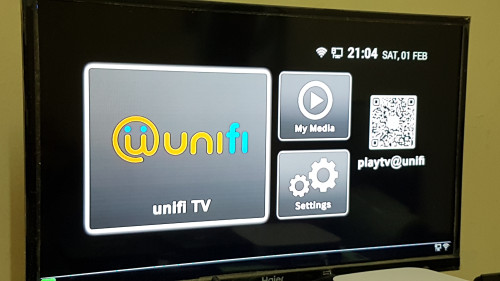 This post has been edited by amirul hafizz: Feb 6 2020, 01:09 AM This post has been edited by amirul hafizz: Feb 6 2020, 01:09 AM |
|
|
|
|
|
go626201
|
Feb 6 2020, 01:17 AM
|
|
|
QUOTE(Candy12 @ Feb 5 2020, 09:28 PM) Pings to most SG servers above 100ms some even close to 300ms. Can i know which SG Server you are getting 100+ms or higher? I just made a latency test website for some Singapore network. For knowing the latency is high or low for specific server,in order to know is it's routing changed or having trouble, because normally MY to SG should not higher than 50ms(some network like Choopa Vultr or Linode routing will get 40+ms). http://mywebping.epizy.com/ |
|
|
|
|
|
MGM
|
Feb 6 2020, 02:35 AM
|
|
|
My unifi bill is due today 6Feb, is it OK to pay on 8Feb without incurring extra charges?
|
|
|
|
|
|
doremon
|
Feb 6 2020, 05:20 AM
|
|
|
QUOTE(MGM @ Feb 6 2020, 02:35 AM) My unifi bill is due today 6Feb, is it OK to pay on 8Feb without incurring extra charges? Yup it's fine. My payment due date on 22 Feb 2020. Usually, 2nd week after due date only will make payment. Sometimes 3rd week after lol If u lucky they will give u a call. Create a story saying no money lor company not doing well haha |
|
|
|
|
|
cba5566
|
Feb 6 2020, 11:57 AM
|
|
|
Based on u guys experience ... the tm given tplink Archer C1200 router can withstand few times reset every 3 days in order to get a good ip ? Scare always reset the router will cause spoilt ...  |
|
|
|
|
|
cfa28
|
Feb 6 2020, 12:20 PM
|
|
|
QUOTE(cba5566 @ Feb 6 2020, 11:57 AM) Based on u guys experience ... the tm given tplink Archer C1200 router can withstand few times reset every 3 days in order to get a good ip ? Scare always reset the router will cause spoilt ... You should call TM @100 to lodge a complaint on this matter |
|
|
|
|



 Quote
Quote





 0.0377sec
 0.57
0.57
 6 queries
 GZIP Disabled