Outline ·
[ Standard ] ·
Linear+
Unifi Official TM UniFi High Speed Broadband Thread V38, READ 1ST PAGE FOR TURBO SPEED INFO!
|
iamoracle
|
 Feb 1 2020, 10:58 AM Feb 1 2020, 10:58 AM
|

|
QUOTE(PJng @ Jan 22 2020, 08:38 PM) Again, if you subs a plan is 159 per month You pay 159 + tax right, you did not pay 159+30+tax right Why called extra charge My plan is 100Mbps at RM129. The plan comes with one TV pack. Why I was charged for the TV pack? Anyway, I have raised a case with TM. Awaiting for their reply. |
|
|
|
|
|
PJng
|
Feb 1 2020, 11:09 AM
|
|
|
QUOTE(iamoracle @ Feb 1 2020, 10:58 AM) My plan is 100Mbps at RM129. The plan comes with one TV pack. Why I was charged for the TV pack? Anyway, I have raised a case with TM. Awaiting for their reply. Did you pay 129 +30+tax? |
|
|
|
|
|
iamoracle
|
Feb 1 2020, 11:24 AM
|
|
|
QUOTE(PJng @ Feb 1 2020, 11:09 AM) Yes. That's the final amount. |
|
|
|
|
|
neekun
|
Feb 1 2020, 01:06 PM
|
|
|
Cannot remove ruby plus and forced to pay rm30 monthly for this. The unifi tv app is such a crap as no support iPad Pro.
|
|
|
|
|
|
Syie9^_^
|
Feb 1 2020, 04:43 PM
|
|
|
hi, can we do this on tm unifi? cheers. 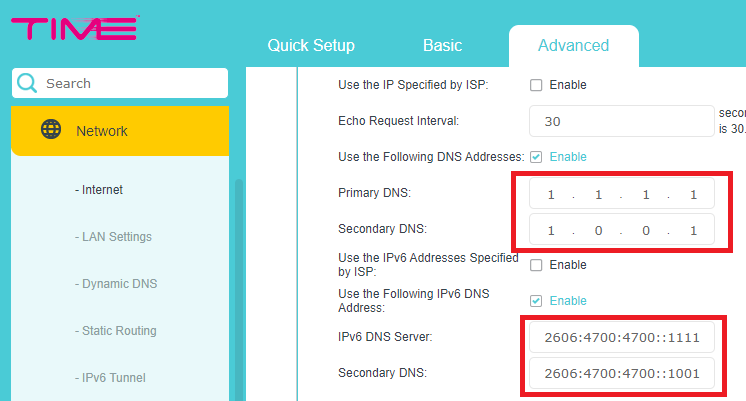 |
|
|
|
|
|
TSSilentVampire
|
Feb 1 2020, 05:01 PM
|
|
|
QUOTE(Syie9^_^ @ Feb 1 2020, 04:43 PM) hi, can we do this on tm unifi? cheers. Yes, we can change DNS manually. Ideally, you would want to do this with your own third-party router though. You can still do it on TM router if you want. |
|
|
|
|
|
Kellicros
|
Feb 2 2020, 01:43 AM
|
|
|
Is there a way to enable Tplink(Archer A9)'s QOS settings for Unifi? 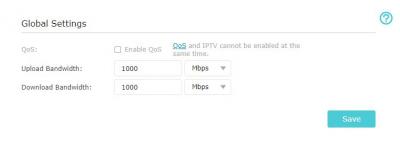
I tried disabling the IPTV/VLAN but I can't get internet over LAN if I do so. Since the new UnifiPlus box does not use VLAN anymore there is no reason to enable it anyway, or is there? |
|
|
|
|
|
soonwai
|
Feb 2 2020, 02:09 AM
|
|
|
QUOTE(Kellicros @ Feb 2 2020, 01:43 AM) Is there a way to enable Tplink(Archer A9)'s QOS settings for Unifi?
I tried disabling the IPTV/VLAN but I can't get internet over LAN if I do so. Since the new UnifiPlus box does not use VLAN anymore there is no reason to enable it anyway, or is there? You still need VLAN because Unifi's internet is still going over VLAN 500. |
|
|
|
|
|
Jjuggler
|
Feb 2 2020, 10:29 AM
|
|
|
QUOTE(Syie9^_^ @ Feb 1 2020, 04:43 PM) hi, can we do this on tm unifi? cheers. Almost all the wireless router/wired router available out there, regardless any brands can be done, just differ in the method of execution of the act. This post has been edited by Jjuggler: Feb 2 2020, 10:30 AM |
|
|
|
|
|
Kellicros
|
Feb 2 2020, 01:49 PM
|
|
|
QUOTE(soonwai @ Feb 2 2020, 02:09 AM) You still need VLAN because Unifi's internet is still going over VLAN 500. Damn it, there is no way to disable IPTV with VLAN enabled, I am starting to regret of buying this router  
|
|
|
|
|
|
SUSjudehow
|
Feb 2 2020, 02:25 PM
|
|
|
Anyone have experience always keep disconnect from wifi? i am using a old rounter i am using home unifi,should change the rounter? Which is new rounter from TM? Thanks
|
|
|
|
|
|
y500
|
Feb 2 2020, 02:39 PM
|
|
|
QUOTE(judehow @ Feb 2 2020, 02:25 PM) Anyone have experience always keep disconnect from wifi? i am using a old rounter i am using home unifi,should change the rounter? Which is new rounter from TM? Thanks what router u using? this?  |
|
|
|
|
|
SUSjudehow
|
Feb 2 2020, 02:51 PM
|
|
|
QUOTE(y500 @ Feb 2 2020, 02:39 PM) what router u using? this? Yes, wired thing is if connect wifi also keep disconnect if not hang, i am think change my pakge soon |
|
|
|
|
|
TSSilentVampire
|
Feb 2 2020, 04:24 PM
|
|
|
QUOTE(Kellicros @ Feb 2 2020, 01:49 PM) Damn it, there is no way to disable IPTV with VLAN enabled, I am starting to regret of buying this router
As bro soonwai said, you CAN’T disable the IPTV mode. It will be the same thing for all routers. You will need VLAN tagging for Unifi to work. QUOTE(judehow @ Feb 2 2020, 02:51 PM) Yes, wired thing is if connect wifi also keep disconnect if not hang, i am think change my pakge soon Read 1st page, 1st post, green text. Read everything. That router is very ancient and is no longer optimal for use. I said that on the 1st page, 1st post. |
|
|
|
|
|
SUSjudehow
|
Feb 2 2020, 05:30 PM
|
|
|
QUOTE(SilentVampire @ Feb 2 2020, 04:24 PM) As bro soonwai said, you CAN’T disable the IPTV mode. It will be the same thing for all routers. You will need VLAN tagging for Unifi to work. Read 1st page, 1st post, green text. Read everything. That router is very ancient and is no longer optimal for use. I said that on the 1st page, 1st post. Just read quit technical not so understand, but what is new pricing for the router and btu unit do i need to change? |
|
|
|
|
|
Jjuggler
|
Feb 2 2020, 05:58 PM
|
|
|
QUOTE(judehow @ Feb 2 2020, 02:25 PM) Anyone have experience always keep disconnect from wifi? i am using a old rounter i am using home unifi,should change the rounter? Which is new rounter from TM? Thanks It seems you're using a DIR-615 router (first-generation unifi router) - Source: y500, If you wish to upgrade to a newer router, I would like to advise you to invest some cash to buy a better router out there. I don't and won't really recommend you to opt for ISP's stock router due to poorly coded firmware and only will be acknowledged by the ISP's when there is actual security breach found/encountered by the cyber-security experts out there before a quick fix over the firmware is issued. |
|
|
|
|
|
SUSjudehow
|
Feb 2 2020, 06:09 PM
|
|
|
QUOTE(Jjuggler @ Feb 2 2020, 05:58 PM) It seems you're using a DIR-615 router (first-generation unifi router) - Source: y500, If you wish to upgrade to a newer router, I would like to advise you to invest some cash to buy a better router out there. I don't and won't really recommend you to opt for ISP's stock router due to poorly coded firmware and only will be acknowledged by the ISP's when there is actual security breach found/encountered by the cyber-security experts out there before a quick fix over the firmware is issued. I am think to buy at tm point so that why can fix for me, cause i scare if buy outside tm will not fix for me and i am not IT Expert. |
|
|
|
|
|
Kellicros
|
Feb 2 2020, 06:50 PM
|
|
|
QUOTE(judehow @ Feb 2 2020, 06:09 PM) I am think to buy at tm point so that why can fix for me, cause i scare if buy outside tm will not fix for me and i am not IT Expert. how old is the router tho? anyway, setting up new router is pretty basic and just a few simple steps, but you will need to get your unifi password from customer service. |
|
|
|
|
|
SUSjudehow
|
Feb 2 2020, 08:19 PM
|
|
|
QUOTE(Kellicros @ Feb 2 2020, 06:50 PM) how old is the router tho? anyway, setting up new router is pretty basic and just a few simple steps, but you will need to get your unifi password from customer service. To be hornest since 1 st time tm have unifi fiber, before this I use streamyx |
|
|
|
|
|
kahjye
|
Feb 2 2020, 10:18 PM
|
|
|
im sorry , ive been with the 300mbps turbo unifi all the times.
but i noticed that during downloads it can reach 250 to 300 mbps then it will be throttled to 30mbps. , checked in fast.com as well.
after 15mins or so of no downloads , the speed raise back to normal.
anyone similar?
This post has been edited by kahjye: Feb 2 2020, 11:40 PM
|
|
|
|
|



 Quote
Quote




 0.0399sec
 0.79
0.79
 6 queries
 GZIP Disabled