Welcome Guest ( Log In | Register )

35 Pages « < 23 24 25 26 27 > » Bottom

Outline · [ Standard ] · Linear+

 ILLEGEAR Selenite Discussion Thread V1, world’s first 17.3” bezel-less laptop

views
     
JonKS1
post Jun 4 2020, 11:04 AM

New Member
*
Newbie
0 posts

Joined: Jun 2010
From: KL
QUOTE(Jared21 @ Jun 4 2020, 02:56 AM)
Are you sure its coming from the subwoofer? I have stupidly loud coil whine when using Turbo mode and i notice its coming from where the main components are somewhere along the strip that houses the power button and such. Tempted to slap a thick thermal pad on whichever capacitor or mosfet is making that god awful sound
*
My PC always run game on Gaming Mode, and the sound is obvious during gaming. The sound came out from the left side (Subwoofer side) of laptop. I am not sure which component is producing that weird sound since I didn't remove the casing for checking. So you also have the similar issue?
Jared21
post Jun 4 2020, 03:48 PM

New Member
*
Newbie
2 posts

Joined: Aug 2015
QUOTE(JonKS1 @ Jun 4 2020, 11:04 AM)
My PC always run game on Gaming Mode, and the sound is obvious during gaming. The sound came out from the left side (Subwoofer side) of laptop. I am not sure which component is producing that weird sound since I didn't remove the casing for checking. So you also have the similar issue?
*
Odd that its coming from the subwoofer. Mine is is coming from directly where the CPU and GPU sit under the keyboard
Prince J
post Jun 4 2020, 07:41 PM

Regular
******
Senior Member
1,272 posts

Joined: May 2010
From: Team ILLEGEAR


QUOTE(SaiyanGoku @ Jun 3 2020, 02:12 AM)
Yes Prince, I meant that logo (the new one is also good  icon_rolleyes.gif ). I can add it to my own windows iso.

BTW, could you ask the ODM about the possibility to make a 92Wh battery for Selenite (upgrade from 63Wh) like the Selenite Pro? Selenite chassis has enough empty space even after removing the 2.5" drive bay.
*
Will try to get the logo for you.

We tried but the selenite battery just doesn't fit the screw holes.

QUOTE(Jared21 @ Jun 4 2020, 02:59 AM)
A bigger battery would be amazing even though i personally am already getting some decent battery life when away from the wall with an aggressive undervolt.

Although with that whole 99% battery after every shutdown who knows how long my battery can hold out....
*
FAE told me there is a new EC / BIOS for alexnvidia ID-S machine to fix the power draw. Can you pm me your SN to see if yours is the same as alexnvidia??
Jared21
post Jun 4 2020, 08:13 PM

New Member
*
Newbie
2 posts

Joined: Aug 2015
QUOTE(Prince J @ Jun 4 2020, 07:41 PM)
FAE told me there is a new EC / BIOS for alexnvidia ID-S machine to fix the power draw. Can you pm me your SN to see if yours is the same as alexnvidia??
*
PM sent!
SaiyanGoku
post Jun 4 2020, 10:35 PM

New Member
*
Junior Member
8 posts

Joined: Apr 2019
From: Hyderabad, India


QUOTE(Prince J @ Jun 4 2020, 05:11 PM)
Will try to get the logo for you.

We tried but the selenite battery just doesn't fit the screw holes.
FAE told me there is a new EC / BIOS for alexnvidia ID-S machine to fix the power draw. Can you pm me your SN to see if yours is the same as alexnvidia??
*
Leave the screws, what about physical dimension? Does 92 Wh battery fits inside the chassis and charges? Also, is there any bios/ec update for Selenite?
Jared21
post Jun 4 2020, 10:42 PM

New Member
*
Newbie
2 posts

Joined: Aug 2015
QUOTE(SaiyanGoku @ Jun 4 2020, 10:35 PM)
Leave the screws, what about physical dimension? Does 92 Wh battery fits inside the chassis and charges? Also, is there any bios/ec update for Selenite?
*
From what i've read elsewhere, its too tall for it to fit inside the chassis and uses different voltage (i think)
Prince J
post Jun 4 2020, 10:51 PM

Regular
******
Senior Member
1,272 posts

Joined: May 2010
From: Team ILLEGEAR


QUOTE(SaiyanGoku @ Jun 4 2020, 10:35 PM)
Leave the screws, what about physical dimension? Does 92 Wh battery fits inside the chassis and charges? Also, is there any bios/ec update for Selenite?
*
Cannot fit, and the power delivery design is different. There are five types of batteries from Tongfang, and they are not from the same factories:

1. 3S1P/4S1P: RAVEN (2018)

2. 47Wh/63Wh: RAVEN SE, PRODIGY, ROGUE, ONYX V, ONYX (2018), SELENITE

3. ONYX PRO

4. SELENITE PRO / IONIC 15 / ID-T (a.k.a Eluktronics MAG-15)

5. IONIC 14

This post has been edited by Prince J: Jun 4 2020, 10:52 PM
alexnvidia
post Jun 5 2020, 11:41 AM

Casual
***
Junior Member
351 posts

Joined: Oct 2006
QUOTE(Prince J @ Jun 4 2020, 12:41 PM)
Will try to get the logo for you.

We tried but the selenite battery just doesn't fit the screw holes.
FAE told me there is a new EC / BIOS for alexnvidia ID-S machine to fix the power draw. Can you pm me your SN to see if yours is the same as alexnvidia??
*
Does this mean potential lower GPU performance? cos from time to time i can see the GPU draw up to 120W, which is 5W higher than the intended GPU power.
Shadowhunt94
post Jun 5 2020, 10:58 PM

New Member
*
Newbie
2 posts

Joined: Mar 2015
QUOTE(Jared21 @ May 31 2020, 08:21 PM)

3) You can try using the command center from either XMG (Neo 17) or Eluktronics (Mech G1R)

4) I just use a clean microfiber cloth to wipe the surfaces down

5) For sound i HIGHLY recommend following this guide at the bottom of the page. Dont have to deal with whatever THX/Soundblaster software. You get the native windows EQ and can tweak to your hearts content: http://forum.notebookreview.com/threads/to...815943/page-462
*
Thanks for the suggestion Jared21, will try those when i'm free.


QUOTE(alexnvidia @ Jun 1 2020, 10:11 AM)

I would suggest you open GPU-Z and let it run in the background while you game. after a stuttering gaming session, check the graph and perfcap reason to see what's going on with the GPU during stuttering. CPU overheating and thermal throttling dont generally cause such severe stuttering. from my past experience, such stuttering during gaming was caused by GPU power delivery circuitry overheating (VRM, inductors). If those components dont make good contact with the thermal pads, you are in for a nasty stuttering surprise.
I did that for a while, it's just that the rig itself hasn't reach the stage of stuttering, perhaps it's based on its mood though? hmm.gif


QUOTE(Prince J @ Jun 3 2020, 01:07 AM)
Hi Shadow, may i know what's the average temperature you are getting on your i7-10875H?

The keyboard RGB only can function with preset animation profile, will feedback your suggestion of animation profile import to ODM. Thank you smile.gif
Before doing any undervolt or turbo limit, it's more than 80, records show sometimes reach 90 above.

Hope that really got smoother animations on those presets at least, right now still not good enough even set to fastest. Of course it is most welcome if there's an option for coders to make something special.



Shadowhunt94
post Jun 5 2020, 11:09 PM

New Member
*
Newbie
2 posts

Joined: Mar 2015
Annnnnnnnnd one more issue after another week of usage.

Owning a Seagate SSHD 5 years ago, checking on Acronis Disk Monitor it says there's some end-to-end transfer error, giving a sign that the hdd could fail. Sometimes it comes out some weird noise, and when i install it into the laptop, the temperature could reach more than 50 degrees Celsius when gaming, loading the files from it. When i install a game to the hdd the task manager shows it loads 100% fully, super long response time, then it just not working, no files transfer. OS could hang and disk management won't see the existence of the hdd, so i have to restart the laptop and it'll become fine again despite still high hdd temp.

Okay, thought that it has served me long, then i decided to buy another sshd and install into it. Just not more than 15 mins it boot up and start copying the files from external to the new sshd, the issue arise again.

Come on, don't tell me the new sshd has problem like the old one???? mad.gif bangwall.gif vmad.gif ranting.gif

The old one i put it into external hdd controller, now it still works like a charm, heat reduced although still has some noise sometimes. sweat.gif

What is happening to the laptop actually? I want to dedicated support as soon as possible guiding me to install the hdd properly remotely, assuming i DID it wrong. There's a flex cable beneath the hdd location, perhaps it's the cause? I don't know. shakehead.gif

I know this laptop is not the most expensive but then 7k is considered bangsawan price for many people already, and the quality just like this?
Prince J
post Jun 6 2020, 12:52 AM

Regular
******
Senior Member
1,272 posts

Joined: May 2010
From: Team ILLEGEAR


QUOTE(Shadowhunt94 @ Jun 5 2020, 11:09 PM)
Annnnnnnnnd one more issue after another week of usage.

Owning a Seagate SSHD 5 years ago, checking on Acronis Disk Monitor it says there's some end-to-end transfer error, giving a sign that the hdd could fail. Sometimes it comes out some weird noise, and when i install it into the laptop, the temperature could reach more than 50 degrees Celsius when gaming, loading the files from it. When i install a game to the hdd the task manager shows it loads 100% fully, super long response time, then it just not working, no files transfer. OS could hang and disk management won't see the existence of the hdd, so i have to restart the laptop and it'll become fine again despite still high hdd temp.

Okay, thought that it has served me long, then i decided to buy another sshd and install into it. Just not more than 15 mins it boot up and start copying the files from external to the new sshd, the issue arise again.

Come on, don't tell me the new sshd has problem like the old one????  mad.gif  bangwall.gif  vmad.gif  ranting.gif

The old one i put it into external hdd controller, now it still works like a charm, heat reduced although still has some noise sometimes.  sweat.gif

What is happening to the laptop actually? I want to dedicated support as soon as possible guiding me to install the hdd properly remotely, assuming i DID it wrong. There's a flex cable beneath the hdd location, perhaps it's the cause? I don't know.  shakehead.gif

I know this laptop is not the most expensive but then 7k is considered bangsawan price for many people already, and the quality just like this?
*
There is no way the ODM cable causes your SSHD to lag, at least we have never experienced before. It's either the SSHD is not detected in your system (cable is faulty, very tiny chance) or it can detect your HDD and provide full functions.

The lag can be caused by many factors including SSHD's firmware, OS installation method as well as the compatibility of the SSHD with windows operating system.

If the drive has buggy firmware, it tends to have caching / incompatible problem with windows 10 system (especially Windows installed in drive C), sometimes a bad compatible secondary SSHD can cause your system to lag too.

If you wish, you also can bring in your own SSHD and we will assist you on the testing.

Thank you.

This post has been edited by Prince J: Jun 6 2020, 01:35 PM
Ralph Yap P
post Jun 6 2020, 07:34 AM

New Member
*
Probation
0 posts

Joined: Apr 2019


Hi guys, facing some problems right here. Was playing GTA online yesterday, then powered off after 2 hours of usage. Soon after that, just remember have to email smth, then i powered my selenite on again. However, my laptop screen started flashing like crazy non-stop. it only resolved when i reduced my screen brightness to minimum. The flashing worsen with increasing brightness. When it is not plugged in, it will flash even with minimum screen brightness. What's the problem guys? Pls help, thanksss cry.gif cry.gif
P.S. had only been using my laptop for a little more than 1 year
Prince J
post Jun 6 2020, 01:26 PM

Regular
******
Senior Member
1,272 posts

Joined: May 2010
From: Team ILLEGEAR


QUOTE(Ralph Yap @ Jun 6 2020, 07:34 AM)
Hi guys, facing some problems right here. Was playing GTA online yesterday, then powered off after 2 hours of usage. Soon after that, just remember have to email smth, then i powered my selenite on again. However, my laptop screen started flashing like crazy non-stop. it only resolved when i reduced my screen brightness to minimum. The flashing worsen with increasing brightness. When it is not plugged in, it will flash even with minimum screen brightness. What's the problem guys? Pls help, thanksss cry.gif  cry.gif
P.S. had only been using my laptop for a little more than 1 year
*
Hi Ralph, can you pm me your serial number? Will create a service ticket for you.
Ralph Yap P
post Jun 7 2020, 01:59 PM

New Member
*
Probation
0 posts

Joined: Apr 2019


QUOTE(Prince J @ Jun 6 2020, 01:26 PM)
Hi Ralph, can you pm me your serial number? Will create a service ticket for you.
*
Alright, will do. thank you.
Shadowhunt94
post Jun 7 2020, 05:13 PM

New Member
*
Newbie
2 posts

Joined: Mar 2015
QUOTE(alexnvidia @ Jun 1 2020, 10:11 AM)
I have the RTX 2070 variant. The GPU performance has been great if not stellar. Never had any issues with stuttering or overheating. I've played games during afternoons in a non air con room before. the temps of the laptop surface does get crazy hot (the strip above the keyboard in between the selenite logo and boost & power button). It's so hot you cant even touch it for more than 2 seconds so gaming in non air con room is HIGHLY not recommended. that being said, i still did not face any stuttering issue during gaming.

While GPU performance is stellar, the same cannot be said about the CPU. The mounting pressure of the tripod design heatsink is not balanced and you can expect high difference in core temperature difference. we are talking about 10-15C difference or more between the coolest core and hottest core during gaming. Their support staff will tell you it's completely normal but we all know that's BS. Yes there are control mechanism in place to stop the CPU from overheating but this also mean the CPU core will be heavily throttled and performance suffers greatly.

You can try to minimize this issue by repasting on your own and adjusting the heatsink cold plate slightly to ensure a more balanced contact. this however is a highly skilled process and extremely difficult to get right. and also, after repasting, temps will be great with minimal difference in temperature between cores. however, after a few weeks, everything will be back to hell again with massive core temperature difference. I've tried both cooler master gel  maker, kryonaut. they behave the same. master gel maker degrades (pump out) a lot faster though for my case.

I would suggest you open GPU-Z and let it run in the background while you game. after a stuttering gaming session, check the graph and perfcap reason to see what's going on with the GPU during stuttering. CPU overheating and thermal throttling dont generally cause such severe stuttering. from my past experience, such stuttering during gaming was caused by GPU power delivery circuitry overheating (VRM, inductors). If those components dont make good contact with the thermal pads, you are in for a nasty stuttering surprise.

not sure if this is useful or related but you can refer this thread i created entirely dedicated to this issue. http://forum.notebookreview.com/threads/al...-freeze.804499/
*
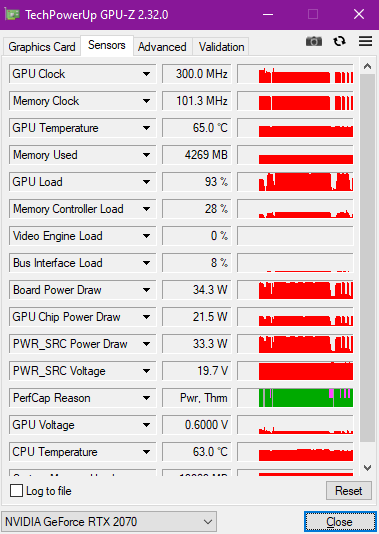
Hi alexnvidia, for the gpu-z usage i manage to get the issue happen (stuttering) sweat.gif

user posted image

The PerCap there states besides Pwr, there's Thrm also, could be the one you're mentioning? Just need to make sure the thermal pads have a good contact on ICs besides the cpu and gpu?
alexnvidia
post Jun 7 2020, 08:27 PM

Casual
***
Junior Member
351 posts

Joined: Oct 2006
QUOTE(Shadowhunt94 @ Jun 7 2020, 10:13 AM)
Hi alexnvidia, for the gpu-z usage i manage to get the issue happen (stuttering)  sweat.gif

user posted image

The PerCap there states besides Pwr, there's Thrm also, could be the one you're mentioning? Just need to make sure the thermal pads have a good contact on ICs besides the cpu and gpu?
*
ah yes, gpu z shows very clearly your stuttering issue. GPU clock tanked to bottom due to thermals i assume? look at the pink region and check what does the perfcap reason say. your gpu temperature is good, so it's not the gpu overheating for sure. that means u need to check other stuff, like GDDR6 memory or the VRM that feeds the GPU. you can use my alienware thread as a rough guide, the steps are pretty much the same.
mynameisnotryan
post Jun 8 2020, 09:05 PM

New Member
*
Newbie
0 posts

Joined: Feb 2019


QUOTE(Shadowhunt94 @ Jun 5 2020, 11:09 PM)
Annnnnnnnnd one more issue after another week of usage.

Owning a Seagate SSHD 5 years ago, checking on Acronis Disk Monitor it says there's some end-to-end transfer error, giving a sign that the hdd could fail. Sometimes it comes out some weird noise, and when i install it into the laptop, the temperature could reach more than 50 degrees Celsius when gaming, loading the files from it. When i install a game to the hdd the task manager shows it loads 100% fully, super long response time, then it just not working, no files transfer. OS could hang and disk management won't see the existence of the hdd, so i have to restart the laptop and it'll become fine again despite still high hdd temp.

Okay, thought that it has served me long, then i decided to buy another sshd and install into it. Just not more than 15 mins it boot up and start copying the files from external to the new sshd, the issue arise again.

Come on, don't tell me the new sshd has problem like the old one????  mad.gif  bangwall.gif  vmad.gif  ranting.gif

The old one i put it into external hdd controller, now it still works like a charm, heat reduced although still has some noise sometimes.  sweat.gif

What is happening to the laptop actually? I want to dedicated support as soon as possible guiding me to install the hdd properly remotely, assuming i DID it wrong. There's a flex cable beneath the hdd location, perhaps it's the cause? I don't know.  shakehead.gif

I know this laptop is not the most expensive but then 7k is considered bangsawan price for many people already, and the quality just like this?
*
I can say with utmost certainty that it's the SSHD at fault here. I think at this point I've replaced the SSHD 3 times at least and I've only been using this laptop for a year and 3 months. Hell one time the drive failed after just 2 months I think. Seagate's SSHD's are the worst drive's I've ever encountered and that comes from somebody who has 12 TB in external WD drives (some have failed obviously but not to the extent of having had 3 replacements). The second time the drive failed it still operated like normal I could access all the files but transferring them out was impossible and it was impossible to put any files into the drive.
amir.asyraf
post Jun 8 2020, 09:25 PM

On my way
****
Junior Member
504 posts

Joined: Oct 2012
From: It's all relative


My Selenite (i7-9750H RTX 2060) has been completely freezing up lately. Usually happens when watching videos. Doesn't matter on Youtube or local files (VLC, MPC, PotPlayer etc). It's really random and has been happening noticeably often now. Sometimes I'm able to watch a movie from start to end, sometimes it would freeze 15 minutes in.

By freeze I mean completely and fully unresponsive and unrecoverable, locked up. Completely unresponsive to any keys or mouse actions. Even if I leave it for an hour it would still be frozen. The only thing I could is force shutdown by holding the power button for 5 seconds. It's really frustrating. I've already had several data loss because of this.

Anyone have any idea? I've never had it locked up while playing games. Right now I'm thinking it's either the RAM or SSD, or maybe even the secondary SSHD.
jason111785
post Jun 9 2020, 01:09 AM

To Eat or Not To Eat
******
Senior Member
1,214 posts

Joined: Jul 2005
From: KaY El (KL)


@Illegear Team, may I know on the Selenite Pro

1) HDMI 2.0 port is a 2.0b or just 2.0
2) Thunderbolt port capable of doing display port 1.4?

I am asking as I am getting a 165hz monitor and it only support 165hz over DP 1.4 on 1440p.
Prince J
post Jun 9 2020, 01:43 AM

Regular
******
Senior Member
1,272 posts

Joined: May 2010
From: Team ILLEGEAR


QUOTE(amir.asyraf @ Jun 8 2020, 09:25 PM)
My Selenite (i7-9750H RTX 2060) has been completely freezing up lately. Usually happens when watching videos. Doesn't matter on Youtube or local files (VLC, MPC, PotPlayer etc). It's really random and has been happening noticeably often now. Sometimes I'm able to watch a movie from start to end, sometimes it would freeze 15 minutes in.

By freeze I mean completely and fully unresponsive and unrecoverable, locked up. Completely unresponsive to any keys or mouse actions. Even if I leave it for an hour it would still be frozen. The only thing I could is force shutdown by holding the power button for 5 seconds. It's really frustrating. I've already had several data loss because of this.

Anyone have any idea? I've never had it locked up while playing games. Right now I'm thinking it's either the RAM or SSD, or maybe even the secondary SSHD.
*
Hi there, can you send in your laptop for us to take a look? Will assist.

QUOTE(jason111785 @ Jun 9 2020, 01:09 AM)
@Illegear Team, may I know on the Selenite Pro

1) HDMI 2.0 port is a 2.0b or just 2.0
2) Thunderbolt port capable of doing display port 1.4?

I am asking as I am getting a 165hz monitor and it only support 165hz  over DP 1.4 on 1440p.
*
HDMI 2.0 with HDCP 2.2

Yes can support Displayport 1.4.

35 Pages « < 23 24 25 26 27 > » Top
 

Change to:
| Lo-Fi Version
0.1706sec    0.76    6 queries    GZIP Disabled
Time is now: 3rd December 2025 - 07:56 AM