Welcome Guest ( Log In | Register )

Outline · [ Standard ] · Linear+

 ILLEGEAR Selenite Discussion Thread V1, world’s first 17.3” bezel-less laptop

views
     
amir.asyraf
post Feb 1 2020, 10:37 PM

On my way
****
Junior Member
504 posts

Joined: Oct 2012
From: It's all relative


I got my Selenite with RTX 2060.

Not gonna talk about hardware spec performance, since it's mostly the same across any device, the only variable being thermal performance

1) Audio
This has got to be the most disappointing part of the laptop. The speakers are so underwhelming. Sounds weak with meh dynamic range. It gets slightly better when you use the pre-installed Sound Blaster Connect. Also, not sure if this is my laptop's problem, but the speaker has a very noticeable popping sound every now and then. I can't pinpoint exactly when it happens, but it does and it's there.


2) Thermal Performance
Out of the box, it was poor at first. I constantly hit the 95 °C PROCHOT (thermal throttle) on the CPU (not even playing at highest setting).

But after undervolting the CPU Core and CPU Cache using Throttlestop, I managed to significantly reduce the temperature and now it rarely goes above 78 °C. Now, it's great! The heat also builds up at the upper part of the laptop body, so when you're using it, you barely feel the heat

They probably didn't do the stress test + undervolting enough I guess? Right now, I'm at -122.1 mV offset on both CPU Core and CPU Cache, and System Agent and iGPU at -45.9 mV offset. Probably could go lower, haven't really gone to the point of it crashing.

On light usage, it's around 42-48 °C during the day and 36-44 °C at night.

But this laptop can easily handle any game you throw at it. No problem. It's just a matter of what FPS you're willing to tolerate.


3) Keyboard
Kinda ok but not particularly great. They keys kind of, uhh wobbly?. And the click isn't as satisfying as I thought it would be. RGB looks awesome though.


4) Touchpad
I personally I think it's great, accurate and feels just nice. So far the best laptop touchpad I've used (that I own).


5) Battery
You'd be lucky to get 4 hours on this, even on the most conservative power saving setting + undervolting + light web browsing. Make sure to change to globally use Integrated graphics in Nvidia control panel, otherwise it's just gonna drive everything with the discrete graphic.


6) Screen
Great for me. 144 Hz and bright. Colour looks good and vibrant. Haven't tested colour accuracy though. The thin bezel is especially nice.


7) Price worthiness
This is what fucked me up the most lol. I thought Illegear has the best price/spec ratio!

https://shopee.com.my/MSI-17.3-GE75-9SF-668...9432.6111695931

Much better spec (RTX 2070) at lower price! MSI too!

Overall, I'd rate the Selenite RTX 2060 7/10

This post has been edited by amir.asyraf: Feb 1 2020, 10:43 PM
amir.asyraf
post Feb 3 2020, 05:54 PM

On my way
****
Junior Member
504 posts

Joined: Oct 2012
From: It's all relative


Woah nice thanks for replying!

QUOTE(Jared21 @ Feb 3 2020, 02:13 PM)
1) For audio refer to the last post on this page of this forum: http://forum.notebookreview.com/threads/to...815943/page-462
I've done this workaround and its improved my speaker experience quite a bit. I dont get any popping sounds and the equalizer does so much more than the SB software. Its the OG realtek control panel so no installing additional software or anything. Simple and clean with all the options you need
*
Thanks, will try and report back.

QUOTE(Jared21 @ Feb 3 2020, 02:13 PM)
2) Regarding thermals, TG Kryonaut is possibly the worse choice of thermal paste for this laptop. The heatsinks are very uneven (typical ODM stuff, Clevo has this problem as well), CPU hold down uses 3 screws instead of 4 corner ones combined with a thin paste like Kryonaut equals pump out and the eventual rise of temps in the long run. Save money and just repaste yourself with something thicker like GC Extreme, Mastergel Nano or Phobya Nanogrease Extreme if you can find it. Personally wouldn't recommend IC DIamond cos it tends to scratch the die but is more than thick enough to compensate the shitty heatsink balance. I had core differentials up to 15 plus degrees on Kryonaut but managed to drop it to about 5 with Mastergel Nano. LM wont do you much due to the uneven heatsink and the voiding of warranty.

The BIOS used to allow undervolting all the way to -200mv but the latest can only get you to -50 and the rest has to be done via XTU or throttlestop. My chip draws around 1.2v stock so i have a -185mv undervolt on core, -85 on cache and -70 on igpu. If you want more control, custom BIOS is the only way to go or you can try to flash an XMG one which has a ton more options than any tongfang reseller so far. Kind of sad when you think about it. Other companies like XMG and Eluktronics offer so much more in the CC software and BIOS while we're stuck with something so barebones

Illegear should do their burn in test with Prime95 and Furmark at the same instance if they really want to test stability. This test combo will bring any system to its knees and if it can pass this test, it can hold up with any task.
*
I see... Thanks I'll definitely be repasting. And yeah for the first time with this laptop, just yesterday I had a relatively long and intense gaming session (3+ hours) and the CPU was constantly hitting its limit at 95 °C, some core even hitting 99 °C.

Man -185 mV offset is really good, unfortunately for me mine is already unstable at -145 mV, with the OS being completely frozen when running Battlefield V and I had to hard reboot. Also, I thought you're supposed to undervolt both CPU Core and CPU Cache equally?

Does flashing custom BIOS void warranty?

QUOTE(Jared21 @ Feb 3 2020, 02:13 PM)
5) What panel is in your laptop? Some people have gotten Chi Mei CMN175D panels instead of the BoE one and i'm trying to source it due to it not using PWM to control brightness and its also a brighter display
*
I've no idea. Where to check?

QUOTE(Jared21 @ Feb 3 2020, 02:13 PM)
6) Looking at the link it shows just a 6 month warranty. Even with that price, i'd much rather pay a bit more for a vendor that at least gives SOME support rather than going through so many loops just to fix something. With the 11/11 sale my unit came out to just above RM6.5K which isnt THAT much more than the GE75 in that link. The boosted 2060 gives close performance to a full 2070 as well, easily beating a Max Q 2070.
*
Is it really boosted? Also, do you use MSI Afterburner with yours to boost the GPU or undervolt? If so, would be great if you could share your profile here. I suck at trying to tune it.

amir.asyraf
post Feb 4 2020, 05:09 PM

On my way
****
Junior Member
504 posts

Joined: Oct 2012
From: It's all relative


QUOTE(Jared21 @ Feb 3 2020, 11:29 PM)
For my undervolt, my cache wont go past -100mv so i left it at -85 to be safe. Core got me dimishing returns at around -190. Will probably back it up to about -170 later.

For display, hit up device manager, click the monitor section, right click on Generic PnP Monitor or whatever its called on your unit and select properties. Under that, hit details and select Hardware Ids from the list.

Yes can confirm this is purely boosted using Turbo mode. I haven't installed Afterburner since it requires the GPU to be active and that draws a lot more power if say i left it running in the background without knowing. So far the highest i've seen my 2060 boost is about 1935mhz and it holds at 1905mhz once the cooling system gets heatsoaked. My firestrike scores are also in line with what i expected with my highest score being 16149. Consistently in the 15k to 16k range. I've linked it below. You should see my undervolt used at that time listed in the description box and left a tidbit smile.gif Can compare to my desktop score in my sig for reference.

http://www.3dmark.com/fs/21345146
*
Nice. I haven't done any benchmarking or stress testing on mine, don't really care. As long I can game and open Visual Studio without the laptop going into seizure.
amir.asyraf
post Feb 28 2020, 02:44 PM

On my way
****
Junior Member
504 posts

Joined: Oct 2012
From: It's all relative


QUOTE(incubus_skj @ Feb 24 2020, 10:32 AM)
the RGB colors a bit soft though, the keyboard illumination isn't as bright as the others in the market.
and since it's a 4-zone RGB, the "wave" function will not look as nice as the per-key RGB keyboards. not that i mind
*
eh it's the same with Selenite which has per-key RGB, the wave animation sucks.

I hope Illegear could release the source code for the command center. I have a some experience in firmware/systems programming, I think I could take a crack at it.

This post has been edited by amir.asyraf: Feb 28 2020, 02:44 PM
amir.asyraf
post Feb 28 2020, 03:10 PM

On my way
****
Junior Member
504 posts

Joined: Oct 2012
From: It's all relative


QUOTE(incubus_skj @ Feb 28 2020, 02:48 PM)
Eh the effects for per key RGB also crap ah? sweat.gif I just leave them 4 different colors no effects easier lol
*
Yeah it's crap, here's what the wave effect looks like: https://gfycat.com/distinctmiserableafricanjacana

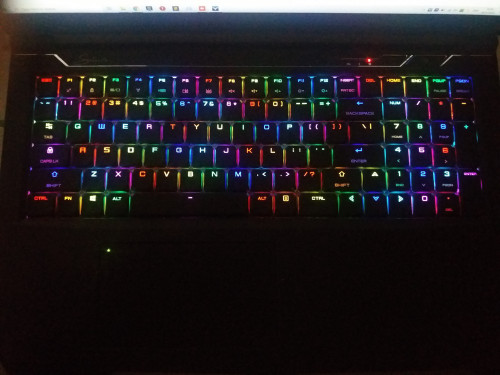
But having the ability to assign each keys their own individual colour is awesome, I just set mine randomly, although I avoid 2 colours next to each other:

user posted image

Too bad the UI/UX for assigning colours to keys sucks though. You can't drag colours to assign multiple keys quickly, and also there's no profiles.

This post has been edited by amir.asyraf: Feb 28 2020, 03:20 PM
amir.asyraf
post Mar 3 2020, 05:58 PM

On my way
****
Junior Member
504 posts

Joined: Oct 2012
From: It's all relative


QUOTE(Jared21 @ Feb 28 2020, 08:13 PM)
I can probably get it from XMG or Eluktronicks. They're very open to all these things
*
Hey that would be awesome if you could get it. I'll host it on GitHub, maybe we'll get some more contributors too.

QUOTE(JonKS1 @ Feb 29 2020, 07:35 AM)
If you are seeking for nicer animation of wave, try to set the speed to the maximum. Then you will notice a higher frequency and smoother transition of wave. Try it out
*
It does seem nicer, but still noticeable. It could be much better especially considering it's per-key illumination.

Actually to think about it I've never really seen any keyboard with proper wave animation.
amir.asyraf
post Apr 4 2020, 01:23 PM

On my way
****
Junior Member
504 posts

Joined: Oct 2012
From: It's all relative


Guys, what's the equivalent/generic name for the Illegear Selenite from other manufacturers? e.g. Tongfang, XMG, Eluktronick etc
amir.asyraf
post Apr 6 2020, 04:15 PM

On my way
****
Junior Member
504 posts

Joined: Oct 2012
From: It's all relative


QUOTE(Prince J @ Apr 5 2020, 01:39 PM)
Hi amir,

SELENITE is ID-S, SELENITE PRO is ID-P.
*
Thanks!
amir.asyraf
post Apr 11 2020, 12:39 PM

On my way
****
Junior Member
504 posts

Joined: Oct 2012
From: It's all relative


QUOTE(Jared21 @ Mar 21 2020, 11:02 PM)
Kryo does not work well on these barebones units. Same thing with Clevo barebones. Its too thin and the levelness of the heatsink is extremely questionable. Also it tends to dry out around the 80 degree mark for some reason. Switch to a thicker paste. I use CM Master Maker Gel and it helps with the uneveness of the heatsink. Dont get anymore massive core differentials
*
I repasted with CM Mastergel Maker.

Honestly it's just worse compared to TG Kryonaut. Before, playing Anthem my CPU would hover around 80-85C max. Now, it's pushing to 90C constantly. And some core even up to 97C. Even during idle I noticed it's higher on average. Now I regret cry.gif
amir.asyraf
post Apr 12 2020, 03:17 PM

On my way
****
Junior Member
504 posts

Joined: Oct 2012
From: It's all relative


QUOTE(Prince J @ Apr 12 2020, 03:02 PM)
Hi amir,

You may send in your selenite and we can help you to repaste back to Thermal Grizzly Kryonaut.
*
No worries. Already ordered one from Shopee.

Good to experiment I guess.
amir.asyraf
post Apr 27 2020, 04:45 PM

On my way
****
Junior Member
504 posts

Joined: Oct 2012
From: It's all relative


Prince J or anyone here

How many external monitors does the laptop support at once? Is it 3?
amir.asyraf
post Apr 27 2020, 05:20 PM

On my way
****
Junior Member
504 posts

Joined: Oct 2012
From: It's all relative


QUOTE(Prince J @ Apr 27 2020, 04:54 PM)
3x (excluded laptop display) for selenite without thunderbolt 3.

2x (excluded laptop display) for selenite with TB3
*
awesome thanks!
amir.asyraf
post May 4 2020, 12:55 PM

On my way
****
Junior Member
504 posts

Joined: Oct 2012
From: It's all relative


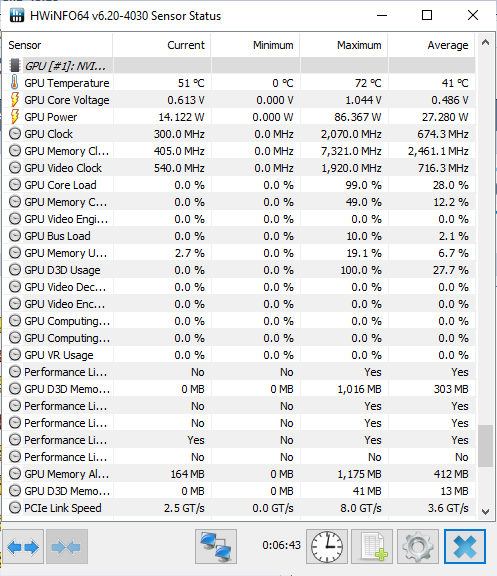
Max only goes up to 86W, I thought RTX 2060 GPU boost can go up to 115W? Or am I missing something here hmm.gif

user posted image

This post has been edited by amir.asyraf: May 4 2020, 12:56 PM
amir.asyraf
post May 5 2020, 12:46 PM

On my way
****
Junior Member
504 posts

Joined: Oct 2012
From: It's all relative


QUOTE(Prince J @ May 5 2020, 12:35 PM)
Hi amir,

This is recorded during gaming?
*
Benchmark on Unigine Heaven and Valley
amir.asyraf
post May 5 2020, 04:28 PM

On my way
****
Junior Member
504 posts

Joined: Oct 2012
From: It's all relative


QUOTE(Prince J @ May 5 2020, 01:01 PM)
For 9th gen selenite, the GPU is automatically boosted from 80W up to 115W depends on your gameplay. It's 115W by default on 10th gen.
*
What do you mean by depends on gameplay? Does it detect the game? Or is it the Valley and Heaven benchmarks aren't GPU intensive enough?
amir.asyraf
post Jun 8 2020, 09:25 PM

On my way
****
Junior Member
504 posts

Joined: Oct 2012
From: It's all relative


My Selenite (i7-9750H RTX 2060) has been completely freezing up lately. Usually happens when watching videos. Doesn't matter on Youtube or local files (VLC, MPC, PotPlayer etc). It's really random and has been happening noticeably often now. Sometimes I'm able to watch a movie from start to end, sometimes it would freeze 15 minutes in.

By freeze I mean completely and fully unresponsive and unrecoverable, locked up. Completely unresponsive to any keys or mouse actions. Even if I leave it for an hour it would still be frozen. The only thing I could is force shutdown by holding the power button for 5 seconds. It's really frustrating. I've already had several data loss because of this.

Anyone have any idea? I've never had it locked up while playing games. Right now I'm thinking it's either the RAM or SSD, or maybe even the secondary SSHD.
amir.asyraf
post Jun 28 2020, 12:20 AM

On my way
****
Junior Member
504 posts

Joined: Oct 2012
From: It's all relative


QUOTE(Prince J @ May 6 2020, 12:07 PM)
As per ODM the GPU itself determine the application / game / software usage and boost the TDP accordingly between 80W -> 115W.
*
Well after several weeks of testing with all kinds of games and benchmarks, I've never been able to go anywhere near 115 W, according to HWiNFO anyway. Max I've gotten was only 81.695 W.

Benchmarks I've run:
Firestrike (Max score 6751)
Time Spy (Max score 15670)
Heaven
Valley

Games I've played:
Battlefield V (Aimed for 60+ FPS)
GTA V (Maxed out)
Fortnite (Maxed out)
Anthem (Maxed out (I think))
Just Cause 4 (Maxed out)
Forza Horizon 4 (Maxed out)
Paladins (Maxed out)
Apex (Aimed for 60+ FPS)

Software:
TensorFlow

At least with the benchmarks and TensorFlow (which are mostly GPU-only intensive), the GPU temperature is only hovering at around 69-75 °C, so temperature isn't the problem and it could push further.

Of course, all of the above was on Turbo mode.

This post has been edited by amir.asyraf: Jun 28 2020, 12:21 AM
amir.asyraf
post Jun 29 2020, 08:13 AM

On my way
****
Junior Member
504 posts

Joined: Oct 2012
From: It's all relative


QUOTE(Prince J @ Jun 29 2020, 12:01 AM)
Hi amir, can i have your BIOS/EC versions?
Latest bios for selenite 9th gen is

Bios N.1.54 and EC 2.09.09

Kindly check if you are on this version.
*
BIOS Version/Date: American Megatrends Inc. N.1.54, 24/6/2019
SMBIOS Version: 3.2
Embedded Controller Version: 2.09

Is that it?


amir.asyraf
post Jun 30 2020, 09:06 AM

On my way
****
Junior Member
504 posts

Joined: Oct 2012
From: It's all relative


QUOTE(Prince J @ Jun 29 2020, 10:35 PM)
If you wish, you may update to the latest version. Do note that there is risk of reflashing BIOS/EC.
Can we test your system physically?
*
Yeah that's the problem. I have several serious problems with the laptop already and really want to bring it in, but this is my main/daily driver. I can't go a day without it.

Unless of course you have an loaner unit that I can work with while you fix my laptop.

This post has been edited by amir.asyraf: Jun 30 2020, 09:07 AM
amir.asyraf
post Jul 8 2020, 08:39 PM

On my way
****
Junior Member
504 posts

Joined: Oct 2012
From: It's all relative


QUOTE(SaiyanGoku @ Jul 4 2020, 02:03 AM)
May I know if anybody has a mismatch of serial number present in BIOS to that of the sticker?
*
Haven't checked but I once brought mine to the center and they found my laptop serial number doesn't match the one in the order/account or something

2 Pages  1 2 >Top
 

Change to:
| Lo-Fi Version
0.0447sec    0.28    7 queries    GZIP Disabled
Time is now: 3rd December 2025 - 07:01 PM