Welcome Guest ( Log In | Register )

4 Pages  1 2 3 > » Bottom

Outline · [ Standard ] · Linear+

 ILLEGEAR Selenite Discussion Thread V1, world’s first 17.3” bezel-less laptop

views
     
SaiyanGoku
post May 7 2019, 11:29 PM

New Member
*
Junior Member
8 posts

Joined: Apr 2019
From: Hyderabad, India


QUOTE(STEVE@ILLEGEAR @ May 7 2019, 01:54 PM)
Dear all, kindly note that we have received an official update for the Creative audio extension and the crackling issue has been resolved as per testing by the manufacturer & our technical team 😊 Please be advised that the official driver update is included as a part for the Windows May 2019 update. Let us know if the issue still persisted on your end. Thank you very much.
*
Could you source the driver separately from creative? Also, I can't seem to find Drivers and downloads (for manuals and stuff) section on your website.
SaiyanGoku
post Jun 23 2019, 01:50 AM

New Member
*
Junior Member
8 posts

Joined: Apr 2019
From: Hyderabad, India


QUOTE(Volt @ Jun 22 2019, 11:15 PM)
Guys, i noticed that my color on my monitor is a bit off after window update and I cant detect my calibration profile enable anywhere in the setting. Does anyone face this issue too?
*
I think could've saved the icc profile to a local folder. Not sure as I haven't had the laptop in my hands yet. Can anyone confirm where the calibrated profile is saved?
SaiyanGoku
post Jun 25 2019, 07:11 PM

New Member
*
Junior Member
8 posts

Joined: Apr 2019
From: Hyderabad, India


Hi

Does Selenite supports double sided nvme drives and would it cause thermal problems? Also, what is the key type supported on m.2 slots?
SaiyanGoku
post Jun 26 2019, 02:00 PM

New Member
*
Junior Member
8 posts

Joined: Apr 2019
From: Hyderabad, India


QUOTE(STEVE@ILLEGEAR @ Jun 26 2019, 08:47 AM)
Hi SaiyanGoku, Good Morning and Thank you for your inquiries. Selenite has two SSD slots, which the first one is M.2 SATA (B + M key) and NVMe (M key) compatible and second slot is NVMe exclusive compatible. So far, it will not cause thermal issues as there is a padding (cooling pad) on the panel for both SSD slots. Hope this clarifies.
*
Thank you Steve. I was worried about thermal issues if I used a double sided drive like Silicon Power P34A80 in Selenite. Also, if one nvme drive is using 4 PCIe lanes, would the other nvme be using 4 lanes or 2 lanes and cause bottle-necking?
SaiyanGoku
post Sep 17 2019, 01:27 AM

New Member
*
Junior Member
8 posts

Joined: Apr 2019
From: Hyderabad, India


QUOTE(Volt @ Sep 16 2019, 05:22 PM)

- Battery only hold up for 1.5 hours in all power mode

*
I have the same issue with battery. I was expecting 3 hours for non intensive tasks on office mode with turbo boost disabled and cpu undervolt but all I see is 1Hr 30 Minutes remaining on windows battery meter.
SaiyanGoku
post Sep 17 2019, 10:49 PM

New Member
*
Junior Member
8 posts

Joined: Apr 2019
From: Hyderabad, India


QUOTE(Prince J @ Sep 17 2019, 12:12 PM)
What's your laptop brightness?
*
10-15%. And refresh rate set to 60Hz on battery manually.
QUOTE(ZM Fong @ Sep 17 2019, 12:16 PM)
Check C states
*
I'm sorry, I don't know how to do that. Please guide me.
SaiyanGoku
post Sep 18 2019, 09:00 PM

New Member
*
Junior Member
8 posts

Joined: Apr 2019
From: Hyderabad, India


QUOTE(Prince J @ Sep 18 2019, 05:00 PM)
Hi Saiyangoku

Can we check your system?
*
Sure, I'll contact you after I reach my room. Let me know which remote access program I need to have.
SaiyanGoku
post Sep 22 2019, 12:06 PM

New Member
*
Junior Member
8 posts

Joined: Apr 2019
From: Hyderabad, India


Fans stop spinning after about one hour in game mode if a GPU intensive task is not running (like just watching movies). Is this a normal behavior? Also, is there a way to override fan speed in office mode? I feel like using office mode for movies but want max fan speed as well.
SaiyanGoku
post Nov 8 2019, 02:07 PM

New Member
*
Junior Member
8 posts

Joined: Apr 2019
From: Hyderabad, India


It would be helpful if there was a "last updated" date column in the drivers list.
Would there be an update to control center to have max fan even in office mode? I don't mind the noise but want lower idle temperature while doing non intensive tasks. (Fans turn off automatically after 1 hour for this). And, would it be possible to get the source code for the control center? I would like to develop advanced options for it
SaiyanGoku
post Nov 16 2019, 03:36 PM

New Member
*
Junior Member
8 posts

Joined: Apr 2019
From: Hyderabad, India


Finally, after trying out multiple tweaks and tricks, got to about 5 hrs on stock battery (or at least what windows reports it to be).
user posted image

QUOTE(alexnvidia @ Nov 11 2019, 11:34 AM)
It would appear that the new illegear command center v1.0.0.45 is very buggy.

1. The new command center will switch off keyboard RGB lighting after few minutes of idling. the display can still be on, but the keyboard lighting will go off. and when you move your mouse, the entire system will freeze for a second trying to turn on the keyboard lighting.

2. Office mode (standard/eco/basic/advanced) no longer lower the CPU PL1 and PL2 TDP to 35W. It will be the same 80W as gaming mode. In other words, there's no difference between gaming mode and office mode.

3. Sometimes, the new command center will not start with windows.
*
Yes, I've noticed the same for points 1 and 3. Haven't checked for point 2.


Attached image(s)
Attached Image
SaiyanGoku
post Nov 17 2019, 10:14 PM

New Member
*
Junior Member
8 posts

Joined: Apr 2019
From: Hyderabad, India


QUOTE(tidus88 @ Nov 17 2019, 05:04 PM)
Hi... I been looking through the whole thread. I just ordered my selenite, did I made a bad decision? Lol... Anyway, if my purchase comes without window preinstalled, will kmspico crack do the job? I never bought a laptop without os. Kindly advice me so I can prepare for this. Haha
*
You don't have to crack windows. You can use it unactivated without any update related issues. Only limit would be in personalization options.
SaiyanGoku
post Nov 29 2019, 10:49 PM

New Member
*
Junior Member
8 posts

Joined: Apr 2019
From: Hyderabad, India


QUOTE(oyama @ Nov 24 2019, 05:04 AM)
care to share what you did tweaks? notworthy.gif
*
I undervolted to -125 mv on both core and cache, disabled turboboost (throttlestop)
Followed these guides here:
http://forum.notebookreview.com/threads/gu...-states.815602/
https://www.tenforums.com/tutorials/72971-a...ns-windows.html
https://www.tenforums.com/tutorials/144700-...ndows-10-a.html
https://www.tenforums.com/tutorials/107718-...ndows-10-a.html

Set Core Parking Index to 17% via Quick Cpu
Set power plan to Battery Saving
Removed devices not in use,
Disabled keyboard backlit
Set screen to 60Hz and lowest brightness
Closed GPU and CPU monitoring softwares except the Command center
Switched off wifi
Got to Office Mode -> Advanced -> 1st fan option.

BUT FOR SOME REASON CAN'T GET LOWER C STATES bangwall.gif bangwall.gif
Also, in HWMonitor, "Uncore" is always consuming 11W while "Package" uses total of 13.5W rclxub.gif rclxub.gif

QUOTE(YVONNE@ILLEGEAR @ Nov 27 2019, 04:20 PM)
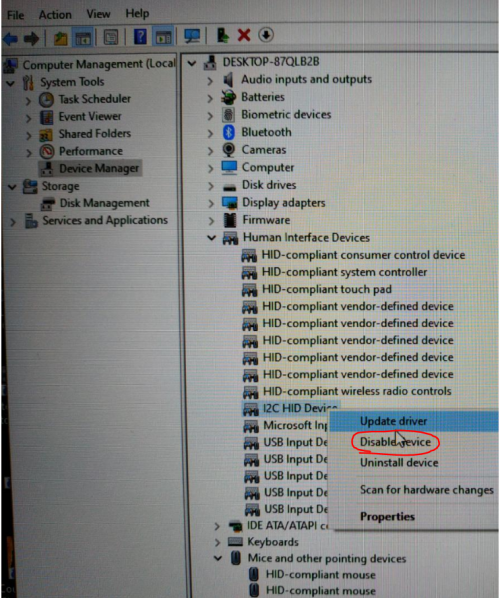
To disable the touchpad on Selenite model you may try to disable I2C HID Device under HUMAN INTERFACE DEVICES in the device manager.
It will permanently disable the touchpad. You can re-enable it back if you wish to after your dota section  laugh.gif 

user posted image
*
Would lowering PL values in registry make the TDP go even further down (like 10W)? Also, need help in lowering C state when idle.
SaiyanGoku
post Dec 1 2019, 08:17 PM

New Member
*
Junior Member
8 posts

Joined: Apr 2019
From: Hyderabad, India


QUOTE(Prince J @ Dec 1 2019, 01:36 PM)
Hi GisisEX,

May i know if you have contacted our support team +60 18-261 8599 (WhatsApp)? We are able to assist you on the BSOD.
*
Is there a firmware or driver update available for the Illegear branded ssd? Current driver is from 2006. I think that might be one of the reasons why C states aren't getting lowered.

user posted image
SaiyanGoku
post Dec 3 2019, 01:24 AM

New Member
*
Junior Member
8 posts

Joined: Apr 2019
From: Hyderabad, India


QUOTE(Jared21 @ Dec 2 2019, 08:53 AM)
does it say what drive it is in device manager? You can also use HWinfo or AS SSD or Crystal disk mark to find out the SSD model
*
No, it is the same everywhere. sad.gif

QUOTE(Prince J @ Dec 2 2019, 01:43 PM)
Hi SaiyanGoku

As per checking, the version here is the driver & OS in the SSD, not the firmware.
*
https://store.illegear.com/extreme-performa...lenite-pro.html

That 93 Wh battery seems sweet! Would it fit Selenite as well?
SaiyanGoku
post Jan 15 2020, 12:01 AM

New Member
*
Junior Member
8 posts

Joined: Apr 2019
From: Hyderabad, India


QUOTE(Jared21 @ Jan 14 2020, 07:11 PM)
To anyone with the Selenite or Onyx suffering from unusually high package power draw, follow these steps. Full credit to eddi3x3x3 on the notebookreview forum:

1. DO NOT use geforce experience
2. Reinstall the nvidia drivers using the NVcleaninstaller (https://www.techpowerup.com/forums/...an-installer-for-nvidia-drivers-alpha.249085/)

When you run the NVcleaninstaller, make sure you select the following:
1. Display Driver (need this obviously)
2. PhysX
3. HD Audio via HDMI
4. Microsoft Visual C 2017 Runtime
5. Optimus (Need that battery life right?)
6. USB-C driver (need this for display port over usb C)
7. Shield Wireless Controller (only if you plan to stream gameplay to another device, otherwise leave it unchecked)
8. Virtual Audio
Leave everything else unchecked until nvidia fixes this issue. My CPU wattage went down from an idle 12 W average to 1-2 W average.

I'm now getting less than 1w idle on both battery and while plugged in and this fix sticks through restarts. Who needs nvidia's dumb telemetry and GFE anyways. C states also drop down to C8 with mine being around 50 to 60% in C8
*
Didn't expect GeForce Experience to be the reason for this issue. shocking.gif

SaiyanGoku
post Jan 15 2020, 01:19 AM

New Member
*
Junior Member
8 posts

Joined: Apr 2019
From: Hyderabad, India


QUOTE(Jared21 @ Jan 14 2020, 07:11 PM)
To anyone with the Selenite or Onyx suffering from unusually high package power draw, follow these steps. Full credit to eddi3x3x3 on the notebookreview forum:

1. DO NOT use geforce experience
2. Reinstall the nvidia drivers using the NVcleaninstaller (https://www.techpowerup.com/forums/...an-installer-for-nvidia-drivers-alpha.249085/)

When you run the NVcleaninstaller, make sure you select the following:
1. Display Driver (need this obviously)
2. PhysX
3. HD Audio via HDMI
4. Microsoft Visual C 2017 Runtime
5. Optimus (Need that battery life right?)
6. USB-C driver (need this for display port over usb C)
7. Shield Wireless Controller (only if you plan to stream gameplay to another device, otherwise leave it unchecked)
8. Virtual Audio
Leave everything else unchecked until nvidia fixes this issue. My CPU wattage went down from an idle 12 W average to 1-2 W average.

I'm now getting less than 1w idle on both battery and while plugged in and this fix sticks through restarts. Who needs nvidia's dumb telemetry and GFE anyways. C states also drop down to C8 with mine being around 50 to 60% in C8
*
Followed everything to the dot, still no change. Lowest I get is 11.2W. Freaking uncore is always using 11W. bangwall.gif bangwall.gif bangwall.gif
SaiyanGoku
post Jan 15 2020, 01:05 PM

New Member
*
Junior Member
8 posts

Joined: Apr 2019
From: Hyderabad, India


QUOTE(Jared21 @ Jan 15 2020, 08:22 AM)
Hmm which driver did you do this with. IIRC the thread only tried with 441.41 and 441.66
*
On 441.41
Power draw on idle never goes below 12W. However, when I left the laptop idling overnight, the lowest recorded was 7W. This is still high considering it wasn't doing anything at all other than being switched on.
SaiyanGoku
post Jan 18 2020, 05:01 PM

New Member
*
Junior Member
8 posts

Joined: Apr 2019
From: Hyderabad, India


QUOTE(Jared21 @ Jan 15 2020, 10:49 AM)
Interesting. I used the HIPM+DIPM+DevSleep section before i discovered the driver bug

http://forum.notebookreview.com/threads/gu...-states.815602/
*
BIG UPDATE:

I installed latest UHD 630 drivers from Intel and boy oh boy, it not only fixed idle power draw but reduced idle temperatures to 35-37 °C too. I guess optimus wasn't configured properly and RTX 2060 was always active despite no game running.
Now power draw while browsing or watching offline video sits at 3-4W.


SaiyanGoku
post Jan 18 2020, 05:32 PM

New Member
*
Junior Member
8 posts

Joined: Apr 2019
From: Hyderabad, India


QUOTE(ZM Fong @ Jan 18 2020, 02:53 PM)
good to know, which driver version?
*
DCH driver version 26.20.100.7584 for UHD 630 and 441.41-notebook-win10-64bit-international-dch-whql for RTX 2060.
SaiyanGoku
post Mar 5 2020, 04:04 PM

New Member
*
Junior Member
8 posts

Joined: Apr 2019
From: Hyderabad, India


Getting frequent STORE_DATA_STRUCTURE_CORRUPTION BSOD error for a week now. Haven't made any changes to stable -120v undervolt to CPU or V-F curve locked to 1300 MHz for RTX 2060 (haven't been playing that many games). Any possible reason/resolution for this? All drivers are updated except GPU (v441.41 currenty) because later versions were causing power draw issues.

4 Pages  1 2 3 > » Top
 

Change to:
| Lo-Fi Version
0.0391sec    0.36    7 queries    GZIP Disabled
Time is now: 5th December 2025 - 07:01 PM