Welcome Guest ( Log In | Register )

Outline · [ Standard ] · Linear+

 ILLEGEAR Selenite Discussion Thread V1, world’s first 17.3” bezel-less laptop

views
     
JonKS1
post Jan 2 2020, 09:07 AM

New Member
*
Newbie
0 posts

Joined: Jun 2010
From: KL
I owned a Selenite more than about a week now, I can say that it is a nice gaming laptop. So I will just skip the good part of this laptop.

I will just mention noticeable problems straight away. After one week of using it, I noticed several problems as shown below:


1. Copying large files (normally more than 10 GB from SSD to ext. HDD most of the time will stuck at 99% forever.

2. I can hear a cracking/pop sound whenever I play a music or video or even game.

3. I feel that the left side speaker is slightly louder than right side speaker. Which means the output is unbalanced. Maybe due to the internal subwoofer location installed on the right side causing the unbalance of the audio.

4. When I plug in my earphone, there is no sound coming out from my earphone. The sound instead is produced from the speaker. So I have to replug several times only then I can get the sound from earphone.


These problems are rather irritating during daily use. Not sure if there is any tip from you guys. On the other hand, I am thinking to reset the laptop one time to see if everything is resolved or not.

This post has been edited by JonKS1: Jan 2 2020, 10:05 AM
JonKS1
post Jan 2 2020, 02:15 PM

New Member
*
Newbie
0 posts

Joined: Jun 2010
From: KL
QUOTE(Prince J @ Jan 2 2020, 12:50 PM)
Hi JonKS1

The previous cracking sound has been fixed by the latest realtek driver patch. Can you whatsapp us for more details? Will assist.
*
As per mentioned by alexnvidia, the issue did not actually solve 100%. Even if I use the new driver, the popping sound will still come back (Although not everytime, but still can hear it from time to time). Hopefully Illegear has a better solution for this. I did message whatsapp to Illegear Support, maybe the technical team are out of office, still have not receive any feedback.
JonKS1
post Jan 2 2020, 02:25 PM

New Member
*
Newbie
0 posts

Joined: Jun 2010
From: KL
QUOTE(alexnvidia @ Jan 2 2020, 01:20 PM)
1. I too experience issues with the USB port on the right side. The port closer to the back will randomly disconnect when i copy a large file to it. It doesnt matter if i use a thumb drive or an external HDD. The result is the same. however, if i move the exact same external storage device to the USB port next to it and perform the exact same file copy, it works perfectly every single time. I have disabled all USB power saving related options in windows and the issue is still persistent. So you might wanna test out the other ports.

2. This issue has been there since day one and was never fixed even with the latest realtek driver (8710). The only method i find able to eliminate this popping and crackling issue is to remove realtek driver altogether and use windows generic driver. however, by doing that, you loose sound blaster cinema function.

3. I didnt notice this but the speakers on selenite are not good to begin with.

4. I dont use headphone so i cant comment on this, but it could be possible your headphone jack is damaged? have you tried other headphone jack?
*
1. Previously I tried to plug in 2 ext HDD, copy files from one to the other. And the transfer just stuck either half way or at 99%. Happens all the time. If you mention that the behind port got problem, I will try again and see if it is true or not. Very disturbing because sometimes I need to transfer huge files and always get this problem.

2. Although the popping sound is minimal, but still you cannot get away with it. Without Sound Blaster Cinema, the speaker output level will be reduced tremendously or not? Because I can only get loud sound with the Sound Blaster Cinema. Hopefully Illegear really can find solution to solve this.

3. If you try to turn on a movie with more than 50%, you can actually hear the difference. Can be tuned by changing the sound balance more the the right. But this will affect if you put on earphone / headset, where the sound will be off one side.

4. I am certain that my earphone jack is still function. Maybe some setting need to be adjusted again.

I am thinking to reset the PC and see if all these still exist or not.

JonKS1
post Jan 3 2020, 01:20 PM

New Member
*
Newbie
0 posts

Joined: Jun 2010
From: KL
QUOTE(Volt @ Jan 3 2020, 11:26 AM)
1. I have no problem on my unit. I have done several back up to my external before, so far everything is good on my side

2. Mine still have the popping sound but its minimal after i did some tweaking.

3. Im not sure, so far i havent notice it cos i rarely use the speaker

4. Mine working flawlessly. Been using the earphone every day.

The only thing that bother me right now is the power button, I cant seem to turn it on once, usually need to press it 2 or 3 times even plug in with power brick.
*
1. The problem comes on and off. Sometimes stuck, sometimes smooth.

2. Mind to share how you do it? Thanks.

3. Definitely my selenite sound output is off balance. I can feel that. You can try to experience.

4. Lucky you. I noticed that even with plug in earphone, the speaker still will comes out with popping sound. Weird.

Normally for plugged in, one time should be fine. Only when it runs with battery, need to hold for 2 seconds only it can on.
JonKS1
post Jan 3 2020, 01:21 PM

New Member
*
Newbie
0 posts

Joined: Jun 2010
From: KL
QUOTE(hamjun0225 @ Jan 3 2020, 01:04 PM)
Illegear power button needs to press and hold for 2 seconds to boot up, it's designed for preventing accidental boot up.
*
Press and hold for 2 seconds only apply to running in battery. If with power adapter, just single press with start up the machine.
JonKS1
post Jan 3 2020, 07:11 PM

New Member
*
Newbie
0 posts

Joined: Jun 2010
From: KL
QUOTE(Volt @ Jan 3 2020, 04:05 PM)
I change the power management setting for the speaker. You could try it but there is no guarantees
you have to disable it through regedit > hkey_current_user > Software > Realtek > Audio > RtknguAudUService > enable > 0
user posted image
Yes, i already know that during my first purchase. But in my case ,single press doesn't usually turn on the laptop. Mostly have to try 2 times
*
Will try it out once free. I am thinking to reinstall the windows again to see if the problem can be eliminated.
JonKS1
post Jan 4 2020, 07:51 PM

New Member
*
Newbie
0 posts

Joined: Jun 2010
From: KL
QUOTE(alexnvidia @ Jan 4 2020, 10:27 AM)
unfortunately it wont. no matter how many times you format, as long as you use the realtek driver and sb cinema software, the popping and crackling will start to appear. there is NO fix till this day.

I too disabled power management in realtek windows app which did reduce the symptom but it is still there.

The only tried and true way is to uninstall the realtek driver and use windows generic default sound driver. but the sound is really tiny and sb cinema will be disabled.
*
pros and cons of having realtek driver. What to do.
JonKS1
post Jan 5 2020, 12:15 AM

New Member
*
Newbie
0 posts

Joined: Jun 2010
From: KL
QUOTE(alexnvidia @ Jan 4 2020, 10:42 PM)
i dont think it's an issue with realtek driver. There are many realtek sound enabled laptops and computers out there and only tongfang made laptops are severely affected by this popping and crackling issue
*
Meaning there is a bug causing it?

Is it okay to let the laptop plugged to power supply all day long even without using it?

This post has been edited by JonKS1: Jan 5 2020, 12:16 AM
JonKS1
post Jan 8 2020, 11:16 AM

New Member
*
Newbie
0 posts

Joined: Jun 2010
From: KL
QUOTE(Prince J @ Jan 8 2020, 01:17 AM)
No problem, happy to help. We are also liaising with factory FAE in regards to the pop sound, will get back as soon as we receive an update from them.
*
This will apply to all laptop including Selenite right?
JonKS1
post Jan 8 2020, 11:30 AM

New Member
*
Newbie
0 posts

Joined: Jun 2010
From: KL
QUOTE(Prince J @ Jan 8 2020, 11:24 AM)
All our other models do not have this issue, it only happened on the previous SELENITE (non pro) and the factory FAE told us that other market users have never complaint about this. Therefore it will take us sometime to send back the system to have them check on it. We did send once few months back and the FAE couldn't find out anything.

Anything we will keep you guys updated.
*
Thank you. I am currently using Selenite, which I have this popping sound problem.

I also noticed the sound produced from the speaker is not balance. Is it due to the subwoofer is located at right side of the laptop causing this problem? I can hear that left side sound is louder than right side sound.
JonKS1
post Jan 8 2020, 11:58 AM

New Member
*
Newbie
0 posts

Joined: Jun 2010
From: KL
QUOTE(Jared21 @ Jan 8 2020, 11:46 AM)
Use this to fix your popping sound

Uninstall your sound blaster and current realtek drivers and only install the realtek driver in the link from Asrock. Then you can open up the OG realtek sound manager and tune it to your liking. I used the rock preset and change a couple of levels and it sounds basically the same as when tuning with the SB software
*
I did some setting with the power management, which reduce the popping sound. Just that I notice the sound is unbalance from the speaker. Do you feel that?
JonKS1
post Jan 8 2020, 12:53 PM

New Member
*
Newbie
0 posts

Joined: Jun 2010
From: KL
QUOTE(Jared21 @ Jan 8 2020, 12:27 PM)
Don't really feel that on my unit.

When messing around with the volume levels for the main speakers and the sub, the level of the sub doesnt affect anything on my end and it sounds perfectly balanced when using
*
Perhaps it is the audio driver again which cause the unbalance sound
JonKS1
post Feb 3 2020, 11:21 PM

New Member
*
Newbie
0 posts

Joined: Jun 2010
From: KL
Is it normal that the Selenite monitor appears to have white light leakage at the bottom part of the screen?

It looks like this as shown in the website:
https://www.dell.com/support/article/my/en/...-screen?lang=en

This post has been edited by JonKS1: Feb 4 2020, 07:26 AM


Attached thumbnail(s)
Attached Image
JonKS1
post Feb 29 2020, 07:35 AM

New Member
*
Newbie
0 posts

Joined: Jun 2010
From: KL
QUOTE(amir.asyraf @ Feb 28 2020, 03:10 PM)
Yeah it's crap, here's what the wave effect looks like: https://gfycat.com/distinctmiserableafricanjacana

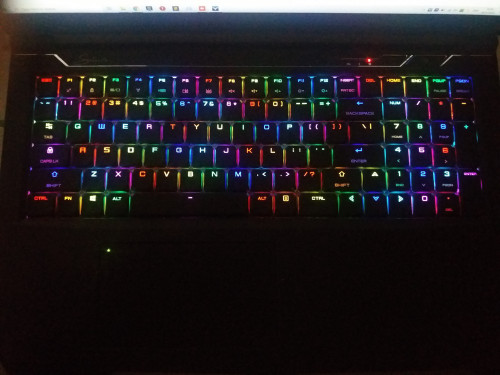
But having the ability to assign each keys their own individual colour is awesome, I just set mine randomly, although I avoid 2 colours next to each other:

user posted image

Too bad the UI/UX for assigning colours to keys sucks though. You can't drag colours to assign multiple keys quickly, and also there's no profiles.
*
If you are seeking for nicer animation of wave, try to set the speed to the maximum. Then you will notice a higher frequency and smoother transition of wave. Try it out
JonKS1
post Mar 3 2020, 08:01 PM

New Member
*
Newbie
0 posts

Joined: Jun 2010
From: KL
QUOTE(amir.asyraf @ Mar 3 2020, 05:58 PM)
It does seem nicer, but still noticeable. It could be much better especially considering it's per-key illumination.

Actually to think about it I've never really seen any keyboard with proper wave animation.
*
I enjoy watching the Razer keyboard RGB setting. They have very smooth wave form and illumination.
JonKS1
post Jun 3 2020, 11:12 PM

New Member
*
Newbie
0 posts

Joined: Jun 2010
From: KL
QUOTE(Jared21 @ May 29 2020, 10:39 PM)
I'm just waiting for that day to happen. My gf uses my laptop for her AC and Overwatch and i've been keeping track of that trickle charge. Happens every single time. Tempted to unplug the battery and just use wall power since i can't even bring it out to classes yet
*
Same goes to me, it happens occasionally where the battery drops to 99% and starts to recharge after power on.

I got another problem on the subwoofer. Whenever I start any games with power adaptor connected, there will be buzzing sound produced from subwoofer. This only happens when the laptop is connected to power adaptor. I did try to play game with battery only, there is no buzzing sound produced.
JonKS1
post Jun 4 2020, 11:04 AM

New Member
*
Newbie
0 posts

Joined: Jun 2010
From: KL
QUOTE(Jared21 @ Jun 4 2020, 02:56 AM)
Are you sure its coming from the subwoofer? I have stupidly loud coil whine when using Turbo mode and i notice its coming from where the main components are somewhere along the strip that houses the power button and such. Tempted to slap a thick thermal pad on whichever capacitor or mosfet is making that god awful sound
*
My PC always run game on Gaming Mode, and the sound is obvious during gaming. The sound came out from the left side (Subwoofer side) of laptop. I am not sure which component is producing that weird sound since I didn't remove the casing for checking. So you also have the similar issue?
JonKS1
post Oct 1 2020, 08:47 PM

New Member
*
Newbie
0 posts

Joined: Jun 2010
From: KL
I have noticed the selenite will charge the battery after power up the PC even though it is fully charge before shut down.
With this rate, the battery will be swollen up like most of the selenite user's case.

Anyone has any solution so far or have to send yo Illegear for check up?


Change to:
| Lo-Fi Version
0.0433sec    0.26    7 queries    GZIP Disabled
Time is now: 2nd December 2025 - 06:58 PM