Welcome Guest ( Log In | Register )

Outline · [ Standard ] · Linear+

 ILLEGEAR Selenite Discussion Thread V1, world’s first 17.3” bezel-less laptop

views
     
Shadowhunt94
post May 31 2020, 05:16 PM

New Member
*
Newbie
2 posts

Joined: Mar 2015
Hi guys, just got my Selenite G on 14th May. Wanna share some of my usage review and questions after two weeks.

i7 10875H 8 cores, 16gb ddr4 ram, RTX 2070 max-p

If you find it long you can skip it, just sharing my honest review about the laptop.

Goods:
1. Built quality seem good. Screen also not much problem. Keyboard experience is weird initially, but after a while already got used to it.

2. Considered portable enough as my previous laptop Lenovo Y50 GTX860M is 15.6 inch but this 17.3 inch beauty is just unbeatable, having the almost same dimensions and weight.

3. Gaming is great on RTX2070 although it's a mobile version, FYI this is refreshed version (factory undervolted by Nvidia) having higher clock speed and reduced total bandwidth. Power consumption maintain the same 115W.

4. Windows Hello Camera, one of the reason to buy this laptop, save time on typing password thumbup.gif

5. Sound wise, i salute the power of THX spatial audio software, but not the speaker itself hehe, overall listening feel is alright. Still prefer the JBL speakers+sub and Dolby software on my Lenovo Y50.

6. Price is unbeatable, been surveyed many brands of laptops with similar specs, but others just overpriced for the 2070 performance.


PROBLEMS:
1. At first i though Kryonaut will work on this laptop like a charm since it's considered a premium grade thermal paste for me. Somehow after some time of the usage, i've been experiencing a serious issue. The game framerate would drastically drop to unplayable frame rate for a while, then it become normal again. Using Afterburner monitoring during gameplay, can notice the cpu and gpu clock dropped to slowest speed too at the moment of stuttering frame rates. This problem happens intermittent one, not always. Not much background process which can interfere the game, just gaming no stream or others.

Used HWiNFO to monitor the status, found that cpu always more than 85c while gaming and all cores experiencing thermal throttling. To solve the issue i undervolted cpu more than -80mV to aid thermal reduction. Now the cpu mostly max up averagely 80c which won't have throttling on it.

OK, initially i thought thermal throttling could be the issue of the game stuttering, but somwhow yesterday the stuttering is coming back again with all undervolt, limit turbo boost, set dGPU at bios, max performance in Nvidia control panel, and no whisper mode at GeForce Experience, you name it. Can't figure out what else i can do to solve this frustrating problem. Maybe it's due to the 14nm++++++ process? sweat.gif sweat.gif sweat.gif

Another reason could be high ambient temp while gaming la, not at 25c air con room, so this issue could be subjective. Unfortunately didn't check for the power draw though at the moment.

2. The turbo and gaming fan mode is a bit problematic also before start using ThrottleStop. The temps are still good when in office mode, but when switching to Turbo from the AB i can see the CPU temp increased few degrees, turned off turbo it'll drop to normal again. Maybe it's the power delivery mode set by the command center there. After undervolting using TS it seem like dont have this issue already.

3. Keyboard RGB is kinda a joke, since i own Corsair mech KB i thought Selenite would be the same having function of import other user lighting effects/having smoother animations, turned out only those presets available. I'm not sure about other luxury laptop brands, or it's only Illegear doing so?

Command center is buggy, sometimes not detecting the hardware or the software can't be used properly, had to restart laptop or restart the process then only can work nicely. The fan button sometimes can't control the fan speed too due to buggy software. Having the feel of being trolled, but can't blame since i didn't perform thorough research enough about keyboard side, hunting for laptops and my friend (who using Laguna SE) to "poison" me to buy this brand, although i already know Illegear beforehand.

4. Rubberize palm rest. Okay thismay be my own preference but i prefer metal surface than this cuz rubberized is damn hard to take care of. When it ages it'll be sticky if you don't take care of it right.

Reviews aside, have some questions for gamers and enthusiasts here.

1. Cooling pad or vacuum cooler for you guys? I searched online and it's really dependent on laptops models, so you can't decide straightly which is better. Or you guys never use these at all?

2. Anyone owning 2070 variant mind to share their thermal performance? Would like to know whether it's me the unlucky one or everyone facing the same issue.

3. How to take care the rubberized surface? Researched online few methods, microfibre + alcohol OR microfibre + wash soap, then wipe with dry cloth. Would like to maximize the lifespan to prevent it become sticky since my previous Y50 also rubberized and unfortunately that moment i didn't realize the importance of taking care it.


That should be all about my review and concern about Selenite G. Any further issues or questions will be discussed in future. Thanks guys for spending time reading this and am happy to join the high end gaming for the first time!

This post has been edited by Shadowhunt94: May 31 2020, 05:19 PM
Shadowhunt94
post Jun 5 2020, 10:58 PM

New Member
*
Newbie
2 posts

Joined: Mar 2015
QUOTE(Jared21 @ May 31 2020, 08:21 PM)

3) You can try using the command center from either XMG (Neo 17) or Eluktronics (Mech G1R)

4) I just use a clean microfiber cloth to wipe the surfaces down

5) For sound i HIGHLY recommend following this guide at the bottom of the page. Dont have to deal with whatever THX/Soundblaster software. You get the native windows EQ and can tweak to your hearts content: http://forum.notebookreview.com/threads/to...815943/page-462
*
Thanks for the suggestion Jared21, will try those when i'm free.


QUOTE(alexnvidia @ Jun 1 2020, 10:11 AM)

I would suggest you open GPU-Z and let it run in the background while you game. after a stuttering gaming session, check the graph and perfcap reason to see what's going on with the GPU during stuttering. CPU overheating and thermal throttling dont generally cause such severe stuttering. from my past experience, such stuttering during gaming was caused by GPU power delivery circuitry overheating (VRM, inductors). If those components dont make good contact with the thermal pads, you are in for a nasty stuttering surprise.
I did that for a while, it's just that the rig itself hasn't reach the stage of stuttering, perhaps it's based on its mood though? hmm.gif


QUOTE(Prince J @ Jun 3 2020, 01:07 AM)
Hi Shadow, may i know what's the average temperature you are getting on your i7-10875H?

The keyboard RGB only can function with preset animation profile, will feedback your suggestion of animation profile import to ODM. Thank you smile.gif
Before doing any undervolt or turbo limit, it's more than 80, records show sometimes reach 90 above.

Hope that really got smoother animations on those presets at least, right now still not good enough even set to fastest. Of course it is most welcome if there's an option for coders to make something special.


Shadowhunt94
post Jun 5 2020, 11:09 PM

New Member
*
Newbie
2 posts

Joined: Mar 2015
Annnnnnnnnd one more issue after another week of usage.

Owning a Seagate SSHD 5 years ago, checking on Acronis Disk Monitor it says there's some end-to-end transfer error, giving a sign that the hdd could fail. Sometimes it comes out some weird noise, and when i install it into the laptop, the temperature could reach more than 50 degrees Celsius when gaming, loading the files from it. When i install a game to the hdd the task manager shows it loads 100% fully, super long response time, then it just not working, no files transfer. OS could hang and disk management won't see the existence of the hdd, so i have to restart the laptop and it'll become fine again despite still high hdd temp.

Okay, thought that it has served me long, then i decided to buy another sshd and install into it. Just not more than 15 mins it boot up and start copying the files from external to the new sshd, the issue arise again.

Come on, don't tell me the new sshd has problem like the old one???? mad.gif bangwall.gif vmad.gif ranting.gif

The old one i put it into external hdd controller, now it still works like a charm, heat reduced although still has some noise sometimes. sweat.gif

What is happening to the laptop actually? I want to dedicated support as soon as possible guiding me to install the hdd properly remotely, assuming i DID it wrong. There's a flex cable beneath the hdd location, perhaps it's the cause? I don't know. shakehead.gif

I know this laptop is not the most expensive but then 7k is considered bangsawan price for many people already, and the quality just like this?
Shadowhunt94
post Jun 7 2020, 05:13 PM

New Member
*
Newbie
2 posts

Joined: Mar 2015
QUOTE(alexnvidia @ Jun 1 2020, 10:11 AM)
I have the RTX 2070 variant. The GPU performance has been great if not stellar. Never had any issues with stuttering or overheating. I've played games during afternoons in a non air con room before. the temps of the laptop surface does get crazy hot (the strip above the keyboard in between the selenite logo and boost & power button). It's so hot you cant even touch it for more than 2 seconds so gaming in non air con room is HIGHLY not recommended. that being said, i still did not face any stuttering issue during gaming.

While GPU performance is stellar, the same cannot be said about the CPU. The mounting pressure of the tripod design heatsink is not balanced and you can expect high difference in core temperature difference. we are talking about 10-15C difference or more between the coolest core and hottest core during gaming. Their support staff will tell you it's completely normal but we all know that's BS. Yes there are control mechanism in place to stop the CPU from overheating but this also mean the CPU core will be heavily throttled and performance suffers greatly.

You can try to minimize this issue by repasting on your own and adjusting the heatsink cold plate slightly to ensure a more balanced contact. this however is a highly skilled process and extremely difficult to get right. and also, after repasting, temps will be great with minimal difference in temperature between cores. however, after a few weeks, everything will be back to hell again with massive core temperature difference. I've tried both cooler master gel  maker, kryonaut. they behave the same. master gel maker degrades (pump out) a lot faster though for my case.

I would suggest you open GPU-Z and let it run in the background while you game. after a stuttering gaming session, check the graph and perfcap reason to see what's going on with the GPU during stuttering. CPU overheating and thermal throttling dont generally cause such severe stuttering. from my past experience, such stuttering during gaming was caused by GPU power delivery circuitry overheating (VRM, inductors). If those components dont make good contact with the thermal pads, you are in for a nasty stuttering surprise.

not sure if this is useful or related but you can refer this thread i created entirely dedicated to this issue. http://forum.notebookreview.com/threads/al...-freeze.804499/
*
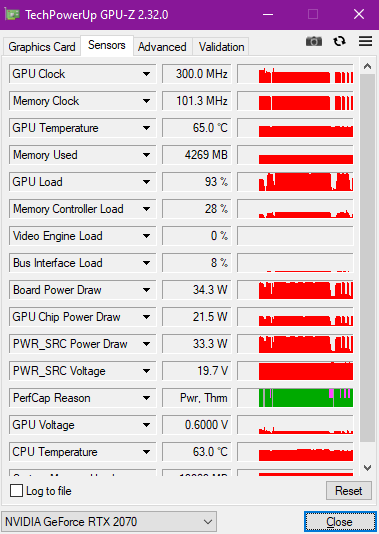
Hi alexnvidia, for the gpu-z usage i manage to get the issue happen (stuttering) sweat.gif

user posted image

The PerCap there states besides Pwr, there's Thrm also, could be the one you're mentioning? Just need to make sure the thermal pads have a good contact on ICs besides the cpu and gpu?
Shadowhunt94
post Jun 16 2020, 10:32 PM

New Member
*
Newbie
2 posts

Joined: Mar 2015
Updates on my problematic SSHD:

After contacting with Illegear tech support, they advised me to uninstall the Intel® Rapid Storage Technology software due to some power management thingy. Unresponsive could be due to power saving or sshd caching tech.
In the mean time, i've performed some settings from online source, one of them is this:

AHCI Link Power Management

For the past few days, i noticed my SSHD seem working like normal, although i've spent not much time with it due to work. Its active time doesn't maintain at 100% like old times anymore, could be the reason i stated at the second sentence.
Also, they requested me to try re-installing few drivers, but before doing so i already notice the sshd's behavior, so i'll just keep stressing and monitor its condition first.
Glad that it could be not the laptop's issue, otherwise i really need to send it back and no more gaming for a while. wacko.gif sweat.gif

Hope that TongFang FAE there has the solution for the affected gaming performance fast, hoping it was software fault rather than thermal pad/contacting issue. I'm kinda lazy to replace it myself or sending it back to Illegear then. grin.gif lol.gif

By the way, do Illegear mind to share how many Selenite G new users during this MCO period? You guys may need to proactively inform them about potential issues so that they won't blindly complaining without seeing this thread. As i myself a tech support also, after sales support quality is a crucial factor to determine your future sales. cool2.gif

This post has been edited by Shadowhunt94: Jun 16 2020, 10:35 PM
Shadowhunt94
post Jun 20 2020, 05:10 PM

New Member
*
Newbie
2 posts

Joined: Mar 2015
QUOTE(alexnvidia @ Jun 19 2020, 07:38 PM)
then this stuttering issue is considered isolated cases for those two selenite G owners? or it's a batch issue? i have no reason to believe they are making this up. and the probability of two different owners facing the same issue is very slim unless that batch of selenite G is problematic? have your support side resolved their gaming stuttering issue?
Due to i seldom gaming recently, so i couldn't replicate the issue frequently. Perhaps i really need to record myself in a video playing games until the issue happens to prove i'm not making this up after seeing Illegear's reply? rolleyes.gif smile.gif As first sentence stated, the issue still not resolved due the less interaction with the laptop.
QUOTE(Shadowhunt94 @ Jun 7 2020, 05:13 PM)
Hi alexnvidia, for the gpu-z usage i manage to get the issue happen (stuttering)  sweat.gif

user posted image

The PerCap there states besides Pwr, there's Thrm also, could be the one you're mentioning? Just need to make sure the thermal pads have a good contact on ICs besides the cpu and gpu?
*
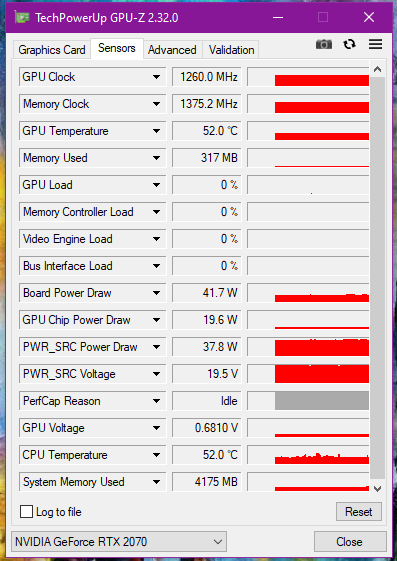
FYI, for the pink part at GPU-Z Per. Cap based on the image i uploaded above, the status there already states capped due to Thermal besides power. For a gpu in idling mode, the color of the graph is in gray instead of pink, just like the image below when the gpu is really in idle.

user posted image

Found a simple explanation of the perf cap reason Perf Cap Reason

One more thing, that time when the issue happening again is when i put gpu-z in background, play the game until the first stuttering came out, then i only tab out to capture gpuz info and show you guys about the Pwr Thrm issue, so the sudden drop at all clocks speed has NOTHING to do with gpu idling since the game is still running in background. As you can see my image above, even i'm not playing games/idling the gpu & memory clock speed won't drop to 300MHz at all. Hope clarify.

I've set 2070 as my main display in Bios instead of MsHybrid, please let me know if you guys can verify this is the culprit of all the issues, shall you can prove with your demo unit.

I will continue to play games until the issue arise again, and record down the power usage also to see if it's the software issue leading to inconsistent power delivery, OR worst case it's really because of overheating of IC components surrounding the GPU itself due to bad heat dissipation of insufficient contact with thermal pads.
Shadowhunt94
post Jun 21 2020, 02:35 PM

New Member
*
Newbie
2 posts

Joined: Mar 2015
QUOTE(Prince J @ Jun 20 2020, 11:17 PM)
Our office SELENITE G demo doesn't have any stuttering, let me see if your BIOS / EC is the same as our demo?
*
I thought i have PMed you the info from bios? For Nvidia driver is the stock when the product came in, v442.53 DCH version.

I come across FB where there's a guy from your side telling me that you guys can deliver the thermal pads to me? Or shall i contact tech for more information?

Personally really hope that the issue is due to thermal pad insufficient contact la, would like to try this method first before sending back for your side to diagnose as i know a bit bout laptop servicing too. Because the game stuttering could happen anytime in any games i've tried, basically it's like betting your luck to witness the issue, so even i send it back to your company it might be no luck for you guys to see the miracle sweat.gif

So far i have met stuttering in GTA V, Shadow of the Tomb Raider, and Borderlands 3. Have yet to play more games to monitor. My CPU & GPU temps averagely no more than 80c no matter what ambient temp it is.

Yesterday night i also benchmarked my rig for around an hour using Tomb Raider, and no luck to see the stuttering. Have to spend time to research how to make it happen.

I will update here again if i have any findings, appreciate for your side to have prompt respond since tech side might be too busy to serve me sometimes. whistling.gif

This post has been edited by Shadowhunt94: Jun 21 2020, 02:38 PM


Change to:
| Lo-Fi Version
0.0387sec    0.36    7 queries    GZIP Disabled
Time is now: 8th December 2025 - 12:33 AM