

QUOTE(sengf @ Jun 19 2020, 04:27 PM)
anybody can help me ?is it original onxy pro 9th is it include Sound Blaster Cinema 5 software?after i reformat gone already, can i know where can i download it back?

illegear website, go to support and downloadILLEGEAR Selenite Discussion Thread V1, world’s first 17.3” bezel-less laptop
|
|
 Jun 20 2020, 12:15 PM Jun 20 2020, 12:15 PM
|
 
Junior Member
351 posts Joined: Oct 2006 
|
QUOTE(sengf @ Jun 19 2020, 04:27 PM) anybody can help me ?is it original onxy pro 9th is it include Sound Blaster Cinema 5 software?after i reformat gone already, can i know where can i download it back? illegear website, go to support and download |
|
|
|
|
|
Jun 20 2020, 01:37 PM
|
|
Senior Member
617 posts Joined: Nov 2006 
|
QUOTE(alexnvidia @ Jun 20 2020, 12:15 PM) illegear website, go to support and download website dont have this software , only driver |
|
|
 Jun 20 2020, 05:10 PM Jun 20 2020, 05:10 PM
Show posts by this member only | IPv6 | Post
#523
|
|
Newbie
2 posts Joined: Mar 2015
|
QUOTE(alexnvidia @ Jun 19 2020, 07:38 PM) then this stuttering issue is considered isolated cases for those two selenite G owners? or it's a batch issue? i have no reason to believe they are making this up. and the probability of two different owners facing the same issue is very slim unless that batch of selenite G is problematic? have your support side resolved their gaming stuttering issue? Due to i seldom gaming recently, so i couldn't replicate the issue frequently. Perhaps i really need to record myself in a video playing games until the issue happens to prove i'm not making this up after seeing Illegear's reply?   As first sentence stated, the issue still not resolved due the less interaction with the laptop. As first sentence stated, the issue still not resolved due the less interaction with the laptop.QUOTE(Shadowhunt94 @ Jun 7 2020, 05:13 PM) Hi alexnvidia, for the gpu-z usage i manage to get the issue happen (stuttering) FYI, for the pink part at GPU-Z Per. Cap based on the image i uploaded above, the status there already states capped due to Thermal besides power. For a gpu in idling mode, the color of the graph is in gray instead of pink, just like the image below when the gpu is really in idle. 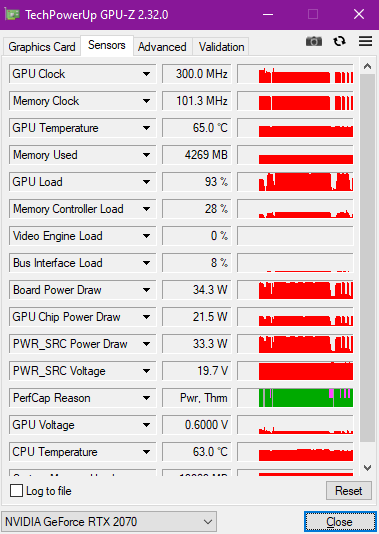 The PerCap there states besides Pwr, there's Thrm also, could be the one you're mentioning? Just need to make sure the thermal pads have a good contact on ICs besides the cpu and gpu? 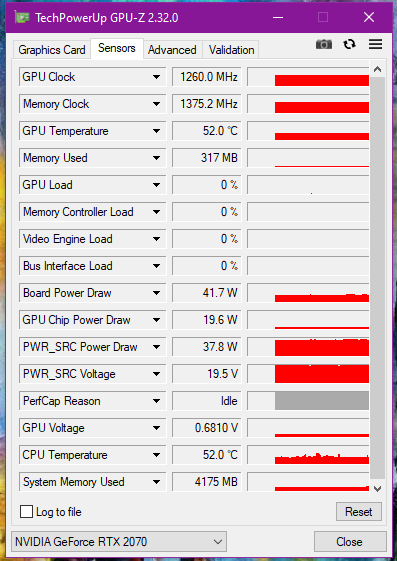 Found a simple explanation of the perf cap reason Perf Cap Reason One more thing, that time when the issue happening again is when i put gpu-z in background, play the game until the first stuttering came out, then i only tab out to capture gpuz info and show you guys about the Pwr Thrm issue, so the sudden drop at all clocks speed has NOTHING to do with gpu idling since the game is still running in background. As you can see my image above, even i'm not playing games/idling the gpu & memory clock speed won't drop to 300MHz at all. Hope clarify. I've set 2070 as my main display in Bios instead of MsHybrid, please let me know if you guys can verify this is the culprit of all the issues, shall you can prove with your demo unit. I will continue to play games until the issue arise again, and record down the power usage also to see if it's the software issue leading to inconsistent power delivery, OR worst case it's really because of overheating of IC components surrounding the GPU itself due to bad heat dissipation of insufficient contact with thermal pads. arslow and alexnvidia liked this post
|
|
|
Jun 20 2020, 11:17 PM
Show posts by this member only | IPv6 | Post
#524
|

Senior Member
1,272 posts Joined: May 2010 From: Team ILLEGEAR
|
QUOTE(sengf @ Jun 20 2020, 01:37 PM) website dont have this software , only driver Soundblaster Cinema software needs to be downloaded from Microsoft Store. Kindly pm our tech support 0182618599 and we will guide you through. QUOTE(Shadowhunt94 @ Jun 20 2020, 05:10 PM) Due to i seldom gaming recently, so i couldn't replicate the issue frequently. Perhaps i really need to record myself in a video playing games until the issue happens to prove i'm not making this up after seeing Illegear's reply? Can I have your BIOS, EC and Nvidia driver versions? You may press F2 to enter into BIOS and inform us the versions As first sentence stated, the issue still not resolved due the less interaction with the laptop.FYI, for the pink part at GPU-Z Per. Cap based on the image i uploaded above, the status there already states capped due to Thermal besides power. For a gpu in idling mode, the color of the graph is in gray instead of pink, just like the image below when the gpu is really in idle. Found a simple explanation of the perf cap reason Perf Cap Reason One more thing, that time when the issue happening again is when i put gpu-z in background, play the game until the first stuttering came out, then i only tab out to capture gpuz info and show you guys about the Pwr Thrm issue, so the sudden drop at all clocks speed has NOTHING to do with gpu idling since the game is still running in background. As you can see my image above, even i'm not playing games/idling the gpu & memory clock speed won't drop to 300MHz at all. Hope clarify. I've set 2070 as my main display in Bios instead of MsHybrid, please let me know if you guys can verify this is the culprit of all the issues, shall you can prove with your demo unit. I will continue to play games until the issue arise again, and record down the power usage also to see if it's the software issue leading to inconsistent power delivery, OR worst case it's really because of overheating of IC components surrounding the GPU itself due to bad heat dissipation of insufficient contact with thermal pads. Our office SELENITE G demo doesn't have any stuttering, let me see if your BIOS / EC is the same as our demo? This post has been edited by Prince J: Jun 20 2020, 11:30 PM |
|
|
Jun 21 2020, 12:11 AM
|
|
Senior Member
617 posts Joined: Nov 2006
|
QUOTE(Prince J @ Jun 20 2020, 11:17 PM) Soundblaster Cinema software needs to be downloaded from Microsoft Store. Kindly pm our tech support 0182618599 and we will guide you through. Dont have this software in windows store, i already contact your tech support but their just said not free, ask me to wait, i already waiting whiole day also no reply me, very bad serviceCan I have your BIOS, EC and Nvidia driver versions? You may press F2 to enter into BIOS and inform us the versions Our office SELENITE G demo doesn't have any stuttering, let me see if your BIOS / EC is the same as our demo? |
|
|
Jun 21 2020, 01:17 PM
Show posts by this member only | IPv6 | Post
#526
|
|
Senior Member
1,272 posts Joined: May 2010 From: Team ILLEGEAR
|
QUOTE(sengf @ Jun 21 2020, 12:11 AM) Dont have this software in windows store, i already contact your tech support but their just said not free, ask me to wait, i already waiting whiole day also no reply me, very bad service Yesterday was weekend (Saturday) and we only had one staff serving walk in RMA. May i have your phone number so I can follow up for you tomorrow when the team has back to work?This post has been edited by Prince J: Jun 21 2020, 01:19 PM |
|
|
|
|
|
Jun 21 2020, 01:36 PM
Show posts by this member only | IPv6 | Post
#527
|
|
Senior Member
1,272 posts Joined: May 2010 From: Team ILLEGEAR
|
QUOTE(alexnvidia @ Jun 19 2020, 07:38 PM) then this stuttering issue is considered isolated cases for those two selenite G owners? or it's a batch issue? i have no reason to believe they are making this up. and the probability of two different owners facing the same issue is very slim unless that batch of selenite G is problematic? have your support side resolved their gaming stuttering issue? So far we only had one complain on the stuttering issue from forumer shadowhunt94. Static_365 issue is another FPS drop in game issue which is related to driver/game settings.based on the youtube reviewer BOB of all trades, eluktronics work closely with tong fang to allow their RTX 2070 super to boost above 115W without any damage. he explicitly said it is PERFECTLY safe and their laptop is DESIGNED around this power envelope. obviously eluktronics dont do any design or manufacturing, it is all done by tong fang and if tong fang allows this, it means they have designed the GPU VRM to withstand the added power boost. maybe you can check with tong fang about this? being able to perform higher than standard rtx 2070 super can be a huge selling point for you guys too, just like how you guys advertise your rtx 2060 to being able to boost above nvidia spec 80W. As per our test using our showroom SELENITE G demo and stock there is no stuttering / lag shown. For the stuttering, it could be related to BIOS/EC version, driver, gameplay, background software or the hardware itself, it would be very helpful if we can receive the units back from shadowhunt94 to determine the root cause of the issue. All tongfang OEM are having the same version of BIOS. As for the boosting above 115W on RTX2060, RTX2070, RTX2070 Super, ODM / Nvidia have made clear statement that boosting above 115W increases the chance of failing the GPU power MOS, we have the responsibility to inform you regarding this in the first place. Perhaps you should consider buying your SELENITE G (ID-S) from Eluktronics rather than from Illegear? We do not have a service center in Brunei (you complained a few times in this thread that you need to ship the part to our KL center for RMA) so that makes no difference for you to buy from Eluktronics because you are going to import anyway. They also can provide you the guarantee of boosting above 115W, I believe they have the warranty in place if you failed the GPU. This post has been edited by Prince J: Jun 21 2020, 01:41 PM |
|
|
Jun 21 2020, 02:22 PM
|
|
Senior Member
617 posts Joined: Nov 2006
|
QUOTE(Prince J @ Jun 21 2020, 01:17 PM) Yesterday was weekend (Saturday) and we only had one staff serving walk in RMA. May i have your phone number so I can follow up for you tomorrow when the team has back to work? i already whatsapp that customer service number , u just inform them know and reply me in that number is ok, thanks Prince J liked this post
|
|
|
Jun 21 2020, 02:35 PM
Show posts by this member only | IPv6 | Post
#529
|
|
Newbie
2 posts Joined: Mar 2015
|
QUOTE(Prince J @ Jun 20 2020, 11:17 PM) Our office SELENITE G demo doesn't have any stuttering, let me see if your BIOS / EC is the same as our demo? I thought i have PMed you the info from bios? For Nvidia driver is the stock when the product came in, v442.53 DCH version.I come across FB where there's a guy from your side telling me that you guys can deliver the thermal pads to me? Or shall i contact tech for more information? Personally really hope that the issue is due to thermal pad insufficient contact la, would like to try this method first before sending back for your side to diagnose as i know a bit bout laptop servicing too. Because the game stuttering could happen anytime in any games i've tried, basically it's like betting your luck to witness the issue, so even i send it back to your company it might be no luck for you guys to see the miracle So far i have met stuttering in GTA V, Shadow of the Tomb Raider, and Borderlands 3. Have yet to play more games to monitor. My CPU & GPU temps averagely no more than 80c no matter what ambient temp it is. Yesterday night i also benchmarked my rig for around an hour using Tomb Raider, and no luck to see the stuttering. Have to spend time to research how to make it happen. I will update here again if i have any findings, appreciate for your side to have prompt respond since tech side might be too busy to serve me sometimes.  This post has been edited by Shadowhunt94: Jun 21 2020, 02:38 PM |
|
|
Jun 21 2020, 03:07 PM
Show posts by this member only | IPv6 | Post
#530
|
|
Senior Member
1,272 posts Joined: May 2010 From: Team ILLEGEAR
|
QUOTE(Shadowhunt94 @ Jun 21 2020, 02:35 PM) I thought i have PMed you the info from bios? For Nvidia driver is the stock when the product came in, v442.53 DCH version. We need the unit back to do multiple tests on the hardware, BIOS /EC and gameplay to identify the root cause so we can fix the issue effectively.I come across FB where there's a guy from your side telling me that you guys can deliver the thermal pads to me? Or shall i contact tech for more information? Personally really hope that the issue is due to thermal pad insufficient contact la, would like to try this method first before sending back for your side to diagnose as i know a bit bout laptop servicing too. Because the game stuttering could happen anytime in any games i've tried, basically it's like betting your luck to witness the issue, so even i send it back to your company it might be no luck for you guys to see the miracle So far i have met stuttering in GTA V, Shadow of the Tomb Raider, and Borderlands 3. Have yet to play more games to monitor. My CPU & GPU temps averagely no more than 80c no matter what ambient temp it is. Yesterday night i also benchmarked my rig for around an hour using Tomb Raider, and no luck to see the stuttering. Have to spend time to research how to make it happen. I will update here again if i have any findings, appreciate for your side to have prompt respond since tech side might be too busy to serve me sometimes. P/S: Found your BIOS / EC version in the pm, i mislooked it. |
|
|
Jun 21 2020, 06:09 PM
|
|
Junior Member
351 posts Joined: Oct 2006
|
QUOTE(Prince J @ Jun 21 2020, 06:36 AM) So far we only had one complain on the stuttering issue from forumer shadowhunt94. Static_365 issue is another FPS drop in game issue which is related to driver/game settings. I dont think eluktronics is able to write their own firmware to make them special. Just like illegear, everything from them is provided by tong fang. However, (this is just a speculation) i believe there might be two variants of the same ID-S motherboard from tong fang. one that is just designed to run a regular 115W GPU, and another that can boost past 115W. This is true in the previous models where for the same tong fang chasis from different companies, some companies offer GPU boost for rtx 2060 and some dont even though it is the exact same chasis ID-S. it does not matter if you on or off the gpu boost button, as long as you hardware ID-S do not allow for this, you will not get GPU boost. and this is not something that can be enabled by simply flashing the firmware. the hardware needs to be designed to take the extra power load. as a tong fang reseller, i'm sure you know more about this than me. As per our test using our showroom SELENITE G demo and stock there is no stuttering / lag shown. For the stuttering, it could be related to BIOS/EC version, driver, gameplay, background software or the hardware itself, it would be very helpful if we can receive the units back from shadowhunt94 to determine the root cause of the issue. All tongfang OEM are having the same version of BIOS. As for the boosting above 115W on RTX2060, RTX2070, RTX2070 Super, ODM / Nvidia have made clear statement that boosting above 115W increases the chance of failing the GPU power MOS, we have the responsibility to inform you regarding this in the first place. Perhaps you should consider buying your SELENITE G (ID-S) from Eluktronics rather than from Illegear? We do not have a service center in Brunei (you complained a few times in this thread that you need to ship the part to our KL center for RMA) so that makes no difference for you to buy from Eluktronics because you are going to import anyway. They also can provide you the guarantee of boosting above 115W, I believe they have the warranty in place if you failed the GPU. GPU boost from Eluktronics is done by pressing the GPU boost button (they call it elektroboost) next to the power button. To boost above 115W for their 2070 Super GPU, Tong fang will need to allow this to happen, meaning tong fang is the one who designed it to boost that high with the necessary power delivery VRM and firmware to do so. It is totally impossible for any selenite ID-S to boost past 115W as stated very clearly in the video unless tong fang allows it, so there is no risk of damage. Since you are so sure all tong fang OEM have the same BIOS, then your selenite G should be capable of boosting above 115W too without compromising the power delivery circuit. which is why i wanted you guys to test if your variant can boost past 115W by pressing on the GPU boost button. perhaps it will cost more to bring in the variant that can boost past 115W? or perhaps your Selenite ID-S is already capable of this and you marketing/technical team overlooked this unique feature? Either way, it would be great if you could test this out (a simple comparison using firestrike with GPU boost on and off will do) or find out from from tong fang if your ID-S is capable of gpu boost past 115W. Again, there is no risk no damage because if tong fand does not allow it, you will not get gpu boost no matter what you do. I have considered buying from eluktronics. As you said, it makes no difference for me buying from illegear or eluktronics because i'm basically getting no good aftersales support for being an international buyer. However, US is a lot further away than Malaysia and it will be a lot more expensive to ship the laptop to Brunei. Also, i was hoping illegear can be different when it comes to dealing with international customers. Since you guys are No.1 in malaysia now, the next step worth looking into is expanding to international waters, at least the nearby countries. I hope you do understand why i'm being extra careful, persistent and asking so many questions most average buyers wont even bother. If anything went wrong with my purchase, the aftersales support for hardware will be non existence unless i ship back the laptop which can be very costly. The support and info you provided in this forum really do help a lot to regain buyer's confidence and i thank you for that. This post has been edited by alexnvidia: Jun 22 2020, 08:22 AM |
|
|
Jun 22 2020, 07:27 PM
Show posts by this member only | IPv6 | Post
#532
|
|
Senior Member
1,272 posts Joined: May 2010 From: Team ILLEGEAR
|
QUOTE(Shadowhunt94 @ Jun 21 2020, 02:35 PM) I thought i have PMed you the info from bios? For Nvidia driver is the stock when the product came in, v442.53 DCH version. Please flash the latest EC and BIOS from below linkI come across FB where there's a guy from your side telling me that you guys can deliver the thermal pads to me? Or shall i contact tech for more information? Personally really hope that the issue is due to thermal pad insufficient contact la, would like to try this method first before sending back for your side to diagnose as i know a bit bout laptop servicing too. Because the game stuttering could happen anytime in any games i've tried, basically it's like betting your luck to witness the issue, so even i send it back to your company it might be no luck for you guys to see the miracle So far i have met stuttering in GTA V, Shadow of the Tomb Raider, and Borderlands 3. Have yet to play more games to monitor. My CPU & GPU temps averagely no more than 80c no matter what ambient temp it is. Yesterday night i also benchmarked my rig for around an hour using Tomb Raider, and no luck to see the stuttering. Have to spend time to research how to make it happen. I will update here again if i have any findings, appreciate for your side to have prompt respond since tech side might be too busy to serve me sometimes. https://support.illegear.com/Drivers/Laptop...2_FlashUtil.zip Do note that during the flashing process be sure you are not working on anything. MAKE SURE YOU ARE PLUGGED IN WITH CHARGER source. Open the F.bat in the Afuwin64 folder to process flashing the Bios and it will restart and enter bios few times. After successfully flashed and entered into desktop, open the F.bat in the Afuwin64cap folder to proceed flashing and updating the EC. Do note that during the flashing process the laptop will reboot few times, be sure to plug in the charger during the flashing process. 10th Gen. Command Center Update (Except IONIC and ARES) https://support.illegear.com/Drivers/Laptop...32_ILLEGEAR.zip |
|
|
Jun 23 2020, 06:30 PM
Show posts by this member only | IPv6 | Post
#533
|
|
Senior Member
1,272 posts Joined: May 2010 From: Team ILLEGEAR
|
QUOTE(alexnvidia @ Jun 21 2020, 06:09 PM) I dont think eluktronics is able to write their own firmware to make them special. Just like illegear, everything from them is provided by tong fang. However, (this is just a speculation) i believe there might be two variants of the same ID-S motherboard from tong fang. one that is just designed to run a regular 115W GPU, and another that can boost past 115W. This is true in the previous models where for the same tong fang chasis from different companies, some companies offer GPU boost for rtx 2060 and some dont even though it is the exact same chasis ID-S. it does not matter if you on or off the gpu boost button, as long as you hardware ID-S do not allow for this, you will not get GPU boost. and this is not something that can be enabled by simply flashing the firmware. the hardware needs to be designed to take the extra power load. as a tong fang reseller, i'm sure you know more about this than me. Let me reiterate that Tongfang TDP for 2060 / 2070 / 2070 Super is 115W maximum, this has been re-confirmed by the FAE contact window as well as the RD head in Tongfang who is also the one approved the design of these models.GPU boost from Eluktronics is done by pressing the GPU boost button (they call it elektroboost) next to the power button. To boost above 115W for their 2070 Super GPU, Tong fang will need to allow this to happen, meaning tong fang is the one who designed it to boost that high with the necessary power delivery VRM and firmware to do so. It is totally impossible for any selenite ID-S to boost past 115W as stated very clearly in the video unless tong fang allows it, so there is no risk of damage. Since you are so sure all tong fang OEM have the same BIOS, then your selenite G should be capable of boosting above 115W too without compromising the power delivery circuit. which is why i wanted you guys to test if your variant can boost past 115W by pressing on the GPU boost button. perhaps it will cost more to bring in the variant that can boost past 115W? or perhaps your Selenite ID-S is already capable of this and you marketing/technical team overlooked this unique feature? Either way, it would be great if you could test this out (a simple comparison using firestrike with GPU boost on and off will do) or find out from from tong fang if your ID-S is capable of gpu boost past 115W. Again, there is no risk no damage because if tong fand does not allow it, you will not get gpu boost no matter what you do. I have considered buying from eluktronics. As you said, it makes no difference for me buying from illegear or eluktronics because i'm basically getting no good aftersales support for being an international buyer. However, US is a lot further away than Malaysia and it will be a lot more expensive to ship the laptop to Brunei. Also, i was hoping illegear can be different when it comes to dealing with international customers. Since you guys are No.1 in malaysia now, the next step worth looking into is expanding to international waters, at least the nearby countries. I hope you do understand why i'm being extra careful, persistent and asking so many questions most average buyers wont even bother. If anything went wrong with my purchase, the aftersales support for hardware will be non existence unless i ship back the laptop which can be very costly. The support and info you provided in this forum really do help a lot to regain buyer's confidence and i thank you for that. Should you wish to boost your laptop GPU TDP to above 115W, you may purchase the ID-S from Eluktronics directly. This post has been edited by Prince J: Jun 23 2020, 06:39 PM |
|
|
|
|
|
Jun 23 2020, 06:45 PM
|
|
Junior Member
351 posts Joined: Oct 2006
|
QUOTE(Prince J @ Jun 23 2020, 11:30 AM) Let me reiterate that Tongfang TDP for 2060 / 2070 / 2070 Super is 115W maximum, this has been re-confirmed by the FAE contact window as well as the RD head in Tongfang who is also the one approved the design of these models. Thanks for the clarification. much appreciated.Should you wish to boost your laptop GPU TDP to above 115W, you may purchase the ID-S from Eluktronics directly. @Shadowhunt94 have u tried the new BIOS and EC firmware? did it fix your in game stuttering? This post has been edited by alexnvidia: Jun 23 2020, 06:48 PM |
|
|
Jun 28 2020, 12:20 AM
Show posts by this member only | IPv6 | Post
#535
|

Junior Member
504 posts Joined: Oct 2012 From: It's all relative
|
QUOTE(Prince J @ May 6 2020, 12:07 PM) As per ODM the GPU itself determine the application / game / software usage and boost the TDP accordingly between 80W -> 115W. Well after several weeks of testing with all kinds of games and benchmarks, I've never been able to go anywhere near 115 W, according to HWiNFO anyway. Max I've gotten was only 81.695 W.Benchmarks I've run: Firestrike (Max score 6751) Time Spy (Max score 15670) Heaven Valley Games I've played: Battlefield V (Aimed for 60+ FPS) GTA V (Maxed out) Fortnite (Maxed out) Anthem (Maxed out (I think)) Just Cause 4 (Maxed out) Forza Horizon 4 (Maxed out) Paladins (Maxed out) Apex (Aimed for 60+ FPS) Software: TensorFlow At least with the benchmarks and TensorFlow (which are mostly GPU-only intensive), the GPU temperature is only hovering at around 69-75 °C, so temperature isn't the problem and it could push further. Of course, all of the above was on Turbo mode. This post has been edited by amir.asyraf: Jun 28 2020, 12:21 AM |
|
|
Jun 28 2020, 11:06 PM
|

Junior Member
8 posts Joined: Apr 2019 From: Hyderabad, India
|
QUOTE(Prince J @ Jun 22 2020, 04:57 PM) Please flash the latest EC and BIOS from below link Any BIOS, driver, etc update for 9th gen Selenite? Could you work with ODM to make defect free >90 Whr battery for it?https://support.illegear.com/Drivers/Laptop...2_FlashUtil.zip Do note that during the flashing process be sure you are not working on anything. MAKE SURE YOU ARE PLUGGED IN WITH CHARGER source. Open the F.bat in the Afuwin64 folder to process flashing the Bios and it will restart and enter bios few times. After successfully flashed and entered into desktop, open the F.bat in the Afuwin64cap folder to proceed flashing and updating the EC. Do note that during the flashing process the laptop will reboot few times, be sure to plug in the charger during the flashing process. 10th Gen. Command Center Update (Except IONIC and ARES) https://support.illegear.com/Drivers/Laptop...32_ILLEGEAR.zip |
|
|
Jun 29 2020, 12:01 AM
|
|
Senior Member
1,272 posts Joined: May 2010 From: Team ILLEGEAR
|
QUOTE(amir.asyraf @ Jun 28 2020, 12:20 AM) Well after several weeks of testing with all kinds of games and benchmarks, I've never been able to go anywhere near 115 W, according to HWiNFO anyway. Max I've gotten was only 81.695 W. Hi amir, can i have your BIOS/EC versions?Benchmarks I've run: Firestrike (Max score 6751) Time Spy (Max score 15670) Heaven Valley Games I've played: Battlefield V (Aimed for 60+ FPS) GTA V (Maxed out) Fortnite (Maxed out) Anthem (Maxed out (I think)) Just Cause 4 (Maxed out) Forza Horizon 4 (Maxed out) Paladins (Maxed out) Apex (Aimed for 60+ FPS) Software: TensorFlow At least with the benchmarks and TensorFlow (which are mostly GPU-only intensive), the GPU temperature is only hovering at around 69-75 °C, so temperature isn't the problem and it could push further. Of course, all of the above was on Turbo mode. QUOTE(SaiyanGoku @ Jun 28 2020, 11:06 PM) Any BIOS, driver, etc update for 9th gen Selenite? Could you work with ODM to make defect free >90 Whr battery for it? Latest bios for selenite 9th gen isBios N.1.54 and EC 2.09.09 Kindly check if you are on this version. |
|
|
Jun 29 2020, 12:08 AM
|
|
Junior Member
8 posts Joined: Apr 2019 From: Hyderabad, India
|
QUOTE(Prince J @ Jun 28 2020, 09:31 PM) Hi amir, can i have your BIOS/EC versions? MsInfo32 says they are Bios N.1.53 and EC 2.07Latest bios for selenite 9th gen is Bios N.1.54 and EC 2.09.09 Kindly check if you are on this version. |
|
|
Jun 29 2020, 08:13 AM
Show posts by this member only | IPv6 | Post
#539
|
|
Junior Member
504 posts Joined: Oct 2012 From: It's all relative
|
QUOTE(Prince J @ Jun 29 2020, 12:01 AM) Hi amir, can i have your BIOS/EC versions? BIOS Version/Date: American Megatrends Inc. N.1.54, 24/6/2019Latest bios for selenite 9th gen is Bios N.1.54 and EC 2.09.09 Kindly check if you are on this version. SMBIOS Version: 3.2 Embedded Controller Version: 2.09 Is that it? |
|
|
Jun 29 2020, 10:35 PM
Show posts by this member only | IPv6 | Post
#540
|
|
Senior Member
1,272 posts Joined: May 2010 From: Team ILLEGEAR
|
QUOTE(SaiyanGoku @ Jun 29 2020, 12:08 AM) MsInfo32 says they are Bios N.1.53 and EC 2.07 If you wish, you may update to the latest version. Do note that there is risk of reflashing BIOS/EC.QUOTE(amir.asyraf @ Jun 29 2020, 08:13 AM) BIOS Version/Date: American Megatrends Inc. N.1.54, 24/6/2019 Can we test your system physically?SMBIOS Version: 3.2 Embedded Controller Version: 2.09 Is that it? |
| Change to: |  0.0174sec 0.0174sec
 0.69 0.69
 6 queries 6 queries
 GZIP Disabled GZIP Disabled
Time is now: 1st December 2025 - 01:09 PM |
 Quote
Quote