Outline ·
[ Standard ] ·
Linear+
TIME [OFFICIAL] TIME Fibre Broadband™ v4, Experience the ONE TRUE 2Gbps
|
FusionXY
|
 Dec 30 2021, 08:23 PM Dec 30 2021, 08:23 PM
|

|
QUOTE(markypcs @ Dec 30 2021, 08:15 PM) Okay, I have decided. Going with the XT8. Mainly due to the extra LAN ports available. Thanks once again all for answering all my questions You're welcome Do get during sales. Much better discounts. |
|
|
|
|
|
markypcs
|
Dec 30 2021, 08:27 PM
|
|
|
QUOTE(FusionXY @ Dec 30 2021, 08:23 PM) You're welcome Do get during sales. Much better discounts. Yes, waiting for 1.1 ! Think on Lazada is the cheapest I see for now, low 1.6k. We shall see on the day itself. |
|
|
|
|
|
1133
|
Dec 31 2021, 12:27 PM
|
|
|
Time give me Hg8145v5, if I want to use my own WiFi router Dlink DIR-X5460 , how can I change it?
|
|
|
|
|
|
FusionXY
|
Dec 31 2021, 04:55 PM
|
|
|
QUOTE(1133 @ Dec 31 2021, 12:27 PM) Time give me Hg8145v5, if I want to use my own WiFi router Dlink DIR-X5460 , how can I change it? Contact CS to convert into bridge mode. |
|
|
|
|
|
1133
|
Dec 31 2021, 05:50 PM
|
|
|
Anyone experienceing connection problems?
My line was not able to connect to Internet since early this morning, modem all lights are on, just no Internet connection available.
|
|
|
|
|
|
1133
|
Dec 31 2021, 05:51 PM
|
|
|
QUOTE(FusionXY @ Dec 31 2021, 04:55 PM) Contact CS to convert into bridge mode. Do you have the contact number? 🙏🏻 |
|
|
|
|
|
FusionXY
|
Dec 31 2021, 06:04 PM
|
|
|
QUOTE(1133 @ Dec 31 2021, 05:51 PM) Do you have the contact number? 🙏🏻 1800181818 |
|
|
|
|
|
steelv
|
Dec 31 2021, 11:34 PM
|
Getting Started

|
QUOTE(markypcs @ Dec 30 2021, 08:15 PM) Okay, I have decided. Going with the XT8. Mainly due to the extra LAN ports available. Thanks once again all for answering all my questions Yes i prefer asus router too, i got tplink ax73, but already keep in box, because tplink firmware suck no bandwidth control, no router to router mesh. |
|
|
|
|
|
jackytiong
|
Jan 1 2022, 12:18 PM
|
|
|
QUOTE(steelv @ Jan 1 2022, 12:34 AM) Yes i prefer asus router too, i got tplink ax73, but already keep in box, because tplink firmware suck no bandwidth control, no router to router mesh. In terms of wifi signal , AX73 more powerful than ASUS abit. |
|
|
|
|
|
darren_yuri
|
Jan 2 2022, 07:45 PM
|
|
|
QUOTE(jjj2 @ Nov 29 2021, 06:14 PM) Hi, your current configuration is not really proper as the mesh nodes is wirelessly bridged with the EC230, you should be connecting using a network cable to achieve optimum performance at least for the 1st node, and then mesh the 2nd node with the 1st node wirelessly. If there is no way to run any network cable, then you remove the EC230, and configure the 1st Mesh Node to dial PPPOE, and the 2nd node pairing with it. Thanks. I am sorry,so do I need to reset the nodes again by going thru the setups? and then reinstall the EC230 back next to the modem? Thanks! |
|
|
|
|
|
engonaplane
|
Jan 2 2022, 09:33 PM
|
New Member
|
hi all. Just got a subsale condo and plan to install Time. However I suspect the previous owner cut the fiber - cannot find the fiber wall socket anywhere in the house and found a fibre dangling from the ceiling next to the MDB. if i go with Time - does the standard installation cover the fiber wall socket or do i need to top up / find an external contractor to fix it prior to installation? 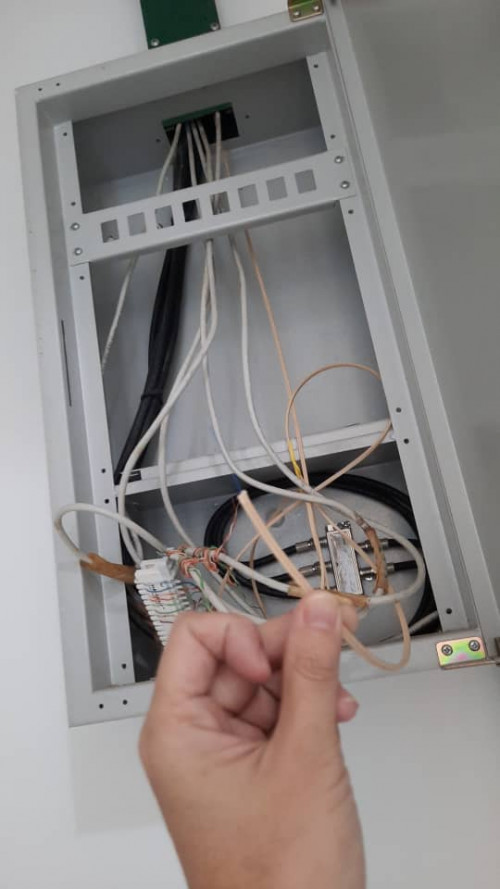 |
|
|
|
|
|
ryansxs
|
Jan 2 2022, 09:36 PM
|
|
|
QUOTE(engonaplane @ Jan 2 2022, 09:33 PM) hi all. Just got a subsale condo and plan to install Time. However I suspect the previous owner cut the fiber - cannot find the fiber wall socket anywhere in the house and found a fibre dangling from the ceiling next to the MDB. if i go with Time - does the standard installation cover the fiber wall socket or do i need to top up / find an external contractor to fix it prior to installation? how do you know that fiber is coming from your home? (is this box outside?) |
|
|
|
|
|
engonaplane
|
Jan 2 2022, 10:16 PM
|
New Member
|
QUOTE(ryansxs @ Jan 2 2022, 09:36 PM) how do you know that fiber is coming from your home? (is this box outside?) inside the house. next to the main distribution box for power - where the MCB and fuses are. This post has been edited by engonaplane: Jan 2 2022, 10:17 PM |
|
|
|
|
|
ryansxs
|
Jan 2 2022, 11:26 PM
|
|
|
QUOTE(engonaplane @ Jan 2 2022, 10:16 PM) inside the house. next to the main distribution box for power - where the MCB and fuses are. this fiber maybe is the pre-laid fiber for your house. they will use this fiber if you apply for TIME for example. |
|
|
|
|
|
engonaplane
|
Jan 3 2022, 01:01 AM
|
New Member
|
QUOTE(ryansxs @ Jan 2 2022, 11:26 PM) this fiber maybe is the pre-laid fiber for your house. they will use this fiber if you apply for TIME for example. noted - will TIME cover the cost or do i need to top up for installation? |
|
|
|
|
|
wesleyktr
|
Jan 3 2022, 07:37 AM
|
New Member
|
Hey all, recently my time internet stopped working all of a sudden in the middle of the night, and hasnt been working for like 4 days already. My router (C1200) has an orange Internet light, and when I checked 192.168.0.1 the WAN shows 0.0.0.0. Does anyone know a fix to this? Thanks.
I initially thought it was a problem with my entire condo but it seems to not be the case as when I turn off my router and connect to the modem WiFi directly (Huawei), the WiFi seems to work (but at very slow speeds). Also when I tried to connect my computer directly to the modem using an ethernet cable, it doesn't work and the connection shows up as unidentified.
|
|
|
|
|
|
ryansxs
|
Jan 3 2022, 01:32 PM
|
|
|
QUOTE(engonaplane @ Jan 3 2022, 01:01 AM) noted - will TIME cover the cost or do i need to top up for installation? Possibly you might need to top up. But i am not sure. |
|
|
|
|
|
jjj2
|
Jan 3 2022, 05:37 PM
|
|
|
QUOTE(darren_yuri @ Jan 2 2022, 07:45 PM) I am sorry,so do I need to reset the nodes again by going thru the setups? and then reinstall the EC230 back next to the modem? Thanks! Hi, if you are satisfied with the current performance, then just keep it as it is. |
|
|
|
|
|
jjj2
|
Jan 3 2022, 05:41 PM
|
|
|
QUOTE(engonaplane @ Jan 2 2022, 09:33 PM) hi all. Just got a subsale condo and plan to install Time. However I suspect the previous owner cut the fiber - cannot find the fiber wall socket anywhere in the house and found a fibre dangling from the ceiling next to the MDB. if i go with Time - does the standard installation cover the fiber wall socket or do i need to top up / find an external contractor to fix it prior to installation? Hi, I assume your condo is prelaid with fibre with the soho box like you shown. Not necessarily need a FWS, just get the SI to terminate the fibre with a fibre connector & plug into the ONU/ONT will do. *P/S : I dont see a power supply there, is there one ? |
|
|
|
|
|
jjj2
|
Jan 3 2022, 06:01 PM
|
|
|
QUOTE(wesleyktr @ Jan 3 2022, 07:37 AM) Hey all, recently my time internet stopped working all of a sudden in the middle of the night, and hasnt been working for like 4 days already. My router (C1200) has an orange Internet light, and when I checked 192.168.0.1 the WAN shows 0.0.0.0. Does anyone know a fix to this? Thanks. I initially thought it was a problem with my entire condo but it seems to not be the case as when I turn off my router and connect to the modem WiFi directly (Huawei), the WiFi seems to work (but at very slow speeds). Also when I tried to connect my computer directly to the modem using an ethernet cable, it doesn't work and the connection shows up as unidentified. Hi, this is a common issue for C1200, if you on & off, it will be back to normal. Advisable to change a router for long term solution. |
|
|
|
|



 Quote
Quote





 0.0340sec
 1.01
1.01
 6 queries
 GZIP Disabled