Welcome Guest ( Log In | Register )

671 Pages « < 415 416 417 418 419 > » Bottom

Outline · [ Standard ] · Linear+

TIME [OFFICIAL] TIME Fibre Broadband™ v4, Experience the ONE TRUE 2Gbps

views
     
markypcs
post Dec 28 2021, 10:01 PM

On my way
****
Senior Member
574 posts

Joined: Jun 2010
QUOTE(FusionXY @ Dec 28 2021, 09:57 PM)
One Mesh is different from AiMesh.
AiMesh router with router is possible.
TP-Link one is can connect to repeater like REXXX
Repeater is like the one connect to wall socket one.

AX73 together with wireless cannot.
With wired can, set another one as an AP.
*
Oh I see!
I understand, so if I were to get a third AX73, it has to have a cable also. Damn so my backup plan won't work.

Do you have experience with TP-Link's repeater? Are they any good?

Or, what would you suggest I do to improve the wifi coverage of the space?

Thanks for the replies dude
FusionXY
post Dec 28 2021, 10:45 PM

LAZZIE ON VACATION
*******
Senior Member
3,836 posts

Joined: Aug 2016

QUOTE(markypcs @ Dec 28 2021, 10:01 PM)
Oh I see!
I understand, so if I were to get a third AX73, it has to have a cable also. Damn so my backup plan won't work.

Do you have experience with TP-Link's repeater? Are they any good?

Or, what would you suggest I do to improve the wifi coverage of the space?

Thanks for the replies dude
*
Yes. If you have an outlet to plug on.
What's your budget for this setup?

If using AX router then best to get AX repeater.
mousqy
post Dec 28 2021, 10:48 PM

Enthusiast
*****
Senior Member
758 posts

Joined: Aug 2008


i use 2 AX9000 router mesh direct from the time modem for 2 story house


markypcs
post Dec 28 2021, 10:51 PM

On my way
****
Senior Member
574 posts

Joined: Jun 2010
QUOTE(FusionXY @ Dec 28 2021, 10:45 PM)
Yes. If you have an outlet to plug on.
What's your budget for this setup?

If using AX router then best to get AX repeater.
*
Looking at about 1-2k probably


QUOTE(mousqy @ Dec 28 2021, 10:48 PM)
i use 2 AX9000 router mesh direct from the time modem for 2 story house
*
Noted, it doesn't matter the distance from the AP?

This post has been edited by markypcs: Dec 28 2021, 11:27 PM
mousqy
post Dec 28 2021, 10:59 PM

Enthusiast
*****
Senior Member
758 posts

Joined: Aug 2008


QUOTE(markypcs @ Dec 28 2021, 10:51 PM)
Looking at about 1k probably
Noted, it doesn't matter the distance from the AP?
*
line of sight if possible or just 1 concrete wall
the router can adjust the wifi intensity also
jjj2
post Dec 29 2021, 12:12 AM

Look at all my stars!!
*******
Senior Member
3,612 posts

Joined: Feb 2006
QUOTE(desmond1310 @ Dec 28 2021, 09:58 AM)
Many thanks jjj2!

I'm in a ~900sqft condo with 2 rooms.
What do you think about Asus RT AX56U? Budget at the moment <RM500
This should do the trick.

Also, am i correct to assume Asus RT AX56U can support 1gbps speed if i make the upgrade?
It can support 1Gbps via LAN of course, but I've not tested it on 1Gbps line on wifi.

*
jjj2
post Dec 29 2021, 12:27 AM

Look at all my stars!!
*******
Senior Member
3,612 posts

Joined: Feb 2006
QUOTE(markypcs @ Dec 28 2021, 05:10 PM)
Spoke to ookas sales rep.

According to my setup, I cannot replace my existing setup with 2 TP Link AX73. He suggested to replace the C1200 mesh router to Deco M4 3 packs.
Attached below are images of my setup.
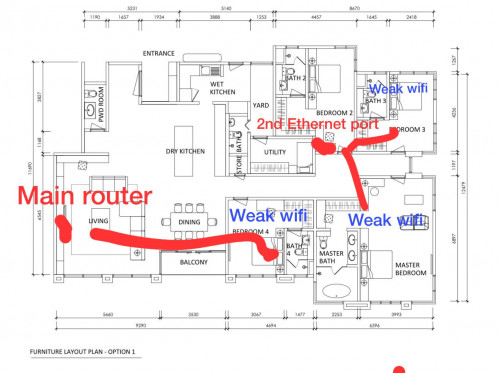
Main router: Huawei Echolife WA8021V5
Second ethernet port: TP Link Archer C1200

Can I get a second opinion here?

user posted image
user posted image
user posted image
*
Hi, based on your initial plan, remove your WA8021V5, replace it with AX73 (pppoe dialing router), hook up a network cable from the router to the wall jack, at the other end setup AX73 as an AP. In this case, you lose the mesh features.

Alternatively, get a real mesh system like TP-Link Deco X60 or X90.
shaktiv8
post Dec 29 2021, 01:29 AM

Casual
***
Junior Member
366 posts

Joined: Sep 2014


QUOTE(markypcs @ Dec 28 2021, 05:10 PM)
Spoke to ookas sales rep.

According to my setup, I cannot replace my existing setup with 2 TP Link AX73. He suggested to replace the C1200 mesh router to Deco M4 3 packs.
Attached below are images of my setup.
Main router: Huawei Echolife WA8021V5
Second ethernet port: TP Link Archer C1200

Can I get a second opinion here?

user posted image
user posted image
user posted image
*
Hi bro, just get a whole home mesh system. You can connect the system directly to time modem and set up using your pppoe username and password

I’m using deco x90 and it’s great.

Mix and match routers brand all suck

markypcs
post Dec 29 2021, 11:03 AM

On my way
****
Senior Member
574 posts

Joined: Jun 2010
QUOTE(jjj2 @ Dec 29 2021, 12:27 AM)
Hi, based on your initial plan, remove your WA8021V5, replace it with AX73 (pppoe dialing router), hook up a network cable from the router to the wall jack, at the other end setup AX73 as an AP. In this case, you lose the mesh features.

Alternatively, get a real mesh system like TP-Link Deco X60 or X90.
*
QUOTE(shaktiv8 @ Dec 29 2021, 01:29 AM)
Hi bro, just get a whole home mesh system. You can connect the system directly to time modem and set up using your pppoe username and password

I’m using deco x90 and it’s great.

Mix and match routers brand all suck
*
Noted! What's the diff between x60 and x90?
My plan is only 300mbps, i'm assuming 3 or 4 x60s is enough for the space and speed?
FusionXY
post Dec 29 2021, 02:34 PM

LAZZIE ON VACATION
*******
Senior Member
3,836 posts

Joined: Aug 2016

QUOTE(markypcs @ Dec 29 2021, 11:03 AM)
Noted! What's the diff between x60 and x90?
My plan is only 300mbps, i'm assuming 3 or 4 x60s is enough for the space and speed?
*
Either 3 set of X60
Or 2 Set of X90

X90 if you are planning to upgrade the speed later.
X60 if you are really on tight budget.
markypcs
post Dec 29 2021, 03:14 PM

On my way
****
Senior Member
574 posts

Joined: Jun 2010
QUOTE(FusionXY @ Dec 29 2021, 02:34 PM)
Either 3 set of X60
Or 2 Set of X90

X90 if you are planning to upgrade the speed later.
X60 if you are really on tight budget.
*
I don’t plan to upgrade the speed. Main concern is providing the space with proper wifi coverage.

If 3 or 4 x60 is sufficient for 300 mbps I’m happy
FusionXY
post Dec 29 2021, 03:46 PM

LAZZIE ON VACATION
*******
Senior Member
3,836 posts

Joined: Aug 2016

QUOTE(markypcs @ Dec 29 2021, 03:14 PM)
I don’t plan to upgrade the speed. Main concern is providing the space with proper wifi coverage.

If 3 or 4 x60 is sufficient for 300 mbps I’m happy
*
2 set of X60 can cover up to 1000sqft.
markypcs
post Dec 29 2021, 05:22 PM

On my way
****
Senior Member
574 posts

Joined: Jun 2010
QUOTE(FusionXY @ Dec 29 2021, 03:46 PM)
2 set of X60 can cover up to 1000sqft.
*
Okay, thanks for the replies all.

I'll do some research on both x60 and x90.
Leaning towards 3 or 4 x60's because I do not plan to upgrade my Time internet anytime soon. 300mbps is enough for my household.
FusionXY
post Dec 29 2021, 07:20 PM

LAZZIE ON VACATION
*******
Senior Member
3,836 posts

Joined: Aug 2016

QUOTE(markypcs @ Dec 29 2021, 05:22 PM)
Okay, thanks for the replies all.

I'll do some research on both x60 and x90.
Leaning towards 3 or 4 x60's because I do not plan to upgrade my Time internet anytime soon. 300mbps is enough for my household.
*
Or Asus XT8 also fine.
Up to your preferences.
longpants
post Dec 30 2021, 12:58 PM

Getting Started
**
Junior Member
260 posts

Joined: Nov 2005


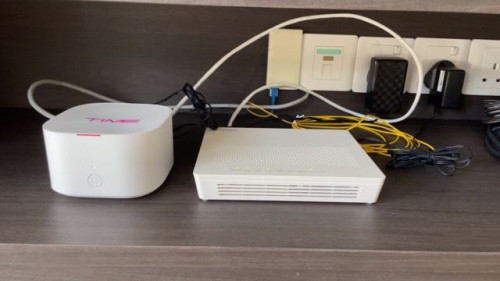
I am new to Time 100mbps with a huawei HG8145V5. Wanting to upgrade for better wireless connectivity around my house condo 1450 sq ft. Having a lot of dead spot at the back room where I have a lot of connection drops.

I am thinking of few options below :
1. Mesh wifi
2. Get a better wifi router
3. Get an access point poe - I do have a cat 6 cable running at the ceiling from The living until the back room corridor but I don’t have any power points next to it.

Any recommendations?

supervai
post Dec 30 2021, 04:38 PM

Getting Started
**
Junior Member
235 posts

Joined: Sep 2010
QUOTE(longpants @ Dec 30 2021, 12:58 PM)
I am new to Time 100mbps with a huawei HG8145V5. Wanting to upgrade for better wireless connectivity around my house condo 1450 sq ft. Having a lot of dead spot at the back room where I have a lot of connection drops.

I am thinking of few options below :
1. Mesh wifi
2. Get a better wifi router
3. Get an access point poe - I do have a cat 6 cable running at the ceiling from The living until the back room corridor but I don’t have any power points next to it.

Any recommendations?
*
I think if you use AP POE, all you need is a POE switch and you don't need a power point. The switch will provide power for the AP. But POE switch is also not that cheap and pricing of AP also depends on the access point u getting.
muncheno
post Dec 30 2021, 05:50 PM

Enthusiast
*****
Senior Member
736 posts

Joined: Jun 2006
From: Ipoh
QUOTE(longpants @ Dec 30 2021, 12:58 PM)
I am new to Time 100mbps with a huawei HG8145V5. Wanting to upgrade for better wireless connectivity around my house condo 1450 sq ft. Having a lot of dead spot at the back room where I have a lot of connection drops.

I am thinking of few options below :
1. Mesh wifi
2. Get a better wifi router
3. Get an access point poe - I do have a cat 6 cable running at the ceiling from The living until the back room corridor but I don’t have any power points next to it.

Any recommendations?
*
If the distance less than 20m, I think you can also can buy a set of those POE adapters/cables.
It is not that expensive (less than MYR 10).

What it does is slit your lan acble into half (4 out of 8 for data and the other half for power).
However your maximum data transfer rate will reduce from 1Gbps to 100mbps.
Additionally, the reason for short distance because your router, typically running with 12VDC and using POE will have voltage drop.

Thus how much is the drop depending on the cable quality.
Dedicated POE router typically running at 48VDC to minimise losses thru the lan cable.

For long terms, I will definitely pull another power near it to support 500mbps or Gbps package, then again for 100mbps now, this is considered the best cost effective option.

markypcs
post Dec 30 2021, 06:18 PM

On my way
****
Senior Member
574 posts

Joined: Jun 2010
QUOTE(FusionXY @ Dec 29 2021, 07:20 PM)
Or Asus XT8 also fine.
Up to your preferences.
*
I'm at a toss up between 2 packs of Deco x90's or XT8's.
Decided to go with these two choices due to reading reviews about how it'll still perform great at distance and through thick walls.

Though I'd appreciate some advice from those who have had experiences with both.
Planning to buy during 1.1, 2x Deco x90 (~RM1,300) vs 2x XT8 (~RM1,600)
MyProLife
post Dec 30 2021, 06:43 PM

I bully wumao & MPKL
*******
Senior Member
2,075 posts

Joined: Sep 2021
From: nowhere

QUOTE(markypcs @ Dec 30 2021, 06:18 PM)
I'm at a toss up between 2 packs of Deco x90's or XT8's.
Decided to go with these two choices due to reading reviews about how it'll still perform great at distance and through thick walls.

Though I'd appreciate some advice from those who have had experiences with both.
Planning to buy during 1.1, 2x Deco x90 (~RM1,300) vs 2x XT8 (~RM1,600)
*
Personally Prefer Asus approach (more open for most of their routers models, more settings) rather than deco locked down approach
markypcs
post Dec 30 2021, 08:15 PM

On my way
****
Senior Member
574 posts

Joined: Jun 2010
QUOTE(MyProLife @ Dec 30 2021, 06:43 PM)
Personally Prefer Asus approach (more open for most of their routers models, more settings) rather than deco locked down approach
*
Okay, I have decided. Going with the XT8.
Mainly due to the extra LAN ports available.

Thanks once again all for answering all my questions

671 Pages « < 415 416 417 418 419 > » Top
 

Change to:
| Lo-Fi Version
0.0222sec    0.56    6 queries    GZIP Disabled
Time is now: 21st December 2025 - 06:09 PM