QUOTE(squall_12 @ Dec 25 2021, 06:54 PM)
I dont know much about how is unifi right now but TIME's in their worst condition. I definitely wouldn't recommend anyone switching to TIME now.
TIME [OFFICIAL] TIME Fibre Broadband™ v4, Experience the ONE TRUE 2Gbps
|
|
Dec 25 2021, 07:06 PM
Show posts by this member only | IPv6 | Post
#8301
|
![]()
Probation
2 posts Joined: Aug 2021 From: Bandar Puchong Jaya, Selangor |
|
|
|
|
|
|
Dec 25 2021, 11:13 PM
|
![]()
Probation
8 posts Joined: Sep 2021 |
hi, i have recently subscribed to time (due to moved to condo). I have a google nest router, how can i replace the stock huawei router (HG8145V5) with the google nest router?
|
|
|
Dec 25 2021, 11:24 PM
Show posts by this member only | IPv6 | Post
#8303
|
![]() ![]() ![]() ![]() ![]() ![]() ![]()
Senior Member
3,836 posts Joined: Aug 2016 |
|
|
|
Dec 26 2021, 08:02 PM
|
![]() ![]()
Junior Member
231 posts Joined: Jan 2008 From: MMU Melaka |
Hi guys, I know my question is hardware related, but was hoping to get sifu advice here. I have also posted my question in the router thread, but am hoping for quick response, thus here i am as well. Sorry if my question is redundant.
I am on TIME fiber 500mbps plan. Current router is Huawei WA8021V5. Current modem is Huawei HG8240H5. All the buzz around WIFI 6, i want to capitalize on the OFDMA and MU-MIMO tech and convinced to upgrade now. What needs to change? The router only? or both router + modem? May I have a recommendation of what brand and model? I have my TIME username and password with me. Is that enough to setup with when i get the new WIFI 6 hardware? Or do i need more info? Does my device needs to support WIFI 6 to make use of the OFDMA/MY-MINO tech? Main phones at home are iPhone XS, Mi 9T Pro, Redmi 10, Huawei Nova 3i (all support WIFI 5 only) Many thanks in advanced. |
|
|
Dec 26 2021, 08:33 PM
Show posts by this member only | IPv6 | Post
#8305
|
![]() ![]() ![]() ![]() ![]() ![]() ![]()
Senior Member
2,614 posts Joined: Nov 2020 |
QUOTE(desmond1310 @ Dec 26 2021, 08:02 PM) Hi guys, I know my question is hardware related, but was hoping to get sifu advice here. I have also posted my question in the router thread, but am hoping for quick response, thus here i am as well. Sorry if my question is redundant. The router needs to change (WA8021V5)I am on TIME fiber 500mbps plan. Current router is Huawei WA8021V5. Current modem is Huawei HG8240H5. All the buzz around WIFI 6, i want to capitalize on the OFDMA and MU-MIMO tech and convinced to upgrade now. What needs to change? The router only? or both router + modem? May I have a recommendation of what brand and model? I have my TIME username and password with me. Is that enough to setup with when i get the new WIFI 6 hardware? Or do i need more info? Does my device needs to support WIFI 6 to make use of the OFDMA/MY-MINO tech? Main phones at home are iPhone XS, Mi 9T Pro, Redmi 10, Huawei Nova 3i (all support WIFI 5 only) Many thanks in advanced. Brands, personally would say TP-Link or Asus Asus more expensive but more features too Can't go wrong with any depending on vudget (skip TP-Link AX50 though, seems to have some heat related problems) If it's the PPPoE username + password then yes it seems Device wise, OFDMA seems to need wifi 6, MU-MIMO seems to be a wifi 5 thing. desmond1310 liked this post

|
|
|
Dec 26 2021, 08:48 PM
|
![]() ![]()
Junior Member
231 posts Joined: Jan 2008 From: MMU Melaka |
QUOTE(PRSXFENG @ Dec 26 2021, 09:33 PM) The router needs to change (WA8021V5) Thanks bro. Helps so much. Regarding the devices reply, do you mean my WIFI 5 devices above cannot make use of the OFDMA, but it can make use of the MU-MIMO?Brands, personally would say TP-Link or Asus Asus more expensive but more features too Can't go wrong with any depending on vudget (skip TP-Link AX50 though, seems to have some heat related problems) If it's the PPPoE username + password then yes it seems Device wise, OFDMA seems to need wifi 6, MU-MIMO seems to be a wifi 5 thing. I am trying to google one by one of my devices to to see if it does support MU-MIMO in any way. Seems like the info is not that easy to come by. This post has been edited by desmond1310: Dec 26 2021, 08:59 PM |
|
|
|
|
|
Dec 26 2021, 10:30 PM
|
![]()
Probation
2 posts Joined: Nov 2021 |
QUOTE(onlinecheow @ Dec 25 2021, 07:06 PM) I dont know much about how is unifi right now but TIME's in their worst condition. Yes man, Time internet speed has been bad for the last 2~3 weeks and it's terrible the last few days. I definitely wouldn't recommend anyone switching to TIME now. Ping to oversea game servers are very bad. Massive packet lost |
|
|
Dec 27 2021, 03:55 PM
Show posts by this member only | IPv6 | Post
#8308
|
![]()
Probation
1 posts Joined: Dec 2021 |
Hello, I need some help with my TIME connection. Currently, under 100Mbps plan while using the HG8240H5 modem and WA8021V5 router with the latest firmware updated.
My desktop is connected with a powerline & CAT6 cable, however I'm only getting single digit speeds. Also, I'm trying to get the PC connected to the data socket/SOHO box from the wall, but still no success in getting a connection. Is there something I'm missing out? Abit lousy with internet connection issues. Thanks in advance. https://pictr.com/images/2021/12/27/BdbqZ6.md.jpg |
|
|
Dec 27 2021, 11:05 PM
Show posts by this member only | IPv6 | Post
#8309
|
![]() ![]() ![]() ![]() ![]() ![]() ![]()
Senior Member
5,608 posts Joined: Jan 2010 |
|
|
|
Dec 27 2021, 11:07 PM
Show posts by this member only | IPv6 | Post
#8310
|
![]() ![]() ![]() ![]() ![]() ![]() ![]()
Senior Member
3,836 posts Joined: Aug 2016 |
|
|
|
Dec 28 2021, 12:04 AM
Show posts by this member only | IPv6 | Post
#8311
|
![]() ![]() ![]() ![]() ![]() ![]() ![]()
Senior Member
3,612 posts Joined: Feb 2006 |
QUOTE(ThePolice @ Dec 27 2021, 03:55 PM) Hello, I need some help with my TIME connection. Currently, under 100Mbps plan while using the HG8240H5 modem and WA8021V5 router with the latest firmware updated. My desktop is connected with a powerline & CAT6 cable, however I'm only getting single digit speeds. Please do a test by using the Cat6 network cable plug into LAN port of WA8021V5 & your laptop. Do a speedtest at speed.time.com.my Also, I'm trying to get the PC connected to the data socket/SOHO box from the wall, but still no success in getting a connection. Please take some pics to show us your current network connection. Is there something I'm missing out? Abit lousy with internet connection issues. Thanks in advance. <a href='https://pictr.com/images/2021/12/27/BdbqZ6.md.jpg' target='_blank'>https://pictr.com/images/2021/12/27/BdbqZ6.md.jpg </a> |
|
|
Dec 28 2021, 12:05 AM
Show posts by this member only | IPv6 | Post
#8312
|
![]() ![]() ![]() ![]() ![]() ![]() ![]()
Senior Member
3,612 posts Joined: Feb 2006 |
|
|
|
Dec 28 2021, 12:33 AM
Show posts by this member only | IPv6 | Post
#8313
|
![]() ![]() ![]() ![]() ![]() ![]()
Senior Member
1,524 posts Joined: Dec 2020 From: Perak |
|
|
|
|
|
|
Dec 28 2021, 12:42 AM
Show posts by this member only | IPv6 | Post
#8314
|
![]() ![]() ![]() ![]() ![]() ![]() ![]()
Senior Member
3,612 posts Joined: Feb 2006 |
QUOTE(desmond1310 @ Dec 26 2021, 08:02 PM) Hi guys, I know my question is hardware related, but was hoping to get sifu advice here. I have also posted my question in the router thread, but am hoping for quick response, thus here i am as well. Sorry if my question is redundant. I am on TIME fiber 500mbps plan. Current router is Huawei WA8021V5. Current modem is Huawei HG8240H5. All the buzz around WIFI 6, i want to capitalize on the OFDMA and MU-MIMO tech and convinced to upgrade now. What needs to change? The router only? or both router + modem? Change the Huawei WA8021V5 router. May I have a recommendation of what brand and model? Do provide your size layout diagram & size, your budget too of course. I have my TIME username and password with me. Is that enough to setup with when i get the new WIFI 6 hardware? Or do i need more info? Yes that is sufficient. Does my device needs to support WIFI 6 to make use of the OFDMA/MY-MINO tech? Main phones at home are iPhone XS, Mi 9T Pro, Redmi 10, Huawei Nova 3i (all support WIFI 5 only) Yes. Anyway 500Mbps you wont see significant difference. Many thanks in advanced. desmond1310 liked this post
|
|
|
Dec 28 2021, 07:36 AM
Show posts by this member only | IPv6 | Post
#8315
|
![]() ![]() ![]() ![]() ![]() ![]()
Senior Member
1,779 posts Joined: Jan 2003 |
|
|
|
Dec 28 2021, 09:58 AM
|
![]() ![]()
Junior Member
231 posts Joined: Jan 2008 From: MMU Melaka |
QUOTE(jjj2 @ Dec 28 2021, 01:42 AM) Many thanks jjj2!I'm in a ~900sqft condo with 2 rooms. What do you think about Asus RT AX56U? Budget at the moment <RM500 Also, am i correct to assume Asus RT AX56U can support 1gbps speed if i make the upgrade? This post has been edited by desmond1310: Dec 28 2021, 11:38 AM |
|
|
Dec 28 2021, 05:10 PM
|
![]() ![]() ![]() ![]()
Senior Member
574 posts Joined: Jun 2010 |
Spoke to ookas sales rep.
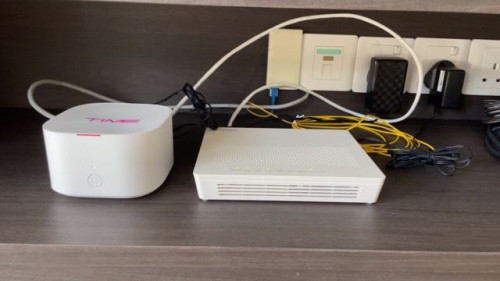
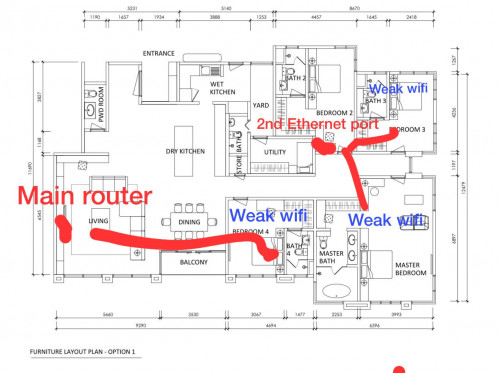
According to my setup, I cannot replace my existing setup with 2 TP Link AX73. He suggested to replace the C1200 mesh router to Deco M4 3 packs. Attached below are images of my setup. Main router: Huawei Echolife WA8021V5 Second ethernet port: TP Link Archer C1200 Can I get a second opinion here? ![]() ![]() ![]() |
|
|
Dec 28 2021, 09:45 PM
Show posts by this member only | IPv6 | Post
#8318
|
![]() ![]() ![]() ![]() ![]() ![]() ![]()
Senior Member
3,836 posts Joined: Aug 2016 |
QUOTE(markypcs @ Dec 28 2021, 05:10 PM) Spoke to ookas sales rep. If you have cable to the another then you replace with the ax73.According to my setup, I cannot replace my existing setup with 2 TP Link AX73. He suggested to replace the C1200 mesh router to Deco M4 3 packs. Attached below are images of my setup. Main router: Huawei Echolife WA8021V5 Second ethernet port: TP Link Archer C1200 Can I get a second opinion here? ![]() ![]() ![]() But due to limitations that this ax73 can pair with only repeater through one Mesh. If you have cable running then it is fine. |
|
|
Dec 28 2021, 09:55 PM
|
![]() ![]() ![]() ![]()
Senior Member
574 posts Joined: Jun 2010 |
QUOTE(FusionXY @ Dec 28 2021, 09:45 PM) If you have cable to the another then you replace with the ax73. What do you mean by AX73 can pair with only repeater through one Mesh?But due to limitations that this ax73 can pair with only repeater through one Mesh. If you have cable running then it is fine. My initial plan is to get two AX73 and see if it'll fix my weak wifi coverage issue, if that doesn't work, maybe get another AX73 (would this work if my 3rd location doesn't have lan cable?) or mesh to extend the range. |
|
|
Dec 28 2021, 09:57 PM
Show posts by this member only | IPv6 | Post
#8320
|
![]() ![]() ![]() ![]() ![]() ![]() ![]()
Senior Member
3,836 posts Joined: Aug 2016 |
QUOTE(markypcs @ Dec 28 2021, 09:55 PM) What do you mean by AX73 can pair with only repeater through one Mesh? One Mesh is different from AiMesh.My initial plan is to get two AX73 and see if it'll fix my weak wifi coverage issue, if that doesn't work, maybe get another AX73 (would this work if my 3rd location doesn't have lan cable?) or mesh to extend the range. AiMesh router with router is possible. TP-Link one is can connect to repeater like REXXX Repeater is like the one connect to wall socket one. AX73 together with wireless cannot. With wired can, set another one as an AP. |
| Change to: | 0.0353sec
0.84
6 queries
GZIP Disabled
Time is now: 20th December 2025 - 03:24 PM |