

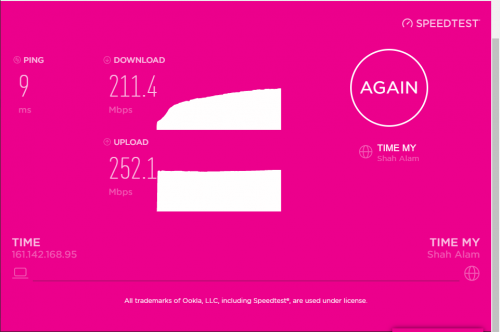
is it possible if i want to get the download speed to 500mpbs or i need to better router? My pc connected to the wifi using Wifi 5ghz
TIME [OFFICIAL] TIME Fibre Broadband™ v4, Experience the ONE TRUE 2Gbps
|
|
 May 23 2021, 06:25 PM May 23 2021, 06:25 PM
|
 
Junior Member
191 posts Joined: Jan 2011 
|
hi guys, im using the 500mbps plan with the D-Link DIR-850L router. So try to check the speedtest and i get the result as below:
is it possible if i want to get the download speed to 500mpbs or i need to better router? My pc connected to the wifi using Wifi 5ghz |
|
|
|
|
|
May 23 2021, 06:35 PM
|

Senior Member
3,616 posts Joined: Feb 2006
|
QUOTE(ahmy @ May 23 2021, 06:25 PM) hi guys, im using the 500mbps plan with the D-Link DIR-850L router. So try to check the speedtest and i get the result as below: Hi, first thing please have a check on the bandwidth received via cable connection, PC direct to Dlink router.is it possible if i want to get the download speed to 500mpbs or i need to better router? My pc connected to the wifi using Wifi 5ghz  Try test on few speed test servers. Do remember to turn off all heavy running background services as well as any Internet Security software, before performing the test. Thanks. |
|
|
May 24 2021, 06:30 PM
|

Junior Member
60 posts Joined: Jul 2011 From: HomeJustHome  
|
Is port 25 blocked for time network?
|
|
|
May 24 2021, 07:35 PM
Show posts by this member only | IPv6 | Post
#7344
|

Junior Member
685 posts Joined: Mar 2016
|
Hi , i just get my TIME fibre 500Mbps installed today
Very satisfied about the performance , tested with Ethernet Cable Almost full speed  With my own Tenda Router via 5GHz 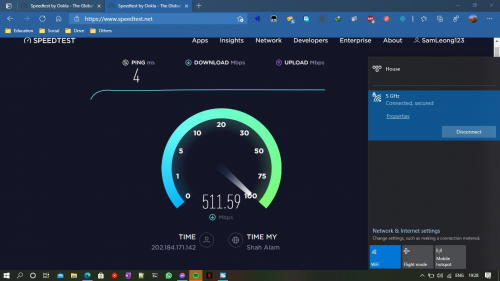 Just one question , can i change the DNS of the given Huawei HG8145V5 ONT? It seems to be hardcoded to TIME DNS server and intercepting the DNS request via UDP 53 from any DNS server (etc Google & Cloudflare , both replied a TM IP and apparently its MCMC IP) 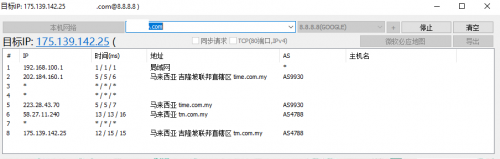 |
|
|
May 24 2021, 08:09 PM
|

Senior Member
2,615 posts Joined: Nov 2020
|
QUOTE(Sam Leong @ May 24 2021, 07:35 PM) Hi , i just get my TIME fibre 500Mbps installed today I don't use time so I dont really know but looking back at older posts it seems that your options are to eitherVery satisfied about the performance , tested with Ethernet Cable Almost full speed With my own Tenda Router via 5GHz Just one question , can i change the DNS of the given Huawei HG8145V5 ONT? It seems to be hardcoded to TIME DNS server and intercepting the DNS request via UDP 53 from any DNS server (etc Google & Cloudflare , both replied a TM IP and apparently its MCMC IP) 1. call CS to put ONT to bridge mode, then use your own router in PPPoE mode and set DNS there or 2. Use Encrypted DNS like DoH or DoT or maybe try logging into huawei ONT and see if there's any options there? telecomadmin/admintelecom worked for me on maxis but that's just an ONT with no WiFi, not sure how TIME has it setup |
|
|
May 25 2021, 01:01 PM
|
|
Junior Member
60 posts Joined: Jul 2011 From: HomeJustHome
|
QUOTE(HimuraShin @ May 24 2021, 06:30 PM) Is port 25 blocked for time network? From Time Support:Please be informed that MCMC request us to block port 25. You may use port 587 moving forward. Kindly take note that we are following MCMC guide Anti-Spam-Toolkit. |
|
|
|
|
|
May 25 2021, 02:47 PM
Show posts by this member only | IPv6 | Post
#7347
|

Junior Member
396 posts Joined: Jan 2003
|
Recently switched to time, everything good except the huawei HG8145V5 modem router, very unstable for me.
I changed the wifi channel to 1/6/11 and it will always auto reset by itself to auto channel after a couple hours. I have to keep login to change the wifi channel settings every time and sometimes it won't even allow to login. It also auto create a new 5ghz ssid with same name as my 2.4ghz ssid. This immediately interrupt my existing 5ghz ssid connections and i have to login to remove this auto created 5ghz ssid. It's really a pain in the ass. Is there a firmware update for this router? |
|
|
May 26 2021, 12:26 AM
Show posts by this member only | IPv6 | Post
#7348
|
|
Newbie
47 posts Joined: Aug 2017
|
QUOTE(Sam Leong @ May 24 2021, 07:35 PM) Just one question , can i change the DNS of the given Huawei HG8145V5 ONT? It seems to be hardcoded to TIME DNS server and intercepting the DNS request via UDP 53 from any DNS server (etc Google & Cloudflare , both replied a TM IP and apparently its MCMC IP) I think you can surely change that via your router settings like I did on mine. I quote my previous post for your easy reading:QUOTE(ahrasis @ May 8 2021, 08:21 AM) I changed mine in the router (TPLink EC230-G1) as well, and I do not have problems with that except may be encrypted SNI which is yet to be implemented by the browsers. Step 1 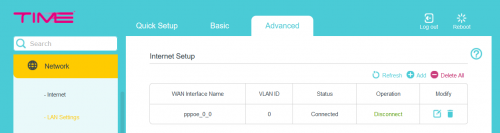 Step 2 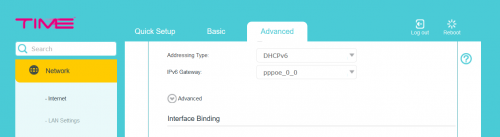 Step 3 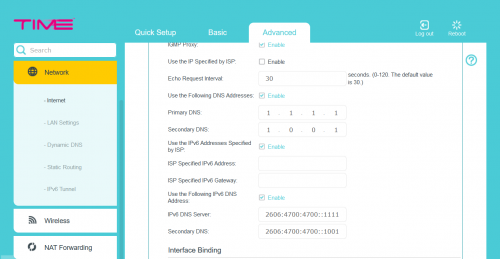 In Edge 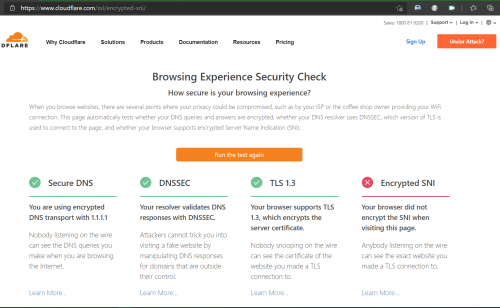 It is the same for firefox but I have to enable certain network settings as advised in https://techorbiter.com/how-to-enable-encry...n-firefox-esni/ |
|
|
May 26 2021, 01:48 AM
|
|
Senior Member
3,616 posts Joined: Feb 2006
|
QUOTE(HimuraShin @ May 24 2021, 06:30 PM) Is port 25 blocked for time network? This port has been blocked by various providers as well as web hosters to prevent spamming. |
|
|
May 26 2021, 01:50 AM
|
|
Senior Member
3,616 posts Joined: Feb 2006
|
QUOTE(Sam Leong @ May 24 2021, 07:35 PM) Hi , i just get my TIME fibre 500Mbps installed today Yes, it can be changed, please kindly contact CS to do so. Very satisfied about the performance , tested with Ethernet Cable Almost full speed With my own Tenda Router via 5GHz Just one question , can i change the DNS of the given Huawei HG8145V5 ONT? It seems to be hardcoded to TIME DNS server and intercepting the DNS request via UDP 53 from any DNS server (etc Google & Cloudflare , both replied a TM IP and apparently its MCMC IP) Thanks. |
|
|
May 26 2021, 02:12 AM
|
|
Junior Member
191 posts Joined: Jan 2011
|
QUOTE(jjj2 @ May 23 2021, 06:35 PM) Hi, first thing please have a check on the bandwidth received via cable connection, PC direct to Dlink router. seems like when using cable connection i can get the 500mbps download speed but when using wifi 5ghz just around 200+mbps. Tested using laptop too still get 200+mbps for download speed. any idea?Try test on few speed test servers. Do remember to turn off all heavy running background services as well as any Internet Security software, before performing the test. Thanks. |
|
|
May 26 2021, 02:12 AM
|
|
Senior Member
3,616 posts Joined: Feb 2006
|
QUOTE(EDK @ May 25 2021, 02:47 PM) Recently switched to time, everything good except the huawei HG8145V5 modem router, very unstable for me. Hi, so far it's running at the latest firmware. I changed the wifi channel to 1/6/11 and it will always auto reset by itself to auto channel after a couple hours. I have to keep login to change the wifi channel settings every time and sometimes it won't even allow to login. It also auto create a new 5ghz ssid with same name as my 2.4ghz ssid. This immediately interrupt my existing 5ghz ssid connections and i have to login to remove this auto created 5ghz ssid. It's really a pain in the ass. Is there a firmware update for this router? If both 2.4GHz & 5GHz wifi SSID are set the same, the band steering will be enabled & vice versa. You may disable the band steering if you need to manually switch between the 2 band. Thanks. EDK liked this post
|
|
|
May 26 2021, 02:14 AM
|
|
Senior Member
3,616 posts Joined: Feb 2006
|
QUOTE(ahmy @ May 26 2021, 02:12 AM) seems like when using cable connection i can get the 500mbps download speed but when using wifi 5ghz just around 200+mbps. Tested using laptop too still get 200+mbps for download speed. any idea? Your incoming bandwidth is sufficient, the Dlink router has a limitation on wifi, so far we tested even on 5GHz, it's giving around 2xxMbps as well... You may opt for a better router. Thanks. |
|
|
|
|
|
May 26 2021, 07:33 AM
|

Senior Member
761 posts Joined: Jan 2003
|
Time down in northern area
|
|
|
May 26 2021, 08:31 AM
|

Junior Member
301 posts Joined: Jan 2007 From: Penang
|
QUOTE(Ree73 @ May 26 2021, 07:33 AM) Time down in northern area Yes. Still down in Gelugor, Penang.This post has been edited by prs516: May 26 2021, 08:38 AM |
|
|
May 26 2021, 08:42 AM
Show posts by this member only | IPv6 | Post
#7356
|
|
Junior Member
685 posts Joined: Mar 2016
|
QUOTE(jjj2 @ May 26 2021, 01:50 AM) Yes, it can be changed, please kindly contact CS to do so. I called CS and they tell me this device can't change DNS lolThanks. (same on live chat) 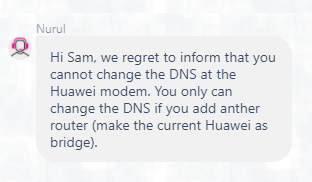 This post has been edited by Sam Leong: May 26 2021, 08:46 AM |
|
|
May 26 2021, 08:54 AM
|
|
Junior Member
191 posts Joined: Jan 2011
|
QUOTE(jjj2 @ May 26 2021, 02:14 AM) Your incoming bandwidth is sufficient, the Dlink router has a limitation on wifi, so far we tested even on 5GHz, it's giving around 2xxMbps as well... alright thanks for the reply. one more think may i know if i can reset the password for router login access as i dont know last time what did i change You may opt for a better router. Thanks.  |
|
|
May 26 2021, 09:53 AM
|
|
Junior Member
301 posts Joined: Jan 2007 From: Penang
|
QUOTE(prs516 @ May 26 2021, 08:31 AM) Yes. Still down in Gelugor, Penang. Update 9:40a.m. Time is back up. |
|
|
May 26 2021, 02:08 PM
|
|
Senior Member
3,616 posts Joined: Feb 2006
|
QUOTE(ahmy @ May 26 2021, 08:54 AM) alright thanks for the reply. one more think may i know if i can reset the password for router login access as i dont know last time what did i change Yes you can reset but before that please get your PPPOE credentials ready as you will need to reconfigure it back after the reset.Thanks. |
|
|
May 26 2021, 04:14 PM
Show posts by this member only | IPv6 | Post
#7360
|
|
Junior Member
396 posts Joined: Jan 2003
|
QUOTE(jjj2 @ May 26 2021, 02:12 AM) Hi, so far it's running at the latest firmware. Thanks for reply, has just try disable band steering but only work for a while a couple hours later the router will still auto reset itself to default settings with band steering on and mess up all my previous settings including channels and etc.If both 2.4GHz & 5GHz wifi SSID are set the same, the band steering will be enabled & vice versa. You may disable the band steering if you need to manually switch between the 2 band. Thanks. Could this be a faulty router? |
| Change to: |  0.0303sec 0.0303sec
 0.66 0.66
 6 queries 6 queries
 GZIP Disabled GZIP Disabled
Time is now: 23rd December 2025 - 01:26 AM |
 Quote
Quote