Welcome Guest ( Log In | Register )

Outline · [ Standard ] · Linear+

TIME [OFFICIAL] TIME Fibre Broadband™ v4, Experience the ONE TRUE 2Gbps

views
     
ahrasis
post Oct 22 2019, 09:57 AM

New Member
*
Newbie
47 posts

Joined: Aug 2017
I want to know whether Time covers Platinum Hill Condominium PV6, Jalan Melati Utama 1, Melati Utama, 53100 Kuala Lumpur as we will be moving in there somewhere next month.
ahrasis
post Oct 29 2019, 08:03 AM

New Member
*
Newbie
47 posts

Joined: Aug 2017
Thank you for the info. I will contact those who have pm'ed me for registration.
ahrasis
post Apr 19 2020, 08:28 AM

New Member
*
Newbie
47 posts

Joined: Aug 2017
Firstly, thanks to this thread, I'm now a Time subscriber for 100mbps package. I have a question to ask pertaining its TP-Link wifi router AC1350 EC230-G1 since I am thinking of flashing a custom firmware either openwrt or dd-wrt. The reason is that I am planning to install in it nginx as a reverse proxy to the servers behind this router. I know a simple port forwarding works for a single server but I have more than one. So I was wondering whether any of those custom firmware support this router model since I could not find its specification sheet. So far, I could search and see AC1350 C60 (v1-v3) but I need to be sure whether they are both the same. Directing me to other discussion regarding this will be good too. Thanking you in advance.

This post has been edited by ahrasis: Apr 19 2020, 08:30 AM
ahrasis
post May 2 2020, 08:14 AM

New Member
*
Newbie
47 posts

Joined: Aug 2017
QUOTE(604weekendwarrior @ Apr 27 2020, 10:07 AM)
I think the EC230 was having issues with the amount of devices connected.  Since MCO I now have 15 devices connected at one time.  Laptop, Phones, Home Devices, Android TV box, etc...
Strange. I don't have any issues using EC230 so far, though we are just using the 100mbps package, however, I do assign fixed LAN IP to most of gadjets manually. I think since installation in November last year, I did only reset less than 5 times. And I run private servers too.
ahrasis
post May 3 2020, 06:35 PM

New Member
*
Newbie
47 posts

Joined: Aug 2017
How do we set cloudflare dns in the router settings? Can't find any related settings.
ahrasis
post Feb 20 2021, 03:14 PM

New Member
*
Newbie
47 posts

Joined: Aug 2017
Seems maxis fibre now comes with wifi 6. Any chance we time broadband users can upgrade our current router to wifi 6 too for free (with contract renewal of course).

Anyone can suggest openwrt or ddwrt router with wifi 6 that is working good with time broadband?
ahrasis
post May 8 2021, 07:36 AM

New Member
*
Newbie
47 posts

Joined: Aug 2017
QUOTE(Enemy @ May 7 2021, 09:18 AM)
But when I test for open port in https://www.yougetsignal.com/tools/open-ports/ using my public IP, it still says the ports are closed. I even tried enabling DMZ and same thing. Appreciate if someone could tell me what I got wrong  notworthy.gif
*
I am not so sure why your ports are not opened. I checked mine just now, as I am running server behind my router, most ports that I need are opened, even the passive ones, and surprisingly port 25 as well. I guess the best is to call CS and tell them your problem.

This post has been edited by ahrasis: May 8 2021, 07:36 AM
ahrasis
post May 8 2021, 08:21 AM

New Member
*
Newbie
47 posts

Joined: Aug 2017
QUOTE(LaiN87 @ May 7 2021, 09:04 AM)
This means when I set my DNS to 8.8.8.8 or 1.1.1.1, and try to go to MCMC blocked websites, it will still be blocked as it is linked to TIME DNS.

It seems like it's an issue with Huawei ONT / routers. Maybe others can check too.
QUOTE(jjj2 @ May 4 2021, 05:58 PM)
Mine one is not proxied. Anyway do understand your concern as the default primary DNS has been automatically set to point to TIME's DNS.
You can change this in your own router or even TIME's provided router.
Did you change the DNS IP in your router or just your PC?

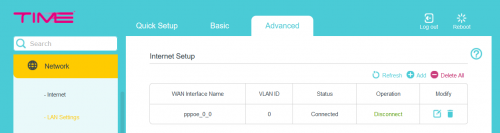
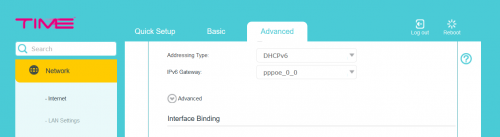
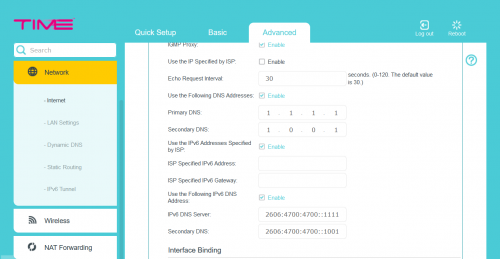
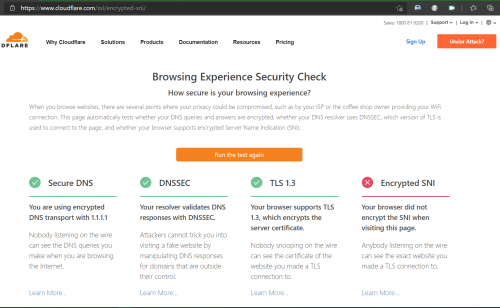
I changed mine in the router (TPLink EC230-G1) as well, and I do not have problems with that except may be encrypted SNI which is yet to be implemented by the browsers.
Step 1
user posted image
Step 2
user posted image
Step 3
user posted image
In Edge
user posted image

It is the same for firefox but I have to enable certain network settings as advised in https://techorbiter.com/how-to-enable-encry...n-firefox-esni/

This post has been edited by ahrasis: May 8 2021, 08:52 AM
ahrasis
post May 9 2021, 08:51 PM

New Member
*
Newbie
47 posts

Joined: Aug 2017
QUOTE(PRSXFENG @ May 8 2021, 09:03 AM)
Looks like your browser is using DoH according to the last image, since the page mentions "secure transport"

Try 1.1.1.1/help and see if it says you're using DoH or DoT

A lot of browsers nowdays are by default enabling DoH
*
If you actually read my post, I was actually answering to LaiN87 post dated May 7 2021, 09:04 AM in am attempt to help him and I am not the one with such problems.
ahrasis
post May 26 2021, 12:26 AM

New Member
*
Newbie
47 posts

Joined: Aug 2017
QUOTE(Sam Leong @ May 24 2021, 07:35 PM)
Just one question , can i change the DNS of the given Huawei HG8145V5 ONT? It seems to be hardcoded to TIME DNS server and intercepting the DNS request via UDP 53 from any DNS server (etc Google & Cloudflare , both replied a TM IP and apparently its MCMC IP)

user posted image
*
I think you can surely change that via your router settings like I did on mine. I quote my previous post for your easy reading:
QUOTE(ahrasis @ May 8 2021, 08:21 AM)
I changed mine in the router (TPLink EC230-G1) as well, and I do not have problems with that except may be encrypted SNI which is yet to be implemented by the browsers.
Step 1
user posted image
Step 2
user posted image
Step 3
user posted image
In Edge
user posted image

It is the same for firefox but I have to enable certain network settings as advised in https://techorbiter.com/how-to-enable-encry...n-firefox-esni/
*
ahrasis
post Nov 5 2021, 09:09 AM

New Member
*
Newbie
47 posts

Joined: Aug 2017
QUOTE(This is a Lamp @ Nov 4 2021, 05:19 PM)
I have found the cause of the issue; the Huawei WA8025V5 was definitively not up to par in terms of network load. Maybe day-to-day activities it's an alright router. I like the compact size too. I connected back the EC230 and the problem was resolved; I still would like to consider a new router.
The agent offered us an upgrade few days back (with new contract of course) and she said this Huawei WA8025V5 is better than TP-Link EC230. But your report seems to contradict her claim.

The installation with new free Huawei WA8025V5 is scheduled mid of next week.

Can I cancel? How should I do that? Via app or email message? I don't want to upgrade if new router is worse than before.

Thank you in advance.

This post has been edited by ahrasis: Nov 5 2021, 09:22 AM
ahrasis
post Nov 6 2021, 09:40 PM

New Member
*
Newbie
47 posts

Joined: Aug 2017
QUOTE(Matchy @ Nov 6 2021, 11:05 AM)
Now recontract got RM10 off + free onemesh? Worth the recontract?
QUOTE(jjj2 @ Nov 6 2021, 06:43 PM)
Both of these are almost on par in performance depending on your house layout. Huawei WA8021V5 has an advantage which you can mesh it up with another same unit, but don't expect too much from it. EC230 can  also be extended using TP-Link One-Mesh technology, yes get another same unit.

If you are having coverage issue on the current router, go for other more powerful models, perhaps AX series.
Thank you for both responses.

I guess I just proceed with the installation as the offer is quite good i.e. add RM10 to upgrade our internet speed from 100 to 300 mpbs.

I will consider the new router as a replacement or an extra to be used while I upgrade EC230 (which I think is the same TP Link AC1350) to OpenWRT's firmware (available at https://openwrt.org/toh/tp-link/archer_c60_v2?s[]=ac1350).

If any of you have the experience of upgrading EC230 to use OpenWRT's firmware, do share.

Thank you again.

This post has been edited by ahrasis: Nov 6 2021, 09:43 PM

ahrasis
post Nov 10 2021, 11:15 AM

New Member
*
Newbie
47 posts

Joined: Aug 2017
QUOTE(EUPH0RIA @ Nov 7 2021, 05:44 PM)
Hi guys, I just move to a new house. In this new house, each room has its own ethernet ports.

I want to connect my PC but it's not working. How do I activate them? Should i just contact TIME?

https://imgur.com/fFxcpe5
https://imgur.com/XvJNftK
https://imgur.com/KLmleCR
*
Except for the cable from your modem to your switch, I don't see any other ethernet cable.

I think the right combination should be from the modem to the router and from the router to the switch (Modem > Router > Switch). From the switch each port in the room with ethernet port should be connected to that switch (Switch > Room with ethernet port). Only then can your PC or other gadget connect to internet using your room ethernet port.

The function of the router is obviously to dial in via PPOE through your modem while separating the internet connection (1) via the switch to all connecting LAN and (2) via its wifi to all connecting wifi devices.
ahrasis
post Nov 12 2021, 11:22 AM

New Member
*
Newbie
47 posts

Joined: Aug 2017
QUOTE(EUPH0RIA @ Nov 10 2021, 03:50 PM)
https://imgur.com/KLmleCR

so that black thing isn't a switch? dang that sounds complicated, i think i'll just use ethernet cable from living room to bedroom at 3rd floor LOL
I suppose that "black thing" is a switch and on top of it is the TIME modem. The router must be there as well and all must be switched on and connected via ethernet cable.

As said, the right setup will be modem < > router < > switch < > to each room ethernet cable. Only then you can simply connect to your room ethernet port, if it is an ethernet port.

And do make sure that the ethernet cable is 5e because the switch clearly doesn't support more than that.

This post has been edited by ahrasis: Nov 12 2021, 11:25 AM
ahrasis
post Nov 12 2021, 01:57 PM

New Member
*
Newbie
47 posts

Joined: Aug 2017
QUOTE(Gregar Forte @ Nov 12 2021, 12:40 PM)
Greetings TIMErs. I would like to ask opinion on international routing on TIME vs unifi mainly. I read from this thread about the congestion on TIME own pipeline around last years MCO where everyone stayed at home which is quite bad. Can you guys can enlighten me on TIME performance nowadays? Thank you
I am not sure about others but our family did not face any problems while using TIME since before MCO. We did face some problems while with Unifi before.
ahrasis
post Nov 13 2021, 09:57 AM

New Member
*
Newbie
47 posts

Joined: Aug 2017
QUOTE(Gregar Forte @ Nov 12 2021, 02:53 PM)
I see. Thats assuring. Whre is your location if you dont mind?
Melati Utama.


Change to:
| Lo-Fi Version
0.0378sec    0.86    7 queries    GZIP Disabled
Time is now: 22nd December 2025 - 08:08 PM