Welcome Guest ( Log In | Register )

672 Pages « < 364 365 366 367 368 > » Bottom

Outline · [ Standard ] · Linear+

TIME [OFFICIAL] TIME Fibre Broadband™ v4, Experience the ONE TRUE 2Gbps

views
     
jjj2
post May 9 2021, 03:32 PM

Look at all my stars!!
*******
Senior Member
3,616 posts

Joined: Feb 2006
QUOTE(LaiN87 @ May 7 2021, 09:04 AM)
jjj2, you are not fully understanding the situation.

My PC is set DNS manually to google DNS in windows. 8.8.8.8
However, it still links back to Time DNS. That's what it means by DNS proxy.

This means when I set my DNS to 8.8.8.8 or 1.1.1.1, and try to go to MCMC blocked websites, it will still be blocked as it is linked to TIME DNS.

It seems like it's an issue with Huawei ONT / routers. Maybe others can check too.
Somewhere along the line connecting there's some interception by Time.
*
Hi, I fully understand what you meant. And we have tested on our side using the HG8245H5 in bridge mode. Anyway we will have to test again on your equipment that you mentioned again at other sites.

Please kindly provide the details below :

1) ONU/ONT Model : HG8145V5 (I guess you are using this)
2) Router Model & its corresponding DNS setup

One more test you can do is via a connected VPN, and once you are connected, run the leak test again, if you notice any TIME's DNS (usually 203.121.x.x) in between, then it confirms the leak.
As I mentioned, we still believe the new ONT which connects you via IPOE & having default primary TIME DNS configured is causing this. Anyway, let's wait for our test result.
Thanks.

Update :

Tested again with HG8145V5 with DNS altered to public DNS, no proxied or 'leak' detected.
We can conclude that it's the ONT or either your computer OS is giving the issue.

Thanks.

This post has been edited by jjj2: May 11 2021, 12:13 AM
jjj2
post May 9 2021, 03:56 PM

Look at all my stars!!
*******
Senior Member
3,616 posts

Joined: Feb 2006
QUOTE(Enemy @ May 7 2021, 09:18 AM)
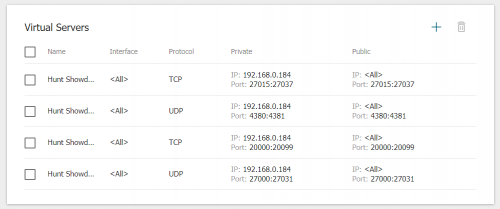
Hi, sorry if this has been asked many times before... I'm using DIR-882 router with the default firmware that comes with TIME broadband, have added some ports for forwarding under 'Virtual Servers' like below;

user posted image

But when I test for open port in https://www.yougetsignal.com/tools/open-ports/ using my public IP, it still says the ports are closed. I even tried enabling DMZ and same thing. Appreciate if someone could tell me what I got wrong  notworthy.gif
*
Hi, can you try to put in your Remote IP instead, if you have a range, then use the entire 24 subnet.
Another thing is I'm not sure whether you need NAT loopback, if you want your devices be able to communicate with each other outside the Gateway(router) then you can tick this.

Thanks.
ahrasis
post May 9 2021, 08:51 PM

New Member
*
Newbie
47 posts

Joined: Aug 2017
QUOTE(PRSXFENG @ May 8 2021, 09:03 AM)
Looks like your browser is using DoH according to the last image, since the page mentions "secure transport"

Try 1.1.1.1/help and see if it says you're using DoH or DoT

A lot of browsers nowdays are by default enabling DoH
*
If you actually read my post, I was actually answering to LaiN87 post dated May 7 2021, 09:04 AM in am attempt to help him and I am not the one with such problems.
szecheng
post May 10 2021, 11:33 AM

Casual
***
Junior Member
460 posts

Joined: Jun 2008


QUOTE(PRSXFENG @ May 7 2021, 08:26 PM)
Specs are a bit dated but eh is fine for XP but you should really get onto a more modern OS than XP

A larger issue would be the network adapter on the PC
Say a 10/100 Mbps ethernet controller or a old b/g wifi card
These would bottleneck your connection.
*
I'm still using core 2 quad with windows 10 cry.gif

but old PC with SSD can be very fast too

This post has been edited by szecheng: May 10 2021, 11:38 AM
Wonka
post May 10 2021, 12:49 PM

U n k o ™
******
Senior Member
1,643 posts

Joined: Apr 2007
From: U n k o L a n d


QUOTE(voncrane @ Apr 26 2021, 12:09 AM)
Unfortunately, there’s not much you alone can do besides wait and keep checking in with them for a free port. Hope your wait is a short one.. Good luck.
*
Oh gosh has been waiting since March cry.gif
maranello55
post May 10 2021, 09:56 PM

Accelera Ayrton!!
*******
Senior Member
3,385 posts

Joined: Aug 2006
From: Sao Paolo, Brazil


Time broadband down in Ampang. Anyone else?
maranello55
post May 10 2021, 09:57 PM

Accelera Ayrton!!
*******
Senior Member
3,385 posts

Joined: Aug 2006
From: Sao Paolo, Brazil


Time broadband down in Ampang. Anyone else?
voncrane
post May 10 2021, 10:19 PM

Noir et fier!
*******
Senior Member
7,120 posts

Joined: Oct 2011
From: Wakanda


QUOTE(Wonka @ May 10 2021, 12:49 PM)
Oh gosh has been waiting since March  cry.gif
*
Hang in there... I had to wait for 2 years for TIME to run their cables to my building. Before that, more years waiting stuck with Unifi max 30Mbps... It’ll get better.. console.gif
kskoay
post May 11 2021, 09:42 AM

On my way
****
Junior Member
659 posts

Joined: Nov 2007
QUOTE(voncrane @ May 10 2021, 10:19 PM)
Hang in there... I had to wait for 2 years for TIME to run their cables to my building. Before that, more years waiting stuck with Unifi max 30Mbps... It’ll get better..  console.gif
*
I feel your pain...my place signed the agreement form with Time on sept 2018, they only started to lay the cable into my building on aug 2020, unfortunately we still can not get the service even until now....according to Time, it still pending JKR approval....I wonder how long it take to get the approval from JKR...pending approval more than half year mad.gif

Tried to check with Time incharge person...response is poor...

By the way, we still stuck with stupid slow and expensive streamyx....

This post has been edited by kskoay: May 11 2021, 09:48 AM
dannygeni
post May 11 2021, 10:53 PM

Regular
******
Senior Member
1,804 posts

Joined: Jun 2009


hi guys...got my time fiber up in time for raya rest day..now need find good long range router? anyway mesh or long range router better?
FusionXY
post May 11 2021, 11:41 PM

LAZZIE ON VACATION
*******
Senior Member
3,836 posts

Joined: Aug 2016

QUOTE(dannygeni @ May 11 2021, 10:53 PM)
hi guys...got my time fiber up in time for raya rest day..now need find good  long range router? anyway mesh or long range router better?
*
How big is your house? And which plan that you subscribed.

Thanks
dannygeni
post May 11 2021, 11:44 PM

Regular
******
Senior Member
1,804 posts

Joined: Jun 2009


QUOTE(FusionXY @ May 11 2021, 11:41 PM)
How big is your house? And which plan that you subscribed.

Thanks
*
I got 500mbps. House bout 1300sf. Anyone use Huawei ax3 WiFi 6+ router?
FusionXY
post May 12 2021, 12:14 AM

LAZZIE ON VACATION
*******
Senior Member
3,836 posts

Joined: Aug 2016

QUOTE(dannygeni @ May 11 2021, 11:44 PM)
I got 500mbps.  House bout 1300sf. Anyone use Huawei ax3 WiFi 6+ router?
*
How about your budget? Huawei AX3 performance suitable for 100Mbps.

My suggestion is to get Deco M5 or M9 Plus for your case.

Thanks
Wonka
post May 12 2021, 09:09 AM

U n k o ™
******
Senior Member
1,643 posts

Joined: Apr 2007
From: U n k o L a n d


QUOTE(voncrane @ May 10 2021, 10:19 PM)
Hang in there... I had to wait for 2 years for TIME to run their cables to my building. Before that, more years waiting stuck with Unifi max 30Mbps... It’ll get better..  console.gif
*
Mine already has TIME on the building and my only option now is to use hotspot to work and the signal reception is super bad.

QUOTE(kskoay @ May 11 2021, 09:42 AM)
I feel your pain...my place signed the agreement form with Time on sept 2018, they only started to lay the cable into my building on aug 2020, unfortunately we still can not get the service even until now....according to Time, it still pending JKR approval....I wonder how long it take to get the approval from JKR...pending approval more than half year  mad.gif

Tried to check with Time incharge person...response is poor...

By the  way, we still stuck with stupid slow and expensive streamyx....
*
at least you have streamyx tho. My only option is hotspot for internet and signal reception is bad...
dannygeni
post May 12 2021, 09:43 PM

Regular
******
Senior Member
1,804 posts

Joined: Jun 2009


QUOTE(FusionXY @ May 12 2021, 12:14 AM)
How about your budget? Huawei AX3 performance suitable for 100Mbps.

My suggestion is to get Deco M5 or M9 Plus for your case.

Thanks
*
will check on this..thanks

Eisenmeteor
post May 13 2021, 12:15 PM

Night Ghost
******
Senior Member
1,484 posts

Joined: Aug 2005
From: Kuala Lumpur


Deco M5 is ok to work for Time 1GB plan right?
FusionXY
post May 13 2021, 01:40 PM

LAZZIE ON VACATION
*******
Senior Member
3,836 posts

Joined: Aug 2016

QUOTE(Eisenmeteor @ May 13 2021, 12:15 PM)
Deco M5 is ok to work for Time 1GB plan right?
*
My suggestion to get M9 Plus better.
Eisenmeteor
post May 13 2021, 01:56 PM

Night Ghost
******
Senior Member
1,484 posts

Joined: Aug 2005
From: Kuala Lumpur


QUOTE(FusionXY @ May 13 2021, 01:40 PM)
My suggestion to get M9 Plus better.
*
Already used them since last year. Im now still on 500mbps plan. Want to upgrade to 1gb. Is m5 not good enough for 1gb?
FusionXY
post May 13 2021, 02:22 PM

LAZZIE ON VACATION
*******
Senior Member
3,836 posts

Joined: Aug 2016

QUOTE(Eisenmeteor @ May 13 2021, 01:56 PM)
Already used them since last year. Im now still on 500mbps plan. Want to upgrade to 1gb. Is m5 not good enough for 1gb?
*
Deco M5 is suitable for 100Mbps and 500Mbps but not 1Gbps as 1Gbps need to get Wireless AX Series.
Router will overheat as performance will be affected due to lower RAM and CPU.
icebryanchan
post May 14 2021, 04:29 PM

seeWhoIsIt
***
Junior Member
480 posts

Joined: Oct 2010


anyone experience frequent disconnection after upgrade the modem?

I upgraded the modem firmware when I was trying to pay the bill via Self Care portal.

672 Pages « < 364 365 366 367 368 > » Top
 

Change to:
| Lo-Fi Version
0.0261sec    0.39    6 queries    GZIP Disabled
Time is now: 24th December 2025 - 11:49 AM