Outline ·
[ Standard ] ·
Linear+
TIME [OFFICIAL] TIME Fibre Broadband™ v4, Experience the ONE TRUE 2Gbps
|
szecheng
|
 Feb 12 2021, 06:54 PM Feb 12 2021, 06:54 PM
|

|
Anyone knows how to set turn off router function at
huawei HG8145 2in1 ONU + Router?
trying to use TPlink AX20 WAN port to HG8145 LAN port 1
pppoe using TIME username & password at TPlink
|
|
|
|
|
|
szecheng
|
Feb 19 2021, 10:52 PM
|
|
|
QUOTE(walkibe @ Feb 19 2021, 07:10 PM) Greetings everyone.. this question has probably been asked many times, but hope you can bear with me  am an existing Time subscriber on the 500mbps package, using the TP-Link AC1200 router. Been facing poor WiFi connectivity to my 3rd room where I now work on daily basis (my apartment unit is about 1100 square feet, at Taman Petaling Utama, PJ, Selangor). Does it make sense for me to take the Essential Booster pack (which comes with 2 unit of Huawei WA8021V5), using one node as the router? Would appreciate some advise, thanks! 1100 square feet apartment, similar to mine. TIME's TP Link AC1350 EC230-G1 cant even reach 500mb download with LAN cable buy these should solved your problem 1. TPlink ax20 = Rm279 2. TPlink ax73 = Rm399 Mesh solution is suitable for 2 floors landed house. one floor apartment doesnt need that unless 1500-1600 square feet This post has been edited by szecheng: Feb 19 2021, 10:53 PM |
|
|
|
|
|
szecheng
|
Feb 22 2021, 06:32 PM
|
|
|
QUOTE(Icehart @ Feb 20 2021, 06:15 PM) Hi guys, I have a question. I'm considering taking on the contract leftover offer from the other Time thread, but most of them are at 100Mbps. Question is - if I upgrade to 800Mbps will my contract term get refreshed? can consider if you are fine with rm99 100mbps as i know any change of plan will renew 24 months contract, maybe you can double check |
|
|
|
|
|
szecheng
|
Feb 22 2021, 06:41 PM
|
|
|
QUOTE(fuzzy007 @ Feb 21 2021, 12:23 AM) hi, if i buy my own router, i just need to plug the lan cable from the time huawei router to my new router and setup the wifi on my new router will be ok? the signal is not great for the time ori huawei router, cant get any connection at my master room toilet in my condo, and my condo not even larger than 1000 sqf  go buy TP Link ax73 if you can afford. its exceptionally good old TP-Link AC1200 router change to new router, WAN port <--> Huawei modem LAN1 setup PPPOE dialup & WiFi then you're done |
|
|
|
|
|
szecheng
|
Mar 1 2021, 06:49 PM
|
|
|
QUOTE(nazhanz @ Mar 1 2021, 02:39 AM) Hye guys, just want to know, anyone here still under contract of TIME broadband but no longer want to use it? Can i propose to relocate the account to my apartment address and continue pay under your account? Please do let me know, im interested to continue that way rather than new 2 year contract. can change ownership terus? |
|
|
|
|
|
szecheng
|
Mar 4 2021, 01:19 PM
|
|
|
QUOTE(GameFr3ak @ Mar 4 2021, 11:52 AM) ah i see... is there any recommended models? Perhaps budget not much also... around 300... 200+ get ax20 300+ get ax74 want vpn client & router to router mesh get asus This post has been edited by szecheng: Mar 4 2021, 01:22 PM |
|
|
|
|
|
szecheng
|
Mar 4 2021, 01:20 PM
|
|
|
QUOTE(FusionXY @ Mar 4 2021, 12:16 PM) You're welcome. Exactly that TIME is trying to save cost by putting 2 in 1 Modem + Router Bundle. Hopefully TIME will provide guide customer on how to setup in bridge mode without calling the customer service. Thanks. dont think normal user got access to do that |
|
|
|
|
|
szecheng
|
Mar 4 2021, 04:05 PM
|
|
|
QUOTE(GameFr3ak @ Mar 4 2021, 02:42 PM) thanks a lot.. i guess as I've read around here I need to get the CS to change the config to bridge mode? from bridge mode back to combi mode |
|
|
|
|
|
szecheng
|
Mar 5 2021, 01:55 PM
|
|
|
summary of testing for time fiber 500mb
condo 1,100 square feet
LAN connection
500mbps can archive by both time router & ax73
WiFi got 2 dependency
1. router (wan speed, coverage, numbers of devices connected)
testing infront of router
time - max 400mbps
ax73 - can reach 500mbps
2. client 5ghz - such as handphone, tablet, pc, laptop wifi devices
wifi to ax73
old huawei tablet 170mbps - near router
handphone 500mbps - near router
office laptop AC 370mbps - near router
pc AX 420mbps - at 3rd room
macbook AX 500mbps - near router
i got 4 computers at home using 4 different wifi AC/AX card model, some can reach only 433mbps
This post has been edited by szecheng: Mar 5 2021, 01:57 PM
|
|
|
|
|
|
szecheng
|
Mar 5 2021, 02:00 PM
|
|
|
QUOTE(ssmart @ Mar 4 2021, 05:56 PM) me too, whenever they did speed tests, it's certainly full speed. when connect to our pc with cat5e , speed drops to 50-60% my finding, tested speed with ookla TIME - different server different speed. some can reach max Unifi - most of the time all server can reach max speed |
|
|
|
|
|
szecheng
|
Mar 17 2021, 03:32 PM
|
|
|
QUOTE(apanzhafran @ Mar 16 2021, 10:56 AM) Hi thank you for that. I guess the problem is from the Huawei, not the TP Link router. We tried using my TP LINK router as well as the latest ASUS GAMING Router from TIME & yet we still have the problem LAPTOP LAN - 400-500mbps WIFI 5G - 300-400mbps PS4 PRO & PS5 LAN - Less than 100mbps WIFI 5G - 300-400mbps i went to my friend place who is having the same problem yet the result still the same Now i dont know what to do as even using the PS5 still get less than 100mbps 😅 TIME router = rubbish just buy your own router & call TIME to change bridge mode back to combi mode |
|
|
|
|
|
szecheng
|
May 10 2021, 11:33 AM
|
|
|
QUOTE(PRSXFENG @ May 7 2021, 08:26 PM) Specs are a bit dated but eh is fine for XP but you should really get onto a more modern OS than XP A larger issue would be the network adapter on the PC Say a 10/100 Mbps ethernet controller or a old b/g wifi card These would bottleneck your connection. I'm still using core 2 quad with windows 10  but old PC with SSD can be very fast too This post has been edited by szecheng: May 10 2021, 11:38 AM |
|
|
|
|
|
szecheng
|
Jun 11 2021, 09:35 AM
|
|
|
QUOTE(Ilomilo @ Jun 7 2021, 09:09 PM) Anyone know if Internet installation is allowed in condos during FMCO? Management giving me trouble saying that SOP don't allow new installation, only allow fixing during FMCO. However I've looked through Strata management SOP and although it expressly allows fixing of electrical and plumbing during FMCO, but nothing mention on new installation, only cannot do renovation and moving house. Anyone got any news/articles clarifying this ah? Difficult wfh with my shitty mobile data only. fiber internet is essential to wfh now your management should allow it try find kpkt guideline to nego with management |
|
|
|
|
|
szecheng
|
Jul 5 2021, 10:29 AM
|
|
|
QUOTE(FusionXY @ Jul 4 2021, 03:45 PM) Get AX73. If willing to spend more then get AX90. Or Deco m9 plus dual pack. how much wider coverage ax90 compare to ax73? |
|
|
|
|
|
szecheng
|
Jul 5 2021, 11:38 AM
|
|
|
QUOTE(FusionXY @ Jul 5 2021, 11:30 AM) Need to ask expert BlacktubiHaha. I already ask him yesterday |
|
|
|
|
|
szecheng
|
Jul 22 2021, 04:36 PM
|
|
|
QUOTE(ocyrus @ Jul 22 2021, 11:11 AM) I'm on the Time 100Mbps plan (using the TP-Link EC230-G1 router) and there are some dead spots in the bedrooms of my condo. Want to get sifus advise - should I buy TP-link mesh unit myself, or get Time Omnimesh? Kind of a noob when it comes to mesh, so appreciate any advise you guys can give. how big is your condo? ax73 should be sufficient, no need mesh |
|
|
|
|
|
szecheng
|
Aug 3 2021, 02:32 PM
|
|
|
QUOTE(research @ Aug 3 2021, 01:29 PM) Awesome-professional-swift-effective input. Took me a week to figure out what happened (following TIME support person advices), risked myself going to 5 phone gadget shops to source new LAN cable (cat5e and cat6 copper). As TIME kept saying they detected it was LAN cable issue. Even though I have given them my router details. Terima kasih so much. Will keep this "Get a router with Gigabit WAN Ports" in mind. faster buy router to enjoy extra 400mb one floor condo just go for single powerful router |
|
|
|
|
|
szecheng
|
Aug 3 2021, 05:04 PM
|
|
|
QUOTE(research @ Aug 3 2021, 02:54 PM) Does this mean I am entitled: 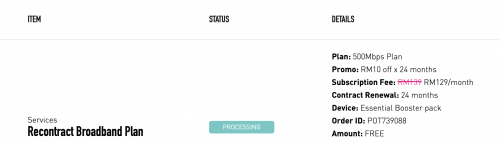 do some research on the routers foc by time first before commit normally foc by service provider stuff is just ok ok performance |
|
|
|
|
|
szecheng
|
Aug 21 2021, 06:37 PM
|
|
|
QUOTE(Lineage @ Aug 21 2021, 09:09 AM) Hi guys, thinking to switch to TIME. But knowing that TIME now provide 2 in 1 modem router for 100mbps and 500mbps package. How can I know replace the router with my current ASUS RT-AX82U? [attachmentid=10953920] This is the TIME installed at my another house. Huawei HG8145V5. I got tried to login the router, the UI is rather simple and not much options there. Appreciated that anyone can provide guide/link to setup with own router.  damm powerful asus router |
|
|
|
|
|
szecheng
|
Sep 1 2021, 12:34 PM
|
|
|
QUOTE(sexysarah1992 @ Sep 1 2021, 11:50 AM) I was using the stock tplink ec230 router. Placed the cooler under the router then no more disconnection. Now changed to tplink ax73 with the same cooler underneath. The signal strength is miles better than ec230. any foc router from fiber provider is rubbish |
|
|
|
|



 Quote
Quote

 0.0376sec
 0.43
0.43
 7 queries
 GZIP Disabled