Outline ·
[ Standard ] ·
Linear+
TIME [OFFICIAL] TIME Fibre Broadband™ v4, Experience the ONE TRUE 2Gbps
|
kayemee
|
 Apr 2 2019, 09:32 PM Apr 2 2019, 09:32 PM
|
New Member


|
I'm just a new TIME subscriber (more than a month) with TPLink Archer C1200 black router. Suddenly it died on me this morning. No lights on the router, even the power symbol.
I tried to reset, but the power light will just on for a couple of seconds, after that no light whatsoever. I also tried to plug into different outlet, same result. It's as if the router is not turning on.
Called CS, technician will call within 24hours.
Did any of you experienced the same issue?
|
|
|
|
|
|
Seng89
|
Apr 2 2019, 10:11 PM
|
|
|
QUOTE(kayemee @ Apr 2 2019, 09:32 PM) I'm just a new TIME subscriber (more than a month) with TPLink Archer C1200 black router. Suddenly it died on me this morning. No lights on the router, even the power symbol. I tried to reset, but the power light will just on for a couple of seconds, after that no light whatsoever. I also tried to plug into different outlet, same result. It's as if the router is not turning on. Called CS, technician will call within 24hours. Did any of you experienced the same issue? Walao.. why I feel time more and more problem now.. 😮😮😮.. I subscribe soon ehhh |
|
|
|
|
|
jjj2
|
Apr 2 2019, 10:31 PM
|
|
|
QUOTE(kayemee @ Apr 2 2019, 09:32 PM) I'm just a new TIME subscriber (more than a month) with TPLink Archer C1200 black router. Suddenly it died on me this morning. No lights on the router, even the power symbol. I tried to reset, but the power light will just on for a couple of seconds, after that no light whatsoever. I also tried to plug into different outlet, same result. It's as if the router is not turning on. Called CS, technician will call within 24hours. Did any of you experienced the same issue? Hi, yes it did happened before, but rarely. It's a faulty unit. |
|
|
|
|
|
jjj2
|
Apr 2 2019, 10:40 PM
|
|
|
QUOTE(chuahcs79 @ Apr 2 2019, 12:38 PM) that default router provide by time fiber tplink c1200 is buggy and problematic to the max,.. best buy your own router that can dial pppoe will do the job, trust me u dont want to use the default one,.. example: very hard to save any changes in the 192.168.0.1, unless u try to click a few times of save button, mostly will stated failed to save,.. sometimes the router will auto reset to default original setting after 1 - 3 hour power off even, lost the pppoe id n pass tooo,..imagine u need to click a few time in order to save each detail coloumn in web, even in latest eu time firmware and always nothing time can do for you other than sent technician to your places to reflash the router firmware or just remotely reflash router firmware for you over the phone, and this router itself generate very high heat as well as the ac power adapter too, cpu always stated running at 100%,.. ..   Sorry to hear the problems that you are facing. Update to Build 20180502 rel.45702 (official) though will not 100% resolve the intermittent "orange globe" issue, but it does minimize it. Also please remove the transparent plastic sticker on the router to minimize the heat. Full proof solution at this moment will be to get a new router. This post has been edited by jjj2: Apr 2 2019, 10:50 PM |
|
|
|
|
|
voncrane
|
Apr 2 2019, 11:41 PM
|
|
|
QUOTE(chuahcs79 @ Apr 2 2019, 12:38 PM) that default router provide by time fiber tplink c1200 is buggy and problematic to the max,.. best buy your own router that can dial pppoe will do the job, trust me u dont want to use the default one,.. example: very hard to save any changes in the 192.168.0.1, unless u try to click a few times of save button, mostly will stated failed to save,.. sometimes the router will auto reset to default original setting after 1 - 3 hour power off even, lost the pppoe id n pass tooo,..imagine u need to click a few time in order to save each detail coloumn in web, even in latest eu time firmware and always nothing time can do for you other than sent technician to your places to reflash the router firmware or just remotely reflash router firmware for you over the phone, and this router itself generate very high heat as well as the ac power adapter too, cpu always stated running at 100%,.. .. QUOTE(mztang52 @ Apr 2 2019, 08:29 PM) Sadly, same goes for the Unifi they wouldn't change it at all. But, most of the users just use it without noticing any problem as long as the Internet is working. Been using mine for over 2 years now.. one unit? lucky.. 2 units from different ISPs batches and all okay? dunno what to say d... Condo full coverage till corridor and furthermost points in the house. But of course those with lemon units should change. |
|
|
|
|
|
dynamite_nmt
|
Apr 3 2019, 07:27 AM
|
Getting Started
|
QUOTE(FusionXY @ Mar 10 2019, 11:48 PM) I would like to recommend you to change router instead of getting Wi-Fi Extender. Wi-Fi Extender and Powerline will reduce the speed by half. Thanks. Sorry for delayed response - was outstation for a bit. What router do you recommend, and is it easy to configure after replacing the stock TPLink Archer C1200? |
|
|
|
|
|
chuan1961
|
Apr 3 2019, 10:09 AM
|
|
|
guys, Time gonna remote update firmware for their default router. What if we are using our own router? 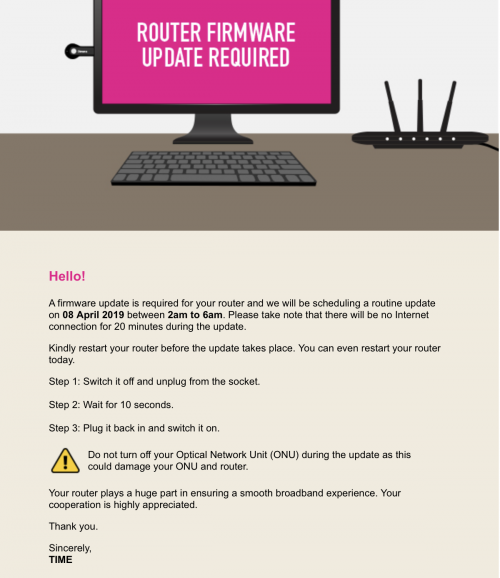 |
|
|
|
|
|
kmrdeva
|
Apr 3 2019, 10:18 AM
|
|
|
QUOTE(chuan1961 @ Apr 3 2019, 10:09 AM) guys, Time gonna remote update firmware for their default router. What if we are using our own router? No action required on our own 3rd party routers I think. |
|
|
|
|
|
chuahcs79
|
Apr 3 2019, 12:29 PM
|
Look at all my stars!!

|
QUOTE(jjj2 @ Apr 2 2019, 10:40 PM) Sorry to hear the problems that you are facing. Update to Build 20180502 rel.45702 (official) though will not 100% resolve the intermittent "orange globe" issue, but it does minimize it. Also please remove the transparent plastic sticker on the router to minimize the heat. Full proof solution at this moment will be to get a new router. global oranges is not issue for me here though, the only issue is all those i stated,., pretty useless router for sure,.. i also did peel off those plastic in day 1 too,.. i currently using the zte zxhn h298n, it is much better even though is older model still wifi is 2.4Ghz 2x2,.. eyeing myself tenda at the moments,.. |
|
|
|
|
|
joefacker
|
Apr 3 2019, 12:52 PM
|
Getting Started
|
Hi guys,
I am looking through the Time Internet bill of my dad's office.
It shows Basic 10M which we are paying RM 168/month, not inclusive of SST.
My question to sifus here is, am i still on an old plan? And if I am, am I under personal or business plan? The bill is addressed to my dad's company.
I have scanned through the new business plans and they start at RM 188 for 20mbps. While personal plans start at RM 99 for 500mbps. Another question is, whats the difference between personal and business plans? Would I be able to help my dad save money by going to a personal plan instead?
Looking forward to for advice.
Thanks
|
|
|
|
|
|
SilentVampire
|
Apr 3 2019, 01:14 PM
|
|
|
QUOTE(chuan1961 @ Apr 3 2019, 10:09 AM) guys, Time gonna remote update firmware for their default router. What if we are using our own router? Don’t bother, you are already using C2300, which is much better than their default router. QUOTE(chuahcs79 @ Apr 3 2019, 12:29 PM) global oranges is not issue for me here though, the only issue is all those i stated,., pretty useless router for sure,.. i also did peel off those plastic in day 1 too,.. i currently using the zte zxhn h298n, it is much better even though is older model still wifi is 2.4Ghz 2x2,.. eyeing myself tenda at the moments,.. Tends is good, but get the TP-Link A6. It is cheaper and newer. |
|
|
|
|
|
chuan1961
|
Apr 3 2019, 03:24 PM
|
|
|
the update won't screw up my router and ONA ya? Leave them ON? cheers QUOTE(SilentVampire @ Apr 3 2019, 01:14 PM) Don’t bother, you are already using C2300, which is much better than their default router. Tends is good, but get the TP-Link A6. It is cheaper and newer. |
|
|
|
|
|
SUSAmeiN
|
Apr 3 2019, 03:30 PM
|
|
|
QUOTE(talexeh @ Apr 2 2019, 05:13 PM) Not sure if I misunderstood you or the other way around but in order for me to get connected to Time broadband, I still require the fibre cable from the condo utility room to be cabled into my home & connect to the router right? THAT fibre cable is the one that I'm trying to hide into the plaster ceiling. Please let me know if I got you message wrong.  You already subscribe or not? the fibre cable already there? better plan earlier, if not the time contractor will charge you 50 for simple hole drill  This post has been edited by AmeiN: Apr 3 2019, 03:31 PM This post has been edited by AmeiN: Apr 3 2019, 03:31 PM |
|
|
|
|
|
SilentVampire
|
Apr 3 2019, 04:19 PM
|
|
|
QUOTE(chuan1961 @ Apr 3 2019, 03:24 PM) the update won't screw up my router and ONA ya? Leave them ON? cheers Nah. Just leave it on. Yours is not the stock router, so it won't affect anything. |
|
|
|
|
|
FusionXY
|
Apr 3 2019, 04:49 PM
|
|
|
QUOTE(dynamite_nmt @ Apr 3 2019, 07:27 AM) Sorry for delayed response - was outstation for a bit. What router do you recommend, and is it easy to configure after replacing the stock TPLink Archer C1200? Hi, state your budget and what's your plan? Yes, it is easy. Just need to get the PPPoE Login Credentials. Thanks. |
|
|
|
|
|
chuan1961
|
Apr 3 2019, 04:49 PM
|
|
|
okay man. thanks QUOTE(SilentVampire @ Apr 3 2019, 04:19 PM) Nah. Just leave it on. Yours is not the stock router, so it won't affect anything. |
|
|
|
|
|
chuahcs79
|
Apr 3 2019, 07:42 PM
|
Look at all my stars!!
|
QUOTE(SilentVampire @ Apr 3 2019, 01:14 PM) Don’t bother, you are already using C2300, which is much better than their default router. Tends is good, but get the TP-Link A6. It is cheaper and newer. Thanks for your input, bro. Apprecite. Will check it out. This post has been edited by chuahcs79: Apr 3 2019, 07:43 PM |
|
|
|
|
|
dynamite_nmt
|
Apr 4 2019, 07:24 AM
|
Getting Started
|
QUOTE(FusionXY @ Apr 3 2019, 04:49 PM) Hi, state your budget and what's your plan? Yes, it is easy. Just need to get the PPPoE Login Credentials. Thanks. Hi there My budget is RM500 to increase the range of my wifi coverage, be it by getting a wifi extender or changing the router per the earlier advice. Thanks |
|
|
|
|
|
SilentVampire
|
Apr 4 2019, 09:24 AM
|
|
|
QUOTE(dynamite_nmt @ Apr 4 2019, 07:24 AM) Hi there My budget is RM500 to increase the range of my wifi coverage, be it by getting a wifi extender or changing the router per the earlier advice. Thanks Top up a little, and get the TP-Link C2300 from OOKAS: https://shopee.com.my/TP-LINK-C2300-AC2300-...80984.826943513 |
|
|
|
|



 Quote
Quote




 0.0219sec
 0.69
0.69
 6 queries
 GZIP Disabled