Outline ·
[ Standard ] ·
Linear+
TIME [OFFICIAL] TIME Fibre Broadband™ v4, Experience the ONE TRUE 2Gbps
|
jjj2
|
 May 4 2024, 03:06 PM May 4 2024, 03:06 PM
|

|
QUOTE(phamtom X @ May 4 2024, 12:40 PM) Hi TIME sifus, need help on troubleshooting. Anyone facing this error "registration with the OLT failed. Check registration parameters" in the diagnostic? check your password.... this is normally done by SI, may I know why are you involving in this ? |
|
|
|
|
|
phamtom X
|
May 4 2024, 05:16 PM
|
Getting Started

|
QUOTE(jjj2 @ May 4 2024, 03:06 PM) check your password.... this is normally done by SI, may I know why are you involving in this ? my home facing internet issue just this morning. it happens at random where sometimes the internet is OK and then the next minute there's no internet. i tried rebooting the router but that helps only a little. so i run the diagnostics in the router provided by TIME to see what went wrong hence got the error message. now the internet seems to have resume on its own as i didn't mess the ONT Authentication that set up by the TIME service engineer. Attached thumbnail(s)
|
|
|
|
|
|
YS3nsatiOn
|
May 4 2024, 05:37 PM
|
|
|
Hi sifus, need some advice from you guys for my new house (double storey) setup which I recently signed up for their 1Gbps package that comes with 2 Dual Band Wireless Optical Network Terminal (not sure whether to call it router or modem anymore because they're 2-in-1 now): 1. HG8245X6-8N-30 2. HG8145X6 My fibre optic point is at ground floor at the TV/ Living area, hence that would be connected to the 1st unit (HG8245X6-8N-30) and at the ground floor, I can get close to 800+Mbps which I'm fine with. But now, when I'm upstairs, I can only get about 400+ Mbps (without using the router/ 2nd unit they gave). So then, I've tried putting the 2nd unit (HG8145X6) upstairs at the common area and when I did speedtest, the speed I'm getting is only about 300 Mbps (even slower than without using this router). My question is, how can I improve this so that I can at least get the same speed both downstairs and upstairs? Not sure if it will help, but I have 2 RJ-45 wall ports downstairs at the TV area beside the fibre optic point and 1 RJ-45 port upstairs at the common area (picture for reference below) 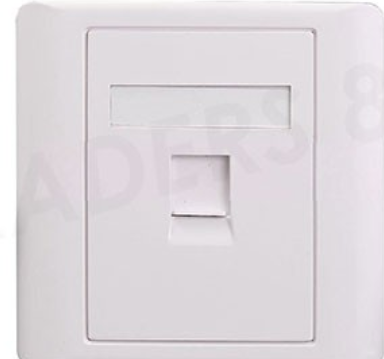 |
|
|
|
|
|
ChenKaiWen
|
May 4 2024, 05:45 PM
|
|
|
QUOTE(phamtom X @ May 4 2024, 05:16 PM) my home facing internet issue just this morning. it happens at random where sometimes the internet is OK and then the next minute there's no internet. i tried rebooting the router but that helps only a little. so i run the diagnostics in the router provided by TIME to see what went wrong hence got the error message. now the internet seems to have resume on its own as i didn't mess the ONT Authentication that set up by the TIME service engineer. Could be a broken fibre based on my experience. Mine had a small damage during installation. The temperature changes cause my fibre reading to degrade until it fails to authenticate etc. |
|
|
|
|
|
ChenKaiWen
|
May 4 2024, 05:47 PM
|
|
|
QUOTE(YS3nsatiOn @ May 4 2024, 05:37 PM) Hi sifus, need some advice from you guys for my new house (double storey) setup which I recently signed up for their 1Gbps package that comes with 2 Dual Band Wireless Optical Network Terminal (not sure whether to call it router or modem anymore because they're 2-in-1 now): 1. HG8245X6-8N-30 2. HG8145X6 My fibre optic point is at ground floor at the TV/ Living area, hence that would be connected to the 1st unit (HG8245X6-8N-30) and at the ground floor, I can get close to 800+Mbps which I'm fine with. But now, when I'm upstairs, I can only get about 400+ Mbps (without using the router/ 2nd unit they gave). So then, I've tried putting the 2nd unit (HG8145X6) upstairs at the common area and when I did speedtest, the speed I'm getting is only about 300 Mbps (even slower than without using this router). My question is, how can I improve this so that I can at least get the same speed both downstairs and upstairs? Not sure if it will help, but I have 2 RJ-45 wall ports downstairs at the TV area beside the fibre optic point and 1 RJ-45 port upstairs at the common area (picture for reference below) Assuming one of the ports downstairs is connected to the upstairs one, just connect the main unit and 2nd unit together with cable through that |
|
|
|
|
|
YS3nsatiOn
|
May 4 2024, 07:29 PM
|
|
|
QUOTE(ChenKaiWen @ May 4 2024, 05:47 PM) Assuming one of the ports downstairs is connected to the upstairs one, just connect the main unit and 2nd unit together with cable through that I tried doing that but I got no internet connection after that…so you know if there’s any settings I need to change in the device settings via 192.168.100.1? I plugged the 1st unit downstairs via LAN cable to the port and the 2nd unit upstairs again to the port at the common area via another LAN cable. |
|
|
|
|
|
Optizorb
|
May 4 2024, 08:45 PM
|
|
|
wah time nowadays damn frustrating leh
everything keep buffering load slow like shit
|
|
|
|
|
|
stasio
|
May 4 2024, 09:58 PM
|
|
|
QUOTE(Optizorb @ May 4 2024, 08:45 PM) wah time nowadays damn frustrating leh everything keep buffering load slow like shit |
|
|
|
|
|
trix
|
May 5 2024, 10:20 AM
|
|
|
installed FTTR
currently working to integrate it with my pfSense
wall->old ont->pfsense->parent node is only partially working
first your ONT authentication password is changed, so you need to grab the new one from parent node and update it in the old ONT
then the child node needs DHCP from parent node otherwise parent node will see them as offline so this is what is blocking me from using this method
workaround i'm using is
wall->parent node -> 2 network cables to pfsense
-configure secondary IP address on the parent node to be in one of pfSense's LAN subnet, then configure WAN on pfsense using static IP
-on parent node configure DMZ to pfSense
-any device that needs to be behind pfSense needs their IP address to be manually configured
at least my original usecase for pfsense(S2S VPN, DNS/IP blocking) is still working with this setup
|
|
|
|
|
|
jjj2
|
May 5 2024, 02:57 PM
|
|
|
QUOTE(phamtom X @ May 4 2024, 05:16 PM) my home facing internet issue just this morning. it happens at random where sometimes the internet is OK and then the next minute there's no internet. i tried rebooting the router but that helps only a little. so i run the diagnostics in the router provided by TIME to see what went wrong hence got the error message. now the internet seems to have resume on its own as i didn't mess the ONT Authentication that set up by the TIME service engineer. Hi, try monitor for a week or two, to see if this problem repeats, if so, then gotta report to CS to check. |
|
|
|
|
|
jjj2
|
May 5 2024, 03:01 PM
|
|
|
QUOTE(YS3nsatiOn @ May 4 2024, 05:37 PM) Hi sifus, need some advice from you guys for my new house (double storey) setup which I recently signed up for their 1Gbps package that comes with 2 Dual Band Wireless Optical Network Terminal (not sure whether to call it router or modem anymore because they're 2-in-1 now): 1. HG8245X6-8N-30 2. HG8145X6 My fibre optic point is at ground floor at the TV/ Living area, hence that would be connected to the 1st unit (HG8245X6-8N-30) and at the ground floor, I can get close to 800+Mbps which I'm fine with. But now, when I'm upstairs, I can only get about 400+ Mbps (without using the router/ 2nd unit they gave). So then, I've tried putting the 2nd unit (HG8145X6) upstairs at the common area and when I did speedtest, the speed I'm getting is only about 300 Mbps (even slower than without using this router). My question is, how can I improve this so that I can at least get the same speed both downstairs and upstairs? Not sure if it will help, but I have 2 RJ-45 wall ports downstairs at the TV area beside the fibre optic point and 1 RJ-45 port upstairs at the common area (picture for reference below) Hi, you may hook up a network cable to the LAN port of HG8245X6-8N-30 & the other end connect to HG8145X6 (upstairs). |
|
|
|
|
|
jjj2
|
May 5 2024, 03:09 PM
|
|
|
QUOTE(YS3nsatiOn @ May 4 2024, 07:29 PM) I tried doing that but I got no internet connection after that…so you know if there’s any settings I need to change in the device settings via 192.168.100.1? I plugged the 1st unit downstairs via LAN cable to the port and the 2nd unit upstairs again to the port at the common area via another LAN cable. It should be already setup during the Installation, just hook up the network cable will do. Just in case it doesn't, during setup, bring the HG8145X6 near to the HN8245X6S-8N-30, when the WPS indicator is stable lit on in green, press & hold the WPS button until the green light blinks, and then press the WPS button on HG8145X6, wait until the WPS indicator on HN8245X6S-8N-30 is Off, it means HG8145X6 already successfully paired. Now you can bring it upstairs & hook up the network cable. Thanks. |
|
|
|
|
|
Matchy
|
May 5 2024, 09:27 PM
|
|
|
Anyone having issue with their time internet? Mine cannot connect to internet.
|
|
|
|
|
|
-PatheticSoul-
|
May 5 2024, 09:28 PM
|
|
|
can you guys access twitter normally? mine kept getting this and have to refresh a couple of times only then can view timeline. same with reading replies etc  |
|
|
|
|
|
JeremyThw
|
May 5 2024, 09:38 PM
|
New Member
|
QUOTE(-PatheticSoul- @ May 5 2024, 09:28 PM) can you guys access twitter normally? mine kept getting this and have to refresh a couple of times only then can view timeline. same with reading replies etc Same issue here, have to use vpn only can load properly  |
|
|
|
|
|
-PatheticSoul-
|
May 6 2024, 05:48 AM
|
|
|
QUOTE(JeremyThw @ May 5 2024, 09:38 PM) Same issue here, have to use vpn only can load properly but the weird part, its ok when im on mobile/ipad. only when on desktop get this problem  |
|
|
|
|
|
PRSXFENG
|
May 6 2024, 07:33 AM
|
|
|
QUOTE(-PatheticSoul- @ May 5 2024, 09:28 PM) can you guys access twitter normally? mine kept getting this and have to refresh a couple of times only then can view timeline. same with reading replies etc I thought it was one of my adblockers or something like that causing it, good to know it's not just me |
|
|
|
|
|
stasio
|
May 6 2024, 02:26 PM
|
|
|
Guys, any targeted day when they will resolve fault ?
Is getting 2 weeks+ now...
|
|
|
|
|
|
eauyong
|
May 6 2024, 03:12 PM
|
Getting Started
|
QUOTE(stasio @ May 6 2024, 02:26 PM) Guys, any targeted day when they will resolve fault ? Is getting 2 weeks+ now... Seems OK. Yesterday watched Live Final matches, morning Uber Cup and afternoon Thomas Cup through VPN Europe connection. HD 1080p |
|
|
|
|
|
stasio
|
May 6 2024, 06:19 PM
|
|
|
Here in PJ, no internet from 3pm to 6pm....
Just recovered ,
luckly TIME send notice to my phone....not checked all yet...
This post has been edited by stasio: May 6 2024, 08:05 PM
|
|
|
|
|



 Quote
Quote


 0.0265sec
 0.31
0.31
 6 queries
 GZIP Disabled