Outline ·
[ Standard ] ·
Linear+
TIME [OFFICIAL] TIME Fibre Broadband™ v4, Experience the ONE TRUE 2Gbps
|
YS3nsatiOn
|
 Apr 27 2020, 12:03 AM Apr 27 2020, 12:03 AM
|

|
QUOTE(Higgsboson8888 @ Apr 26 2020, 07:54 PM) Anyone has issues with their TIME connection today? Since morning the network has been disconnected abruptly, no chance of reconnecting it back. Where's your area at? I didn't face any issue except for last week (probably Tue/Wed) where I had very slow speed. That's all |
|
|
|
|
|
YS3nsatiOn
|
Apr 27 2020, 01:40 PM
|
|
|
QUOTE(604weekendwarrior @ Apr 27 2020, 10:07 AM) I also thought it was a good router when I got it but over the past 2 months I had to consistently power cycle the router daily. I recently upgraded to the Asus Rt-ac67u Aimesh router. One in the living room, one in the bedroom. Speed is close to my 500Mbps I'm paying for. I think the EC230 was having issues with the amount of devices connected. Since MCO I now have 15 devices connected at one time. Laptop, Phones, Home Devices, Android TV box, etc... TIME gave me the Archer c1200 router and it has been working very fine so far  |
|
|
|
|
|
YS3nsatiOn
|
May 4 2024, 05:37 PM
|
|
|
Hi sifus, need some advice from you guys for my new house (double storey) setup which I recently signed up for their 1Gbps package that comes with 2 Dual Band Wireless Optical Network Terminal (not sure whether to call it router or modem anymore because they're 2-in-1 now): 1. HG8245X6-8N-30 2. HG8145X6 My fibre optic point is at ground floor at the TV/ Living area, hence that would be connected to the 1st unit (HG8245X6-8N-30) and at the ground floor, I can get close to 800+Mbps which I'm fine with. But now, when I'm upstairs, I can only get about 400+ Mbps (without using the router/ 2nd unit they gave). So then, I've tried putting the 2nd unit (HG8145X6) upstairs at the common area and when I did speedtest, the speed I'm getting is only about 300 Mbps (even slower than without using this router). My question is, how can I improve this so that I can at least get the same speed both downstairs and upstairs? Not sure if it will help, but I have 2 RJ-45 wall ports downstairs at the TV area beside the fibre optic point and 1 RJ-45 port upstairs at the common area (picture for reference below) 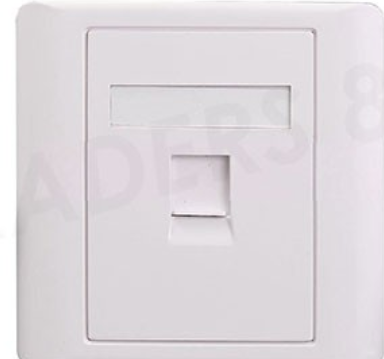 |
|
|
|
|
|
YS3nsatiOn
|
May 4 2024, 07:29 PM
|
|
|
QUOTE(ChenKaiWen @ May 4 2024, 05:47 PM) Assuming one of the ports downstairs is connected to the upstairs one, just connect the main unit and 2nd unit together with cable through that I tried doing that but I got no internet connection after that…so you know if there’s any settings I need to change in the device settings via 192.168.100.1? I plugged the 1st unit downstairs via LAN cable to the port and the 2nd unit upstairs again to the port at the common area via another LAN cable. |
|
|
|
|
|
YS3nsatiOn
|
Nov 27 2024, 04:31 PM
|
|
|
Hi everyone, I'm currently facing an issue which I don't understand, so would wanna seek your expertise to help me out. I have a TIME subscription 1GBps and they gave me 2 units which are the HG8245X6-8N-30 & HG8145X6-10. The 1st one is connected downstairs at my living room area and the 2nd unit I put it upstairs and connect them both with a LAN cable via the wall port. I think TIME technician helped me set up the 2nd unit as a repeater/ AP. Somehow, as per screenshot below, the Ethernet repeater speed will keep dropping to 10Mbps. Upon initial connection, it will show 1000Mbps then after about 5-10 minutes it goes back to this. Anyone knows what is wrong with this?  |
|
|
|
|



 Quote
Quote
 0.0294sec
 0.16
0.16
 7 queries
 GZIP Disabled