QUOTE(slackinux @ Sep 26 2023, 12:07 PM)
I tested the 2nd unit so called mesh enabled router is actually not implementing wireless mesh protocol 802.11k/v/r.
It is just a wireless AP or wired AP, i.e., if connected to main router via ethernet cable.
I placed the main router at level 2 and placed the 2nd unit at level one. Both having same WiFi SSID.
I connect to the level 1 SSID and go up to the level 2. My device forever attach to the level 1 SSID.
It will never switch to level 2 SSID seamlessly like other mesh router.
Unless you choose to connect level 2 SSID manually then only it connects to level 2 SSID.
Therefore, the 2nd unit router given definitely not a mesh unit. It is actually acting as a wireless AP.
TIME marketing team is misleading the subscriber with the term "mesh".
In networking term, wireless mesh means a network element that implements 802.11k/v/r protocol.
Hi, I would like to retreat my statement that Huawei Optixstar HG8145X6-10 not implementing 802.11k/v/r protocol.
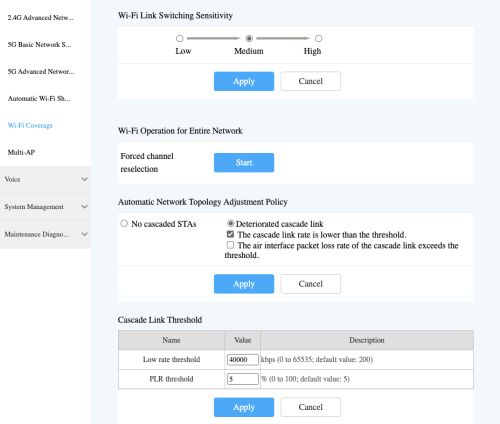
My previous test showed that my device didn't switch between SSID from main router and 2nd router due to default setting of the
Cascade Link Threshold value is too low, i.e., 200kbps.
Meaning that if the device's data transfer rate lower than 200kbps then it will switch to another SSID that is stronger.
After I increased the cascade link threshold from 200kbps to 40000kbps, my device able to switch between main router and 2nd mesh unit's SSID seamlessly.
Conclusion is Huawei Optixstar HG8145X6-10 is compliant to Easymesh and able to switch between SSID seamlessly.


 Sep 23 2023, 10:05 AM


 Quote
Quote




 0.0216sec
 0.94
0.94
 6 queries
 GZIP Disabled