Welcome Guest ( Log In | Register )

672 Pages « < 503 504 505 506 507 > » Bottom

Outline · [ Standard ] · Linear+

TIME [OFFICIAL] TIME Fibre Broadband™ v4, Experience the ONE TRUE 2Gbps

views
     
jjj2
post Jul 14 2023, 10:10 PM

Look at all my stars!!
*******
Senior Member
3,616 posts

Joined: Feb 2006
QUOTE(c00lbeans @ Jul 14 2023, 09:37 PM)
im on Astro IPTV with Time broadband 100mbps. Past few days the connection speed has dropped to 1mpbs and despite on/off modem many times and changing the wifi channels in the modem to few settings, its still the same!! is there something wrong with Time now? called Time support just now and they taichi to Astro, and when i tried Astro, they don't have anyone now to talk to! this is so frustrating!
*
Hi, you need to call Astro IPTV hotline 0395431543

Usually this problem happens when the router auto reset to default pppoe credential.
c00lbeans P
post Jul 14 2023, 11:14 PM

New Member
*
Probation
12 posts

Joined: Nov 2021
QUOTE(jjj2 @ Jul 14 2023, 10:10 PM)
Hi, you need to call Astro IPTV hotline 0395431543

Usually this problem happens when the router auto reset to default pppoe credential.
*
- why/how would the router auto reset? some bug or random thing happend?
- default to pppoe credential means what? i checked in the router, still using my username etc
- so the issue likely on my side rather than on time/astro's side?
- any idea how to fix or troubleshoot further

thx
dvinez
post Jul 15 2023, 06:21 PM

Limited Edition
******
Senior Member
1,475 posts

Joined: Dec 2006
From: Paradise


Hi guys,

Just got my TIME broadband installed.

They gave me 2in1 Huawei HG8145V5.
I got TP-Link AX20 for router, when I connect LAN1 to WAN, AX20 automatically can online.

No need to call customer service or, login or setting at both device.

I then proceed to login HG8145V5 and disable its wireless.

Am I doing okay now? Or it is totally different thing?
Better call customer service request bridge mode etc? hmm.gif

Thank you in advance, your advice is very much appreciated.

QUOTE
user posted image
user posted image


PRSXFENG
post Jul 15 2023, 09:30 PM

Look at all my stars!!
*******
Senior Member
2,616 posts

Joined: Nov 2020


QUOTE(dvinez @ Jul 15 2023, 06:21 PM)
Hi guys,

Just got my TIME broadband installed.

They gave me 2in1 Huawei HG8145V5.
I got TP-Link AX20 for router, when I connect LAN1 to WAN, AX20 automatically can online.

No need to call customer service or, login or setting at both device.

I then proceed to login HG8145V5 and disable its wireless.

Am I doing okay now? Or it is totally different thing?
Better call customer service request bridge mode etc? hmm.gif

Thank you in advance, your advice is very much appreciated.
*
While yes, this does make it able to get online, you are creating a Double NAT situation

It is still recommended to change to bridge mode
eauyong
post Jul 15 2023, 09:52 PM

Getting Started
**
Junior Member
242 posts

Joined: Jan 2003
QUOTE(PRSXFENG @ Jul 15 2023, 09:30 PM)
While yes, this does make it able to get online, you are creating a Double NAT situation

It is still recommended to change to bridge mode
*
Or use the AX20 in AP mode and not router and place it further and nearer to other users.


dvinez
post Jul 15 2023, 11:01 PM

Limited Edition
******
Senior Member
1,475 posts

Joined: Dec 2006
From: Paradise


QUOTE(PRSXFENG @ Jul 15 2023, 09:30 PM)
While yes, this does make it able to get online, you are creating a Double NAT situation

It is still recommended to change to bridge mode
*
So, I just call TIME

Request HG8145V5 bridge mode > AX20 internet connection change to PPPOE > Enter ID and password

Then it is done right? Nothing to do at HG8145V5. Thank you notworthy.gif


QUOTE(eauyong @ Jul 15 2023, 09:52 PM)
Or use the AX20 in AP mode and not router and place it further and nearer to other users.
*
Do you know if HG8145V5 is better or AX20, in term of speed, connecting multiple devices, etc.
Random speed comparison AX20 seems better in the beginning but result don't vary much. Thank you notworthy.gif
jjj2
post Jul 15 2023, 11:20 PM

Look at all my stars!!
*******
Senior Member
3,616 posts

Joined: Feb 2006
QUOTE(dvinez @ Jul 15 2023, 11:01 PM)
So, I just call TIME

Request HG8145V5 bridge mode > AX20 internet connection change to PPPOE > Enter ID and password

Then it is done right? Nothing to do at HG8145V5. Thank you notworthy.gif
YES
Do you know if HG8145V5 is better or AX20, in term of speed, connecting multiple devices, etc.
AX20 is better. 8145V5 is a crap.
Random speed comparison AX20 seems better in the beginning but result don't vary much. Thank you notworthy.gif
*
eauyong
post Jul 15 2023, 11:20 PM

Getting Started
**
Junior Member
242 posts

Joined: Jan 2003
QUOTE(dvinez @ Jul 15 2023, 11:01 PM)
Then it is done right? Nothing to do at HG8145V5. Thank you notworthy.gif
Do you know if HG8145V5 is better or AX20, in term of speed, connecting multiple devices, etc.
Random speed comparison AX20 seems better in the beginning but result don't vary much. Thank you notworthy.gif
*
If the speed from Time is a 100Mbps service, it does not matters. The Huawei HG8145V5 is fast enough often download speed exceeded 100Mbps even with Time's speed throttling.
I think even 500Mbps service do not matters too.

This post has been edited by eauyong: Jul 15 2023, 11:21 PM
RushArt
post Jul 19 2023, 11:03 PM

Getting Started
**
Junior Member
59 posts

Joined: Jan 2014
I just move to a new condo with TIME. The problem is, with Huawei HG8145V5, my bedroom has terrible wifi signal. The rest of the house is fine.

If I am going to buy TP Link Archer AX-55, will it improve the wifi signal? And do I need to set my HG8145V5 as bridge mode and AX-55 as WiFi router?

This post has been edited by RushArt: Jul 20 2023, 06:33 PM
jjj2
post Jul 20 2023, 06:40 PM

Look at all my stars!!
*******
Senior Member
3,616 posts

Joined: Feb 2006
QUOTE(RushArt @ Jul 19 2023, 11:03 PM)
I just move to a new condo with TIME. The problem is, with Huawei HG8145V5, my bedroom has terrible wifi signal. The rest of the house is fine.

If I am going to buy TP Link Archer AX-55, will it improve the wifi signal? And do I need to set my HG8145V5 as bridge mode and AX-55 as WiFi router?
*
For sure if compare to V5, it will be a lot better. Set your V5 to be in ONU mode, then let your Asus router performs the rest.

RushArt
post Jul 21 2023, 10:31 AM

Getting Started
**
Junior Member
59 posts

Joined: Jan 2014
QUOTE(jjj2 @ Jul 20 2023, 06:40 PM)
For sure if compare to V5, it will be a lot better. Set your V5 to be in ONU mode, then let your Asus router performs the rest.
*
Thanks for the reply. How do I set V5 to be ONU? Do I need to call customer service or I can set it in V5 itself?
jjj2
post Jul 21 2023, 06:07 PM

Look at all my stars!!
*******
Senior Member
3,616 posts

Joined: Feb 2006
QUOTE(RushArt @ Jul 21 2023, 10:31 AM)
Thanks for the reply. How do I set V5 to be ONU? Do I need to call customer service or I can set it in V5 itself?
*
It's better for you to call CS.
ChenKaiWen
post Jul 26 2023, 04:53 PM

Casual
***
Junior Member
387 posts

Joined: May 2019


I received Time advertisement in mail today. Checked with website and all taman around mine are also covered. Finally after 10+ years lol.

There were some work a few weeks ago, digging up the road to put some pipes. Not sure if it's time or something else. I looked around but I don't see any FDP.

Any clue to find where it is?
x3iQuanta
post Jul 26 2023, 06:08 PM

Getting Started
**
Junior Member
70 posts

Joined: Feb 2013
Just got 500Mbps installed in my condo today. Latency for upstairs is quite high and I'm thinking of adding another node to pair with the two HG8145X6 they gave. Are there any recommended ones to get?
RushArt
post Jul 26 2023, 11:35 PM

Getting Started
**
Junior Member
59 posts

Joined: Jan 2014
QUOTE(jjj2 @ Jul 20 2023, 06:40 PM)
For sure if compare to V5, it will be a lot better. Set your V5 to be in ONU mode, then let your Asus router performs the rest.
*
QUOTE(jjj2 @ Jul 21 2023, 06:07 PM)
It's better for you to call CS.
*
Just want to give an update here, TP-Link AX55 is amazing. Very strong signal even in my original deadspot using TIME given router. And yes, updating to bridge mode is as easy as chatting with TIME customer service.

Thank you so much for the help!
kennyng77
post Jul 27 2023, 10:48 AM

Getting Started
**
Junior Member
116 posts

Joined: Oct 2010
From: Petaling Jaya


I kept the Huawei fibre modem from previous condo, now new condo TIME using HG8145X6. Just to check, can I use back the old huawei fibre modem to enable to use my TP-Link AX73 or really need to call CS to change HG8145X6 as bridge mode?
PRSXFENG
post Jul 27 2023, 12:27 PM

Look at all my stars!!
*******
Senior Member
2,616 posts

Joined: Nov 2020


QUOTE(kennyng77 @ Jul 27 2023, 10:48 AM)
I kept the Huawei fibre modem from previous condo, now new condo TIME using HG8145X6. Just to check, can I use back the old huawei fibre modem to enable to use my TP-Link AX73 or really need to call CS to change HG8145X6 as bridge mode?
*
Probably the 2nd one, since the old modem has its own settings/id/details that would not be the same
Could you possibly change the details to match? Probably if the credentials were known

But just call CS to change the mode of the HG8145X6
jjj2
post Jul 27 2023, 04:08 PM

Look at all my stars!!
*******
Senior Member
3,616 posts

Joined: Feb 2006
QUOTE(kennyng77 @ Jul 27 2023, 10:48 AM)
I kept the Huawei fibre modem from previous condo, now new condo TIME using HG8145X6. Just to check, can I use back the old huawei fibre modem to enable to use my TP-Link AX73 or really need to call CS to change HG8145X6 as bridge mode?
*
Hi, you cant simply change the ONU as it needs to be authenticated with the OLT.
It's better for you to call CS to request them change the X6 to bridge mode, else if you mess up, they will charge you for reconfiguration.


LoNeLyKiRa
post Jul 28 2023, 03:20 PM

Getting Started
**
Junior Member
114 posts

Joined: Mar 2008
hi i plan to upgrade the default time router X6 to archer axe75. is this consider worth the upgrade in terms of 6e and better signal coverage/performance? do recommend me if there is better option out there
SUSpetpenyubobo
post Jul 29 2023, 01:00 AM

Regular
******
Senior Member
1,030 posts

Joined: Jan 2022

jjj2

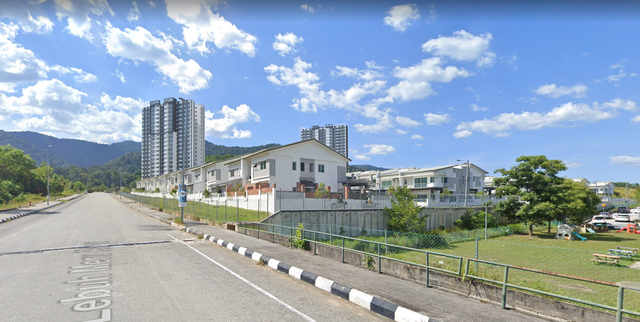
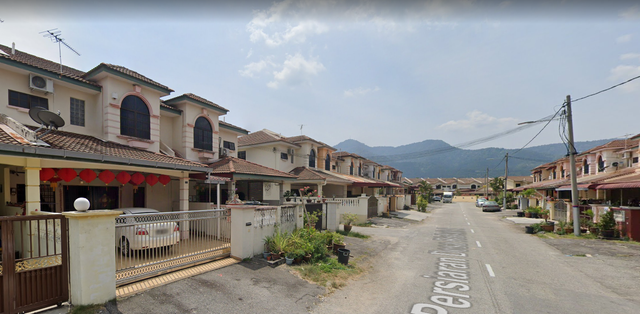
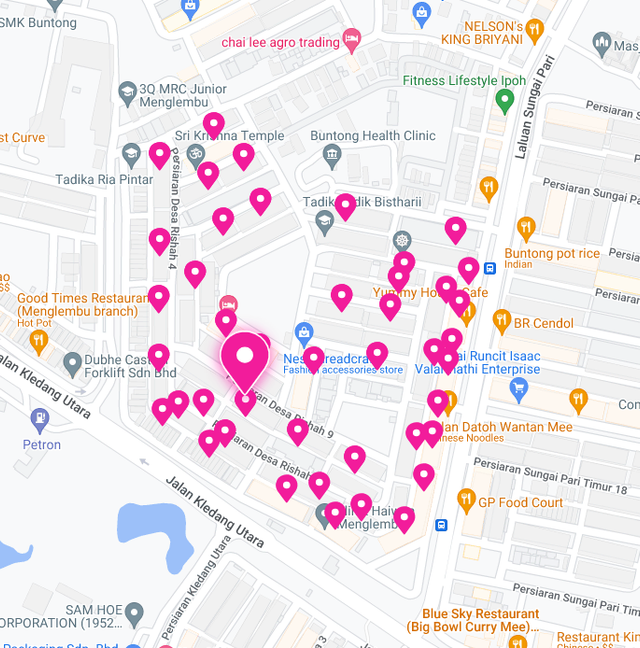
Is TIME now expanding to landed homes in Perak?

user posted image

user posted image

user posted image

672 Pages « < 503 504 505 506 507 > » Top
 

Change to:
| Lo-Fi Version
0.0232sec    0.38    6 queries    GZIP Disabled
Time is now: 24th December 2025 - 11:34 AM