

Hello fellas,
quick question saja,
does the ASUS RT-AX3000 able to handle
the following:
- Maxis Home Fibre 2Gbps
or
- Unifi Home 2Gbps
?
Home Networking WiFi Router Discussion Thread, Updated for 2023
Home Networking WiFi Router Discussion Thread, Updated for 2023
|
|
  Feb 7 2024, 12:37 PM Feb 7 2024, 12:37 PM
|
 
Junior Member
554 posts Joined: Jan 2003  
|
Hello fellas,
quick question saja, does the ASUS RT-AX3000 able to handle the following: - Maxis Home Fibre 2Gbps or - Unifi Home 2Gbps ? |
|
|
|
|
|
Feb 7 2024, 12:55 PM
|

Senior Member
6,712 posts Joined: Aug 2008 From: Malaysia 
|
QUOTE(Omochao @ Feb 7 2024, 12:14 PM) It will come, but only they themselves can tell. Mine sometime will jump node and connect further way lolIoT devices like Tapo Cams/ LED bulbs, I didn't even change anything, just put it on auto for all signal and band selection. Because it can only go up to 2.4Ghz, no point changing it anyway. The only thing that I can think off is that I can set it to connect to another node.  |
|
|
Feb 7 2024, 02:19 PM
Show posts by this member only | IPv6 | Post
#5463
|

Junior Member
835 posts Joined: Nov 2007 From: Land of Forgotten
|
QUOTE(zioburosky13 @ Feb 7 2024, 12:37 PM) Hello fellas, wireless maybe yes. quick question saja, does the ASUS RT-AX3000 able to handle the following: - Maxis Home Fibre 2Gbps or - Unifi Home 2Gbps ? wired no , unless that router has a 2.5Gbps port. |
|
|
Feb 7 2024, 02:23 PM
Show posts by this member only | IPv6 | Post
#5464
|
|
Junior Member
835 posts Joined: Nov 2007 From: Land of Forgotten
|
QUOTE(TongCN @ Feb 7 2024, 12:55 PM) Mine sometime will jump node and connect further way lol which means is getting better signal coverage from that node.Or else try power cycle the nodes to force it connect to the nearest ones. Right now I've encountered an issue for my own network is that my deco x20 cannot register near device when I roam with my phone next to it. Other phones like xiaomi ,samsung and redmi, no issues..only my phone . After resetting and even resetup the whole decos, nothing helps. Turning on and off for 2.4ghz+5ghz only also failed. The only way is to turn off fast roaming protocol permanently i deco app, and now is functioning as normal. |
|
|
Feb 8 2024, 09:51 AM
|
|
Junior Member
554 posts Joined: Jan 2003
|
QUOTE(Omochao @ Feb 7 2024, 02:19 PM) wireless maybe yes. If so, wired no , unless that router has a 2.5Gbps port. what are the current options of routers capable of supporting 2Gbps wired connection on the market now? |
|
|
Feb 8 2024, 11:47 AM
Show posts by this member only | IPv6 | Post
#5466
|
|
Junior Member
835 posts Joined: Nov 2007 From: Land of Forgotten
|
QUOTE(zioburosky13 @ Feb 8 2024, 09:51 AM) If so, Plenty on the market, tp-link and asus already release it, WiFi 7 certified routers supports more than 2Gbps. what are the current options of routers capable of supporting 2Gbps wired connection on the market now? Or go for mikrotik like how they are doing it here in this thread https://forum.lowyat.net/topic/4925452 |
|
|
|
|
|
Feb 8 2024, 01:07 PM
Show posts by this member only | IPv6 | Post
#5467
|

All Stars
11,459 posts Joined: Oct 2007 From: KL
|
QUOTE(TongCN @ Feb 7 2024, 12:55 PM) Mine sometime will jump node and connect further way lol Mine also. Got one device always want to connect to the one WiFi 8m away instead of the one 4m away. When using Deco, just let it be. Still works, just slower and sometimes it’ll jump back to the closer one. When using Mikrotik, I block it from connecting to the further one. |
|
|
Feb 8 2024, 04:11 PM
Show posts by this member only | IPv6 | Post
#5468
|
|
Junior Member
835 posts Joined: Nov 2007 From: Land of Forgotten
|
QUOTE(soonwai @ Feb 8 2024, 01:07 PM) Mine also. Got one device always want to connect to the one WiFi 8m away instead of the one 4m away. When using Deco, just let it be. Still works, just slower and sometimes it’ll jump back to the closer one. When using Mikrotik, I block it from connecting to the further one. try turning the mesh option off when your device keeps getting connected to that node, or turn off fast roaming in the options.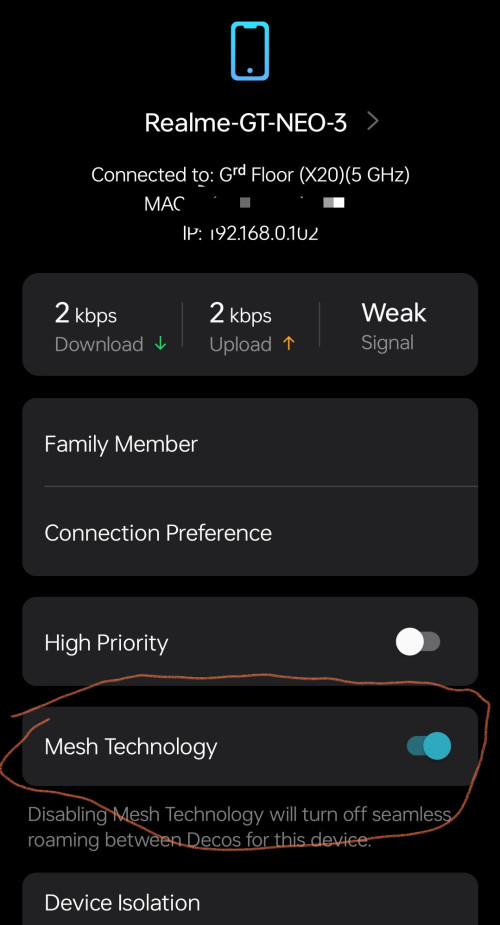 This post has been edited by Omochao: Feb 8 2024, 04:13 PM |
|
|
Feb 8 2024, 04:22 PM
Show posts by this member only | IPv6 | Post
#5469
|
|
All Stars
11,459 posts Joined: Oct 2007 From: KL
|
QUOTE(Omochao @ Feb 8 2024, 04:11 PM) try turning the mesh option off when your device keeps getting connected to that node, or turn off fast roaming in the options. Tried. Doesn't help. It's the device that wants to change. Anyway Deco already long gone. Just temporary while waiting for Mikrotik.... |
|
|
Feb 8 2024, 04:22 PM
|

Junior Member
578 posts Joined: Jun 2006
|
Hi. This set up is based in hk.
Current hkt broadband is 1000M + 1000M speed. From what I understand from the installation guy is its not a 2Gig line. More like there are two 1Gig lines. And if you aggregate it you get around 1.2. I figure no harm trying dual WAN on this. Does that sound right or am I way off? Currently leaning towards the asus axe7800 or tplink be550. Any thoughts or recommendations? 1 user (max 5) 10 devices max Very small place, range will not be an issue. Priority on stability and speed. |
|
|
Feb 8 2024, 06:56 PM
Show posts by this member only | IPv6 | Post
#5471
|
|
Junior Member
835 posts Joined: Nov 2007 From: Land of Forgotten
|
QUOTE(soonwai @ Feb 8 2024, 04:22 PM) Tried. Doesn't help. It's the device that wants to change. Anyway Deco already long gone. Just temporary while waiting for Mikrotik. then most likely is the hardware firmware issues, faced it back on Mercusys as well...this mesh is a headache to get it right. If the firmware is good and stable, you are caught in between whether do update to test out new features.  |
|
|
Feb 15 2024, 02:17 AM
Show posts by this member only | IPv6 | Post
#5472
|

Senior Member
1,394 posts Joined: Aug 2006 From: Sungai Petani
|
I'm using tplink 3150v2 for quite some time now. Only recently it has issues with upnp where it just stopped working for no reason but only to some ports.
Anyone can recommend me a good router for UPGRADE? No need for good wifi as already using Netgear Orbi for Mesh AP. This post has been edited by nyunyu: Feb 15 2024, 02:18 AM |
|
|
Feb 19 2024, 01:43 PM
|
|
Senior Member
6,712 posts Joined: Aug 2008 From: Malaysia
|
Hmm .. this is funny
To recap, i replaced one unit of my x20 to my parent home and use as single router while leaving 2 units x20 at my own home while main using XE75 Yesterday i saw pop out of new firmware can be installed in my app. I check my own home and it says everything is up-to-date XE75 - 1.2.9 X20 - 1.5.2 So i switch to parent's home and detect the X20 has 1.5.3 How come my home's one X20 cannot be upgrade from 1.5.2 to 1.5.3 (is it because it is a node now?) I bought the X20 (3packs) btw so all should be same if there is a new firmware update. |
|
|
|
|
|
Feb 19 2024, 08:30 PM
Show posts by this member only | IPv6 | Post
#5474
|
|
Senior Member
2,613 posts Joined: Nov 2020
|
QUOTE(TongCN @ Feb 19 2024, 01:43 PM) Hmm .. this is funny Maybe different hardware revisions?To recap, i replaced one unit of my x20 to my parent home and use as single router while leaving 2 units x20 at my own home while main using XE75 Yesterday i saw pop out of new firmware can be installed in my app. I check my own home and it says everything is up-to-date XE75 - 1.2.9 X20 - 1.5.2 So i switch to parent's home and detect the X20 has 1.5.3 How come my home's one X20 cannot be upgrade from 1.5.2 to 1.5.3 (is it because it is a node now?) I bought the X20 (3packs) btw so all should be same if there is a new firmware update. |
|
|
Feb 19 2024, 10:52 PM
Show posts by this member only | IPv6 | Post
#5475
|
|
Junior Member
6 posts Joined: Jul 2019
|
Any recommendations for a wifi extender?
House type: Condo Size of house: 1 floor, 1500sqf Features required: a wifi extender to address wifi dead spot in my gaming room or lounge room (depending where I place the main router). Prefer low latency and not to technical to setup. Number of devices connected to WiFi: 3-4 Internet Speed: 100mbps Budget: <200 MYR |
|
|
Feb 20 2024, 12:03 AM
|
 
Elite
8,421 posts Joined: Jul 2008 
|
QUOTE(Wombat0 @ Feb 19 2024, 10:52 PM) Any recommendations for a wifi extender? Most Wi-Fi extender are not optimized for latencyHouse type: Condo Size of house: 1 floor, 1500sqf Features required: a wifi extender to address wifi dead spot in my gaming room or lounge room (depending where I place the main router). Prefer low latency and not to technical to setup. Number of devices connected to WiFi: 3-4 Internet Speed: 100mbps Budget: <200 MYR |
|
|
Feb 20 2024, 05:32 AM
Show posts by this member only | IPv6 | Post
#5477
|
|
Junior Member
835 posts Joined: Nov 2007 From: Land of Forgotten
|
QUOTE(TongCN @ Feb 19 2024, 01:43 PM) Hmm .. this is funny I think is due to you using the main node XE75,is causing the app detect your location in MY.So i switch to parent's home and detect the X20 has 1.5.3 How come my home's one X20 cannot be upgrade from 1.5.2 to 1.5.3 (is it because it is a node now?) I bought the X20 (3packs) btw so all should be same if there is a new firmware update. Meanwhile global and US website has 1.5.3 for Deco X20 V1. If you are daring enough, can always download the file, and update it manually through the web browser. |
|
|
Feb 20 2024, 05:36 AM
Show posts by this member only | IPv6 | Post
#5478
|

All Stars
14,307 posts Joined: Jan 2011
|
QUOTE(Wombat0 @ Feb 19 2024, 10:52 PM) Any recommendations for a wifi extender? Nowadays no one will use wifi extender this kind of electrical waste for wifi expansion anymore.House type: Condo Size of house: 1 floor, 1500sqf Features required: a wifi extender to address wifi dead spot in my gaming room or lounge room (depending where I place the main router). Prefer low latency and not to technical to setup. Number of devices connected to WiFi: 3-4 Internet Speed: 100mbps Budget: <200 MYR Ur budget is impossible to get anything that can help in ur prob at all. Go and get a decent wifi 5 tri-band mesh system at least by expanding ur tight budget. |
|
|
Feb 20 2024, 05:37 AM
Show posts by this member only | IPv6 | Post
#5479
|
|
Junior Member
835 posts Joined: Nov 2007 From: Land of Forgotten
|
QUOTE(Wombat0 @ Feb 19 2024, 10:52 PM) Any recommendations for a wifi extender? If you have plaster ceiling in your unit , may consider getting an unmanaged switch and do your own ethernet cabling in the gap of ceiling .House type: Condo Size of house: 1 floor, 1500sqf Features required: a wifi extender to address wifi dead spot in my gaming room or lounge room (depending where I place the main router). Prefer low latency and not to technical to setup. Number of devices connected to WiFi: 3-4 Internet Speed: 100mbps Budget: <200 MYR You can't really do much with that budget, and for condos they will always recommend you to use mesh due to beam slabs and the layout of a typical condo unit. 1500sf for a condo is not small. Wombat0 liked this post
|
|
|
Feb 20 2024, 08:22 AM
|
|
Senior Member
6,712 posts Joined: Aug 2008 From: Malaysia
|
QUOTE(PRSXFENG @ Feb 19 2024, 08:30 PM) Maybe different hardware revisions? The 3 units of x20 is a 3 packs bundle actually so all hardware version is same which is v1QUOTE(Omochao @ Feb 20 2024, 05:32 AM) I think is due to you using the main node XE75,is causing the app detect your location in MY. Not sure, maybe when i switch x20 as main again probably will update-able i guess. Meanwhile global and US website has 1.5.3 for Deco X20 V1. If you are daring enough, can always download the file, and update it manually through the web browser. Just some minor improvement so can skip at the moment. I wan XE75 1.3.0 update and dunno when  Addon: both my home and parent home using same TP-Link account of mine actually. This post has been edited by TongCN: Feb 20 2024, 08:24 AM |
| Change to: |  0.0207sec 0.0207sec
 1.07 1.07
 6 queries 6 queries
 GZIP Disabled GZIP Disabled
Time is now: 18th December 2025 - 06:44 AM |
 Quote
Quote