Welcome Guest ( Log In | Register )

Outline · [ Standard ] · Linear+

Home Networking WiFi Router Discussion Thread, Updated for 2023

views
     
PRSXFENG
post May 27 2021, 02:28 PM

Look at all my stars!!
*******
Senior Member
2,607 posts

Joined: Nov 2020


QUOTE(Noob Boy 1996 @ May 27 2021, 02:22 PM)
Hi guys. Need advice on the new setup.

Just upgrade to 300 Mbps and received 2 units of Deco M4. Want to connect M4 to the modem but if like that TM said must give back the stock unifi router (TP-Link Archer C1200). Current connection Modem → TP-Link C1200 → Deco M4 (First floor and second floor). House size about 1500 sf with 2 floors. Should I give up my stock unifi router? Which setup should I do to get maximum performance? Should I set deco m4 as wireless router or AP?
*
hmm you should directly go modem to deco to avoid double NAT
but why are they saying need to take back stock router?

like you can just setup yourself, and they wont even know

PRSXFENG
post Jun 4 2021, 10:28 AM

Look at all my stars!!
*******
Senior Member
2,607 posts

Joined: Nov 2020


As in next door? might be better to run an ethernet cable or a Fibre Optic cable over there and setup an AP there
PRSXFENG
post Jul 6 2021, 07:14 PM

Look at all my stars!!
*******
Senior Member
2,607 posts

Joined: Nov 2020


QUOTE(@skyhawk@ @ Jul 6 2021, 05:12 PM)
Hi there, I plan to set up wifi mesh for maxis wifi 6 router supplied (KAON 2140). Can I buy Tp-link mesh E4/M4 as a satellite? Since this router supports Easy mesh, can it work well with Tp-link mesh?
*
Pretty sure TP-Link Deco mesh is propriatery to Deco Mesh system, so, cannot.
Have to get EasyMesh compatible nodes.

Seems like the only one available here is D-Link COVR-1100

This post has been edited by PRSXFENG: Jul 6 2021, 07:16 PM
PRSXFENG
post Jul 6 2021, 10:34 PM

Look at all my stars!!
*******
Senior Member
2,607 posts

Joined: Nov 2020


QUOTE(@skyhawk@ @ Jul 6 2021, 09:31 PM)
thanks for the feedback bro. however, u said only one compatible, all other brand mesh wifi not support easy mesh? i tot all mesh wifi by default support easy mesh
*
All the current mesh on the market is proprietary (even TP-Link has 2 different mesh systems, OneMesh and Deco Mesh)

Now this new EasyMesh by the Wifi Alliance is open and compatible across brand
Problem is there's not much out there on the market yet that supports it
PRSXFENG
post Jul 11 2021, 02:44 PM

Look at all my stars!!
*******
Senior Member
2,607 posts

Joined: Nov 2020


QUOTE(mr08nobody @ Jul 11 2021, 01:14 PM)
i don't really know how much to expect for this upgrade. i browse through lazada and found some, tp link rm199, huawei rm2xx, asus rm3xx. i think i'm ok with rm3xx as long as the router can support 2 tv, 2 laptops, 7 mobile phones.
*
TP Link AX10/20/73 are good choices (AX50 has overheating issues)

Asus also ok, they are more expensive but more features and possibly longer firmware support.

No comment on Huawei
PRSXFENG
post Mar 7 2022, 10:44 PM

Look at all my stars!!
*******
Senior Member
2,607 posts

Joined: Nov 2020


QUOTE(Duckies @ Mar 3 2022, 05:54 PM)
Any wireless adapter recommendation for PC? I am currently using the PCIE version which I bought many years back but it only supports 2.4Ghz. It's giving me horrible ping and a lot of spiking/lagging when gaming but when I use my laptop to connect to the 5ghz instead it gives good ping!

I am checking out TPlink Archer TX3000E and Archer TX50E but I don't know which is better.
*
Just get Intel AX200 Desktop Kit, most wifi6 cards on the market these days all still use the same Intel AX200 chipset inside.
PRSXFENG
post Mar 15 2022, 07:32 PM

Look at all my stars!!
*******
Senior Member
2,607 posts

Joined: Nov 2020


QUOTE(ben3003 @ Mar 15 2022, 07:25 AM)
Hi guys, any way to share my internet to another house behind? Distance around 30m wall to wall. My uncle bak from singapore so thinking a way to share my house network instead he always stand outside his house to fetch wifi. Will wifi extender works? He doesnt need really good speed or good latency. I have a spare AC extender not sure how good it will work, cos the router is actually at living room, which is probably 40m include 2 walls in between to outdoor.
*
Best way is to still just run a lan cable across but of course depending on the situation it might not be possible
PRSXFENG
post Jan 31 2023, 08:21 PM

Look at all my stars!!
*******
Senior Member
2,607 posts

Joined: Nov 2020


QUOTE(Torboxz @ Jan 24 2023, 02:25 PM)
Hi guys,
I need help setting up port forwarding on unifi D-Link DIR-1860Z. Usually, all you need to know is your local ip address and the port needs to be open. But the customised (i guess) unifi router has a little bit more options. Can anyone help me? If I uploaded it correctly, you’d see the options in the picture below.
Thanks.
<a href='https://pictr.com/images/2023/01/24/ESpRMG.md.png' target='_blank'>https://pictr.com/images/2023/01/24/ESpRMG.md.png </a>
*
Try
2 WAN host blank
WAN connection leave as is
wan start/end port as the port you need, such as 19132 for both
no need to tick mac mapping
then enter local ip and local port

if it doesnt let you leave wan blank, try * ?
I dont have the router so cant try it
PRSXFENG
post Mar 24 2023, 09:39 AM

Look at all my stars!!
*******
Senior Member
2,607 posts

Joined: Nov 2020


QUOTE(akky @ Mar 23 2023, 02:58 PM)
Would like to check if there is any Wifi 6 router mesh supports Unifi's IPTV and VoIP?
*
voip is connected to modem so its unrelated

iptv should work if it supports vlan, such as tplink deco
PRSXFENG
post Mar 29 2023, 02:58 PM

Look at all my stars!!
*******
Senior Member
2,607 posts

Joined: Nov 2020


QUOTE(celciuz @ Mar 25 2023, 12:05 PM)
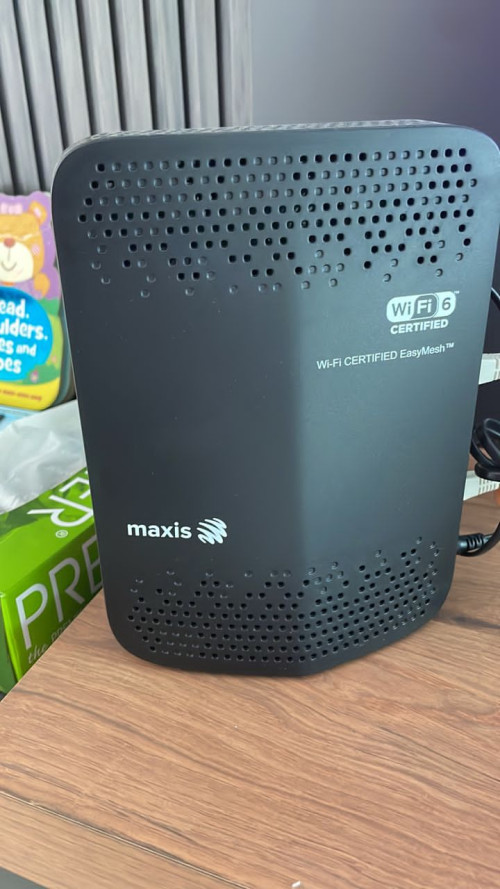
My neighbor is using this modem that came together with Maxis Fiber. It is placed in the living hall and he’s having issue with Wi-Fi coverage upstairs.

He sent me photo and I saw the “EasyMesh”, can directly just add on “EasyMesh” compatible nodes?

user posted image
*
Yeah, open standard, can connect to other easymesh compatible nodes
PRSXFENG
post Feb 19 2024, 08:30 PM

Look at all my stars!!
*******
Senior Member
2,607 posts

Joined: Nov 2020


QUOTE(TongCN @ Feb 19 2024, 01:43 PM)
Hmm .. this is funny

To recap, i replaced one unit of my x20 to my parent home and use as single router while leaving 2 units x20 at my own home while main using XE75

Yesterday i saw pop out of new firmware can be installed in my app.
I check my own home and it says everything is up-to-date
XE75 - 1.2.9
X20 - 1.5.2

So i switch to parent's home and detect the X20 has 1.5.3

How come my home's one X20 cannot be upgrade from 1.5.2 to 1.5.3 (is it because it is a node now?)

I bought the X20 (3packs) btw so all should be same if there is a new firmware update.
*
Maybe different hardware revisions?
PRSXFENG
post May 17 2024, 10:25 AM

Look at all my stars!!
*******
Senior Member
2,607 posts

Joined: Nov 2020


QUOTE(studentsurvey @ May 17 2024, 12:39 AM)
Hi Sifus,

Can i get help for quick ques.

Internet Package - Time 600mpbs
Available stock modem and router - 2 unit Huawei

From my previous place, i have:
1. Tp-link Deco X90 - 1 unit
2. Tp-link Deco m9 plus - 2 units

Current set-up, i use both the stock huawei modem & router as I just installed the internet. My question is, how do i now use the Decos instead?

I was thinking:
Modem - Huawei stock (do not change)
Connected to Modem - Deco X90 (not sure how to configure, to get the internet yet).
The other two Deco - spread to potential dead spots

Is the above the best configuration?
*
looks good
the huawei devices provided are probably 2 in one modem/routers
simply ask time cs to change it over to modem mode
then connect up your deco wan to lan1 of the huawei and setup with pppoe
PRSXFENG
post May 17 2024, 10:55 PM

Look at all my stars!!
*******
Senior Member
2,607 posts

Joined: Nov 2020


QUOTE(myrancid @ May 17 2024, 07:09 PM)
Hi,

I'm looking to replace my RT-AX1800HP. Is there any better firewall than this? I blocked youtube on url filter (router) and my 7 yrs old son just use private mode on safari ipad browser and he can watch as usual lol
*
using router based firewall is kinda eh these days

ios has poweful screen time management features, why not use that to restrict instead?
PRSXFENG
post Jun 22 2024, 05:42 PM

Look at all my stars!!
*******
Senior Member
2,607 posts

Joined: Nov 2020


QUOTE(MyProLife @ Jun 22 2024, 03:12 PM)
Depends on which brand actually if you want buy from china as cheap APs (don't just expect buy one can cover everywhere)

Xiaomi there got some models available in both china and global variants. Unless you banana then china variants should be okay enough. Some models especially MTK powered can be flashed with openwrt. I recommend to try AX3000T as it is relatively recent and decent enough as ap (flashable with openwrt)

Tp-link china lineup is very different from global lineup. Because China r&d team is separated from global r&d team. China lineup tends to use cheaper components like lower amount of ram/rom/lower rf components. ( so i don't recommend buy tp-link china models from chinese platforms)

Asus also got some that available in both china and global. But actually which defind software/firmware feature is determined by CPE (in laymen term is bios for asus routers) china firmware may have some unnecessary features like game boosters service. If you want slightly better coverage can always set to Australia
mode in advanced settings
It all up to you accordingly to budget. Got more budget can try 2 or 3 asus routers as ap, if less budget then get xiaomi ax3000t should be okay (regardless of china or global variants)
*
My "as cheap as possible" suggestion is to get a Xiaomi AX3200/Redmi AX6s from CeX (2nd hand) for RM85

https://my.webuy.com/product-detail/?id=6934177754951

but you need to go through the process of getting openwrt on it

https://openwrt.org/toh/xiaomi/ax3200
PRSXFENG
post Oct 16 2024, 05:47 PM

Look at all my stars!!
*******
Senior Member
2,607 posts

Joined: Nov 2020


QUOTE(nampaknyahebat @ Oct 16 2024, 12:30 PM)
Hey guys, I just switched to CelcomDigi fibre and given EX510 router, how good is it as compared to my old AX50? Should I switch to EX510 or remain with AX50? Much appreciated!
edit: Just found out that EX510 has mesh function and I also have a used AX10. Upon checking AX10, it does have EasyMesh function but it required a firmware update. The question now is, how do I update the firmware when it required my pppoe username and password to enable Internet access to update the firmware. Meaning that I need to temporarily switch over to AX10, setup the router and update the firmware then switch back to EX510? Please let me know if there is any other option to update the AX10 firmware.
*
you can connect your AX10 configured as Dynamic IP to the EX510 with ethernet cable temporarily to give it an internet connection to perform the update

otherwise, you can download the firmware update file from
https://www.tp-link.com/my/support/download...-ax10/#Firmware

and manually load it into the router from webui

Warning! please check the hardware version of your AX10 (v1, v1.2, v2) and select the correct one on the firmware download page to get the correct firmware for your revision
PRSXFENG
post Nov 7 2024, 10:27 AM

Look at all my stars!!
*******
Senior Member
2,607 posts

Joined: Nov 2020


QUOTE(blacktubi @ Nov 7 2024, 10:18 AM)
Looks like only the older, discontinued models are affected and only affect a small group of customer.

I suspect it's because these customers are running on much older firmware and didn't update their router firmware frequently.

Hopefully ASUS can come out with a solution soon.
*
seems like we do have one case with an ax86u in the asus thread

seems like the factory configuation data partition gets destroyed though, not good
PRSXFENG
post Nov 18 2024, 09:03 AM

Look at all my stars!!
*******
Senior Member
2,607 posts

Joined: Nov 2020


QUOTE(eternity4av @ Nov 8 2024, 09:23 AM)
Hi seniors, I'm still researching & I was watching TP Link Malaysia YouTube channel on how to link XE75/BE65 to Unifi using Dynamic IP, does this mean, I would not utilise the capable hardware of XE75/BE65 when its using Dynamic IP mode?
*
not recommended to do that, find their other video that sets it up with PPPoE
PRSXFENG
post Dec 30 2024, 06:01 PM

Look at all my stars!!
*******
Senior Member
2,607 posts

Joined: Nov 2020


QUOTE(zak3 @ Dec 30 2024, 11:57 AM)
sorry abit out of topic.

i have 2 ipad. (4th gen and mini).
it cannot connect to my wifi router (tm dlink x1860z) - cant join bla2 something like that..

however it can connect to my mobile hotspot.

googling doesn't seems to have answer.. or maybe i miss somewhere.  unsure.gif

any ideas?
*
From what I've seen before, it seems like they're not happy with WPA2/WPA3 mode, and also not happy with Protected Management Frames

you have to use WPA2 and no Protected Management Frames
PRSXFENG
post Dec 30 2024, 11:06 PM

Look at all my stars!!
*******
Senior Member
2,607 posts

Joined: Nov 2020


QUOTE(koceh87 @ Dec 30 2024, 10:19 PM)
Here the model. I'm not sure if this router a free router from TIME or he bought separately. Based on wifi ssid, seems not a free router from TIME, isn't?
*
TP-Link AX50

this is something you would have bought yourself, not provided by ISP

So yeah, you can reuse it with any ISP


Change to:
| Lo-Fi Version
0.0343sec    0.43    7 queries    GZIP Disabled
Time is now: 1st December 2025 - 08:54 PM