Welcome Guest ( Log In | Register )

302 Pages « < 274 275 276 277 278 > » Bottom

Outline · [ Standard ] · Linear+

Home Networking WiFi Router Discussion Thread, Updated for 2023

views
     
issac99289928
post Apr 9 2024, 05:06 PM

Getting Started
**
Junior Member
291 posts

Joined: Sep 2016
From: muar, johor


QUOTE(stxksy @ Apr 9 2024, 12:30 PM)
Hi all,

My Wifi router (DIR-X1860Z) provided by TM is having faulty (got LAN no Wifi). I tried everything I could to fix it (reset, contact technical support etc.) and I think I am out of luck but to conclude that it is broken.

I am looking to get another new Mesh router. My house is a double storey terrace with Unifi 1GBps and >10 devices are connected to Wifi. My budget is below RM1000 so I need valuable suggestion/recommendation from you guys.

Thank you very much in advance.
*
double check your ssid .maybe it is the minor difference between ABC_5Ghz@unifi and ABC_5GHz@unifi . just rename the ssid.
stxksy
post Apr 9 2024, 09:09 PM

Getting Started
**
Junior Member
207 posts

Joined: Oct 2016


QUOTE(issac99289928 @ Apr 9 2024, 05:06 PM)
double check your ssid .maybe it is the minor difference between ABC_5Ghz@unifi and ABC_5GHz@unifi . just rename the ssid.
*
When I go to router WLAN settings I cannot select 5Ghz and I really unsure what is happening.
PalakOtakHang
post Apr 11 2024, 01:04 AM

Getting Started
**
Junior Member
144 posts

Joined: Jul 2020
From: 5.3638° N, 100.3260° E
Hello all, networking noob here

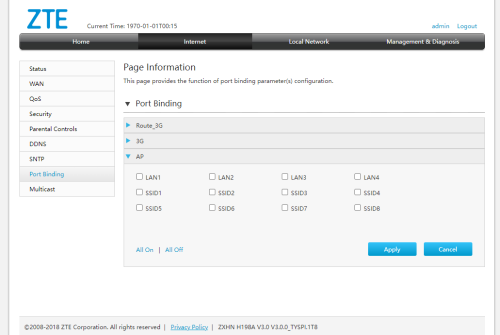
I set up a ZTE ZXHN H198A as an "access point". The device has only bridge mode (dont have access point mode). I disabled the DHCP on it. So far, other client devices can connect to the "access point" via lan cable/wifi.

user posted image
What is this "port binding"? Am I missing anything?

tyvm


This post has been edited by PalakOtakHang: Apr 11 2024, 01:05 AM
eternity4av
post Apr 13 2024, 10:57 AM

♥ ♥ ♥ taeyeon
*******
Senior Member
2,270 posts

Joined: Nov 2004
hi fellow seniors, i'm torn in between xe75 vs ax80 or ax95 as per guide above, currently using ax73.

but would like to check my wifi, is there any recommended app for both ios and android to check the signal strength?
borgyang
post Apr 18 2024, 09:00 PM

Getting Started
**
Junior Member
64 posts

Joined: Jun 2014
My Parents House
House Type: Double-Storey Terrace
ISP: Unifi
Plan: 300 Mbps
Brand: FiberHome
Name: WiFi 6 AX1800 Wireless Router
Model: SR1041Y

My New House
House Type: Double-Storey Terrace
ISP: Maxis
Plan: 300 Mbps
Brand: KAON
Name: Maxis Fibre WiFi 6 Router
Model: AR2140

Hi guys, I’m looking for entry-level Wi-Fi 6 router to improve the Wi-Fi network coverage in the bedrooms at upstairs for my parents house and my new house. The Unifi/Maxis stock router is installed at downstairs by the technician.

We will not consider wired backhaul because we don’t want to hack walls and it’s not nice to see the cables hanging on the walls. So, I guess the only way is to go wireless backhaul through Mesh Wi-Fi.

We understand that the speed will drop significantly if we use Mesh Wi-Fi, but we don’t really mind as long as it gives us a better coverage and more stable connection.

Questions:

1. Can we use back the existing Unifi/Maxis stock router and pair it to the Mesh Wi-Fi router from either TP-Link and Asus? Will there be any compatibility issues with the pairing?

2. We don’t want to buy an overkill router as we are currently on 300 Mbps plan. Our main concern is the Wi-Fi network coverage, not the speed. Should we go for AX1800 or AX3000 Wi-Fi 6 router? Does AX3000 come with a higher transmission power to strengthen signal coverage as compared to AX1800?

3. We have budget constraints so we are looking at these entry-level Wi-Fi 6 routers. Which model is the best value for money at this price point? Which router combination works well?

TP-Link Archer AX23 AX1800
TP-Link Archer AX53 AX3000
TP-Link Deco X20 AX1800
TP-Link Deco X50 AX3000
Asus RT-AX1800HP AX1800 (replace RT-AX55)
Asus RT-AX57 AX3000
Asus ZenWiFi XD5 AX3000

Thanks in advance!

This post has been edited by borgyang: Apr 18 2024, 09:02 PM
hasmidzul_jojo
post Apr 19 2024, 06:29 AM

Getting Started
**
Junior Member
203 posts

Joined: Feb 2008
QUOTE(borgyang @ Apr 18 2024, 09:00 PM)


Questions:

1. Can we use back the existing Unifi/Maxis stock router and pair it to the Mesh Wi-Fi router from either TP-Link and Asus? Will there be any compatibility issues with the pairing?

Answer : Yes, but with some condition.Use match Mesh compatibility type hardware.For your parent house, fetch another SR1041Y for meshing, get another EasyMesh compatible AP for your own house eg: TPLINK Archer Ax23 or another AR2140.

2. We don’t want to buy an overkill router as we are currently on 300 Mbps plan. Our main concern is the Wi-Fi network coverage, not the speed. Should we go for AX1800 or AX3000 Wi-Fi 6 router? Does AX3000 come with a higher transmission power to strengthen signal coverage as compared to AX1800?

Answer : Just get Ax1800 devices since you have budget constrain and not for speed.Transmission power is regulated on specific country region.

3. We have budget constraints so we are looking at these entry-level Wi-Fi 6 routers. Which model is the best value for money at this price point? Which router combination works well?

Answer : As per above answer.

*
ahpaul82
post Apr 19 2024, 01:16 PM

.:保罗:.
*******
Senior Member
3,795 posts

Joined: Jan 2003
From: .: Old Klang Road :.


Struggling to make decision which to go after see this : confused.gif

Attached Image

ASUS RT-AX57 and TUF Gaming AX4200

Current Broadband Speed : 600MB

Broadcom vs MediaTek.. hmm...
borgyang
post Apr 19 2024, 07:30 PM

Getting Started
**
Junior Member
64 posts

Joined: Jun 2014
QUOTE(hasmidzul_jojo @ Apr 19 2024, 06:29 AM)
*
Thanks for your suggestions!

I just did a quick price comparison online and found that the TP-Link Official Store on Shopee is selling TP-Link Archer AX53 AX3000 at RM228. We only need to top up additional RM20 from the AX1800 model, but I wonder why they sell so cheap. Have you heard of any issues or negative feedback for this model?

Wi-Fi 6 AX1800 Router
TP-Link Archer AX23 AX1800 - RM208
Asus RT-AX1800HP AX1800 - RM345

Wi-Fi 6 AX3000 Router
TP-Link Archer AX53 AX3000 - RM228
Asus RT-AX57 AX3000 - RM458

In this case, the new TP-Link Archer X53 AX3000 will be paired with the existing Unifi/Maxis stock router using Mesh Wi-Fi through wireless backhaul. How can I set up Mesh Wi-Fi between two routers of different brands?

Will there be two sets (2.4 GHz + 5 Ghz) of different SSID for this kind of setup? Will there be any issue if I use the same SSID and password for both routers?

What’s the differences between these two setups for connecting both routers using Mesh Wi-Fi through wireless backhaul?
1) 1x TP-Link Archer X53 AX3000 + 1x Unifi/Maxis stock router
2) 2x TP-Link Archer X53 AX3000

Thanks in advance!

This post has been edited by borgyang: Apr 19 2024, 07:31 PM
Khan92
post Apr 20 2024, 05:02 AM

To live is to die
****
Junior Member
553 posts

Joined: Aug 2017


QUOTE(borgyang @ Apr 19 2024, 07:30 PM)
Thanks for your suggestions!

I just did a quick price comparison online and found that the TP-Link Official Store on Shopee is selling TP-Link Archer AX53 AX3000 at RM228. We only need to top up additional RM20 from the AX1800 model, but I wonder why they sell so cheap. Have you heard of any issues or negative feedback for this model?

Wi-Fi 6 AX1800 Router
TP-Link Archer AX23 AX1800 - RM208
Asus RT-AX1800HP AX1800 - RM345

Wi-Fi 6 AX3000 Router
TP-Link Archer AX53 AX3000 - RM228
Asus RT-AX57 AX3000 - RM458

In this case, the new TP-Link Archer X53 AX3000 will be paired with the existing Unifi/Maxis stock router using Mesh Wi-Fi through wireless backhaul. How can I set up Mesh Wi-Fi between two routers of different brands?

Will there be two sets (2.4 GHz + 5 Ghz) of different SSID for this kind of setup? Will there be any issue if I use the same SSID and password for both routers?

What’s the differences between these two setups for connecting both routers using Mesh Wi-Fi through wireless backhaul?
1) 1x TP-Link Archer X53 AX3000 + 1x Unifi/Maxis stock router
2) 2x TP-Link Archer X53 AX3000

Thanks in advance!
*
I've been using ax55 pro for a couple of months, so far no issue at all

hasmidzul_jojo
post Apr 20 2024, 07:16 AM

Getting Started
**
Junior Member
203 posts

Joined: Feb 2008
QUOTE(borgyang @ Apr 19 2024, 07:30 PM)
Thanks for your suggestions!

I just did a quick price comparison online and found that the TP-Link Official Store on Shopee is selling TP-Link Archer AX53 AX3000 at RM228. We only need to top up additional RM20 from the AX1800 model, but I wonder why they sell so cheap. Have you heard of any issues or negative feedback for this model?

Wi-Fi 6 AX1800 Router
TP-Link Archer AX23 AX1800 - RM208
Asus RT-AX1800HP AX1800 - RM345

Wi-Fi 6 AX3000 Router
TP-Link Archer AX53 AX3000 - RM228
Asus RT-AX57 AX3000 - RM458

In this case, the new TP-Link Archer X53 AX3000 will be paired with the existing Unifi/Maxis stock router using Mesh Wi-Fi through wireless backhaul. How can I set up Mesh Wi-Fi between two routers of different brands?

Will there be two sets (2.4 GHz + 5 Ghz) of different SSID for this kind of setup? Will there be any issue if I use the same SSID and password for both routers?

What’s the differences between these two setups for connecting both routers using Mesh Wi-Fi through wireless backhaul?
1) 1x TP-Link Archer X53 AX3000 + 1x Unifi/Maxis stock router
2) 2x TP-Link Archer X53 AX3000

Thanks in advance!
*
tplink ax23 and ax53 using different mesh system, EASYMESH and ONEMESH, which would not work together.Since you are on a budget, the only choice was what i wrote before.Your MAxis router only work with EASYMESH and fiberhome sr1041y only work with same fiberhome ecosystem.Google for EASYMESH and ONEMESH.

The last time i setup mesh network was on wifi5 AC system (dual band wifi, not the triband one) and i dont like it.Never setup mesh system on wifi6 system or triband AP/router.

Im on wired backhaul and only use fast roaming feature on my setup.

The internet connection is 800Mbps and i use one ax6000 router and one ax1800 AP (wired).I could achieve 800mbps (speedtest.net) on strong signal,very near to AP and a minimum 2x2 80MHz(5GHz) wifi6 clients across both AP.

This post has been edited by hasmidzul_jojo: Apr 20 2024, 07:20 AM
AlvinDj
post Apr 20 2024, 06:49 PM

New Member
*
Newbie
11 posts

Joined: Jul 2011


Recently just bought a GTENIQ02X55 Modem Router for my uMobile uHome 5G but somehow still feel the lack of 5G signal pull strength...

Is there any way I can boost its pull of 5G signal strength by changing it's antenna without going through the parabolic antenna route?

I don't mind buying and changing to a better quality / larger higher dbi gain antenna to replace the original stock ones, so long it can be kept indoor with easy DIY.

This post has been edited by AlvinDj: Apr 20 2024, 06:50 PM
TSblacktubi
post Apr 20 2024, 07:16 PM

-
Group Icon
Elite
8,416 posts

Joined: Jul 2008

QUOTE(AlvinDj @ Apr 20 2024, 06:49 PM)
Recently just bought a GTENIQ02X55 Modem Router for my uMobile uHome 5G but somehow still feel the lack of 5G signal pull strength...

Is there any way I can boost its pull of 5G signal strength by changing it's antenna without going through the parabolic antenna route?

I don't mind buying and changing to a better quality / larger higher dbi gain antenna to replace the original stock ones, so long it can be kept indoor with easy DIY.
*
It wouldn't make any difference unless you switch to a directional antenna. You can buy a smaller panel antenna and put it at your window, it will work as long as it's facing outside.
TSblacktubi
post Apr 20 2024, 07:18 PM

-
Group Icon
Elite
8,416 posts

Joined: Jul 2008

QUOTE(hasmidzul_jojo @ Apr 20 2024, 07:16 AM)
tplink ax23 and ax53 using different mesh system, EASYMESH and ONEMESH, which would not work together.Since you are on a budget, the only choice was what i wrote before.Your MAxis router only work with EASYMESH and fiberhome sr1041y only work with same fiberhome ecosystem.Google for EASYMESH and ONEMESH.

The last time i setup mesh network was on wifi5 AC system (dual band wifi, not the triband one) and i dont like it.Never setup mesh system on wifi6 system or triband AP/router.

Im on wired backhaul and only use fast roaming feature on my setup.

The internet connection is 800Mbps and i use one ax6000 router and one ax1800 AP (wired).I could achieve 800mbps (speedtest.net) on strong signal,very near to AP and a minimum 2x2 80MHz(5GHz) wifi6 clients across both AP.
*
TP-Link already updated AX23 and AX53 to EasyMesh.

I believe all their current Wi-Fi 6 routers on sale can support EasyMesh except for a few older models like the AX11000.
westlife
post Apr 20 2024, 08:09 PM

10k Club
********
All Stars
14,299 posts

Joined: Jan 2011
is there any affordable but good overall performance in terms of coverage/speed/latency wifi mesh i can buy to use in the apartment (abt 882 sq ft) i stay now?
Omochao
post Apr 21 2024, 04:58 PM

Enthusiast
*****
Junior Member
835 posts

Joined: Nov 2007
From: Land of Forgotten
QUOTE(borgyang @ Apr 19 2024, 07:30 PM)
Thanks for your suggestions!

» Click to show Spoiler - click again to hide... «

On and off minor hiccups in firmware but is not really nerve breaking or headache inducing.

Asus comes with a long time support and whole lot pack of features built into their devices, hence the higher price, and also not to forget their very very long firmware support.

» Click to show Spoiler - click again to hide... «

Yes but it depends on what kind of router and satellite node that you are using.

For example, I got two mesh from TM when I renewed my contract, was given two AX3000 SR1041F, both mesh without any problems to my main node, have tested with Mercusys Halo mesh, and also Tp Link Deco mesh, all through the WPS method.

Yes, there will be two sets 2.4/5Ghz in the house if there are two nodes, basically a mesh has the same SSID,same security protocols. It just a mirror of your main, whatever you set on the main will be reflected on the satellite node but that only applies if both mesh system are the same. Mesh works by having same SSID /password and that is how roaming works.

If you mesh for example , a router/extender from another different band, it just a "repeater" in a way.

» Click to show Spoiler - click again to hide... «


I doubt that Maxis stock router can be meshed. As I read from many it has a lot of issues.

Where else, the current supplied router generation WiFi6 Fiberhome is better IMO. I'm using one of it as a "mesh" for my current setup of decos. So far so good, not so fast roaming handshake, but still perform what is intended to.

*
This post has been edited by Omochao: Apr 21 2024, 04:59 PM
tachlio
post Apr 26 2024, 04:33 PM

de~sign "ing"
*******
Senior Member
3,102 posts

Joined: May 2005
From: Penang *̡͌l̡*̡̡
I using Deco M9 Plus for Time 600Mbs package.
But I seldom hit >300Mbs.

Then I tried use back Time Free Wifi 6 Modem, it can easily archieve 500Mbs+ on same spot.

I thinking to upgrade router for my 1300SqFt condo.

Typically having 10+ active device streaming, TV Box etc. IOT like smart swtich/bulb having 5-10+

Any suggestion for more future proof?
Looking for TPlink BE550 or Asus RT-BE88U, but feel its a waste for me Deco AC mesh router...

Any suggestion?
pikafaded
post Apr 26 2024, 05:13 PM

Enthusiast
*****
Junior Member
904 posts

Joined: Mar 2018

Hi, may I know if I am only on 500Mbps, what benefits will I get if I use a router that's recommended for 1Gbps and above vs a mid range router that is just enough for 500Mbps like AX55/AX73?
TSblacktubi
post Apr 26 2024, 10:38 PM

-
Group Icon
Elite
8,416 posts

Joined: Jul 2008

QUOTE(tachlio @ Apr 26 2024, 04:33 PM)
I using Deco M9 Plus for Time 600Mbs package.
But I seldom hit >300Mbs.

Then I tried use back Time Free Wifi 6 Modem, it can easily archieve 500Mbs+ on same spot.

I thinking to upgrade router for my 1300SqFt condo.

Typically having 10+ active device streaming, TV Box etc. IOT like smart swtich/bulb having 5-10+

Any suggestion for more future proof?
Looking for TPlink BE550 or Asus RT-BE88U, but feel its a waste for me Deco AC mesh router...

Any suggestion?
*
Get the Deco X95 single pack so you can still use your Deco M9 plus. But I think 1 unit of Deco X95 can cover your entire home.

IMO Deco X95 outperforms BE550 on 5GHz and 2.4Ghz.

QUOTE(pikafaded @ Apr 26 2024, 05:13 PM)
Hi, may I know if I am only on 500Mbps, what benefits will I get if I use a router that's recommended for 1Gbps and above vs a mid range router that is just enough for 500Mbps like AX55/AX73?
*
Specs wise, you typically get a better CPU and better WiFi chip.

As for realistic result, you will get better WiFi speed when you are further from the router.

A low end router probably deliver around 100Mbps after a few walls, a high-end router can deliver 300-400 or even the full 500Mbps.
tachlio
post Apr 27 2024, 10:15 PM

de~sign "ing"
*******
Senior Member
3,102 posts

Joined: May 2005
From: Penang *̡͌l̡*̡̡
QUOTE(blacktubi @ Apr 26 2024, 10:38 PM)
Get the Deco X95 single pack so you can still use your Deco M9 plus. But I think 1 unit of Deco X95 can cover your entire home.

IMO Deco X95 outperforms BE550 on 5GHz and 2.4Ghz.
Specs wise, you typically get a better CPU and better WiFi chip.

As for realistic result, you will get better WiFi speed when you are further from the router.

A low end router probably deliver around 100Mbps after a few walls, a high-end router can deliver 300-400 or even the full 500Mbps.
*
How about single Deco BE65? It may sufficient for my condo, the M9 will be wireless backhaul for some dead zone.

Exceet
post Apr 29 2024, 10:03 AM

Getting Started
**
Junior Member
51 posts

Joined: Nov 2014


Hi, currently I am on unifi 300mbps package, with fiberhome router.

I have several questions:

1) for wireless backhaul using asus router, i am considering 2 units of XT8 / 2 units of AX57. From my understanding, XT8 pros is dedicated 5ghz (2) wireless backhaul. But since my package is only 300mbps, AX57 even with wireless backhaul should still have half of the bandwidth right (2402mbps divide by 2, 1201mbps), so by getting 2x AX57 i can still achieve maximum speed as compare to xt8?

2) for wired backhaul, will there be issue if i were to connect router in this way?
.Tm unifi modem to fiberhome router
.2 LAN cable from fiberhome router to AX57 unit 1(mesh 1) and unit 2 (mesh 2)

Or second unit AX57 need to have its wired backhaul connected to 1st AX57?

3) wired backhaul
. Tm unifi modem to fiberhome router
. Tm unifi modem to ax57 unit 1
. Tm unifi modem to ax57 unit 2
This way i can save 2 LAN port on fiberhome router, but will it work?

302 Pages « < 274 275 276 277 278 > » Top
 

Change to:
| Lo-Fi Version
0.0214sec    0.25    6 queries    GZIP Disabled
Time is now: 15th December 2025 - 06:04 AM