Welcome Guest ( Log In | Register )

3 Pages  1 2 3 >Bottom

Outline · [ Standard ] · Linear+

 Official TP-Link C1200 V1(EU) Firmware is out, Hidden WDS functionality works!, Page 29

views
     
TSJohnLai
post Jan 9 2018, 11:30 PM, updated 3y ago

Skeptical Cat
*******
Senior Member
3,669 posts

Joined: Apr 2006
» Click to show Spoiler - click again to hide... «


WARNING
If the router is flashed with EU firmware, one WILL NOT BE ABLE TO FLASH BACK to TP-LINK TM Malaysia Firmware.

As requested by imalmighty, one may wish to flash back to TM or TIME firmware after updating to EU firmware.
First, download and upgrade to the EU firmware at EDIT7 below, then flash TM or TIME firmware at EDIT6 below.
Note that every settings will be reset.
However, sometimes these steps result in corrupted config.bin after upgrading and the router is not able to boot or run correctly.
The solution is to take a pointy stick and press 'reset' button to restore the config.bin back to normal.

Please note EU firmware only contains wifi 5Ghz channel 36, 40, 44, 48 while Malaysia firmware contains channel 36, 40, 44, 48, 100, 120, 161 and 165.
EU firmware = 5Ghz beamforming and AP Mode available
MY firmware = No 5Ghz beamforming and no AP Mode.

Note : After flashing firmware at EDIT7, one can flash US firmware to the router, see EDIT10 below.


EDIT: For those who accidentally updated to TIME Firmware that hides the firmware upgrade interface, please login and enter this address http://192.168.0.1/userRpm/firmwareUpgrade.htm or follow the instruction posted by biloxee here

EDIT2: As pointed by RoxyGal, official firmware for C1200 V1 (EU) is out.
TP-Link site : http://test.tp-link.com/en/download/Archer...1.html#Firmware
Direct link to firmware : http://static.tp-link.com/2018/201801/2018...)_V1_180124.zip


QUOTE
Modifications and Bug Fixes:
1. Optimize the solution to solve the wireless issue caused by Android devices' unreasonable behavior.
2. Add AP mode for this device.
3. Enhance the performance and stability of PPTP VPN.

Note:
If your current firmware version is Archer C1200(EU)_V1_160918 and earlier, your device's configuration will be lost after upgrade this firmware and please don't restore the saved backup file, which means you need manually configure your device again after upgrade.
EDIT3: Since the official firmware and previous beta firmware only have channel 36, 40, 44 and 48 for 5Ghz wifi at 200mW......plus few are complaining about not being able to use channel 161 and 165 at 1W..... here is the beta firmware for TM which supposely fix the random reboot issue. Do note TM beta firmware has TR-069 enabled by default as well as additional @unifi suffix at wifi.

EDIT4: Official TM Firmware is out at https://www.tp-link.com/my/download/Archer-...1.html#Firmware Direct Link : Archer C1200(EU) V1 TM Unifi Wireless Router (Latest 15-2-2018)
QUOTE
1. Firmware upgrade resolving Google MDNS issue for TM Unifi users


EDIT5: New beta firmware C1200v1_eu-up-1.1.3 Build 20180308 rel.49551(Beta) is out. http://support.tp-link.com/f/a65fe63a04/?dl=1 ---->EU version. This is not Malaysia version.

EDIT6:
» Click to show Spoiler - click again to hide... «

Due to TP-Link Malaysia website inconsistency....better visit tplink Malaysia official site itself for TM and TIME firmware version

C1200v1_eu_tm-up-1.0.0 Build 20180403 rel.22124_2018-04-03_14.13.08
QUOTE
Modifications :

1. Support DualLan

2. Support Tr069
C1200v1_eu_time-up-boot-1.0.0 Build 20180502 rel.45702
QUOTE
Modification:

1. Remove preset ipv6 dns

2. Bug fixed on parental control
EDIT7: C1200v1_eu-up-1.1.3 Build 20180502 rel.46288 (Link is dead, rehosted at zippyshare) is out ---->EU version. This is not Malaysia version. Thanks to zhuoyang, no idea where he/she got it from TP-Link forum laugh.gif Found the post here. Apparently, this one is supposed to fix UPNP not working issue. hmm.gif

EDIT8: Wireless distribution system (WDS) functionality can be enabled and it works (most of it), please visit page 29. Read all stuff at page 29 from top to bottom.

EDIT9: Apparently, a lot of users complained about WAN IP changing the next day. This was caused by AUTO selection at router PPPOE dialer. Seriously, I expect users to set On Demand when setting up the router from the beginning. (This should be common knowledge, no? blink.gif Who in the world use Auto? bangwall.gif ). Here the guide:
user posted image

Do note the router with latest firmware still randomly reboot once every 3 - 4 weeks....... dry.gif

EDIT10:
According to Aspick and heidarren, apparently after flashing EDIT7 EU beta firmware, the router can be flashed to US firmware available here https://www.tp-link.com/us/support/download...00/v1/#Firmware
The US firmware has higher transmit power (<30dBm) compared to EU/MY firmware (<23dBm) for 5ghz channel.
On the other hand, the US firmware seems to have lower 2.4ghz transmit power. hmm.gif
Warning : Unsure if the router can be flashed back to EU/MY firmware after flashing to US firmware. Once flashed to US firmware, there is no going back to EU/MY firmware. excl.gif

This post has been edited by JohnLai: Oct 18 2019, 07:53 PM
Jjuggler
post Jan 10 2018, 06:24 AM

Narcissistic Genius
******
Senior Member
1,341 posts

Joined: Dec 2016
My router just rebooted by its own today morning. Just realize my public ip changes from 175 to 202. Which means, I flash the router to beta on 4th January. today is 10th January. 6 days rocking solid. rclxms.gif
pakmulau
post Jan 10 2018, 08:59 AM

On my way
****
Junior Member
589 posts

Joined: Mar 2016
QUOTE(Jjuggler @ Jan 10 2018, 06:24 AM)
My router just rebooted by its own today morning. Just realize my public ip changes from 175 to 202. Which means, I flash the router to beta on 4th January. today is 10th January. 6 days rocking solid.  rclxms.gif
*
may i know how to detect if router rebooted apart from ip changes?

got my unifi since 2/1/18 and this router c1200 quite okay so far

never aware any rebooted issue while i'm home

away from home sometimes i check my ip camera and so far okay
Jjuggler
post Jan 10 2018, 12:15 PM

Narcissistic Genius
******
Senior Member
1,341 posts

Joined: Dec 2016
QUOTE(pakmulau @ Jan 10 2018, 08:59 AM)
may i know how to detect if router rebooted apart from ip changes?

got my unifi since 2/1/18 and this router c1200 quite okay so far

never aware any rebooted issue while i'm home

away from home sometimes i check my ip camera and so far okay
*
You can see the router log, apart from public ip change.
pakmulau
post Jan 10 2018, 12:19 PM

On my way
****
Junior Member
589 posts

Joined: Mar 2016
QUOTE(Jjuggler @ Jan 10 2018, 12:15 PM)
You can see the router log, apart from public ip change.
*
thank you. will see the log tonight.

if got rebooted a lot will consider to use beta firmware
Jjuggler
post Jan 10 2018, 12:30 PM

Narcissistic Genius
******
Senior Member
1,341 posts

Joined: Dec 2016
QUOTE(pakmulau @ Jan 10 2018, 12:19 PM)
thank you. will see the log tonight.

if got rebooted a lot will consider to use beta firmware
*
This is my pov on the beta testing I did on my router. I've updated in my personal blog. You can read if you want.

https://techmemasta.wordpress.com/2018/01/0...ng-walkthrough/
pakmulau
post Jan 10 2018, 01:12 PM

On my way
****
Junior Member
589 posts

Joined: Mar 2016
QUOTE(Jjuggler @ Jan 10 2018, 12:30 PM)
This is my pov on the beta testing I did on my router. I've updated in my personal blog. You can read if you want.

https://techmemasta.wordpress.com/2018/01/0...ng-walkthrough/
*
thank you for sharing that article rclxms.gif rclxms.gif rclxms.gif

will refer to it if i install the beta later.
sohlican
post Jan 10 2018, 01:16 PM

Casual
***
Junior Member
340 posts

Joined: Jan 2003
From: Malaysia


How to install this new firmware if the update firmware page is hidden?
Jjuggler
post Jan 10 2018, 01:19 PM

Narcissistic Genius
******
Senior Member
1,341 posts

Joined: Dec 2016
QUOTE(sohlican @ Jan 10 2018, 01:16 PM)
How to install this new firmware if the update firmware page is hidden?
*
Do you flash your router to the latest version issued for time users?
sohlican
post Jan 10 2018, 01:19 PM

Casual
***
Junior Member
340 posts

Joined: Jan 2003
From: Malaysia


QUOTE(Jjuggler @ Jan 10 2018, 01:19 PM)
Do you flash your router to the latest version issued for time users?
*
I believe so, it was flashed by TIME technician when they were here earlier.
lyt25_1234
post Jan 10 2018, 04:56 PM

Regular
******
Senior Member
1,152 posts

Joined: Jul 2011
Any idea when will the BETA firmware be out as Official FW?
SilentVampire
post Jan 10 2018, 05:00 PM

Networking Enthusiast
*******
Senior Member
5,714 posts

Joined: Mar 2007


QUOTE(sohlican @ Jan 10 2018, 01:19 PM)
I believe so, it was flashed by TIME technician when they were here earlier.
*
Then, you won't be able to flash your firmware as the newest firmware by Time hides the firmware upgrade page.
sohlican
post Jan 10 2018, 05:36 PM

Casual
***
Junior Member
340 posts

Joined: Jan 2003
From: Malaysia


QUOTE(SilentVampire @ Jan 10 2018, 05:00 PM)
Then, you won't be able to flash your firmware as the newest firmware by Time hides the firmware upgrade page.
*
Too bad for me then, I'll probably sell the router off and get a better one.
Baconateer
post Jan 10 2018, 05:39 PM

Meh..... (TM)
*******
Senior Member
5,088 posts

Joined: Jun 2013
From: Blue Planet


i just install TIME yesterday..is this bad news for me too?
TSJohnLai
post Jan 10 2018, 06:13 PM

Skeptical Cat
*******
Senior Member
3,669 posts

Joined: Apr 2006
QUOTE(sohlican @ Jan 10 2018, 01:19 PM)
I believe so, it was flashed by TIME technician when they were here earlier.
*
QUOTE(Baconateer @ Jan 10 2018, 05:39 PM)
i just install TIME yesterday..is this bad news for me too?
*
Hmmm....not sure about TIME firmware....but can you access through the link below after login?

192.168.0.1/webpages/pages/userrpm/firmwareUpgrade.XXXXXXXXXXXXX.html

Replace the xxxxxxxxxxxxxx with the 13 numbers that often accompanies the link when you mouse over any of the menu.

This post has been edited by JohnLai: Jan 10 2018, 06:13 PM
Baconateer
post Jan 10 2018, 06:14 PM

Meh..... (TM)
*******
Senior Member
5,088 posts

Joined: Jun 2013
From: Blue Planet


QUOTE(JohnLai @ Jan 10 2018, 06:13 PM)
Hmmm....not sure about TIME firmware....but can you access through the link below after login?

192.168.0.1/webpages/pages/userrpm/firmwareUpgrade.XXXXXXXXXXXXX.html

Replace the xxxxxxxxxxxxxx with the 13 numbers that often accompanies the link when you mouse over any of the menu.
*
will give it a try later...
SilentVampire
post Jan 10 2018, 06:35 PM

Networking Enthusiast
*******
Senior Member
5,714 posts

Joined: Mar 2007


QUOTE(sohlican @ Jan 10 2018, 05:36 PM)
Too bad for me then, I'll probably sell the router off and get a better one.
*
It is actually decent for daily use, if the firmware is fixed. However, since it isn’t, I would recommend you get a better router any way.

QUOTE(Baconateer @ Jan 10 2018, 05:39 PM)
i just install TIME yesterday..is this bad news for me too?
*
Nah, it is actually adequate for day to day use, only if the firmware is fixed.
Baconateer
post Jan 10 2018, 06:41 PM

Meh..... (TM)
*******
Senior Member
5,088 posts

Joined: Jun 2013
From: Blue Planet


QUOTE(SilentVampire @ Jan 10 2018, 06:35 PM)
Nah, it is actually adequate for day to day use, only if the firmware is fixed.
*
so..wat happen if i dont fix the firmware??
SilentVampire
post Jan 10 2018, 06:43 PM

Networking Enthusiast
*******
Senior Member
5,714 posts

Joined: Mar 2007


QUOTE(Baconateer @ Jan 10 2018, 06:41 PM)
so..wat happen if i dont fix the firmware??
*
Depending on your luck, you get random reboots, high CPU load, wireless connectivity loss, and so on. Some people are ok, and some are not.
Baconateer
post Jan 10 2018, 06:44 PM

Meh..... (TM)
*******
Senior Member
5,088 posts

Joined: Jun 2013
From: Blue Planet


QUOTE(SilentVampire @ Jan 10 2018, 06:43 PM)
Depending on your luck, you get random reboots, high CPU load, wireless connectivity loss, and so on. Some people are ok, and some are not.
*
Sounds terrible.. shocking.gif

hopefully mine will be okay..
SilentVampire
post Jan 10 2018, 06:47 PM

Networking Enthusiast
*******
Senior Member
5,714 posts

Joined: Mar 2007


QUOTE(Baconateer @ Jan 10 2018, 06:44 PM)
Sounds terrible.. shocking.gif

hopefully mine will be okay..
*
Hopefully not bro. If it does, you have to change router or flash this beta firmware, or change router and wait for the stable release of the new firmware. Either way, changing router is the only way if it happen now.
lyt25_1234
post Jan 10 2018, 11:00 PM

Regular
******
Senior Member
1,152 posts

Joined: Jul 2011
QUOTE(lyt25_1234 @ Jan 10 2018, 04:56 PM)
Any idea when will the BETA firmware be out as Official FW?
*
Just got to know it will be out very soon....
TSJohnLai
post Jan 10 2018, 11:42 PM

Skeptical Cat
*******
Senior Member
3,669 posts

Joined: Apr 2006
QUOTE(Baconateer @ Jan 10 2018, 06:14 PM)
will give it a try later...
*
Update:

Just discovered TIME has different method to login after one accidentally update the nightmare firmware which hide the firmware upgrade page.

http://192.168.0.1/userRpm/firmwareUpgrade.htm
jimmy.soo
post Jan 11 2018, 10:06 PM

Happy Go Lucky
******
Senior Member
1,050 posts

Joined: Feb 2006
From: KL


updated the beta firmware, the configuration and settings retained, did not get reset.
coolguy_0925
post Jan 12 2018, 10:53 AM

Look at all my stars!!
*******
Senior Member
4,538 posts

Joined: Jan 2003
Anyone tried this from TP-Link AU?

http://static.tp-link.com/2018/201801/2018...)_V1_180103.zip

I guess it is the same as the beta?
TSJohnLai
post Jan 12 2018, 11:53 AM

Skeptical Cat
*******
Senior Member
3,669 posts

Joined: Apr 2006
QUOTE(coolguy_0925 @ Jan 12 2018, 10:53 AM)
Anyone tried this from TP-Link AU?

http://static.tp-link.com/2018/201801/2018...)_V1_180103.zip

I guess it is the same as the beta?
*
Except that one is for US hardware and not EU hardware.

Firmware is same as US beta firmware.
sohlican
post Jan 13 2018, 08:23 PM

Casual
***
Junior Member
340 posts

Joined: Jan 2003
From: Malaysia


Is the beta firmware final yet?
biloxee
post Jan 14 2018, 01:24 PM

On my way
****
Senior Member
561 posts

Joined: Jul 2015
Archer C1200 (EU) V1:
http://static.tp-link.com/2018/201801/2018...180101_Beta.zip

1 week uptime with this beta firmware with IPv6 disabled.
No random reboots. No problems with WIFI. No decrease in speed.


Some tests were done while the internet connection was being used.
Attached Image
quackpack
post Jan 14 2018, 10:41 PM

Casual
***
Junior Member
327 posts

Joined: Nov 2007


QUOTE(JohnLai @ Jan 10 2018, 11:42 PM)
Update:

Just discovered TIME has different method to login after one accidentally update the nightmare firmware which hide the firmware upgrade page.

http://192.168.0.1/userRpm/firmwareUpgrade.htm
*
I can't seem to go to that page, it just loops back in the main menu. Is the link correct? Thanks
TSJohnLai
post Jan 14 2018, 10:51 PM

Skeptical Cat
*******
Senior Member
3,669 posts

Joined: Apr 2006
QUOTE(quackpack @ Jan 14 2018, 10:41 PM)
I can't seem to go to that page, it just loops back in the main menu. Is the link correct? Thanks
*
According to sohlican, he can access the hidden firmware page via the link after updating to TIME firmware.
biloxee
post Jan 14 2018, 11:46 PM

On my way
****
Senior Member
561 posts

Joined: Jul 2015
QUOTE(quackpack @ Jan 14 2018, 10:41 PM)
I can't seem to go to that page, it just loops back in the main menu. Is the link correct? Thanks
*
I did it this way with Chrome...

- Log in and right-click say for eg. Guest Network and select Inspect
Attached Image

- A new window will open. Look for the "./pages/userrpm/basic_guest.##############.html" and double-click to edit.
Replace basic_guest with firmwareUpgrade
Attached Image

- Go back to the first window, and click on Guest Network. It will launch the firmware upgrade page...


TSJohnLai
post Jan 15 2018, 12:06 AM

Skeptical Cat
*******
Senior Member
3,669 posts

Joined: Apr 2006
QUOTE(biloxee @ Jan 14 2018, 11:46 PM)
I did it this way with Chrome...

- Log in and right-click say for eg. Guest Network and select Inspect
Attached Image

- A new window will open. Look for the "./pages/userrpm/basic_guest.##############.html" and double-click to edit.
Replace basic_guest with firmwareUpgrade
Attached Image

- Go back to the first window, and click on Guest Network. It will launch the firmware upgrade page...
*
Only applicable for v60000 firmware.

Older 30000 and 40000 firmwares which TIME firmware seem to be based don't make use of the extra 13 digits.
biloxee
post Jan 15 2018, 12:12 AM

On my way
****
Senior Member
561 posts

Joined: Jul 2015
QUOTE(JohnLai @ Jan 15 2018, 12:06 AM)
Only applicable for v60000 firmware.

Older 30000 and 40000 firmwares which TIME firmware seem to be based don't make use of the extra 13 digits.
*
That's the method I used after I mistakenly installed the TIME firmware.
The method works without the numbers...


TSJohnLai
post Jan 15 2018, 12:16 AM

Skeptical Cat
*******
Senior Member
3,669 posts

Joined: Apr 2006
QUOTE(biloxee @ Jan 15 2018, 12:12 AM)
That's the method I used after I mistakenly installed the TIME firmware.
The method works without the numbers...
*
Eh? You mean TIME already use v60000 as base firmware? blink.gif

Well, I did posted how to find the 13digits on post #15.......
biloxee
post Jan 15 2018, 12:23 AM

On my way
****
Senior Member
561 posts

Joined: Jul 2015
QUOTE(JohnLai @ Jan 15 2018, 12:16 AM)
Eh? You mean TIME already use v60000 as base firmware? blink.gif

Well, I did posted how to find the 13digits on post #15.......
*
No, it might not have had the 13 numbers. I installed many firmwares the first few days I got the C1200 so I can't remember exactly.

But that's the way I got myself out of that hole...


I would reinstall the TIME firmware again for the exact screenshots and links but I want to see how long this beta firmware will go before it reboots on its own or needs a reboot.

This post has been edited by biloxee: Jan 15 2018, 12:27 AM
MrSpeedy
post Jan 23 2018, 07:14 PM

Casual
***
Junior Member
460 posts

Joined: Jun 2012


TP-Link FAQ website suddenly removed the C1200 EU V1 Beta firmware.
So full firmware will release soon?
biloxee
post Jan 23 2018, 08:18 PM

On my way
****
Senior Member
561 posts

Joined: Jul 2015
QUOTE(MrSpeedy @ Jan 23 2018, 07:14 PM)
TP-Link FAQ website suddenly removed the C1200 EU V1 Beta firmware.
So full firmware will release soon?
*
It's still available here...

http://static.tp-link.com/2018/201801/2018...180101_Beta.zip
happyboy1234
post Jan 23 2018, 10:08 PM

New Member
*
Junior Member
46 posts

Joined: May 2009


anyone face this issue before

QOS enabled and add few device to limit the speed, but the device not in the list also affected. Need to disable QOS then only back to normal
TSJohnLai
post Jan 23 2018, 10:19 PM

Skeptical Cat
*******
Senior Member
3,669 posts

Joined: Apr 2006
QUOTE(happyboy1234 @ Jan 23 2018, 10:08 PM)
anyone face this issue before

QOS enabled and add few device to limit the speed, but the device not in the list also affected. Need to disable QOS then only back to normal
*
-.- Devices not added to QOS list will get lowest priority. Didn't you read the manual?
wilson025
post Jan 24 2018, 04:10 PM

Getting Started
**
Junior Member
140 posts

Joined: Dec 2005
From: Selangor


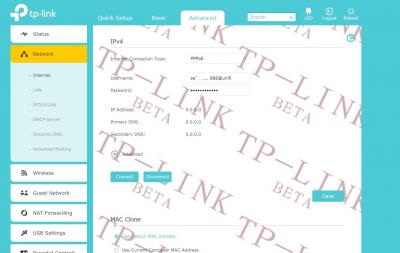
need help, after upgrade firmware ac1200 EU v1 beta, i cant connect internet,
already called tm 100 reset my pppoe password, still same , cannot connect internet

This post has been edited by wilson025: Jan 24 2018, 04:14 PM


Attached thumbnail(s)
Attached Image Attached Image Attached Image
TSJohnLai
post Jan 24 2018, 04:14 PM

Skeptical Cat
*******
Senior Member
3,669 posts

Joined: Apr 2006
QUOTE(wilson025 @ Jan 24 2018, 04:10 PM)
need help, after upgrade firmware ac1200 EU v1 beta, i cant connect internet,
already called tm 100 reset my pppoe password, still same , cannot connect internet
*
After click connect, still cannot online?

Go call TM again and ask for username and password.
Password is case-sensitive.
Starting to think you enter the wrong username as well.
wilson025
post Jan 24 2018, 04:15 PM

Getting Started
**
Junior Member
140 posts

Joined: Dec 2005
From: Selangor


QUOTE(JohnLai @ Jan 24 2018, 04:14 PM)
After click connect, still cannot online?

Go call TM again and ask for username and password.
Password is case-sensitive.
Starting to think you enter the wrong username as well.
*
yes, already asked tm 100, password and user name are right ,but still cant connect
TSJohnLai
post Jan 24 2018, 04:26 PM

Skeptical Cat
*******
Senior Member
3,669 posts

Joined: Apr 2006
QUOTE(wilson025 @ Jan 24 2018, 04:15 PM)
yes, already asked tm 100, password and user name are right ,but still cant connect
*
Triple check again.
Wrong login/pass issue.

Meanwhile, please check
user posted image
wilson025
post Jan 24 2018, 04:37 PM

Getting Started
**
Junior Member
140 posts

Joined: Dec 2005
From: Selangor


QUOTE(JohnLai @ Jan 24 2018, 04:26 PM)
Triple check again.
Wrong login/pass issue.

Meanwhile, please check
user posted image
*
still same bro cry.gif
can help me try?
i send you my username and password?
TSJohnLai
post Jan 24 2018, 04:42 PM

Skeptical Cat
*******
Senior Member
3,669 posts

Joined: Apr 2006
QUOTE(wilson025 @ Jan 24 2018, 04:37 PM)
still same bro cry.gif
can help me try?
i send you my username and password?
*
Don't.
This is clearly a case of wrong unifi username/pass.
Use TM Live Chat service to reset your password again.
At unifi.com.my , you can find your login username too. (check it just to be sure)

wilson025
post Jan 24 2018, 05:35 PM

Getting Started
**
Junior Member
140 posts

Joined: Dec 2005
From: Selangor


QUOTE(JohnLai @ Jan 24 2018, 04:42 PM)
Don't.
This is clearly a case of wrong unifi username/pass.
Use TM Live Chat service to reset your password again.
At unifi.com.my , you can find your login username too. (check it just to be sure)
*
i click reset button at ac1200 router ,
and reset up my username and pass, finally rclxms.gif
RoxyGal
post Jan 26 2018, 01:35 AM

٩͡[๏̯͡๏]۶ Im roxygal ٩͡[๏̯͡๏]۶
******
Senior Member
1,031 posts

Joined: Sep 2006
From: ▁▂▃▅▇ ٩͡[๏̯͡๏]۶?


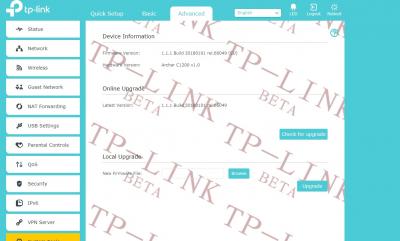
Just flashed to Tp-link C1200 EU Version 1 beta firmware 1.1.1 Build 20180101 rel.66049 (EU)

Beta firmware for C1200 EU Version 1.0

and unable to downgrade/restore/revert back to the stock UNIFI firmware as the original is still better than the beta firmware

Last original UNIFI FIRMWARE

I notice inconsistency with this firmware such as wifi speed not consistant, cpu and speed being underclock or being throtle, some latency issue and so on.

After intensive testing, I personally found out original stock unifi firmware works the best until latest stable firmware is out

Summary as below:

Isssue:

Wifi speed not consistant
GUI lagging
UNABLE TO FLASH BACK TO ORIGINAL UNIFI FIRMWARE
WIFI 5GHZ only has 36, 40, 44 and 48 channel only (NO HIGHER CHANNEL COMPARED TO ORIGINAL UNIFI FIRMWARE as I am using Channel 165 previously)
Some latency issue (depends whether you can feel the difference compared to original UNIFI FIRMWARE)
TX Beamforming taking CPU usage heavily (No difference in speed at enabling it for WIFI 5ghz)
Wifi Link speed going up and down.
WIFI/WAN disconnection drop/Router restart


What this beta firmware solve:

No more WIFI/WAN disconnection drop/restart STILL facing same problem
Runs cooler than Unifi original firmware
Reboot a little faster


Using FTTH UNIFI HOME 30MBPS/10MBPS connected to ASUS RT with this router configured as Access Point mode with manual setting.

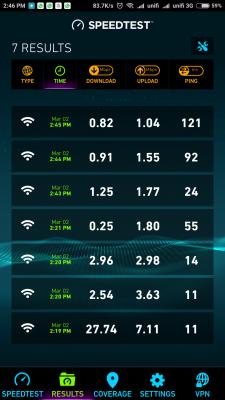
Below is the screenshot of the UNIFI speed test using N150 wifi dongle( link speed 72mbps) to test the speed using original UNIFI firmware. Will get the speed 10 out of 10 test. Using LAN will get ping 2ms and jitter 1ms.

After flashed to this beta firmware, UNIFI speed test not showing perfect score anymore.

WIFI 2.4ghz with 20mhz, channel 11 and wireless N only
WIFI 5ghz with 80mhz, channel 48 and wireless N/AC only

DHCP server disable
WPS Pin disable
Sharing Setting unticked for 3 access method
Folder sharing disable
Print server disable
SPI firewall disable
1.1.1 Build 20180101 rel.66049 (EU)
TX Beamforming disable
WPS disable
Nat and Nat Boost disable

This post has been edited by RoxyGal: Jan 26 2018, 07:42 PM


Attached thumbnail(s)
Attached Image
TSJohnLai
post Jan 26 2018, 11:21 AM

Skeptical Cat
*******
Senior Member
3,669 posts

Joined: Apr 2006
» Click to show Spoiler - click again to hide... «


To answer wifi missing channels and signal issue:
1) Archer C1200(EU)_V1_170706 C1200v1_eu-up-1.1.1 Build 20170706 rel.65715.bin as well as beta firmware C1200v1_eu-up-1.1.1 Build 20180101 rel.66049(Beta)
are missing wireless.region.json, wireless.24g.json and wireless.5g.json. Meanwhile C1200v1_eu_tm-up-boot-1.0.0 Build 20170905 rel.41738_2017-09-05_13.51.02.bin has those three included. Since I am the only one who complain about wifi channels issue to TP-Link about these missing files, I guess they ignored me? sleep.gif

2) TX beamforming = For C1200 case, it only has Single-User beamforming mode (only 2 antennas are used for 5ghz, don't get confused with 3 antenna. The middle antenna is shared between 2.4ghz and 5ghz), therefore if one 5ghz user is heavily downloading stuff, then other 5ghz users will get lower signal strength in dB. Of course CPU usage gonna increase because calculation needed for beamforming. With SU-Beamforming, it is generally accepted the signal strengh will be improved up to 5 or 8 dB.

3) Wifi link speed going up and down? Did you align three antennas correctly? (In front of router looking at LED, left=5ghz, middle = 2.4ghz and 5ghz, right= 2.4ghz). Don't forget TP-Link also turning on wifi power saving by default, meaning if there is no wireless activity, the link speed will be reduced. (Not to mention if 5ghz beamforming is turned on and one user is downloading heavily scenario)


EDIT:
Here a funny part, in v40000 series TM firmware....do you know it defaults to Bahamas wifi region?
user posted image

Then, remote management TR-069 is enabled by default and can't be disabled. A security risk indeed.

This post has been edited by JohnLai: Jan 26 2018, 11:32 AM
mastering89
post Jan 26 2018, 11:36 AM

miao miao
*******
Senior Member
2,546 posts

Joined: Jan 2009
From: Cyberjaya
very informational thread smile.gif

SilentVampire
post Jan 26 2018, 11:58 AM

Networking Enthusiast
*******
Senior Member
5,714 posts

Joined: Mar 2007


QUOTE(JohnLai @ Jan 26 2018, 11:21 AM)
» Click to show Spoiler - click again to hide... «


To answer wifi missing channels and signal issue:
1) Archer C1200(EU)_V1_170706 C1200v1_eu-up-1.1.1 Build 20170706 rel.65715.bin as well as beta firmware C1200v1_eu-up-1.1.1 Build 20180101 rel.66049(Beta)
are missing wireless.region.json, wireless.24g.json and wireless.5g.json. Meanwhile C1200v1_eu_tm-up-boot-1.0.0 Build 20170905 rel.41738_2017-09-05_13.51.02.bin has those three included. Since I am the only one who complain about wifi channels issue to TP-Link about these missing files, I guess they ignored me?  sleep.gif

2) TX beamforming = For C1200 case, it only has Single-User beamforming mode (only 2 antennas are used for 5ghz, don't get confused with 3 antenna. The middle antenna is shared between 2.4ghz and 5ghz), therefore if one 5ghz user is heavily downloading stuff, then other 5ghz users will get lower signal strength in dB. Of course CPU usage gonna increase because calculation needed for beamforming. With SU-Beamforming, it is generally accepted the signal strengh will be improved up to 5 or 8 dB.

3) Wifi link speed going up and down? Did you align three antennas correctly? (In front of router looking at LED, left=5ghz, middle = 2.4ghz and 5ghz, right= 2.4ghz). Don't forget TP-Link also turning on wifi power saving by default, meaning if there is no wireless activity, the link speed will be reduced. (Not to mention if 5ghz beamforming is turned on and one user is downloading heavily scenario)
EDIT:
Here a funny part, in v40000 series TM firmware....do you know it defaults to Bahamas wifi region?
user posted image

Then, remote management TR-069 is enabled by default and can't be disabled. A security risk indeed.
*
Beautiful analysis of the code bro JohnLai. The best lesson to take away from this is to get your own third party router and not to use TM provided router.
wilson025
post Jan 26 2018, 01:37 PM

Getting Started
**
Junior Member
140 posts

Joined: Dec 2005
From: Selangor


for me eu beta 1 is better than bofore version, no more dc when watching movie
playing game
Ebony & Ivory
post Jan 26 2018, 02:12 PM

Enthusiast
*****
Senior Member
959 posts

Joined: Jan 2016
so it seems like there is no way revert to tm firmware after flash the beta.
TSJohnLai
post Jan 26 2018, 02:24 PM

Skeptical Cat
*******
Senior Member
3,669 posts

Joined: Apr 2006
QUOTE(mastering89 @ Jan 26 2018, 11:36 AM)
very informational thread smile.gif
*
QUOTE(SilentVampire @ Jan 26 2018, 11:58 AM)
Beautiful analysis of the code bro JohnLai. The best lesson to take away from this is to get your own third party router and not to use TM provided router.
*
Now then....here another funny and legal parts.

According to Portal Rasmi Kementerian Komunikasi & Multimedia Malaysia, http://www.kkmm.gov.my/akta_kpkk/WiFi%20Gu...e-Final%20V.pdf , year 2005 ;
user posted image


The latest one from MCMC as shown below, https://www.mcmc.gov.my/skmmgovmy/media/Gen...WirelessLAN.pdf , finalized in year 2013 has funny typo....
Example:
user posted image
user posted image

5150Mhz? doh.gif Not sure if compared to year 2005 document and the year 2013 document itself where the appendix section mentioned 5250Mhz itself, see below:
user posted image
But ETSI EN 301 893 documentation mentioned 5150 to 5350 exists....oh well

......let get started with 5150 MHz to 5350 MHz, 5470 MHz to 5650 MHz and 5725 MHz to 5875 MHz.
https://www.mcmc.gov.my/skmmgovmy/media/Gen...C-T007_2014.pdf
user posted image
The data above shown DFS is mandatory for 5150 MHz to 5350 MHz.
DFS and TPC is mandatory for 5470 MHz to 5650 MHz.
Meanwhile DFS and TPC are not needed for 5725 MHz to 5875 MHz.

Based on legendary wikipedia information https://en.wikipedia.org/wiki/List_of_WLAN_...2.11a/h/j/n/ac)
At 5ghz...the approved channels (in this case 20 Mhz bandwidth) for Malaysia are channels
36, 40, 44, 48, 52 ,56, 60, 64 = 5150 MHz to 5350 MHz
100, 104, 108, 112, 116, 120, 124, 128 = 5470 MHz to 5650 MHz (132, 136 and 140 are forbidden by MCMC)
149, 153, 157, 161, 165 = 5725 MHz to 5875 MHz (Technically, Malaysia can use 147, 169 and 173, however tplink c1200 hardware is designed for use in EU, so it is unlikely EU hardware revision can support these three channels)


biggie
post Jan 26 2018, 06:03 PM

Regular
******
Senior Member
1,291 posts

Joined: Jan 2003
QUOTE(wilson025 @ Jan 24 2018, 05:35 PM)
i click reset button at ac1200 router ,
and reset up my username and pass, finally rclxms.gif
*
Actually just reading this thread. I'm having the same issue. Now will try reset, and put in the password again.
TSJohnLai
post Jan 26 2018, 06:10 PM

Skeptical Cat
*******
Senior Member
3,669 posts

Joined: Apr 2006
Checking the EU V1 beta firmware......
user posted image
blink.gif Country code DE = Deutschland, Germany. But according to German regulation....it should support :

36, 40, 44, 48
52, 56, 60, 64
104, 108, 112, 116, 120, 124, 128, 132, 140

Weird....I wonder where is the function to select wireless region.....
user posted image
Oh great...it is hidden and 'unselectable'

user posted image
Life sucks.

user posted image
Hmm...Malaysia is there....

Any idea? laugh.gif
RoxyGal
post Jan 26 2018, 07:44 PM

٩͡[๏̯͡๏]۶ Im roxygal ٩͡[๏̯͡๏]۶
******
Senior Member
1,031 posts

Joined: Sep 2006
From: ▁▂▃▅▇ ٩͡[๏̯͡๏]۶?


QUOTE(JohnLai @ Jan 26 2018, 11:21 AM)
» Click to show Spoiler - click again to hide... «


To answer wifi missing channels and signal issue:
1) Archer C1200(EU)_V1_170706 C1200v1_eu-up-1.1.1 Build 20170706 rel.65715.bin as well as beta firmware C1200v1_eu-up-1.1.1 Build 20180101 rel.66049(Beta)
are missing wireless.region.json, wireless.24g.json and wireless.5g.json. Meanwhile C1200v1_eu_tm-up-boot-1.0.0 Build 20170905 rel.41738_2017-09-05_13.51.02.bin has those three included. Since I am the only one who complain about wifi channels issue to TP-Link about these missing files, I guess they ignored me?  sleep.gif

2) TX beamforming = For C1200 case, it only has Single-User beamforming mode (only 2 antennas are used for 5ghz, don't get confused with 3 antenna. The middle antenna is shared between 2.4ghz and 5ghz), therefore if one 5ghz user is heavily downloading stuff, then other 5ghz users will get lower signal strength in dB. Of course CPU usage gonna increase because calculation needed for beamforming. With SU-Beamforming, it is generally accepted the signal strengh will be improved up to 5 or 8 dB.

3) Wifi link speed going up and down? Did you align three antennas correctly? (In front of router looking at LED, left=5ghz, middle = 2.4ghz and 5ghz, right= 2.4ghz). Don't forget TP-Link also turning on wifi power saving by default, meaning if there is no wireless activity, the link speed will be reduced. (Not to mention if 5ghz beamforming is turned on and one user is downloading heavily scenario)
EDIT:
Here a funny part, in v40000 series TM firmware....do you know it defaults to Bahamas wifi region?
user posted image

Then, remote management TR-069 is enabled by default and can't be disabled. A security risk indeed.
*
Personal preference and result varies.

So did you try whether you can flash back to original stock unifi firmware after flashing to BETA firmware?
biloxee
post Jan 26 2018, 07:55 PM

On my way
****
Senior Member
561 posts

Joined: Jul 2015
QUOTE(RoxyGal @ Jan 26 2018, 07:44 PM)
Personal preference and result varies.

So did you try whether you can flash back to original stock unifi firmware after flashing to BETA firmware?
*
Have you tried flashing the lastest TP-Link Australia firmware first,

http://static.tp-link.com/Archer%20C1200(EU)_V1_170706.zip

and then trying to flash the TM UniFi firmware?


TSJohnLai
post Jan 26 2018, 08:01 PM

Skeptical Cat
*******
Senior Member
3,669 posts

Joined: Apr 2006
QUOTE(RoxyGal @ Jan 26 2018, 07:44 PM)
Personal preference and result varies.

So did you try whether you can flash back to original stock unifi firmware after flashing to BETA firmware?
*
Nope, I can't do that. Random reboot is my worst enemy. wink.gif
Currently I am trying to see if one can set the wifi region using the beta firmware.
The code sure hella long....
shamsay
post Jan 26 2018, 08:59 PM

On my way
****
Senior Member
606 posts

Joined: Jan 2003
From: Deep Beach


No random reboot after a week with beta firmware..CPU is stable 20 -70%..memory increase to 46% now..but still stable..
TSJohnLai
post Jan 26 2018, 09:58 PM

Skeptical Cat
*******
Senior Member
3,669 posts

Joined: Apr 2006
The good news on C1200 EU V1 hardware support rclxms.gif :
user posted image


The really bad news :
user posted image
It is locked out by firmware. shocking.gif

Anyone wanna complain to TP-Link? I tried....no result...
RoxyGal
post Jan 26 2018, 10:15 PM

٩͡[๏̯͡๏]۶ Im roxygal ٩͡[๏̯͡๏]۶
******
Senior Member
1,031 posts

Joined: Sep 2006
From: ▁▂▃▅▇ ٩͡[๏̯͡๏]۶?


QUOTE(biloxee @ Jan 26 2018, 07:55 PM)
Have you tried flashing the lastest TP-Link Australia firmware first,

http://static.tp-link.com/Archer%20C1200(EU)_V1_170706.zip

and then trying to flash the TM UniFi firmware?
*
Yes I did. It stated error in flashing firmware.

Still facing Wifi reconnected and router restart problem with the beta firmware. And for me UNIFI stock firmware works the best although having the same problem.


RoxyGal
post Jan 26 2018, 10:36 PM

٩͡[๏̯͡๏]۶ Im roxygal ٩͡[๏̯͡๏]۶
******
Senior Member
1,031 posts

Joined: Sep 2006
From: ▁▂▃▅▇ ٩͡[๏̯͡๏]۶?


should have AP setting and many more feature but mostly disable

HTML access at


http://192.168.0.1/webpages/pages/userrpm/

or http://your default gateway ip/webpages/pages/userrpm/

This post has been edited by RoxyGal: Jan 26 2018, 10:36 PM
biloxee
post Jan 26 2018, 11:52 PM

On my way
****
Senior Member
561 posts

Joined: Jul 2015
QUOTE(RoxyGal @ Jan 26 2018, 10:36 PM)
should have AP setting and many more feature but mostly disable

HTML access at
http://192.168.0.1/webpages/pages/userrpm/

or http://your default gateway ip/webpages/pages/userrpm/
*
AP mode is hidden but available...
Attached Image

TSJohnLai
post Jan 26 2018, 11:53 PM

Skeptical Cat
*******
Senior Member
3,669 posts

Joined: Apr 2006
QUOTE(RoxyGal @ Jan 26 2018, 10:15 PM)
Yes I did. It stated error in flashing firmware.

Still facing Wifi reconnected and router restart problem with the beta firmware. And for me UNIFI stock firmware works the best although having the same problem.
*
Just a quick check. Did you fully reset the router after updating the firmware? As in pressing the tiny reset hole? hmm.gif There are few reports about settings aren't properly saved after updating from v40000 to v60000. A hard factory reset is needed instead of soft factory reset.

TSJohnLai
post Jan 27 2018, 12:07 AM

Skeptical Cat
*******
Senior Member
3,669 posts

Joined: Apr 2006
QUOTE(biloxee @ Jan 26 2018, 11:52 PM)
AP mode is hidden but available...
Attached Image
*
WDS Bridging is hidden as well. Geez....if all these functions are enabled, it would be a killer router.
biloxee
post Jan 27 2018, 12:20 AM

On my way
****
Senior Member
561 posts

Joined: Jul 2015
QUOTE(JohnLai @ Jan 27 2018, 12:07 AM)
WDS Bridging is hidden as well. Geez....if all these functions are enabled, it would be a killer router.
*
Yea, hopefully TP-Link enables everything and releases an updated firmware soon...
TSJohnLai
post Jan 27 2018, 12:36 AM

Skeptical Cat
*******
Senior Member
3,669 posts

Joined: Apr 2006
QUOTE(biloxee @ Jan 27 2018, 12:20 AM)
Yea, hopefully TP-Link enables everything and releases an updated firmware soon...
*
The main problem = I don't think they will unlock the wifi region selection if one takes a look at Archer C1200(EU)_V1_170706 firmware. sad.gif
RoxyGal
post Jan 27 2018, 12:53 AM

٩͡[๏̯͡๏]۶ Im roxygal ٩͡[๏̯͡๏]۶
******
Senior Member
1,031 posts

Joined: Sep 2006
From: ▁▂▃▅▇ ٩͡[๏̯͡๏]۶?


QUOTE(JohnLai @ Jan 26 2018, 11:53 PM)
Just a quick check. Did you fully reset the router after updating the firmware? As in pressing the tiny reset hole? hmm.gif There are few reports about settings aren't properly saved after updating from v40000 to v60000. A hard factory reset is needed instead of soft factory reset.
*
Did everything from flashing back to Australia firmware to Unifi firmware/ Beta to Unifi firmware.

Still cannot
RoxyGal
post Jan 27 2018, 12:58 AM

٩͡[๏̯͡๏]۶ Im roxygal ٩͡[๏̯͡๏]۶
******
Senior Member
1,031 posts

Joined: Sep 2006
From: ▁▂▃▅▇ ٩͡[๏̯͡๏]۶?


QUOTE(biloxee @ Jan 26 2018, 11:52 PM)
AP mode is hidden but available...
Attached Image
*
Can you teach how to enable?
TSJohnLai
post Jan 27 2018, 01:06 AM

Skeptical Cat
*******
Senior Member
3,669 posts

Joined: Apr 2006
QUOTE(RoxyGal @ Jan 27 2018, 12:53 AM)
Did everything from flashing back to Australia firmware to Unifi firmware/ Beta to Unifi firmware.

Still cannot
*
Well....I am out of idea in solving your issue.


Meanwhile, I was able to enter the region selection, however, it can't save the settings.
user posted image
RoxyGal
post Jan 27 2018, 01:10 AM

٩͡[๏̯͡๏]۶ Im roxygal ٩͡[๏̯͡๏]۶
******
Senior Member
1,031 posts

Joined: Sep 2006
From: ▁▂▃▅▇ ٩͡[๏̯͡๏]۶?


QUOTE(JohnLai @ Jan 27 2018, 01:06 AM)
Well....I am out of idea in solving your issue.
Meanwhile, I was able to enter the region selection, however, it can't save the settings.
user posted image
*
I just want to flash back to UNIFI stock firmware,that's all. Anyway thanks
biloxee
post Jan 27 2018, 10:34 AM

On my way
****
Senior Member
561 posts

Joined: Jul 2015
QUOTE(shamsay @ Jan 26 2018, 08:59 PM)
No random reboot after a week with beta firmware..CPU is stable 20 -70%..memory increase to 46% now..but still stable..
*
Let us know when/if it reboots. Mine rebooted this morning after 9 days...


biloxee
post Jan 27 2018, 10:59 AM

On my way
****
Senior Member
561 posts

Joined: Jul 2015
QUOTE(RoxyGal @ Jan 27 2018, 12:58 AM)
Can you teach how to enable?
*
https://forum.lowyat.net/index.php?showtopi...post&p=87680955

Replace basic_guest with workingMode


QUOTE(RoxyGal @ Jan 27 2018, 12:53 AM)
Did everything from flashing back to Australia firmware to Unifi firmware/ Beta to Unifi firmware.
Still cannot
*
TFTP Recovery method?

http://tftpd32.jounin.net/


RoxyGal
post Jan 27 2018, 12:59 PM

٩͡[๏̯͡๏]۶ Im roxygal ٩͡[๏̯͡๏]۶
******
Senior Member
1,031 posts

Joined: Sep 2006
From: ▁▂▃▅▇ ٩͡[๏̯͡๏]۶?


QUOTE(biloxee @ Jan 27 2018, 10:34 AM)
Let us know when/if it reboots. Mine rebooted this morning after 9 days...
*
Immediately reboot when using samsung s6 connecting at 5ghz at 866Mbps to do speed test.


QUOTE(biloxee @ Jan 27 2018, 10:59 AM)
thanks
biloxee
post Jan 27 2018, 04:27 PM

On my way
****
Senior Member
561 posts

Joined: Jul 2015
Seems like IPv6 not working correctly on the recently released non-beta firmware (Archer C1200(US)_V1_180103) for the C1200 US v1 model.

Not surprising the EU v1 beta firmware is also having IPv6 issues...

This post has been edited by biloxee: Jan 27 2018, 04:33 PM
biggie
post Jan 28 2018, 09:02 AM

Regular
******
Senior Member
1,291 posts

Joined: Jan 2003
Earlier error is due to I do not choose Malaysia (unifi) in the setting.

Now working ok after about 24hours. Wondering if this router is as good as d850 which goes months without need to reset.

However I do notice that with this beta the wifi signal seem to be lower then before. Seem similar to d850 which is not good.
jesseclane
post Jan 28 2018, 10:09 AM

Getting Started
**
Junior Member
227 posts

Joined: Apr 2008


just installed time yesterday. no wonder my router keep crashing
TSJohnLai
post Jan 28 2018, 11:46 AM

Skeptical Cat
*******
Senior Member
3,669 posts

Joined: Apr 2006
QUOTE(biggie @ Jan 28 2018, 09:02 AM)
Earlier error is due to I do not choose Malaysia (unifi) in the setting.

Now working ok after about 24hours. Wondering if this router is as good as d850 which goes months without need to reset.

However I do notice that with this beta the wifi signal seem to be lower then before. Seem similar to d850 which is not good.
*
Darn. I finally know the reason of weak wifi signal as reported by few users!

In Malaysia; 5150-5350, 5470-5650 and 5725-5875 max EIRP are 1 Watt.
However, the beta firmware is using DE (Germany) power profile; 5250 – 5350 MHz (channel 36-64) is limited to 200 mW. Since the beta firmware only has channel 36 - 48. No wonder lah. doh.gif Germany 5470 – 5725 has eirp of 1W, too bad beta firmware has missing channel.

According to Utilities Regulation and Competition Authority of the Bahamas (No idea why Time/TM/Maxis firmwares select BS as power profile, anyone wanna report to MCMC?), 5150–5250MHz is limited to 200mW, 5250–5350MHz is limited to 200 mW, 5470–5725 = 1W, 5725–5825 = 1W

Hope this concludes wifi signal issue.
If users are previously using higher channel with high eirp, after updating to beta firmware, weaker signal is expected.

QUOTE(jesseclane @ Jan 28 2018, 10:09 AM)
just installed time yesterday. no wonder my router keep crashing
*
Crash due to beta or original default firmware? Please be specific.
jesseclane
post Jan 28 2018, 11:55 AM

Getting Started
**
Junior Member
227 posts

Joined: Apr 2008


QUOTE(JohnLai @ Jan 28 2018, 11:46 AM)
Crash due to beta or original default firmware? Please be specific.
*
Original firmware.

Firmware: 1.0.0 Build 20171130 rel.34681 (EU)

Hardware: Archer C1200 v1.0

Seem like still no official fix from TP-Link for V1 right?
lyt25_1234
post Jan 29 2018, 09:24 AM

Regular
******
Senior Member
1,152 posts

Joined: Jul 2011
QUOTE(JohnLai @ Jan 28 2018, 11:46 AM)
Darn. I finally know the reason of weak wifi signal as reported by few users!

In Malaysia; 5150-5350, 5470-5650 and 5725-5875 max EIRP are 1 Watt.
However, the beta firmware is using DE (Germany) power profile; 5250 – 5350 MHz (channel 36-64) is limited to 200 mW. Since the beta firmware only has channel 36 - 48. No wonder lah. doh.gif  Germany 5470 – 5725 has eirp of 1W, too bad beta firmware has missing channel.

According to Utilities Regulation and Competition Authority of the Bahamas (No idea why Time/TM/Maxis firmwares select BS as power profile, anyone wanna report to MCMC?),  5150–5250MHz is limited to 200mW, 5250–5350MHz is limited to 200 mW, 5470–5725 = 1W, 5725–5825 = 1W

Hope this concludes wifi signal issue.
If users are previously using higher channel with high eirp, after updating to beta firmware, weaker signal is expected.
Crash due to beta or original default firmware? Please be specific.
*
Yes, I can confirm that the WiFi signal has degraded with the BETA firmware.
RoxyGal
post Jan 29 2018, 05:59 PM

٩͡[๏̯͡๏]۶ Im roxygal ٩͡[๏̯͡๏]۶
******
Senior Member
1,031 posts

Joined: Sep 2006
From: ▁▂▃▅▇ ٩͡[๏̯͡๏]۶?


tplink eu v1 latest firmware came out already

http://static.tp-link.com/2018/201801/2018...)_V1_180124.zip
TSJohnLai
post Jan 29 2018, 06:59 PM

Skeptical Cat
*******
Senior Member
3,669 posts

Joined: Apr 2006
QUOTE(RoxyGal @ Jan 29 2018, 05:59 PM)
tplink eu v1 latest firmware came out already

http://static.tp-link.com/2018/201801/2018...)_V1_180124.zip
*
Thanks. I updated the thread.

Strangely, the openwrt revision seem to be older than beta.
Beta is 66049 while official is 52299. Will test later.
RoxyGal
post Jan 29 2018, 07:29 PM

٩͡[๏̯͡๏]۶ Im roxygal ٩͡[๏̯͡๏]۶
******
Senior Member
1,031 posts

Joined: Sep 2006
From: ▁▂▃▅▇ ٩͡[๏̯͡๏]۶?


QUOTE(JohnLai @ Jan 29 2018, 06:59 PM)
Thanks. I updated the thread.

Strangely, the openwrt revision seem to be older than beta.
Beta is 66049 while official is 52299. Will test later.
*
newer doesnt mean better

Tested roughly

Summary

WIFI 2.4G/5G transmission,stability,speed : Unifi stock firmware still works better, stronger, stable and consistant. Still not upper channel like 165 for WIFI 5ghz. Feel like being throttle and underclock.
For malaysia WIFI channel, max wattage should be 200mW for 2.4G and 1000mW for 5G. Guess this firmware using Europe Wifi region so no maximum wattage and channel.


CPU AND RAM: Almost perfect.

GUI: Fast

IPV6: never test because using as AP

AP mode: AP Mode enable but not in full mode as missing few setting. Im still using manual AP setting.

Disconnect Issue: Under testing.


TSJohnLai
post Jan 29 2018, 07:35 PM

Skeptical Cat
*******
Senior Member
3,669 posts

Joined: Apr 2006
QUOTE(RoxyGal @ Jan 29 2018, 07:29 PM)
newer doesnt mean better

Tested roughly

Summary

WIFI 2.4G/5G transmission,stability,speed : Unifi stock firmware still works better, stronger, stable and consistant. Still not upper channel like 165 for WIFI 5ghz. Feel like being throttle and underclock.
For malaysia WIFI channel, max wattage should be 200mW for 2.4G and 1000mW for 5G. Guess this firmware using Europe Wifi region so no maximum wattage and channel.

CPU AND RAM: Almost perfect.

GUI: Fast

IPV6: never test because using as AP

AP mode: AP Mode enable but not in full mode as missing few setting. Im still using manual AP setting.

Disconnect Issue: Under testing.
*
Well, the official firmware wifi region still automatically select Germany as default....no option to select other.
MrSpeedy
post Jan 29 2018, 09:44 PM

Casual
***
Junior Member
460 posts

Joined: Jun 2012


QUOTE(JohnLai @ Jan 29 2018, 07:35 PM)
Well, the official firmware wifi region still automatically select Germany as default....no option to select other.
*
Do you think TP-Link will release regional based firmware later?
I think this is for the general testing firmware because of the link http://test.tp-link.com

But I highly doubted that Malaysian version TM will screw with their crappy "@unifi" SSID and other backdoors.
TSJohnLai
post Jan 29 2018, 10:11 PM

Skeptical Cat
*******
Senior Member
3,669 posts

Joined: Apr 2006
QUOTE(MrSpeedy @ Jan 29 2018, 09:44 PM)
Do you think TP-Link will release regional based firmware later?
I think this is for the general testing firmware because of the link http://test.tp-link.com

But I highly doubted that Malaysian version TM will screw with their crappy "@unifi" SSID and other backdoors.
*
It is their prototyping website (you know, for html coding test just to see if everything displayed correctly ) before releasing firmware globally. So....it is as official as it can be.

........there was a beta firmware for Malaysia region......which fixed the random reboot issue too....with the most desired WIFI channel region (Bahamas...really? But why? Why Bahamas? rclxub.gif ), but it is full of crappy stuffs.
The filename is (Someone posted it at Jjuggler's blog);
C1200v1_eu_tm-up-boot-1.0.0 Build 20180104 rel.7326_2018-01-05_10.30.45.bin

Strongly advised not to install TM firmware. puke.gif

Maybe those who interested might wanna ask Jjuggler to supply that particular firmware here?

Jjuggler
post Jan 30 2018, 02:31 AM

Narcissistic Genius
******
Senior Member
1,341 posts

Joined: Dec 2016
QUOTE(JohnLai @ Jan 29 2018, 10:11 PM)
It is their prototyping website (you know, for html coding test just to see if everything displayed correctly ) before releasing firmware globally. So....it is as official as it can be.

........there was a beta firmware for Malaysia region......which fixed the random reboot issue too....with the most desired WIFI channel region (Bahamas...really? But why? Why Bahamas?  rclxub.gif ), but it is full of crappy stuffs.
The filename is (Someone posted it at Jjuggler's blog);
C1200v1_eu_tm-up-boot-1.0.0 Build 20180104 rel.7326_2018-01-05_10.30.45.bin

Strongly advised not to install TM firmware.  puke.gif

Maybe those who interested might wanna ask Jjuggler to supply that particular firmware here?
*
i prefer the stock beta than the beta provided by tm.
biggie
post Jan 30 2018, 08:35 AM

Regular
******
Senior Member
1,291 posts

Joined: Jan 2003
QUOTE(RoxyGal @ Jan 29 2018, 05:59 PM)
tplink eu v1 latest firmware came out already

http://static.tp-link.com/2018/201801/2018...)_V1_180124.zip
*
How to update? Can press update firmware button? For current beta users need to input every setting again?
lyt25_1234
post Jan 30 2018, 09:58 AM

Regular
******
Senior Member
1,152 posts

Joined: Jul 2011
Wow, I have to say the official TP-LINK eu v1 latest firmware is faster and less CPU intensive!

Will continue to monitor the performance and stability of it.
TSJohnLai
post Jan 30 2018, 10:19 AM

Skeptical Cat
*******
Senior Member
3,669 posts

Joined: Apr 2006
QUOTE(Jjuggler @ Jan 30 2018, 02:31 AM)
i prefer the stock beta than the beta provided by tm.
*
Unfortunately, there is demand for that particular TM firmware. Might as well as give them what they want? happy.gif

QUOTE(biggie @ Jan 30 2018, 08:35 AM)
How to update? Can press update firmware button? For current beta users need to input every setting again?
*
Manual update, download the zip, extract, login to router, select the new firmware, click upgrade, wait.
In my case, no setting was reset after upgrading from beta to official.
Jjuggler
post Jan 30 2018, 10:42 AM

Narcissistic Genius
******
Senior Member
1,341 posts

Joined: Dec 2016
the cpu load is lesser than 30% for me. mostly stay in the range of 10 - 15%. just flash my c1200 to the latest fw which just released few days ago. Highly recommended.

Will prepare a full depth review on the new firmware soon.

This post has been edited by Jjuggler: Jan 30 2018, 10:43 AM
TSJohnLai
post Jan 30 2018, 11:10 AM

Skeptical Cat
*******
Senior Member
3,669 posts

Joined: Apr 2006
QUOTE(Jjuggler @ Jan 30 2018, 10:42 AM)
the cpu load is lesser than 30% for me. mostly stay in the range of 10 - 15%. just flash my c1200 to the latest fw which just released few days ago. Highly recommended.

Will prepare a full depth review on the new firmware soon.
*
So....may I upload the TM firmware 'robbed' from your site by one of your user? laugh.gif
poh880
post Jan 30 2018, 12:03 PM

On my way
****
Junior Member
529 posts

Joined: Aug 2006
From: Oil Town (Miri)


Latest firmware 24/1/2018 still cannot log in with TP-Link Cloud. sad.gif
Jjuggler
post Jan 30 2018, 01:12 PM

Narcissistic Genius
******
Senior Member
1,341 posts

Joined: Dec 2016
QUOTE(JohnLai @ Jan 30 2018, 11:10 AM)
So....may I upload the TM firmware 'robbed' from your site by one of your user?  laugh.gif
*
hahaha. up to you bro. btw special thanks for you for highlighting the new firmware is out of the public just two days after i purchase my asus ac58u bangwall.gif lol. biggrin.gif
TSJohnLai
post Jan 30 2018, 01:18 PM

Skeptical Cat
*******
Senior Member
3,669 posts

Joined: Apr 2006
QUOTE(Jjuggler @ Jan 30 2018, 01:12 PM)
hahaha. up to you bro. btw special thanks for you for highlighting the new firmware is out of the public just two days after i purchase my asus ac58u  bangwall.gif lol.  biggrin.gif
*
It was RoxyGal who first discovered the new official firmware. rclxms.gif Will upload TM Beta firmware at first page soon. My lovely RoxyGal, remember to check it later.

By the way Jjuggler, why did you purchase ac58u in first place? blink.gif
Jjuggler
post Jan 30 2018, 01:20 PM

Narcissistic Genius
******
Senior Member
1,341 posts

Joined: Dec 2016
QUOTE(JohnLai @ Jan 30 2018, 01:18 PM)
It was RoxyGal who first discovered the new official firmware.  rclxms.gif  Will upload TM Beta firmware at first page soon. My lovely RoxyGal, remember to check it later.

By the way Jjuggler, why did you purchase ac58u in first place?  blink.gif
*
I purchase the asus ac58u to keep it as a backup incase if and only if tplink messed up their latest firmware again. Looks like someone is going to storeroom to be used later. rclxms.gif

Special thanks to RoxyGal rclxm9.gif

This post has been edited by Jjuggler: Jan 30 2018, 01:20 PM
SilentVampire
post Jan 30 2018, 03:17 PM

Networking Enthusiast
*******
Senior Member
5,714 posts

Joined: Mar 2007


QUOTE(Jjuggler @ Jan 30 2018, 01:20 PM)
I purchase the asus ac58u to keep it as a backup incase if and only if tplink messed up their latest firmware again. Looks like someone is going to storeroom to be used later.  rclxms.gif

Special thanks to RoxyGal  rclxm9.gif
*
Hey bro, TP-Link just released the TP-Link C2300, for the Malaysian market. It is only RM645: https://www.lazada.com.my/tp-link-c2300-ac2...5b0cQSIcQd&mp=1, which is slightly cheaper than then C3150, and looks to be as good as or better than the C3150, so just something to keep in mind: http://www.tp-link.com/my/products/details...cher-C2300.html
biggie
post Jan 31 2018, 11:22 AM

Regular
******
Senior Member
1,291 posts

Joined: Jan 2003
QUOTE(JohnLai @ Jan 30 2018, 10:19 AM)
Unfortunately, there is demand for that particular TM firmware. Might as well as give them what they want?  happy.gif
Manual update, download the zip, extract, login to router, select the new firmware, click upgrade, wait.
In my case, no setting was reset after upgrading from beta to official.
*
Thank you. Upgrade mine successfully. Hopefully, will be a stable as the previous release which I am happy with.

Also tick the beamforming this time aorund. IPV6 have been disable previously.

TSJohnLai
post Jan 31 2018, 11:30 AM

Skeptical Cat
*******
Senior Member
3,669 posts

Joined: Apr 2006
QUOTE(biggie @ Jan 31 2018, 11:22 AM)
Thank you. Upgrade mine successfully. Hopefully, will be a stable as the previous release which I am happy with.

Also tick the beamforming this time aorund. IPV6 have been disable previously.
*
Well....aside from official firmware....if you really need the high power 5ghz channel 161 and 165....you might wanna try TM beta firmware (random reboot / wifi fix included).
Beware of TM firrmware pro and cons... dry.gif
You can find it at first page.
coolguy_0925
post Jan 31 2018, 11:41 AM

Look at all my stars!!
*******
Senior Member
4,538 posts

Joined: Jan 2003
QUOTE(JohnLai @ Jan 31 2018, 11:30 AM)
Well....aside from official firmware....if you really need the high power 5ghz channel 161 and 165....you might wanna try TM beta firmware (random reboot / wifi fix included).
Beware of TM firrmware pro and cons...  dry.gif
You can find it at first page.
*
If I get you right, Europe firmware has lower 5GHz power vs Msia?

How about 2.4GHz?
TSJohnLai
post Jan 31 2018, 12:08 PM

Skeptical Cat
*******
Senior Member
3,669 posts

Joined: Apr 2006
QUOTE(coolguy_0925 @ Jan 31 2018, 11:41 AM)
If I get you right, Europe firmware has lower 5GHz power vs Msia?

How about 2.4GHz?
*
For 5Ghz, yes.
For 2.4Ghz, MCMC MTSFB TC T007:2014 document mentions max 2.4ghz eirp is 500mW.

For 2.4Ghz at Germany (well, EU C1200 V1 firmware defaults to DE)
user posted image
coolguy_0925
post Jan 31 2018, 02:22 PM

Look at all my stars!!
*******
Senior Member
4,538 posts

Joined: Jan 2003
QUOTE(JohnLai @ Jan 31 2018, 12:08 PM)
For 5Ghz, yes.
For 2.4Ghz, MCMC MTSFB TC T007:2014 document mentions max 2.4ghz eirp is 500mW.

For 2.4Ghz at Germany (well, EU C1200 V1 firmware defaults to DE)
user posted image
*
Wow Msia MCMC max 500mW but DE max 100mW
TSJohnLai
post Jan 31 2018, 02:50 PM

Skeptical Cat
*******
Senior Member
3,669 posts

Joined: Apr 2006
QUOTE(coolguy_0925 @ Jan 31 2018, 02:22 PM)
Wow Msia MCMC max 500mW but DE max 100mW
*
Majority of low and mid range router sold in Malaysia actually limit 2.4Ghz at 100mW.
Only for high end router where TP-Link, Asus, DLink etc engineers bother to set correct/max 500mW 2.4Ghz for Malaysia. So much for being 'high end'. innocent.gif
Artificial product segmentation. (Same for 5Ghz)

Now, make your choice of which firmware to use. devil.gif
It is either official EU firmware or TM Beta firmware.
coolguy_0925
post Jan 31 2018, 02:53 PM

Look at all my stars!!
*******
Senior Member
4,538 posts

Joined: Jan 2003
QUOTE(JohnLai @ Jan 31 2018, 02:50 PM)
Majority of low and mid range router sold in Malaysia actually limit 2.4Ghz at 100mW.
Only for high end router where TP-Link, Asus, DLink etc engineers bother to set correct/max 500mW 2.4Ghz for Malaysia. So much for being 'high end'.  innocent.gif
Artificial product segmentation. (Same for 5Ghz)

Now, make your choice of which firmware to use.  devil.gif
It is either official EU firmware or TM Beta firmware.
*
I will stick to EU as I still get decent signal upstairs thumbup.gif
SilentVampire
post Jan 31 2018, 02:58 PM

Networking Enthusiast
*******
Senior Member
5,714 posts

Joined: Mar 2007


QUOTE(JohnLai @ Jan 31 2018, 02:50 PM)
Majority of low and mid range router sold in Malaysia actually limit 2.4Ghz at 100mW.
Only for high end router where TP-Link, Asus, DLink etc engineers bother to set correct/max 500mW 2.4Ghz for Malaysia. So much for being 'high end'.  innocent.gif
Artificial product segmentation. (Same for 5Ghz)

Now, make your choice of which firmware to use.  devil.gif
It is either official EU firmware or TM Beta firmware.
*
True. I would not and did not bother with the C1200 anymore, as I am sick of waiting for the firmware to be fixed, so if you are like me, just change to another router.
Jjuggler
post Feb 1 2018, 12:23 PM

Narcissistic Genius
******
Senior Member
1,341 posts

Joined: Dec 2016
QUOTE(SilentVampire @ Jan 31 2018, 02:58 PM)
True. I would not and did not bother with the C1200 anymore, as I am sick of waiting for the firmware to be fixed, so if you are like me, just change to another router.
*
Bro pardon me for being rude, but have you tried the latest un-official firmware pointed by RoxyGal? I flash my c1200 to the firmware and it does reduce the cpu usage and the router going well for about 3 days. The only drawback is the lan port of the router not detecting my cable. so relying on wireless now. rclxms.gif
cannavaro
post Feb 1 2018, 01:30 PM

CATTENACIO
*******
Senior Member
3,008 posts

Joined: Sep 2005
From: T.T.D.I, Bukit Damansara


QUOTE(Jjuggler @ Feb 1 2018, 12:23 PM)
Bro pardon me for being rude, but have you tried the latest un-official firmware pointed by RoxyGal? I flash my c1200 to the firmware and it does reduce the cpu usage and the router going well for about 3 days. The only drawback is the lan port of the router not detecting my cable. so relying on wireless now.  rclxms.gif
*
eh, you mean all 4 LAN ports not working after the update?
SilentVampire
post Feb 1 2018, 02:14 PM

Networking Enthusiast
*******
Senior Member
5,714 posts

Joined: Mar 2007


QUOTE(Jjuggler @ Feb 1 2018, 12:23 PM)
Bro pardon me for being rude, but have you tried the latest un-official firmware pointed by RoxyGal? I flash my c1200 to the firmware and it does reduce the cpu usage and the router going well for about 3 days. The only drawback is the lan port of the router not detecting my cable. so relying on wireless now.  rclxms.gif
*
No worries bro. I gave up on the C1200. Will wait for a proper good firmware to be released before I even consider using it again in any capacity.
TSJohnLai
post Feb 1 2018, 03:12 PM

Skeptical Cat
*******
Senior Member
3,669 posts

Joined: Apr 2006
QUOTE(Jjuggler @ Feb 1 2018, 12:23 PM)
Bro pardon me for being rude, but have you tried the latest un-official firmware pointed by RoxyGal? I flash my c1200 to the firmware and it does reduce the cpu usage and the router going well for about 3 days. The only drawback is the lan port of the router not detecting my cable. so relying on wireless now.  rclxms.gif
*
QUOTE(cannavaro @ Feb 1 2018, 01:30 PM)
eh, you mean all 4 LAN ports not working after the update?
*
confused.gif
In my case, LAN ports are working just fine.

Port 4 customised for hypptv, port 1 connected to main gaming desktop.

Jjuggler's cable got loose?
xproc
post Feb 1 2018, 06:40 PM

free for all
*******
Senior Member
4,470 posts

Joined: Sep 2007
From: Kuala Lumpur


compare to Asus RT-AC55UHP with TP-Link Archer C1200... keep which 1? going to get time soon...
SilentVampire
post Feb 1 2018, 06:44 PM

Networking Enthusiast
*******
Senior Member
5,714 posts

Joined: Mar 2007


QUOTE(xproc @ Feb 1 2018, 06:40 PM)
compare to Asus RT-AC55UHP with TP-Link Archer C1200... keep which 1? going to get time soon...
*
Asus RT-AC55UHP, without a doubt, if compared to TP Link Archer C1200.
xproc
post Feb 1 2018, 06:46 PM

free for all
*******
Senior Member
4,470 posts

Joined: Sep 2007
From: Kuala Lumpur


QUOTE(SilentVampire @ Feb 1 2018, 06:44 PM)
Asus RT-AC55UHP, without a doubt, if compared to TP Link Archer C1200.
*
ok thank... but spec is almost similar right?
SilentVampire
post Feb 1 2018, 07:15 PM

Networking Enthusiast
*******
Senior Member
5,714 posts

Joined: Mar 2007


QUOTE(xproc @ Feb 1 2018, 06:46 PM)
ok thank... but spec is almost similar right?
*
Asus is better with more stable firmware, more frequent updates to the firmware, and better wireless transmission power, higher RAM, although CPU processing power is less than TP-Link. See here for a comparison of hardware specs:

https://wikidevi.com/wiki/TP-LINK_Archer_C1200_v1.x
https://wikidevi.com/wiki/ASUS_RT-AC55UHP

I will still use the Asus over the TP Link anytime.
xproc
post Feb 1 2018, 07:21 PM

free for all
*******
Senior Member
4,470 posts

Joined: Sep 2007
From: Kuala Lumpur


QUOTE(SilentVampire @ Feb 1 2018, 07:15 PM)
Asus is better with more stable firmware, more frequent updates to the firmware, and better wireless transmission power, higher RAM, although CPU processing power is less than TP-Link. See here for a comparison of hardware specs:

https://wikidevi.com/wiki/TP-LINK_Archer_C1200_v1.x
https://wikidevi.com/wiki/ASUS_RT-AC55UHP

I will still use the Asus over the TP Link anytime.
*
ok thanks.... rclxms.gif notworthy.gif
Jjuggler
post Feb 2 2018, 07:11 PM

Narcissistic Genius
******
Senior Member
1,341 posts

Joined: Dec 2016
QUOTE(JohnLai @ Feb 1 2018, 03:12 PM)
confused.gif
In my case, LAN ports are working just fine.

Port 4 customised for hypptv, port 1 connected to main gaming desktop.

Jjuggler's cable got loose?
*
my bad. the cable is loose. haha. nevermine. I sold my gaming rig and using laptop now since my parents house is quite messy. somemore i didn't like a messy desktop setup. relying on wireless now.
goskype
post Feb 3 2018, 01:02 AM

Casual
***
Junior Member
354 posts

Joined: Oct 2010
hey guys, I got the Archer C7 tp link, I set up my router and inserted my PPPOE and did the UNIFI config for IPTV, it wrote INTERNET connected but I don't get any connection and unable to load even to google sad.gif, is there a setting I missed or I have to call Unifi to send a technician?
TSJohnLai
post Feb 3 2018, 01:18 AM

Skeptical Cat
*******
Senior Member
3,669 posts

Joined: Apr 2006
QUOTE(goskype @ Feb 3 2018, 01:02 AM)
hey guys, I got the Archer C7 tp link, I set up my router and inserted my PPPOE and did the UNIFI config for IPTV, it wrote INTERNET connected but I don't get any connection and unable to load even to google sad.gif, is there a setting I missed or I have to call Unifi to send a technician?
*
.....Check your gateway.
Maybe you set static ip on your device?

C7 default gateway 192.168.1.1
Other TP-Link Archer default gateway is 192.168.0.1
Jjuggler
post Feb 4 2018, 10:33 AM

Narcissistic Genius
******
Senior Member
1,341 posts

Joined: Dec 2016
my review on c1200 flashed with the new firmware which is posted by RoxyGal and highlighted by JohnLai bro.

https://techmemasta.wordpress.com/2018/02/0...irmware-is-out/
shamsay
post Feb 5 2018, 12:54 PM

On my way
****
Senior Member
606 posts

Joined: Jan 2003
From: Deep Beach


Seems the new official firmware still having auto reboot issue.my router just reboot again after 2days uptime.
cybpsych
post Feb 5 2018, 02:44 PM

---------------------
*********
All Stars
65,272 posts

Joined: Jan 2003
the reboot is warm or cold reboot?

my experience with stock firmware from unifi is that the connectivity will drop once a while, and regain usable after around 10-20seconds.
gustoh7
post Feb 5 2018, 05:45 PM

New Member
*
Newbie
5 posts

Joined: Feb 2018


QUOTE(shamsay @ Feb 5 2018, 05:54 AM)
Seems the new official firmware still having auto reboot issue.my router just reboot again after 2days uptime.
*
Hi.I have the same issue.Auto reboot still persists after upgrade to the new firmware.I have Archer C1200 EU V1 version.

TSJohnLai
post Feb 5 2018, 08:17 PM

Skeptical Cat
*******
Senior Member
3,669 posts

Joined: Apr 2006
QUOTE(shamsay @ Feb 5 2018, 12:54 PM)
Seems the new official firmware still having auto reboot issue.my router just reboot again after 2days uptime.
*
QUOTE(gustoh7@gmail.com @ Feb 5 2018, 05:45 PM)
Hi.I have the same issue.Auto reboot still persists after upgrade to the new firmware.I have Archer C1200 EU V1 version.
*
Strange, I haven't encounter random reboot with the official firmware. It has been 6 days since I installed it. hmm.gif
cannavaro
post Feb 5 2018, 11:50 PM

CATTENACIO
*******
Senior Member
3,008 posts

Joined: Sep 2005
From: T.T.D.I, Bukit Damansara


Those who still have the auto reboot issue.. do you use the C1200 as your main router(gateway) or just an additional access point?
Jjuggler
post Feb 6 2018, 12:14 AM

Narcissistic Genius
******
Senior Member
1,341 posts

Joined: Dec 2016
QUOTE(JohnLai @ Feb 5 2018, 08:17 PM)
Strange, I haven't encounter random reboot with the official firmware. It has been 6 days since I installed it.  hmm.gif
*
the router did perform well via ethernet. but when comes to wifi... urghhhh. trust me. the beta firmware was way better when it comes to wifi. But, it is easy to express our opinion and we are not in the same shoe as tplink engineers. atleast, i praise for their duty for solving this issue.
gustoh7
post Feb 6 2018, 02:03 PM

New Member
*
Newbie
5 posts

Joined: Feb 2018


QUOTE(cannavaro @ Feb 5 2018, 04:50 PM)
Those who still have the auto reboot issue.. do you use the C1200 as your main router(gateway) or just an additional access point?
*
Hi.I am using Archer C1200 as main router.I am thinking to buy other brand of router.No TP-Link.

SilentVampire
post Feb 6 2018, 02:21 PM

Networking Enthusiast
*******
Senior Member
5,714 posts

Joined: Mar 2007


QUOTE(gustoh7@gmail.com @ Feb 6 2018, 02:03 PM)
Hi.I am using Archer C1200 as main router.I am thinking to buy other brand of router.No TP-Link.
*
TP-Link is good with their high-end products. I am using the C3150 v2 and it has been rock solid reliable, and I believe the C5400 v2 is good as well. But, I understand your reluctance in buying another TP-Link product. Then, go for Asus.
fx20
post Feb 6 2018, 02:43 PM

Enthusiast
*****
Senior Member
817 posts

Joined: Feb 2010
QUOTE(SilentVampire @ Feb 6 2018, 02:21 PM)
TP-Link is good with their high-end products. I am using the C3150 v2 and it has been rock solid reliable, and I believe the C5400 v2 is good as well. But, I understand your reluctance in buying another TP-Link product. Then, go for Asus.
*
TP-Link has good products. I used to loved them. But no more custom firmware.

But with asus, there are many custom firmware.
RoxyGal
post Feb 8 2018, 01:09 AM

٩͡[๏̯͡๏]۶ Im roxygal ٩͡[๏̯͡๏]۶
******
Senior Member
1,031 posts

Joined: Sep 2006
From: ▁▂▃▅▇ ٩͡[๏̯͡๏]۶?


Latest Official TP-Link C1200 V1(EU) firmware still having restart problem. The whole modem restart.
jimmy.soo
post Feb 8 2018, 12:52 PM

Happy Go Lucky
******
Senior Member
1,050 posts

Joined: Feb 2006
From: KL


I guess I better stick to the beta firmware for now
coolguy_0925
post Feb 8 2018, 02:22 PM

Look at all my stars!!
*******
Senior Member
4,538 posts

Joined: Jan 2003
Yes it still restarts by itself

Last session lasted about 5 days
wiraevo0630
post Feb 8 2018, 02:51 PM

New Member
*
Junior Member
31 posts

Joined: Sep 2007


guys, currently i m using Netis 2 in 1 modem router which was provided by TM while install 30mb unifi for me, but i found out that the wifi is not stable. is there any TP-Link modem router to replace that Netis?
SilentVampire
post Feb 8 2018, 02:59 PM

Networking Enthusiast
*******
Senior Member
5,714 posts

Joined: Mar 2007


QUOTE(wiraevo0630 @ Feb 8 2018, 02:51 PM)
guys, currently i m using Netis 2 in 1 modem router which was provided by TM while install 30mb unifi for me, but i found out that the wifi is not stable. is there any TP-Link modem router to replace that Netis?
*
Would suggest you try D-Link products instead as they are the only ones that are working for the VDSL connections at the moment. See here for two models, I recommend the first link:

1) https://www.lazada.com.my/d-link-ac1200-2x9...54c9idRNle&mp=1

2) https://www.lazada.com.my/latest-d-link-3x9...54c9idRNle&mp=1
TSJohnLai
post Feb 8 2018, 04:42 PM

Skeptical Cat
*******
Senior Member
3,669 posts

Joined: Apr 2006
QUOTE(coolguy_0925 @ Feb 8 2018, 02:22 PM)
Yes it still restarts by itself

Last session lasted about 5 days
*
Well, mine auto reboot just now.

8 days plus.

Better than original firmware which reboot many times within one day.
biggie
post Feb 8 2018, 08:12 PM

Regular
******
Senior Member
1,291 posts

Joined: Jan 2003
Mine lasted for 5 days
wiraevo0630
post Feb 9 2018, 08:27 AM

New Member
*
Junior Member
31 posts

Joined: Sep 2007


QUOTE(SilentVampire @ Feb 8 2018, 02:59 PM)
Would suggest you try D-Link products instead as they are the only ones that are working for the VDSL connections at the moment. See here for two models, I recommend the first link:

1) https://www.lazada.com.my/d-link-ac1200-2x9...54c9idRNle&mp=1

2) https://www.lazada.com.my/latest-d-link-3x9...54c9idRNle&mp=1
*
thanks for the suggestion, bro. TP-LINK 2 IN 1 is easy for setup? just replace the current Netis modem router will do?
SilentVampire
post Feb 9 2018, 09:42 AM

Networking Enthusiast
*******
Senior Member
5,714 posts

Joined: Mar 2007


QUOTE(wiraevo0630 @ Feb 9 2018, 08:27 AM)
thanks for the suggestion, bro. TP-LINK 2 IN 1 is easy for setup? just replace the current Netis modem router will do?
*
D-Link you mean, and yes, just replace the current Netis modem router will do.
wiraevo0630
post Feb 9 2018, 11:11 AM

New Member
*
Junior Member
31 posts

Joined: Sep 2007


QUOTE(SilentVampire @ Feb 9 2018, 09:42 AM)
D-Link you mean, and yes, just replace the current Netis modem router will do.
*
Thanks again bro, i think must have to replace this Netis sad.gif
Alex9182
post Feb 10 2018, 01:57 PM

On my way
****
Senior Member
669 posts

Joined: Sep 2015
Need some help here,

after upgrade firmware to "Archer C1200(EU)_V1_180124", the modem works ok.

then when i try to upgrade back to TM firmware, i get message "Unable to Upgrade".

what i need to do to get it back to Tm firmware? Please help.
TSJohnLai
post Feb 10 2018, 07:09 PM

Skeptical Cat
*******
Senior Member
3,669 posts

Joined: Apr 2006
QUOTE(Alex9182 @ Feb 10 2018, 01:57 PM)
Need some help here,

after upgrade firmware to "Archer C1200(EU)_V1_180124", the modem works ok.

then when i try to upgrade back to TM firmware, i get message "Unable to Upgrade".

what i need to do to get it back to Tm firmware?  Please help.
*
Read post by biloxee
Alex9182
post Feb 10 2018, 09:09 PM

On my way
****
Senior Member
669 posts

Joined: Sep 2015
QUOTE(JohnLai @ Feb 10 2018, 07:09 PM)
Read post by biloxee
*
Thanks a lot, it is complected process, i will try later. smile.gif
Alex9182
post Feb 11 2018, 11:07 PM

On my way
****
Senior Member
669 posts

Joined: Sep 2015
Hi, I am using TP-Link Archer C1200 router TM unit at home for browsing, some gaming, internet banking usage.

I want to ask, at router management setting, NAT Forwarding, ALG, UPnP, can i disable all those. it seem not needed for me but i am not sure.

Can i safely disabling all those within NAT Forwarding, will it make my router less secure?
does it reduce the CPU load on the router?
please help
TSJohnLai
post Feb 12 2018, 04:11 PM

Skeptical Cat
*******
Senior Member
3,669 posts

Joined: Apr 2006
QUOTE(Alex9182 @ Feb 11 2018, 11:07 PM)
Hi, I am using TP-Link Archer C1200 router TM unit at home for browsing, some gaming, internet banking usage.

I want to ask, at router management setting, NAT Forwarding, ALG, UPnP, can i disable all those. it seem not needed for me but i am not sure.

Can i safely disabling all those within NAT Forwarding, will it make my router less secure?
does it reduce the CPU load on the router?
please help
*
Hmm? Are you using TM beta firmware at first post? Downgrade successful with TFTP?

Yes, disable all ALG and UPNP. It will make your router MORE SECURE.
There are some malware/virus/trojan made use of UPNP for portforwarding and exposing victim system to the Internet.


Alex9182
post Feb 12 2018, 05:10 PM

On my way
****
Senior Member
669 posts

Joined: Sep 2015
QUOTE(JohnLai @ Feb 12 2018, 04:11 PM)
Hmm? Are you using TM beta firmware at first post? Downgrade successful with TFTP?

Yes, disable all ALG and UPNP. It will make your router MORE SECURE.
There are some malware/virus/trojan made use of UPNP for portforwarding and exposing victim system to the Internet.
*
No, I upgrade directly to "Archer C1200(EU)_V1_180124" then try to go back to TM firmware but received "unable to upgrade" message.

I have not try TFTP to go back to Tm firmware yet because the procedure is complicated to me and this global version work well.

just seen some post saying disabling WPS, ALG and UPNP can reduce CPU load and make network more secure but i am not sure will it make my network difficult to use or slow it down or something else. that is why i ask smile.gif


hollowsxd
post Feb 16 2018, 01:58 AM

New Member
*
Junior Member
30 posts

Joined: Aug 2012
From: Klang


I just upgraded to V1_20180208 and it seems they added the @unifi suffix again..
boxsystem
post Feb 16 2018, 11:36 AM

Legend
******
Senior Member
1,573 posts

Joined: Jan 2003
From: Nilai, Negeri Sembilan
QUOTE(hollowsxd @ Feb 16 2018, 01:58 AM)
I just upgraded to V1_20180208 and it seems they added the @unifi suffix again..
*
Same here. Hence I totally ditched the router and continue using my RT14UHP again. Guess, I would have to save and fork out some cash for an AC Asus Router then.

Re-flashed firmware from EU support page. Will monitor conditions. Current page..


This post has been edited by boxsystem: Feb 16 2018, 12:40 PM


Attached thumbnail(s)
Attached Image
TSJohnLai
post Feb 16 2018, 02:07 PM

Skeptical Cat
*******
Senior Member
3,669 posts

Joined: Apr 2006
Some people prefer TP-Link TM Malaysia Firmware due to having more 5ghz channels....

RoxyGal, the official TM Malaysia firmware is out.
hollowsxd
post Feb 16 2018, 03:09 PM

New Member
*
Junior Member
30 posts

Joined: Aug 2012
From: Klang


QUOTE(JohnLai @ Feb 16 2018, 02:07 PM)
Some people prefer TP-Link TM Malaysia Firmware due to having more 5ghz channels....

RoxyGal, the official TM Malaysia firmware is out.
*
True although the only annoying one is unifi shameless plugs dry.gif
RoxyGal
post Feb 16 2018, 04:18 PM

٩͡[๏̯͡๏]۶ Im roxygal ٩͡[๏̯͡๏]۶
******
Senior Member
1,031 posts

Joined: Sep 2006
From: ▁▂▃▅▇ ٩͡[๏̯͡๏]۶?


QUOTE(JohnLai @ Feb 16 2018, 02:07 PM)
Some people prefer TP-Link TM Malaysia Firmware due to having more 5ghz channels....

RoxyGal, the official TM Malaysia firmware is out.
*
I know but after update to international firmware I can no longer update the UNIFI latest firmware. It stated unable update firmware. Any solution? @JohnLai , can you try for me? I think you too unable to update to UNIFI latest firmware

This post has been edited by RoxyGal: Feb 16 2018, 04:54 PM


Attached thumbnail(s)
Attached Image
TSJohnLai
post Feb 16 2018, 11:10 PM

Skeptical Cat
*******
Senior Member
3,669 posts

Joined: Apr 2006
QUOTE(RoxyGal @ Feb 16 2018, 04:18 PM)
I know but after update to international firmware I can no longer update the UNIFI latest firmware. It stated unable update firmware. Any solution? @JohnLai , can you try for me? I think you too unable to update to UNIFI latest firmware
*
Biloxee already pointed it out.

TFTP method ought to work.
Difference is the IP would be 192.168.0.66 hmm.gif

This post has been edited by JohnLai: Feb 16 2018, 11:11 PM
RoxyGal
post Feb 17 2018, 12:04 AM

٩͡[๏̯͡๏]۶ Im roxygal ٩͡[๏̯͡๏]۶
******
Senior Member
1,031 posts

Joined: Sep 2006
From: ▁▂▃▅▇ ٩͡[๏̯͡๏]۶?


QUOTE(JohnLai @ Feb 16 2018, 11:10 PM)
Biloxee already pointed it out.

TFTP method ought to work.
Difference is the IP would be 192.168.0.66  hmm.gif
*
@JohnLai

Tried TFTP method, able to access to c1200 restore firmware and upload the stock unifi firmware but when reboot it will only revert back to the last firmware. So TFTP method doesnt work
RoxyGal
post Feb 17 2018, 01:01 AM

٩͡[๏̯͡๏]۶ Im roxygal ٩͡[๏̯͡๏]۶
******
Senior Member
1,031 posts

Joined: Sep 2006
From: ▁▂▃▅▇ ٩͡[๏̯͡๏]۶?


QUOTE(hollowsxd @ Feb 16 2018, 01:58 AM)
I just upgraded to V1_20180208 and it seems they added the @unifi suffix again..
*
@hollowsxd

Can i know the latest unifi firmware dated V1_20180208 for the wifi 5ghz whether they have upper channel 144, 161 and above?
RoxyGal
post Feb 17 2018, 01:01 AM

٩͡[๏̯͡๏]۶ Im roxygal ٩͡[๏̯͡๏]۶
******
Senior Member
1,031 posts

Joined: Sep 2006
From: ▁▂▃▅▇ ٩͡[๏̯͡๏]۶?


QUOTE(hollowsxd @ Feb 16 2018, 01:58 AM)
I just upgraded to V1_20180208 and it seems they added the @unifi suffix again..
*
@hollowsxd

Can i know the latest unifi firmware dated V1_20180208 for the wifi 5ghz whether they have upper channel 144, 161 and above?
TSJohnLai
post Feb 17 2018, 01:14 AM

Skeptical Cat
*******
Senior Member
3,669 posts

Joined: Apr 2006
QUOTE(RoxyGal @ Feb 17 2018, 12:04 AM)
@JohnLai

Tried TFTP method, able to access to c1200 restore firmware and upload the stock unifi firmware but when reboot it will only revert back to the last firmware. So TFTP method doesnt work
*
Guess you have to contact TP-Link for more info.

As for your 5ghz channel question on the TM latest official firmware, it contains 36, 40, 44, 48, 100, 120, 161 and 165.


EDIT: Are you sure TFTP successfully upload TM firmware into the router?


This post has been edited by JohnLai: Feb 17 2018, 01:23 AM
RoxyGal
post Feb 17 2018, 02:29 AM

٩͡[๏̯͡๏]۶ Im roxygal ٩͡[๏̯͡๏]۶
******
Senior Member
1,031 posts

Joined: Sep 2006
From: ▁▂▃▅▇ ٩͡[๏̯͡๏]۶?


QUOTE(JohnLai @ Feb 17 2018, 01:14 AM)
Guess you have to contact TP-Link for more info.

As for your 5ghz channel question on the TM latest official firmware, it contains 36, 40, 44, 48, 100, 120, 161 and 165.
EDIT: Are you sure TFTP successfully upload TM firmware into the router?

*
Did exactly like the video above after refering few tutorial including the above. Succeed in recovery but when it boot, same firmware as before. Dont know what went wrong
biloxee
post Feb 17 2018, 02:22 PM

On my way
****
Senior Member
561 posts

Joined: Jul 2015
QUOTE(RoxyGal @ Feb 17 2018, 02:29 AM)
Did exactly like the video above after refering few tutorial including the above. Succeed in recovery but when it boot, same firmware as before. Dont know what went wrong
*
What did you rename the latest TP-Link-UniFi firmware to?
RoxyGal
post Feb 17 2018, 02:40 PM

٩͡[๏̯͡๏]۶ Im roxygal ٩͡[๏̯͡๏]۶
******
Senior Member
1,031 posts

Joined: Sep 2006
From: ▁▂▃▅▇ ٩͡[๏̯͡๏]۶?


QUOTE(biloxee @ Feb 17 2018, 02:22 PM)
What did you rename the latest TP-Link-UniFi firmware to?
*
first attempt using tftp failed in the log viewer because using the wrong filename. In the log viewer it will state the correct file name so i renamed it to the correct one as stated. Cant remember it, something like C1200_v1_tp_recovery.bin. After renamed it to the right filename, it even showed correct file block transfer
biloxee
post Feb 17 2018, 04:21 PM

On my way
****
Senior Member
561 posts

Joined: Jul 2015
QUOTE(RoxyGal @ Feb 17 2018, 02:40 PM)
first attempt using tftp failed in the log viewer because using the wrong filename. In the log viewer it will state the correct file name so i renamed it to the correct one as stated. Cant remember it, something like C1200_v1_tp_recovery.bin. After renamed it to the right filename, it even showed correct file block transfer
*
Oh ok, perhaps there may be a need to strip the boot section of the latest TP-Link-UniFi firmware since the filename contains the word "boot" per this wiki. Other sources.

user posted image


1) Download dd for windows from http://www.chrysocome.net/dd
=> dd-0.6beta3.zip

2) Extract dd.exe to a folder

3) Rename the latest TP-Link-UniFi firmware (C1200v1_eu_tm-up-boot-1.0.0 Build 20180208 rel.57928_2018-02-09_10.03.18.bin) to orig.bin and copy it to the same folder where dd.exe is located

4) Launch the Command Prompt window and navigate to the directory where dd.exe and orig.bin are located and type the following command
CODE
dd if=orig.bin of=tplink.bin skip=257 bs=512
and hit [ENTER]

user posted image ==> user posted image

5) Rename tplink.bin to C1200_v1_tp_recovery.bin and perform the TFTP recovery process...


Worth trying?


RoxyGal
post Feb 17 2018, 04:44 PM

٩͡[๏̯͡๏]۶ Im roxygal ٩͡[๏̯͡๏]۶
******
Senior Member
1,031 posts

Joined: Sep 2006
From: ▁▂▃▅▇ ٩͡[๏̯͡๏]۶?


QUOTE(biloxee @ Feb 17 2018, 04:21 PM)
Oh ok, perhaps there may be a need to strip the boot section of the latest TP-Link-UniFi firmware since the filename contains the word "boot" per this wiki. Other sources.

user posted image
1) Download dd for windows from http://www.chrysocome.net/dd
=> dd-0.6beta3.zip

2) Extract dd.exe to a folder

3) Rename the latest TP-Link-UniFi firmware (C1200v1_eu_tm-up-boot-1.0.0 Build 20180208 rel.57928_2018-02-09_10.03.18.bin) to orig.bin and copy it to the same folder where dd.exe is located

4) Launch the Command Prompt window and navigate to the directory where dd.exe and orig.bin are located and type the following command
CODE
dd if=orig.bin of=tplink.bin skip=257 bs=512
and hit [ENTER]

user posted image ==> user posted image

5) Rename tplink.bin to C1200_v1_tp_recovery.bin and perform the TFTP recovery process...
Worth trying?
*
Tested. Stripped uboot and restore again. Still back to the same firmware. What went wrong?

This post has been edited by RoxyGal: Feb 17 2018, 06:40 PM
Alex9182
post Feb 19 2018, 10:53 AM

On my way
****
Senior Member
669 posts

Joined: Sep 2015
been using global firmware "Archer C1200(EU)_V1_180124" to replace TM stock firmware since 10Feb.

already 9 days, the router seems stable, no reboot by itself. wifi range is good, can cover my 2 story teres house all corner using 2.4G band. speed can achieve 33mbps down 11mbps up.

cpu load =11% memory usage 41%


TSJohnLai
post Feb 21 2018, 01:35 AM

Skeptical Cat
*******
Senior Member
3,669 posts

Joined: Apr 2006
....RoxyGal

A question for you. You said tftp flashed TM firmware automatically reset to EU version after reboot.....

Try these.
1) TFTP older version of the firmware C1200v1_eu_tm-up-boot-1.0.0 Build 20170905 rel.41738_2017-09-05_13.51.02, but DON'T REBOOT once you are able to access TM firmware configuration page.

2) Right away flash the current C1200v1_eu_tm-up-boot-1.0.0 Build 20180208 rel.57928_2018-02-09_10.03.18 via the 41738 upgrade pages.

RoxyGal
post Feb 21 2018, 11:18 PM

٩͡[๏̯͡๏]۶ Im roxygal ٩͡[๏̯͡๏]۶
******
Senior Member
1,031 posts

Joined: Sep 2006
From: ▁▂▃▅▇ ٩͡[๏̯͡๏]۶?


QUOTE(JohnLai @ Feb 21 2018, 01:35 AM)
....RoxyGal

A question for you. You said tftp flashed TM firmware automatically reset to EU version after reboot.....

Try these.
1) TFTP older version of the firmware C1200v1_eu_tm-up-boot-1.0.0 Build 20170905 rel.41738_2017-09-05_13.51.02, but DON'T REBOOT once you are able to access TM firmware configuration page.

2) Right away flash the current C1200v1_eu_tm-up-boot-1.0.0 Build 20180208 rel.57928_2018-02-09_10.03.18 via the 41738 upgrade pages.
*
Tried this way as well, after i TFTP older version of the firmware C1200v1_eu_tm-up-boot-1.0.0 Build 20170905 rel.41738_2017-09-05_13.51.02 and wait the router the power cycle and reboot. And after reboot, it will still be the same international firmware.

There will be no TM configuration page at all.
TSJohnLai
post Feb 22 2018, 01:30 AM

Skeptical Cat
*******
Senior Member
3,669 posts

Joined: Apr 2006
QUOTE(RoxyGal @ Feb 21 2018, 11:18 PM)
Tried this way as well, after i TFTP older version of the firmware C1200v1_eu_tm-up-boot-1.0.0 Build 20170905 rel.41738_2017-09-05_13.51.02 and wait the router the power cycle and reboot. And after reboot, it will still be the same international firmware.

There will be no TM configuration page at all.
*
No no....what I mean is, first you tftp 41738 into the router (don't reboot yet after you tftp 41738), then upgrade to 57928 directly at 192.168.0.1 page.

You said you are able to view TM firmware configuration page (the 5ghz high channel wifi list) after successful tftp, but it revert back to EU after reboot right? Following the above method ought to work.
boxsystem
post Feb 22 2018, 12:27 PM

Legend
******
Senior Member
1,573 posts

Joined: Jan 2003
From: Nilai, Negeri Sembilan
QUOTE(boxsystem @ Feb 16 2018, 11:36 AM)
Same here. Hence I totally ditched the router and continue using my RT14UHP again. Guess, I would have to save and fork out some cash for an AC Asus Router then.

Re-flashed firmware from EU support page.  Will monitor conditions. Current page..
*
Vlan tagging 600 doesnt work. My HyppTV collapsed. Kahkahkah.

Now, using it as Repeater for upstairs. I still need to get rid of the homeplug because it's really giving poor output in a 3-phase house.

This post has been edited by boxsystem: Feb 22 2018, 12:27 PM
biloxee
post Feb 22 2018, 06:56 PM

On my way
****
Senior Member
561 posts

Joined: Jul 2015
This C1200v1_eu-up-1.1.3 Build 20180124 rel.52299 firmware is still very prone to uncommanded reboots.

12 hours and reboot
8.5 days and reboot


lyt25_1234
post Feb 23 2018, 09:11 AM

Regular
******
Senior Member
1,152 posts

Joined: Jul 2011
QUOTE(boxsystem @ Feb 22 2018, 12:27 PM)
Vlan tagging 600 doesnt work. My HyppTV collapsed. Kahkahkah.

Now, using it as Repeater for upstairs. I still need to get rid of the homeplug because it's really giving poor output in a 3-phase house.
*
Time to drill holes to your concrete walls to lay cat5e cables all around the house...good luck.
This is what happened to me too and resorted to finally drilling holes all around the house to lay out the cables for a piece of mind once and for all.


Alex9182
post Feb 23 2018, 03:30 PM

On my way
****
Senior Member
669 posts

Joined: Sep 2015
QUOTE(biloxee @ Feb 22 2018, 06:56 PM)
This C1200v1_eu-up-1.1.3 Build 20180124 rel.52299 firmware is still very prone to uncommanded reboots.

12 hours and reboot
8.5 days and reboot
*
check your CPU load, is it running at near 100%?

mine is not experiencing self reboot and CPU is running most of the time at around 11%, very seldom exceed 50%


** PS.

I am quite satisfied with this Wireless router, it does not give me any problem at all and WiFi coverage is good for my house for whole family use. so, no need to consider upgrade at this moment. smile.gif

This post has been edited by Alex9182: Feb 25 2018, 12:56 PM
lyt25_1234
post Feb 23 2018, 04:01 PM

Regular
******
Senior Member
1,152 posts

Joined: Jul 2011
I'm experiencing 2.4Ghz WiFi is always "Aquiring IP Address..." around evening time.


Alex9182
post Feb 25 2018, 12:51 PM

On my way
****
Senior Member
669 posts

Joined: Sep 2015
QUOTE(lyt25_1234 @ Feb 23 2018, 04:01 PM)
I'm experiencing 2.4Ghz WiFi is always "Aquiring IP Address..." around evening time.
*
Check if your WiFi channel is congested, try change to other Channel that is not congested. smile.gif

This post has been edited by Alex9182: Feb 25 2018, 12:58 PM


Attached thumbnail(s)
Attached Image
lyt25_1234
post Feb 25 2018, 01:05 PM

Regular
******
Senior Member
1,152 posts

Joined: Jul 2011
QUOTE(Alex9182 @ Feb 25 2018, 12:51 PM)
Check if your WiFi channel is congested, try change to other Channel that is not congested. smile.gif
*
Yes, I'm usinng channel 13 which is not congested at all...but still the same.
biloxee
post Feb 25 2018, 03:04 PM

On my way
****
Senior Member
561 posts

Joined: Jul 2015
QUOTE(JohnLai @ Feb 22 2018, 01:30 AM)
No no....what I mean is, first you tftp 41738 into the router (don't reboot yet after you tftp 41738), then upgrade to 57928 directly at 192.168.0.1 page.


*
Attached Image
Can't, just tried it. Once the recovery firmware is transferred to the router, it will automatically reboot.

Cannot restore any of the UniFi firmwares.
It will restore the AU v1.1.1 Build 20170706 rel.65715 and Beta firmwares.

Reverting to the Beta firmware. The latest v1.1.3 Build 20180124 rel.52299 firmware is terrible for me. Keeps rebooting.

TSJohnLai
post Feb 25 2018, 10:04 PM

Skeptical Cat
*******
Senior Member
3,669 posts

Joined: Apr 2006
QUOTE(biloxee @ Feb 25 2018, 03:04 PM)
Attached Image
Can't, just tried it. Once the recovery firmware is transferred to the router, it will automatically reboot.

Cannot restore any of the UniFi firmwares.
It will restore the AU v1.1.1 Build 20170706 rel.65715 and Beta firmwares.

Reverting to the Beta firmware. The latest v1.1.3 Build 20180124 rel.52299 firmware is terrible for me. Keeps rebooting.
*
Sigh, I just sent email to TP-Link support again asking on how to revert back to Malaysia firmware from EU firmware.

Let see if TP-Link will reply to me. Don't put too much hope.....
lyt25_1234
post Feb 26 2018, 02:16 PM

Regular
******
Senior Member
1,152 posts

Joined: Jul 2011
QUOTE(lyt25_1234 @ Feb 23 2018, 04:01 PM)
I'm experiencing 2.4Ghz WiFi is always "Aquiring IP Address..." around evening time.
*
Ok, solved it.
hnr2802
post Feb 26 2018, 04:09 PM

On my way
****
Senior Member
627 posts

Joined: May 2009


I have updated to the latest EU firmware. The route CPU load is 100% and preventing me from surfing the net. Any advice?
TSJohnLai
post Feb 26 2018, 04:12 PM

Skeptical Cat
*******
Senior Member
3,669 posts

Joined: Apr 2006
QUOTE(lyt25_1234 @ Feb 26 2018, 02:16 PM)
Ok, solved it.
*
Mind to tell us how did you solve it?

QUOTE(hnr2802 @ Feb 26 2018, 04:09 PM)
I have updated to the latest EU firmware. The route CPU load is 100% and preventing me from surfing the net. Any advice?
*
Did you disable NAT Acceleration or use QOS functionality?

Or somebody is torrenting/p2p?
hnr2802
post Feb 26 2018, 05:38 PM

On my way
****
Senior Member
627 posts

Joined: May 2009


QUOTE(JohnLai @ Feb 26 2018, 04:12 PM)
Mind to tell us how did you solve it?
Did you disable NAT Acceleration or use QOS functionality?

Or somebody is torrenting/p2p?
*
I don't use QoS. But im trying to setup ipv6. And not successful.
TSJohnLai
post Feb 26 2018, 09:00 PM

Skeptical Cat
*******
Senior Member
3,669 posts

Joined: Apr 2006
QUOTE(hnr2802 @ Feb 26 2018, 05:38 PM)
I don't use QoS. But im trying to setup ipv6. And not successful.
*
user posted image


About cpu usage, did you enable other service such as USB file sharing and Print Server?

hnr2802
post Feb 26 2018, 10:03 PM

On my way
****
Senior Member
627 posts

Joined: May 2009


QUOTE(JohnLai @ Feb 26 2018, 09:00 PM)
user posted image
About cpu usage, did you enable other service such as USB file sharing and Print Server?
*
Currently im using mikrotik. That’s why you are seeing ipv6 feom the forum. I think i have mentioned that the tplink not usable. I cant browse anything. I have disable usb & print sharing.

My main aim is
1) low CPU load
2) works with hypptv
3) ipv6

This post has been edited by hnr2802: Feb 26 2018, 10:04 PM
Alex9182
post Feb 27 2018, 02:31 PM

On my way
****
Senior Member
669 posts

Joined: Sep 2015
QUOTE(hnr2802 @ Feb 26 2018, 10:03 PM)
Currently im using mikrotik. That’s why you are seeing ipv6 feom the forum. I think i have mentioned that the tplink not usable. I cant browse anything. I have disable usb & print sharing.

My main aim is
1) low CPU load
2) works with hypptv
3) ipv6
*
ipv6, i turn it off still working ok, what additional function if turn it on?
cannavaro
post Feb 27 2018, 02:39 PM

CATTENACIO
*******
Senior Member
3,008 posts

Joined: Sep 2005
From: T.T.D.I, Bukit Damansara


QUOTE(hnr2802 @ Feb 26 2018, 04:09 PM)
I have updated to the latest EU firmware. The route CPU load is 100% and preventing me from surfing the net. Any advice?
*
Try a 30/30/30 reset and reconfigure your router again
Jjuggler
post Feb 27 2018, 10:05 PM

Narcissistic Genius
******
Senior Member
1,341 posts

Joined: Dec 2016
Currently testing the famous cylindrical router, dlink dir850l router which purchased last week through a forumer (new tm set wrapped box (virgin) in plastics). The router comes with 2.09TM firmware pre-loaded when i open the box since the router is new. What i can say, apart from the annoying @unifi behind the ssid, the wireless coverage were awesome and far more better than that c1200. I don't know why people hate this router. For me it is working great. I am using google dns but disabled the ipv6. Streaming HD and 4K movies via wireless were superb. Besides that, I feel that the router is cute and perfectly fits even in small place. Although i against the suffix unifi thing, but, this firmware quite stable for me and still running successfully for about a week without even a single reboot. I feel one of the best routers supplied by tm besides the innacomm / innatech router and the dir615, i feel dir850l can get the title as well. This is my point of view and my experience of using the router. No offence. btw, im staying in 20x70 square feet double storey house. Router located at upstairs and I can get the signal even at my front garden (1/5 bar)
Jjuggler
post Feb 27 2018, 10:09 PM

Narcissistic Genius
******
Senior Member
1,341 posts

Joined: Dec 2016
QUOTE(hnr2802 @ Feb 26 2018, 10:03 PM)
Currently im using mikrotik. That’s why you are seeing ipv6 feom the forum. I think i have mentioned that the tplink not usable. I cant browse anything. I have disable usb & print sharing.

My main aim is
1) low CPU load
2) works with hypptv
3) ipv6
*
sorry to say, that router cannot be saved anymore. Even the latest firmware only lowers few problem but not all. I will suggest you to use the mikrotik router if it is a wired router and install a wireless router to broadcast the wireless signal via bridging. I did this method during im using mikrotik router.
Alex9182
post Feb 27 2018, 11:16 PM

On my way
****
Senior Member
669 posts

Joined: Sep 2015
QUOTE(Jjuggler @ Feb 27 2018, 10:05 PM)
Currently testing the famous cylindrical router, dlink dir850l router which ............... awesome and far more better than that c1200. ............
*
Next time if my C1200 give me problem / breakdown and over warranty period, i sure get DIR-850L as replacement. smile.gif
Alex9182
post Feb 27 2018, 11:55 PM

On my way
****
Senior Member
669 posts

Joined: Sep 2015
oh, C1200 with "C1200v1_eu-up-1.1.3 Build 20180124 rel.52299" firmware just self rebooted after 5 days, not so good after all.
TSJohnLai
post Feb 28 2018, 12:10 AM

Skeptical Cat
*******
Senior Member
3,669 posts

Joined: Apr 2006
QUOTE(Alex9182 @ Feb 27 2018, 11:55 PM)
oh, C1200 with "C1200v1_eu-up-1.1.3 Build 20180124 rel.52299" firmware just self rebooted after 5 days, not so good after all.
*
~.~ It is well known fact that C1200 will still random reboot, although not that frequent.
Basically, one can expect random reboot once a week.

It is a pity. C1200 hardware is better than DIR-850L. But unstable firmware is really an issue.

This post has been edited by JohnLai: Feb 28 2018, 12:11 AM
Alex9182
post Feb 28 2018, 12:18 AM

On my way
****
Senior Member
669 posts

Joined: Sep 2015
QUOTE(JohnLai @ Feb 28 2018, 12:10 AM)
~.~ It is well known fact that C1200 will still random reboot, although not that frequent.
Basically, one can expect random reboot once a week.

It is a pity. C1200 hardware is better than DIR-850L.  But unstable firmware is really an issue.
*
thinking to save some money by using this router also can not, just now was thinking DIR850L can be trusted but after seeing another thread condemn it so teruk, better get other unit.

any recommendation for a stable no "self reboot", on 24-7 router?

with limited budget, not looking for high performance, just stable one for family used similar function with c1200 is ok but must be stable and low cost.

current unifi speed is 30mbps, double story teres house, 20 x 70 size. family of 5.

Tenda AC6 is it good choice?

This post has been edited by Alex9182: Feb 28 2018, 12:25 AM
TSJohnLai
post Feb 28 2018, 12:26 AM

Skeptical Cat
*******
Senior Member
3,669 posts

Joined: Apr 2006
QUOTE(Alex9182 @ Feb 28 2018, 12:18 AM)
thinking to save some money by using this router also can not, just now was thinking DIR850L can be trusted but after seeing another thread condemn it so teruk, better get other unit.

any recommendation for a stable no "self reboot", on 24-7 router?

with limited budget, not looking for high performance, just stable one for family used similar function with c1200 is ok but must be stable and low cost.

current unifi speed is 30mbps, double story teres house, 20 x 70 size. family of 5.
*
Any high end router that costs more than RM800.

Example : ASUS RT-AC68U ---> Reason = one can flash alternative firmware.....although default firmware is good enough....
Alex9182
post Feb 28 2018, 12:41 AM

On my way
****
Senior Member
669 posts

Joined: Sep 2015
QUOTE(JohnLai @ Feb 28 2018, 12:26 AM)
Any high end router that costs more than RM800.

Example : ASUS RT-AC68U ---> Reason = one can flash alternative firmware.....although default firmware is good enough....
*
no la, dont want to spent so much, if can get <RM200 ok d

TSJohnLai
post Feb 28 2018, 12:46 AM

Skeptical Cat
*******
Senior Member
3,669 posts

Joined: Apr 2006
QUOTE(Alex9182 @ Feb 28 2018, 12:41 AM)
no la, dont want to spent so much, if can get <RM200 ok d
*
-.-...Do you know TP-Link C1200 itself cost about RM350?

And D-Link DIR-850L costs about RM300?

How exactly do you think <RM200 router will perform? sad.gif Hate to shatter your hope, but hey...it is life.... console.gif
Alex9182
post Feb 28 2018, 12:55 AM

On my way
****
Senior Member
669 posts

Joined: Sep 2015
QUOTE(JohnLai @ Feb 28 2018, 12:46 AM)
-.-...Do you know TP-Link C1200 itself cost about RM350?

And D-Link DIR-850L costs about RM300?

How exactly do you think <RM200 router will perform?  sad.gif  Hate to shatter your hope, but hey...it is life.... console.gif
*
Asus RT-N12HP may be can meet my need, i dont need 5g band. as long as stable and good range is ok for me. smile.gif

This post has been edited by Alex9182: Feb 28 2018, 01:00 AM
TSJohnLai
post Feb 28 2018, 01:03 AM

Skeptical Cat
*******
Senior Member
3,669 posts

Joined: Apr 2006
QUOTE(Alex9182 @ Feb 28 2018, 12:55 AM)
Asus RT-N12HP may be can meet my need, i dont need 5g band. as long as stable is ok for me. smile.gif
*
Thus, I propose you to check your area for 2.4Ghz wifi.
If it is really congested.....as in 10 - 20 wifi hotspots around, you are screwed.

Plus, some leaky microwave oven can totally screwed 2.4Ghz wifi signal.

Even better, try to connect to C1200 2.4ghz and run some speed benchmark. If it can get 30Mbps, RT-N12HP should be fine.
Alex9182
post Feb 28 2018, 01:15 AM

On my way
****
Senior Member
669 posts

Joined: Sep 2015
QUOTE(JohnLai @ Feb 28 2018, 01:03 AM)
Thus, I propose you to check your area for 2.4Ghz wifi.
If it is really congested.....as in 10 - 20 wifi hotspots around, you are screwed.

Plus, some leaky microwave oven can totally screwed 2.4Ghz wifi signal.

Even better, try to connect to C1200 2.4ghz and run some speed benchmark. If it can get 30Mbps, RT-N12HP should be fine.
*
my area not congested, currently running C1200 only at 2.4G and getting 30~33mbps consistently.

Few models under RM200 for consideration : -

TP-Link TL-WR841HP - RM180
TP-Link Archer C5 - RM160 "mudah seller New TM set"
Asus ASUS RT-N12HP - RM199
Tenda AC6 - Rm160

i will get which ever is most "stable", no reboot, disconnect. Pls recommend. smile.gif

mean time i try to manually reboot the router each day, hope it will not self reboot in between.

This post has been edited by Alex9182: Feb 28 2018, 03:45 AM
SilentVampire
post Feb 28 2018, 08:15 AM

Networking Enthusiast
*******
Senior Member
5,714 posts

Joined: Mar 2007


QUOTE(Alex9182 @ Feb 28 2018, 01:15 AM)
my area not congested, currently running C1200 only at 2.4G and getting 30~33mbps consistently.

Few models under RM200 for consideration : -

TP-Link TL-WR841HP  - RM180 
TP-Link Archer C5      - RM160 "mudah seller New TM set"
Asus ASUS RT-N12HP  - RM199
Tenda AC6                  - Rm160

i will get which ever is most "stable", no reboot, disconnect. Pls recommend. smile.gif

mean time i try to manually reboot the router each day, hope it will not self reboot in between.
*
Will just recommend the Asus then if you want to save your money and want something reliable.
Jjuggler
post Feb 28 2018, 08:22 AM

Narcissistic Genius
******
Senior Member
1,341 posts

Joined: Dec 2016
QUOTE(Alex9182 @ Feb 27 2018, 11:16 PM)
Next time if my C1200 give me problem / breakdown and over warranty period, i sure get DIR-850L as replacement. smile.gif
*
some forumer express their own thoughts on using a specific router. Do not blindly bash the router if 2 people says so. Always give a try to see whether it is good or bad. I give the dlink dir850 a try, i must say, I am amazed with the wireless coverage and some claims that the wireless signal is weak. I would say it is a false statement. The wireless coverage is superb. You should know how to set the router well if you want to maximize its performance. I would say, dir850 > c1200. That c1200 cannot be saved anymore. the firmware is crap. more like repeating the same mistake. One thing i like about this dir850 is, the router remains cool. which means, no overheat. You see, some low end routers are good, and such example is this dlink 850l. Im using the latest firmware on my dir850, and i dont mind the @unifi thing behind my ssid as long as it does not auto reboot during heavy torrenting. One more thing, my ping always stay lower than 50ms when playing games online.
Jjuggler
post Feb 28 2018, 08:40 AM

Narcissistic Genius
******
Senior Member
1,341 posts

Joined: Dec 2016
QUOTE(Alex9182 @ Feb 28 2018, 01:15 AM)
my area not congested, currently running C1200 only at 2.4G and getting 30~33mbps consistently.

Few models under RM200 for consideration : -

TP-Link TL-WR841HP  - RM180 
TP-Link Archer C5      - RM160 "mudah seller New TM set"
Asus ASUS RT-N12HP  - RM199
Tenda AC6                  - Rm160

i will get which ever is most "stable", no reboot, disconnect. Pls recommend. smile.gif

mean time i try to manually reboot the router each day, hope it will not self reboot in between.
*
First analyze your situation.
1. Do your area congested with 2.4ghz wireless signal.
2. Do you need a dual band router?
3. What internet package you're current subscribed to?
4. How many devices connected to the router i.e how many device will stay connected with the router via physical connection and how many devices will stay connected via wireless?
5. What is your budget? If your budget is around rm200, the best router you can get around the price is asus rtn12hp. But is it worth for your home usage?
6. If you're subscribe to between 10 to 50Mbps, then you can buy a single band router. But remember, although your area is not congested, sometime, your house appliances can cause wireless distortion.
7. If you're planning to use or upgrade to higher bandwidth such as 100Mbps, then you need to invest money on a dual band router that comes with gigabit wan+4xlan ports.
8. Where do you place the router? If you staying in a double storey house, you should place the router at upstairs and not downstairs since the wireless signal transmitted downwards and not upwards. and the router should be placed at the center of your house.
9. Your router should always receive firmware upgrades from the manufacturer like asus brand. This is to ensure you don't always have to stick up with the firmware bugs. avoid tplink and dlink brand whenever possible.
10. You should know how to tweak the performance of the router so that you can maximize the performance of the router.

there you go. I always spend some money to test out the routers. And currently, i am testing dir850l router (tm version). My luck is good when i bought a virgin dir850l which the bos is still seal in the plastics. rclxms.gif . Archer c5 definitely better and only c5v1 supports third party firmware such as ddwrt but ready to lose your 5ghz wireless card / board. rclxms.gif

Alex9182
post Feb 28 2018, 11:50 AM

On my way
****
Senior Member
669 posts

Joined: Sep 2015
QUOTE(Jjuggler @ Feb 28 2018, 08:40 AM)
First analyze your situation.
1. Do your area congested with 2.4ghz wireless signal.
2. Do you need a dual band router?
3. What internet package you're current subscribed to?
4. How many devices connected to the router i.e how many device will stay connected with the router via physical connection and how many devices will stay connected via wireless?
5. What is your budget? If your budget is around rm200, the best router you can get around the price is asus rtn12hp. But is it worth for your home usage?
6. If you're subscribe to between 10 to 50Mbps, then you can buy a single band router. But remember, although your area is not congested, sometime, your house appliances can cause wireless distortion.
7. If you're planning to use or upgrade to higher bandwidth such as 100Mbps, then you need to invest money on a dual band router that comes with gigabit wan+4xlan ports.
8. Where do you place the router? If you staying in a double storey house, you should place the router at upstairs and not downstairs since the wireless signal transmitted downwards and not upwards. and the router should be placed at the center of your house.
9. Your router should always receive firmware upgrades from the manufacturer like asus brand. This is to ensure you don't always have to stick up with the firmware bugs. avoid tplink and dlink brand whenever possible.
10. You should know how to tweak the performance of the router so that you can maximize the performance of the router.

there you go. I always spend some money to test out the routers. And  currently, i am testing dir850l router (tm version). My luck is good when i bought a virgin dir850l which the bos is still seal in the plastics.  rclxms.gif . Archer c5 definitely better and only c5v1 supports third party firmware such as ddwrt but ready to lose your 5ghz wireless card / board.  rclxms.gif
*
information for above analysis: -
1. 2.4Ghz band at my area is not congested, only 6~8 user i can see using wifi analyzer and they only used band 1, band 11, band 4.
2. only need 2.4Ghz band. good enough for me.
3. unifi bonanza package 30mbps with Hypp TV.
4. Connected device :- LAN cable = Hype TV, CCTV, PC x2. 2.4G wireless device =Android mobile phone x5 user.
5. budget as low as posible because no point paying for extra that i do not need. RM200 =good.
6. 2.4Gb band never has problem, used Streamyx with single band before, no problem at all.
7. no need for more then 30mbps speed.
8. placement at center of house downstairs, current C1200 2.4G range is good enough.
9. no problem with firmware upgrade, i will upgrade which ever brand i use.
10. i always disable any/ all service that i do not need in the router to reduce the CPU load.

I try call TM see they can replace my C1200 with DIR850L, the problem now is i have already upgrade the firmware, no longer able to go back to TM firmware.

**ps, just chat with Unifi CS, he check system, few reboot on few days basis looks like not going to give replacement.

This post has been edited by Alex9182: Feb 28 2018, 12:04 PM
Jjuggler
post Feb 28 2018, 12:40 PM

Narcissistic Genius
******
Senior Member
1,341 posts

Joined: Dec 2016
QUOTE(Alex9182 @ Feb 28 2018, 11:50 AM)
information for above analysis: -
1. 2.4Ghz band at my area is not congested, only 6~8 user i can see using wifi analyzer and they only used band 1, band 11, band 4.
2. only need 2.4Ghz band. good enough for me.
3. unifi bonanza package 30mbps with Hypp TV.
4. Connected device :- LAN cable = Hype TV, CCTV, PC x2.  2.4G wireless device =Android mobile phone  x5 user.
5. budget as low as posible because no point paying for extra that i do not need. RM200 =good.
6. 2.4Gb band never has problem, used Streamyx with single band before, no problem at all.
7. no need for more then 30mbps speed.
8. placement at center of house downstairs, current C1200 2.4G range is good enough.
9. no problem with firmware upgrade, i will upgrade which ever brand i use.
10. i always disable any/ all service that i do not need in the router to reduce the CPU load.

I try call TM see they can replace my C1200 with DIR850L, the problem now is i have already upgrade the firmware, no longer able to go back to TM firmware.

**ps, just chat with Unifi CS, he check system, few reboot on few days basis looks like not going to give replacement.
*
keep on complaining to them that the wireless not stable and the router keeps rebooting twice or thrice in a day.

P/s: I stated that dir850l (using latest tm firmware, 2.09TM) better than c1200 because I feel it is decent enough for me. I do not emphasize that this router promise you with epic performance. i have 4 laptops, a pc, 5 androids and 1 iphone 7+, and i feel the router can handle the connected device well.

As mentioned by @SilentVampire bro, you can give asus rtn12hp a try.
Alex9182
post Feb 28 2018, 12:46 PM

On my way
****
Senior Member
669 posts

Joined: Sep 2015
QUOTE(Jjuggler @ Feb 28 2018, 12:40 PM)
keep on complaining to them that the wireless not stable and the router keeps rebooting twice or thrice in a day.

P/s: I stated that dir850l (using latest tm firmware, 2.09TM) better than c1200 because I feel it is decent enough for me. I do not emphasize that this router promise you with epic performance. i have 4 laptops, a pc, 5 androids and 1 iphone 7+, and i feel the router can handle the connected device well.

As mentioned by @SilentVampire bro, you can give asus rtn12hp a try.
*
they check system for reboot history, i don't have 2~3 reboot in a day, (unless i fake it by manual rebooting it).

now Asus RT-N12HP vs TP-Link DIR850L, dont know which one to go.


Invalid Username
post Feb 28 2018, 02:54 PM

Casual
***
Junior Member
323 posts

Joined: May 2010

I am using TIME's stock firmware. Is it possible to update to the EU v1 new firmware with no problems? current version is 1.0.0 Build 20171130 rel. 34681 (EU)
Jjuggler
post Feb 28 2018, 03:44 PM

Narcissistic Genius
******
Senior Member
1,341 posts

Joined: Dec 2016
QUOTE(Alex9182 @ Feb 28 2018, 12:46 PM)
they check system for reboot history, i don't have 2~3 reboot in a day, (unless i fake it by manual rebooting it).

now Asus RT-N12HP vs TP-Link DIR850L, dont know which one to go.
*
If you for free then dir850l.
if you want to invest, then pick rt12hp

QUOTE(Invalid Username @ Feb 28 2018, 02:54 PM)
I am using TIME's stock firmware. Is it possible to update to the EU v1 new firmware with no problems? current version is 1.0.0 Build 20171130 rel. 34681 (EU)
*
can. just follow bro JohnLai's guide.
Alex9182
post Feb 28 2018, 03:52 PM

On my way
****
Senior Member
669 posts

Joined: Sep 2015
QUOTE(Jjuggler @ Feb 28 2018, 03:44 PM)
If you for free then dir850l.
if you want to invest, then pick rt12hp
*
both need to buy, where got free one.

i saw got New TM set and New Time set for sale at Shopee around same price at RM150, are they the same? can update to global firmware?


RoxyGal
post Feb 28 2018, 04:09 PM

٩͡[๏̯͡๏]۶ Im roxygal ٩͡[๏̯͡๏]۶
******
Senior Member
1,031 posts

Joined: Sep 2006
From: ▁▂▃▅▇ ٩͡[๏̯͡๏]۶?


QUOTE(biloxee @ Feb 25 2018, 03:04 PM)
Attached Image
Can't, just tried it. Once the recovery firmware is transferred to the router, it will automatically reboot.

Cannot restore any of the UniFi firmwares.
It will restore the AU v1.1.1 Build 20170706 rel.65715 and Beta firmwares.

Reverting to the Beta firmware. The latest v1.1.3 Build 20180124 rel.52299 firmware is terrible for me. Keeps rebooting.
*
QUOTE(JohnLai @ Feb 25 2018, 10:04 PM)
Sigh, I just sent email to TP-Link support again asking on how to revert back to Malaysia firmware from EU firmware.

Let see if TP-Link will reply to me. Don't put too much hope.....
*
Im right

LoL, Please update me on the tplink support @JohnLai
RoxyGal
post Feb 28 2018, 04:12 PM

٩͡[๏̯͡๏]۶ Im roxygal ٩͡[๏̯͡๏]۶
******
Senior Member
1,031 posts

Joined: Sep 2006
From: ▁▂▃▅▇ ٩͡[๏̯͡๏]۶?


QUOTE(Alex9182 @ Feb 27 2018, 11:16 PM)
Next time if my C1200 give me problem / breakdown and over warranty period, i sure get DIR-850L as replacement. smile.gif
*
me too will do the same

I believe dlink 850L will do better than c1200 after my manual custom setting
Alex9182
post Feb 28 2018, 04:18 PM

On my way
****
Senior Member
669 posts

Joined: Sep 2015
QUOTE(biloxee @ Feb 25 2018, 03:04 PM)
Reverting to the Beta firmware. The latest v1.1.3 Build 20180124 rel.52299 firmware is terrible for me. Keeps rebooting.
Beta firmware got rebooting issue or not, if no issue i will upgrade to this and forget about getting new router.

**Ps. just restore to beta "Build 20180101 rel.66049(Beta)" firmware, CPU load very high at 45~95!

This post has been edited by Alex9182: Feb 28 2018, 05:10 PM
Jjuggler
post Feb 28 2018, 05:37 PM

Narcissistic Genius
******
Senior Member
1,341 posts

Joined: Dec 2016
QUOTE(Alex9182 @ Feb 28 2018, 04:18 PM)
Beta firmware got rebooting issue or not, if no issue i will upgrade to this and forget about getting new router.

**Ps.  just restore to beta "Build 20180101 rel.66049(Beta)" firmware, CPU load very high at 45~95!
*
if you replace the c1200 to 850l from tm. i said free. whistling.gif
biloxee
post Feb 28 2018, 05:52 PM

On my way
****
Senior Member
561 posts

Joined: Jul 2015
QUOTE(Alex9182 @ Feb 28 2018, 04:18 PM)
Beta firmware got rebooting issue or not, if no issue i will upgrade to this and forget about getting new router.

**Ps.  just restore to beta "Build 20180101 rel.66049(Beta)" firmware, CPU load very high at 45~95!
*
Still monitoring but from the short duration when I was using it previously, I feel it reboots less frequently than the latest EU firmware.

Also, I'd consider the output of the CPU monitor with a grain of salt.
The more you refresh it, the higher the CPU usage displayed will be which is absurd when you know the router is not doing anything apart from being refreshed.


RoxyGal
post Feb 28 2018, 06:14 PM

٩͡[๏̯͡๏]۶ Im roxygal ٩͡[๏̯͡๏]۶
******
Senior Member
1,031 posts

Joined: Sep 2006
From: ▁▂▃▅▇ ٩͡[๏̯͡๏]۶?


QUOTE(biloxee @ Feb 28 2018, 05:52 PM)
Still monitoring but from the short duration when I was using it previously, I feel it reboots less frequently than the latest EU firmware.

Also, I'd consider the output of the CPU monitor with a grain of salt.
The more you refresh it, the higher the CPU usage displayed will be which is absurd when you know the router is not doing anything apart from being refreshed.
*
Latest EU firmware i felt it's just a gimmick or decoy to make the CPU % load lower and they throttle the CPU router processing.

I said Beta EU firmware is better. I want to try the latest Unifi firmware
Alex9182
post Feb 28 2018, 09:25 PM

On my way
****
Senior Member
669 posts

Joined: Sep 2015
QUOTE(Jjuggler @ Feb 28 2018, 05:37 PM)
if you replace the c1200 to 850l from tm. i said free.  whistling.gif
*
Your 850l is what hardware and firmware version, tomorrow seller will let me know, if same to yours, then i buy.

Jjuggler
post Feb 28 2018, 10:54 PM

Narcissistic Genius
******
Senior Member
1,341 posts

Joined: Dec 2016
QUOTE(Alex9182 @ Feb 28 2018, 09:25 PM)
Your 850l is what hardware and firmware version, tomorrow seller will let me know, if same to yours, then i buy.
*
when i open the box, the router pre-loaded with tm's latest firmware, 2.09TM. So im currently running the latest firmware.
Alex9182
post Feb 28 2018, 11:00 PM

On my way
****
Senior Member
669 posts

Joined: Sep 2015
QUOTE(Jjuggler @ Feb 28 2018, 10:54 PM)
when i open the box, the router pre-loaded with tm's latest firmware, 2.09TM. So im currently running the latest firmware.
*
what about hardware version? what version is your current set?
Jjuggler
post Feb 28 2018, 11:09 PM

Narcissistic Genius
******
Senior Member
1,341 posts

Joined: Dec 2016
QUOTE(Alex9182 @ Feb 28 2018, 11:00 PM)
what about hardware version? what version is your current set?
*
hardware version revision b1
Alex9182
post Feb 28 2018, 11:17 PM

On my way
****
Senior Member
669 posts

Joined: Sep 2015
QUOTE(Jjuggler @ Feb 28 2018, 11:09 PM)
hardware version revision b1
*
tqvm smile.gif

** Ps. at Lazada, review for Asus RT-N12HP is way better then D-Link DIR-850L, most of the good comment is stability, i think is better to get Asus after all.

This post has been edited by Alex9182: Feb 28 2018, 11:44 PM
Alex9182
post Feb 28 2018, 11:53 PM

On my way
****
Senior Member
669 posts

Joined: Sep 2015
QUOTE(Jjuggler @ Feb 28 2018, 03:44 PM)
If you for free then dir850l.
if you want to invest, then pick rt12hp

As mentioned by @SilentVampire bro, you can give asus rtn12hp a try.

*
thumbsup.gif thumbsup.gif

now baru i understand what you mean, brain abit slow.

ok final, go for Asus RT-N12HP rclxm9.gif

This post has been edited by Alex9182: Feb 28 2018, 11:56 PM
Jjuggler
post Mar 1 2018, 12:17 AM

Narcissistic Genius
******
Senior Member
1,341 posts

Joined: Dec 2016
QUOTE(Alex9182 @ Feb 28 2018, 11:53 PM)
thumbsup.gif  thumbsup.gif

now baru i understand what you mean, brain abit slow.

ok final, go for Asus RT-N12HP  rclxm9.gif
*
no problem bro. Maybe you don't see it. Acceptable since everyone makes mistake. Makesure you properly invest in a router. Good luck. rclxms.gif
cannavaro
post Mar 1 2018, 12:36 AM

CATTENACIO
*******
Senior Member
3,008 posts

Joined: Sep 2005
From: T.T.D.I, Bukit Damansara


QUOTE(Alex9182 @ Feb 28 2018, 11:53 PM)
thumbsup.gif  thumbsup.gif

now baru i understand what you mean, brain abit slow.

ok final, go for Asus RT-N12HP  rclxm9.gif
*
I'm using a few RT-N12HP in AP mode (not for myself but for tenants)
don't forget to flash it to the latest firmware
the latest FW is dated 30/11/17
oldest FW is way back, 12/01/15

just goes to show how awesome ASUS is unlike TPLINK who simply release a new hardware revision or permanent beta, buggy firmware laugh.gif

at my office we are still using an ASUS RT-N12 D1, and ASUS released a new firmware for it as well back in November last year!
to give you an idea how old this model is, the oldest FW you can download is dated 27/09/13 !
Alex9182
post Mar 1 2018, 12:50 AM

On my way
****
Senior Member
669 posts

Joined: Sep 2015
QUOTE(cannavaro @ Mar 1 2018, 12:36 AM)
I'm using a few RT-N12HP in AP mode (not for myself but for tenants)
don't forget to flash it to the latest firmware
the latest FW is dated 30/11/17
oldest FW is way back, 12/01/15

just goes to show how awesome ASUS is unlike TPLINK who simply release a new hardware revision or permanent beta, buggy firmware  laugh.gif

at my office we are still using an ASUS RT-N12 D1, and ASUS released a new firmware for it as well back in November last year!
to give you an idea how old this model is, the oldest FW you can download is dated 27/09/13 !
*
at Asus malaysia site, i see last firmware is "2016/08/11 Version 3.0.0.4.380.2943 ".
at global site, FW dated 30/11/17 is for RT-N12HP B1, can use for malaysia set?

This post has been edited by Alex9182: Mar 1 2018, 12:57 AM
cannavaro
post Mar 1 2018, 01:00 AM

CATTENACIO
*******
Senior Member
3,008 posts

Joined: Sep 2005
From: T.T.D.I, Bukit Damansara


QUOTE(Alex9182 @ Mar 1 2018, 12:50 AM)
at Asus malaysia site, i see last firmware is "2016/08/11  Version 3.0.0.4.380.2943 ".
at global site, FW dated 30/11/17 is for RT-N12HP B1, can use for malaysia set?
*
Mine are all B1, bought in Malaysia.. IIRC I have like 5 of them? deployed across 4 floors of a building
I recall the box not stating 'B1 version' but on the router itself showing 'B1' at the back.
Alex9182
post Mar 1 2018, 01:07 AM

On my way
****
Senior Member
669 posts

Joined: Sep 2015
QUOTE(cannavaro @ Mar 1 2018, 01:00 AM)
Mine are all B1, bought in Malaysia.. IIRC I have like 5 of them? deployed across 4 floors of a building
I recall the box not stating 'B1 version' but on the router itself showing 'B1' at the back.
*
ok, when mine arrived and if B1 then will check if they flash the latest FW for me, if not then i update my self. smile.gif

cannavaro
post Mar 1 2018, 01:11 AM

CATTENACIO
*******
Senior Member
3,008 posts

Joined: Sep 2005
From: T.T.D.I, Bukit Damansara


QUOTE(Alex9182 @ Mar 1 2018, 01:07 AM)
ok, when mine arrived and if B1 then will check if they flash the latest FW for me, if not then i update my self.  smile.gif
*
BTW AFAIK the main difference between B1 and non B1 version is dual WAN mode. B1 has it, the normal one doesn't.
Even the old ASUS RT-N12 D1 has dual WAN mode btw.

alijoe
post Mar 1 2018, 12:00 PM

Casual
***
Junior Member
376 posts

Joined: Jun 2006
Sorry, how about archer c20? good enough as budget replacement to this problematic c1200?
Alex9182
post Mar 1 2018, 01:31 PM

On my way
****
Senior Member
669 posts

Joined: Sep 2015
QUOTE(alijoe @ Mar 1 2018, 12:00 PM)
Sorry, how about archer c20? good enough as budget replacement to this problematic c1200?
*
ha ha, this router is priced below RM200. why you choose it?

is it cost? functionality/features? brand? stability? aesthetic? Range coverage? speed?

any other models you have in mind?

This post has been edited by Alex9182: Mar 1 2018, 01:33 PM
Jjuggler
post Mar 1 2018, 02:11 PM

Narcissistic Genius
******
Senior Member
1,341 posts

Joined: Dec 2016
At last, i bought this baby. Bought this baby to try out the features. I guess i get the v2. Bought at Mines, Seri Kembangan.

cc: SilentVampire bro.

[attachmentid=9624632]

This post has been edited by Jjuggler: Mar 1 2018, 02:13 PM
SilentVampire
post Mar 1 2018, 02:53 PM

Networking Enthusiast
*******
Senior Member
5,714 posts

Joined: Mar 2007


QUOTE(Jjuggler @ Mar 1 2018, 02:11 PM)
At last, i bought this baby. Bought this baby to try out the features. I guess i get the v2. Bought at Mines, Seri Kembangan.

cc: SilentVampire bro.

[attachmentid=9624632]
*
Definitely the v2. Remember to update to latest firmware, US_170926, and enjoy! Do not enable IPv6 though, as it can be very unstable once you do that, and I tested it briefly with IPv6, and did not like it, and the settings seem to be retained even if you turn IPv6 off, so I just reset it and did not bother with re-enabling IPv6 anymore.
Jjuggler
post Mar 1 2018, 02:57 PM

Narcissistic Genius
******
Senior Member
1,341 posts

Joined: Dec 2016
QUOTE(SilentVampire @ Mar 1 2018, 02:53 PM)
Definitely the v2. Remember to update to latest firmware, US_170926, and enjoy! Do not enable IPv6 though, as it can be very unstable once you do that, and I tested it briefly with IPv6, and did not like it, and the settings seem to be retained even if you turn IPv6 off, so I just reset it and did not bother with re-enabling IPv6 anymore.
*
noted bro. rclxms.gif
Alex9182
post Mar 1 2018, 03:11 PM

On my way
****
Senior Member
669 posts

Joined: Sep 2015
QUOTE(SilentVampire @ Mar 1 2018, 02:53 PM)
Definitely the v2. Remember to update to latest firmware, US_170926, and enjoy! Do not enable IPv6 though, as it can be very unstable once you do that, and I tested it briefly with IPv6, and did not like it, and the settings seem to be retained even if you turn IPv6 off, so I just reset it and did not bother with re-enabling IPv6 anymore.
*
expensive model also very unstable, or it happen to all router if enable IPv6?
SilentVampire
post Mar 1 2018, 03:19 PM

Networking Enthusiast
*******
Senior Member
5,714 posts

Joined: Mar 2007


QUOTE(Alex9182 @ Mar 1 2018, 03:11 PM)
expensive model also very unstable, or it happen to all router if enable IPv6?
*
It has less to do with the router and more to the fact that IPv6 is still very badly optimized for use in Malaysia. IPv4 is stable and no problems with this router and everything else is very satisfactory so far.
Invalid Username
post Mar 1 2018, 04:12 PM

Casual
***
Junior Member
323 posts

Joined: May 2010

is it advisable to install the TM Unifi firmware or the normal EU firmware? Have a TIME router
TSJohnLai
post Mar 1 2018, 11:43 PM

Skeptical Cat
*******
Senior Member
3,669 posts

Joined: Apr 2006
QUOTE(Invalid Username @ Mar 1 2018, 04:12 PM)
is it advisable to install the TM Unifi firmware or the normal EU firmware? Have a TIME router
*
.....Which one is more important for you?

Having option to select more 5ghz wifi channels, but you need to accept TR-069 and @unifi suffix at wifi guest network with TM firmware

Or EU firmware with limited 5ghz wifi channels without TR-069 and annoying @unifi suffix?
Invalid Username
post Mar 1 2018, 11:44 PM

Casual
***
Junior Member
323 posts

Joined: May 2010

QUOTE(JohnLai @ Mar 2 2018, 12:43 AM)
.....Which one is more important for you?

Having option to select more 5ghz wifi channels, but you need to accept TR-069 and @unifi suffix at wifi guest network with TM firmware

Or EU firmware with limited 5ghz wifi channels without TR-069 and annoying @unifi suffix?
*
I’ve installed the TM firmware. What I meant was if it was ok to install the TM firmware as my router is from Time I didn’t know if it would work as usual.
kombeng7
post Mar 2 2018, 12:12 AM

New Member
*
Newbie
41 posts

Joined: Jan 2014
I wanted to update to TM firmware but I accidentally update to EU firmware. How do I setup the router to connect to Unifi?
Alex9182
post Mar 2 2018, 12:39 AM

On my way
****
Senior Member
669 posts

Joined: Sep 2015
QUOTE(kombeng7 @ Mar 2 2018, 12:12 AM)
I wanted to update to TM firmware but I accidentally update to EU firmware. How do I setup the router to connect to Unifi?
*
if Tp-Link brand, watch this link : connect to unifi

This post has been edited by Alex9182: Mar 2 2018, 12:40 AM
kombeng7
post Mar 2 2018, 12:51 AM

New Member
*
Newbie
41 posts

Joined: Jan 2014
QUOTE(Alex9182 @ Mar 2 2018, 12:39 AM)
if Tp-Link brand, watch this link  : connect to unifi
*
Ok done. Thank you.
TSJohnLai
post Mar 2 2018, 01:06 AM

Skeptical Cat
*******
Senior Member
3,669 posts

Joined: Apr 2006
QUOTE(Invalid Username @ Mar 1 2018, 11:44 PM)
I’ve installed the TM firmware. What I meant was if it was ok to install the TM firmware as my router is from Time I didn’t know if it would work as usual.
*
Should be fine.

Beware though....currently, if one flashed EU, can't flash back to MY. sad.gif

TP-Link doesn't respond to my email about how to revert back to MY from EU firmware at all.

Invalid Username
post Mar 2 2018, 01:36 AM

Casual
***
Junior Member
323 posts

Joined: May 2010

QUOTE(JohnLai @ Mar 2 2018, 02:06 AM)
Should be fine.

Beware though....currently, if one flashed EU, can't flash back to MY. sad.gif

TP-Link doesn't respond to my email about how to revert back to MY from EU firmware at all.
*
Yup, that was partly why I chose TM too, even though my 5g is relatively empty
AVFAN
post Mar 2 2018, 02:02 AM

20k VIP Club
*********
All Stars
24,453 posts

Joined: Nov 2010
QUOTE(Alex9182 @ Mar 1 2018, 12:50 AM)
at Asus malaysia site, i see last firmware is "2016/08/11  Version 3.0.0.4.380.2943 ".
at global site, FW dated 30/11/17 is for RT-N12HP B1, can use for malaysia set?
*
i just updated to that B1 firmware, 3004.380.8120.

it's good.

* this is a spare router, not used anymore.
alijoe
post Mar 2 2018, 08:39 AM

Casual
***
Junior Member
376 posts

Joined: Jun 2006
QUOTE(Alex9182 @ Mar 1 2018, 01:31 PM)
ha ha, this router is priced below RM200. why you choose it?

is it cost? functionality/features? brand? stability? aesthetic? Range coverage? speed?

any other models you have in mind?
*
like.i said "budget replacement" dual band router since just wanna use for normal usage less than 6 devices. no point staying with c1200 with non stop reboot. so if this c20 good enough as replacement, i might take it. and yes dont have the high class budget for those expensive models.
Alex9182
post Mar 2 2018, 02:23 PM

On my way
****
Senior Member
669 posts

Joined: Sep 2015
Asus RT-N12HP arrived, setup and update to latest firmware, simple and easy.

However, something is wrong with the WiFi connection even after done factory reset and re-setup.
1). Ping, Download, Upload is abnormally low and in consistent,

2). Wifi range is lower then C1200.

result are the same tested on few devices. maybe i get a defective unit.

Put back Archer C1200, everything back to normal speed

(see attached test result for Asus Vs Tp-Link).

**PS... Note book connected with LAN cable, speed is not effected, (Ping 15ms, Download 32mbps, Upload 10mbps).

This post has been edited by Alex9182: Mar 2 2018, 04:13 PM


Attached thumbnail(s)
Attached Image Attached Image
RoxyGal
post Mar 2 2018, 04:03 PM

٩͡[๏̯͡๏]۶ Im roxygal ٩͡[๏̯͡๏]۶
******
Senior Member
1,031 posts

Joined: Sep 2006
From: ▁▂▃▅▇ ٩͡[๏̯͡๏]۶?


cannot tahan, router frequent reboot. Decided to call TM and ask them change to dlink 850L. Luckily im using high end asus RT as primary
shamsay
post Mar 2 2018, 04:34 PM

On my way
****
Senior Member
606 posts

Joined: Jan 2003
From: Deep Beach


Mine almost 10days without reboot with 1.1.3 Build 20180124 fw.cpu 11-50%, memory 47%
Alex9182
post Mar 2 2018, 05:35 PM

On my way
****
Senior Member
669 posts

Joined: Sep 2015
Any one know why my Asus RT-N12HP has Wifi connection problem?

If no solution, i will return the unit to Lazada on coming Monday for full refund because of defective unit.


rhytion
post Mar 2 2018, 05:42 PM

Casual
***
Junior Member
389 posts

Joined: Oct 2016
From: Kota Kinabalu


Interesting, someone from Malaysia working to add those disabled channels into the AU firmware, after someone gained SSH access to the router. Gonna try them myself as well.

https://forum.lede-project.org/t/build-for-...-ac1200/2547/34

This post has been edited by rhytion: Mar 2 2018, 05:44 PM
Alex9182
post Mar 2 2018, 05:46 PM

On my way
****
Senior Member
669 posts

Joined: Sep 2015
QUOTE(rhytion @ Mar 2 2018, 05:42 PM)
Interesting, someone from Malaysia working to add those disabled channels into the AU firmware, after someone gained SSH access to the router. Gonna try them myself as well.

https://forum.lede-project.org/t/build-for-...-ac1200/2547/34
*
Much appreciated if some with the appropriate knowledge can focusing on solving the reboot issue. making C1200 stable and good.

**Ps, i wrote to Tp-Link asking them to take action. hope more ppl can write to them pressurizing them to take action fast. attached mail screen capture.

This post has been edited by Alex9182: Mar 2 2018, 06:14 PM


Attached thumbnail(s)
Attached Image
AVFAN
post Mar 2 2018, 07:01 PM

20k VIP Club
*********
All Stars
24,453 posts

Joined: Nov 2010
QUOTE(Alex9182 @ Mar 2 2018, 05:35 PM)
Any one know why my Asus RT-N12HP has Wifi connection problem?

If no solution, i will return the unit to Lazada on coming Monday for full refund because of defective unit.
*
this is tplink thread.

u shud ask asusmy, provide details:
https://forum.lowyat.net/topic/2651405/+7960

i used rtn12hp_b1 for 4 years, full 50mbps wifi with default settings, no tweaking.


Alex9182
post Mar 2 2018, 07:14 PM

On my way
****
Senior Member
669 posts

Joined: Sep 2015
QUOTE(AVFAN @ Mar 2 2018, 07:01 PM)
this is tplink thread.

u shud ask asusmy, provide details:
https://forum.lowyat.net/topic/2651405/+7960

i used rtn12hp_b1 for 4 years, full 50mbps wifi with default settings, no tweaking.
*
i use default setting as well, should work out of the box.

in this case, it must be a faulty unit and i can just return the unit to Lazada for full refund.

no need to play with the problem. smile.gif

This post has been edited by Alex9182: Mar 2 2018, 07:17 PM
TSJohnLai
post Mar 2 2018, 07:43 PM

Skeptical Cat
*******
Senior Member
3,669 posts

Joined: Apr 2006
QUOTE(Alex9182 @ Mar 2 2018, 02:23 PM)
Asus RT-N12HP arrived, setup and update to latest firmware, simple and easy.

However, something is wrong with the WiFi connection even after done factory reset and re-setup.
1). Ping, Download, Upload is abnormally low and in consistent,

2). Wifi range is lower then C1200.

result are the same tested on few devices. maybe i get a defective unit.

Put back Archer C1200, everything back to normal speed

(see attached test result for Asus Vs Tp-Link).

**PS...  Note book connected with LAN cable, speed is not effected, (Ping 15ms, Download 32mbps, Upload 10mbps).
*
hmm.gif

1) Did you screw in two antennas properly?

2) Did you adjust the antenna transmit power and force channel 40Mhz? Go to Advanced Settings, Wireless.
Enable Wireless Multicast Forwarding.
Disable Enable WMM ASPD
Disable Enhanced interference management
Set Tx Power adjustment to 200 mW
Alex9182
post Mar 2 2018, 08:12 PM

On my way
****
Senior Member
669 posts

Joined: Sep 2015
QUOTE(JohnLai @ Mar 2 2018, 07:43 PM)
hmm.gif

1) Did you screw in two antennas properly?

2) Did you adjust the antenna transmit power and force channel 40Mhz? Go to Advanced Settings, Wireless.
Enable Wireless Multicast Forwarding.
Disable Enable WMM ASPD
Disable Enhanced interference management
Set Tx Power adjustment to 200 mW
*
Antenna screw properly, unscrew and rescrew in. The rest i leave it at default.
Default should not give such problems i guess.


This post has been edited by Alex9182: Mar 2 2018, 08:17 PM
TSJohnLai
post Mar 2 2018, 08:14 PM

Skeptical Cat
*******
Senior Member
3,669 posts

Joined: Apr 2006
QUOTE(Alex9182 @ Mar 2 2018, 08:12 PM)
Antenna screw properly, unscrew and rescrew in. The rest i leave it at default.
Default should not give such problems i guess.
*
Don't.
The default wireless options sucks.
I used DSL-N12HP before. (a more or less the same stuff)

After you make the modification, reboot and rebenchmark.
Alex9182
post Mar 2 2018, 08:18 PM

On my way
****
Senior Member
669 posts

Joined: Sep 2015
QUOTE(JohnLai @ Mar 2 2018, 08:14 PM)
Don't.
The default wireless options sucks.
I used DSL-N12HP before. (a more or less the same stuff)

After you make the modification, reboot and rebenchmark.
*
I believe many happy user are using default settings, no need to tweak just to get 30mbps within 3 meters away line of sight distance. smile.gif


This post has been edited by Alex9182: Mar 2 2018, 08:21 PM
TSJohnLai
post Mar 2 2018, 08:20 PM

Skeptical Cat
*******
Senior Member
3,669 posts

Joined: Apr 2006
QUOTE(Alex9182 @ Mar 2 2018, 08:18 PM)
I believe many happy user are using default settings, no need to tweak just to get 30mbps within 3 meters away line of sight distance. smile.gif
*
..........Should I explain what those option do?

You need to make those changes if you wanna get 30Mbps..... dry.gif It doesn't matter about devices being within 3 meters away line of sight distance.
Alex9182
post Mar 2 2018, 08:23 PM

On my way
****
Senior Member
669 posts

Joined: Sep 2015
QUOTE(JohnLai @ Mar 2 2018, 08:20 PM)
..........Should I explain what those option do?

You need to make those changes if you wanna get 30Mbps..... dry.gif  It doesn't matter about devices being within 3 meters away line of sight distance.
*
Using wifi analyser app found the signal gone missing few moments then come back.

This never happen to C1200.

I will give it a try later, if does not work as it should then i let know. smile.gif

Ps... I already posted at Asus link, should continue discuss there as this is tp-link thread.

This post has been edited by Alex9182: Mar 2 2018, 08:29 PM
Invalid Username
post Mar 3 2018, 11:34 AM

Casual
***
Junior Member
323 posts

Joined: May 2010

Still experiencing dropped internet connection with the latest TM firmware. As far as I notice it lasted for about 24 hours.

Btw, are logs not saved across reboot?

This post has been edited by Invalid Username: Mar 3 2018, 11:34 AM
Alex9182
post Mar 3 2018, 12:57 PM

On my way
****
Senior Member
669 posts

Joined: Sep 2015
Chat with Tp-Link Support Agent yesterday on Archer C1200 random self reboot problem, see attached reply.

don't know how soon they can find the solution for it.

This post has been edited by Alex9182: Mar 3 2018, 02:42 PM


Attached thumbnail(s)
Attached Image
soonwai
post Mar 5 2018, 08:44 AM


********
All Stars
11,455 posts

Joined: Oct 2007
From: KL


Apparently current EU V2 firmware is a customized openwrt build. Are the V1s as well? I can’t check as I no longer have mine.

Is TM still giving out V1s only?
cannavaro
post Mar 5 2018, 12:25 PM

CATTENACIO
*******
Senior Member
3,008 posts

Joined: Sep 2005
From: T.T.D.I, Bukit Damansara


edit: wrong topic

This post has been edited by cannavaro: Mar 5 2018, 04:14 PM
shamsay
post Mar 7 2018, 12:24 AM

On my way
****
Senior Member
606 posts

Joined: Jan 2003
From: Deep Beach


QUOTE(shamsay @ Mar 2 2018, 04:34 PM)
Mine almost 10days without reboot with 1.1.3 Build 20180124 fw.cpu 11-50%, memory 47%
*


15days uptime now..performance still ok..
Alex9182
post Mar 7 2018, 03:13 AM

On my way
****
Senior Member
669 posts

Joined: Sep 2015
QUOTE(shamsay @ Mar 7 2018, 12:24 AM)
15days uptime now..performance still ok..
*
Wow, mine only lasted 6 days before it rebooted.

Invalid Username
post Mar 7 2018, 10:42 PM

Casual
***
Junior Member
323 posts

Joined: May 2010

Complained to TIME today, their engineer called me and pushed a firmware update to my router remotely to Build 20180213 rel. 22243 (EU). However, still experiencing reboot after 2 hours uptime.
Alex9182
post Mar 7 2018, 10:57 PM

On my way
****
Senior Member
669 posts

Joined: Sep 2015
QUOTE(Invalid Username @ Mar 7 2018, 10:42 PM)
Complained to TIME today, their engineer called me and pushed a firmware update to my router remotely to Build 20180213 rel. 22243 (EU). However, still experiencing reboot after 2 hours uptime.
*
Before that, what FW you are using? How frequently it reboot itself?
Invalid Username
post Mar 7 2018, 11:57 PM

Casual
***
Junior Member
323 posts

Joined: May 2010

QUOTE(Alex9182 @ Mar 7 2018, 11:57 PM)
Before that, what FW you are using? How frequently it reboot itself?
*
I was using the stock TIME firmware, experience frequent disconnects. Ended up flashing the TM firmware but still same thing happening.
Frequency varies widely, sometimes one day, sometimes few hours.
Alex9182
post Mar 9 2018, 09:54 PM

On my way
****
Senior Member
669 posts

Joined: Sep 2015
QUOTE(Invalid Username @ Mar 7 2018, 11:57 PM)
I was using the stock TIME firmware, experience frequent disconnects. Ended up flashing the TM firmware but still same thing happening.
Frequency varies widely, sometimes one day, sometimes few hours.
*
This 2 days, C1200 self rebooted 3 times, really no good.

have just placed order for Archer C7 V4 at Lazada "EIT Store".

pay RM330 for it, hope it is good.


This post has been edited by Alex9182: Mar 10 2018, 04:39 PM
tritonite
post Mar 10 2018, 08:34 PM

Casual
***
Junior Member
337 posts

Joined: Feb 2009
QUOTE(Alex9182 @ Mar 9 2018, 09:54 PM)
This 2 days, C1200 self rebooted 3 times, really no good.

have just placed order for Archer C7 V4 at Lazada "EIT Store".

pay RM330 for it, hope it is good.
*
I'm considering the Archer C7 or C5 as a replacement.

Please let me know if the C7 works out for you.

SilentVampire
post Mar 10 2018, 08:42 PM

Networking Enthusiast
*******
Senior Member
5,714 posts

Joined: Mar 2007


QUOTE(Alex9182 @ Mar 9 2018, 09:54 PM)
This 2 days, C1200 self rebooted 3 times, really no good.

have just placed order for Archer C7 V4 at Lazada "EIT Store".

pay RM330 for it, hope it is good.
*
Bro, I did recommend you that router or the Asus RT-AC1300UHP last time. Glad you took my advice.

QUOTE(tritonite @ Mar 10 2018, 08:34 PM)
I'm considering the Archer C7 or C5 as a replacement.

Please let me know if the C7 works out for you.
*
I would recommend the C7 v4 as it is newer than the C5 and price is not too expensive.
tritonite
post Mar 10 2018, 08:47 PM

Casual
***
Junior Member
337 posts

Joined: Feb 2009
QUOTE(SilentVampire @ Mar 10 2018, 08:42 PM)
I would recommend the C7 v4 as it is newer than the C5 and price is not too expensive.
*
I would still like to know if it has good performance without all this issue with disconnections that the C1200 has.

I don't want to spend all that money and have it being less reliable than the original DIR-850?

SilentVampire
post Mar 10 2018, 08:49 PM

Networking Enthusiast
*******
Senior Member
5,714 posts

Joined: Mar 2007


QUOTE(tritonite @ Mar 10 2018, 08:47 PM)
I would still like to know if it has good performance without all this issue with disconnections that the C1200 has.

I don't want to spend all that money and have it being less reliable than the original DIR-850?
*
Bro, it would be better than the C1200 and the DIR-850L that’s for sure. I had the C7 v2 and it was rock solid stable, so I expect C7 v4 would be stable as well.
Alex9182
post Mar 10 2018, 09:09 PM

On my way
****
Senior Member
669 posts

Joined: Sep 2015
QUOTE(tritonite @ Mar 10 2018, 08:47 PM)
I would still like to know if it has good performance without all this issue with disconnections that the C1200 has.

I don't want to spend all that money and have it being less reliable than the original DIR-850?
*
Bro, i have took quite some time looking for a reasonable price and good router,

Archer C7 has many good review all over the world, win quite a number of awards, and recommended by few Sifu here at Lowyat.

unless i get a defective unit, i expect it to perform as it should.

Alex9182
post Mar 10 2018, 09:22 PM

On my way
****
Senior Member
669 posts

Joined: Sep 2015
QUOTE(SilentVampire @ Mar 10 2018, 08:42 PM)
Bro, I did recommend you that router or the Asus RT-AC1300UHP last time. Glad you took my advice.
I would recommend the C7 v4 as it is newer than the C5 and price is not too expensive.
*
Ya ya, i remember your self and Bro Jjuggler also recommend this model.

online, can find many good reviews, bad review are very less for this model.

V4 has integrate 5G and 2.4G into 3 external antenna, hope the performance is better then V2.
rhytion
post Mar 11 2018, 10:25 AM

Casual
***
Junior Member
389 posts

Joined: Oct 2016
From: Kota Kinabalu


Finally got root access after enabled SSH for this router thanks to help from this forum

https://forum.lede-project.org/t/build-for-...-ac1200/2547/44

Now I can enable back Malaysia bands on AU firmware
TSJohnLai
post Mar 11 2018, 10:45 AM

Skeptical Cat
*******
Senior Member
3,669 posts

Joined: Apr 2006
QUOTE(rhytion @ Mar 11 2018, 10:25 AM)
Finally got root access after enabled SSH for this router thanks to help from this forum

https://forum.lede-project.org/t/build-for-...-ac1200/2547/44

Now I can enable back Malaysia bands on AU firmware
*
Would be grateful if you post the step on enabling back Malaysia bands on AU firmware after getting root access.
rhytion
post Mar 11 2018, 01:03 PM

Casual
***
Junior Member
389 posts

Joined: Oct 2016
From: Kota Kinabalu


QUOTE(JohnLai @ Mar 11 2018, 10:45 AM)
Would be grateful if you post the step on enabling back Malaysia bands on AU firmware after getting root access.
*
What I did is I enabled SSH access by following the thread and then root access, make sure to turn off your firewall in case you're running Windows 10 otherwise it won't work. Afterwards you need to edit /etc/config/wireless, and change the two country options from 'DE' to 'MY', for both 2.4GHz and 5GHz. In my case, I have to copy the original file to /tmp before editing it with the default SSH client and then copying it back since in netcat pressing down arrow doesn't seem possible to me with the current /bin/ash.

What I want to do next is try to enable 802.11r FT between these two routers but before that I need to find a way to replace wpad-mini with wpad on that router, as the default filesystem is mounted read-only so I couldn't use opkg to reinstall it.

Lastly, I bricked my router by running

CODE
mtd write C1200.bin linux


to see if I could restore it to old TM firmware and after a reboot it's not booting up properly anymore. It seems like TFTP is not working for me, when I tried to boot it up all the light just flashes for a second then only the WPS LED lights up. I can go into the Web GUI which we normally get after a failed firmware update but it never goes pass 40%, either showing firmware upgrade failed or firmware not compatible. Anyone with similar experiences know how to fix it or will TM consider this as customer's fault?

This post has been edited by rhytion: Mar 11 2018, 01:06 PM
TSJohnLai
post Mar 11 2018, 01:18 PM

Skeptical Cat
*******
Senior Member
3,669 posts

Joined: Apr 2006
QUOTE(rhytion @ Mar 11 2018, 01:03 PM)
Lastly, I bricked my router by running

CODE
mtd write C1200.bin linux


to see if I could restore it to old TM firmware and after a reboot it's not booting up properly anymore. It seems like TFTP is not working for me, when I tried to boot it up all the light just flashes for a second then only the WPS LED lights up. I can go into the Web GUI which we normally get after a failed firmware update but it never goes pass 40%, either showing firmware upgrade failed or firmware not compatible. Anyone with similar experiences know how to fix it or will TM consider this as customer's fault?
*
sweat.gif
..........still under warranty? Then I suggest you to totally brick it using one of the method posted in lede forum thread and go claim warranty from TM.....
I think you just overwrite the uboot safeloader section with wrong stuff.


That aside, does the DE-->MY setting persist after router reboot? hmm.gif


EDIT:About that 40% issue, which firmware did you try? EU or TM?

EDIT2:I think you forgot to cut off the first 0x20200 from TM firmware before mtd write.

TM firmware has boot partition
QUOTE
fwup-ptn factory-boot base 0x01000 size 0x2abc9
fwup-ptn fs-uboot base 0x2bbc9 size 0x2939d
fwup-ptn os-image base 0x54f66 size 0x1d5001
fwup-ptn file-system base 0x229f67 size 0xc6a001
fwup-ptn product-info base 0xe93f68 size 0x00110
fwup-ptn soft-version base 0xe94078 size 0x00059
fwup-ptn extra-para base 0xe940d1 size 0x0000b
fwup-ptn support-list base 0xe940dc size 0x0011c
fwup-ptn profile base 0xe941f8 size 0x022bc
fwup-ptn default-config base 0xe964b4 size 0x09d83
fwup-ptn qos-db base 0xea0237 size 0x32071
fwup-ptn partition-table base 0x00800 size 0x00800
Eu firmware doesn't have boot partition
QUOTE
fwup-ptn fs-uboot base 0x01000 size 0x2939d
fwup-ptn os-image base 0x2a39d size 0x1d8001
fwup-ptn file-system base 0x20239e size 0xc3a001
fwup-ptn product-info base 0xe3c39f size 0x00110
fwup-ptn soft-version base 0xe3c4af size 0x00059
fwup-ptn extra-para base 0xe3c508 size 0x0000b
fwup-ptn support-list base 0xe3c513 size 0x00099
fwup-ptn profile base 0xe3c5ac size 0x02790
fwup-ptn default-config base 0xe3ed3c size 0x07d28
fwup-ptn qos-db base 0xe46a64 size 0x32071
fwup-ptn partition-table base 0x00800 size 0x00800
Can you still ssh to the router? If can, try to cut off the boot partition and mtd write again. But since you already wrote the firmware into the router...well....... sweat.gif

This post has been edited by JohnLai: Mar 11 2018, 01:38 PM
rhytion
post Mar 11 2018, 02:28 PM

Casual
***
Junior Member
389 posts

Joined: Oct 2016
From: Kota Kinabalu


QUOTE(JohnLai @ Mar 11 2018, 01:18 PM)
sweat.gif
..........still under warranty? Then I suggest you to totally brick it using one of the method posted in lede forum thread and go claim warranty from TM.....
I think you just overwrite the uboot safeloader section with wrong stuff.

That aside, does the DE-->MY setting persist after router reboot? hmm.gif
EDIT:About that 40% issue, which firmware did you try? EU or TM?

EDIT2:I think you forgot to cut off the first 0x20200 from TM firmware before mtd write.

TM firmware has boot partition
Eu firmware doesn't have boot partition
Can you still ssh to the router? If can, try to cut off the boot partition and mtd write again. But since you already wrote the firmware into the router...well....... sweat.gif
*
Not really sure if it persists, haven't tried yet. Can't SSH into the router anymore. Tried nearly all firmware from TM and EU and non of them are working sadly. Now waiting for warranty claim from TM.
TSJohnLai
post Mar 11 2018, 10:02 PM

Skeptical Cat
*******
Senior Member
3,669 posts

Joined: Apr 2006
QUOTE(rhytion @ Mar 11 2018, 02:28 PM)
Not really sure if it persists, haven't tried yet. Can't SSH into the router anymore. Tried nearly all firmware from TM and EU and non of them are working sadly. Now waiting for warranty claim from TM.
*
About that editing /etc/config/wireless, was you doing it via VIM or UCI? Do you reload the wifi interface after applying change?
tritonite
post Mar 11 2018, 10:29 PM

Casual
***
Junior Member
337 posts

Joined: Feb 2009
QUOTE(Alex9182 @ Mar 10 2018, 09:22 PM)
Ya ya, i remember your self and Bro Jjuggler also recommend this model.

online, can find many good reviews, bad review are very less for this model.

V4 has integrate 5G and 2.4G into 3 external antenna, hope the performance is better then V2.
*
user posted image

Actually, the 3 external antennae are for the 5 GHz. The 2.4 GHz antennae are internal.


rhytion
post Mar 11 2018, 10:35 PM

Casual
***
Junior Member
389 posts

Joined: Oct 2016
From: Kota Kinabalu


QUOTE(JohnLai @ Mar 11 2018, 10:02 PM)
About that editing /etc/config/wireless, was you doing it via VIM or UCI? Do you reload the wifi interface after applying change?
*
I did it via vim by connecting through an SSH client without root access, I'm using Bitvise personally, if I run vim directly through the netcat one then the arrow keys just won't work. I just ran wifi to reload the interface afterwards and the changes were applied and shown in web interface.

Anyway, just contacted TM for replacement, hopefully I won't get the trashcan.

This post has been edited by rhytion: Mar 11 2018, 10:36 PM
Alex9182
post Mar 11 2018, 10:51 PM

On my way
****
Senior Member
669 posts

Joined: Sep 2015
QUOTE(tritonite @ Mar 11 2018, 10:29 PM)
user posted image

Actually, the 3 external antennae are for the 5 GHz. The 2.4 GHz antennae are internal.
*
the 6 antenna is V2

see internal picture from FCC file attached, V2 = 6 antenna, V4 = 3 antenna.


Attached thumbnail(s)
Attached Image Attached Image
TSJohnLai
post Mar 11 2018, 11:12 PM

Skeptical Cat
*******
Senior Member
3,669 posts

Joined: Apr 2006
QUOTE(rhytion @ Mar 11 2018, 10:35 PM)
I did it via vim by connecting through an SSH client without root access, I'm using Bitvise personally, if I run vim directly through the netcat one then the arrow keys just won't work. I just ran wifi to reload the interface afterwards and the changes were applied and shown in web interface.

Anyway, just contacted TM for replacement, hopefully I won't get the trashcan.
*
Well, I used UCI to do so. Channel is successfully changed to 165. (verified via Wifi Analyser).
Unfortunately, the setting doesn't persist after reboot.

Reason being the /etc is mounted as ramfs type file system.
user posted image

rclxub.gif


EDIT:

SUCCESS!!!!!!!!!
SETTING PERSISTED!!

user posted image

user posted image
Ignore the CPU usage, I am torrenting a lot of stuff. biggrin.gif

user posted image

EDIT2: Edited the image to remove private info....

This post has been edited by JohnLai: Mar 12 2018, 12:15 AM
MrSpeedy
post Mar 12 2018, 07:20 AM

Casual
***
Junior Member
460 posts

Joined: Jun 2012


» Click to show Spoiler - click again to hide... «

Good job on that.
If you don't mind, can you please explain step-by-step in layman terms?

Extra: Since the previous Beta firmware is the most stable firmware, is it possible to use SSH to modify the annoying 'Beta' background wallpaper?
Then it will solve most of the problems...
TSJohnLai
post Mar 12 2018, 08:34 AM

Skeptical Cat
*******
Senior Member
3,669 posts

Joined: Apr 2006
QUOTE(MrSpeedy @ Mar 12 2018, 07:20 AM)
» Click to show Spoiler - click again to hide... «

Good job on that.
If you don't mind, can you please explain step-by-step in layman terms?

Extra: Since the previous Beta firmware is the most stable firmware, is it possible to use SSH to modify the annoying 'Beta' background wallpaper?
Then it will solve most of the problems...
*
Alamak, how am I suppose to explain step-by-step? Using vim alone through Esc, i (case sensitive), ZZ (case sensitive) to save temporary stuff at 10-usb is troublesome enough. rclxub.gif

I don't use beta firmware....beside, to remove the background, I think one must delete/replace index.1516775402233.html background? It is possible to modify the Beta background wallpaper. However, the setting will not persist after reboot. hmm.gif
lyt25_1234
post Mar 12 2018, 09:04 AM

Regular
******
Senior Member
1,152 posts

Joined: Jul 2011
QUOTE(JohnLai @ Mar 12 2018, 08:34 AM)
Alamak, how am I suppose to explain step-by-step? Using vim alone through Esc, i (case sensitive), ZZ (case sensitive) to save temporary stuff at 10-usb is troublesome enough. rclxub.gif

I don't use beta firmware....beside, to remove the background, I think one must delete/replace index.1516775402233.html background? It is possible to modify the Beta background wallpaper. However, the setting will not persist after reboot. hmm.gif
*
How do you ssh to the router? and what is the login credentials?

Thanks.
TSJohnLai
post Mar 12 2018, 09:07 AM

Skeptical Cat
*******
Senior Member
3,669 posts

Joined: Apr 2006
QUOTE(lyt25_1234 @ Mar 12 2018, 09:04 AM)
How do you ssh to the router? and what is the login credentials?

Thanks.
*
Follow the guide at https://forum.lede-project.org/t/build-for-...-ac1200/2547/47
lyt25_1234
post Mar 12 2018, 09:09 AM

Regular
******
Senior Member
1,152 posts

Joined: Jul 2011
QUOTE(JohnLai @ Mar 12 2018, 09:07 AM)
Thanks! Will do!
TSJohnLai
post Mar 12 2018, 10:37 AM

Skeptical Cat
*******
Senior Member
3,669 posts

Joined: Apr 2006
QUOTE(lyt25_1234 @ Mar 12 2018, 09:09 AM)
Thanks! Will do!
*
hmm.gif

Officially, there are three bands :
1)U-NII-1 = 36-50
2)U-NII-2A = 50-64 U-NII-2C = 100-144
3)U-NII-3 = 149-165

We all know U-NII-1 is universally available.

TM firmware is using BS country code with extra parameter "no_autodetect": true which results in channel 36, 40, 44, 48, 100, 120, 161 and 165
However, simply forcing BS code without this extra parameter results in channel 36, 40, 44, 48. doh.gif
I guess one must write extra parameter into config.bin for the firmware to display additional higher channel. I assume "no_autodetect": true actually disable DFS.

No idea how this parameter should be written into config.bin
To be certain, I need config.bin with channel 100 from TM router. Anyone with TM latest firmware can donate a config.bin for me to check?


Forcing MY country code will result in channel 36, 38, 40, 44, 48, 149, 153, 157 and 161.

Here is a funny stuff, if one forces TW code, one will have access to U-NII-2A channel (auto default to channel 56), with the side effect 2.4ghz wifi stops working . From what I can see, TW code will force DFS to be enabled regardless of the extra "no_autodetect": true parameter hmm.gif Something about 5ghz DFS causes 2.4ghz wifi to stop working.
The same 2.4ghzs issue also happens with SG country code.


EDIT:
Weird, I am expecting higher channel with higher transmit power should produce better signalquality . But the result kinda...strange:
36 = -44dBm
161 = -52dBm
(The closer to 0dBm, the better the signal)
As if the higher channel still transmit at same power as lower channel.


EDIT:
Would be grateful if someone help me to test these countries code:
DZ
AL
BH
KW
AZ
EG
UA
IN
SV
CO
CR
PE
AR
MX
CA
KR
JP

The above is the one I haven't test yet. sweat.gif It took me too long to test, I already tested 80+ country codes.
Some country code broadcast at higher power.
Just write out 5ghz range for each of the country code above.

edit:
after searching high and low for BCM47189 documentation......it appears C1200 V1 EU doesn't support DFS. This confirms my suspicion about TM Bahamas region code with additional parameter.......

This post has been edited by JohnLai: Mar 12 2018, 04:14 PM
sixshot
post Mar 12 2018, 12:16 PM

Casual
***
Junior Member
464 posts

Joined: Apr 2010
From: Des Plaines


im using wireless. whats the best wireless usb adapter for unifi?

came across tplink t4u. anyone using it? how's the performance?
JakzT
post Mar 12 2018, 05:21 PM

Casual
***
Junior Member
455 posts

Joined: May 2008
From: Batu Caves


Firmware Version : 1.0.0 Build 20180208 rel.57928 (EU)
Hardware Version : Archer C1200 v1.0

Recently just updated to the latest firmware version, the dynamic dns it fail to update.
How to solve it?
TSJohnLai
post Mar 12 2018, 08:07 PM

Skeptical Cat
*******
Senior Member
3,669 posts

Joined: Apr 2006
QUOTE(JakzT @ Mar 12 2018, 05:21 PM)
Firmware Version : 1.0.0 Build 20180208 rel.57928 (EU)
Hardware Version : Archer C1200 v1.0

Recently just updated to the latest firmware version, the dynamic dns it fail to update.
How to solve it?
*
I assume you get your dynamic dns detail correct....

Please read the following.
http://forum.tp-link.com/showthread.php?10...ll=1#post225389
QUOTE
Lurvelly
I also face this issue, but tplink technical support tell me that there will be a firmware to resolve this issue asap.

And there is a temp solution for this : When you use PPPoE dial-up, please change it to Dynamic IP, and then back to PPPoE dial-up.

I have tested it works.


tritonite
post Mar 13 2018, 03:25 PM

Casual
***
Junior Member
337 posts

Joined: Feb 2009
QUOTE(Alex9182 @ Mar 11 2018, 10:51 PM)
the 6 antenna is V2

see internal picture from FCC file attached, V2 = 6 antenna, V4 = 3 antenna.
*
Fair enough.

I was looking at the local TP-Link site, which I don't think they've updated to the latest V4 version of the Archer C7.

SilentVampire
post Mar 13 2018, 04:36 PM

Networking Enthusiast
*******
Senior Member
5,714 posts

Joined: Mar 2007


QUOTE(tritonite @ Mar 13 2018, 03:25 PM)
Fair enough.

I was looking at the local TP-Link site, which I don't think they've updated to the latest V4 version of the Archer C7.
*
See the Australia TP-Link site for a quick overview of the C7 v 4: https://www.tp-link.com/au/products/details..._Archer-C7.html
Alex9182
post Mar 13 2018, 05:59 PM

On my way
****
Senior Member
669 posts

Joined: Sep 2015
just curious, actually what is the difference between TM supplied C1200 v1 compare to C1200 v1 sold at Malaysia market?

do Marketed unit have this self reboot issue?
tritonite
post Mar 13 2018, 06:15 PM

Casual
***
Junior Member
337 posts

Joined: Feb 2009
QUOTE(SilentVampire @ Mar 13 2018, 04:36 PM)
See the Australia TP-Link site for a quick overview of the C7 v 4: https://www.tp-link.com/au/products/details..._Archer-C7.html
*
I've perused the US site - different antenna diagram, but same conclusion - TP-Link US - Archer C7
gustoh7
post Mar 13 2018, 07:10 PM

New Member
*
Newbie
5 posts

Joined: Feb 2018


Hi all.
Who has reboot issue try to change your power adapter.
Try to use 2A or 2,5A power adapter instead of 1A power adapter.
Maybe reboot issue will be gone.
Power adapter is not expensive.


shamsay
post Mar 13 2018, 07:55 PM

On my way
****
Senior Member
606 posts

Joined: Jan 2003
From: Deep Beach


21 days uptime now... memory usage suddenly drop from 50% to 42% . CPU maintain 20-60% .
TSJohnLai
post Mar 13 2018, 08:02 PM

Skeptical Cat
*******
Senior Member
3,669 posts

Joined: Apr 2006
QUOTE(Alex9182 @ Mar 13 2018, 05:59 PM)
just curious, actually what is the difference between TM supplied C1200 v1 compare to C1200 v1 sold at Malaysia market?

do Marketed unit have this self reboot issue?
*
Exactly the same hardware inside/out with same issue.
You still have your C1200 v1 with EU firmware?
Can you send your backup config.bin to me privately?
I want test something.


QUOTE(gustoh7 @ Mar 13 2018, 07:10 PM)
Hi all.
Who has reboot issue try to change your power adapter.
Try to use 2A or 2,5A power adapter instead of 1A power adapter.
Maybe reboot issue will be gone.
Power adapter is not expensive.
*
No difference.
RoxyGal
post Mar 13 2018, 08:16 PM

٩͡[๏̯͡๏]۶ Im roxygal ٩͡[๏̯͡๏]۶
******
Senior Member
1,031 posts

Joined: Sep 2006
From: ▁▂▃▅▇ ٩͡[๏̯͡๏]۶?


c1200 is really hopeless
Alex9182
post Mar 13 2018, 08:22 PM

On my way
****
Senior Member
669 posts

Joined: Sep 2015
QUOTE(gustoh7 @ Mar 13 2018, 07:10 PM)
Hi all.
Who has reboot issue try to change your power adapter.
Try to use 2A or 2,5A power adapter instead of 1A power adapter.
Maybe reboot issue will be gone.
Power adapter is not expensive.
*
Tested, same problem occurred.
Also cool it down with fan, same problem occurred.
Best solution is get other wireless router. smile.gif
TSJohnLai
post Mar 13 2018, 08:24 PM

Skeptical Cat
*******
Senior Member
3,669 posts

Joined: Apr 2006
QUOTE(RoxyGal @ Mar 13 2018, 08:16 PM)
c1200 is really hopeless
*
Can you reset your router, set some random wifi password and pppoe password, save.....then go to advanced, system tools, backup&restore, backup and send the copy of config.bin to me?
Alex9182
post Mar 13 2018, 08:25 PM

On my way
****
Senior Member
669 posts

Joined: Sep 2015
QUOTE(RoxyGal @ Mar 13 2018, 08:16 PM)
c1200 is really hopeless
*
And TP-link don't seems to be doing much to remedy the problem, wondering why.
RoxyGal
post Mar 13 2018, 09:27 PM

٩͡[๏̯͡๏]۶ Im roxygal ٩͡[๏̯͡๏]۶
******
Senior Member
1,031 posts

Joined: Sep 2006
From: ▁▂▃▅▇ ٩͡[๏̯͡๏]۶?


QUOTE(JohnLai @ Mar 13 2018, 08:24 PM)
Can you reset your router, set some random wifi password and pppoe password, save.....then go to advanced, system tools, backup&restore, backup and send the copy of config.bin to me?
*
here

https://files.fm/u/cztuydfj
TSJohnLai
post Mar 13 2018, 09:59 PM

Skeptical Cat
*******
Senior Member
3,669 posts

Joined: Apr 2006
QUOTE(RoxyGal @ Mar 13 2018, 09:27 PM)
Okay.....check your PM inbox.
Report back the result....

Edit: Please clear your browser cache before checking the wireless channel section after restore.

This post has been edited by JohnLai: Mar 13 2018, 10:05 PM
RoxyGal
post Mar 13 2018, 10:06 PM

٩͡[๏̯͡๏]۶ Im roxygal ٩͡[๏̯͡๏]۶
******
Senior Member
1,031 posts

Joined: Sep 2006
From: ▁▂▃▅▇ ٩͡[๏̯͡๏]۶?


QUOTE(JohnLai @ Mar 13 2018, 09:59 PM)
Okay.....check your PM inbox.
Report back the result....

Edit: Please clear your browser cache before checking the wireless channel section after restore.
*
thanx..can you tell what did you enhanced?
TSJohnLai
post Mar 13 2018, 10:08 PM

Skeptical Cat
*******
Senior Member
3,669 posts

Joined: Apr 2006
QUOTE(RoxyGal @ Mar 13 2018, 10:06 PM)
thanx..can you tell what did you enhanced?
*
Hopefully extra 5ghz channels appear? lol.gif
RoxyGal
post Mar 13 2018, 10:13 PM

٩͡[๏̯͡๏]۶ Im roxygal ٩͡[๏̯͡๏]۶
******
Senior Member
1,031 posts

Joined: Sep 2006
From: ▁▂▃▅▇ ٩͡[๏̯͡๏]۶?


QUOTE(JohnLai @ Mar 13 2018, 10:08 PM)
Hopefully extra 5ghz channels appear?  lol.gif
*
ok thank you very much. What about 2.4Ghz wifi power 200mW max for malaysia like the unifi stock firmware?

the australia firmware wifi power for 2.4G/5G is very weak compared to unifi firmware
TSJohnLai
post Mar 13 2018, 10:16 PM

Skeptical Cat
*******
Senior Member
3,669 posts

Joined: Apr 2006
QUOTE(RoxyGal @ Mar 13 2018, 10:13 PM)
ok thank you very much. What about 2.4Ghz wifi power 200mW max for malaysia like the unifi stock firmware?

the australia firmware wifi power  for 2.4G/5G is very weak compared to unifi firmware
*
-.-....have you tested it yet?
RoxyGal
post Mar 13 2018, 10:40 PM

٩͡[๏̯͡๏]۶ Im roxygal ٩͡[๏̯͡๏]۶
******
Senior Member
1,031 posts

Joined: Sep 2006
From: ▁▂▃▅▇ ٩͡[๏̯͡๏]۶?


QUOTE(JohnLai @ Mar 13 2018, 10:16 PM)
-.-....have you tested it yet?
*
later..will give feedback
TSJohnLai
post Mar 13 2018, 10:45 PM

Skeptical Cat
*******
Senior Member
3,669 posts

Joined: Apr 2006
QUOTE(RoxyGal @ Mar 13 2018, 10:40 PM)
later..will give feedback
*
mellow.gif
.....if you want to ask about the wifi power.....I need config.bin from router with TM Firmware before I can make a comparison. Need to determine whether it is hardcoded into firmware or can it be modified....

JakzT
post Mar 13 2018, 11:36 PM

Casual
***
Junior Member
455 posts

Joined: May 2008
From: Batu Caves


Really tm provide c1200 is hopeless..
Today the router suddenly no internet, my cctv unable to view at apps..
Have to go back and restart the router..
TSJohnLai
post Mar 13 2018, 11:46 PM

Skeptical Cat
*******
Senior Member
3,669 posts

Joined: Apr 2006
QUOTE(JakzT @ Mar 13 2018, 11:36 PM)
Really tm provide c1200 is hopeless..
Today the router suddenly no internet, my cctv unable to view at apps..
Have to go back and restart the router..
*
I personally blame TP-Link.
C1200 hardware is good. Too bad its firmware suck.

How do you hammer the router? 24/7 torrenting with unlimited connection? icon_idea.gif
Alex9182
post Mar 13 2018, 11:58 PM

On my way
****
Senior Member
669 posts

Joined: Sep 2015
QUOTE(JohnLai @ Mar 13 2018, 11:46 PM)
I personally blame TP-Link.
C1200 hardware is good. Too bad its firmware suck.

How do you hammer the router? 24/7 torrenting with unlimited connection? icon_idea.gif
*
Tp-Link if solve C1200 problem, then C1200 become better then Archer C7. smile.gif
JakzT
post Mar 14 2018, 01:54 AM

Casual
***
Junior Member
455 posts

Joined: May 2008
From: Batu Caves


QUOTE(JohnLai @ Mar 13 2018, 11:46 PM)
I personally blame TP-Link.
C1200 hardware is good. Too bad its firmware suck.

How do you hammer the router? 24/7 torrenting with unlimited connection? icon_idea.gif
*
No torrent or anyone using, because its in new house.
still under renovation, only afternoon use by family who went there to site visit.
it just cctv using the internet. 24/7 and the ddns couldn't follow up for the router auto reboot. doh.gif
RoxyGal
post Mar 14 2018, 02:49 AM

٩͡[๏̯͡๏]۶ Im roxygal ٩͡[๏̯͡๏]۶
******
Senior Member
1,031 posts

Joined: Sep 2006
From: ▁▂▃▅▇ ٩͡[๏̯͡๏]۶?


QUOTE(JohnLai @ Mar 13 2018, 10:45 PM)
mellow.gif
.....if you want to ask about the wifi power.....I need config.bin from router with TM Firmware before I can make a comparison. Need to determine whether it is hardcoded into firmware or can it be modified....
*
backup file error. Cant restore .bin file. Nvm, anyway thanx. Im just using it as secondary AP for AC mode
TSJohnLai
post Mar 14 2018, 09:23 AM

Skeptical Cat
*******
Senior Member
3,669 posts

Joined: Apr 2006
QUOTE(RoxyGal @ Mar 14 2018, 02:49 AM)
backup file error. Cant restore .bin file. Nvm, anyway thanx. Im just using it as secondary AP for AC mode
*
console.gif

As I feared. Root access is really mandatory.
TP-Link webui will accept config.bin with modified <country>MY</country> settings after sending the command below:

uci set wireless.eth2.country=MY
uci set wireless.eth3.country=MY
uci set wireless.eth2.channel=auto
uci commit wireless; wifi


and restarting the uci/uhttp server :

/etc/init.d/uhttpd restart

Only then a modified config.bin can be uploaded successfully through TP-Link webui.


EDIT:
Consider gaining root access? laugh.gif
Ubuntu live usb?

This post has been edited by JohnLai: Mar 14 2018, 11:09 AM
RoxyGal
post Mar 14 2018, 12:16 PM

٩͡[๏̯͡๏]۶ Im roxygal ٩͡[๏̯͡๏]۶
******
Senior Member
1,031 posts

Joined: Sep 2006
From: ▁▂▃▅▇ ٩͡[๏̯͡๏]۶?


QUOTE(JohnLai @ Mar 14 2018, 09:23 AM)
console.gif

As I feared. Root access is really mandatory.
TP-Link webui will accept config.bin with modified <country>MY</country> settings after sending the command below:

uci set wireless.eth2.country=MY
uci set wireless.eth3.country=MY
uci set wireless.eth2.channel=auto
uci commit wireless; wifi


and restarting the uci/uhttp server :

/etc/init.d/uhttpd restart

Only then a modified config.bin can be uploaded successfully through TP-Link webui.
EDIT:
Consider gaining root access?  laugh.gif
Ubuntu live usb?
*
I have linux live USB , but i dont wanna waste anymore time on c1200
Alex9182
post Mar 16 2018, 12:36 AM

On my way
****
Senior Member
669 posts

Joined: Sep 2015
QUOTE(RoxyGal @ Mar 14 2018, 12:16 PM)
I have linux live USB , but i dont wanna waste anymore time on c1200
*
me too, want to sell it off. smile.gif
biloxee
post Mar 16 2018, 01:07 AM

On my way
****
Senior Member
561 posts

Joined: Jul 2015
Using v1.1.1 Build 20180101 rel.66049 (BETA) firmware

1 week 6 hours uptime and still going...


Ebony & Ivory
post Mar 16 2018, 02:26 AM

Enthusiast
*****
Senior Member
959 posts

Joined: Jan 2016
QUOTE(Alex9182 @ Mar 16 2018, 12:36 AM)
me too, want to sell it off. smile.gif
*
just keep it in store room, can use as backup if something wrong with main router.
Alex9182
post Mar 16 2018, 10:19 AM

On my way
****
Senior Member
669 posts

Joined: Sep 2015
QUOTE(Ebony & Ivory @ Mar 16 2018, 02:26 AM)
just keep it in store room, can use as backup if something wrong with main router.
*
I got this beta FW dated 08-03-2018 from TP-Link forum, any one want to give it a try.
BETA FW

This post has been edited by Alex9182: Mar 16 2018, 10:21 AM
TSJohnLai
post Mar 16 2018, 10:43 AM

Skeptical Cat
*******
Senior Member
3,669 posts

Joined: Apr 2006
QUOTE(Alex9182 @ Mar 16 2018, 10:19 AM)
I got this beta FW dated 08-03-2018 from TP-Link forum, any one want to give it a try.
BETA FW
*
Updated on first page. Thanks.


edit:
C1200v1_eu-up-1.1.3 Build 20180124 rel.52299
OpenWRT build number r12067

C1200v1_eu-up-1.1.3 Build 20180308 rel.49551(Beta)
OpenWRT build number r13176

Flashing the 20180308 firmware results in 2.4Ghz wifi channel 12 and 13 missing.

Official EU firmware 20180124 "flash-firm"
CODE

 if [ "$fcc" = "1" ];then
  channel=$(($num%9+2))
 else
  channel=$(($num%13+1))
 fi


But the 20180308 beta
CODE

 if [ "$fcc" = "1" ];then
  channel=$(($num%9+2))
 else
  channel=$(($num%9+2))
 fi


Hmm? Seem like 20180308 adds Wake On Lan (WOL) feature.


Wireless driver and something about IPv6 being modified, but no idea what is being modified.
That all about it.


EDIT:
From my rooting experiment....
Apparently, after one commit uci wireless etc and upload edited config.bin with any one of channel 58, 106, 122 and 138 with 80Mhz, C1200 will use that channel just fine. However, TP-Link webui will display "AUTO(Channel 106)" (depending on channel specified in config.bin) and there is no way to select U-NII-2A and U-NII-2C channels at webui.

This post has been edited by JohnLai: Mar 16 2018, 11:47 AM
Alex9182
post Mar 16 2018, 12:17 PM

On my way
****
Senior Member
669 posts

Joined: Sep 2015
QUOTE(JohnLai @ Mar 16 2018, 10:43 AM)
Updated on first page. Thanks.
edit:
....
Hmm? Seem like 20180308 adds Wake On Lan (WOL) feature.
Wireless driver and something about IPv6 being modified, but no idea what is being modified.
That all about it.
....
*
Do you have any idea what they edit will solve the random reboot problem?

if C1200 is not connected to modem, just by itself and let it power on, can we check it got random reboot problem?
voncrane
post Mar 16 2018, 12:33 PM

Noir et fier!
*******
Senior Member
7,118 posts

Joined: Oct 2011
From: Wakanda


QUOTE(JohnLai @ Mar 16 2018, 10:43 AM)
» Click to show Spoiler - click again to hide... «
Parking, interested to read about more feedback on the beta firmware..
gustoh7
post Mar 16 2018, 03:28 PM

New Member
*
Newbie
5 posts

Joined: Feb 2018


Hi guys...
How can I find out If the router C1200 was rebooted when I was not at home?
There is no option how long is router turned on in menu.
Thank you.
TSJohnLai
post Mar 16 2018, 03:58 PM

Skeptical Cat
*******
Senior Member
3,669 posts

Joined: Apr 2006
QUOTE(Alex9182 @ Mar 16 2018, 12:17 PM)
Do you have any idea what they edit will solve the random reboot problem?

if C1200 is not connected to modem, just by itself and let it power on, can we check it got random reboot problem?
*
Absolutely no idea to both of your questions.
But, didn't tplink said the reboot is caused by a lot of network packet (in google case, it was MDNS) in short time?
With the fix of discarding some of those packets to avoid overloading the router?
Maybe use iPerf --parallel 200 000 between two systems to hammer the router? laugh.gif

QUOTE(voncrane @ Mar 16 2018, 12:33 PM)
Parking, interested to read about more feedback on the beta firmware..
*
Nothing else. Give up on it. sad.gif

On the other hand, I must say...being the only user in the neighbourhood using channel 138 at 80Mhz works wonder with ssh + root + config.bin modification.

QUOTE(gustoh7 @ Mar 16 2018, 03:28 PM)
Hi guys...
How can I find out If the router C1200 was rebooted when I was not at home?
There is no option how long is router turned on in menu.
Thank you.
*
Get a computer/laptop connected to router via LAN and install Microsoft Message Analyzer.
My home PC server never turned off....so........this might not suit your requirement. ohmy.gif
Alex9182
post Mar 16 2018, 04:01 PM

On my way
****
Senior Member
669 posts

Joined: Sep 2015
QUOTE(gustoh7 @ Mar 16 2018, 03:28 PM)
Hi guys...
How can I find out If the router C1200 was rebooted when I was not at home?
There is no option how long is router turned on in menu.
Thank you.
*
this question was ask and answer before Click here to see.


TSJohnLai
post Mar 16 2018, 04:13 PM

Skeptical Cat
*******
Senior Member
3,669 posts

Joined: Apr 2006
QUOTE(Alex9182 @ Mar 16 2018, 04:01 PM)
this question was ask and answer before Click here to see.
*
Agree. The easiest method = check the router log time stamp. (make sure NTP is enabled, Time Settings)

If the router reboot itself, check the router log earliest time stamp that changed into actual time when NTP successfully synchronized.

Default time starting point is 2017-01-01 00:00:00 for 1.1.3 Build 20180124 52299 (EU). By checking the time stamp in the log where it synch into actual time, you will know when is the last time the router reboot itself.

Or use the mail function too? Auto mail every 1 hour. Then check the log on time stamp.
Alex9182
post Mar 16 2018, 04:17 PM

On my way
****
Senior Member
669 posts

Joined: Sep 2015
QUOTE(gustoh7 @ Mar 16 2018, 03:28 PM)
Hi guys...
How can I find out If the router C1200 was rebooted when I was not at home?
There is no option how long is router turned on in menu.
Thank you.
*
For me, i just check the External IP on Phone Ookla speed test, see attached screen capture.
if change = Router rebooted


Attached thumbnail(s)
Attached Image
gustoh7
post Mar 16 2018, 04:21 PM

New Member
*
Newbie
5 posts

Joined: Feb 2018


QUOTE(Alex9182 @ Mar 16 2018, 09:01 AM)
this question was ask and answer before Click here to see.
*
"You can see the router log, apart from public ip change."
But my public IP address is still the same.

Alex9182
post Mar 16 2018, 04:23 PM

On my way
****
Senior Member
669 posts

Joined: Sep 2015
QUOTE(gustoh7 @ Mar 16 2018, 04:21 PM)
"You can see the router log, apart from public ip change."
But my public IP address is still the same.
*
yes, not very reliable method, once in a while reboot also will be the same. but most of the time it change la.
voncrane
post Mar 16 2018, 08:41 PM

Noir et fier!
*******
Senior Member
7,118 posts

Joined: Oct 2011
From: Wakanda


QUOTE(JohnLai @ Mar 16 2018, 03:58 PM)

Nothing else. Give up on it.  sad.gif
sweat.gif.. Guess I'll remain on current firmware as it's been stable so far.
Alex9182
post Mar 16 2018, 09:10 PM

On my way
****
Senior Member
669 posts

Joined: Sep 2015
QUOTE(voncrane @ Mar 16 2018, 08:41 PM)
sweat.gif.. Guess I'll remain on current firmware as it's been stable so far.
*
your C1200 have been switch on 24/7 for how long? never single self reboot?
you are on (C1200v1_eu-up-1.1.1 Build 20180101 rel.66049(Beta)) FW right?
can you share your setting, what make it stable?
voncrane
post Mar 16 2018, 09:49 PM

Noir et fier!
*******
Senior Member
7,118 posts

Joined: Oct 2011
From: Wakanda


QUOTE(Alex9182 @ Mar 16 2018, 09:10 PM)
your C1200 have been switch on 24/7 for how long? never single self reboot?
you are on (C1200v1_eu-up-1.1.1 Build 20180101 rel.66049(Beta)) FW right?
can you share your setting, what make it stable?
*
Mine's running FW V1.1.3 Build 20180124 rel.52299 (EU). It's a firmware that was applied via online upgrade in the web UI. I believe it's been on for at least a week. WAN IP remains the same. I've had it on longer than a week. Before I can be watching Netflix or Youtube via TV app while some heavy p2p goes on PC or Media box and suddenly it'll randomly reboot. Sometimes more than once a day. Since flashed this firmware. Not a single occurrence. Lucky.
Attached Image

As for settings..
Router mode.
IPv6 is enabled and working.
Using OpenDNS for both IPv6 & IPv4.
Default DHCP Server settings.
Wireless:
*2.4GHz is on High TP & Channel 13 offers the least interference at the condo, Auto channel width.
*5GHz is also on High TP, a/n/ac mixed, Channel 36 has no interference whatsoever, auto channel width.
Guest Network disabled.. No USB/Printer connected.. Have other wireless devices for such.
All boxes ticked under the Nat Forwarding >> ALG area.
UPnP enabled, DMZ disabled
Both Parental & QoS settings are disabled.
SPI Firewall enabled, DoS protection disabled
ARP Binding and Access Control disabled
No VPN Servers setup/enabled.
Alex9182
post Mar 16 2018, 09:56 PM

On my way
****
Senior Member
669 posts

Joined: Sep 2015
QUOTE(voncrane @ Mar 16 2018, 09:49 PM)
Mine's running FW V1.1.3 Build 20180124 rel.52299 (EU). ................
your setting is very similar to default.
i also try that FW before using similar setting except having more feature turn off. it rebooted during halfway internet banking while no other heavy usage and Unifi TV was off. got piss off and replace with Archer C7. now so far so good. smile.gif

This post has been edited by Alex9182: Mar 16 2018, 09:56 PM
voncrane
post Mar 16 2018, 09:59 PM

Noir et fier!
*******
Senior Member
7,118 posts

Joined: Oct 2011
From: Wakanda


QUOTE(Alex9182 @ Mar 16 2018, 09:56 PM)
your setting is very similar to default.
i also try that FW before using similar setting except having more feature turn off. it rebooted during halfway internet banking while no other heavy usage and Unifi TV was off. got piss off and replace with Archer C7. now so far so good. smile.gif
*
Yeah.. Close to default works and so I left as is.. I too have read about so many disappointed by the router. Guess mine was one of the lucky batches.
biloxee
post Mar 16 2018, 10:06 PM

On my way
****
Senior Member
561 posts

Joined: Jul 2015
QUOTE(voncrane @ Mar 16 2018, 09:49 PM)
Mine's running FW V1.1.3 Build 20180124 rel.52299 (EU).
*
That firmware produced the most uncommanded reboots for me.


I remember you mentioned previously that you rarely monitor the WAN IP, so how do you know for sure it didn't reboot?
Leaving it on for long periods doesn't mean it never auto-rebooted during the night or when your not using the internet.
All, it takes is a couple of minutes to reestablish a connection once it reboots...

This post has been edited by biloxee: Mar 16 2018, 10:07 PM
voncrane
post Mar 16 2018, 10:12 PM

Noir et fier!
*******
Senior Member
7,118 posts

Joined: Oct 2011
From: Wakanda


QUOTE(biloxee @ Mar 16 2018, 10:06 PM)
That firmware produced the most uncommanded reboots for me.
I remember you mentioned previously that you rarely monitor the WAN IP, so how do you know for sure it didn't reboot?
Leaving it on for long periods doesn't mean it never auto-rebooted during the night or when your not using the internet.
All, it takes is a couple of minuted to reestablish a connection once it reboots...
*
Well, after i mentioned such and noticed so many people getting the same problem.. I offered to daily monitor the WAN IP.. Each night as tonight, I check and no change. I don't leave any browser cookies or cache behind as all are cleared with each browser exit .. so it can't be remnants. I've also explained that I could sit watching TV and cuz the router is right there beside the TV, easy to notice if it reboots. Not just me, other house members. I'm a night owl and most days of the week I'm home telecommuting on the PC.. So I'm sure I'd notice if I suddenly lose internet connection in the middle of a conference call. smile.gif
biloxee
post Mar 16 2018, 10:22 PM

On my way
****
Senior Member
561 posts

Joined: Jul 2015
QUOTE(voncrane @ Mar 16 2018, 10:12 PM)
Well, after i mentioned such and noticed so many people getting the same problem.. I offered to daily monitor the WAN IP.. Each night as tonight, I check and no change. I don't leave any browser cookies or cache behind as all are cleared with each browser exit .. so it can't be remnants. I've also explained that I could sit watching TV and cuz the router is right there beside the TV, easy to notice if it reboots. Not just me, other house members. I'm a night owl and most days of the week I'm home telecommuting on the PC.. So I'm sure I'd notice if I suddenly lose internet connection in the middle of a conference call.  smile.gif
*
Ok, got it...

shamsay
post Mar 17 2018, 01:38 PM

On my way
****
Senior Member
606 posts

Joined: Jan 2003
From: Deep Beach


After 22days..my router rebooted...how i know it was reboot..since i set vpn..so the public ip still same until it is reboot n wan ip is change..and i cant vpn anymore.22 days uptime consider ok la..
Alex9182
post Mar 17 2018, 03:11 PM

On my way
****
Senior Member
669 posts

Joined: Sep 2015
QUOTE(shamsay @ Mar 17 2018, 01:38 PM)
After 22days..my router rebooted...how i know it was reboot..since i set vpn..so the public ip still same until it is reboot n wan ip is change..and i cant vpn anymore.22 days uptime consider ok la..
*
if not rebooting during halfway trading stock ok la.
if rebooting when entering order then no good d.
voncrane
post Mar 17 2018, 07:04 PM

Noir et fier!
*******
Senior Member
7,118 posts

Joined: Oct 2011
From: Wakanda


QUOTE(Alex9182 @ Mar 17 2018, 03:11 PM)
if not rebooting during halfway trading stock ok la.
if rebooting when entering order then no good d.
*
Haha... Really bad luck if it happens then.. By the time it's done rebooting.. Window closed..
Jjuggler
post Mar 17 2018, 07:18 PM

Narcissistic Genius
******
Senior Member
1,341 posts

Joined: Dec 2016
So, anyone? who test the new beta firmware? How is the performance of the router?
biloxee
post Mar 17 2018, 07:39 PM

On my way
****
Senior Member
561 posts

Joined: Jul 2015
[EDIT]

Nvm, I found it...

This post has been edited by biloxee: Mar 17 2018, 07:45 PM
Alex9182
post Mar 17 2018, 08:08 PM

On my way
****
Senior Member
669 posts

Joined: Sep 2015
QUOTE(Jjuggler @ Mar 17 2018, 07:18 PM)
So, anyone? who test the new beta firmware? How is the performance of the router?
*
Give up on C1200 d. smile.gif
TSJohnLai
post Mar 17 2018, 08:13 PM

Skeptical Cat
*******
Senior Member
3,669 posts

Joined: Apr 2006
QUOTE(Jjuggler @ Mar 17 2018, 07:18 PM)
So, anyone? who test the new beta firmware? How is the performance of the router?
*
Performance more or less the same as official EU firmware.
Reboot part --> Unsure, as it still haven't reboot since I installed it yesterday...although with a bit wifi channel modification.....


Eh, how many 5ghz channel available for your new toys C3150v2 ? biggrin.gif
Jjuggler
post Mar 17 2018, 11:07 PM

Narcissistic Genius
******
Senior Member
1,341 posts

Joined: Dec 2016
QUOTE(JohnLai @ Mar 17 2018, 08:13 PM)
Performance more or less the same as official EU firmware.
Reboot part --> Unsure, as it still haven't reboot since I installed it yesterday...although with a bit wifi channel modification.....
Eh, how many 5ghz channel available for your new toys C3150v2 ? biggrin.gif
*
channel 36 and auto inclusive. tongue.gif . Having 9 including auto channels in total. So far i am a happy user of this router. Never faced a single issues. Special thanks SilentVampire bro for suggesting me to test this router. Those who wish to buy this router, do upgrade your firmware to the latest version. Because you will face some minor difficulties of getting an error to setup the router successfully.
Can refer my personal review on this router here


[attachmentid=9667832]

I hope they really find out a possible solution for the auto-reboot part. I felt pity to those who have to depend on stock isp router and those who tight budget. I felt surprise that, the router that received many negative reviews, DIR850L performs better than c1200. Awesome hardware, poorly coded firmware.

This post has been edited by Jjuggler: Mar 17 2018, 11:09 PM
Jjuggler
post Mar 17 2018, 11:15 PM

Narcissistic Genius
******
Senior Member
1,341 posts

Joined: Dec 2016
QUOTE(Alex9182 @ Mar 17 2018, 08:08 PM)
Give up on C1200 d. smile.gif
*
Haha. Lets hope for a miracle. For such an awesome hardware, this router should be a rival to its big bro, Archer c7.
RoxyGal
post Mar 18 2018, 12:26 AM

٩͡[๏̯͡๏]۶ Im roxygal ٩͡[๏̯͡๏]۶
******
Senior Member
1,031 posts

Joined: Sep 2006
From: ▁▂▃▅▇ ٩͡[๏̯͡๏]۶?


QUOTE(Jjuggler @ Mar 17 2018, 11:07 PM)
channel 36 and auto inclusive. tongue.gif . Having 9 including auto channels in total. So far i am a happy user of this router. Never faced a single issues. Special thanks SilentVampire bro for suggesting me to test this router. Those who wish to buy this router, do upgrade your firmware to the latest version. Because you will face some minor difficulties of getting an error to setup the router successfully.

Can refer my personal review on this router here


[attachmentid=9667832]

I hope they really find out a possible solution for the auto-reboot part. I felt pity to those who have to depend on stock isp router and those who tight budget. I felt surprise that, the router that received many negative reviews, DIR850L performs better than c1200. Awesome hardware, poorly coded firmware.
*
last firmware update was on 2017 and no more update after that?


asus ac88u double the price of c3150

c3150 with 32 mb flash memory for firmware/256 ram
ac88u with 128 mb flash memory for firmware/512 ram


Jjuggler
post Mar 18 2018, 12:37 AM

Narcissistic Genius
******
Senior Member
1,341 posts

Joined: Dec 2016
QUOTE(RoxyGal @ Mar 18 2018, 12:26 AM)
last firmware update was on 2017 and no more update after that?
asus ac88u double the price of c3150

c3150 with 32 mb flash memory for firmware/256 ram
ac88u with 128 mb flash memory for firmware/512 ram
*
Yeap. I am surprised too. However, one good feature that this router has is, built-in antivirus that blocks suspicious activity when we are surfing through the internet. As we know, its TP-LINK brand. So yeah. Hopefully they will soon release the new improved firmware. I am not sure whether they already solved the KRACK WPA2 issue since most of the manufacturer release an urgent update for their router despite it is affected or vice versa.
XPS
post Mar 18 2018, 01:16 AM

Casual
***
Junior Member
322 posts

Joined: Jan 2008
QUOTE(RoxyGal @ Mar 18 2018, 12:26 AM)
last firmware update was on 2017 and no more update after that?
asus ac88u double the price of c3150

c3150 with 32 mb flash memory for firmware/256 ram
ac88u with 128 mb flash memory for firmware/512 ram
*
@jjugler
Your C3150 review is well written. Good read.

@RoxyGal
If you were to compare, it should be the Asus AC86U, the current model as the AC88U is outdated.
Also the AC86U has the newer BCM4366E chip whch fixes some of the issues with the BCM4366 used in both the AC88U and C3150.
TSJohnLai
post Mar 18 2018, 01:23 AM

Skeptical Cat
*******
Senior Member
3,669 posts

Joined: Apr 2006
QUOTE(Jjuggler @ Mar 17 2018, 11:07 PM)
channel 36 and auto inclusive. tongue.gif . Having 9 including auto channels in total. So far i am a happy user of this router. Never faced a single issues. Special thanks SilentVampire bro for suggesting me to test this router. Those who wish to buy this router, do upgrade your firmware to the latest version. Because you will face some minor difficulties of getting an error to setup the router successfully.

Can refer my personal review on this router here


[attachmentid=9667832]

*
hmm.gif
If you set 20Mhz, did channel 165 appear for C3150V2 laugh.gif ?
Could you some extra testing with your new toy?
Download wifi analyzer https://play.google.com/store/apps/details?....analyzer&hl=en ,
Check if the dbm changes (take note of the dbm value) for channel 36, 149, 157 and 165 (if 165 appears after setting 20mhz or auto width).
I wonder if TP-Link is using same transmit power for all channels in its whole product range. hmm.gif

Because C1200 (eu firmware) seems to use same transmit power for all 5ghz channel........the proof is the dbm signal quality decreasing as the frequency get higher linearly.
RoxyGal
post Mar 18 2018, 02:47 AM

٩͡[๏̯͡๏]۶ Im roxygal ٩͡[๏̯͡๏]۶
******
Senior Member
1,031 posts

Joined: Sep 2006
From: ▁▂▃▅▇ ٩͡[๏̯͡๏]۶?


QUOTE(JohnLai @ Mar 18 2018, 01:23 AM)
hmm.gif
If you set 20Mhz, did channel 165 appear for C3150V2 laugh.gif ?
Could you some extra testing with your new toy?
Download wifi analyzer https://play.google.com/store/apps/details?....analyzer&hl=en ,
Check if the dbm changes (take note of the dbm value) for channel 36, 149, 157 and 165 (if 165 appears after setting 20mhz or auto width).
I wonder if TP-Link is using same transmit power for all channels in its whole product range.  hmm.gif

Because C1200 (eu firmware) seems to use same transmit power for all 5ghz channel........the proof is the dbm signal quality decreasing as the frequency get higher linearly.
*
no need test, 100% confirm transmit power lower
RoxyGal
post Mar 18 2018, 03:27 AM

٩͡[๏̯͡๏]۶ Im roxygal ٩͡[๏̯͡๏]۶
******
Senior Member
1,031 posts

Joined: Sep 2006
From: ▁▂▃▅▇ ٩͡[๏̯͡๏]۶?


QUOTE(XPS @ Mar 18 2018, 01:16 AM)
@jjugler
Your C3150 review is well written.  Good read.

@RoxyGal
If you were to compare, it should be the Asus AC86U, the current model as the AC88U is outdated.
Also the AC86U has the newer BCM4366E chip whch fixes some of the issues with the BCM4366 used in both the AC88U and C3150.
*
I think i know why .

C1200 has 16 mb of flash memory and the latest firmware update file size is 14.86 MB. Tplink international forumer stated that tplink has yet to fix KRACK issue.

I guess, the flash memory is just not enough space to update everything. Better remove feature and go for stability and wifi power

See this link.
https://www.asus.com/my/Networking/RTN14UHP...pDesk_Download/

even asus n14uhp has KRACK update on february 2018 and due to not enough space in flash memory, some feature is deleted for the latest firmware.
Alex9182
post Mar 18 2018, 10:53 AM

On my way
****
Senior Member
669 posts

Joined: Sep 2015
QUOTE(Jjuggler @ Mar 17 2018, 11:07 PM)


Can refer my personal review on this router here


*
Bro, i saw the router come with power adapter, if let it on 24/7, the power consumption must be quite high.
Jjuggler
post Mar 18 2018, 01:31 PM

Narcissistic Genius
******
Senior Member
1,341 posts

Joined: Dec 2016
QUOTE(XPS @ Mar 18 2018, 01:16 AM)
@jjugler
Your C3150 review is well written.  Good read.
*
Thank you. rclxms.gif

QUOTE(JohnLai @ Mar 18 2018, 01:23 AM)
hmm.gif
If you set 20Mhz, did channel 165 appear for C3150V2 laugh.gif ?
Could you some extra testing with your new toy?
Download wifi analyzer https://play.google.com/store/apps/details?....analyzer&hl=en ,
Check if the dbm changes (take note of the dbm value) for channel 36, 149, 157 and 165 (if 165 appears after setting 20mhz or auto width).
I wonder if TP-Link is using same transmit power for all channels in its whole product range.  hmm.gif

Because C1200 (eu firmware) seems to use same transmit power for all 5ghz channel........the proof is the dbm signal quality decreasing as the frequency get higher linearly.
*
I will test it and provide the outcome of the test.

QUOTE(Alex9182 @ Mar 18 2018, 10:53 AM)
Bro, i saw the router come with power adapter, if let it on 24/7, the power consumption must be quite high.
*
This is a high performance router. I haven't check my electric bill. Just only 2 weeks + bro. I will let you know if it consumes electricity compared with other routers. Even my previous asus ac87r comes with adapter. all high end router does comes with adapter to be precise. biggrin.gif

This post has been edited by Jjuggler: Mar 18 2018, 01:32 PM
Alex9182
post Mar 18 2018, 05:19 PM

On my way
****
Senior Member
669 posts

Joined: Sep 2015
QUOTE(Jjuggler @ Mar 18 2018, 01:31 PM)
Thank you.  rclxms.gif
I will test it and provide the outcome of the test.
This is a high performance router. I haven't check my electric bill. Just only 2 weeks + bro. I will let you know if it consumes electricity compared with other routers. Even my previous asus ac87r comes with adapter. all high end router does comes with adapter to be precise.  biggrin.gif
*
Archer C7 consume 4.5W of power, Archer C1200 consume around 7W the last time i check.

This post has been edited by Alex9182: Mar 18 2018, 07:59 PM


Attached image(s)
Attached Image
biloxee
post Mar 18 2018, 07:47 PM

On my way
****
Senior Member
561 posts

Joined: Jul 2015
QUOTE(shamsay @ Mar 17 2018, 01:38 PM)
After 22days..my router rebooted...how i know it was reboot..since i set vpn..so the public ip still same until it is reboot n wan ip is change..and i cant vpn anymore.22 days uptime consider ok la..
*
8 days 20 hours and rebooted. Damn it.

Previous max uptime was 8+ days as well. Can't seem to go beyond 9 days...
Jjuggler
post Mar 18 2018, 08:05 PM

Narcissistic Genius
******
Senior Member
1,341 posts

Joined: Dec 2016
QUOTE(Alex9182 @ Mar 18 2018, 05:19 PM)
Archer C7 consume 4.5W of power, Archer C1200 consume around 7W the last time i check.
*
Wow. Nice. Haha rclxms.gif
shamsay
post Mar 18 2018, 10:59 PM

On my way
****
Senior Member
606 posts

Joined: Jan 2003
From: Deep Beach


QUOTE(biloxee @ Mar 18 2018, 07:47 PM)
8 days 20 hours and rebooted. Damn it.

Previous max uptime was 8+ days as well. Can't seem to go beyond 9 days...
*
Please try to factory reset and configure again.that how i can get 22days uptime.maybe you can try also
Alex9182
post Mar 18 2018, 11:04 PM

On my way
****
Senior Member
669 posts

Joined: Sep 2015
QUOTE(shamsay @ Mar 18 2018, 10:59 PM)
Please try to factory reset and configure again.that how i can get 22days uptime.maybe you can try also
*
Continue to monitor see next reboot can sustain another 22days, maybe next time different d.
lyt25_1234
post Mar 19 2018, 11:37 AM

Regular
******
Senior Member
1,152 posts

Joined: Jul 2011
QUOTE(Alex9182 @ Mar 18 2018, 05:19 PM)
Archer C7 consume 4.5W of power, Archer C1200 consume around 7W the last time i check.
*
Hi,

Can I know what brand/model of that power measurement device you using there?


Alex9182
post Mar 19 2018, 12:38 PM

On my way
****
Senior Member
669 posts

Joined: Sep 2015
QUOTE(lyt25_1234 @ Mar 19 2018, 11:37 AM)
Hi,

Can I know what brand/model of that power measurement device you using there?
*
mine is generic no brand one, you can find new models at Lazada, search for "ac electricity meter" cost around RM50.

if you want branded, Uni-T brand is not bad.

This post has been edited by Alex9182: Mar 19 2018, 12:44 PM


Attached thumbnail(s)
Attached Image
lyt25_1234
post Mar 19 2018, 01:36 PM

Regular
******
Senior Member
1,152 posts

Joined: Jul 2011
QUOTE(Alex9182 @ Mar 19 2018, 12:38 PM)
mine is generic no brand one, you can find new models at Lazada, search for "ac electricity meter" cost around RM50.

if you want branded, Uni-T brand is not bad.
*
Thanks!
voncrane
post Mar 19 2018, 02:09 PM

Noir et fier!
*******
Senior Member
7,118 posts

Joined: Oct 2011
From: Wakanda


QUOTE(Alex9182 @ Mar 19 2018, 12:38 PM)
mine is generic no brand one, you can find new models at Lazada, search for "ac electricity meter" cost around RM50.

if you want branded, Uni-T brand is not bad.
*
Nice... I be quoting for my future reference.. thumbup.gif
westernkl
post Mar 20 2018, 02:43 AM

On my way
****
Junior Member
552 posts

Joined: Aug 2010


QUOTE(voncrane @ Mar 19 2018, 02:09 PM)
Nice... I be quoting for my future reference..  thumbup.gif
*
hello guys, i am also user of TP-Link C1200 Router (it is given by TM).

Behind the Router only got 1 USB Port, but i wanna setup both Print Server & Disk Storage.

Can I connect additional USB Hub to extend the usage of default USB Port?
icon_question.gif

Reference picture
» Click to show Spoiler - click again to hide... «


This post has been edited by westernkl: Mar 20 2018, 02:44 AM
voncrane
post Mar 20 2018, 08:42 AM

Noir et fier!
*******
Senior Member
7,118 posts

Joined: Oct 2011
From: Wakanda


QUOTE(westernkl @ Mar 20 2018, 02:43 AM)
hello guys, i am also user of TP-Link C1200 Router (it is given by TM).

Behind the Router only got 1 USB Port, but i wanna setup both Print Server & Disk Storage.

Can I connect additional USB Hub to extend the usage of default USB Port?
icon_question.gif

Reference picture
» Click to show Spoiler - click again to hide... «

*
No idea.. Not even using my usb port. Got a HP printer with inbuilt wifi.. Can scan or print from all connected devices including mobile phones or tablets, etc..

This post has been edited by voncrane: Mar 20 2018, 08:42 AM
westernkl
post Mar 20 2018, 01:19 PM

On my way
****
Junior Member
552 posts

Joined: Aug 2010


QUOTE(voncrane @ Mar 20 2018, 08:42 AM)
No idea.. Not even using my usb port. Got a HP printer with inbuilt wifi.. Can scan or print from all connected devices including mobile phones or tablets, etc..
*
Is anyone can help? I need urgent help pls!
SilentVampire
post Mar 20 2018, 01:50 PM

Networking Enthusiast
*******
Senior Member
5,714 posts

Joined: Mar 2007


QUOTE(westernkl @ Mar 20 2018, 01:19 PM)
Is anyone can help? I need urgent help pls!
*
Bro, if you want to use the C1200 as a print server and disk storage, I would recommend you getting another router as the C1200 only supports USB2.0. If that doesn’t matter, I suggest you get the TP-Link C7 v4 as it has two USB2.0 port rather than only one.
westernkl
post Mar 20 2018, 02:13 PM

On my way
****
Junior Member
552 posts

Joined: Aug 2010


QUOTE(SilentVampire @ Mar 20 2018, 01:50 PM)
Bro, if you want to use the C1200 as a print server and disk storage, I would recommend you getting another router as the C1200 only supports USB2.0. If that doesn’t matter, I suggest you get the TP-Link C7 v4 as it has two USB2.0 port rather than only one.
*
i dont have extra money to another new router.

Can i just buy 1 USB Hub to extend few more USB ports?

user posted image

SilentVampire
post Mar 20 2018, 02:22 PM

Networking Enthusiast
*******
Senior Member
5,714 posts

Joined: Mar 2007


QUOTE(westernkl @ Mar 20 2018, 02:13 PM)
i dont have extra money to another new router.

Can i just buy 1 USB Hub to extend few more USB ports?

user posted image
*
It might not work as the extra USB ports will need more voltage than the router can provide and the CPU of the router might not be strong enough as well, ergo it won’t work, but you can try.

But, the USB port on the C1200 is only 2.0, so attaching a USB3.0 to the port wont make it 3.0, only 2.0, so your disk transfer will be slow.
westernkl
post Mar 20 2018, 02:26 PM

On my way
****
Junior Member
552 posts

Joined: Aug 2010


QUOTE(SilentVampire @ Mar 20 2018, 02:22 PM)
It might not work as the extra USB ports will need more voltage than the router can provide and the CPU of the router might not be strong enough as well, ergo it won’t work, but you can try.

But, the USB port on the C1200 is only 2.0, so attaching a USB3.0 to the port wont make it 3.0, only 2.0, so your disk transfer will be slow.
*
I don't care slow speed transfer, as long as can extend USB ports. icon_question.gif

No worry, my this USB Port has extra power plug (DC 5V) for more juices... brows.gif
SilentVampire
post Mar 20 2018, 02:29 PM

Networking Enthusiast
*******
Senior Member
5,714 posts

Joined: Mar 2007


QUOTE(westernkl @ Mar 20 2018, 02:26 PM)
I don't care slow speed transfer, as long as can extend USB ports. icon_question.gif

No worry, my this USB Port has extra power plug (DC 5V) for more juices... brows.gif
*
You can try then, and hope that the CPU of the router can take it. Good luck.
voncrane
post Mar 20 2018, 04:35 PM

Noir et fier!
*******
Senior Member
7,118 posts

Joined: Oct 2011
From: Wakanda


QUOTE(westernkl @ Mar 20 2018, 02:26 PM)
I don't care slow speed transfer, as long as can extend USB ports. icon_question.gif

No worry, my this USB Port has extra power plug (DC 5V) for more juices... brows.gif
*
Looks like you've made up your mind. Try it out then.. If it works..Great! Do return to let us know how it goes..
Alex9182
post Mar 20 2018, 06:12 PM

On my way
****
Senior Member
669 posts

Joined: Sep 2015
QUOTE(westernkl @ Mar 20 2018, 01:19 PM)
Is anyone can help? I need urgent help pls!
*
have you check your printer is supported or not, if not supported, then can not.
westernkl
post Mar 20 2018, 10:23 PM

On my way
****
Junior Member
552 posts

Joined: Aug 2010


QUOTE(Alex9182 @ Mar 20 2018, 06:12 PM)
have you check your printer is supported or not, if not supported, then can not.
*
My printer is supported.

Now I need 1 more Usb port for Disk Storage.


soonwai
post Mar 21 2018, 12:03 AM


********
All Stars
11,455 posts

Joined: Oct 2007
From: KL


QUOTE(westernkl @ Mar 20 2018, 02:26 PM)
I don't care slow speed transfer, as long as can extend USB ports. icon_question.gif

No worry, my this USB Port has extra power plug (DC 5V) for more juices... brows.gif
*
Should be no problem with external power but really depends on TPLink's firmware. On my Mikrotik router, I use a powered USB hub to connect a USB GPS, thumbdrive and a 3G USB modem. No printer as the Mikrotik doesn't support that.
tHeRiDdLeR
post Mar 24 2018, 02:10 PM

Getting Started
**
Junior Member
247 posts

Joined: Jan 2003
From: Sri Serdang


for this router where can i get the system up time status ??

soonwai
post Mar 25 2018, 12:44 PM


********
All Stars
11,455 posts

Joined: Oct 2007
From: KL


QUOTE(tHeRiDdLeR @ Mar 24 2018, 02:10 PM)
for this router where can i get the system up time status ??
*
It’s not displayed either in the webgui or the app. Possibly out of embarrassment.
coolguy_0925
post Mar 25 2018, 01:08 PM

Look at all my stars!!
*******
Senior Member
4,538 posts

Joined: Jan 2003
QUOTE(soonwai @ Mar 25 2018, 12:44 PM)
It’s not displayed either in the webgui or the app. Possibly out of embarrassment.
*
rclxms.gif

Never expose your disadvantage

This post has been edited by coolguy_0925: Mar 25 2018, 01:10 PM
Alex9182
post Mar 25 2018, 01:08 PM

On my way
****
Senior Member
669 posts

Joined: Sep 2015
QUOTE(soonwai @ Mar 25 2018, 12:44 PM)
It’s not displayed either in the webgui or the app. Possibly out of embarrassment.
*
Archer C7 V4 where to see up time, can not find it.
soonwai
post Mar 25 2018, 01:33 PM


********
All Stars
11,455 posts

Joined: Oct 2007
From: KL


QUOTE(Alex9182 @ Mar 25 2018, 01:08 PM)
Archer C7 V4 where to see up time, can not find it.
*
Possibly don’t have also. Seems like display of system uptime was left out of newer firmwares. If your TPLink has SNMP, I believe you can still get it from there. C1200 dun have SNMP, C9 got, C7 no idea.

This post has been edited by soonwai: Mar 25 2018, 01:34 PM
tHeRiDdLeR
post Mar 25 2018, 03:02 PM

Getting Started
**
Junior Member
247 posts

Joined: Jan 2003
From: Sri Serdang


QUOTE(soonwai @ Mar 25 2018, 12:44 PM)
It’s not displayed either in the webgui or the app. Possibly out of embarrassment.
*
tqvm bro for the info
Elvin7
post Mar 26 2018, 01:15 PM

Casual
***
Junior Member
330 posts

Joined: May 2012
Just fixed unifi 30 and Tplink C1200 was provided. May i know if there is a function to schedule on/off the wireless?
zkteh
post Mar 27 2018, 11:53 AM

Getting Started
**
Junior Member
160 posts

Joined: May 2015
Update for C1200 auto reboot / WAN IP keep changing issue

so TM has provided some setting tweaking to stabilise the condition.

1. disable ipv6
2. disable NAT Boost
3. set to auto DNS (get DNS from ISP)
4. MTU Size : 1492

So far the router uptime has been over 10 Days to date. Same goes with the WAN IP, it doesn't change itself.

UPDATE:
The router still having the same issue after changing these setting.
Firmware Version : 1.0.0. Build 20180208 rel.57928 (EU)

Thank you.

This post has been edited by zkteh: Apr 1 2018, 03:21 PM
soonwai
post Mar 27 2018, 12:43 PM


********
All Stars
11,455 posts

Joined: Oct 2007
From: KL


QUOTE(Elvin7 @ Mar 26 2018, 01:15 PM)
Just fixed unifi 30 and Tplink C1200 was provided. May i know if there is a function to schedule on/off the wireless?
*
Unfortunately no. The closest thing to achieving that would be to use parental controls.
SilentVampire
post Mar 27 2018, 02:55 PM

Networking Enthusiast
*******
Senior Member
5,714 posts

Joined: Mar 2007


QUOTE(zkteh @ Mar 27 2018, 11:53 AM)
Update for C1200 auto reboot / WAN IP keep changing issue

so TM has provided some setting tweaking to stabilise the condition.

1. disable ipv6
2. disable NAT Boost
3. set to auto DNS (get DNS from ISP)
4. MTU Size : 1492

So far the router uptime has been over 10 Days to date. Same goes with the WAN IP, it doesn't change itself.

Thank you.
*
Lol, just change the router for the best results.
terradrgn
post Mar 27 2018, 05:40 PM

Getting Started
**
Junior Member
255 posts

Joined: Oct 2007
QUOTE(SilentVampire @ Mar 27 2018, 02:55 PM)
Lol, just change the router for the best results.
*
Yeah, but that requires $$$.

QUOTE(zkteh @ Mar 27 2018, 11:53 AM)
Update for C1200 auto reboot / WAN IP keep changing issue

so TM has provided some setting tweaking to stabilise the condition.

1. disable ipv6
2. disable NAT Boost
3. set to auto DNS (get DNS from ISP)
4. MTU Size : 1492

So far the router uptime has been over 10 Days to date. Same goes with the WAN IP, it doesn't change itself.

Thank you.
*
Thank you for the update, just changed my settings.
zkteh
post Mar 27 2018, 07:11 PM

Getting Started
**
Junior Member
160 posts

Joined: May 2015
QUOTE(SilentVampire @ Mar 27 2018, 02:55 PM)
Lol, just change the router for the best results.
*
I am requesting back for my Archer C5, but til now no news.
I shouldn't agreed to replace the router due to speed upgrade cry.gif

QUOTE(terradrgn @ Mar 27 2018, 05:40 PM)
Yeah, but that requires $$$.
Thank you for the update, just changed my settings.
*
Hi, I have some bad news for you, the router restarted itself just now. shakehead.gif

This post has been edited by zkteh: Mar 27 2018, 07:15 PM
TSJohnLai
post Mar 27 2018, 07:58 PM

Skeptical Cat
*******
Senior Member
3,669 posts

Joined: Apr 2006
QUOTE(zkteh @ Mar 27 2018, 07:11 PM)
I am requesting back for my Archer C5, but til now no news.
I shouldn't agreed to replace the router due to speed upgrade  cry.gif
Hi, I have some bad news for you, the router restarted itself just now.  shakehead.gif
*
Just go and update your C1200 V1 EU firmware to Malaysia firmware......
coolguy_0925
post Mar 27 2018, 08:05 PM

Look at all my stars!!
*******
Senior Member
4,538 posts

Joined: Jan 2003
Touch wood mine so far so good with the new EU beta firmware!
SilentVampire
post Mar 27 2018, 08:08 PM

Networking Enthusiast
*******
Senior Member
5,714 posts

Joined: Mar 2007


QUOTE(zkteh @ Mar 27 2018, 07:11 PM)
I am requesting back for my Archer C5, but til now no news.
I shouldn't agreed to replace the router due to speed upgrade  cry.gif
Hi, I have some bad news for you, the router restarted itself just now.  shakehead.gif
*
Just get Tenda if you are on a budget, or the TP-Link Archer C7 v4. TP-Link is actually ok, but it is just the one specific model, which is the C1200, which is shit.
TSJohnLai
post Mar 27 2018, 08:27 PM

Skeptical Cat
*******
Senior Member
3,669 posts

Joined: Apr 2006
QUOTE(SilentVampire @ Mar 27 2018, 08:08 PM)
Just get Tenda if you are on a budget, or the TP-Link Archer C7 v4. TP-Link is actually ok, but it is just the one specific model, which is the C1200, which is shit.
*
Then TP-Link Malaysia has the audacity to name it as :

user posted image

puke.gif
zkteh
post Mar 27 2018, 08:40 PM

Getting Started
**
Junior Member
160 posts

Joined: May 2015
QUOTE(JohnLai @ Mar 27 2018, 07:58 PM)
Just go and update your C1200 V1 EU firmware to Malaysia firmware......
*
Hi, thank you for ur suggestion. In fact, I have already flashed to the latest MY firmware, and the issue is still there.
Website info : Archer C1200(EU) V1 TM Unifi Wireless Router (Latest 15-2-2018)
Router info : Firmware Version : 1.0.0. Build 20180208 rel.57928 (EU)
Filename : C1200v1_eu_tm-up-boot-1.0.0 Build 20180208 rel.57928_2018-02-09_10.03.18.rar

QUOTE(SilentVampire @ Mar 27 2018, 08:08 PM)
Just get Tenda if you are on a budget, or the TP-Link Archer C7 v4. TP-Link is actually ok, but it is just the one specific model, which is the C1200, which is shit.
*
Alright, thank you for your advice.

This post has been edited by zkteh: Apr 1 2018, 03:22 PM
SilentVampire
post Mar 27 2018, 08:53 PM

Networking Enthusiast
*******
Senior Member
5,714 posts

Joined: Mar 2007


QUOTE(JohnLai @ Mar 27 2018, 08:27 PM)
Then TP-Link Malaysia has the audacity to name it as :

user posted image

puke.gif
*
If I am the person in charge of TP-Link MY, I would fire the marketing manager immediately for promoting fake news. This is definitely the best example of ‘fake news’.

QUOTE(zkteh @ Mar 27 2018, 08:40 PM)
Hi, thank you for ur suggestion. In fact, I have already flashed to the latest MY firmware.
Website info : Archer C1200(EU) V1 TM Unifi Wireless Router (Latest 15-2-2018)
Router info : Firmware Version : 1.0.0. Build 20180208 rel.57928 (EU)
Filename : C1200v1_eu_tm-up-boot-1.0.0 Build 20180208 rel.57928_2018-02-09_10.03.18.rar
Alright, thank you for your advice.
*
No worries. Hope you get a good router.
Alex9182
post Mar 28 2018, 02:25 AM

On my way
****
Senior Member
669 posts

Joined: Sep 2015
QUOTE(SilentVampire @ Mar 27 2018, 08:53 PM)
If I am the person in charge of TP-Link MY, I would fire the marketing manager immediately for promoting fake news. This is definitely the best example of ‘fake news’.
*
TP-Link have resources to make C1200 Firmware good, it must be intentional if they don't do it.


Alex9182
post Mar 28 2018, 12:48 PM

On my way
****
Senior Member
669 posts

Joined: Sep 2015
was wandering, why my Archer C1200 system log after i delete all, some item will keep showing after some time, from time to time.

why Archer C7 V4 after delete all, maintain empty all the time.

This post has been edited by Alex9182: Mar 28 2018, 12:50 PM
voncrane
post Mar 28 2018, 02:30 PM

Noir et fier!
*******
Senior Member
7,118 posts

Joined: Oct 2011
From: Wakanda


I finally experienced a random forced reboot liao on the C1200 yesterday. But otherwise, okay for my needs..
Jjuggler
post Mar 28 2018, 03:05 PM

Narcissistic Genius
******
Senior Member
1,341 posts

Joined: Dec 2016
QUOTE(JohnLai @ Mar 27 2018, 08:27 PM)
Then TP-Link Malaysia has the audacity to name it as :

user posted image

puke.gif
*
dahel. lol... hahaha. this made my day. I just visit to their website just now. They did some changes to their website.
Alex9182
post Mar 28 2018, 06:14 PM

On my way
****
Senior Member
669 posts

Joined: Sep 2015
Ha Ha C1200 is (Best Unifi router) self reboot champion.
Archer C7 is "Hot" router, but i find it running cooler then C1200. smile.gif


Attached thumbnail(s)
Attached Image
ikengkai
post Mar 31 2018, 06:46 PM

Getting Started
**
Junior Member
263 posts

Joined: Oct 2007
QUOTE(zkteh @ Mar 27 2018, 08:40 PM)
Hi, thank you for ur suggestion. In fact, I have already flashed to the latest MY firmware.
Website info : Archer C1200(EU) V1 TM Unifi Wireless Router (Latest 15-2-2018)
Router info : Firmware Version : 1.0.0. Build 20180208 rel.57928 (EU)
Filename : C1200v1_eu_tm-up-boot-1.0.0 Build 20180208 rel.57928_2018-02-09_10.03.18.rar
Alright, thank you for your advice.
*
The new firmware for C1200 stable?
zkteh
post Mar 31 2018, 10:22 PM

Getting Started
**
Junior Member
160 posts

Joined: May 2015
QUOTE(ikengkai @ Mar 31 2018, 06:46 PM)
The new firmware for C1200 stable?
*
Hi,
Obviously, no. You have missed out the information I provided before the post you replied to.

ikengkai
post Apr 1 2018, 12:41 PM

Getting Started
**
Junior Member
263 posts

Joined: Oct 2007
QUOTE(zkteh @ Mar 27 2018, 11:53 AM)
Update for C1200 auto reboot / WAN IP keep changing issue

so TM has provided some setting tweaking to stabilise the condition.

1. disable ipv6
2. disable NAT Boost
3. set to auto DNS (get DNS from ISP)
4. MTU Size : 1492

So far the router uptime has been over 10 Days to date. Same goes with the WAN IP, it doesn't change itself.

Thank you.
*
Read history thread. Wow, like this I better remain on the current Sep 2017 firmware and don't update yet. Thank for info.
zkteh
post Apr 1 2018, 03:17 PM

Getting Started
**
Junior Member
160 posts

Joined: May 2015
QUOTE(ikengkai @ Apr 1 2018, 12:41 PM)
Read history thread. Wow, like this I better remain on the current Sep 2017 firmware and don't update yet. Thank for info.
*
What I mean is that, the latest firmware has not fixed the reboot/wan IP keep changing issue. And it is a known issue since the first release of the firmware. It's not like a bug in a newly release firmware, which can be easily resolved. In other words, the issue cannot be fixed unless TP-Link/TM wanted to do so.

This post has been edited by zkteh: Apr 1 2018, 03:24 PM
biloxee
post Apr 2 2018, 12:54 AM

On my way
****
Senior Member
561 posts

Joined: Jul 2015
v1.1.1 Build 20180101 rel.66049 (BETA) firmware

2 weeks+ uptime...and still going....

Attached Image

Attached Image

Alex9182
post Apr 3 2018, 12:54 AM

On my way
****
Senior Member
669 posts

Joined: Sep 2015
QUOTE(biloxee @ Apr 2 2018, 12:54 AM)
v1.1.1 Build 20180101 rel.66049 (BETA) firmware

2 weeks+ uptime...and still going....

*
for sure it will reboot itself at unknown time for unknown reason. because it is C1200. smile.gif
ikengkai
post Apr 3 2018, 10:37 AM

Getting Started
**
Junior Member
263 posts

Joined: Oct 2007
QUOTE(zkteh @ Apr 1 2018, 03:17 PM)
What I mean is that, the latest firmware has not fixed the reboot/wan IP keep changing issue. And it is a known issue since the first release of the firmware. It's not like a bug in a newly release firmware, which can be easily resolved. In other words, the issue cannot be fixed unless TP-Link/TM wanted to do so.
*
I look at the system log. What the keyword to know the router disconnect? I did faced this problem after 3-4 days of usage, with latest 2018-02-08 EU V1 firmware.

few example:

network[2034]: <5> 290250 Restart interfaces
network[2034]: <6> 290004 Disconnect interface internet
network[2034]: <6> 290004 Disconnect interface wan
network[2034]: <6> 290102 Set PPPoE, username is xxxxxx@unifi
network[2034]: <6> 290130 Set IPv6 status to off, protocol is pppoev6


Please help to educate me. thank you bro.


Also see lot of this type of message.

2018-04-03 04:18:05 qos[13787]: <6> 259504 Service start
2018-04-03 04:18:05 qos[13787]: <6> 259503 Function disabled
2018-04-03 04:18:04 qos[13787]: <6> 259505 Service stop
2018-04-03 04:18:04 nat[13372]: <6> 211501 Initialization succeeded
2018-04-03 04:18:02 nat[13372]: <6> 211501 Initialization succeeded
2018-04-03 02:41:58 qos[9362]: <6> 259504 Service start
2018-04-03 02:41:58 qos[9362]: <6> 259503 Function disabled
2018-04-03 02:41:58 qos[9362]: <6> 259505 Service stop
zkteh
post Apr 3 2018, 05:36 PM

Getting Started
**
Junior Member
160 posts

Joined: May 2015
QUOTE(ikengkai @ Apr 3 2018, 10:37 AM)
I look at the system log. What the keyword to know the router disconnect? I did faced this problem after 3-4 days of usage, with latest 2018-02-08 EU V1 firmware.

few example: 

network[2034]: <5> 290250 Restart interfaces
....
To identify whether the router has rebooted itself, scroll to the end page (save log to txt for better spotting) then compare the date and time of the last log amd static log.
Difference between them is that the static log will remain there even after the router has been restarted.

For example, 2018-03-27 is the last log and 2018-02-08 onwards is the static log.
I know the router has rebooted itself because 2018-03-27 is the same day I checked the log, and it has a big gap between the last log and static log. If the router has been running up to 3 days, the last log will be 2018-03-25.


Please do this everyday cause the old data will be overwritten once it's "full" (I am not sure tplink will store for how many logs)

CODE

2018-03-27 18:48:46 led-controller[728]: <7> 288001 Receive data length = 132
2018-03-27 18:48:46 led-controller[728]: <3> 288753 Config importing failed
2018-03-27 18:48:46 led-controller[728]: <7> 288009 Failed to read LAN_ON
2018-03-27 18:48:46 led-controller[728]: <7> 288003 Led rule name is LAN_ON
2018-03-27 18:48:46 led-controller[728]: <7> 288001 Receive data length = 132
2018-02-08 00:01:14 nat[10164]: <7> 211001 Flush conntrack
2018-02-08 00:01:14 nat[10164]: <6> 211021 IPSEC ALG enabled
2018-02-08 00:01:14 nat[10164]: <6> 211021 L2TP ALG enabled
2018-02-08 00:01:14 nat[10164]: <6> 211021 PPTP ALG enabled
2018-02-08 00:01:14 nat[10164]: <6> 211021 SIP ALG enabled
2018-02-08 00:01:14 nat[10164]: <6> 211021 RTSP ALG enabled


To identify whether the WAN IP has changed itself.
1. Look for NAT in the logs (please ignore the 1st NAT logs as it is required to get a IP after reboot)
2. using online website to trace the IP, or use the google search built in function, type in : myip

From here, I know around 2018-03-31 16:05, then WAN IP has changed itself


CODE

2018-03-31 16:43:56 locale[12846]: <7> 283002 Explorer language is 'en_US'
2018-03-31 16:43:49 locale[12756]: <6> 283051 Language is changed to 'en_US'
2018-03-31 16:43:49 locale[12756]: <7> 283002 Explorer language is 'en_US'
2018-03-31 16:06:00 nat[18608]: <7> 211001 Flush conntrack
2018-03-31 16:06:00 nat[18608]: <6> 211021 IPSEC ALG enabled
2018-03-31 16:06:00 nat[18608]: <6> 211021 L2TP ALG enabled
2018-03-31 16:06:00 nat[18608]: <6> 211021 PPTP ALG enabled
2018-03-31 16:06:00 nat[18608]: <6> 211021 SIP ALG enabled
2018-03-31 16:06:00 nat[18608]: <6> 211021 RTSP ALG enabled
2018-03-31 16:06:00 nat[18608]: <6> 211021 H323 ALG enabled
2018-03-31 16:06:00 nat[18608]: <6> 211021 TFTP ALG enabled
2018-03-31 16:06:00 nat[18608]: <6> 211021 FTP ALG enabled
2018-03-31 16:05:56 qos[19111]: <6> 259504 Service start
2018-03-31 16:05:56 qos[19111]: <6> 259503 Function disabled
2018-03-31 16:05:56 qos[19111]: <6> 259505 Service stop
2018-03-31 16:05:51 nat[18608]: <6> 211501 Initialization succeeded
2018-03-31 16:05:49 nat[18608]: <6> 211501 Initialization succeeded
2018-03-31 16:05:44 qos[18512]: <6> 259504 Service start
2018-03-31 16:05:44 qos[18512]: <6> 259503 Function disabled
2018-03-31 16:05:44 qos[18512]: <6> 259505 Service stop
2018-03-31 16:05:44 nat[17771]: <7> 211001 Flush conntrack
2018-03-31 16:05:44 nat[17771]: <6> 211021 IPSEC ALG enabled
2018-03-31 16:05:44 nat[17771]: <6> 211021 L2TP ALG enabled
2018-03-31 16:05:44 nat[17771]: <6> 211021 PPTP ALG enabled
2018-03-31 16:05:44 nat[17771]: <6> 211021 SIP ALG enabled
2018-03-31 16:05:44 nat[17771]: <6> 211021 RTSP ALG enabled
2018-03-31 16:05:43 nat[17771]: <6> 211021 H323 ALG enabled
2018-03-31 16:05:43 nat[17771]: <6> 211021 TFTP ALG enabled
2018-03-31 16:05:43 nat[17771]: <6> 211021 FTP ALG enabled
2018-03-31 16:05:37 nat[17771]: <6> 211501 Initialization succeeded
2018-03-31 16:05:35 nat[17771]: <6> 211501 Initialization succeeded
2018-03-31 11:49:54 led-controller[728]: <6> 288051 Start to run LAN1_ON
2018-03-31 11:49:54 led-controller[728]: <7> 288004 LAN1_ON is found
2018-03-31 11:49:54 led-controller[728]: <7> 288003 Led rule name is LAN1_ON


Hope this helps. TQ.

This post has been edited by zkteh: Apr 3 2018, 05:41 PM
ikengkai
post Apr 3 2018, 08:50 PM

Getting Started
**
Junior Member
263 posts

Joined: Oct 2007
QUOTE(zkteh @ Apr 3 2018, 05:36 PM)
To identify whether the router has rebooted itself, scroll to the end page (save log to txt for better spotting) then compare the date and time of the last log amd static log.
Thank bro!
I did capture the IP through the Advanced -> Status page.
Okay, will continue to monitor the reboot issue. I setup to send log to my email every 24 hours....
Alex9182
post Apr 3 2018, 09:09 PM

On my way
****
Senior Member
669 posts

Joined: Sep 2015
Ooh, Tp-Link Archer C1200 sold outside is V3, not V1 that is why no self reboot issue.


Attached thumbnail(s)
Attached Image
zhuoyang
post Apr 4 2018, 09:05 AM

Getting Started
**
Junior Member
197 posts

Joined: Jul 2011
what's the current best firmware for unifi tp-link ac1200 ? Recently my archer c5 broke and tm changed it to ac1200 doh.gif doh.gif
ikengkai
post Apr 6 2018, 01:58 PM

Getting Started
**
Junior Member
263 posts

Joined: Oct 2007
QUOTE(zkteh @ Apr 3 2018, 05:36 PM)


Disable NAT Boost, configure per your setting. Still see internet led go orange/red at night time, happen 2-4 times per night... Checked the logs, a lot of led thing only...
Tp-link can't fix the led controller problem?????


CODE

2018-04-05 22:51:18 led-controller[720]: <7> 288004 WAN1_OFF is found
2018-04-05 22:51:18 led-controller[720]: <7> 288003 Led rule name is WAN1_OFF
2018-04-05 22:51:18 led-controller[720]: <7> 288001 Receive data length = 132
2018-04-05 22:51:18 led-controller[720]: <6> 288051 Start to run WAN0_ON
2018-04-05 22:51:18 led-controller[720]: <7> 288004 WAN0_ON is found
2018-04-05 22:51:18 led-controller[720]: <7> 288003 Led rule name is WAN0_ON
2018-04-05 22:51:18 led-controller[720]: <7> 288001 Receive data length = 132
2018-04-05 22:51:18 led-controller[720]: <3> 288753 Config importing failed
2018-04-05 22:51:18 led-controller[720]: <7> 288009 Failed to read LAN_OFF
2018-04-05 22:51:18 led-controller[720]: <7> 288003 Led rule name is LAN_OFF
2018-04-05 22:51:18 led-controller[720]: <7> 288001 Receive data length = 132
2018-04-05 22:01:15 led-controller[720]: <6> 288051 Start to run WAN1_ON
2018-04-05 22:01:15 led-controller[720]: <7> 288004 WAN1_ON is found
2018-04-05 22:01:15 led-controller[720]: <7> 288003 Led rule name is WAN1_ON
2018-04-05 22:01:15 led-controller[720]: <7> 288001 Receive data length = 132
2018-04-05 22:01:15 led-controller[720]: <6> 288051 Start to run WAN0_OFF
2018-04-05 22:01:15 led-controller[720]: <7> 288004 WAN0_OFF is found
2018-04-05 22:01:15 led-controller[720]: <7> 288003 Led rule name is WAN0_OFF
2018-04-05 22:01:15 led-controller[720]: <7> 288001 Receive data length = 132
2018-04-05 22:01:14 led-controller[720]: <3> 288753 Config importing failed
2018-04-05 22:01:14 led-controller[720]: <7> 288009 Failed to read LAN_OFF
2018-04-05 22:01:14 led-controller[720]: <7> 288003 Led rule name is LAN_OFF
2018-04-05 22:01:14 led-controller[720]: <7> 288001 Receive data length = 132
2018-04-05 22:00:57 led-controller[720]: <6> 288051 Start to run WAN1_OFF
2018-04-05 22:00:57 led-controller[720]: <7> 288004 WAN1_OFF is found
2018-04-05 22:00:57 led-controller[720]: <7> 288003 Led rule name is WAN1_OFF
2018-04-05 22:00:57 led-controller[720]: <7> 288001 Receive data length = 132
2018-04-05 22:00:57 led-controller[720]: <6> 288051 Start to run WAN0_ON
2018-04-05 22:00:57 led-controller[720]: <7> 288004 WAN0_ON is found
2018-04-05 22:00:57 led-controller[720]: <7> 288003 Led rule name is WAN0_ON
2018-04-05 22:00:57 led-controller[720]: <7> 288001 Receive data length = 132
2018-04-05 22:00:57 led-controller[720]: <3> 288753 Config importing failed
2018-04-05 22:00:57 led-controller[720]: <7> 288009 Failed to read LAN_OFF
2018-04-05 22:00:57 led-controller[720]: <7> 288003 Led rule name is LAN_OFF
2018-04-05 22:00:57 led-controller[720]: <7> 288001 Receive data length = 132
2018-04-05 21:56:43 led-controller[720]: <6> 288051 Start to run WAN1_ON
2018-04-05 21:56:43 led-controller[720]: <7> 288004 WAN1_ON is found
2018-04-05 21:56:43 led-controller[720]: <7> 288003 Led rule name is WAN1_ON
2018-04-05 21:56:43 led-controller[720]: <7> 288001 Receive data length = 132
2018-04-05 21:56:43 led-controller[720]: <6> 288051 Start to run WAN0_OFF
2018-04-05 21:56:43 led-controller[720]: <7> 288004 WAN0_OFF is found
2018-04-05 21:56:43 led-controller[720]: <7> 288003 Led rule name is WAN0_OFF
2018-04-05 21:56:43 led-controller[720]: <7> 288001 Receive data length = 132
2018-04-05 21:56:42 led-controller[720]: <3> 288753 Config importing failed
2018-04-05 21:56:42 led-controller[720]: <7> 288009 Failed to read LAN_OFF
2018-04-05 21:56:42 led-controller[720]: <7> 288003 Led rule name is LAN_OFF
2018-04-05 21:56:42 led-controller[720]: <7> 288001 Receive data length = 132
2018-04-05 21:56:05 led-controller[720]: <6> 288051 Start to run WAN1_OFF
2018-04-05 21:56:05 led-controller[720]: <7> 288004 WAN1_OFF is found
2018-04-05 21:56:05 led-controller[720]: <7> 288003 Led rule name is WAN1_OFF
2018-04-05 21:56:05 led-controller[720]: <7> 288001 Receive data length = 132
2018-04-05 21:56:05 led-controller[720]: <6> 288051 Start to run WAN0_ON
2018-04-05 21:56:05 led-controller[720]: <7> 288004 WAN0_ON is found
2018-04-05 21:56:05 led-controller[720]: <7> 288003 Led rule name is WAN0_ON
2018-04-05 21:56:05 led-controller[720]: <7> 288001 Receive data length = 132
2018-04-05 21:56:05 led-controller[720]: <3> 288753 Config importing failed
2018-04-05 21:56:05 led-controller[720]: <7> 288009 Failed to read LAN_OFF
2018-04-05 21:56:05 led-controller[720]: <7> 288003 Led rule name is LAN_OFF
2018-04-05 21:56:05 led-controller[720]: <7> 288001 Receive data length = 132
2018-04-05 21:54:54 led-controller[720]: <6> 288051 Start to run WAN1_ON
2018-04-05 21:54:54 led-controller[720]: <7> 288004 WAN1_ON is found
2018-04-05 21:54:54 led-controller[720]: <7> 288003 Led rule name is WAN1_ON
2018-04-05 21:54:54 led-controller[720]: <7> 288001 Receive data length = 132
2018-04-05 21:54:54 led-controller[720]: <6> 288051 Start to run WAN0_OFF
2018-04-05 21:54:54 led-controller[720]: <7> 288004 WAN0_OFF is found
2018-04-05 21:54:54 led-controller[720]: <7> 288003 Led rule name is WAN0_OFF
2018-04-05 21:54:54 led-controller[720]: <7> 288001 Receive data length = 132
2018-04-05 21:54:54 led-controller[720]: <3> 288753 Config importing failed
2018-04-05 21:54:54 led-controller[720]: <7> 288009 Failed to read LAN_OFF
2018-04-05 21:54:54 led-controller[720]: <7> 288003 Led rule name is LAN_OFF
2018-04-05 21:54:54 led-controller[720]: <7> 288001 Receive data length = 132
2018-04-05 21:54:37 led-controller[720]: <6> 288051 Start to run WAN1_OFF
2018-04-05 21:54:37 led-controller[720]: <7> 288004 WAN1_OFF is found
2018-04-05 21:54:37 led-controller[720]: <7> 288003 Led rule name is WAN1_OFF
2018-04-05 21:54:37 led-controller[720]: <7> 288001 Receive data length = 132
2018-04-05 21:54:37 led-controller[720]: <6> 288051 Start to run WAN0_ON
2018-04-05 21:54:37 led-controller[720]: <7> 288004 WAN0_ON is found
2018-04-05 21:54:37 led-controller[720]: <7> 288003 Led rule name is WAN0_ON
2018-04-05 21:54:37 led-controller[720]: <7> 288001 Receive data length = 132
2018-04-05 21:54:37 led-controller[720]: <3> 288753 Config importing failed
2018-04-05 21:54:37 led-controller[720]: <7> 288009 Failed to read LAN_OFF
2018-04-05 21:54:37 led-controller[720]: <7> 288003 Led rule name is LAN_OFF
2018-04-05 21:54:37 led-controller[720]: <7> 288001 Receive data length = 132
2018-04-05 21:35:18 led-controller[720]: <6> 288051 Start to run WAN1_ON
2018-04-05 21:35:18 led-controller[720]: <7> 288004 WAN1_ON is found
2018-04-05 21:35:18 led-controller[720]: <7> 288003 Led rule name is WAN1_ON
2018-04-05 21:35:18 led-controller[720]: <7> 288001 Receive data length = 132
2018-04-05 21:35:18 led-controller[720]: <6> 288051 Start to run WAN0_OFF
2018-04-05 21:35:18 led-controller[720]: <7> 288004 WAN0_OFF is found
2018-04-05 21:35:18 led-controller[720]: <7> 288003 Led rule name is WAN0_OFF
2018-04-05 21:35:18 led-controller[720]: <7> 288001 Receive data length = 132
2018-04-05 21:35:18 led-controller[720]: <3> 288753 Config importing failed
2018-04-05 21:35:18 led-controller[720]: <7> 288009 Failed to read LAN_OFF
2018-04-05 21:35:18 led-controller[720]: <7> 288003 Led rule name is LAN_OFF
2018-04-05 21:35:18 led-controller[720]: <7> 288001 Receive data length = 132
2018-04-05 21:35:01 led-controller[720]: <6> 288051 Start to run WAN1_OFF
2018-04-05 21:35:01 led-controller[720]: <7> 288004 WAN1_OFF is found
2018-04-05 21:35:01 led-controller[720]: <7> 288003 Led rule name is WAN1_OFF
2018-04-05 21:35:01 led-controller[720]: <7> 288001 Receive data length = 132
2018-04-05 21:35:01 led-controller[720]: <6> 288051 Start to run WAN0_ON
2018-04-05 21:35:01 led-controller[720]: <7> 288004 WAN0_ON is found
2018-04-05 21:35:01 led-controller[720]: <7> 288003 Led rule name is WAN0_ON
2018-04-05 21:35:01 led-controller[720]: <7> 288001 Receive data length = 132
2018-04-05 21:35:01 led-controller[720]: <3> 288753 Config importing failed
2018-04-05 21:35:01 led-controller[720]: <7> 288009 Failed to read LAN_OFF
2018-04-05 21:35:01 led-controller[720]: <7> 288003 Led rule name is LAN_OFF
2018-04-05 21:35:01 led-controller[720]: <7> 288001 Receive data length = 132
2018-04-05 21:22:06 led-controller[720]: <6> 288051 Start to run WAN1_ON
2018-04-05 21:22:06 led-controller[720]: <7> 288004 WAN1_ON is found
2018-04-05 21:22:06 led-controller[720]: <7> 288003 Led rule name is WAN1_ON
2018-04-05 21:22:06 led-controller[720]: <7> 288001 Receive data length = 132
2018-04-05 21:22:06 led-controller[720]: <6> 288051 Start to run WAN0_OFF
2018-04-05 21:22:06 led-controller[720]: <7> 288004 WAN0_OFF is found
2018-04-05 21:22:06 led-controller[720]: <7> 288003 Led rule name is WAN0_OFF
2018-04-05 21:22:06 led-controller[720]: <7> 288001 Receive data length = 132
2018-04-05 21:22:06 led-controller[720]: <3> 288753 Config importing failed
2018-04-05 21:22:06 led-controller[720]: <7> 288009 Failed to read LAN_OFF
2018-04-05 21:22:06 led-controller[720]: <7> 288003 Led rule name is LAN_OFF
2018-04-05 21:22:06 led-controller[720]: <7> 288001 Receive data length = 132
2018-04-05 21:21:29 led-controller[720]: <6> 288051 Start to run WAN1_OFF
2018-04-05 21:21:29 led-controller[720]: <7> 288004 WAN1_OFF is found
2018-04-05 21:21:29 led-controller[720]: <7> 288003 Led rule name is WAN1_OFF
2018-04-05 21:21:29 led-controller[720]: <7> 288001 Receive data length = 132
2018-04-05 21:21:29 led-controller[720]: <6> 288051 Start to run WAN0_ON
2018-04-05 21:21:29 led-controller[720]: <7> 288004 WAN0_ON is found
2018-04-05 21:21:29 led-controller[720]: <7> 288003 Led rule name is WAN0_ON
2018-04-05 21:21:29 led-controller[720]: <7> 288001 Receive data length = 132
2018-04-05 21:21:29 led-controller[720]: <3> 288753 Config importing failed
2018-04-05 21:21:29 led-controller[720]: <7> 288009 Failed to read LAN_OFF
2018-04-05 21:21:29 led-controller[720]: <7> 288003 Led rule name is LAN_OFF
2018-04-05 21:21:29 led-controller[720]: <7> 288001 Receive data length = 132
2018-04-05 21:06:57 led-controller[720]: <6> 288051 Start to run WAN1_ON
2018-04-05 21:06:57 led-controller[720]: <7> 288004 WAN1_ON is found
2018-04-05 21:06:57 led-controller[720]: <7> 288003 Led rule name is WAN1_ON
2018-04-05 21:06:57 led-controller[720]: <7> 288001 Receive data length = 132
2018-04-05 21:06:57 led-controller[720]: <6> 288051 Start to run WAN0_OFF
2018-04-05 21:06:57 led-controller[720]: <7> 288004 WAN0_OFF is found
2018-04-05 21:06:57 led-controller[720]: <7> 288003 Led rule name is WAN0_OFF
2018-04-05 21:06:57 led-controller[720]: <7> 288001 Receive data length = 132
2018-04-05 21:06:57 led-controller[720]: <3> 288753 Config importing failed
2018-04-05 21:06:57 led-controller[720]: <7> 288009 Failed to read LAN_OFF
2018-04-05 21:06:57 led-controller[720]: <7> 288003 Led rule name is LAN_OFF
2018-04-05 21:06:57 led-controller[720]: <7> 288001 Receive data length = 132
2018-04-05 21:06:20 led-controller[720]: <6> 288051 Start to run WAN1_OFF
2018-04-05 21:06:20 led-controller[720]: <7> 288004 WAN1_OFF is found
2018-04-05 21:06:20 led-controller[720]: <7> 288003 Led rule name is WAN1_OFF
2018-04-05 21:06:20 led-controller[720]: <7> 288001 Receive data length = 132
2018-04-05 21:06:20 led-controller[720]: <6> 288051 Start to run WAN0_ON
2018-04-05 21:06:20 led-controller[720]: <7> 288004 WAN0_ON is found
2018-04-05 21:06:20 led-controller[720]: <7> 288003 Led rule name is WAN0_ON
2018-04-05 21:06:20 led-controller[720]: <7> 288001 Receive data length = 132
2018-04-05 21:06:20 led-controller[720]: <3> 288753 Config importing failed
2018-04-05 21:06:20 led-controller[720]: <7> 288009 Failed to read LAN_OFF

SilentVampire
post Apr 6 2018, 02:08 PM

Networking Enthusiast
*******
Senior Member
5,714 posts

Joined: Mar 2007


QUOTE(Alex9182 @ Apr 3 2018, 09:09 PM)
Ooh, Tp-Link Archer C1200 sold outside is V3, not V1 that is why no self reboot issue.
*
Yes, the TP-Link sold by vendors are V3, not V1. TM are the only ones that keep issuing V1 although there are many issues already.

QUOTE(ikengkai @ Apr 6 2018, 01:58 PM)
QUOTE(zkteh @ Apr 3 2018, 05:36 PM)


Disable NAT Boost, configure per your setting. Still see internet led go orange/red at night time, happen 2-4 times per night... Checked the logs, a lot of led thing only...
Tp-link can't fix the led controller problem?????
Just get your own router and change it to the TP-Link C7 v4, or the Asus RT-AC1300UHP.
voncrane
post Apr 6 2018, 03:59 PM

Noir et fier!
*******
Senior Member
7,118 posts

Joined: Oct 2011
From: Wakanda


QUOTE(SilentVampire @ Apr 6 2018, 02:08 PM)
Yes, the TP-Link sold by vendors are V3, not V1. TM are the only ones that keep issuing V1 although there are many issues already.
Disable NAT Boost, configure per your setting. Still see internet led go orange/red at night time, happen 2-4 times per night... Checked the logs, a lot of led thing only...
Tp-link can't fix the led controller problem?????

Just get your own router and change it to the TP-Link C7 v4, or the Asus RT-AC1300UHP.
*
TM has to clear stock mah.. Must have bought in bulk to be cheaper and I have to say mine works for me.. Not so much for others.

This post has been edited by voncrane: Apr 6 2018, 04:00 PM
ikengkai
post Apr 7 2018, 05:45 PM

Getting Started
**
Junior Member
263 posts

Joined: Oct 2007
Now testing disable some of the setting per advice below....

Special note on turning on the UniFi IPTV setting:
Do not access the router administration web interface by connecting your PC to LAN Port #1 of the router, you should connect your HyppTV STB to that port instead. If you connect your PC to that port, you will end up unable to access the administration web interface after you click on the Save button, because that port will be assigned to a separate VLAN.
There is an option for IGMP Version 2 and Version 3. If you choose IGMP V3, your Internet link will be down. Your Internet link can only work properly with IGMP V2.
Certain function of the router, such as QoS, will need to be disabled once you enable the IPTV setting. Probably because they are not compatible with each other.
ikengkai
post Apr 7 2018, 05:47 PM

Getting Started
**
Junior Member
263 posts

Joined: Oct 2007
QUOTE(SilentVampire @ Apr 6 2018, 02:08 PM)

Just get your own router and change it to the TP-Link C7 v4, or the Asus RT-AC1300UHP.
*
Not cheap for a good router.... so, try to see can "rescue"...
hurricane21
post Apr 7 2018, 07:26 PM

Senior Probation
******
Senior Member
1,388 posts

Joined: Feb 2006
From: Southern Region


Is the latest official TM firmware still have @unifi on WiFi ssid?

Thanks.
voncrane
post Apr 7 2018, 08:32 PM

Noir et fier!
*******
Senior Member
7,118 posts

Joined: Oct 2011
From: Wakanda


QUOTE(hurricane21 @ Apr 7 2018, 07:26 PM)
Is the latest official TM firmware still have @unifi on WiFi ssid?

Thanks.
*
Yes.. It's free advertising.
hurricane21
post Apr 7 2018, 08:35 PM

Senior Probation
******
Senior Member
1,388 posts

Joined: Feb 2006
From: Southern Region


QUOTE(voncrane @ Apr 7 2018, 08:32 PM)
Yes.. It's free advertising.
*
I thought they updated and removed.
Guess just flash the EU one, from what I read in this thread, I won’t lose my HyppTV correct? Just the 5ghz WiFi band different?

Thanks.
voncrane
post Apr 7 2018, 09:49 PM

Noir et fier!
*******
Senior Member
7,118 posts

Joined: Oct 2011
From: Wakanda


QUOTE(hurricane21 @ Apr 7 2018, 08:35 PM)
I thought they updated and removed.
Guess just flash the EU one, from what I read in this thread, I won’t lose my HyppTV correct? Just the 5ghz WiFi band different?

Thanks.
*
I'm using AUS firmware.. No problems with wifi or Hypptv. Vlan tag it properly and should be okay. You probably meant 5 Ghz channels?? Possibly.
Alex9182
post Apr 7 2018, 10:49 PM

On my way
****
Senior Member
669 posts

Joined: Sep 2015
QUOTE(hurricane21 @ Apr 7 2018, 08:35 PM)
I thought they updated and removed.
Guess just flash the EU one, from what I read in this thread, I won’t lose my HyppTV correct? Just the 5ghz WiFi band different?

Thanks.
*
C1200 V1 with EU Firmware is all good except it auto random reboot itself every few days. many user here experience this.

once you upgrade to EU Firmware, there is no turning back, you can not go back to TM Firmware.


Jjuggler
post Apr 8 2018, 12:02 AM

Narcissistic Genius
******
Senior Member
1,341 posts

Joined: Dec 2016
QUOTE(hurricane21 @ Apr 7 2018, 08:35 PM)
I thought they updated and removed.
Guess just flash the EU one, from what I read in this thread, I won’t lose my HyppTV correct? Just the 5ghz WiFi band different?

Thanks.
*
less 5ghz channels. i would advise you to change to better router if you're an intermediate and heavy user. if for streaming hd videos on youtube, less downloads, browsing, then c1200 will suit you.

This post has been edited by Jjuggler: Apr 8 2018, 12:03 AM
hurricane21
post Apr 8 2018, 06:19 PM

Senior Probation
******
Senior Member
1,388 posts

Joined: Feb 2006
From: Southern Region


QUOTE(voncrane @ Apr 7 2018, 09:49 PM)
I'm using AUS firmware.. No problems with wifi or Hypptv. Vlan tag it properly and should be okay.  You probably meant 5 Ghz channels?? Possibly.
*
Oh okay, good to hear that I won’t lose my HyppTV.
Yes sorry I mean 5g WiFi channel.

QUOTE(Alex9182 @ Apr 7 2018, 10:49 PM)
C1200 V1 with EU Firmware is all good except it auto random reboot itself every few days. many user here experience this.

once you upgrade to EU Firmware, there is no turning back, you can not go back to TM Firmware.
*
EU also will auto reboot? Currently using the stock v1 firmware come original, never update to TM firmware.

QUOTE(Jjuggler @ Apr 8 2018, 12:02 AM)
less 5ghz channels. i would advise you to change to better router if you're an intermediate and heavy user. if for streaming hd videos on youtube, less downloads, browsing, then c1200 will suit you.
*
Should be no problem since my devices always connect to 2.4ghz only due to coverage.
Watching YouTube not a problem but my downloads always get inconsistent speed that’s why I am thinking to flash EU firmware. hmm.gif
AVFAN
post Apr 8 2018, 07:35 PM

20k VIP Club
*********
All Stars
24,453 posts

Joined: Nov 2010
QUOTE(hurricane21 @ Apr 8 2018, 06:19 PM)
Should be no problem since my devices always connect to 2.4ghz only due to coverage.
Watching YouTube not a problem but my downloads always get inconsistent speed that’s why I am thinking to flash EU firmware. hmm.gif
*
50mbps, 2.4ghz is fine... ethernet or wifi... if yr router is performing.

download... dunno what DL u mean, but p2p, it depends on seeds and peers.

if good enough, u should get max 50/8=6.25MBps, maybe 6.5 at times.

if poor seeds/peers... poor, zero even.

if u r consistently getting poor DL speed with wifi, u gotta think another router.
biloxee
post Apr 8 2018, 08:19 PM

On my way
****
Senior Member
561 posts

Joined: Jul 2015
QUOTE(biloxee @ Apr 2 2018, 12:54 AM)
v1.1.1 Build 20180101 rel.66049 (BETA) firmware

2 weeks+ uptime...and still going....

Attached Image

Attached Image
*
3 weeks uptime. This IP has been good to me...

Attached Image
hurricane21
post Apr 8 2018, 09:20 PM

Senior Probation
******
Senior Member
1,388 posts

Joined: Feb 2006
From: Southern Region


QUOTE(AVFAN @ Apr 8 2018, 07:35 PM)
50mbps, 2.4ghz is fine... ethernet or wifi... if yr router is performing.

download... dunno what DL u mean, but p2p, it depends on seeds and peers.

if good enough, u should get max 50/8=6.25MBps, maybe 6.5 at times.

if poor seeds/peers... poor, zero even.

if u r consistently getting poor DL speed with wifi, u gotta think another router.
*
Direct download, using Jdownloader, speed always fluctuate between 4.8 ~ 6.2 max. hmm.gif

Torrent not sure because now speed is fast enough for direct download. Last torrent was on Streamyx 2mbps time.

Can’t afford better router yet, was aiming for Asus but kind of out of budget. sad.gif
AVFAN
post Apr 8 2018, 10:46 PM

20k VIP Club
*********
All Stars
24,453 posts

Joined: Nov 2010
QUOTE(hurricane21 @ Apr 8 2018, 09:20 PM)
Direct download, using Jdownloader, speed always fluctuate between 4.8 ~ 6.2 max. hmm.gif
That speed is good la... apa lagi mau?!
hurricane21
post Apr 9 2018, 05:23 PM

Senior Probation
******
Senior Member
1,388 posts

Joined: Feb 2006
From: Southern Region


QUOTE(AVFAN @ Apr 8 2018, 10:46 PM)
That speed is good la... apa lagi mau?!
*
Because last time on 30mbps I am able to get around stable 3.2MB/s on downloads. hmm.gif
hafiez
post Apr 13 2018, 09:09 AM

Look at all my stars!!
*******
Senior Member
2,980 posts

Joined: Jan 2007
From: Mount Chiliad


for the random reboot problem, is it possible to change the power adaptor?

yesterday when I plugged the router at the 4-way socket, the power starts but the power led blink for a minute. after that is started normal.

however if i plug it direct to the wall socket (certain wall), the led power light will remain constant after I switched it ON.

I experienced this problem way back in streamyx era forgot which modem. after I changed the power adaptor, the problem disappears.

This post has been edited by hafiez: Apr 13 2018, 09:10 AM
Alex9182
post Apr 13 2018, 11:18 AM

On my way
****
Senior Member
669 posts

Joined: Sep 2015
QUOTE(hafiez @ Apr 13 2018, 09:09 AM)
for the random reboot problem, is it possible to change the power adaptor?

yesterday when I plugged the router at the 4-way socket, the power starts but the power led blink for a minute. after that is started normal.

however if i plug it direct to the wall socket (certain wall), the led power light will remain constant after I switched it ON.

I experienced this problem way back in streamyx era forgot which modem. after I changed the power adaptor, the problem disappears.
*
do you mean changing power adapter or changing power socket?


This post has been edited by Alex9182: Apr 13 2018, 11:18 AM
hafiez
post Apr 13 2018, 11:22 AM

Look at all my stars!!
*******
Senior Member
2,980 posts

Joined: Jan 2007
From: Mount Chiliad


QUOTE(Alex9182 @ Apr 13 2018, 11:18 AM)
do you mean changing power adapter or changing power socket?
*

power adaptor or power supply that came with the router package.
Alex9182
post Apr 13 2018, 12:27 PM

On my way
****
Senior Member
669 posts

Joined: Sep 2015
QUOTE(hafiez @ Apr 13 2018, 11:22 AM)
power adaptor or power supply that came with the router package.
*
Archer C1200 comes with 12V 1A power adapter,
Archer C7 V4 comes with 12V 2A power adapter,

i tried both on Archer C1200 router before, self reboot still occur, seems reboot is not due to power adapter.

ikengkai
post Apr 15 2018, 06:12 PM

Getting Started
**
Junior Member
263 posts

Joined: Oct 2007
QUOTE(Alex9182 @ Apr 13 2018, 12:27 PM)
Archer C1200 comes with 12V 1A power adapter,
Archer C7 V4 comes with 12V 2A power adapter,

i tried both on Archer C1200 router before, self reboot still occur, seems reboot is not due to power adapter.
*
Disable NAT boost feature, and all other special NAT feature... on for 4-5 days okay, then observed 1 reboot. The logging date will roll back to Feb 8 (firmware date) if browse through it...

Anyway, remain happy with tp-link router, compare dlink.
Alex9182
post Apr 15 2018, 08:33 PM

On my way
****
Senior Member
669 posts

Joined: Sep 2015
QUOTE(ikengkai @ Apr 15 2018, 06:12 PM)
Disable NAT boost feature, and all other special NAT feature... on for 4-5 days okay, then observed 1 reboot. The logging date will roll back to Feb 8 (firmware date) if browse through it...

Anyway, remain happy with tp-link router, compare dlink.
*
Archer C1200 V1 (TM supplied unit) can not be saved at this moment with all version of FW,

with limited budget, best option is to get Archer C7 V4. it will give you totally trouble free operation. System log will have nothing to show after many days or weeks because totally no problem encounter. smile.gif

This post has been edited by Alex9182: Apr 15 2018, 08:36 PM
ryansxs
post Apr 20 2018, 08:43 PM

Look at all my stars!!
*******
Senior Member
2,376 posts

Joined: Dec 2005


can someone advice which firmware has repeater option for c1200? (if you can check for me) TY
mytaffeta
post Apr 30 2018, 01:58 AM

Regular
******
Senior Member
1,325 posts

Joined: Dec 2010


QUOTE(Alex9182 @ Apr 15 2018, 08:33 PM)
Archer C1200 V1 (TM supplied unit) can not be saved at this moment with all version of FW,

with limited budget, best option is to get Archer C7 V4. it will give you totally trouble free operation. System log will have nothing to show after many days or weeks because totally no problem encounter. smile.gif
*
can you guide where to buy and how to differentiate version?
Alex9182
post Apr 30 2018, 02:54 AM

On my way
****
Senior Member
669 posts

Joined: Sep 2015
QUOTE(mytaffeta @ Apr 30 2018, 01:58 AM)
can you guide where to buy and how to differentiate version?
*
I got mine from Lazada, EIT store for RM 330 after voucher. smile.gif

You just confirm with seller what version before placing order most likely is V4.
hitz666
post Apr 30 2018, 11:06 AM

New Member
*
Newbie
9 posts

Joined: Jul 2007


hi guys,

I'm using C1200 router supplied by TM, i'm having problem to access netflix from my smart tv and phone when using wifi, i have to access netflix using phone data first then only can switch to wifi, anyone having the same problem?
voncrane
post Apr 30 2018, 11:30 AM

Noir et fier!
*******
Senior Member
7,118 posts

Joined: Oct 2011
From: Wakanda


QUOTE(hitz666 @ Apr 30 2018, 11:06 AM)
hi guys,

I'm using C1200 router supplied by TM, i'm having problem to access netflix from my smart tv and phone when using wifi, i have to access netflix using phone data first then only can switch to wifi, anyone having the same problem?
*
Nope.. Frequent Netflix user here and been using the router for over a year, never experienced such. What firmware are you running on the router?
hitz666
post Apr 30 2018, 11:41 AM

New Member
*
Newbie
9 posts

Joined: Jul 2007


QUOTE(voncrane @ Apr 30 2018, 11:30 AM)
Nope.. Frequent Netflix user here and been using the router for over a year, never experienced such. What firmware are you running on the router?
*
Not sure which firmware version, but never yet update it since starting using unifi last year, might be firmware issue?
SilentVampire
post Apr 30 2018, 11:43 AM

Networking Enthusiast
*******
Senior Member
5,714 posts

Joined: Mar 2007


QUOTE(mytaffeta @ Apr 30 2018, 01:58 AM)
can you guide where to buy and how to differentiate version?
*
Which platform do you usually buy from? I would recommend Ookas. They are really good and an official TP-Link reseller. Search Ookas on Google. They are on Lazada, Lelong, Shopee, and 11street. Their TP Link C7 is V4, although they have it as V2.

QUOTE(hitz666 @ Apr 30 2018, 11:06 AM)
hi guys,

I'm using C1200 router supplied by TM, i'm having problem to access netflix from my smart tv and phone when using wifi, i have to access netflix using phone data first then only can switch to wifi, anyone having the same problem?
*
It is definitely the router issue, try switching router and see if the problem persists.

QUOTE(voncrane @ Apr 30 2018, 11:30 AM)
Nope.. Frequent Netflix user here and been using the router for over a year, never experienced such. What firmware are you running on the router?
*
You are just lucky bro. Many other users having problems with the router, both Unifi and TIME users.
Alex9182
post Apr 30 2018, 12:59 PM

On my way
****
Senior Member
669 posts

Joined: Sep 2015
I have recently purchase Asus RT-AC68U (T-Mobile refurbished) RM290+ at Taobao, the original Unit selling at Malaysia around RM900. see This Link. for the condition of the set i received.

This Router with 111 Awards is very good performance, can upgrade to many third party firmware as well. recommended (if you dont mind refurbish unit). smile.gif

With dual core processor, performance sure better then TP-Link Archer C7 V4 icon_rolleyes.gif

PS. Click the red color wording will take you to the link. (just for those who don't know smile.gif ).

This post has been edited by Alex9182: Apr 30 2018, 01:25 PM
llk
post Apr 30 2018, 01:57 PM

Look at all my stars!!
*******
Senior Member
4,157 posts

Joined: Jan 2003
From: KL
Sorry for off topic: I have a TP Link AC1750 V4 (Archer C7) to let go, please check my sales thread, PM me if you are interested.
tHeRiDdLeR
post Apr 30 2018, 02:34 PM

Getting Started
**
Junior Member
247 posts

Joined: Jan 2003
From: Sri Serdang


QUOTE(SilentVampire @ Apr 30 2018, 11:43 AM)
Which platform do you usually buy from? I would recommend Ookas. They are really good and an official TP-Link reseller. Search Ookas on Google. They are on Lazada, Lelong, Shopee, and 11street. Their TP Link C7 is V4, although they have it as V2.
It is definitely the router issue, try switching router and see if the problem persists.
You are just lucky bro. Many other users having problems with the router, both Unifi and TIME users.
*
bought tp-link c3150 from this seller thru 11street. i also recommend this seller too. rclxms.gif

voncrane
post Apr 30 2018, 05:21 PM

Noir et fier!
*******
Senior Member
7,118 posts

Joined: Oct 2011
From: Wakanda


QUOTE(hitz666 @ Apr 30 2018, 11:41 AM)
Not sure which firmware version, but never yet update it since starting using unifi last year, might be firmware issue?
*
Yeah, it's possible. I'm running an Australian fw and I recommend flashing the latest from them too. Bare in mind, you would have to manually setup the firmware to match Malaysian ISP. If you do flash the Aussie fw, the iptv ports are reversed (I.e 4 is 1 and 1 is 4). If you are uncomfortable and or just want peace or mind. Then check current firmware matches the latest Malaysian version. Update manually if it isn't.

QUOTE(SilentVampire @ Apr 30 2018, 11:43 AM)
Which platform do you usually buy from? I would recommend Ookas. They are really good and an official TP-Link reseller. Search Ookas on Google. They are on Lazada, Lelong, Shopee, and 11street. Their TP Link C7 is V4, although they have it as V2.
It is definitely the router issue, try switching router and see if the problem persists.
You are just lucky bro. Many other users having problems with the router, both Unifi and TIME users.
*
Yeah.. I consider myself very lucky it's been alright for me. No need to dispose or upgrade just yet.. thumbup.gif

Edit: Darn phone autocorrect.

This post has been edited by voncrane: Apr 30 2018, 11:01 PM
biloxee
post Apr 30 2018, 06:03 PM

On my way
****
Senior Member
561 posts

Joined: Jul 2015
QUOTE(voncrane @ Apr 30 2018, 05:21 PM)
Yeah, it's possible. I'm running an Australian fw and I recommend flashing the latest from them too. Bear in mind, you would have to manually setup the firmware to match Malaysian ISP. If you do flash the Aussie fw, the iptv ports are reversed (I.e 4 is 1 and 1 is 4). If you are uncomfortable and or just want peace or mind. Then check current firmware matches the latest Malaysian version. Update manually if it isn't.
Yeah.. I consider myself very lucky it's been alright for me. No need to dispose of upgrade just yet..  thumbup.gif
*
Good advise. rclxms.gif

The C1200 works fine for me too...
Alex9182
post Apr 30 2018, 11:14 PM

On my way
****
Senior Member
669 posts

Joined: Sep 2015
Did a search on topic "router security" and first page will find: -

PCworld.com
"Avoid using routers supplied by ISPs".

tomsguide.com
"If your router is given to you by your internet service provider [ISP], you don't want to use"

routersecurity.org
"Many people use the device given them by their Internet Service Provider (ISP) which I think is a bad idea"

See attached, I can confirm that, before i update Archer C1200 firmware to Aus version, it has back door and on my Network Location, there are many unknown PC. after update, all gone.

now i will not use TM router as main router again, use it as AP or bridge is ok. smile.gif

This post has been edited by Alex9182: Apr 30 2018, 11:17 PM


Attached thumbnail(s)
Attached Image
XPS
post Apr 30 2018, 11:32 PM

Casual
***
Junior Member
322 posts

Joined: Jan 2008
QUOTE(Alex9182 @ Apr 30 2018, 11:14 PM)
Did a search on topic "router security" and first page will find: -

PCworld.com
"Avoid using routers supplied by ISPs".

tomsguide.com
"If your router is given to you by your internet service provider [ISP], you don't want to use"

routersecurity.org
"Many people use the device given them by their Internet Service Provider (ISP) which I think is a bad idea"

See attached, I can confirm that, before i update Archer C1200 firmware to Aus version, it has back door and on my Network Location, there are many unknown PC. after update, all gone.

now i will not use TM router as main router again, use it as AP or bridge is ok. smile.gif
*
You believe the stuff written at PCWorld? blink.gif

There are other places that tend to be more balanced views as the folks there actually know what they are talking about.

TM stock router in the early days DIR-615 (orange and white) is amazing. Only issue was single band and weak wifi which is easily solved by disabling its wifi and bridging with a good dual band AP (yes dual band was expensive as TPLink, Dlink, ASUS those days were not selling dual bands yet). Runs for months (usually reboot result of TNB power failure) without need for reboot unlike the routers from TM these days which are crappy so it seems.
Alex9182
post May 1 2018, 01:11 AM

On my way
****
Senior Member
669 posts

Joined: Sep 2015
QUOTE(XPS @ Apr 30 2018, 11:32 PM)
You believe the stuff written at PCWorld?  blink.gif
*
Many others are saying not to use router provided by ISP, is there any reason for that?
smile.gif
XPS
post May 1 2018, 01:38 AM

Casual
***
Junior Member
322 posts

Joined: Jan 2008
QUOTE(Alex9182 @ May 1 2018, 01:11 AM)
Many others are saying not to use router provided by ISP, is there any reason for that?
smile.gif
*
It all depends on the ISP. Generally, ISP modems are cheap and does the basic job. The DIR-615 is an exception by TM who got a good deal and DLink wrote a custom firmware for the launch of Unifi.

Streamyx days when most people were using single band 2.4GHz routers? You can hear the endless complaints around low speedtest, lagging, etc. Did not had problems with TM supplied adsl modem bridged with dual band router, running 5GHz mostly and getting rated speeds for years.

There is no clear cut good or bad with ISP supplied gear. You need to understand what it is designed for and its limitations. Work around its limitations and if you expect more, its fine to look elsewhere.
Alex9182
post May 1 2018, 01:08 PM

On my way
****
Senior Member
669 posts

Joined: Sep 2015
@XPS
Test your router security here click here to see if your ISP provided router pass security test. or Failed brows.gif

This post has been edited by Alex9182: May 1 2018, 01:16 PM


Attached thumbnail(s)
Attached Image Attached Image
voncrane
post May 1 2018, 01:29 PM

Noir et fier!
*******
Senior Member
7,118 posts

Joined: Oct 2011
From: Wakanda


QUOTE(Alex9182 @ May 1 2018, 01:08 PM)
@XPS
Test your router security here click here to see if your ISP provided router pass security test.  or Failed brows.gif
*
Ran the tests and mine's secure. So once again, this router works for me.. thumbup.gif
biloxee
post May 1 2018, 02:06 PM

On my way
****
Senior Member
561 posts

Joined: Jul 2015
QUOTE(Alex9182 @ May 1 2018, 01:08 PM)
@XPS
Test your router security here click here to see if your ISP provided router pass security test.  or Failed brows.gif
*
C1200 passed but I don't think it its any real indication of security...

Attached Image
Alex9182
post May 1 2018, 04:41 PM

On my way
****
Senior Member
669 posts

Joined: Sep 2015
My Asus Ac68u pass but tp-link archer c7 failed.
Pls help me how to setting make it pass.
SilentVampire
post May 1 2018, 06:15 PM

Networking Enthusiast
*******
Senior Member
5,714 posts

Joined: Mar 2007


QUOTE(Alex9182 @ May 1 2018, 04:41 PM)
My Asus Ac68u pass but tp-link archer c7 failed.
Pls help me how to setting make it pass.
*
That’s just checking which port is open/responds to a ping from the website. You need to disable WAN ping and then, check which port is open on your router. See here: https://www.whatismyip.com/port-scanner/

Select the Web package for the list of common ports.
Alex9182
post May 1 2018, 06:27 PM

On my way
****
Senior Member
669 posts

Joined: Sep 2015
Check all 4 package, all closed.

I also use ping.pe to ping my self, again AC68U all red but Archer C7 green.


This post has been edited by Alex9182: May 1 2018, 06:31 PM
SilentVampire
post May 1 2018, 06:55 PM

Networking Enthusiast
*******
Senior Member
5,714 posts

Joined: Mar 2007


QUOTE(Alex9182 @ May 1 2018, 06:27 PM)
Check all 4 package, all closed.

I also use ping.pe to ping my self, again AC68U all red but Archer C7 green.
*
What error message does it display?
XPS
post May 1 2018, 10:10 PM

Casual
***
Junior Member
322 posts

Joined: Jan 2008
QUOTE(Alex9182 @ May 1 2018, 01:08 PM)
@XPS
Test your router security here click here to see if your ISP provided router pass security test.  or Failed brows.gif
*
Appreciate the link. Been using grc for a long time now, cannot remember must be Jaring days and most likely pre-streamyx biggrin.gif

DIR-615 passed it the first day it was installed. And checked from time to time especially considering the D-Link firmware was basically not updated being custom TM.

Network is always double protected at firewall and individual client level. Now with the advent of mobile devices and IoT, an Intrusion and Protection System is in place (which was the main factor in getting the new router recently). Plus both DIR-615 and AirPorts are rather aged and as a matter of practice, networking gear are usually due for replacement 7 to 10 years of age even if they work fine.
XPS
post May 1 2018, 10:11 PM

Casual
***
Junior Member
322 posts

Joined: Jan 2008
QUOTE(biloxee @ May 1 2018, 02:06 PM)
C1200 passed but I don't think it its any real indication of security...
*
Its a test that your firewall is properly configured.

Use dslreports.com for bufferbloats and more definitive speed test.

This post has been edited by XPS: May 1 2018, 10:12 PM
XPS
post May 1 2018, 10:16 PM

Casual
***
Junior Member
322 posts

Joined: Jan 2008
QUOTE(Alex9182 @ May 1 2018, 04:41 PM)
My Asus Ac68u pass but tp-link archer c7 failed.
Pls help me how to setting make it pass.
*
Check your firewall settings. By right out of the box routers should not have ports opened. Did you setup the Archer yourself?

The old posts in this forum, circa 2012/2013 had some recommendations for DIR-615 by the couple of gurus who are no longer posting. Stuff like turning off TR-021 in addition to firewall setups. Try a search.

Please note those firewall recommendations will apply to all routers in general. DLink is mentioned as that is your search key.

This post has been edited by XPS: May 1 2018, 10:21 PM
Alex9182
post May 1 2018, 11:08 PM

On my way
****
Senior Member
669 posts

Joined: Sep 2015
QUOTE(XPS @ May 1 2018, 10:16 PM)
Check your firewall settings. By right out of the box routers should not have ports opened.  Did you setup the Archer yourself?

The old posts in this forum, circa 2012/2013 had some recommendations for DIR-615 by the couple of gurus who are no longer posting.  Stuff like turning off TR-021 in addition to firewall setups.  Try a search.

Please note those firewall recommendations will apply to all routers in general.  DLink is mentioned as that is your search key.
*
yes i setup my self, but nearly everything default, firewall sure is default setting. dont know why fail the test.

Alex9182
post May 1 2018, 11:09 PM

On my way
****
Senior Member
669 posts

Joined: Sep 2015
QUOTE(SilentVampire @ May 1 2018, 06:55 PM)
What error message does it display?
*
no error message, green mean it response to ping from outside, red mean it ignore.


Attached thumbnail(s)
Attached Image
XPS
post May 1 2018, 11:15 PM

Casual
***
Junior Member
322 posts

Joined: Jan 2008
QUOTE(Alex9182 @ May 1 2018, 11:09 PM)
no error message, green mean it response to ping from outside, red mean it ignore.
*
Check if something like "Respond Ping Request from WAN in Firewall - General" is enabled. It should not be meaning your router will be in stealth mode.
Alex9182
post May 1 2018, 11:31 PM

On my way
****
Senior Member
669 posts

Joined: Sep 2015
QUOTE(XPS @ May 1 2018, 11:15 PM)
Check if something like "Respond Ping Request from WAN in Firewall - General" is enabled.  It should not be meaning your router will be in stealth mode.
*
Tq Bro, after enable that one, now pass all d. icon_rolleyes.gif

Are there any other site that can test our router more better?
hitz666
post May 3 2018, 08:43 AM

New Member
*
Newbie
9 posts

Joined: Jul 2007


QUOTE(voncrane @ Apr 30 2018, 05:21 PM)
Yeah, it's possible. I'm running an Australian fw and I recommend flashing the latest from them too. Bare in mind, you would have to manually setup the firmware to match Malaysian ISP. If you do flash the Aussie fw, the iptv ports are reversed (I.e 4 is 1 and 1 is 4). If you are uncomfortable and or just want peace or mind. Then check current firmware matches the latest Malaysian version. Update manually if it isn't.
*
Finally solved netflix login issues by updating latest firmware for tm unifi, thanks for your help guys
chengsiong
post May 6 2018, 01:37 AM

Getting Started
**
Junior Member
168 posts

Joined: Nov 2010
From: KL


QUOTE(JohnLai @ Mar 14 2018, 09:23 AM)
console.gif

As I feared. Root access is really mandatory.
TP-Link webui will accept config.bin with modified <country>MY</country> settings after sending the command below:

uci set wireless.eth2.country=MY
uci set wireless.eth3.country=MY
uci set wireless.eth2.channel=auto
uci commit wireless; wifi


and restarting the uci/uhttp server :

/etc/init.d/uhttpd restart

Only then a modified config.bin can be uploaded successfully through TP-Link webui.
EDIT:
Consider gaining root access?  laugh.gif
Ubuntu live usb?
*
Hello, sorry for late post. Would like to ask whether can you still perform this in the newest firmware? I can't seems to get through the login part. Thanks
TSJohnLai
post May 6 2018, 07:44 PM

Skeptical Cat
*******
Senior Member
3,669 posts

Joined: Apr 2006
QUOTE(chengsiong @ May 6 2018, 01:37 AM)
Hello, sorry for late post. Would like to ask whether can you still perform this in the newest firmware? I can't seems to get through the login part. Thanks
*
Yes. Why? Which login?
Jjuggler
post May 9 2018, 12:49 AM

Narcissistic Genius
******
Senior Member
1,341 posts

Joined: Dec 2016
got the time version of c1200 last monday.

Currently testing on the latest beta firmware.

[attachmentid=9785185]
Alex9182
post May 9 2018, 01:10 AM

On my way
****
Senior Member
669 posts

Joined: Sep 2015
QUOTE(Jjuggler @ May 9 2018, 12:49 AM)
got the time version of c1200 last monday.
Currently testing on the latest beta firmware.
*
Time version is V1 also like TM or V3 like those selling in the market?

This post has been edited by Alex9182: May 9 2018, 01:11 AM
TSJohnLai
post May 9 2018, 01:15 AM

Skeptical Cat
*******
Senior Member
3,669 posts

Joined: Apr 2006
QUOTE(Jjuggler @ May 9 2018, 12:49 AM)
got the time version of c1200 last monday.

Currently testing on the latest beta firmware.

*
QUOTE(Alex9182 @ May 9 2018, 01:10 AM)
Time version is V1 also like TM or V3 like those selling in the market?
*
And which region? EU or US? laugh.gif
Jjuggler
post May 9 2018, 02:03 AM

Narcissistic Genius
******
Senior Member
1,341 posts

Joined: Dec 2016
QUOTE(Alex9182 @ May 9 2018, 01:10 AM)
Time version is V1 also like TM or V3 like those selling in the market?
*
V3 comes with new logo. biggrin.gif

QUOTE(JohnLai @ May 9 2018, 01:15 AM)
And which region? EU or US? laugh.gif
*
V1. EU version. Don't wish to use tm's official firmware. hahaha. Bought it from a TIME user. For rm150. Such a generous gentlemen.

This post has been edited by Jjuggler: May 9 2018, 02:09 AM
voncrane
post May 9 2018, 02:51 AM

Noir et fier!
*******
Senior Member
7,118 posts

Joined: Oct 2011
From: Wakanda


QUOTE(Jjuggler @ May 9 2018, 02:03 AM)
V3 comes with new logo.  biggrin.gif
V1. EU version. Don't wish to use tm's official firmware. hahaha. Bought it from a TIME user. For rm150. Such a generous gentlemen.
*
Err, you actually paid for this router? I mean, I'm an owner and it performs well for me. But folks like me are an anomaly. Just saying that if it wasn't given to me "free", based on what I've been hearing about it, I wouldn't use my money to buy it. Would have gotten something better. But hey, bought d and so good luck.. biggrin.gif
Jjuggler
post May 9 2018, 03:03 AM

Narcissistic Genius
******
Senior Member
1,341 posts

Joined: Dec 2016
QUOTE(voncrane @ May 9 2018, 02:51 AM)
Err, you actually paid for this router? I mean, I'm an owner and it performs well for me. But folks like me are an anomaly. Just saying that if it wasn't given to me "free", based on what I've been hearing about it, I wouldn't use my money to buy it. Would have gotten something better. But hey, bought d and so good luck..  biggrin.gif
*
I am using unifi currently. I do have tm's archer c1200 (dismantle it in order to have an access to the internal parts as well as void the warranty as well). I bought time's archer c1200 to compare both of them. We need to invest on something that we wish to learn.

This post has been edited by Jjuggler: May 9 2018, 03:05 AM
voncrane
post May 9 2018, 03:10 AM

Noir et fier!
*******
Senior Member
7,118 posts

Joined: Oct 2011
From: Wakanda


QUOTE(Jjuggler @ May 9 2018, 03:03 AM)
I am using unifi currently. I do have tm's archer c1200 (dismantle it in order to have an access to the internal parts as well as void the warranty as well). I bought time's archer c1200 to compare both of them. We need to invest on something that we wish to learn.
*
Fair enough.. Do let us know if you find noteworthy ways of improving it's performance.. smile.gif
chengsiong
post May 11 2018, 01:34 AM

Getting Started
**
Junior Member
168 posts

Joined: Nov 2010
From: KL


QUOTE(JohnLai @ May 6 2018, 07:44 PM)
Yes. Why? Which login?
*
After uploading the modified config.bin to the firmware, I still can't get SSH to work. It is Unifi latest firmware for ver 1.0.

I have confirmed the config is successfully uploaded by downloading after reboot the router.
TSJohnLai
post May 11 2018, 08:06 AM

Skeptical Cat
*******
Senior Member
3,669 posts

Joined: Apr 2006
QUOTE(chengsiong @ May 11 2018, 01:34 AM)
After uploading the modified config.bin to the firmware, I still can't get SSH to work. It is Unifi latest firmware for ver 1.0.

I have confirmed the config is successfully uploaded by downloading after reboot the router.
*
Not sure about latest TM Unifi firmware, but did you add the line below into the config.bin?
CODE
< RemoteSSH >on< /RemoteSSH >


Alex9182
post May 11 2018, 11:17 PM

On my way
****
Senior Member
669 posts

Joined: Sep 2015
QUOTE(Jjuggler @ May 9 2018, 03:03 AM)
I am using unifi currently. I do have tm's archer c1200 (dismantle it in order to have an access to the internal parts as well as void the warranty as well). I bought time's archer c1200 to compare both of them. We need to invest on something that we wish to learn.
*
How you find TM set compare to Time set, are they the same?
Jjuggler
post May 12 2018, 09:11 AM

Narcissistic Genius
******
Senior Member
1,341 posts

Joined: Dec 2016
QUOTE(Alex9182 @ May 11 2018, 11:17 PM)
How you find TM set compare to Time set, are they the same?
*
I will release the review soon bro. No worries.
chengsiong
post May 14 2018, 01:04 AM

Getting Started
**
Junior Member
168 posts

Joined: Nov 2010
From: KL


QUOTE(JohnLai @ May 11 2018, 08:06 AM)
Not sure about latest TM Unifi firmware, but did you add the line below into the config.bin?
CODE
< RemoteSSH >on< /RemoteSSH >

*
Yes I have added this line. However is the spaces needed?
TSJohnLai
post May 14 2018, 01:25 AM

Skeptical Cat
*******
Senior Member
3,669 posts

Joined: Apr 2006
QUOTE(chengsiong @ May 14 2018, 01:04 AM)
Yes I have added this line. However is the spaces needed?
*
CODE

<RemoteSSH>on</RemoteSSH>
<SysAccountLogin>off</SysAccountLogin>


Nah, there is no spacing, no idea why the spacing suddenly there. hmm.gif
These both are up?
The SysAccountLogin must be off.
Beside, remotessh must be under dropbear.

This post has been edited by JohnLai: May 14 2018, 01:28 AM
Adriel
post May 14 2018, 06:59 PM

New Member
*
Junior Member
23 posts

Joined: Nov 2004
From: Land below the wind


I just got my unifi last Friday, didn't really played around with the router yet till now, I was giving a TP-link Archer C1200 v1.0 "Firmware version : 1.0.0 Build 20170905 rel.41738 (EU)".

Is this the latest version "C1200v1_eu_tm-up-boot-1.0.0 Build 20180208 rel.57928_2018-02-09_10.03.18.rar"?
TSJohnLai
post May 14 2018, 07:32 PM

Skeptical Cat
*******
Senior Member
3,669 posts

Joined: Apr 2006
QUOTE(Adriel @ May 14 2018, 06:59 PM)
I just got my unifi last Friday, didn't really played around with the router yet till now, I was giving a TP-link Archer C1200 v1.0 "Firmware version : 1.0.0 Build 20170905 rel.41738  (EU)".

Is this the latest version "C1200v1_eu_tm-up-boot-1.0.0 Build 20180208 rel.57928_2018-02-09_10.03.18.rar"?
*
Yes.
R4yMoNd
post May 14 2018, 07:35 PM

Regular
******
Senior Member
1,139 posts

Joined: Aug 2006
wow. 2.4Ghz very crowded in Eu isit?
Adriel
post May 15 2018, 09:27 AM

New Member
*
Junior Member
23 posts

Joined: Nov 2004
From: Land below the wind


QUOTE(JohnLai @ May 14 2018, 07:32 PM)
Yes.
*
Will try flash it later in the evening then haha, thanks for the reply. biggrin.gif
SilentVampire
post May 15 2018, 12:10 PM

Networking Enthusiast
*******
Senior Member
5,714 posts

Joined: Mar 2007


QUOTE(Adriel @ May 15 2018, 09:27 AM)
Will try flash it later in the evening then haha, thanks for the reply. biggrin.gif
*
Make sure you have your PPPoE username and password handy, as it might wipe the configuration settings.
Alex9182
post May 15 2018, 12:41 PM

On my way
****
Senior Member
669 posts

Joined: Sep 2015
QUOTE(R4yMoNd @ May 14 2018, 07:35 PM)
wow. 2.4Ghz very crowded in Eu isit?
*
Not accessory crowded, check using app, my area like below screen-capture, not crowded.


Attached thumbnail(s)
Attached Image
R4yMoNd
post May 15 2018, 01:38 PM

Regular
******
Senior Member
1,139 posts

Joined: Aug 2006
QUOTE(Alex9182 @ May 15 2018, 12:41 PM)
Not accessory crowded, check using app, my area like below screen-capture, not crowded.
*
Hi bro.. Thanks for the screenshot, I think I misunderstood with the statement in the 1st post stating that EU version is only 5Ghz (I assume no 2.4Ghz)
What TS meant was the 5Ghz for EU version is not as complete as MY version
TSJohnLai
post May 15 2018, 07:47 PM

Skeptical Cat
*******
Senior Member
3,669 posts

Joined: Apr 2006
QUOTE(R4yMoNd @ May 15 2018, 01:38 PM)
Hi bro.. Thanks for the screenshot, I think I misunderstood with the statement in the 1st post stating that EU version is only 5Ghz (I assume no 2.4Ghz)
What TS meant was the 5Ghz for EU version is not as complete as MY version
*
The latest beta EU version actually removed 2.4ghz channel 12 and 13.
Official EU and Malaysia version still contain 2.4ghz channel 1 to 13.
Adriel
post May 15 2018, 08:05 PM

New Member
*
Junior Member
23 posts

Joined: Nov 2004
From: Land below the wind


So what are my chances of getting bricked while upgrading my router firmware and all a sudden Najib magic power comes out. BLACKOUT.

Was at 16% and currently experiencing darkness infront the router lol
TSJohnLai
post May 15 2018, 08:10 PM

Skeptical Cat
*******
Senior Member
3,669 posts

Joined: Apr 2006
QUOTE(Adriel @ May 15 2018, 08:05 PM)
So what are my chances of getting bricked while upgrading my router firmware and all a sudden Najib magic power comes out. BLACKOUT.

Was at 16% and currently experiencing darkness infront the router lol
*
Don't worry, can use tftp method to reflash back.
Adriel
post May 15 2018, 09:48 PM

New Member
*
Junior Member
23 posts

Joined: Nov 2004
From: Land below the wind


QUOTE(JohnLai @ May 15 2018, 08:10 PM)
Don't worry, can use tftp method to reflash back.
*
Yup finally flashed it lol
TSJohnLai
post May 15 2018, 09:53 PM

Skeptical Cat
*******
Senior Member
3,669 posts

Joined: Apr 2006
QUOTE(Adriel @ May 15 2018, 09:48 PM)
Yup finally flashed it lol
*
Using TFTP or normal method after your power failure? confused.gif
Adriel
post May 15 2018, 11:33 PM

New Member
*
Junior Member
23 posts

Joined: Nov 2004
From: Land below the wind


QUOTE(JohnLai @ May 15 2018, 09:53 PM)
Using TFTP or normal method after your power failure? :confused:
*
I pressed the factory reset button, then set a static ip on my desktop and could access a simple recovery page which allows you to flash back again.

Saw a site saying so, can't find the site link anymore as I was browsing using my phone just now lol
Alex9182
post May 15 2018, 11:46 PM

On my way
****
Senior Member
669 posts

Joined: Sep 2015
Archer C1200 can be setting to use as WiFi bridge or not? how do i set it?
BenYeeHua
post May 17 2018, 01:31 PM

Regular
******
Senior Member
1,873 posts

Joined: Nov 2010


New Firmware spotted, but it is written as it is for TIME Router, hmm...
QUOTE
Archer C1200(EU) V1 TM Unifi Wireless Router (Latest 16-5-2018)


Modifications :

1. Support DualLan

2. Support Tr069

Notes :

1. For Archer C1200(EU) - TIME Wireless Router
2. It is NOT suggested to upgrade firmware which is not for your region. If this site is not for your region, please click here to choose your own region and download the most suitable firmware version.

https://www.tp-link.com/my/download/Archer-...1.html#Firmware

The file is C1200v1_eu_tm-up-1.0.0 Build 20180403 rel.22124_2018-04-03_14.13.08.bin, missing a "boot" compare with previous version, and reduced file size.

As it said support Tr069, but it is there for the previous firmware, just disable as default configuration.
So I guess it means enable by default? hmm.gif

Anyways, it will be helpful if someone compare and find out the different, as the router is shared with other people, no more flashing without thinking.
FYI, so far the previous version is stable, but weak on multiple download(1 p2p download is ok) and reboot itself per 2 weeks. notworthy.gif
SilentVampire
post May 17 2018, 03:39 PM

Networking Enthusiast
*******
Senior Member
5,714 posts

Joined: Mar 2007


QUOTE(BenYeeHua @ May 17 2018, 01:31 PM)
New Firmware spotted, but it is written as it is for TIME Router, hmm...

https://www.tp-link.com/my/download/Archer-...1.html#Firmware

The file is C1200v1_eu_tm-up-1.0.0 Build 20180403 rel.22124_2018-04-03_14.13.08.bin, missing a "boot" compare with previous version, and reduced file size.

As it said support Tr069, but it is there for the previous firmware, just disable as default configuration.
So I guess it means enable by default? hmm.gif

Anyways, it will be helpful if someone compare and find out the different, as the router is shared with other people, no more flashing without thinking.
FYI, so far the previous version is stable, but weak on multiple download(1 p2p download is ok) and reboot itself per 2 weeks. notworthy.gif
*
Tr069 is somewhat dubious, as TIME or TM can now login to your router remotely, and without knowing your router password. It gives them free unrestricted access to your router and change its settings however they want to. Anyway, they can also use it to configure your BTU remotely if they are any problems, so it can work both ways. If I were you, I would just get another router, my own third party router, rather than relying on this damn C1200. GST is being zero-rated so prices for new router might go down.

Alex9182
post May 17 2018, 09:38 PM

On my way
****
Senior Member
669 posts

Joined: Sep 2015
QUOTE(SilentVampire @ May 17 2018, 03:39 PM)
If I were you, I would just get another router, my own third party router, rather than relying on this damn C1200.
*
Yea, i recently get THIS from Taobao. cost me around RM300 including air shipping, arrived in 6 days after payment. it is refurbished but looks new. very good deal, Ori Asus unit cost around RM900. This is high performance router. smile.gif


Attached thumbnail(s)
Attached Image
SilentVampire
post May 18 2018, 10:58 AM

Networking Enthusiast
*******
Senior Member
5,714 posts

Joined: Mar 2007


QUOTE(Alex9182 @ May 17 2018, 09:38 PM)
Yea, i recently get THIS from Taobao. cost me around RM300 including air shipping, arrived in 6 days after payment. it is refurbished but looks new. very good deal, Ori Asus unit cost around RM900. This is high performance router. smile.gif
*
Very nice bro. Thanks for the link smile.gif
voncrane
post May 18 2018, 11:11 AM

Noir et fier!
*******
Senior Member
7,118 posts

Joined: Oct 2011
From: Wakanda


QUOTE(Alex9182 @ May 17 2018, 09:38 PM)
Yea, i recently get THIS from Taobao. cost me around RM300 including air shipping, arrived in 6 days after payment. it is refurbished but looks new. very good deal, Ori Asus unit cost around RM900. This is high performance router. smile.gif
*
Hey, thanks for the share.. Quoting for future reference.
terradrgn
post May 19 2018, 01:02 AM

Getting Started
**
Junior Member
255 posts

Joined: Oct 2007
QUOTE(Alex9182 @ May 17 2018, 09:38 PM)
Yea, i recently get THIS from Taobao. cost me around RM300 including air shipping, arrived in 6 days after payment. it is refurbished but looks new. very good deal, Ori Asus unit cost around RM900. This is high performance router. smile.gif
*
thanks for the share!
pitywoman
post May 22 2018, 12:16 AM

Casual
***
Junior Member
484 posts

Joined: Dec 2009
may i know how do the qos works? if those i not listed at medium or high priority, what category will they falls on?
pitywoman
post May 22 2018, 12:23 AM

Casual
***
Junior Member
484 posts

Joined: Dec 2009
QUOTE(JohnLai @ Jan 23 2018, 10:19 PM)
-.- Devices not added to QOS list will get lowest priority. Didn't you read the manual?
*
where can i read the manul. i dled from tplink but doesnt seems read about this.
dlsl
post May 22 2018, 07:09 AM

Casual
***
Junior Member
457 posts

Joined: Oct 2005
I have tplink c1200 V2 with latest firmware. Im having very low 2.4ghz router connected speed (~1mb) and internet is also very slow.
I tried disable wmm and qos but it is still the same problem.
i have no problem with 5ghz.
I try different channel and bandwidth but it is remain the same.
anyone has any ideal?
SilentVampire
post May 22 2018, 10:49 AM

Networking Enthusiast
*******
Senior Member
5,714 posts

Joined: Mar 2007


QUOTE(dlsl @ May 22 2018, 07:09 AM)
I have tplink c1200 V2 with latest firmware. Im having very low 2.4ghz router connected speed (~1mb) and internet is also very slow.
I tried disable wmm and qos but it is still the same problem.
i have no problem with 5ghz.
I try different channel and bandwidth but it is remain the same.
anyone has any ideal?
*
Nothing to do with the router in this instance. Your 2.4 GHz frequency is too damn congested or full of interference. Use a WiFi analyzer on your Android or PC to check and read here: https://www.lifewire.com/is-5-ghz-wifi-bett...-2-4-ghz-818293
dlsl
post May 22 2018, 08:42 PM

Casual
***
Junior Member
457 posts

Joined: Oct 2005
I do check with wifi analyzer and select the less congested channel. the 2.4ghz is very slow. i trial the same channel and bandwidth with my old dlink router, it has no problem. I trial my friend tenda router also no problem. this is why i think it is tplink problem. this is happening with my phone and laptop. Do you have any other opinion or suggestion?
TSJohnLai
post May 22 2018, 09:09 PM

Skeptical Cat
*******
Senior Member
3,669 posts

Joined: Apr 2006
QUOTE(pitywoman @ May 22 2018, 12:23 AM)
where can i read the manul. i dled from tplink but doesnt seems read about this.
*
doh.gif
Read the source yourself
Attached File  core_qos.rtf ( 20.9k ) Number of downloads: 28

Open using wordpad.


QUOTE(dlsl @ May 22 2018, 08:42 PM)
I do check with wifi analyzer and select the less congested channel. the 2.4ghz is very slow. i trial the same channel and bandwidth with my old dlink router, it has no problem. I trial my friend tenda router also no problem. this is why i think it is tplink problem. this is happening with my phone and laptop. Do you have any other opinion or suggestion?
*
Post a screenshot of your wifi analyzer result. I am quite skeptical.
zhuoyang
post May 22 2018, 09:20 PM

Getting Started
**
Junior Member
197 posts

Joined: Jul 2011
Was browsing through tp-link forum and found this beta firmware anyone willing to test it out ?
I am still using tm's unstable af firmware and still finding for better firmware before the point of no return.

3 Pages  1 2 3 >Top
 

Change to:
| Lo-Fi Version
0.2529sec    0.24    6 queries    GZIP Disabled
Time is now: 2nd December 2025 - 01:25 AM