Welcome Guest ( Log In | Register )

3 Pages  1 2 3 >Bottom

Outline · [ Standard ] · Linear+

 Official TP-Link C1200 V1(EU) Firmware is out, Hidden WDS functionality works!, Page 29

views
     
voncrane
post Mar 16 2018, 12:33 PM

Noir et fier!
*******
Senior Member
7,118 posts

Joined: Oct 2011
From: Wakanda


QUOTE(JohnLai @ Mar 16 2018, 10:43 AM)
» Click to show Spoiler - click again to hide... «
Parking, interested to read about more feedback on the beta firmware..
voncrane
post Mar 16 2018, 08:41 PM

Noir et fier!
*******
Senior Member
7,118 posts

Joined: Oct 2011
From: Wakanda


QUOTE(JohnLai @ Mar 16 2018, 03:58 PM)

Nothing else. Give up on it.  sad.gif
sweat.gif.. Guess I'll remain on current firmware as it's been stable so far.
voncrane
post Mar 16 2018, 09:49 PM

Noir et fier!
*******
Senior Member
7,118 posts

Joined: Oct 2011
From: Wakanda


QUOTE(Alex9182 @ Mar 16 2018, 09:10 PM)
your C1200 have been switch on 24/7 for how long? never single self reboot?
you are on (C1200v1_eu-up-1.1.1 Build 20180101 rel.66049(Beta)) FW right?
can you share your setting, what make it stable?
*
Mine's running FW V1.1.3 Build 20180124 rel.52299 (EU). It's a firmware that was applied via online upgrade in the web UI. I believe it's been on for at least a week. WAN IP remains the same. I've had it on longer than a week. Before I can be watching Netflix or Youtube via TV app while some heavy p2p goes on PC or Media box and suddenly it'll randomly reboot. Sometimes more than once a day. Since flashed this firmware. Not a single occurrence. Lucky.
Attached Image

As for settings..
Router mode.
IPv6 is enabled and working.
Using OpenDNS for both IPv6 & IPv4.
Default DHCP Server settings.
Wireless:
*2.4GHz is on High TP & Channel 13 offers the least interference at the condo, Auto channel width.
*5GHz is also on High TP, a/n/ac mixed, Channel 36 has no interference whatsoever, auto channel width.
Guest Network disabled.. No USB/Printer connected.. Have other wireless devices for such.
All boxes ticked under the Nat Forwarding >> ALG area.
UPnP enabled, DMZ disabled
Both Parental & QoS settings are disabled.
SPI Firewall enabled, DoS protection disabled
ARP Binding and Access Control disabled
No VPN Servers setup/enabled.
voncrane
post Mar 16 2018, 09:59 PM

Noir et fier!
*******
Senior Member
7,118 posts

Joined: Oct 2011
From: Wakanda


QUOTE(Alex9182 @ Mar 16 2018, 09:56 PM)
your setting is very similar to default.
i also try that FW before using similar setting except having more feature turn off. it rebooted during halfway internet banking while no other heavy usage and Unifi TV was off. got piss off and replace with Archer C7. now so far so good. smile.gif
*
Yeah.. Close to default works and so I left as is.. I too have read about so many disappointed by the router. Guess mine was one of the lucky batches.
voncrane
post Mar 16 2018, 10:12 PM

Noir et fier!
*******
Senior Member
7,118 posts

Joined: Oct 2011
From: Wakanda


QUOTE(biloxee @ Mar 16 2018, 10:06 PM)
That firmware produced the most uncommanded reboots for me.
I remember you mentioned previously that you rarely monitor the WAN IP, so how do you know for sure it didn't reboot?
Leaving it on for long periods doesn't mean it never auto-rebooted during the night or when your not using the internet.
All, it takes is a couple of minuted to reestablish a connection once it reboots...
*
Well, after i mentioned such and noticed so many people getting the same problem.. I offered to daily monitor the WAN IP.. Each night as tonight, I check and no change. I don't leave any browser cookies or cache behind as all are cleared with each browser exit .. so it can't be remnants. I've also explained that I could sit watching TV and cuz the router is right there beside the TV, easy to notice if it reboots. Not just me, other house members. I'm a night owl and most days of the week I'm home telecommuting on the PC.. So I'm sure I'd notice if I suddenly lose internet connection in the middle of a conference call. smile.gif
voncrane
post Mar 17 2018, 07:04 PM

Noir et fier!
*******
Senior Member
7,118 posts

Joined: Oct 2011
From: Wakanda


QUOTE(Alex9182 @ Mar 17 2018, 03:11 PM)
if not rebooting during halfway trading stock ok la.
if rebooting when entering order then no good d.
*
Haha... Really bad luck if it happens then.. By the time it's done rebooting.. Window closed..
voncrane
post Mar 19 2018, 02:09 PM

Noir et fier!
*******
Senior Member
7,118 posts

Joined: Oct 2011
From: Wakanda


QUOTE(Alex9182 @ Mar 19 2018, 12:38 PM)
mine is generic no brand one, you can find new models at Lazada, search for "ac electricity meter" cost around RM50.

if you want branded, Uni-T brand is not bad.
*
Nice... I be quoting for my future reference.. thumbup.gif
voncrane
post Mar 20 2018, 08:42 AM

Noir et fier!
*******
Senior Member
7,118 posts

Joined: Oct 2011
From: Wakanda


QUOTE(westernkl @ Mar 20 2018, 02:43 AM)
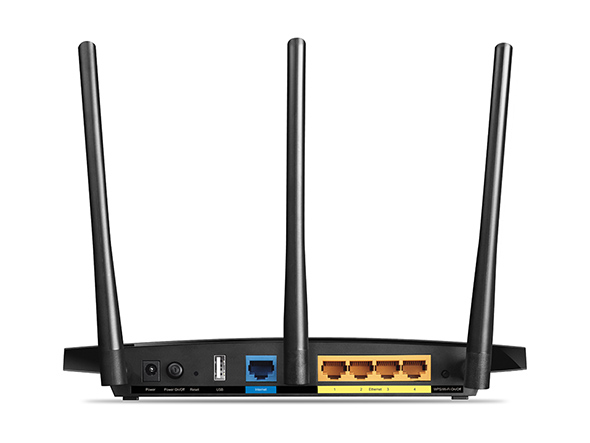
hello guys, i am also user of TP-Link C1200 Router (it is given by TM).

Behind the Router only got 1 USB Port, but i wanna setup both Print Server & Disk Storage.

Can I connect additional USB Hub to extend the usage of default USB Port?
icon_question.gif

Reference picture
» Click to show Spoiler - click again to hide... «

*
No idea.. Not even using my usb port. Got a HP printer with inbuilt wifi.. Can scan or print from all connected devices including mobile phones or tablets, etc..

This post has been edited by voncrane: Mar 20 2018, 08:42 AM
voncrane
post Mar 20 2018, 04:35 PM

Noir et fier!
*******
Senior Member
7,118 posts

Joined: Oct 2011
From: Wakanda


QUOTE(westernkl @ Mar 20 2018, 02:26 PM)
I don't care slow speed transfer, as long as can extend USB ports. icon_question.gif

No worry, my this USB Port has extra power plug (DC 5V) for more juices... brows.gif
*
Looks like you've made up your mind. Try it out then.. If it works..Great! Do return to let us know how it goes..
voncrane
post Mar 28 2018, 02:30 PM

Noir et fier!
*******
Senior Member
7,118 posts

Joined: Oct 2011
From: Wakanda


I finally experienced a random forced reboot liao on the C1200 yesterday. But otherwise, okay for my needs..
voncrane
post Apr 6 2018, 03:59 PM

Noir et fier!
*******
Senior Member
7,118 posts

Joined: Oct 2011
From: Wakanda


QUOTE(SilentVampire @ Apr 6 2018, 02:08 PM)
Yes, the TP-Link sold by vendors are V3, not V1. TM are the only ones that keep issuing V1 although there are many issues already.
Disable NAT Boost, configure per your setting. Still see internet led go orange/red at night time, happen 2-4 times per night... Checked the logs, a lot of led thing only...
Tp-link can't fix the led controller problem?????

Just get your own router and change it to the TP-Link C7 v4, or the Asus RT-AC1300UHP.
*
TM has to clear stock mah.. Must have bought in bulk to be cheaper and I have to say mine works for me.. Not so much for others.

This post has been edited by voncrane: Apr 6 2018, 04:00 PM
voncrane
post Apr 7 2018, 08:32 PM

Noir et fier!
*******
Senior Member
7,118 posts

Joined: Oct 2011
From: Wakanda


QUOTE(hurricane21 @ Apr 7 2018, 07:26 PM)
Is the latest official TM firmware still have @unifi on WiFi ssid?

Thanks.
*
Yes.. It's free advertising.
voncrane
post Apr 7 2018, 09:49 PM

Noir et fier!
*******
Senior Member
7,118 posts

Joined: Oct 2011
From: Wakanda


QUOTE(hurricane21 @ Apr 7 2018, 08:35 PM)
I thought they updated and removed.
Guess just flash the EU one, from what I read in this thread, I won’t lose my HyppTV correct? Just the 5ghz WiFi band different?

Thanks.
*
I'm using AUS firmware.. No problems with wifi or Hypptv. Vlan tag it properly and should be okay. You probably meant 5 Ghz channels?? Possibly.
voncrane
post Apr 30 2018, 11:30 AM

Noir et fier!
*******
Senior Member
7,118 posts

Joined: Oct 2011
From: Wakanda


QUOTE(hitz666 @ Apr 30 2018, 11:06 AM)
hi guys,

I'm using C1200 router supplied by TM, i'm having problem to access netflix from my smart tv and phone when using wifi, i have to access netflix using phone data first then only can switch to wifi, anyone having the same problem?
*
Nope.. Frequent Netflix user here and been using the router for over a year, never experienced such. What firmware are you running on the router?
voncrane
post Apr 30 2018, 05:21 PM

Noir et fier!
*******
Senior Member
7,118 posts

Joined: Oct 2011
From: Wakanda


QUOTE(hitz666 @ Apr 30 2018, 11:41 AM)
Not sure which firmware version, but never yet update it since starting using unifi last year, might be firmware issue?
*
Yeah, it's possible. I'm running an Australian fw and I recommend flashing the latest from them too. Bare in mind, you would have to manually setup the firmware to match Malaysian ISP. If you do flash the Aussie fw, the iptv ports are reversed (I.e 4 is 1 and 1 is 4). If you are uncomfortable and or just want peace or mind. Then check current firmware matches the latest Malaysian version. Update manually if it isn't.

QUOTE(SilentVampire @ Apr 30 2018, 11:43 AM)
Which platform do you usually buy from? I would recommend Ookas. They are really good and an official TP-Link reseller. Search Ookas on Google. They are on Lazada, Lelong, Shopee, and 11street. Their TP Link C7 is V4, although they have it as V2.
It is definitely the router issue, try switching router and see if the problem persists.
You are just lucky bro. Many other users having problems with the router, both Unifi and TIME users.
*
Yeah.. I consider myself very lucky it's been alright for me. No need to dispose or upgrade just yet.. thumbup.gif

Edit: Darn phone autocorrect.

This post has been edited by voncrane: Apr 30 2018, 11:01 PM
voncrane
post May 1 2018, 01:29 PM

Noir et fier!
*******
Senior Member
7,118 posts

Joined: Oct 2011
From: Wakanda


QUOTE(Alex9182 @ May 1 2018, 01:08 PM)
@XPS
Test your router security here click here to see if your ISP provided router pass security test.  or Failed brows.gif
*
Ran the tests and mine's secure. So once again, this router works for me.. thumbup.gif
voncrane
post May 9 2018, 02:51 AM

Noir et fier!
*******
Senior Member
7,118 posts

Joined: Oct 2011
From: Wakanda


QUOTE(Jjuggler @ May 9 2018, 02:03 AM)
V3 comes with new logo.  biggrin.gif
V1. EU version. Don't wish to use tm's official firmware. hahaha. Bought it from a TIME user. For rm150. Such a generous gentlemen.
*
Err, you actually paid for this router? I mean, I'm an owner and it performs well for me. But folks like me are an anomaly. Just saying that if it wasn't given to me "free", based on what I've been hearing about it, I wouldn't use my money to buy it. Would have gotten something better. But hey, bought d and so good luck.. biggrin.gif
voncrane
post May 9 2018, 03:10 AM

Noir et fier!
*******
Senior Member
7,118 posts

Joined: Oct 2011
From: Wakanda


QUOTE(Jjuggler @ May 9 2018, 03:03 AM)
I am using unifi currently. I do have tm's archer c1200 (dismantle it in order to have an access to the internal parts as well as void the warranty as well). I bought time's archer c1200 to compare both of them. We need to invest on something that we wish to learn.
*
Fair enough.. Do let us know if you find noteworthy ways of improving it's performance.. smile.gif
voncrane
post May 18 2018, 11:11 AM

Noir et fier!
*******
Senior Member
7,118 posts

Joined: Oct 2011
From: Wakanda


QUOTE(Alex9182 @ May 17 2018, 09:38 PM)
Yea, i recently get THIS from Taobao. cost me around RM300 including air shipping, arrived in 6 days after payment. it is refurbished but looks new. very good deal, Ori Asus unit cost around RM900. This is high performance router. smile.gif
*
Hey, thanks for the share.. Quoting for future reference.
voncrane
post May 24 2018, 09:24 AM

Noir et fier!
*******
Senior Member
7,118 posts

Joined: Oct 2011
From: Wakanda


QUOTE(TaKeOVER @ May 24 2018, 04:16 AM)
do u know what firmware to flash so i can get rid of this stupid @unifi, i upgraded to MY 2018 04 firmware still has problems, the no ip doesnt work with out a retarded workaround.
*
Can flash Australian firmware to rid yourself of the forced advertising..

3 Pages  1 2 3 >Top
 

Change to:
| Lo-Fi Version
0.0201sec    0.59    7 queries    GZIP Disabled
Time is now: 2nd December 2025 - 04:52 PM