

Is the latest official TM firmware still have @unifi on WiFi ssid?
Thanks.
Official TP-Link C1200 V1(EU) Firmware is out, Hidden WDS functionality works!, Page 29
Official TP-Link C1200 V1(EU) Firmware is out, Hidden WDS functionality works!, Page 29
|
|
 Apr 7 2018, 07:26 PM Apr 7 2018, 07:26 PM
Return to original view | Post
#1
|
 
Senior Member
1,388 posts Joined: Feb 2006 From: Southern Region  
|
Is the latest official TM firmware still have @unifi on WiFi ssid?
Thanks. |
|
|
|
|
|
Apr 7 2018, 08:35 PM
Return to original view | Post
#2
|
|
Senior Member
1,388 posts Joined: Feb 2006 From: Southern Region
|
QUOTE(voncrane @ Apr 7 2018, 08:32 PM) Yes.. It's free advertising. I thought they updated and removed.  Guess just flash the EU one, from what I read in this thread, I won’t lose my HyppTV correct? Just the 5ghz WiFi band different? Thanks. |
|
|
Apr 8 2018, 06:19 PM
Return to original view | Post
#3
|
|
Senior Member
1,388 posts Joined: Feb 2006 From: Southern Region
|
QUOTE(voncrane @ Apr 7 2018, 09:49 PM) I'm using AUS firmware.. No problems with wifi or Hypptv. Vlan tag it properly and should be okay. You probably meant 5 Ghz channels?? Possibly. Oh okay, good to hear that I won’t lose my HyppTV. Yes sorry I mean 5g WiFi channel. QUOTE(Alex9182 @ Apr 7 2018, 10:49 PM) C1200 V1 with EU Firmware is all good except it auto random reboot itself every few days. many user here experience this. EU also will auto reboot? Currently using the stock v1 firmware come original, never update to TM firmware. once you upgrade to EU Firmware, there is no turning back, you can not go back to TM Firmware. QUOTE(Jjuggler @ Apr 8 2018, 12:02 AM) less 5ghz channels. i would advise you to change to better router if you're an intermediate and heavy user. if for streaming hd videos on youtube, less downloads, browsing, then c1200 will suit you. Should be no problem since my devices always connect to 2.4ghz only due to coverage.Watching YouTube not a problem but my downloads always get inconsistent speed that’s why I am thinking to flash EU firmware.  |
|
|
Apr 8 2018, 09:20 PM
Return to original view | Post
#4
|
|
Senior Member
1,388 posts Joined: Feb 2006 From: Southern Region
|
QUOTE(AVFAN @ Apr 8 2018, 07:35 PM) 50mbps, 2.4ghz is fine... ethernet or wifi... if yr router is performing. Direct download, using Jdownloader, speed always fluctuate between 4.8 ~ 6.2 max. download... dunno what DL u mean, but p2p, it depends on seeds and peers. if good enough, u should get max 50/8=6.25MBps, maybe 6.5 at times. if poor seeds/peers... poor, zero even. if u r consistently getting poor DL speed with wifi, u gotta think another router. Torrent not sure because now speed is fast enough for direct download. Last torrent was on Streamyx 2mbps time. Can’t afford better router yet, was aiming for Asus but kind of out of budget.  |
|
|
Apr 9 2018, 05:23 PM
Return to original view | Post
#5
|
|
Senior Member
1,388 posts Joined: Feb 2006 From: Southern Region
|
QUOTE(AVFAN @ Apr 8 2018, 10:46 PM) That speed is good la... apa lagi mau?! Because last time on 30mbps I am able to get around stable 3.2MB/s on downloads. |
|
|
Jul 10 2018, 12:25 AM
Return to original view | Post
#6
|
|
Senior Member
1,388 posts Joined: Feb 2006 From: Southern Region
|
QUOTE(JohnLai @ Jul 9 2018, 12:53 PM) On the other hand, you could use C1200 as wireless repeater (with EU firmware) to cover deadspot/weak signal area in your house after buying new router........ Can setup C1200 as wireless repeater? I upgraded mine to EU firmware but only found AP mode, no wireless bridging mode to be found. |
|
|
|
|
|
Jul 10 2018, 07:29 AM
Return to original view | Post
#7
|
|
Senior Member
1,388 posts Joined: Feb 2006 From: Southern Region
|
QUOTE(voncrane @ Jul 10 2018, 12:39 AM) AUS fw here and I believe it's wired AP to wireless mode.. Yeah only AP mode found. [attachmentid=9906753]  QUOTE(JohnLai @ Jul 10 2018, 12:46 AM) Oh crap, I think I better rephrase it. My mistake. I shouldn't call it as wireless repeater. Wow, mind to teach how to activate it? There is no WDS mode (wireless bridging). There is only AP mode via LAN cable. I was saying connecting via LAN cable between two routers and use the AP mode to extend wireless coverage. EDIT: But...playing around with the firmware seem to indicate WDS is hidden and might work.........   I wonder if it will work? Problem is = I don't have spare router to test.....  |
|
|
Jul 10 2018, 05:56 PM
Return to original view | Post
#8
|
|
Senior Member
1,388 posts Joined: Feb 2006 From: Southern Region
|
QUOTE(JohnLai @ Jul 10 2018, 01:59 PM) Thanks for the video, it successfully saved my wifi but at internet tab keep saying WAN is not connected no matter I choose Static IP or Dynamic IP. Maybe is there any other stuffs related? Having not much knowledge on networking so hope someone will eventually enable it. |
|
|
Jul 10 2018, 08:29 PM
Return to original view | Post
#9
|
|
Senior Member
1,388 posts Joined: Feb 2006 From: Southern Region
|
QUOTE(JohnLai @ Jul 10 2018, 06:31 PM) Well, my guinea pig, you gonna be my test subject. Seems like WDS can't activate simultaneously for both 2.4G and 5G. Of course there are other settings you need to do. Please follow the instruction at page 96 and 97 [attachmentid=9907635] EDIT: There is hidden 5Ghz WDS page too, did you test with 2.4ghz?  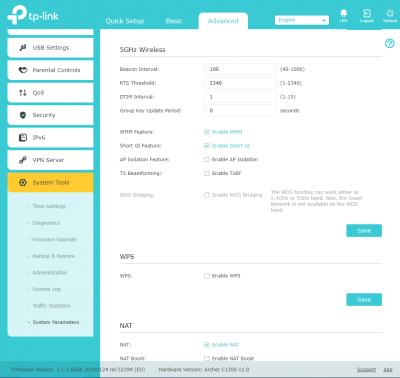
Currently bridging 2.4G and the WDS status is showing 'Run' 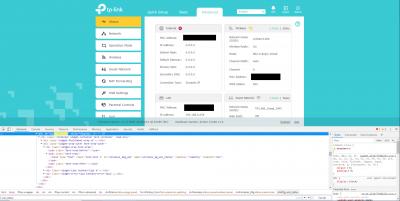
I did try both Wifi and LAN, able to surf no problem. Haven't try 5G yet because my main router is broadcasting on channel 149. I read some post previously can enable more 5G band, same method? And the DHCP is acting weird as it won't follow my main router's setting, it just simply give my device an IP. Btw these keyword below for easy searching: 2g_wds_status 5g_wds_status This post has been edited by hurricane21: Jul 10 2018, 08:32 PM |
|
|
Jul 10 2018, 08:37 PM
Return to original view | Post
#10
|
|
Senior Member
1,388 posts Joined: Feb 2006 From: Southern Region
|
QUOTE(JohnLai @ Jul 10 2018, 08:34 PM) EH? So fast....I was playing with microsoft paint to let you know where is the status of WDS..... WDS showing 'Run", but my device won't follow the assigned IP from main router. K lah...tell me....does WDS works? Need to disable secondary router DHCP server. Keep the primary router (the one with WAN access) DHCP server active. However, the internet runs fine, so consider it successful? Attached thumbnail(s) 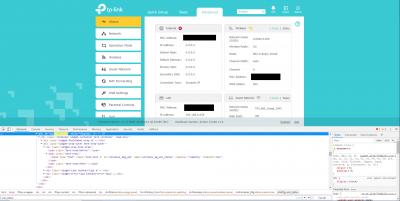
|
|
|
Jul 10 2018, 08:47 PM
Return to original view | Post
#11
|
|
Senior Member
1,388 posts Joined: Feb 2006 From: Southern Region
|
QUOTE(JohnLai @ Jul 10 2018, 08:39 PM) Strange......did you disable the secondary router DHCP server? Yes, I disabled DHCP on the C1200 as per instruction.
Now I got 3 devices connected to the C1200, but the wireless statistics page only show my main router and iPhone. PC via LAN, iPhone via Wifi 2.4G 
Btw restart won't affect those setting.  Guess have to continue explore tomorrow. |
|
|
Jul 10 2018, 09:00 PM
Return to original view | Post
#12
|
|
Senior Member
1,388 posts Joined: Feb 2006 From: Southern Region
|
QUOTE(JohnLai @ Jul 10 2018, 08:53 PM) What kind of IP assigned to your devices after you connect at secondary router (c1200)? Just wanna know how 'weird' the IP might be...... Well, I still think it is better for you to setup WDS using 5ghz (more bandwidth and less interference) as backhaul instead of 2.4ghz Oh, please enable 5ghz TX Beamforming too. I saw you didn't enable it in your previous screenshot. Here a funny thing, there is hidden 2.4ghz TX Beamforming too. One can enable it, but I am not sure if beamforming works for 2.4ghz. But I assigned my PC to .10 and iPhone to .20. When connect via C1200, is will assign me the IP from the DHCP pool from my main router, example: 192.168.0.218 That's why I find it strange because I got another repeater (Xiaomi router mini) and it will give me my assigned IP from main router (.10). Found some info regarding 5G channels at LEDE forum thread, have to take time to read.  |
|
|
Jul 10 2018, 09:21 PM
Return to original view | Post
#13
|
|
Senior Member
1,388 posts Joined: Feb 2006 From: Southern Region
|
QUOTE(JohnLai @ Jul 10 2018, 09:08 PM) That is definitely strange, probably it just a WDS incompatibility / interoperability between vendors.About those 5ghz channel......... I posted my experience in gaining back channels 149 - 165 from few pages ago..... good luck, you might want to use LAN cable for the setting up.....   Wondering why tp-link hide those setting Will update back on 5G WDS once I did it Btw, thanks a lot.  |
|
|
|
|
|
Jul 11 2018, 08:38 PM
Return to original view | Post
#14
|
|
Senior Member
1,388 posts Joined: Feb 2006 From: Southern Region
|
QUOTE(JohnLai @ Jul 10 2018, 09:27 PM) Thanks for being my guinea pig on WDS testing, love ya. Forced my main router's 5G channel to 48 and it dos work like 2.4G.  bye. bye.If you are successful with ssh+root+modified config.bin+openssl+zlib+uci+reload etc, you will be greeted with :  Will await your progress report.   So means both 2.4G and 5G WDS is definitely working on the router. But the DHCP still acting weird but nevermind as long as the internet is working. Plus I set the SSID on C1200 same as my main router and it does switch in between. How do I know? Because when I walk downstairs and the IP change to main router assigned and IP become random when I walk back upstairs. And if I am using xiaomi router mini as repeater, I won't get full upload speed. (currently on unifi 50mbps) However the router won't sync NTP maybe it depend on WAN connection. |
|
|
Jul 27 2018, 07:15 PM
Return to original view | Post
#15
|
|
Senior Member
1,388 posts Joined: Feb 2006 From: Southern Region
|
QUOTE(Kanuki @ Jul 27 2018, 02:16 PM) btw.. It can't get the internet from the main router Yes, the NTP is depend on WAN connection, so just manually re-setting the time on every restart.using Wireless Bridging for NTP right? Other than that, it is OK for daily use, for now la. |
|
|
Jan 2 2019, 01:34 PM
Return to original view | Post
#16
|
|
Senior Member
1,388 posts Joined: Feb 2006 From: Southern Region
|
QUOTE(junyang96 @ Jan 2 2019, 04:51 AM) I have 2 C1200, one in MY firmware using as router & modem and one EU firmware using as repeater. IPV6 disabled. DHCP only on for main router. I got same issue last time with my Redmi 3S but occasionally, after reboot then it will back to normal. But other Android phone at home got no issue.I tried using the 5G WDS and it works just fine for my laptop (almost no drop in speed when wired to repeater) but the problem is with my android's wifi connection it's really unstable  . It connects some times but most of time hanging at obtaining ip . It connects some times but most of time hanging at obtaining ipI have 4 different SSID the phone can connect to the main SSIDs just fine but not with the repeater's. It can authenticate but just keeps hanging at obtaining ip. Even if I use static ip(tried both inside and outside the dhcp pool) on my android it will connect but no internet . Whereas my laptop seems to connect steadily with the 2.4G, couldn't try with the 5G though I did some search and some say SSIDs have to be the same for WDS bridging. Is that true  ? Tried to assign same SSID for the 5G wifi but problem still happens with the android. I'm guessing it's a discrete case for my android because I'm using unofficial rom. Will try with other phones and laptop in the future. ? Tried to assign same SSID for the 5G wifi but problem still happens with the android. I'm guessing it's a discrete case for my android because I'm using unofficial rom. Will try with other phones and laptop in the future. btw @JohnLai how to show the WDS mode 1 and 2 in inspect element? Now C1200 had gone back to storage for spare because bought a new router and move them to 2nd floor so it can cover whole house. |
| Change to: |  0.0557sec 0.0557sec
 0.51 0.51
 7 queries 7 queries
 GZIP Disabled GZIP Disabled
Time is now: 1st December 2025 - 01:44 PM |
 Quote
Quote