Welcome Guest ( Log In | Register )

68 Pages « < 63 64 65 66 67 > » Bottom

Outline · [ Standard ] · Linear+

 Official TP-Link C1200 V1(EU) Firmware is out, Hidden WDS functionality works!, Page 29

views
     
X1X1
post Sep 24 2021, 10:30 PM

Casual
***
Junior Member
330 posts

Joined: Jan 2019
QUOTE(extercy @ Sep 24 2021, 07:46 PM)
Unless you are near and in line of sight of the router, you will never get ok performance. Ok performance in the sense compared to wired LAN. This is the truth for a long time. The perception of WiFi being cheaper while in reality WiFi is very expensive compared to wired LAN for performance.
*
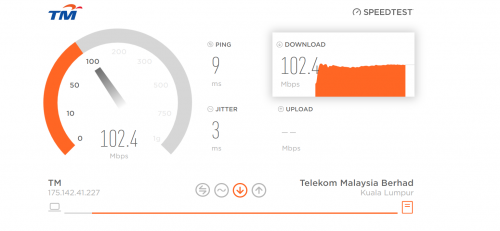
before this i can reach 100++m for 100m lines, so not sure how fast should i get compare with cable.
btw my question is abt missing 5g wifi, ok ?
user posted image

This post has been edited by X1X1: Sep 24 2021, 10:34 PM
extercy
post Sep 25 2021, 01:12 PM

Casual
***
Junior Member
363 posts

Joined: Oct 2011
Boost for a speed test does not mean performance. Performance has a minimum consistency.

Ok since you don't know much, I explain further. As you see in my post with the internal of the router aka circuit board, there are 3 main components, the router, the switch and the WiFi aka AP. So as with all chips, when overheats, it will throttle until hang .. if overheat too rapidly, it will shutdown.

So what you are basically experiencing is overheating that cause the WiFi / AP chip to throttle, hence losing TX and RX range. This is only one end, you will need to check the other end also... I let you figure this out.

These routers are consumer routers and restarting it once everyday if you are a medium load user. Most industrial router are so expensive but reliable, that it makes a RM 700 router looks like child's play but as a home user, there are ways to customized the consumer range for great performance... just depends on how deep you want to dive into networking.

This post has been edited by extercy: Sep 25 2021, 01:19 PM
Jaclow
post Sep 25 2021, 01:16 PM

Getting Started
**
Junior Member
171 posts

Joined: Sep 2019
QUOTE(Pop The Bubbles @ Jun 11 2021, 10:51 PM)
Not sure if this router is utterly bullshit or just unifi connection. My house is on 100M unifi connection and the connection is constantly dropped when I was downloading anything large. Does it fix this by flashing the newer firmware?
*
I'm on tplink Ax73 from c1200.. No more complaints..
Jaclow
post Sep 25 2021, 01:24 PM

Getting Started
**
Junior Member
171 posts

Joined: Sep 2019
Anyways is there a guide to convert c1200 to ap for my office use?

I don't see a operation menu.firmware tm v1 eu 202010311

Or I have to manually disable dhcp.
extercy
post Sep 25 2021, 01:27 PM

Casual
***
Junior Member
363 posts

Joined: Oct 2011
QUOTE(Jaclow @ Sep 25 2021, 01:24 PM)
Anyways is there a guide to convert c1200 to ap for my office use?

I don't see a operation menu.firmware tm v1 eu 202010311

Or I have to manually disable dhcp.
*
I am running the stock Malaysia firmware and make it an AP the old skool way .. that is disable DHCP. Just make sure the AP IP does not clash with your main router IP.

This post has been edited by extercy: Sep 25 2021, 01:28 PM
Jaclow
post Sep 25 2021, 01:46 PM

Getting Started
**
Junior Member
171 posts

Joined: Sep 2019
QUOTE(extercy @ Sep 25 2021, 01:27 PM)
I am running the stock Malaysia firmware and make it an AP the old skool way .. that is disable DHCP. Just make sure the AP IP does not clash with your main router IP.
*
Thanks u.
chiwawa10
post Oct 13 2021, 11:10 AM

Casual
***
Junior Member
393 posts

Joined: Nov 2006
QUOTE(Chan Hensem @ Sep 22 2021, 11:28 AM)
New firmware found on TP-Link AC1200 Malaysia page. This is for hardware V1.

Maybe for Frag Attack patch?  cool2.gif
*
Are you sure it's a new firmware? The file name seems to indicate Build 20200306 rel.15999_2020-03-06 which roughly translates to March 2020. Anyway, I checked my firmware version and it's the same as this. I'm sure I did not perform any firmware update on my router before.
Alpha_Tay
post Oct 13 2021, 05:52 PM

Beware The Spammer Star!
******
Senior Member
1,725 posts

Joined: Jan 2003
QUOTE(chiwawa10 @ Oct 13 2021, 11:10 AM)
Are you sure it's a new firmware? The file name seems to indicate Build 20200306 rel.15999_2020-03-06 which roughly translates to March 2020. Anyway, I checked my firmware version and it's the same as this. I'm sure I did not perform any firmware update on my router before.
*
the firmware compile date, testing period, public release date.

it's new firmware that release to public for all user to do manual update.

your unifi c1200 depend on your install date, the router manufacture date, firmware version came with, your unifi connected BRAS TR-069 do they do firmware update on all connected unifi c1200 router, etc.

This post has been edited by Alpha_Tay: Oct 13 2021, 05:56 PM
playnice96
post Oct 21 2021, 09:51 AM

New Member
*
Newbie
48 posts

Joined: Sep 2017
Hi guys, tried to setup WDS Bridge on my AC1200 to connect with upstairs AC1200(Same unit owner).
Have done below:
1. Set my router LAN IP to same subnet as upstairs router
2. Disable DHCP
3. Survey and setup WDS Bridge
4. Reboot

But the WDS Status still shown as ASSOC, unable to connect to internet. Any idea why?

Thanks in advance
extercy
post Oct 23 2021, 01:00 AM

Casual
***
Junior Member
363 posts

Joined: Oct 2011
QUOTE(playnice96 @ Oct 21 2021, 09:51 AM)
Hi guys, tried to setup WDS Bridge on my AC1200 to connect with upstairs AC1200(Same unit owner).
Have done below:
1. Set my router LAN IP to same subnet as upstairs router
2. Disable DHCP
3. Survey and setup WDS Bridge
4. Reboot

But the WDS Status still shown as ASSOC, unable to connect to internet. Any idea why?

Thanks in advance
*
Could be weak connection. You are asking a lot of the weak AC1200 as a WDS.

As an AP is not so bad since back haul is handled by the LAN.

Alpha_Tay
post Nov 8 2021, 08:54 PM

Beware The Spammer Star!
******
Senior Member
1,725 posts

Joined: Jan 2003
just now try to upgrade to the new firmware manually, only get firmware upgrade once by unifi via TR-069 before, and it stuck but not hang at 34% forever, the internet and 192.168.0.1 router GUI is still working without any problem, but cannot login to 192.168.0.1 router GUI with the correct username and password, click Login and no respond multiple times, the router just manually restarted yesterday, try some method like unplug the fibre modem ethernet cable to the router and replug again, the internet doesnt work after that, after wait for around a hour more, turn off the router and turn it on again, the router has the new firmware, tried to upgrade the same new firmware again just in case.

Archer C1200(EU) V1 TM Unifi Wireless Router (Latest 23-8-2021)

Published Date: 2021-08-23

C1200v1_eu_tm-up-1.0.0 Build 20200306 rel.15999_2020-03-06_15.16.53.bin

unifi TR-069 upgrade firmware : C1200 v1.0 firmware 1.0.0 Build 20190805 rel.22215 (EU) , original firmware : C1200 v1.0 firmware 1.0.0 Build 20180403 rel.22124 (EU)


This post has been edited by Alpha_Tay: Nov 18 2021, 11:18 PM
jodi
post Nov 19 2021, 11:40 AM

Getting Started
**
Junior Member
221 posts

Joined: Jan 2003


QUOTE(Alpha_Tay @ Nov 8 2021, 08:54 PM)
just now try to upgrade to the new firmware manually, only get firmware upgrade once by unifi via TR-069 before, and it stuck but not hang at 34% forever, the internet and 192.168.0.1 router GUI is still working without any problem, but cannot login to 192.168.0.1 router GUI with the correct username and password, click Login and no respond multiple times, the router just manually restarted yesterday, try some method like unplug the fibre modem ethernet cable to the router and replug again, the internet doesnt work after that, after wait for around a hour more, turn off the router and turn it on again, the router has the new firmware, tried to upgrade the same new firmware again just in case.

Archer C1200(EU) V1 TM Unifi Wireless Router (Latest 23-8-2021)

Published Date: 2021-08-23

C1200v1_eu_tm-up-1.0.0 Build 20200306 rel.15999_2020-03-06_15.16.53.bin

unifi TR-069 upgrade firmware : C1200 v1.0 firmware 1.0.0 Build 20190805 rel.22215 (EU) , original firmware : C1200 v1.0 firmware 1.0.0 Build 20180403 rel.22124 (EU)
*
How did you resolve this?
Alpha_Tay
post Nov 19 2021, 12:52 PM

Beware The Spammer Star!
******
Senior Member
1,725 posts

Joined: Jan 2003
QUOTE(jodi @ Nov 19 2021, 11:40 AM)
How did you resolve this?
*
see my full post detail, i didnt resolve it, i just wait for a long time, and it turn out didnt firmware upgrade half way fail, even if it did, there is still recovery method.
RotiTheCanai
post Dec 17 2021, 06:19 AM

New Member
*
Junior Member
5 posts

Joined: Nov 2021
Hi ,

My c1200 is frozen and only wps indicator light is on.

Cant access wireless or even reset it.

Please help
BenYeeHua
post Dec 17 2021, 02:14 PM

Regular
******
Senior Member
1,873 posts

Joined: Nov 2010


QUOTE(RotiTheCanai @ Dec 17 2021, 06:19 AM)
Hi ,

My c1200 is frozen and  only wps indicator light is on.

Cant access wireless or even reset it.

Please help
*
Consider purchase a new one?
If no, then renew your contract 2 years by calling TM and let them exchange for you, but I am very sure this is not the best solution, because they will give you a crappy NETIS router that can only handle until 100M. icon_rolleyes.gif
RotiTheCanai
post Dec 17 2021, 04:09 PM

New Member
*
Junior Member
5 posts

Joined: Nov 2021
QUOTE(BenYeeHua @ Dec 17 2021, 02:14 PM)
Consider purchase a new one?
If no, then renew your contract 2 years by calling TM and let them exchange for you, but I am very sure this is not the best solution, because they will give you a crappy NETIS router that can only handle until 100M. icon_rolleyes.gif
*
Appreciate the reply. I thought it could be salvaged 😄 but yeah going to get a new one and not through TM. Thx bro.
Hwoarang45
post Jan 3 2022, 12:42 PM

Hardcore Gamer
******
Senior Member
1,848 posts

Joined: Jan 2003
From: Boleh Land


question, im thinking bringing my router to tmpoint exchange for new tell them the router keep restarting, anyone know whats the current router the replacing with? is it FIBERHOME?
prokiller1199
post Jan 7 2022, 07:28 PM

Hi there.
*****
Senior Member
966 posts

Joined: Apr 2016


QUOTE(Hwoarang45 @ Jan 3 2022, 12:42 PM)
question, im thinking bringing my router to tmpoint exchange for new tell them the router keep restarting, anyone know whats the current router the replacing with? is it FIBERHOME?
*
if replace new router need renew contract, better buy your own and get better router. the router depends on the stock I think.
ZzZzz...
post Mar 16 2022, 09:59 AM

Art of Sleeping
******
Senior Member
1,785 posts

Joined: Nov 2008


Hi sifu,
a stupid question,
is this router can be mod or flash to support mobile hotspot?
eg. like usb connect phone to the port in router, enable mobile hotspot, then user can connect the router to get internet connection.
mytaffeta
post Mar 16 2022, 12:46 PM

Regular
******
Senior Member
1,325 posts

Joined: Dec 2010


im having this ping spike issue when playing game on my console.. still using this stock router and original firmware.. tech suggest to replace the router, should i?

other services, youtube, surfing all good, just that when gaming random spike.. very annoying..

68 Pages « < 63 64 65 66 67 > » Top
 

Change to:
| Lo-Fi Version
0.0318sec    0.97    6 queries    GZIP Disabled
Time is now: 10th December 2025 - 08:03 AM