Welcome Guest ( Log In | Register )

Outline · [ Standard ] · Linear+

 Official TP-Link C1200 V1(EU) Firmware is out, Hidden WDS functionality works!, Page 29

views
     
extercy
post Aug 16 2021, 03:48 PM

Casual
***
Junior Member
363 posts

Joined: Oct 2011
The problem with hardware nowadays are there is a calculated lifespan and the package, hardware and software, limits the use based on how much you pay for it. In the past, there is no cheaper option but now there many " adequate " options.

The picture is a C1200 V1 that I got free and my upgrade to Wireless AC biggrin.gif The original black heatsink runs warm and have thick thermal pads, while the 2 silver heatsinks, I added. But look at the temperatures !

So without the heatsinks, the chips (top left is LAN, right middle is Wireless) will easily overheat and I am just using this C1200 as an AP. If you use it as a router, then it will overheat even more. And like all chips that overheat, it will hang or if less severe, it "reboots".

I have seen some new routers that are going this way where there are no heatsinks compared to the past .. and no, it is not because the chipset can handle the heat, but it is due to limiting the lifespan of the product so you can be a repeat customer and not a customer that long long time buy 1 time kind of customer biggrin.gif

Consumer products like this are not as robust as enterprise/ business products so I will restart the C1200 at least once a week.
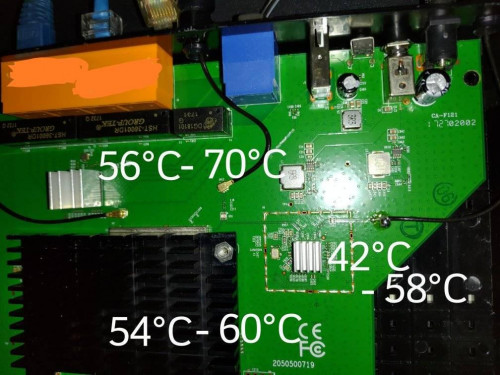
user posted image

This post has been edited by extercy: Aug 16 2021, 03:53 PM
extercy
post Aug 24 2021, 12:11 AM

Casual
***
Junior Member
363 posts

Joined: Oct 2011
QUOTE(colins @ Aug 23 2021, 03:25 PM)
Hi, may I know how / what you used to "stick" the heat sinks? Thanks.
*
Mine came with thermal sticker on the bigger one ( Top Left) and the smaller one came with what looks like ordinary clear double sided tape .. hahaha.

If you can fit something bigger on both should be better. I advice you to use thermal adhesive if you plan to mount the router vertically, just to make sure the bigger heatsinks don't fall off. Add a fan on top to suck out the hot air if you are using it as a main router. Fan only works if you remove the protective plastic that came from the manufacturer dry.gif

This post has been edited by extercy: Aug 24 2021, 12:16 AM
extercy
post Sep 1 2021, 03:01 PM

Casual
***
Junior Member
363 posts

Joined: Oct 2011
QUOTE(potatobanana @ Aug 30 2021, 01:41 AM)
Anyone experienced SSID missing?

My phone and other devices can scan 2.4Ghz, but not 5Ghz

Tried reboot the router from admin page but still same issue, have to do a full reboot by switch power on/off then 5Ghz reappear again
*
yea.. this is normal .. mine can suddenly not get connection until I do a power off, wait 5 seonds and on again. As I mentioned in my post above, the chip overheats and hangs .. sometimes until like 5-10 minutes later then it will reappear once the chip cools down enuff. At times, it just hangs permanently until a reboot.
extercy
post Sep 24 2021, 07:46 PM

Casual
***
Junior Member
363 posts

Joined: Oct 2011
QUOTE(X1X1 @ Sep 23 2021, 06:43 PM)
my getting weird, phone n laptop have 5g but pc don't have .........
2.4g connections which is very very very slow (max 40 for 100m line).
btw any good router recommend, good cheap n can setup mesh ....
*
Unless you are near and in line of sight of the router, you will never get ok performance. Ok performance in the sense compared to wired LAN. This is the truth for a long time. The perception of WiFi being cheaper while in reality WiFi is very expensive compared to wired LAN for performance.
extercy
post Sep 24 2021, 07:49 PM

Casual
***
Junior Member
363 posts

Joined: Oct 2011
QUOTE(patricktoh @ Sep 23 2021, 08:28 PM)
PC wifi card support
1. Dual band?
2. Support 5G channel 149 and above? Else change channel number between 36 to 48.
*
I tested this a bit and only use Channel 149 if you are very near to the router and if your place have lots of channel overlap because this channel is really really really short distance.

Channel 36 to 48 have much much longer range as the performance is very noticeable.
extercy
post Sep 25 2021, 01:12 PM

Casual
***
Junior Member
363 posts

Joined: Oct 2011
Boost for a speed test does not mean performance. Performance has a minimum consistency.

Ok since you don't know much, I explain further. As you see in my post with the internal of the router aka circuit board, there are 3 main components, the router, the switch and the WiFi aka AP. So as with all chips, when overheats, it will throttle until hang .. if overheat too rapidly, it will shutdown.

So what you are basically experiencing is overheating that cause the WiFi / AP chip to throttle, hence losing TX and RX range. This is only one end, you will need to check the other end also... I let you figure this out.

These routers are consumer routers and restarting it once everyday if you are a medium load user. Most industrial router are so expensive but reliable, that it makes a RM 700 router looks like child's play but as a home user, there are ways to customized the consumer range for great performance... just depends on how deep you want to dive into networking.

This post has been edited by extercy: Sep 25 2021, 01:19 PM
extercy
post Sep 25 2021, 01:27 PM

Casual
***
Junior Member
363 posts

Joined: Oct 2011
QUOTE(Jaclow @ Sep 25 2021, 01:24 PM)
Anyways is there a guide to convert c1200 to ap for my office use?

I don't see a operation menu.firmware tm v1 eu 202010311

Or I have to manually disable dhcp.
*
I am running the stock Malaysia firmware and make it an AP the old skool way .. that is disable DHCP. Just make sure the AP IP does not clash with your main router IP.

This post has been edited by extercy: Sep 25 2021, 01:28 PM
extercy
post Oct 23 2021, 01:00 AM

Casual
***
Junior Member
363 posts

Joined: Oct 2011
QUOTE(playnice96 @ Oct 21 2021, 09:51 AM)
Hi guys, tried to setup WDS Bridge on my AC1200 to connect with upstairs AC1200(Same unit owner).
Have done below:
1. Set my router LAN IP to same subnet as upstairs router
2. Disable DHCP
3. Survey and setup WDS Bridge
4. Reboot

But the WDS Status still shown as ASSOC, unable to connect to internet. Any idea why?

Thanks in advance
*
Could be weak connection. You are asking a lot of the weak AC1200 as a WDS.

As an AP is not so bad since back haul is handled by the LAN.


Change to:
| Lo-Fi Version
0.0546sec    0.40    7 queries    GZIP Disabled
Time is now: 8th December 2025 - 05:22 AM