Welcome Guest ( Log In | Register )

68 Pages « < 57 58 59 60 61 > » Bottom

Outline · [ Standard ] · Linear+

 Official TP-Link C1200 V1(EU) Firmware is out, Hidden WDS functionality works!, Page 29

views
     
eugenecctan
post Jul 8 2020, 01:38 PM

Wee Wang Wang
******
Senior Member
1,058 posts

Joined: Nov 2009


QUOTE(ryws @ Jul 4 2020, 03:26 PM)
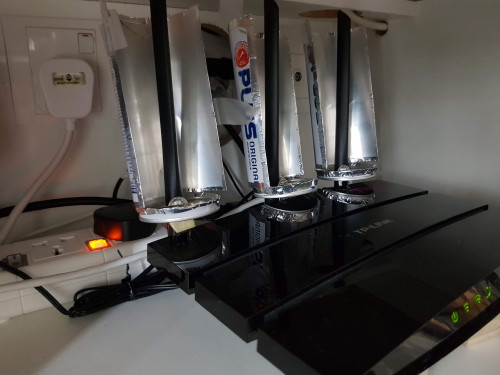
The antenna coverage is 360 degree. By doing this, you boost all the signal to the front 180 degree.
This is effective especially your router is placed at the corner of your house/condo.
user posted image
*
It will works if you place your router at the corner, the recommended location always the center of the house. That is thy i place it in the center of the house by hanging it on the wall. And try to block the signal to go upwards. smile.gif
HG8240HMaxis P
post Jul 16 2020, 10:05 AM

New Member
*
Probation
10 posts

Joined: Jul 2020
Anyone manage to get ipv6 working? It works well on my default maxis router.

I get ip addresses for ipv6 in the router page, but ipv6-test.com shows it just doesn't work.
HG8240HMaxis P
post Jul 16 2020, 10:57 AM

New Member
*
Probation
10 posts

Joined: Jul 2020
QUOTE(HG8240HMaxis @ Jul 16 2020, 10:05 AM)

Anyone manage to get ipv6 working? It works well on my default maxis router.

I get ip addresses for ipv6 in the router page, but ipv6-test.com shows it just doesn't work.
*


Can't edit posts, I assume because I'm on a probation account.

user posted image
Not sure what to censor.

I have also tried

SLAAC
Prefix delegation: Disabled
SLAAC+Stateless+DHCP

Both lead to getting ipv6 ip addresses, but test-ipv6.com still shows i cant connect to ipv6 websites.
BenYeeHua
post Jul 18 2020, 08:13 AM

Regular
******
Senior Member
1,873 posts

Joined: Nov 2010


QUOTE(HG8240HMaxis @ Jul 16 2020, 10:57 AM)
Can't edit posts, I assume because I'm on a probation account.
[Image]
Not sure what to censor.
I have also tried
SLAAC
Prefix delegation: Disabled
SLAAC+Stateless+DHCP
Both lead to getting ipv6 ip addresses, but test-ipv6.com still shows i cant connect to ipv6 websites.
*
Blame maxis? hmm.gif
With TM, sometimes the IPv6 is inaccessible to the Internet, need reconnect PPPoE to make it works again.

So, having a IPv6 address don't means it works.
HG8240HMaxis P
post Jul 18 2020, 09:12 AM

New Member
*
Probation
10 posts

Joined: Jul 2020
QUOTE(BenYeeHua @ Jul 18 2020, 08:13 AM)
Blame maxis? hmm.gif
With TM, sometimes the IPv6 is inaccessible to the Internet, need reconnect PPPoE to make it works again.

So, having a IPv6 address don't means it works.
*
I don't know if it matters but it is using TM's infra.
I've reconnected PPoE multiple times, each with a different setting.
heLL_bOy
post Jul 18 2020, 02:40 PM

Regular
******
Senior Member
1,350 posts

Joined: Nov 2004
From: HEAVEN & HELL


QUOTE(HG8240HMaxis @ Jul 16 2020, 10:57 AM)
Can't edit posts, I assume because I'm on a probation account.
user posted image
Not sure what to censor.
I have also tried
SLAAC
Prefix delegation: Disabled
SLAAC+Stateless+DHCP
Both lead to getting ipv6 ip addresses, but test-ipv6.com still shows i cant connect to ipv6 websites.
*
try enable SLAAC on "GET IPV6 Address"

try enable SLAAC+Stateless DHCP on " Assigned Type"
michaelkkl
post Jul 18 2020, 03:00 PM

Casual
***
Junior Member
362 posts

Joined: Jan 2011
QUOTE(HG8240HMaxis @ Jul 16 2020, 10:57 AM)
Can't edit posts, I assume because I'm on a probation account.
user posted image
Not sure what to censor.
I have also tried
SLAAC
Prefix delegation: Disabled
SLAAC+Stateless+DHCP
Both lead to getting ipv6 ip addresses, but test-ipv6.com still shows i cant connect to ipv6 websites.
*
Get IPv6 address: SLAAC
Prefix Delegation: Enable
LAN Assignment Type: SLAAC+Stateless DHCP

Save and restart everything
skty
post Jul 18 2020, 06:20 PM

There is only one thing I know. That is I know nothing.
*******
Senior Member
4,507 posts

Joined: Aug 2005
From: Klang/Shah Alam


hi guys, I want to pass down my current TP-Link Archer C1200 router to my parent.

I am using the router now with TIME 500mbps package and I want to downgrade and sign two years contract with TIME to get new router TP-Link EC230.

Want to ask, since my parent is using streamyx 4mbps (due to the area don't support Unifi yet), is the TP-Link Archer C1200 router compatible with streamyx?

Many many thanks.
HG8240HMaxis P
post Jul 19 2020, 04:53 AM

New Member
*
Probation
10 posts

Joined: Jul 2020
QUOTE(heLL_bOy @ Jul 18 2020, 02:40 PM)
try enable SLAAC on "GET IPV6 Address"

try enable SLAAC+Stateless DHCP on " Assigned Type"
*
Still doesn't work sad.gif

QUOTE(michaelkkl @ Jul 18 2020, 03:00 PM)
Get IPv6 address: SLAAC
Prefix Delegation: Enable
LAN Assignment Type: SLAAC+Stateless DHCP

Save and restart everything
*
For some reason the router won't even connect to the internet with those settings; 0.0.0.0 on ipv4. However if I switch prefix delegation to disable, the internet works - though I still don't have ipv6 working.
coolguy_0925
post Jul 19 2020, 09:22 AM

Look at all my stars!!
*******
Senior Member
4,538 posts

Joined: Jan 2003
QUOTE(skty @ Jul 18 2020, 06:20 PM)
hi guys, I want to pass down my current TP-Link Archer C1200 router to my parent.

I am using the router now with TIME 500mbps package and I want to downgrade and sign two years contract with TIME to get new router TP-Link EC230.

Want to ask, since my parent is using streamyx 4mbps (due to the area don't support Unifi yet), is the TP-Link Archer C1200 router compatible with streamyx?

Many many thanks.
*
If you are intending to replace the streamyx modem with this router, the answer is no

streamyx requires ADSL modem to dial up
skty
post Jul 19 2020, 02:57 PM

There is only one thing I know. That is I know nothing.
*******
Senior Member
4,507 posts

Joined: Aug 2005
From: Klang/Shah Alam


QUOTE(coolguy_0925 @ Jul 19 2020, 09:22 AM)
If you are intending to replace the streamyx modem with this router, the answer is no

streamyx requires ADSL modem to dial up
*
thank you bro.
Alpha_Tay
post Jul 20 2020, 07:48 PM

Beware The Spammer Star!
******
Senior Member
1,725 posts

Joined: Jan 2003
just realise that unifi given C1200 have this firmware version, never update it manually, but not sure and forgot is it came with this firmware or the firmware was update by TM TR-069 , however this firmware version was not available at internet. unifi biz fibre RM139 100mbps install at 2019 September.

1.0.0 Build 20190805 rel.22215 (EU)

Archer C1200 v1.0

also, even after router restart automatically or manually, the ipv4 would still stay the same, for multiple months, but ipv6 would change every restart. fibre modem is Huawei HG8240H5 ONT

if want to change ipv4, have to restart router "many" multiple times during period of few hours. but the next ipv4 would still stay the same even after router restart.

Alpha_Tay
post Jul 21 2020, 02:56 PM

Beware The Spammer Star!
******
Senior Member
1,725 posts

Joined: Jan 2003
this D-Link DIR-850L TM customize firmware bug that affect Dahua imou Ip Camera, and probably only firmware version 2.12TM affected, doesn't affect TM customize TP-Link Archer C1200 v1.0 firmware 1.0.0 Build 20190805 rel.22215 (EU)

QUOTE(Alpha_Tay @ Jun 15 2020, 04:57 PM)
it seem there is some bug at the unifi D-Link DIR-850L router 2.12TM firmware release at 2019, Dahua imou Ip Camera Cloud Live Stream would Disconnect 99% of time, While LAN and Wifi Live Stream still working 100% of time, but 6 Models, 4 Brands of newer and older generation Ip Camera Cloud Live Stream would still working well 100% of time.

tried to reset and reconfig/setting manually without config backup and upload unifi D-Link DIR-850L router, bug issue still happen.

tried to Enable UPnP: ; IPv4 Multicast Streams: ; IPv6 Multicast Streams: ; Application Level Gateway (ALG) Configuration ; PPTP: ; IPSec (VPN): ; RTSP: ; SIP: ; and Multiple Port Forwarding, work a while and Cloud Disconnect again.

Enable DMZ: work but didn't spend the times to test it for how long, but DMZ work for only single device/IP.

Tested Dahua imou Ip Camera Cloud Live Stream with TP-Link Deco M4 v2 Latest Firmware 190917 , working 100% of time.

more Detail Report here : https://forum.lowyat.net/index.php?showtopi...&#entry97021190

subscribe and install unifi fibre 30mbps at December 2017, the unifi D-Link DIR-850L router came with newer Default Firmware 2.09TM , the Sticker at the plastic router casing and package box bottom has Firmware 2.09TM written, the big multiple Realtek Chipset security issue was fixed with this Default Firmware. never tried to play with different Region firmware upload & install manually with this router, the only firmware upgrade done was 2.10TM and 2.12TM , at router web interface Check for New Firmware.

tried to Flash unifi D-Link DIR-850L with newest international Firmware 2.23 with lastest fixes, 1st Boot to D-Link Router Recovery Mode and flash Middle Firmware DIR850LB1_FW210WWb03.bin , then router web interface Upgrade Manually DIR850LB1_FW220WWb03.bin , then DIR850LB1_FW223WWb01.bin , after that Restore To Factory Default Settings and reconfig/setting manually without config backup and upload.

https://forum.lowyat.net/index.php?showtopi...&#entry86448823

http://forums.dlink.com/index.php?topic=44909.0

ftp://ftp2.dlink.com/SECURITY_ADVISEMENTS...CH_v2.20B03.zip

http://pmdap.dlink.com.tw/PMD/GetAgileFile...3494E7;19623.0;

http://pmdap.dlink.com.tw/PMD/GetAgileFile...0064E7;15877.0;

ftp://ftp2.dlink.com/PRODUCTS/DIR-850L/RE...BM8_WW_BETA.zip

with Latest international Firmware 2.23 , all [Dahua imou Ip Camera Cloud Live Stream would Disconnect 99% of time] issue was gone, now Dahua imou Ip Camera Cloud Cloud Live Stream was working 100% of time, same as all other [6 Models, 4 Brands of newer and older generation Ip Camera Cloud Live Stream would still working well 100% of time.] with all setting turned off [UPnP: ; IPv4 Multicast Streams: ; IPv6 Multicast Streams: ; Application Level Gateway (ALG) Configuration ; PPTP: ; IPSec (VPN): ; RTSP: ; SIP: ; Multiple Port Forwarding ; DMZ]

another issue happen since 2.12TM firmware also gone, System Log E-Mail, now it's also working 100% of time. this issue doesn't happen at 2.10TM firmware.

https://forum.lowyat.net/index.php?showtopi...&#entry92708171

https://forum.lowyat.net/index.php?showtopi...&#entry92708161

https://forum.lowyat.net/index.php?showtopi...&#entry92708142

the D-Link DIR-850L international firmware doesn't have TM TR-069 and other customization, router web interface is much smoother.
*
QUOTE(Alpha_Tay @ Jul 20 2020, 07:48 PM)
just realise that unifi given C1200 have this firmware version, never update it manually, but not sure and forgot is it came with this firmware or the firmware was update by TM TR-069 , however this firmware version was not available at internet. unifi biz fibre RM139 100mbps install at 2019 September.

1.0.0 Build 20190805 rel.22215 (EU)

Archer C1200 v1.0

also, even after router restart automatically or manually, the ipv4 would still stay the same, for multiple months, but ipv6 would change every restart. fibre modem is Huawei HG8240H5 ONT

if want to change ipv4, have to restart router "many" multiple times during period of few hours. but the next ipv4 would still stay the same even after router restart.
*
voncrane
post Jul 25 2020, 04:04 AM

Noir et fier!
*******
Senior Member
7,118 posts

Joined: Oct 2011
From: Wakanda


QUOTE(skty @ Jul 19 2020, 02:57 PM)
thank you bro.
*
Try using it as wired AP mode.. It’s a solid performer.. Definitely overkill on a 4Mbps plan.
officialshalogin P
post Jul 25 2020, 06:40 AM

New Member
*
Probation
9 posts

Joined: Jul 2020
already brought expressvpn, how to setup vpn in this router; i mean from their management page?

SMF97
post Jul 25 2020, 07:41 PM

New Member
*
Newbie
41 posts

Joined: Mar 2017


Greeting, how to add to block specific website using c1200 router?
[peanut]
post Jul 25 2020, 11:42 PM

Getting Started
**
Junior Member
205 posts

Joined: Sep 2007
Just wanna say kudos to those who contributed here. Helped me setup the otherwise useless router from TM to act as a repeater.
SUSnonamer
post Jul 26 2020, 10:24 AM

Getting Started
**
Junior Member
224 posts

Joined: Apr 2019
-delete-

This post has been edited by nonamer: Jul 30 2020, 02:12 AM
4lt4ir
post Jul 26 2020, 06:54 PM

{--} 7
******
Senior Member
1,397 posts

Joined: Sep 2006
QUOTE(peanut @ Jul 25 2020, 11:42 PM)
Just wanna say kudos to those who contributed here. Helped me setup the otherwise useless router from TM to act as a repeater.
*
Which firmware are you on again?
Alpha_Tay
post Aug 12 2020, 01:27 PM

Beware The Spammer Star!
******
Senior Member
1,725 posts

Joined: Jan 2003
this works, thx.

QUOTE(JohnLai @ Jan 9 2018, 11:30 PM)
EDIT9: Apparently, a lot of users complained about WAN IP changing the next day. This was caused by AUTO selection at router PPPOE dialer. Seriously, I expect users to set On Demand when setting up the router from the beginning. (This should be common knowledge, no?  blink.gif Who in the world use Auto?  bangwall.gif  ). Here the guide:
user posted image

Do note the router with latest firmware still randomly reboot once every 3 - 4 weeks....... dry.gif
QUOTE(dmi3 @ Sep 22 2018, 03:04 PM)
Guys, is it possible that the infamous random reboot and WAN IP reset has a simple solution instead of upgrading your firmware?

I realized something about C1200, any AUTO settings in it are set to worst possible choice available instead of the best. This is very apparent when i select wireless channel width to AUTO, it will choose the worst choice and perform the worst. So, i guess the trick here is to manually specify exactly what you want in the settings and don't leave it as AUTO due to very poor programming in the firmware.

SO, from what i read through all the problems regarding random reboot or WAN IP resets, majority of them sounded like the trigger was idle internet activity. So then i went in to INTERNET settings, and choose MANUAL connection mode with 0 idle time and i tested. Saved settings and went to sleep. Mind you my WAN IP changes every next morning before this settings. After this settings, i was pleased to find my WAN IP is still same. I believe ON DEMAND connection mode with 0 idle time works the same.

So far so good, WAN IP sticks during idle activity, heavy torrenting, heavy streaming, lite browsing. The record so far is few days, crossing finger that this will work for the entire month !  biggrin.gif
*
QUOTE(ellim33 @ Oct 18 2018, 12:13 PM)
goto Advanced, Internet, Advanced. Set connection mode to On Demand and Max Idle Time to Zero. Save.
[attachmentid=10074643]
*

68 Pages « < 57 58 59 60 61 > » Top
 

Change to:
| Lo-Fi Version
0.0299sec    0.49    6 queries    GZIP Disabled
Time is now: 5th December 2025 - 12:55 PM